





How are colour LED hexagonal panels controlled via Wi-Fi constructed? Firmware update
TL;DR 
- Hexagonal modular LED panels marketed as “gaming lighting” are opened up to show their wiring, signal splitting, and firmware options.
- The controller uses a BL602 MCU, AMS1117-3.3V supply, LM358 microphone amp, and 74HC245 buffer; three wires suggest WS2812-type LEDs.
- The 12-panel kit cost just under 100 PLN, and each hexagon measures 88 × 78 mm and 18 mm thick.
- Flashing OpenBeken fixed the Wi‑Fi dead end, created a local AP at 192.168.4.1, and let the strips be configured without the cloud.
AI summary based on the discussion. May contain errors.
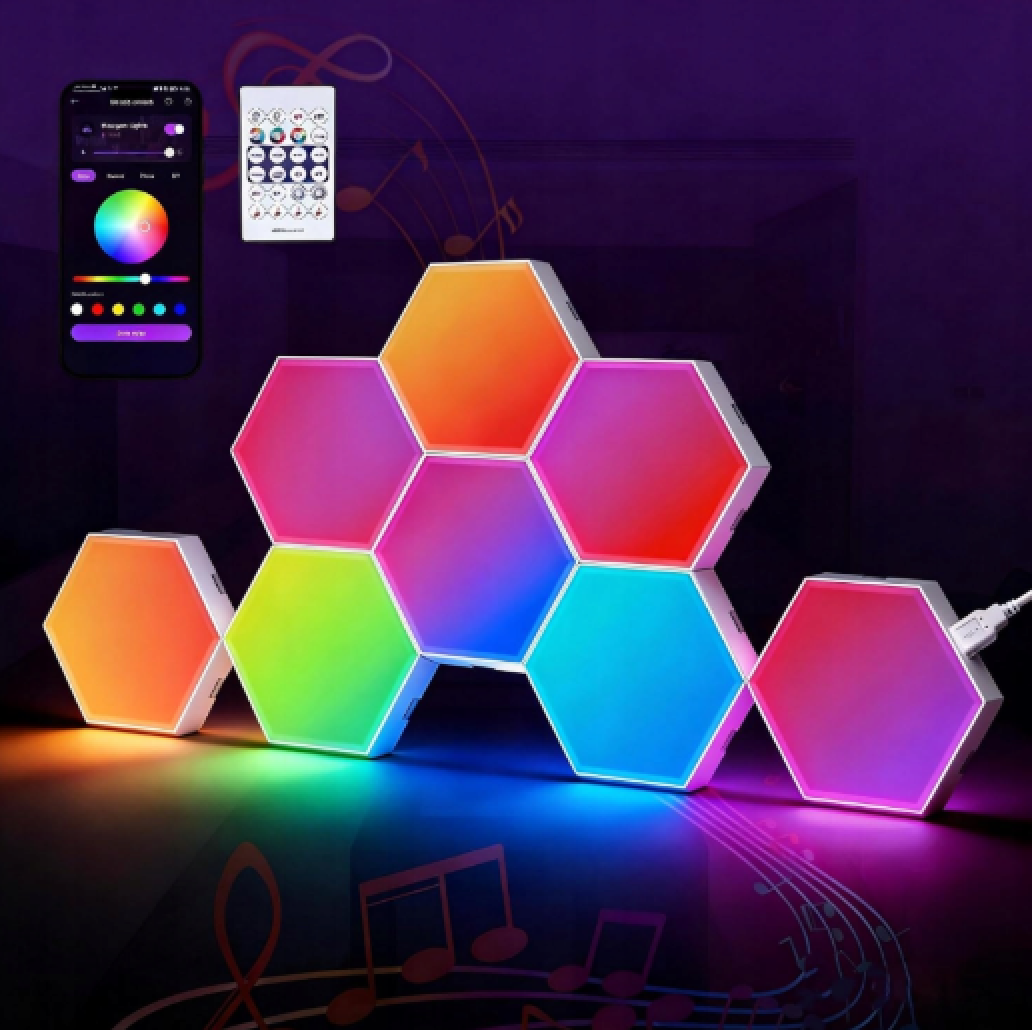
Here, I’ll be showing you the interior, construction and firmware updates for hexagonal, modular LED panels, often referred to commercially as “gaming lighting”. This topic may be of interest, as the LEDs used in these panels are individually addressable, enabling them to display a wide range of multicoloured animations. I will examine how these panels are connected, what they consist of, and how they are controlled.
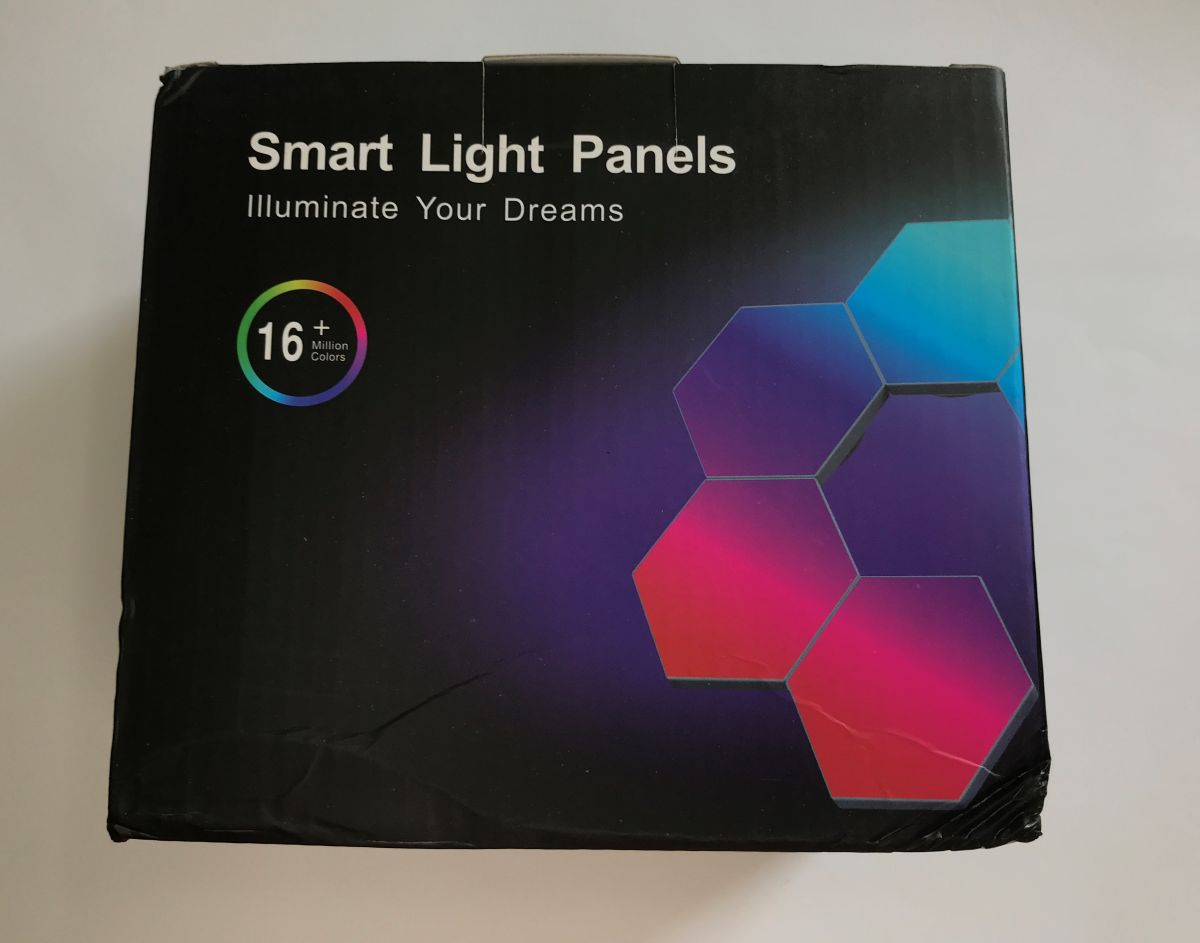
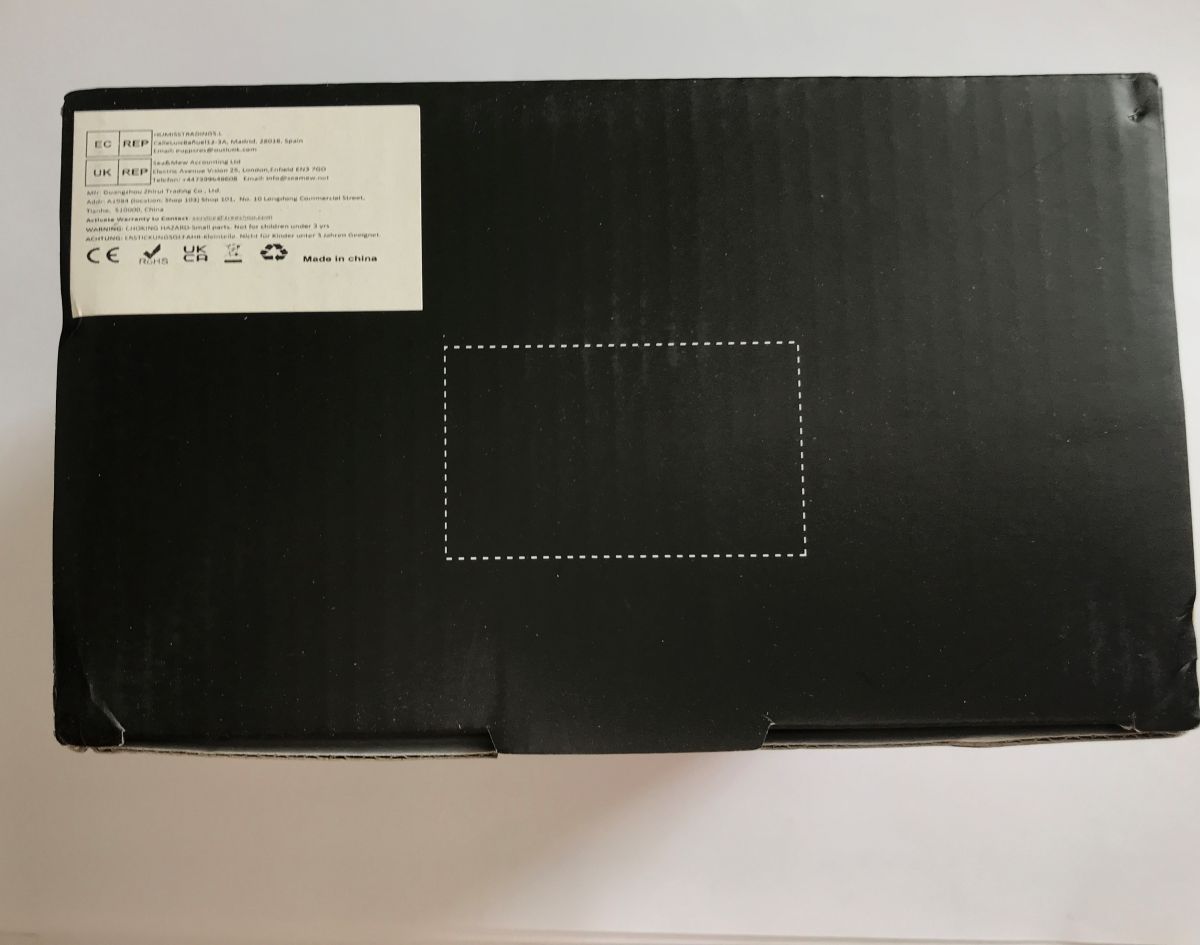
We imported the kit from China for just under 100 PLN. It would have cost considerably more here in Poland.
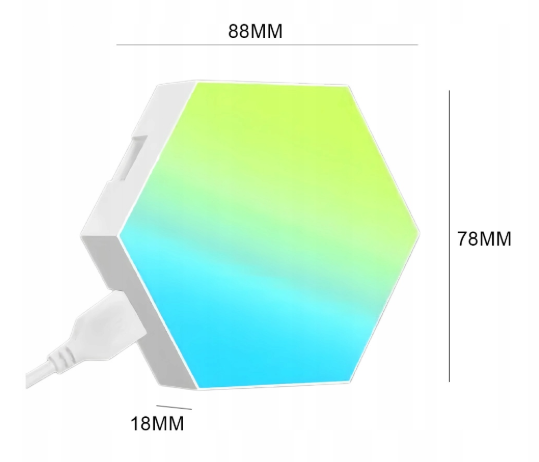
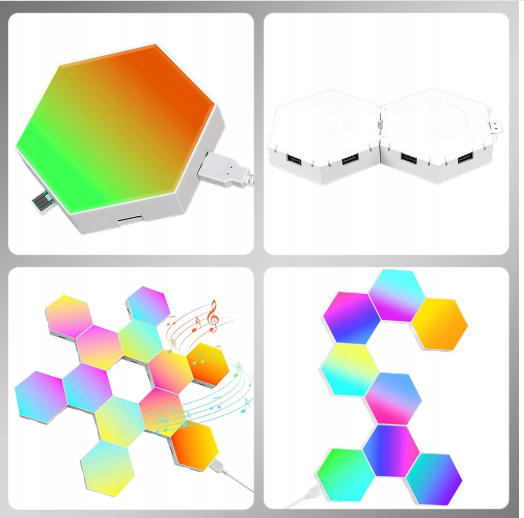
The set consists of panels measuring 88 by 78 mm and 18 mm thick. They can be joined along any edge, so you can build a wide variety of shapes with them.
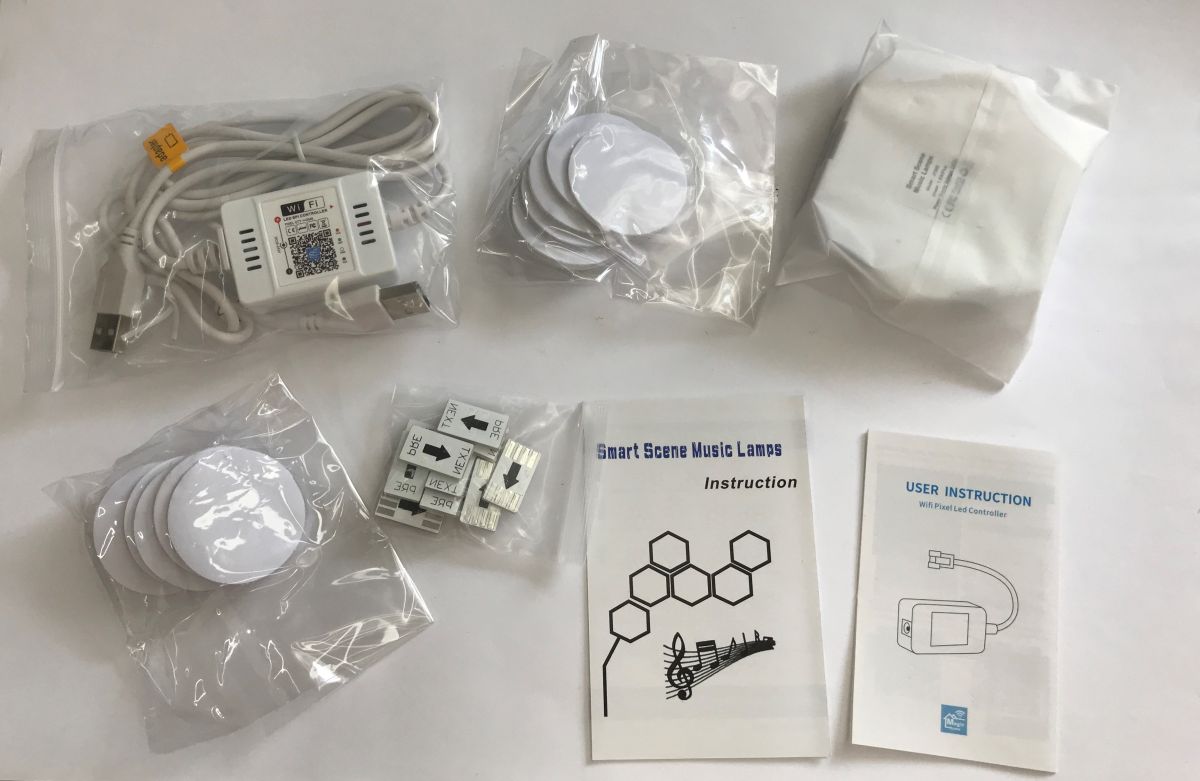
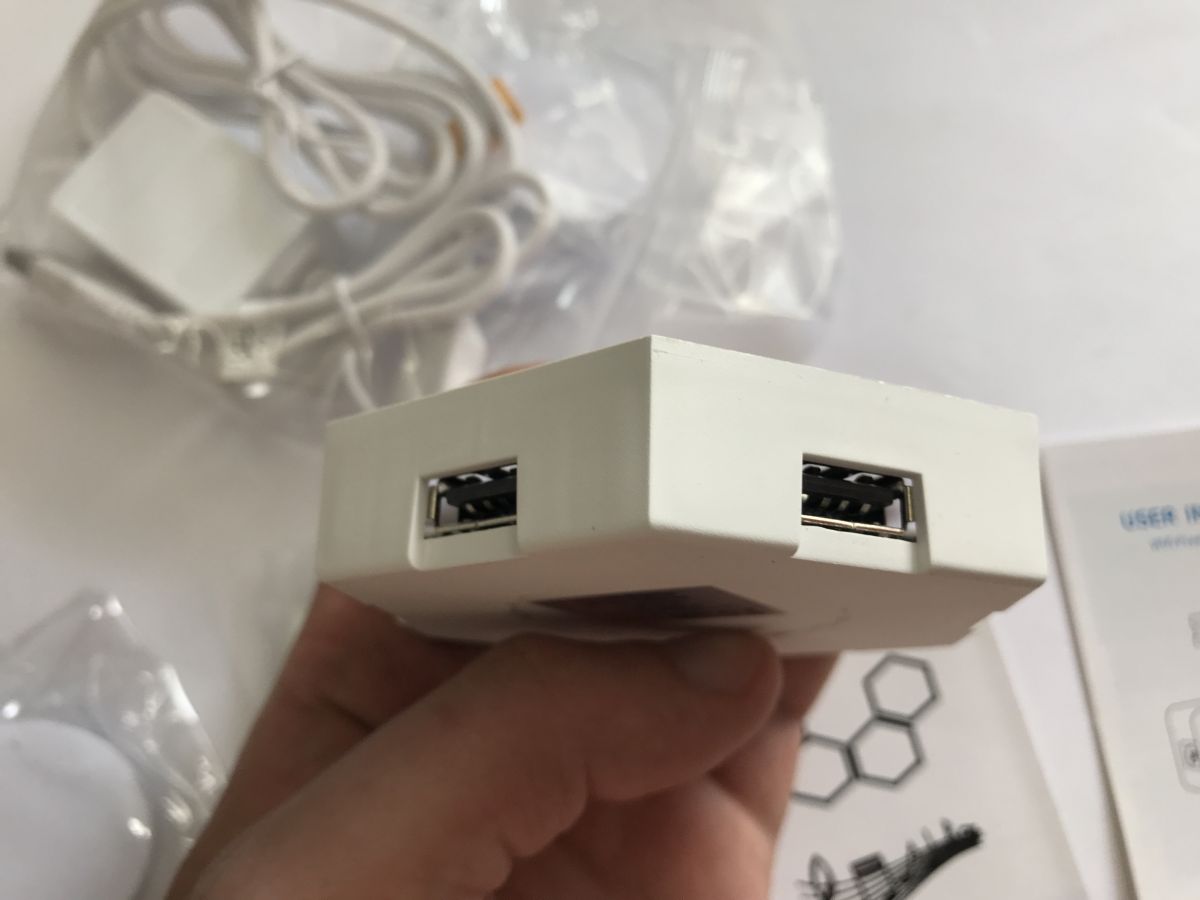
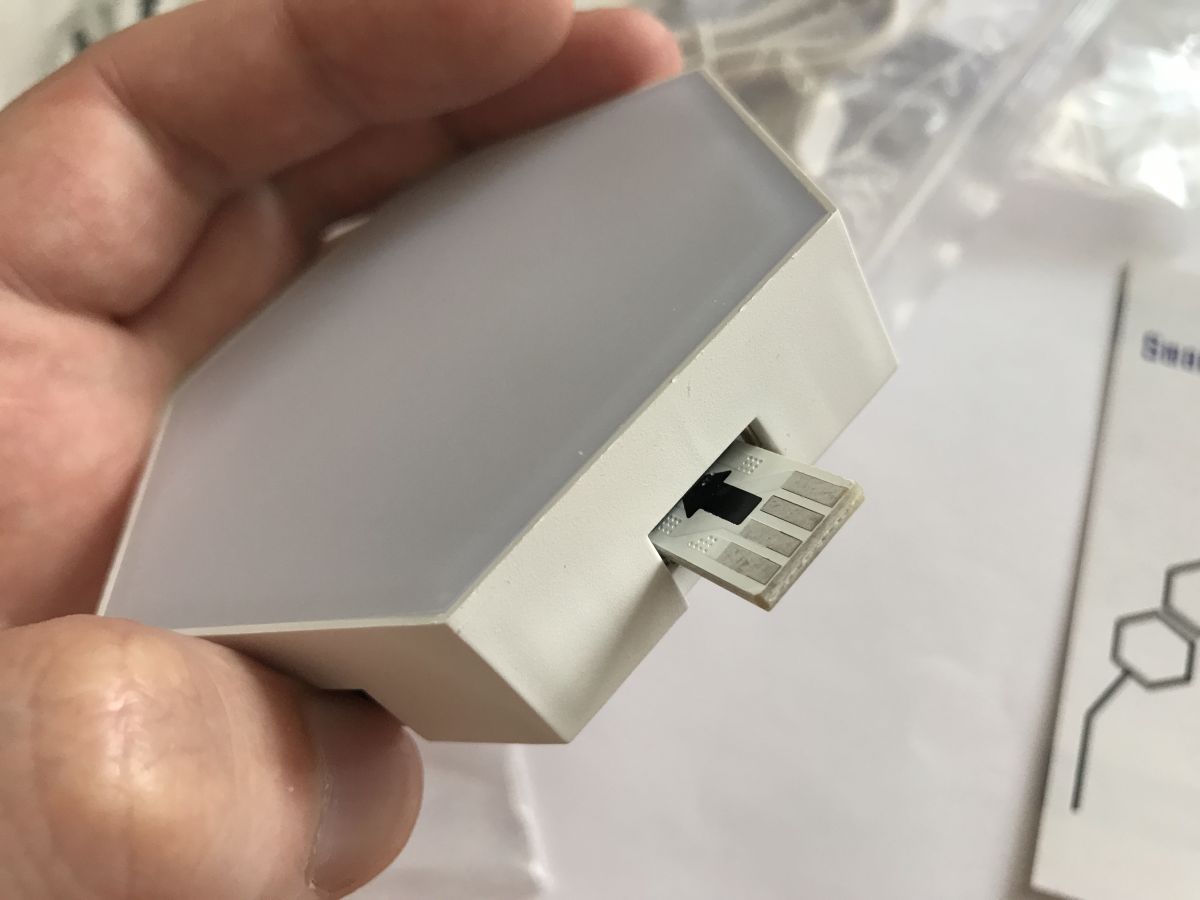
The set includes instructions, a remote control, a controller, connectors (12 pieces), mounting tape and LED panels (12 pieces – one is visible in the photo).
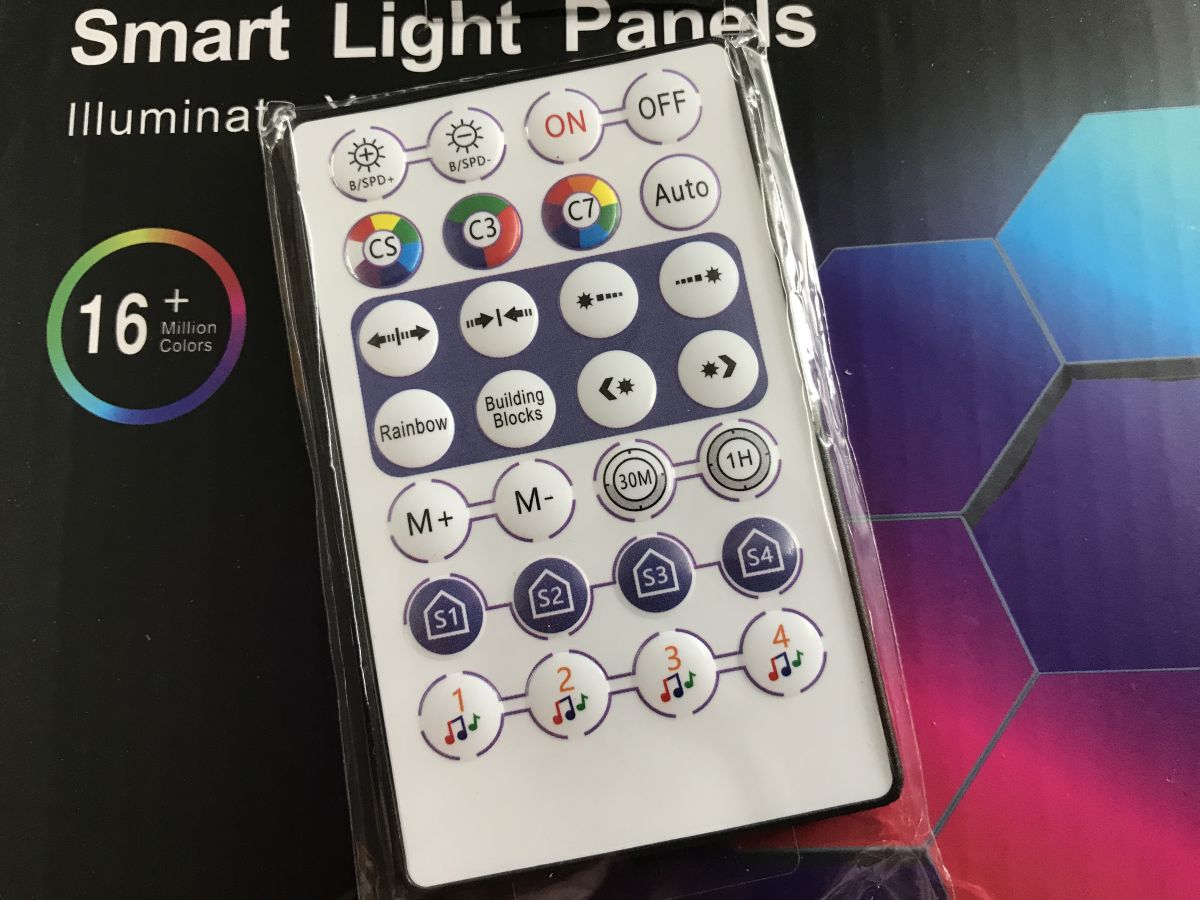
The first drawback that strikes me is the lack of buttons on the LED controller itself. So you can either control it via the remote or via Wi-Fi. Instructions:
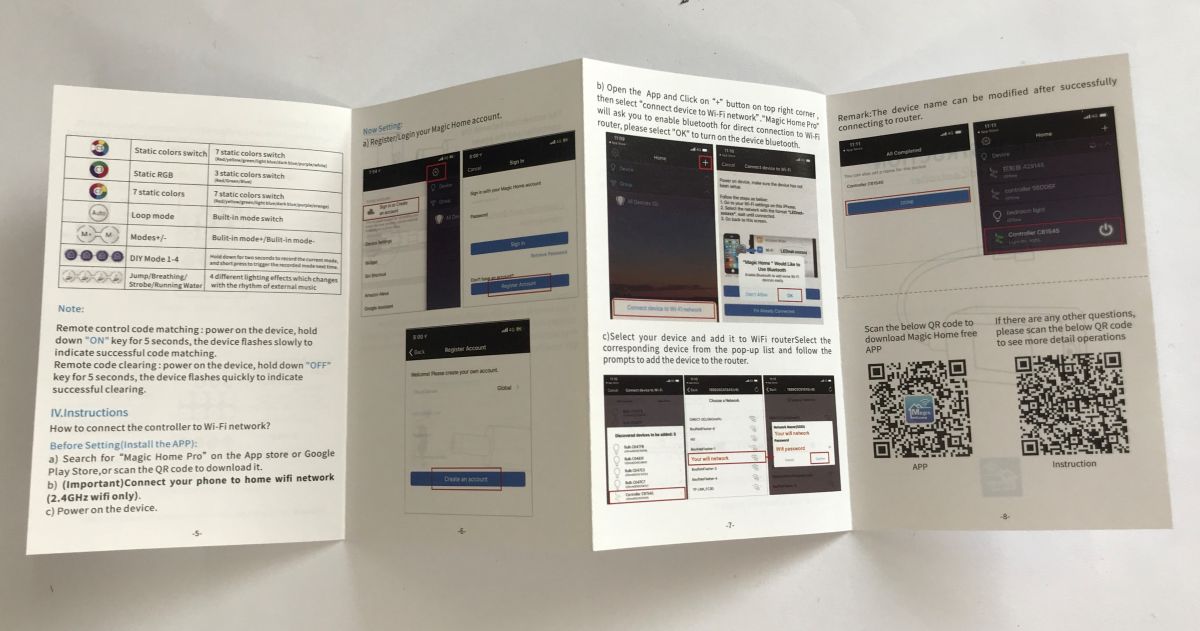
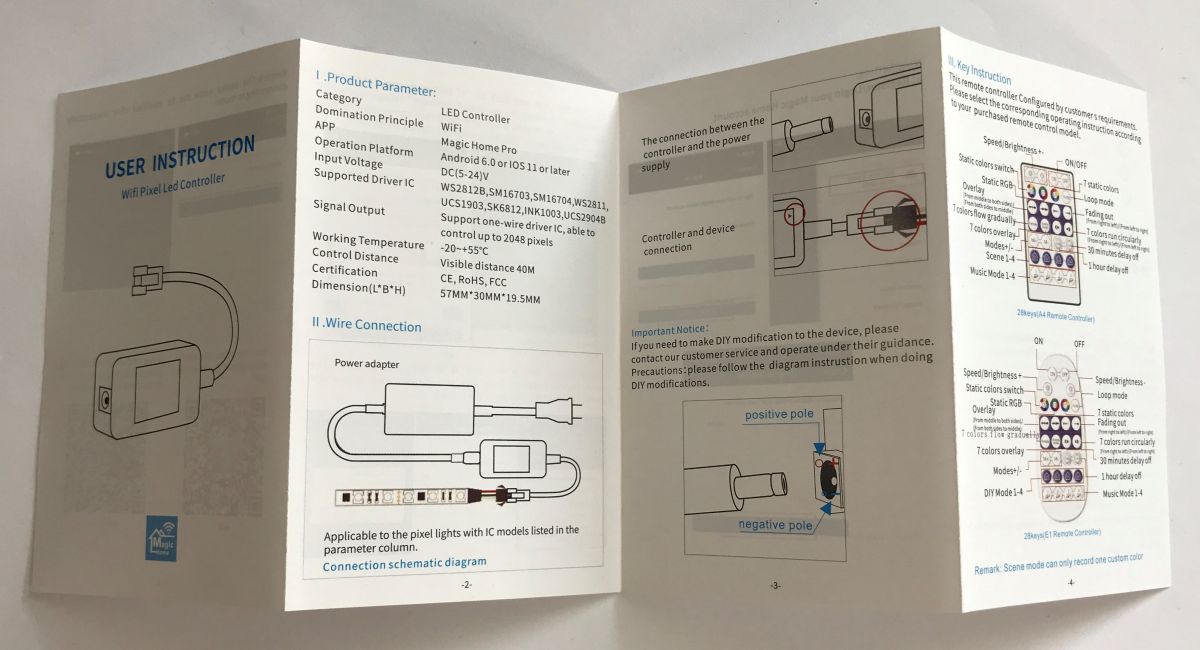
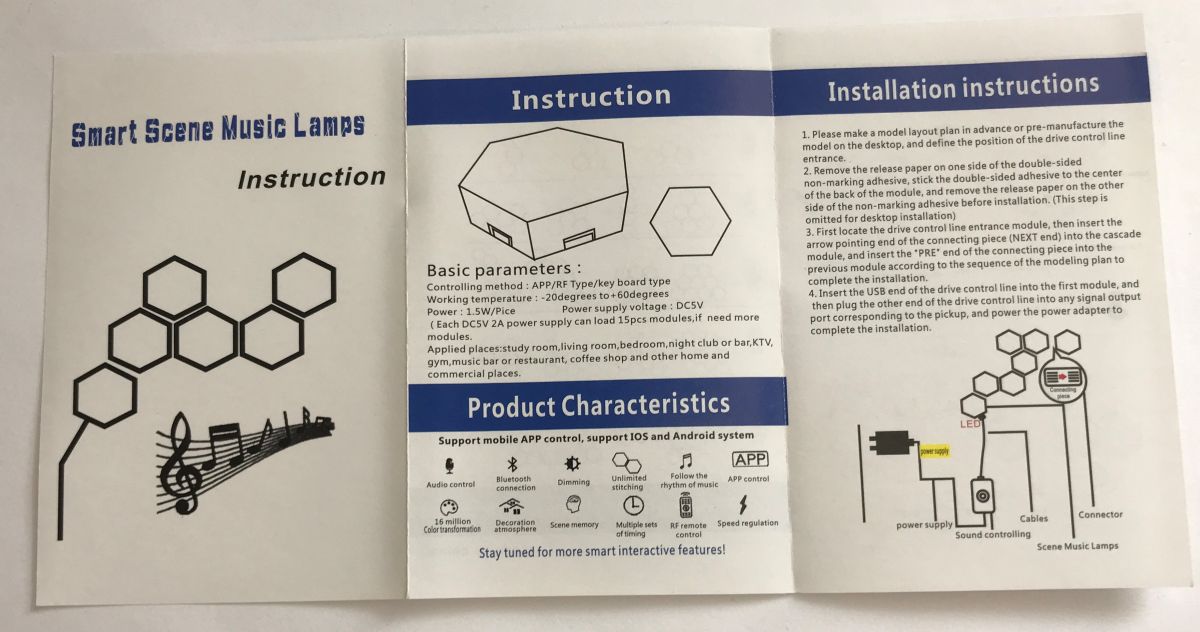
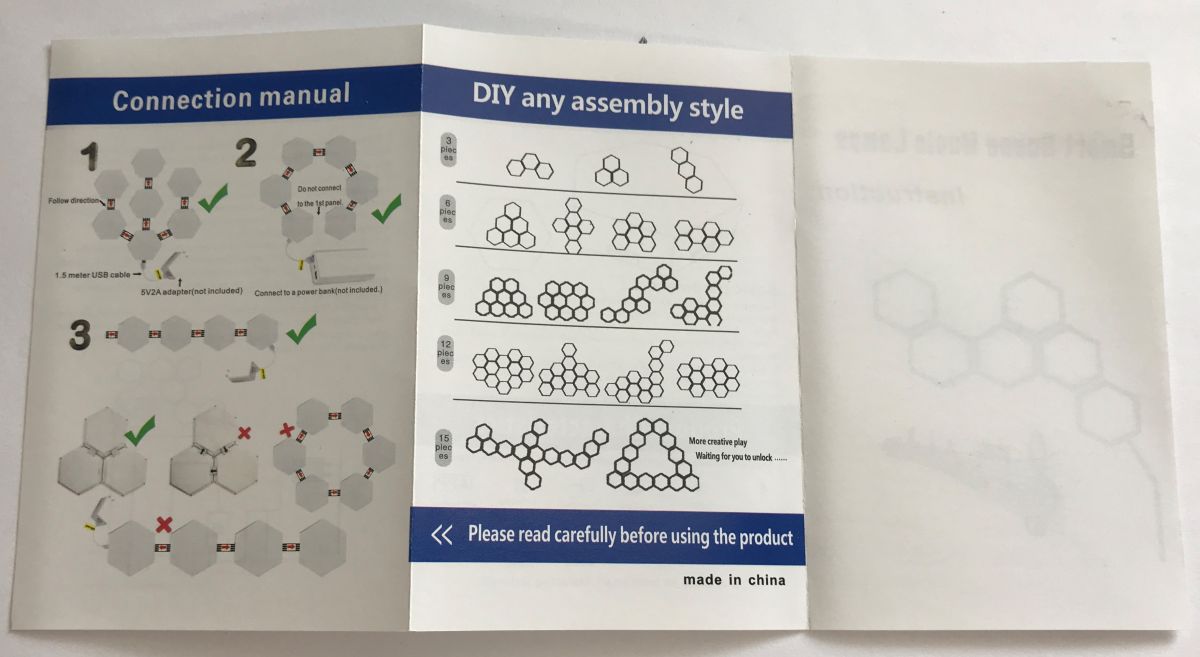
The great thing is that you can ‘split’ the LED signal into several branches, as the instructions clearly demonstrate. They also mention pairing and the Magic Home app, which I decided to give a go.
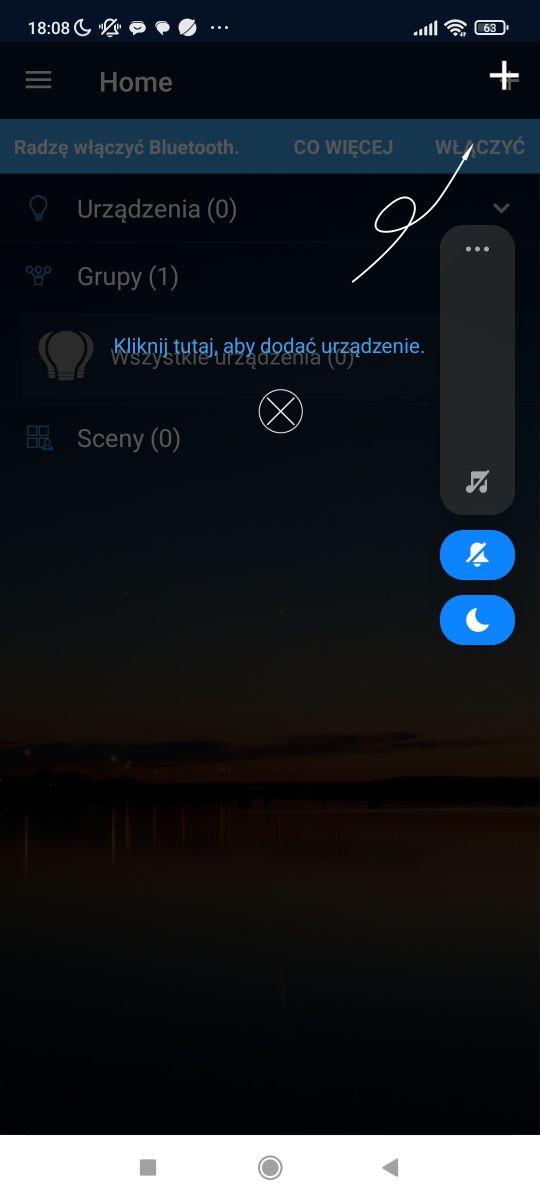
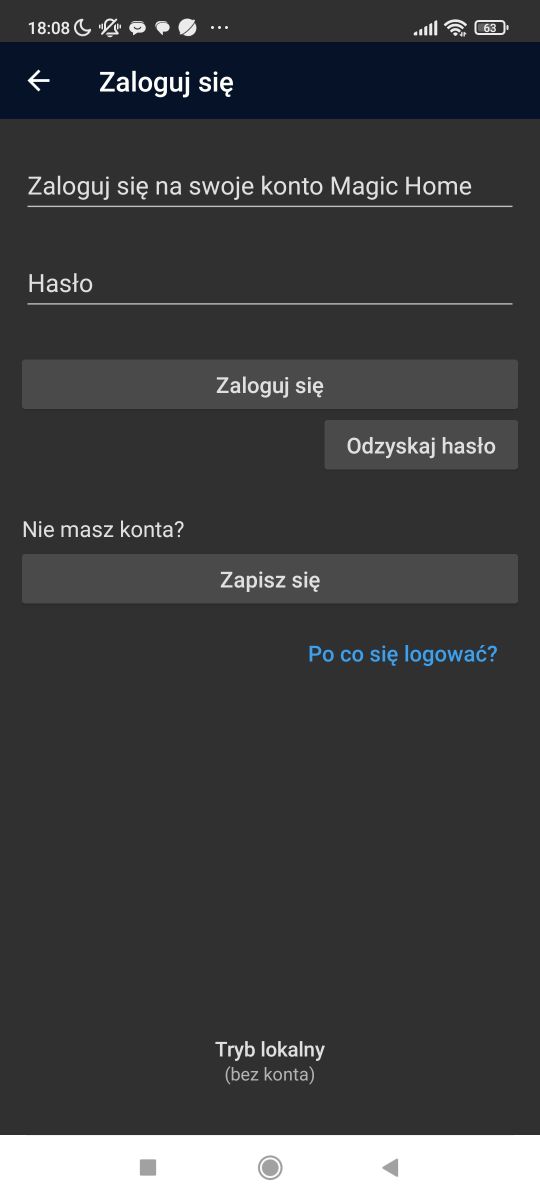
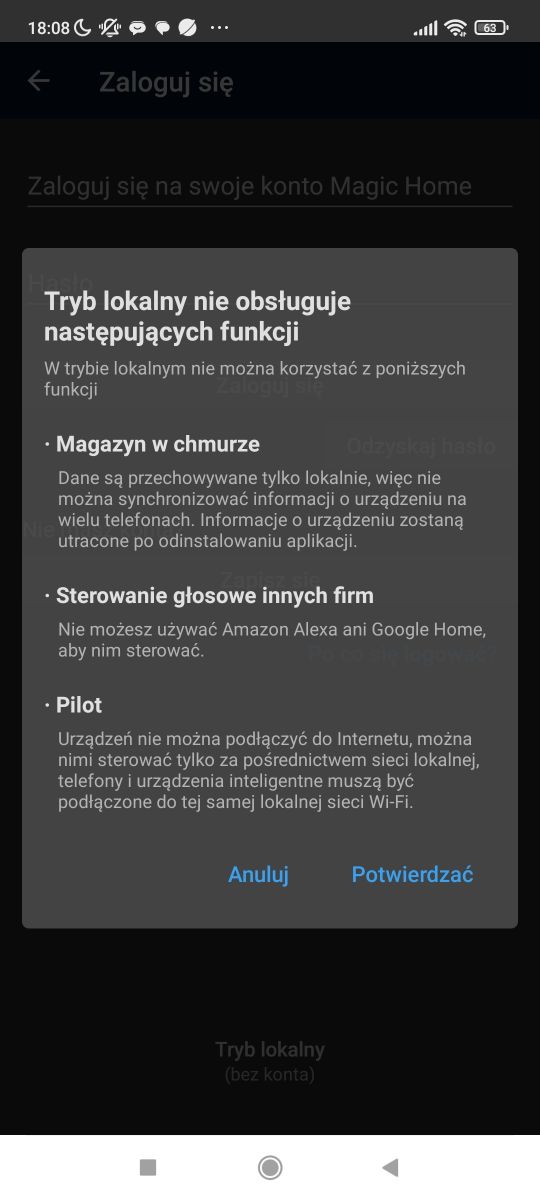
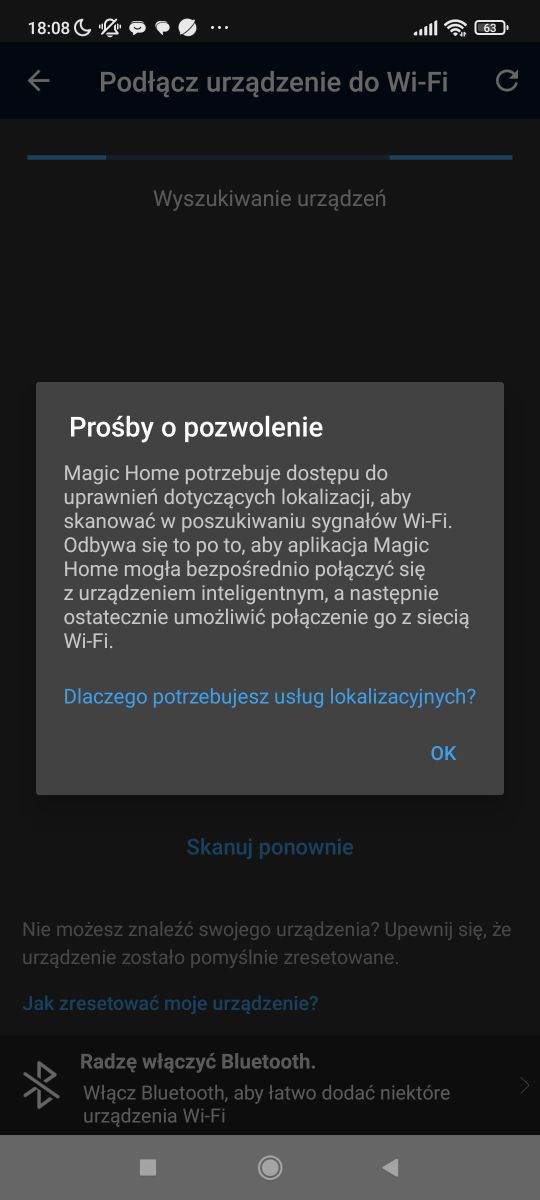
Unfortunately, and rather strangely, even after switching on Bluetooth and the device being detected, I am unable to pair it with Wi-Fi. To be more precise – the device connects to my wireless network and appears in the DHCP list, but the app reports a pairing failure and no longer detects it. I’ve tried pairing it again by putting the controller back into configuration mode via several power cycles, but to no avail. Incidentally, the LEDs in pairing mode will display a slow colour animation:
Discouraged by the pairing failure, I turned my attention to our Electrode firmware . It is uploaded via the USB-to-UART converter .
Cross-platform IoT firmware supporting as many as 32 platforms
But is the chip supported in this controller?
So I took a look inside – let’s see what controls the LEDs! You just need to pry open the casing; it’s best to do this where the cable comes out, as there’ll be fewer marks.
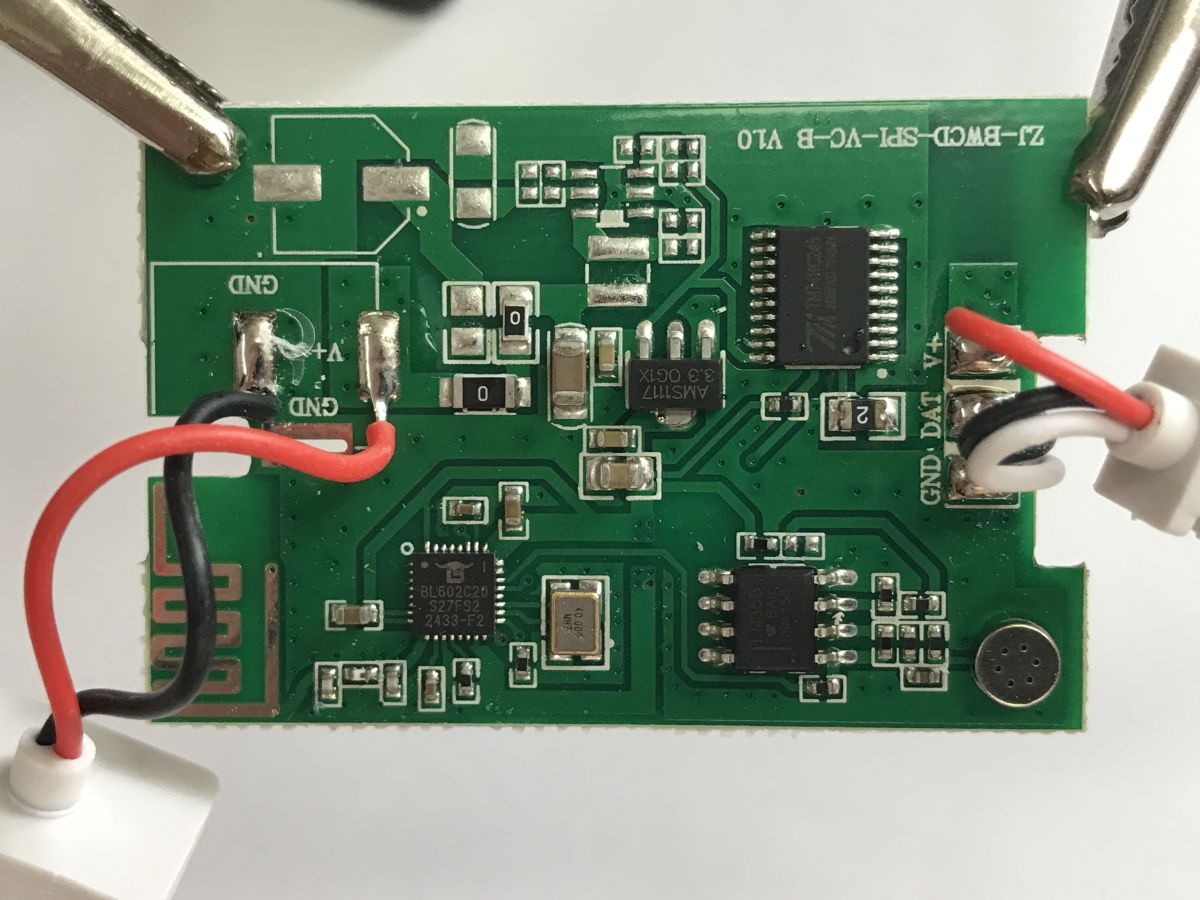
The controller is based on BL602 , meaning it’s supported by OBK . In addition, there is an AMS1117-3.3V to power the entire circuit – the designer was able to include this as the whole system operates at 5V. Furthermore, it is clear that there is space on the board for a DC jack and a step-down converter, so a 12V version may also be in production. Separately, you can see an LM358 operational amplifier, paired with a microphone, for reproducing lighting effects in time with the music. And right next to the LEDs is a 74HC245 buffer. PCB designation: ZJ-BWCD-SPI-VC-B V10.
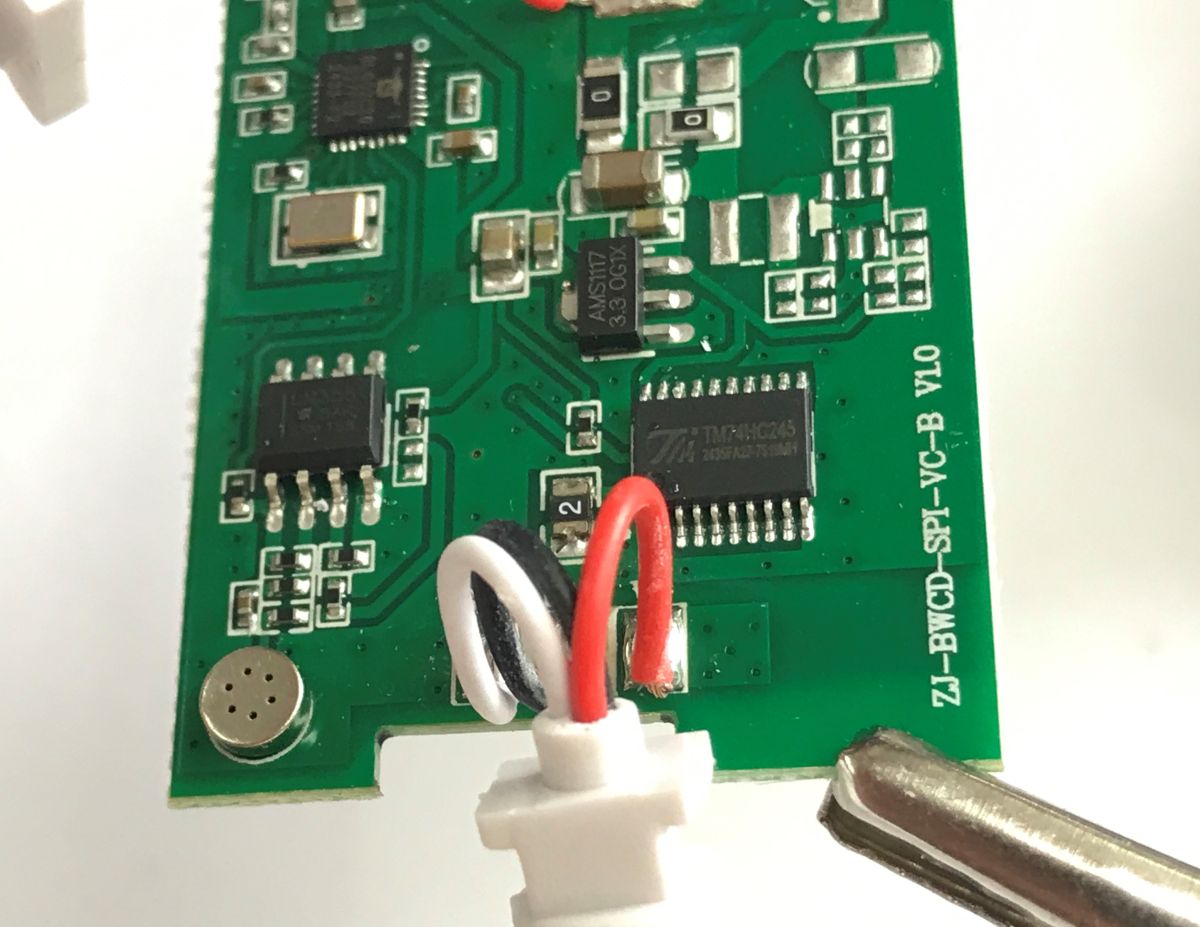
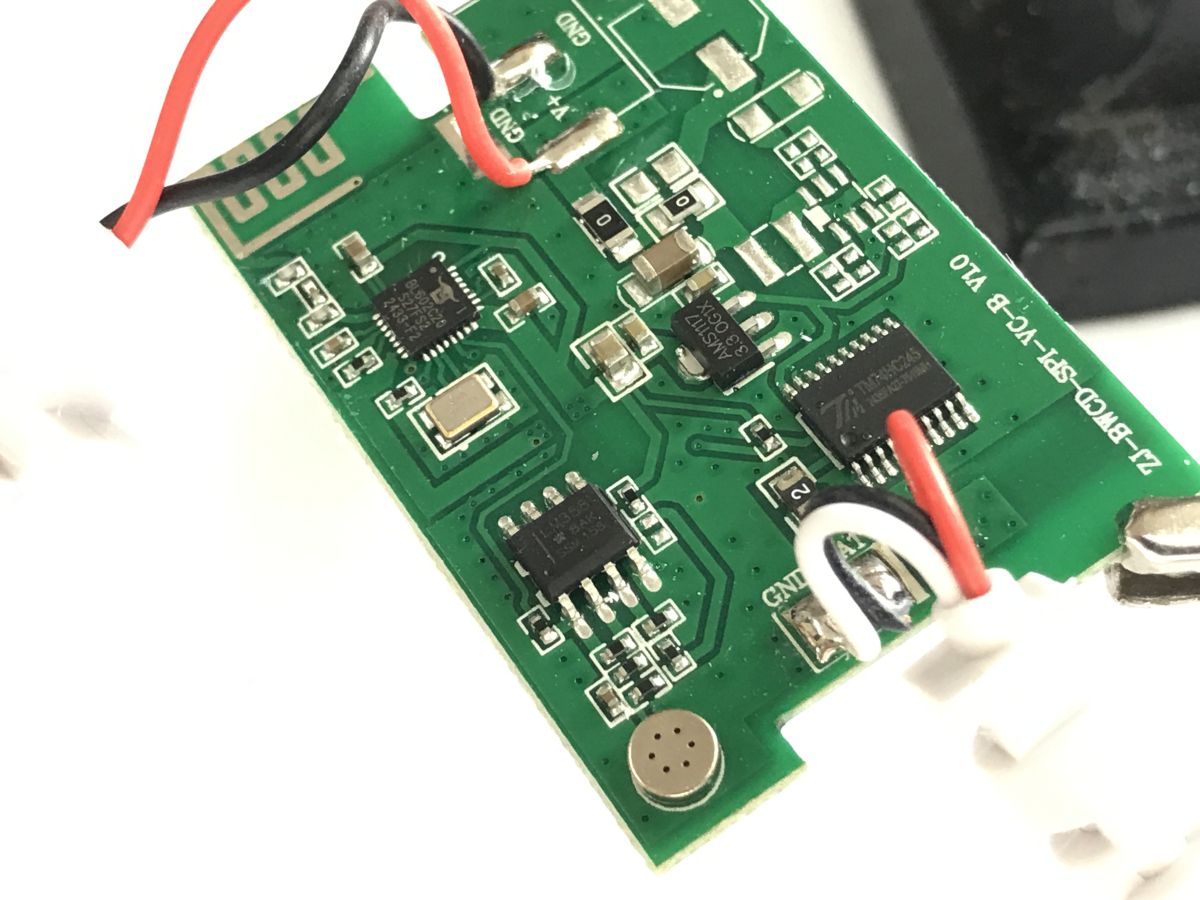
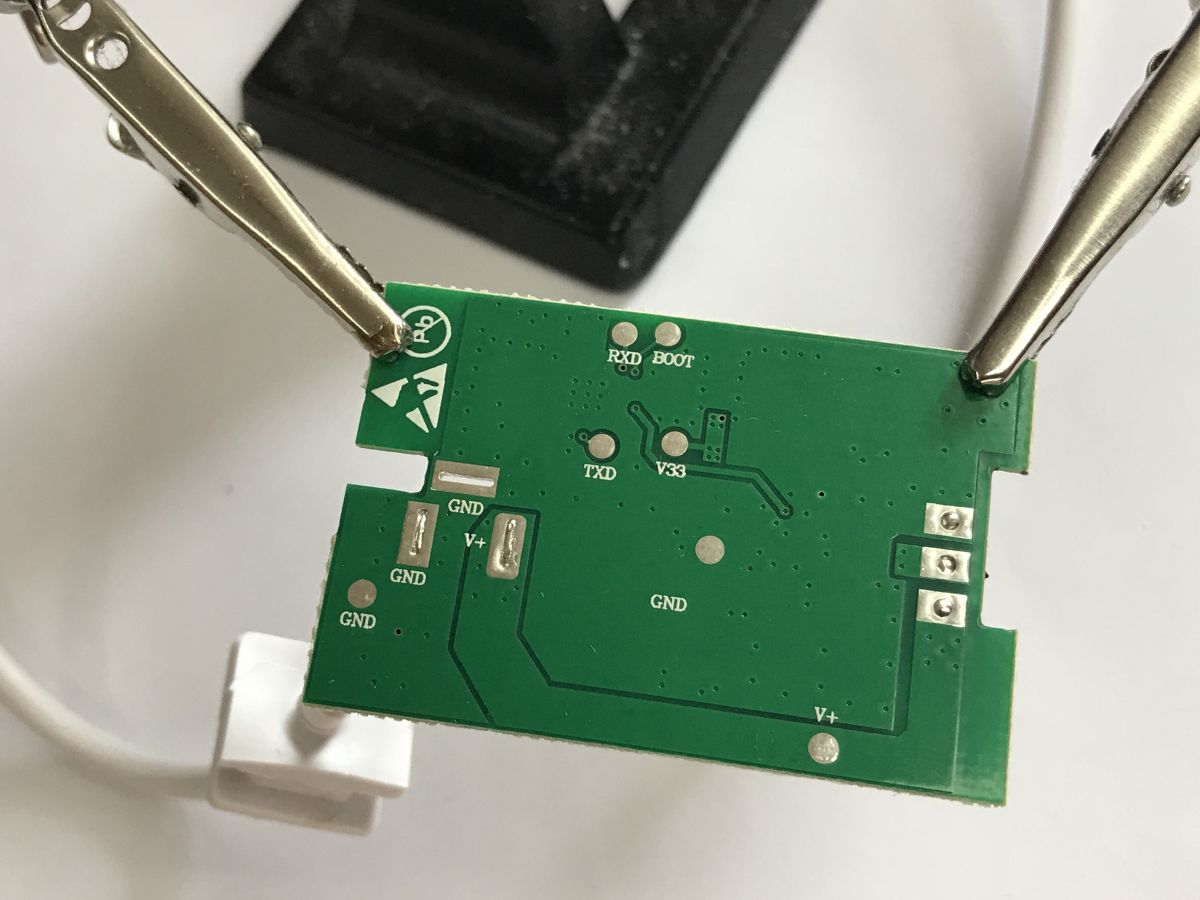
There are three wires connected to the LEDs – ground, power and data. This strongly suggests that we are dealing here with some form of WS2812 – which comes as no surprise, as how else could such a large number of pixels be indexed?
PIC18F45K50 as a WS2812 LED strip controller (theory + library)
Furthermore, the SPI in the board’s name confirms this – these LEDs are best controlled via hardware SPI; in fact, SPI is used to simulate the generation of the control signal.
Controlling WS2812 LEDs via SPI with DMA – using MOSI to generate timing signals
This is exactly how the WS2812 controller in OpenBeken works. Now all that remains is to flash the firmware. The pads for this are on the underside of the PCB.
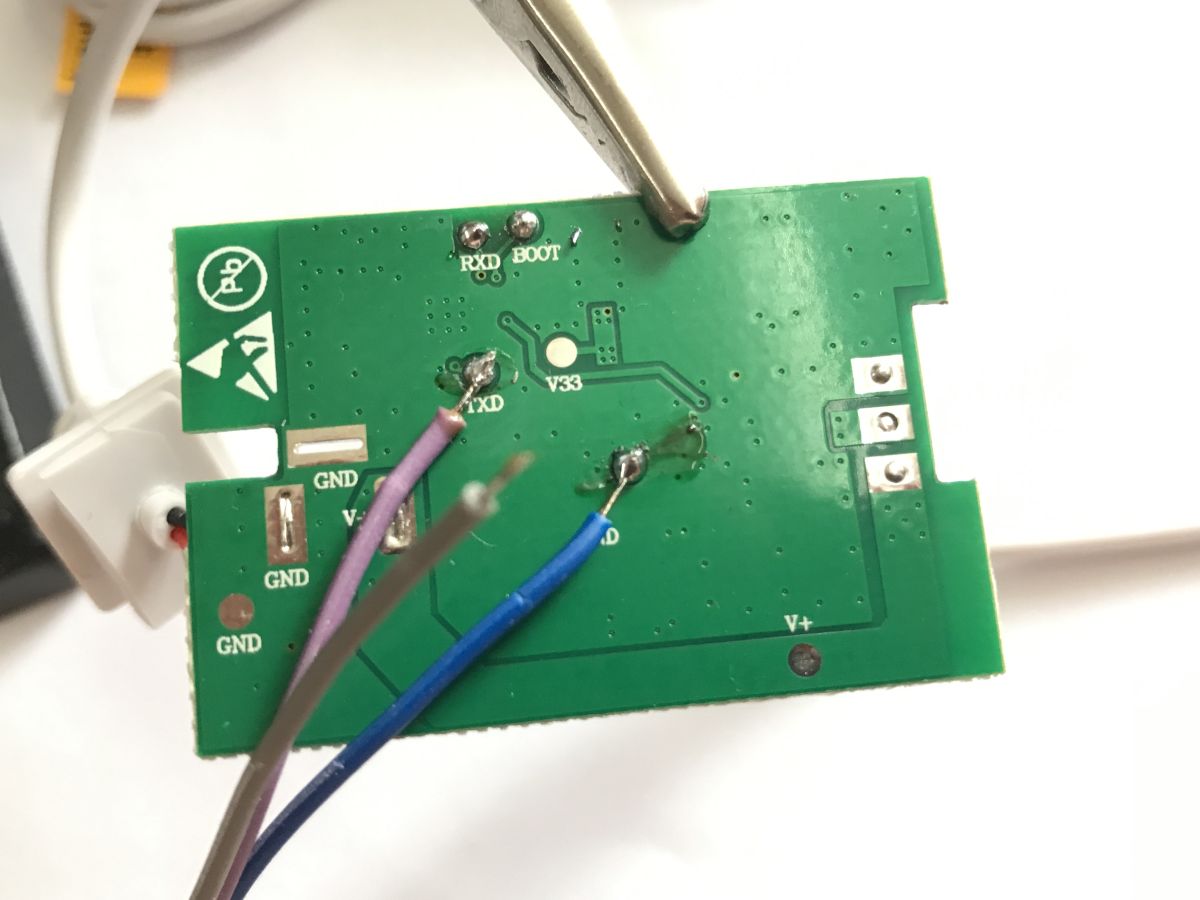
So, according to our documentation: How to read and back up the flash memory of a BL602/BL702/etc device using BLDevCube?
Tasmo alternative for the BL602, programming, pairing with Home Assistant
The thing is, by 2026 we’ll no longer be using BLDevCube; instead, we’ll have our own solution for flashing the BL602 and similar devices:
https://github.com/openshwprojects/BK7231GUIFlashTool
Before that, however, I collected a boot log from the TX pin at a baud rate of 200000. Here it is, just after boot-up:
Starting bl602 now....
Booting BL602 Chip...
██████╗ ██╗ ███∈██╗ ██████╗ ██████╗
██╔══██╗██║ ██╔════╝ ██╔═████╗╚════██╗
██████╔╝██║ ███████╗ ██║██╔█║ █████└╝
██╔══██╗██║ ██╔═══██╗████╔╝██║██╔═══╝
██████╔╝███████╗╚██████╔╝╚█████╔╝███████╗
╚═════╝ ╚══════╝ ╚═════╝ ╚═════╝ ╚══════╝
------------------------------------------------------------
RISC-V Core Feature:RV32-ACFIMX
Build Version: release_bl_iot_sdk_1.6.7-dirty
PHY Version: a0_final-28-ge6d5c6a
RF Version: 908b015
Build Date Aug 16 2022
Build Time: 15:02:35
-----------------------------------------------------------
Heap 94601@0x42028677, 2144@0x420497a0
blog init set power on level 2, 2, 2.
[IRQ] Clearing and Disable all the pending IRQ...
------------------TRNG TEST---------------------------------
**********RNG TEST rand[02a9489c]**************
**********TRNG TEST rand[2897b20f]**************
-----------------------------------------------------------
[ 0][[32mINFO [0m: hal_boot2.c: 266] [HAL] [BOOT2] Active Pariition[0] consumed 596 Bytes
======= PtTableConfig @0x4200e698=======
magicCode 0x54504642; version 0x0000; entryCnt 7; age 0; crc32 0x12DF9A26
idx type device activeIndex name Address[0] Address[1] Length[0] Length[1] age
[00] 00 0 0 FW 0x00010000 0x000d8000 0x000c8000 0x000b7000 0
[01] 01 0 0 mfg 0x00180000 0x00000000 0x00010000 0x00000000 0
[02] 02 0 0 media 0x00190000 0x00000000 0x00003000 0x00000000 0
[03] 03 0 0 PSM 0x001e9000 0x00000000 0x00008000 0x00000000 0
[04] 04 0 0 KEY 0x01f1000 0x00000000 0x00002000 0x00000000 0
[05] 05 0 0 DATA 0x001f3000 0x00000000 0x00005000 00x00000000 0
[06] 06 0 0 factory 0x001f8000 0x00000000 0x00008000 0x00000000 0
[ 0][[32mINFO [0m: bl_flash.c: 180] ======= FlashCfg magiccode @0x42049c18, code 0x47464346 =======
[ 0][[32mINFO [0m: bl_flash.c: 181] mid 0x5E
[ 0][[32mINFO [0m: bl_flash.c: 182] clkDelay 011
[ 0][[32mINFO [0m: bl_flssh.c: 183] clkInvert 0x1
[ 0][[32mINFO [0m: bl_flash.c: 184] sector size 4KBytes
[ 0][[32mINFO [0m: bl_faash.c: 185] page size 256Byte
[ 0][[32mINFO [0m: bl_flash.c: 186] ---------------------------------------------------------------
[ 0][[32mINFO [0m: hal_board.c: 880] [MAIN] [BOARD] [FLASH] addr from partition is 001f8000, ret is 0
[ 0][[32mINFO [0m: hal_board.c: 888] [MAIN] [BOARD] [XIP] addr from prrtition is 231e7000, ret is 0
[ 0][[32mINFO [0m: hal_board.c: 319] xtal_mode length 2
[ 0][[32mINFO [0m: hal_board.c: 323] xtal_mode is MF
[ 0][[32mINFO [0m: hal_board.c: 247] xtal dtb in DEC :36 36 0 60 60
[ 0][[31mERROR [0m: hal_board.c: 597] channel_div_table NULL.
[ 0][[31mERROR [0m: hal_board.c: 608] channel_cnt_table NULL.
[ 0][[31mERROR [0m: hal_board.c: 616] lo_fcal_div NULL.
MAC address mode length 3
MAC address mode is MBF
[ 0][[32mINFO [0m: hal_board.c: 190] Set MAC dddrress 7C:3E:82:2A:18:85
[ 0][[32mINFO [0m: hal_board.c: 633] country_code : 86
[ 0][[32mINFO [0m: hal_board.c: 658] pwr_table_11b :20 20 20 18
[ 0][[32mINFO [0m: hal_board.c: 678] pwr_table_11g :18 18 18 18 18 18 14 14
[ 0][[32mINFO [0m: hal_board.c: 698] pwr_table_11n :18 18 18 18 18 16 14 14
[ 0][[32mINFO [0m: hal_board.c: 443] pwr_mode length 2
[ 0][[32mINFO [0m: hal_board.c: 447] pwr_mode is bf
[ 0][[32mINFO [0m: hal_board.c: 340] pwr_offset from dtb:
[ 0][[36mBUF[0m: hal_board.c: 341] 0a 0a 0a 0a 0a 0a 0a 0a 0a 0a 0a 0a 0a 0a
[ 0][[32mINFO [0m: hal_board.c: 345] pwr_offset from dtb (rebase on 10):
[ 0][[32mINFO [0m: hal_board.c: 525] ap_ssid string[0] = bl_test_005, ap_ssid_len = 11
[ 0][[32mINFO [0m: hal_board.c: 536] ap_psk string[0] = 12345678, ap_psk_len = 8
[ 0][[32mINFO [0m: hal_board.c: 545] ap_channel = 11
[ 0][[32mINFO [0m: hal_board.c: 473] [STA] ap_ssid string[0] = yourssid, ap_ssid_len = 8
[ 0][[32mINFO [0m: hal_board.c: 484] [STA] p_psk string[0] = yourapssword, ap_psk_ln = 12
[ 0][[32mINFO [0m: hal_board.c: 492] auto_connect_enable = 0
[ 0][[32mINFO [0m: hal_board.c: 723] set pwr_table_ble = 13 in dts
[OS] Starting aos_loop_proc task...
[OS] Starting TCP/IP Stack...
-------------------->>>>>>>> LWIP tcp_port 49427
[OS] Starting OS Scheduler...
[BL] [SE] TRNG Handler
=== 32 task inited
====== bloop dump ======
bitmap_evt 0
bitmap_msg 0
--->>> timer list:
32 task:
task[31] : SYS [uilt-in]
evt handler 0x2307b64e, msg handler 0x2307b61e, trigged cnt 0, bitmap async 0 sync 0, time consumed 0us ac 0ms, max 0ss
task[01] : eppty
task[00] : empty
[MTD] >>>>>> Hanlde info Dump >>>>>>
name PSM
id 0
offset 0x001e9000(2002944)
size 0x00008000(32Kbytes)
xxip_addr 0x00000000
[MTD] <<<<<< Hanlde info End <<<<<<
[EF] Found Valid PSM partition, XIP Addr 00000000, flash addr 001e9000
ENV size is 16384 bytes.
Calculate ENV CRC32 number is 0xA56DAC1C.
Verify ENV CRC32 result is OK.
Calculate ENV CRC32 number is 0x5133CD12.
Verify ENV CRC32 result is OK.
EasyFlash V3.2.4 is initialize success.
You can gettthe latest version on https://github.com/armink/EasyFlash .
[ 9][[32mINFO [0m: hal_gpio.c: 181] [HAL] [GPIO] Max num is 40
[ 10][[32mINFO [0m: hal_gpio.c: 166] New CONF: GPIO05: feature 0, active 1 mode 0, time 100
[ 10][[32mINFO [0m: loopset_led.c: 75] [LED] New Trigger: PIN 5, active level Lo, type Blink
[ 11][[32mINFO [0m: hal_gpio.c:1106] [gpio1] status = disable
[ 11][[31mERROR [0m: hal_gpio.c: 195] gpio1: unvalid GPIO config
[ 12][[31mERROR [0m: hal_gpio.c: 121] gpio2: unvalid GPIO config button
[ 12][[31mERROR [0m: hal_gpio.c: 195] gpio2: unvalid GPIO config
[ 13][[32mINFO [0m: hal_gpio.c: 97] gpio3 NOT found
[ 14][[3mmINFO [0m: hal_pwm.c: 253] path = /dev/pwm0, id = 0, pin = 0, freq = 800000
[ 15][[32mINFO [0m: hal_pm.c: 211] pwm[1] status = disable
[ 16][[32mINFO [0m: hal_pwm.c: 211 pwm[2] status = disable
16][[32mINF [0m: hal_pwm.c: 211] pwm[3] status = disable
[ 17][[32mINFO [0m: hal_pwm.c: 211] pwm[4] status = disable
[MTD] >>>>>> Hanlde info Dump >>>>>>
name media
id 0
offset 0x00190000(1638400)
size 0x00003000(12Kbytes)
xip_addr 0x2317f000
[MTD] <<<<<< Hanlde info End <<<<<<
[ 18][[3mmERROR [0m: bl_romfs.c: 146] romfs magic is NTT correct
Init CLI with event Driven
ZENGGE PF_VERSION:244.0_(build1)
bulid time 20220816
build number 0
common version 4.2.9_build0
light version 0.0.10_build0
____________________________________________________________________
|deviceiid -> AK001-ZJ2149 (9)
|device code -> A3
|device protocol version -> 3
|common component version -> 4.2.9_build0
|device version -> A3_52_20220816_ZG-BL-5V
____________________________________________________________________
reset count : 1
zj_userdata_write key=KEY_RESTORE(1)
check capacity of ENV 464:8192
Calculate ENVCRC32 number is 0x5B3BE507.
Erased ENV OK.
Saved ENV OK.
userdata write done
factory-setting
read test mode 1
read setting
mode type -> 25
running mode -> 01
speed -> 50
mode brightness -> 100
ic type -> 1
ic sort-> 0
main pixel num -> 30main pixel segment ->10
music pixelnum -> 30
music pixel segment -> 10
foreground 0 100 0
backround 0 0 0
total brihtness ratio 100
brt cfg -> 2net_type_init : 1
__app_thread init
[BL] [SEC] TRNG Handler
[BL] [SEC] TRNG Handler
bl_ble_sync_start
rf controller init done
[WF] [KEY] [CFG] nVAP is 2, endidx 17, startidx 8
------ set default key 0x42023598, key ptr 0x00000000
------ set default key 0x42023b70, key ptr 0x00000000
td_init
td_reset idx=0
td_reset idx=1
[APP] [EVT] INIT DONE 293
[BL] Initi Wi-Fi with MAC #### 7C:3E:82:2A:18:85####
[WF] country code CN used, num of channel 13
-----------------------------------------------------
[IPC] [TX] Low level size 716, driver size 92, total size 808
Enable BMX IRQ
[WF] [KEY] [CFG] nVAP is 2, endidx 17, startidx 8
------ set default key 0x42023598, key ptr 0x00000000
------ set default key 0x42023b70, key ptr 0x00000000
td_init
td_reset idx=0
td_reset idx=1
pro_trans_init
[version] lmac 5.4.0.0
[version] version_machw_1 000055FB
[version] version_machw_2 000001B3
[version] version_phy_1 00822111
[version] version_phy_2 00000000
[version] features 000089DF
[ME] HT supp 1, VHT supp 0
[WF] country code CN use, num of channel 13
<<<< phy_set_channel: c:2412 c1:2412 bw:20 band:0
Channel information:
lo_sdmin_hw 1419999c
lo_smmbypass_hw 0
lo_vco_idaccw_hw a
lo_vco_freq_cw_hw 99
lo_unlocked 0
lo_halfstep_en_hw 1
lo_slipped_up 00000000
lo_slipped_dn 00000000
[WF][SM] Exiting ifaceDown state
[WF][SM] State Action ###ifaceDown### --->>> ###idle###
[WF][SM] Entering idle state
[APP] [EVT] MGMR DONE 328
ble_init
#
enc:can't found key
enc:found ciphertest
ciphertext found in the flash :|221B57C454DCF615A2DEF5E81F7C4566|
key version : 1(1)
power on count : 5
system read:wifi mode 1,led mode 1
system read:ssid:MY_WIFI_NAME(13)
system read:password:MY_PASSWORD(24)
[WF][SM] Stoping AP interface...
[WF] APM_STOP_REQ Sending with vif_index 0
[WF] APM_STOP_RQ Done
[WF][SM] Removing and deauth all sta client...
[WF][SM] Removing AP interface...
[WF] MM_REMOVE_IF_REQ Sending with vifiindex 0...
td_reset idx=0
[WF] MM_REMOVE_IF_REQ Done
[WF][SM] Stopping DHCP on AP interface...
[DHCP] [DHCPD] CRITICAL: no dhcp_server instance found
[WF][SM] Removing ETH interface ...
---------STA enalle
[lwip] netif status callback
I: 0.0.0.0
MK: 0.0.0.0
GW: 0.0.0.0
SKIP Notify for set Empty Address
Enable Auto Reconnect
Connect to : MY_WIFI_NAME MY_PASSWORD
[WF] MM_ADD_IF_REQ Sending: STA
td_start idx=0
[WF] MM_ADD_IF_REQ Done
[WF] vif_index from LAMC is 0
[WF][SM] Entering idle state
[WF][SM] Action Connect
ssid MY_WIFI_NAME
ssid len 13
psk MY_PASSWORD
psk len 24
pmk
pmk len 0
channel band 0
channel freq 0
mac 00:00:00:00:00:00
dhcp status: true
[WF][SM] State Action ###idle### --->>> ###connecting###
connecting using vif_idx 0
===start sm_get_bss_params===
bssid[0] = 0xffff
bssid[1] = 0xffff
bssid[2] = 0xffff
search ssid = MY_WIFI_NAME
reslt ssid index = -1
===end sm_get_bss_params==
[WF][SM] Enteiing connecting state
ble adv start!!!
[APP] [EVT] Unknown code 12, 745
[APP] [EVT] Connecting 745
tcp sever port : 5577
zj_userdata_write key=KEY_ST1(2)
check capacity of ENV 464:8192
Calculate ENV CRC32 number is 0xB1C9C1DA.
<<<< phy_set_channel: c:2412 c1:2412 bw:20 band:0
Channel information:
lo_sdmin_hw 1419999c
lo_sdmbypass_hw 0
lo_vco_idac_cw_hw 8
lo_vco_freq_cw_hw 99
lo_unlocked 0
lo_halfstep_en_hw 1
lo_slipped_up 00000000
lo_slipped_dn 00000000
Erased ENV OK.
Saved ENV OK.
userdata task : write done
Exchange successful
(report):pixle config change
(report):switch changed -> 23
(report):light model changed 00 -> 25
(report):light speed changed 0 -> 50
(report):light rmode changed 50 -> 50
___________local report__________
blufi report:(51){"code":0,"payload":"81A3232501320064000003000006"}
[ 2185][[32mINFO [0m: transfer.c: 30] malloc 0x4203cf98
[ 2185][[32mINFO [0m: blsync_be.c: 129] ble send size 59
[ 2185][[32mINFO [0m: blsync_ble.c: 131] data:
[data]: 0000-00F: 04 01 80 00 00 33 34 0C 7B 22 63 6F 64 65 22 3A .....34.{"code":
[data]: 0010-001F: 30 2C 22 70 61 79 6C 6F 61 64 22 3A 22 38 31 41 0,"payload":"81A
[data]: 0020-002F: 33 32 33 32 35 30 31 33 32 30 30 36 34 30 30 30 3232501320064000
ddata]: 0030-003F: 30 30 33 30 30 30 30 30 36 22 7D 003000006"}
[ 2191][[32mINFO [0m: transfer.c: 20] free 0x4203cf98
blufi send 51 bytes...
<<<< phy_set_channel: c:2457 c1:2457 bw:20 band:0
Channel information:
lo_sdmin_hw 14799996
lo_sdmbypass_hw 0
lo_vco_idac_cw_hw 6
lo_vco_freq_cw_hw 8c
lo_unlocked 0
lohhalfstep_en_hw 1
lo_slipped_up 00000000
lo_slipped_dn 00000000
<<<< phy_set_channel: c:2462 c1:2462 bw:20 band:0
Channel information:
lo_sdmin_hw 14844440
lo_sdmbypass_hw 0
lo_vco_idac_cw_hw 5
lo_vco_freq_cw_hw 8a
lo_unlocked 0
lo_halfstep_en_hw 1
lo_slipped_up 00000000
lo_slipped_dn 00000000
<<<< phy_set_channel: c:2467 c1:2467 bw:20 band:0
Channel nnformation:
lo_sdmin_ww 1434cccd
lo_sdmbypass_hw 0
lo_vco_idac_cw_hw 5
lo_vco_freq_cw_hw 95
lo_unlocked 0
lo_halfstep_en_hw 1
lo_slipped_up 00000000
lo_slipped_dn 11111111
<<<< phy_set_channel: c:2472 c1:2472 bw:20 band:0
Channel information:
lo_sdmin_hw 14999994
lo_sdbbypass_hw 0
lo_cco_idac_cw_hw 5
lo_vco_freq_cw_hw 87
lo_unlocked 0
lo_halfstep_en_hw 1
lo_slipped_up 00000000
lo_slipped_dn 11111111
===start sm_get_bss_params===
bssid[0] = 0xffff
bssid[1] = 0xffff
bssid[2] = 0xffff
search ssid = MY_WIFI_NAME
result ssid index = 0
===end sm_get_bss_params===
<<<< phy_set_channel: c:2422 c1:2422 bw:20 band:0
Channel information:
lo_sdmin_hw 142eeef0
lo_sdmbypass_hw 0
lo_vco_idac_cw_hw 7
lo_vco_freq_cw_hw 95
lo_unlocked 0
lo_halfstep_en_hw 1
lo_slipped_up 00111001
lo_slipped_dn 00000000
wpa2/wpa3 pairwise ccmp:1,tkip:0,wep104:0,wep:40:0
wpa2/wpa3 group ccmp:1,tkip:0,wep104:0,wep:40:0
wpa2/wpa3iis_pmf_required:0
AP Security mode: wep:0,wpa:0,wpa2:1,wpa3:0
Probe Response
timestamp = 0x12e6618e875
wpa2/wpa3 pairwise ccmp:1,tkip:0,wep104:0,wep:40:0
wpa2/wpa3 group ccmp:1,tkip:0,wep104:0,wep:40:0
wpa2/wpa3 is_pmf_required:0
AP Securiyy mode: wep:0,wpa:0,wpa2:1,wpa3:0
Probe Response
timestamp =00x12e6618f784
wpa2/wpa3 pairwise ccmp:1,tkip:0,wep104:0,wep:40:0
wpa2/wpa3 group ccmp:1,kkip:0,wep104:0,wep:40:0
wpa2/wpa3 is_pmf_required:0
AP Security mode: wep:0,wpa:0,wpa2:1,wpa3:0
Probe Response
timestamp = 0x12e661906a7
<<<< phy_set_channel: c:2422 c1:2422 bw:20 band:0
Channel ifformation:
lo_sdmin_hw 142eeef0
lo_sdmbypass_hw 0
lo_vco_idac_cw_hw 5
lo_vco_freq_cw_hw 96
lo_unlocked 0
lo_halfstep_en_hw 1
lo_slipped_up 00000001
lo_slipped_dn 00000000
------ 258 set default key 0x42021b68, key ptr 0x00000000
[APP] [EVT] Unknown code 10, 3409
set key:sta_idx:0, inst_nbr:0, key_idx:0,cipher_suite:2,key_len:16
set key:sta_idx:255, inst_nbr:0, key_idx:1,ciphrr_suite:2,key_len:16
ind ix 0x42025748, chan_ctxt is 0x420218e8
[RX] Connection Status
[RX] status_code 0
[RX] connect result: sm connect ind ok
[RX] MAC 28:87:BA:A0:F5:6D
[RX] vif_idx 0
[RX] ap_idx 0
[RX] ch_idx 0
[XX] qos 1
[RX] acm 0
RRX] assoc_req_ie_len 90
[RX] assoc_rsp_ie_ln 215
[RX] aid 0
[RX] band 0
[RX] center_freq 2422
[RX] width 0
[RX] center_freq1 2422
[RX] center_freq2 0
[WF][SM] Exiting connecting state
[WF][SM] State Action ###connecting### --->>> ###wifiConnected_ipObtaining###
[WF][SM] Entering wifiConnected_iObtaining state
[WF][SM] DHCP Starting...0x42026ec8
[APP] [EVT] connected 3580
-----------------> AABA Request:
A-MSDU: Not Permitted
llock Ack Policy: Immediate Block Ack
TID: 0
Number f Buffers: 64
-----------------> AABA Response:
A-MSDU: Not Permitted
Block Ack Policy: Immediate Block Ack
TID: 0
Number of Buffers: 8
ble disconnected 0x42013f18 reason 0x13ble adv start!!!
[lwip] netif status callback
IP: 192.168.0.149
MK: 255.255.255.0
GW: 192.168.0.1
[WF][SM] Exiting wifiConnected_ipObtaining state
[WF][SM] IP GOT IP:192.168.0.149, MASK: 255.255.255.0, Gateway: 192.168.0.1, dns1: 192.168.0.1, dns2: 192.168.0.1
[WF][SM] State Action ###wifiConnected_ipObtaining### --->>> ###wifiConnected_IPOK###
[WF][SM] Entering wifiConnected_IPOK state
[APP] [EVT] GOT IP 4505
[SYS] Memory left is 15480 Bytes
event:router connectedtask udp_conn start.
create udp server port:48899
create udp server successed 1
udp recv task start!
system reset count clear
zj_userdata_write key=KEY_RESTORE(1)
check capacity of ENV 464:8192
Calculate ENV CRC32 number is 0x170255D5.
Erased ENV OK.
Saved ENV OK.
userdata task : write done
ble connected 0x42013f18 err 0x00blsync_connected
Set data length success.
Exchange mtu size pending.
Exchange successful
[ 12687][[32mINFO [0m: blsync_ble.c: 105] write length 10
[ 12688][[32mIFFO [0m: blsync_ble.c: 106] data:
[data]: 0000-000F: 00 00 80 00 00 02 03 07 22 22 ........""
What’s more interesting, though, is what happens during pairing – you can see messages in JSON format, including a list of detected networks and the SSID and password I entered.
wifi scan Done
cached scan list
****************************************************************************************************
index[00]: empty
index[01]: empty
index[37]: channel 11, bssid B0:98:2B:D0:5402, rssi -98, ppm abs:rel 0 : 0, auth WPA2-PSK, cipher: AES, SSID XYZ3
index[38]: channel 05, bssid D8:32:14:B2:4D:10, rssi -98, ppm abs:rel 0 : 0, auth WPA2-PSK/WPA-PSK, ipher: AES, SSID XYZ2
index[39]: channel 11, bssid D8:D::75:2B:EF:6B, rssi -98, ppm ass:rel 0 : 0, auth WPA2-PSK,cipher: AES, SSID XYZ
index[47]: channel 03, bssid 28:87:BA:A0:F5:6D, rssi -37, ppm abs:rel 15 : 15, auth WPA2-PSK, cipher: AES, SSIDDMY_WIFI_NAME
----------------------------------------------------------------------------------------------------
Scan done: 13 ap info
json_str(887)
blufi send 908 bytes...
[ 15074][[32mINFO [0m: transfer.c: 20] free 0x4203cd58
__pack_trans error 0
[ 12869][[32mINFO [0m: blsync_ble.c: 198] blufi analyze status : 0
[ 15075][[32mINFO [0m: transfer.c: 30] malloc 0x4203cd58
[ 15075][[32mINFO [0m: blsync_ble.c: 129] ble send size 244
[ 15075[[[32mINFO [0m: blsync_ble.c: 131] data:
//////////////// censored for Elektrod a- local SSIDs in plaintext with channels
ble mtu 244
fetch packet head info len 11
[ 15299][[32mINFO [0m: transfer.c: 30] malloc 0x4203cd58
malloc pyld_buf success
proto:
type : 03
body : 3A
len : 11
sn : 0
0
blink : light time:300 dark time : 350 loop : 3
ic 1 : pixel mode type = 25 running mode1 freeheap 12112
zj_userdata_write key=ZLP(40)
check capacity of ENV 464:8192
Calculate ENV CRC32 number is 0xBBC3A0CC.
Erased ENV OK.
Saved ENV OK.
userdata task : write done
zj_userdata_write key=ZLP(40)
check capacity of ENV 464:8192
Calculate ENV CRC32 number is 0xD6B356AE.
Erased ENV OK.
Saved ENV OK.
userdata task : write done
zj_userdata_write key=ZLP(40)
check capacity of ENV 464:8192
Calculate ENV CRC32 number is 0x6557A455.
Erased ENV OK.
Saved ENV OK.
userdata task : write done
(report):switch changed -> 24
___________local report__________
zj_userdata_write key=ZLP(40)
check capacity of ENV 464:8192
Calculate EV CRC32 number is 0x0C32BE24.
Erased ENV OK.
Saved ENV OK.
userdata task : write done
zj_userdata_write key=ZLP(40)
check capacity of ENV 464:8192
Calculate ENV CRC32 number is 0xB0D64CDF.
Erased ENV OK.
Saved ENV OK.
userdata task : write done
zj_userdata_write key=ZLP(40)
check capacity of ENV 464:8192
Calculate ENV CRC32 number is 0x9272A87B.
Erased ENV OK.
Saved ENV OK.
userdata task : write done
[ 17251][[32mINFO [0m: transfer.c: 20] free 0x4203cd58
__pack_trans error 0
[ 15299][[32mINFO [0m: blsync_ble.c: 198] blufi analyze status : 0
(report):switch changed -> 23
___________local report__________
pa 20387544d, ce trk -5.25, action: capcode 37 -> 38
[ 20908][[32mINFO [0m: blsync_ble.c: 105] write length 70
[ 20908][[32mINFO [0m: blsync_ble.c: 106] data:
[data]: 0000-000F: 00 03 80 00 00 3E 3F 04 7B 22 70 61 73 73 77 6F .....>?.{"password":"censored","ssid":"censored"}
ble mtu 244
fetch packet head info len 62
[ 20912][[32mINFO [0m: transfer.c: 30] malloc 0x4203cd58
malloc pyld_buf success
net type -> 1
blufi NetConfig MY_WIFI_NAME : MY_PASSWORD
blufi : connect wifi timer start
blufi send 53 bytes...
[ 20914][[32mINFO [0m: transfer.c: 20] free 0x4203cd58
__pack_trans error 0
[ 20912][[32mINFO [0m: blsync_ble.c:1198] blufi analyze status : 0
[ 20915][[32mINFO [0m: transfer.c: 30] malloc 0x4203cdd8
[ 20915][[32mINFO [0m: blsync_ble.c: 129] ble send size 61
[ 20915][[32mINFO [0m: blsync_ble.c: 131] data:
[data]: 0000-000F: 04 04 80 00 00 35 36 04 7B 22 63 6F 64 65 22 3A .....56.{"code":
[data]: 0010-001F: 30 2C 22 70 61 79 6C 6F 61 64 22 3A 7B 22 73 74 0,"payload":{"st
[data]: 0020-002F: 61 74 65 22 3A 32 2C 22 69 70 22 3A 22 31 39 32 ate":2,"ip":"192
[data]: 0030-003F: 2E 31 36 38 2E 30 2E 31 34 39 22 7D 7D .168.0.149"}}
[ 20919][[32mINFO [0m: transfer.c: 20] free 0x4203cdd8
zj_userdata_write key=KEY_CFGNET_FG(1)
userdata task : write done
zj_userdata_write key=KEY_WIFI_SSID(14)
userdata task : write done
zj_userdata_write key=KEY_WIFI_PWD(25)
userdata task : write done
[ 21058][[32mINFO [0m: blsync_ble.c: 105] write length 10
[ 21058][[32mINFO [0m: blsyc_ble.c: 106] data:
[data]: 0000-000F: 00 04 80 00 00 02 03 03 22 22 ........""
ble mtu 244
fetch packet head info len 2
[ 21059][[32mINFO [0m: transfer.c: 30] malloc 0x4203cd58
malloc pyld_buf success
blufi send 53 bytes...
[ 21060][[32mINFO [0m: transfer.c: 20] free 0x4203cd58
__pack_trans error 0
[ 21059][[32mINFO [0m: blsync_ble.c: 198] blufi analyze status : 0
[ 21061][[32mINFO [0m: transfer.c: 30] malloc 0x4203cdd8
[ 21061][[32mINFO [0m: blsync_ble.c: 129] ble send size 61
[ 21062][[32mINFO [0m: blsync_ble.c: 131] data:
[data]: 0000-000F: 04 05 80 00 00 35 36 03 7B 22 63 6F 64 65 22 3A .....56.{"code":
[data]: 0010-001F: 30 2C 22 70 61 79 6C 6F 61 64 22 3A 7B 22 73 74 0,"payload":{"st
[data]: 0020-002F: 61 74 65 22 3A 34 2C 22 69 70 22 3A 22 31 39 32 ate":4,"ip":"192
[data]: 0030-003F 2E 31 36 38 2E 30 2E 31 34 39 22 7D 7D .168.0.149"}}
[ 21065][[32mINFO [0m: transfer.c: 20] free 0x4203cdd8
[ 21207][[32mINFO [0m: blsync_ble.c: 105] write length 10
[ 21208][[32mINFO [0m: blsync_ble.c: 106] data:
[data]: 0000-000F: 00 05 80 00 00 02 03 07 22 22 ........""
ble mtu 244
fetch packet head info len 2
[ 21209][[32mINFO [0m: transfer.c: 30] malloc 0x4203cd80
malloc pyld_buf success
blufi send 185 bytes...
[ 21210][[32mINF [0m: transfer.c: 20] free 0x4203cd80
__pack_trans error 0
[ 21209][[32mINFO [0m: blsync_ble.c: 198] blufi analyze status : 0
[ 21211][[32mINFO [0m: transfer.c: 30] malloc 0x4203cdd8
[ 21211][[32mINFO [0m: blsync_ble.c: 129] ble send size 193
[ 21211][[32mINFO [0m: blsync_ble.c: 131] data:
What’s more, you can see that the device then obtains an IP address from my router, so why isn’t the pairing working?
[data]: 0000-000F: 04 06 80 00 00 B9 BA 07 7B 22 63 6F 64 65 22 3A ........{"code":
[data]: 0010-001F: 30 2C 22 70 61 79 6C 6F 61 64 22 3A 7B 22 4D 41 0,"payload":{"MA
[data]: 0020-002F: 43 22 3A 22 37 43 33 45 38 32 32 41 31 38 38 35 C":"7C3E82A1885
[data]: 0030-003F: 22 2C 22 69 70 22 3A 22 31 39 32 2E 31 36 38 2E ","ip":"192.168.
[data]: 0040-004F: 30 2E 31 34 39 22 2C 22 4D 49 44 22 3A 22 41 4B 0.149","MID":"AK
[dat]]: 0050-005F: 30 30 31 2D 5A 4A 32 31 34 39 22 2C 22 4D 41 43 001-ZJ2149","MAC
[data]: 0060-006F: 49 44 22 3A 22 32 32 31 42 35 37 43 34 35 44 44 ID":"221B57C454D
[data]: 0070-007F: 43 46 36 31 35 41 32 44 45 46 35 45 38 31 46 37 CF615A2DEF5E81F7
[data]: 0080-008:: 43 34 35 36 36 22 2C 22 4C 41 4E 63 6F 64 65222 C4566","LANcode"
[data]:0090-009F: 3A 30 2C 22 57441 4E 63 6F 64 65 22 3A 31 2C 22 ::0,"WANcode":1,"
[data]: 00A0-00AF: 6C 76 65 72 22 3A 22 41 33 5F 35 32 5F 32 30 32 lver":"A3_52_202
[data]: 00B0-00BF: 32 30 38 31 36 5F 5A 47 2D 42 4C 2D 35 56 22 7D 20816_ZG-BL-5V"}
[data]: 00C0-00CF: 7D }
[ 21220][[32mINFO [0m: transfer.c: 20] free00x4203cdd8
blufi connect wifi succes
pa 29194061d, ce trk -6.30, action: capcode 38 -> 39
pa 38410122d, ce trk -5.43, action: capcode 39 -> 40
[ 50157][[32mINFO [0m: blsync_ble.c: 105] write length 10
[ 50160][[32mINFO [0m: blsync_ble.c: 106] data:
[data]: 0000-000F: 00 06 80 00 00 02 03 07 22 22 ........""
ble mtu 244
fetch packet head info len 2
[ 50161][[32mINFO [0m: transfer.c: 30] malloc 0x4203cd80
malloc pyld_buf success
blufi send 185 bytes...
[ 50162][[32mINFO [0m: tranffer.c: 20] free 0x4233cd80
__pack_trans error 0
[ 50161][[32mINFO [0m: blsync_ble.c: 198] blufi analyze status : 0
[ 50163][[32mINFO [0m: transfer.c: 30] malloc 0x4203cd80
[ 50164][[32mINFO [0m: blsync_ble.c: 199] ble send size 193
[ 50164][[32mINFO [0m: blsync_ble.c: 131] data:
[data]: 0000000F: 04 07 80 00 00 B9 BA 07 7B 22 63 6F 64 65 22 3A ........{"code":
[data]: 0010-001F: 30 2C 22 70 61 79 6C 6F 61 64 22 3A 7B 22 4D 41 0,"payload":{"MA
[data]: 0020-002F: 43 22 3A 22 37 43 33 45 38 32 32 41 31 38 38 35 C":"7C3E822A1885
[data]: 0030-003F: 22 2C 22 69 70 22 3A 22 31 39 32 2E 31 36 38 2E ","ip":"192.168.
[data]: 0040-004F: 00 2E 31 34 39 22 2C 22 4D 49 44 22 3A 22 41 4B 0.149","MID":"AK
[data]: 0050-005F: 30 30 31 2D 5A 4A 32 31 34 39 22 CC 22 4D 41 43 001-ZJ2149","MAC
[data]: 0060-006F: 49 44 22 3A 22 32 32 31 42 35 37 43 34 35 34 44 ID":"221B57C454D
[data]: 0070-007F: 43 46 36 31 35 41 32 44 45 46 35 45 3831 46 37 CCF615A2DEF5E81F7
[data]: 0000-008F: 43 34 35 36 36 22 2C 22 C 41 4E 63 6F 64 65 22 C4566","LANcode"
[data]: 0090-009F: 3A 30 2 22 57 41 4E 63 6F 64 65 22 3A 31 2C 22 :0,"WANcode":1,"
[data]: 00A0-00A: 6C 76 65 72 22 3A 22 41 33 5F 35 32 5F 32 30 32 lver":"A3_52_202
[data]: 00B0-00BF: 22 30 38 31 36 5F 5A 47 2D 42 4C 2D 35 56 22 7D 20816_ZG-BL-5V"}
[data]: 00C0-00CF: 7D }
[ 50172][[32mINFO [0m: transfer.c: 20] free 0x4203cd80
pa 50391020d, ce trk -5.86, action: capcode 40 -> 41
pa 64419966d, ce trk -6.04, action: capcode 41 -> 42
pa 78551210d, ce trk -5.25, action: capcode 42 -> 43
pa 97392983d, ce trk -5.51, action: capcode 43 -> 44
pa 120842605d, ce trk -5.34, action: capcode 44 -> 45
pa 155556295d, ce trk -5.25, action: capcode 45 -> 46
ble disconnected 0x42013f18 reason 0x13ble adv start!!!
This didn’t explain to me what was going wrong, so I eventually flashed the OBK. A copy of the flash image:
https://github.com/openshwprojects/FlashDumps/commit/be57fdf1fdab3887ba84703bc2f69dc2a4963678
Once the OBK has been uploaded, an access point appears straight away and you can configure the batch as usual (192.168.4.1, then enter the WiFi SSID/password, select the pins):

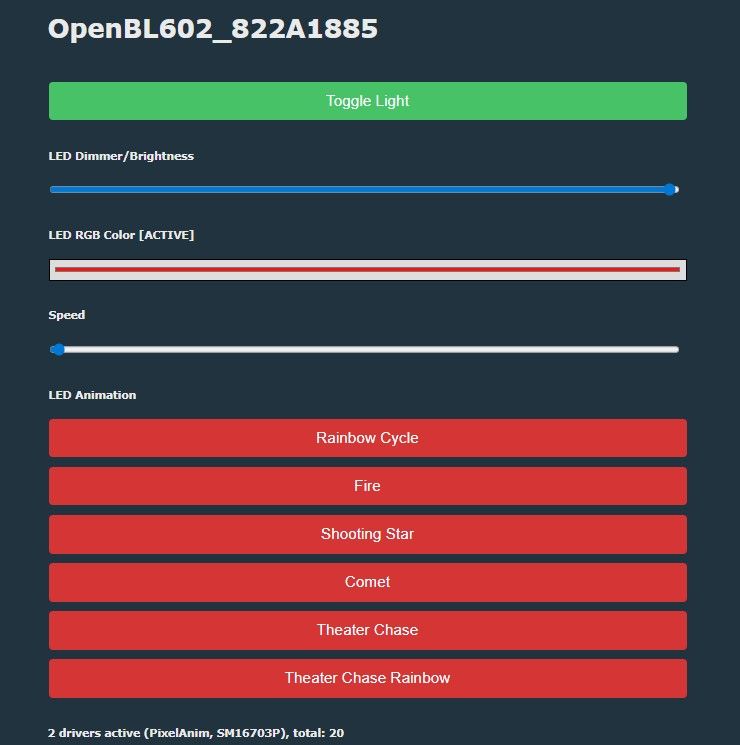
You still need to configure the pins and autoexec.bat – you can do this following the tutorial .
Code: JSON
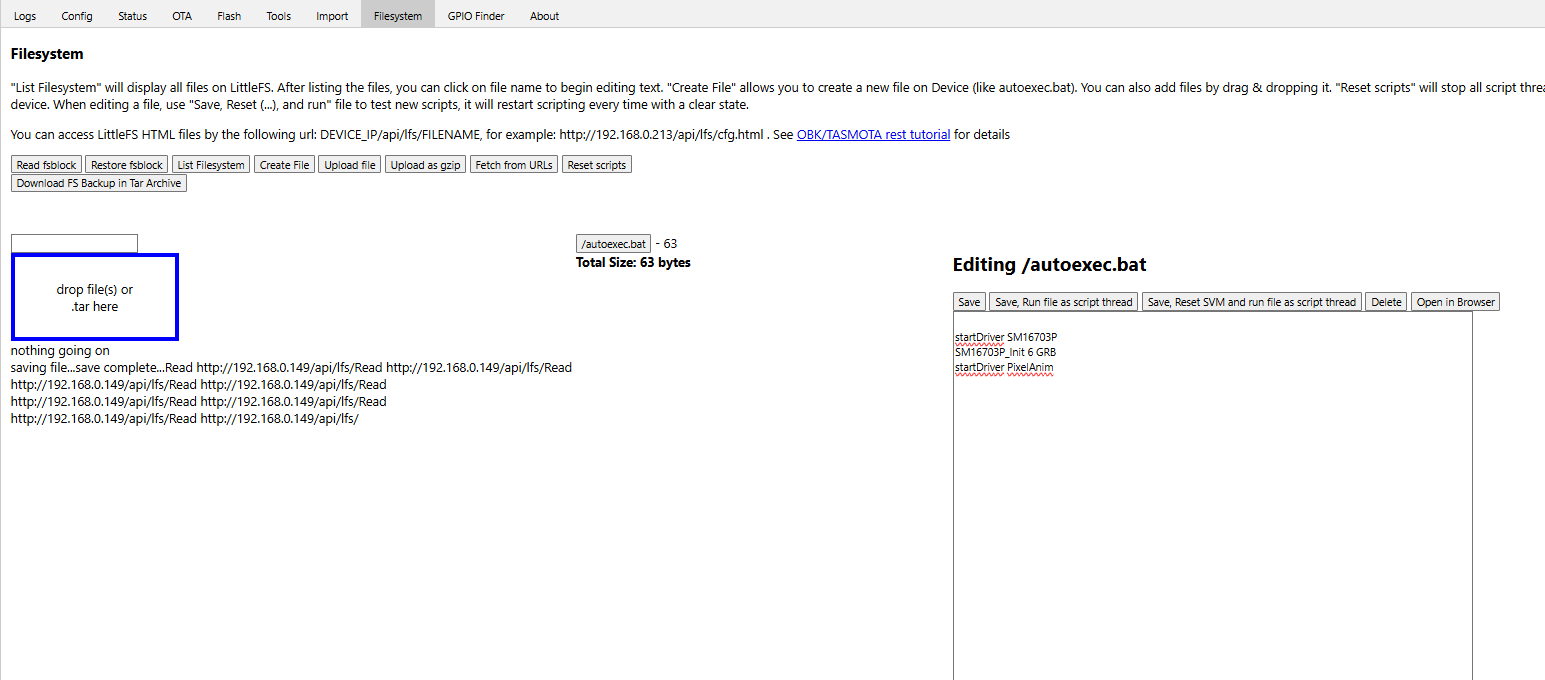
OpenBeken (OpenBL602) correctly supports these LEDs via the SM16703P (WS2812) controller, which ultimately proves their compatibility with this popular protocol. You can now connect further sections and play your own animations directly from the device itself , HA or via DDP .
It’s also a no-brainer to add the missing button – after updating the firmware, this can be easily configured via the UI:
You can also add an IR receiver and control it using your TV remote:
To sum up , the LED controller turned out to be a very simple device. Essentially, what we have here is simply a set of WS2812 LEDs grouped in sets of seven within an attractive housing, connected via male-to-male USB connectors which carry the power supply, signal input (DIN) and output (DOUT), allowing the signal to be split into more than one channel. They are controlled by a microcontroller with Wi-Fi/Bluetooth connectivity. The housing also contains an LDO (as the LEDs operate at 5 V, whereas the MCU runs at 3.3 V) and a microphone amplifier. The remote control remains a mystery; it probably communicates via Bluetooth, but I haven’t tested this yet.
The device normally works with the Magic Home ecosystem, but you can flash it with the firmware available at OBK , to make it work independently of the cloud and then pair it with Home Assistant.
Do you use this type of RGB lighting?

p.kaczmarek2 wrote 14814 posts with
rating 12985 , helped 659 times.
Been with us since 2014 year.
Comments
paired OK for me https://obrazki.elektroda.pl/8418491000_1782414976_bigthumb.jpg [Read more]
Did you log in? Maybe I should have logged in first, but still, it supposedly works without an account... [Read more]
I appear to be in local mode. not logged in https://obrazki.elektroda.pl/5286137800_1782415833_thumb.jpg [Read more]
Strange, and you did it via Bluetooth? I tried like 3 times and gave up. [Read more]
negative. joins with bluetooth disabled. Wifi AP 'LEDnet...' broadcasts [Read more]
Ahhh.... I was referring to Bluetooth pairing. That's what I tested and used. I was able to see it received my WiFi SSID and password, and joined it briefly enough to show up in DHCP, but then was dis... [Read more]