logo elektroda
logo elektroda
X
logo elektroda

Lighting and socket control using a Mitsubishi FX PLC – pulse switching

phonex 18491 68
Best answers

How can I make a Mitsubishi FX PLC toggle an output on each input pulse, so one pulse turns Y001 on and the next pulse turns it off?

Yes — use a rising-edge pulse (PLS) or an equivalent previous-state bit to detect each press, then toggle the output with a latch/hold branch so the next pulse reverses it [#6931234][#6941970] If your FX model doesn’t support edge detection, emulate it with a standard counter and comparators: on count 1 turn the output on, on count 2 turn it off and reset the counter [#6933643] In the ladder shown in the thread, the first rung stores the pulse in an internal M bit for one scan, and the following rungs use that bit plus the current Y state to decide whether to set or hold Y001 [#6931234]
Generated by the language model.
ADVERTISEMENT
Treść została przetłumaczona polish » english Zobacz oryginalną wersję tematu
  • #31 6952933
    phonex
    Level 18  
    Posts: 364
    Help: 6
    Rate: 30
    Yes, I’ve remembered about the variables. For now, I’m practising the operations of the individual blocks; later I’ll put them all together :)
    I did as you said, but there’s still no response
    Lighting and socket control using a Mitsubishi FX PLC – pulse switching
  • ADVERTISEMENT
  • #32 6953188
    jestam
    Automation specialist
    Posts: 1794
    Help: 210
    Rate: 144
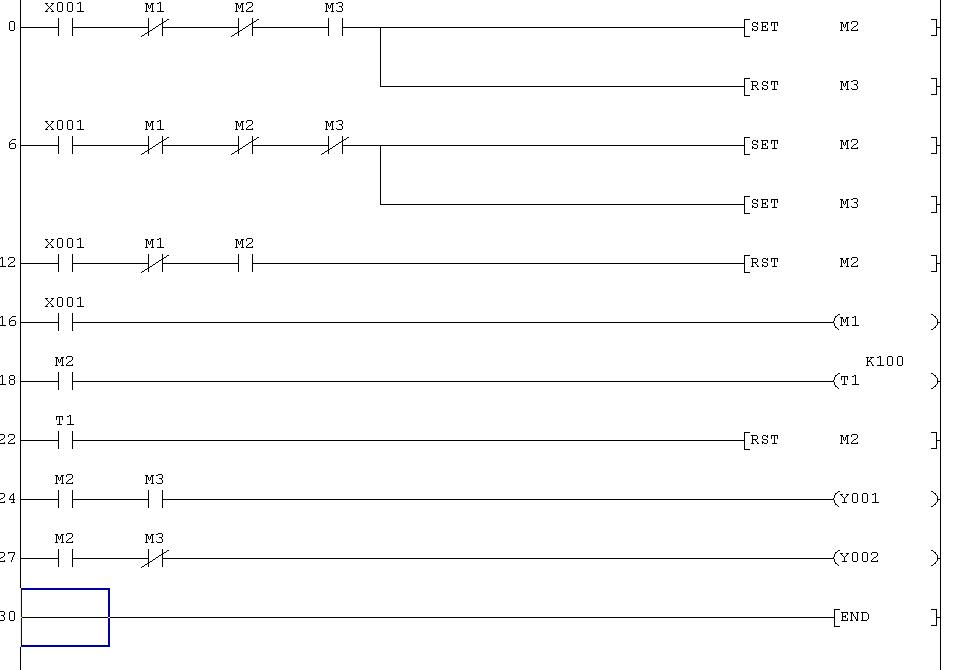
    Yes. There is one more problem. Take a look at lines 0, 6 and 12. Each of them contains contacts for the ‘drive’ and ‘direction’ variables, and these variables are being controlled. If the condition in line 0 is met, the variable being reset causes the condition in the next line to be met as well, even though it shouldn’t be. This is one of the reasons why using SET/RST can be tricky.

    The solution is as follows. Add two more variables: nast_jazda (nj) and nast_kierunek (nk). In lines 0, 6, 12 and 22, set and reset the variables nj and nk. At the end of the programme, assign nj → j and nk → k. The corrected programme is in the previous post.
  • #33 6954783
    phonex
    Level 18  
    Posts: 364
    Help: 6
    Rate: 30
    It’s working now – huge respect for your skills :)
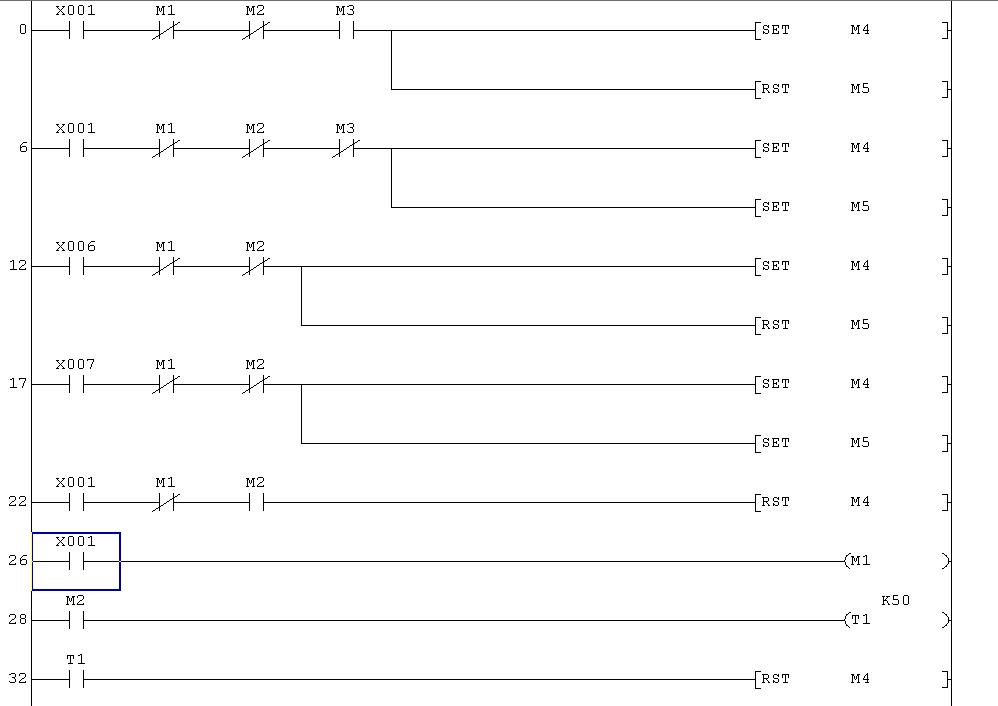
    Just a small tweak: an alarm standby signal on input X6, for example, causes all the roller shutters to go down (I arm the alarm, the roller shutters go down), whereas a signal on X7 sent whilst the alarm is disarmed (whether continuous or just a brief pulse) causes the roller shutters to rise (I disarm the alarm, the roller shutters rise)
    Will this work using the roller shutter groups I’ve created, as the main group?

    I’ve set them up like that, but the movement only starts once the roller shutters are stationary, and the timer measuring the movement time isn’t working either (the output remains active all the time)

    Lighting and socket control using a Mitsubishi FX PLC – pulse switching

    P.S. I’ve still got a few more ideas for using this controller; I hope you’re patient :)
  • #34 6962559
    jestam
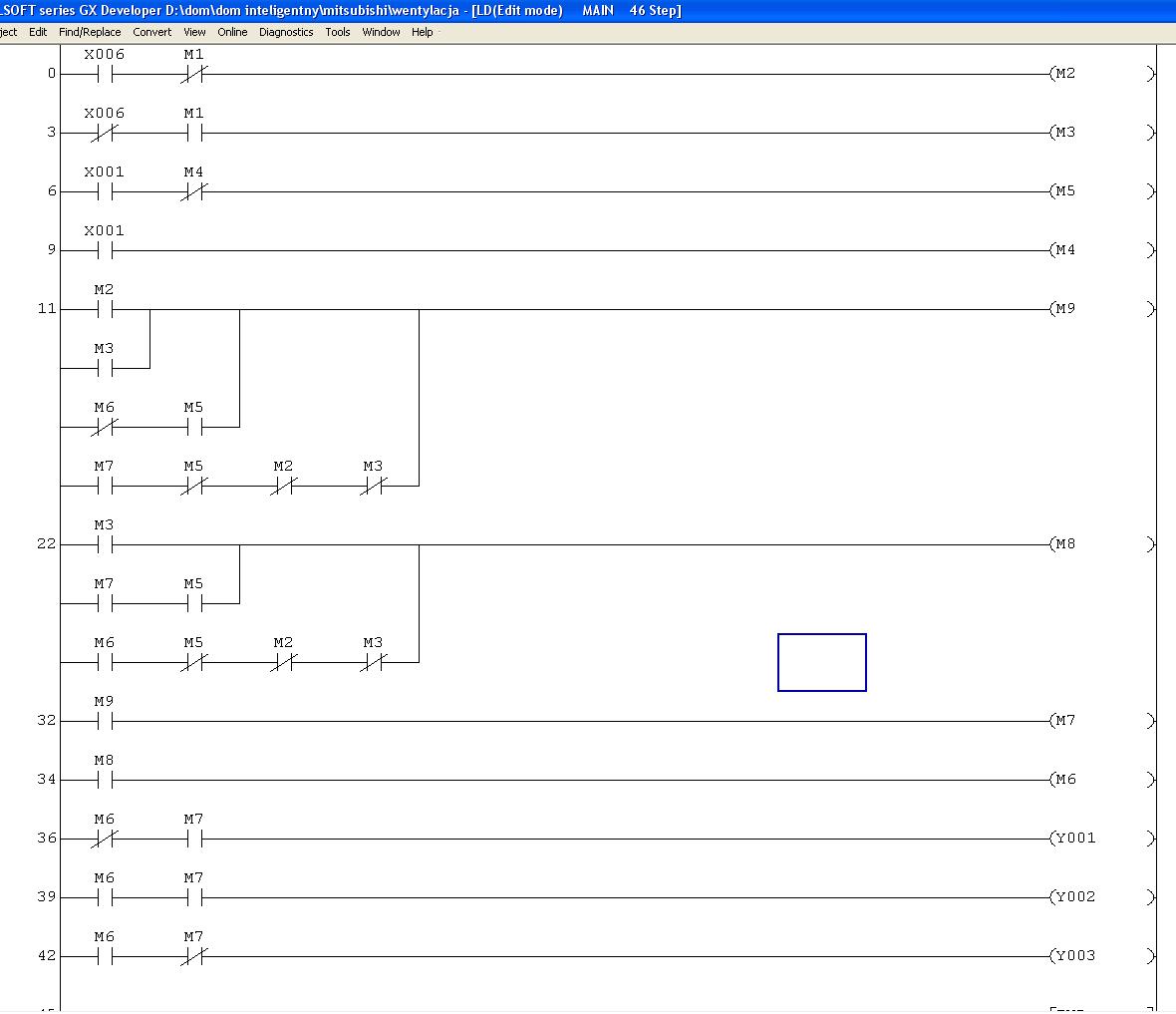
    Automation specialist
    Posts: 1794
    Help: 210
    Rate: 144
    Please give the variables names; I’m starting to lose track of which is which.

    In the code you’ve posted, the handling of X6 and X7 is incorrect.
    1. The series connection of the contact -|/m1|- makes no sense. m1 is used to detect a falling edge on x1, -|x1|--|/m1|-; leaving m1 for x6, which was inserted at the start, serves no purpose.
    2. Since it’s permissible to control the output continuously (the motors won’t be damaged in the event of a limit switch failure?), why bother with timers for the roller shutters?
    3. Define the relationship between x6 and x7. From what you’ve written, I understand that the alarm can be armed (x6 = 1, x7 = 0) or disarmed (x7 = 1, x6 = 0). Why, then, are two signals needed?

    Since the topic of roller shutters is starting to dominate this thread, perhaps you should ask a moderator to split it off?
  • #35 6962781
    phonex
    Level 18  
    Posts: 364
    Help: 6
    Rate: 30
    I’ve changed the subject,
    actually, you’re right – we can only use the X6 input for the alarm, where X6=1 means the alarm is armed and X6=0 means it’s disarmed
    As for continuous control, I think it’s better to use this timer; it always provides an extra safety measure for the roller shutter motor.
    So, should I remove /m1 from the connections?
  • #36 6962937
    jestam
    Automation specialist
    Posts: 1794
    Help: 210
    Rate: 144
    Delete lines 12 and 17

    insert the following code in their place

    xa - alarm input
    state 0 - disarmed
    state 1 - armed
    0->1 transition: arming, lower the shutters
    1->0 transition: disarming, raise the shutters

    
    ; wykrycie uzbrojenia i rozbrojenia alarmu
     
    |---|xa|-----|/xap|--------------(al_uzb)---
    |
    |---|/xa|----|xap|---------------(al_roz)---
    |
    |---|xa|-------------------------(xap)------
    
    ; zamknięcie rolet
    |---|al_uzb|-----------------+---[SET nj1
    |                            +---[RES nk1
    ... itd dla kolejnych rolet
    
    ; otwarcie rolet
    |---|al_roz|-----------------+---[SET nj1
    |                            +---[SET nk1
    ... itd dla kolejnych rolet
    
    
  • #37 6966412
    phonex
    Level 18  
    Posts: 364
    Help: 6
    Rate: 30
    It works as it should :)
    I reckon quite a few DIY home automation enthusiasts will find these instructions useful :)
    Now, something I tried to sort out over the weekend, without success:
    I have a motor in a mechanical ventilation system with three speeds, and I’d like to control it as follows:
    e.g. X1: the first press engages speed 1, the second press speed 2, the third press speed 3, the fourth press switches the motor off, and then the cycle repeats
    Additionally, a pulse on X6 switches the motor to speed 1 (arming the alarm), whilst the absence of a pulse on X6 (disarming the alarm) restores it to its pre-arming state
    Furthermore, X2 switches the motor to speed 3 (ventilation)

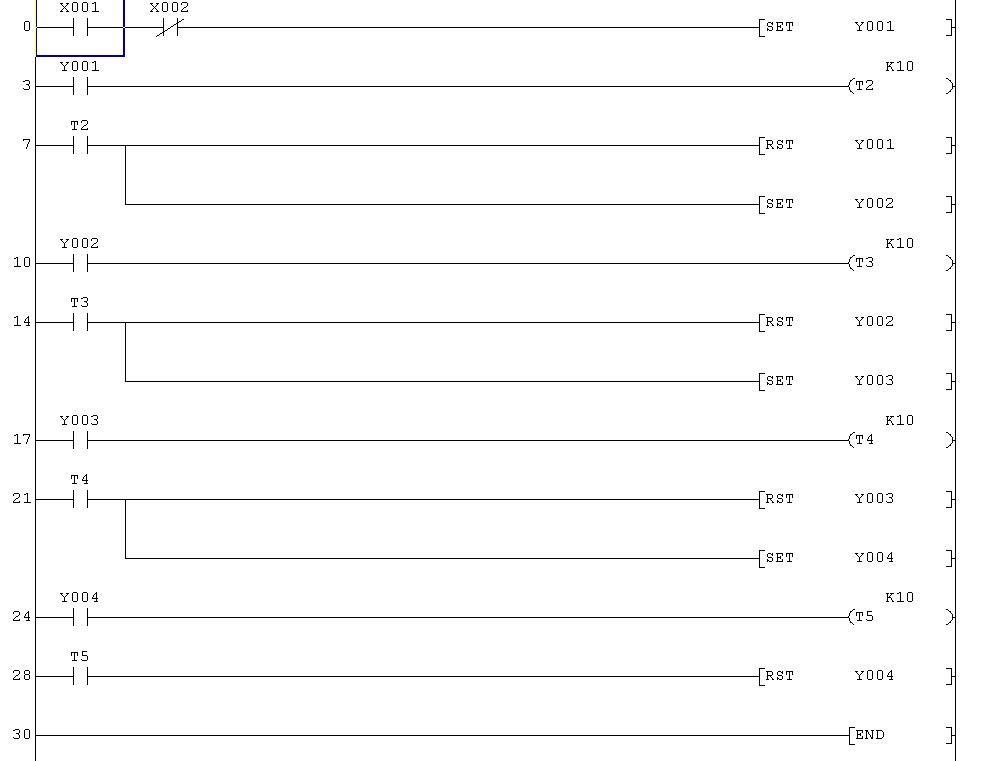
    and just a moment ago I set up a garden watering control system for 4 circuits; when X1 receives a signal from the control clock (e.g. a signal between 4 and 6 am – is it possible to use timers so that I don’t have to connect the clock separately?), furthermore, if X2 receives a signal indicating no rain (dry conditions), it sequentially activates the 4 irrigation control valves for the set durations, after which it switches off; please check if this is possible (it works on a PLC)


    Lighting and socket control using a Mitsubishi FX PLC – pulse switching

    Is it possible to create a routine so that a single input performs different functions depending on the number of times it is pressed?
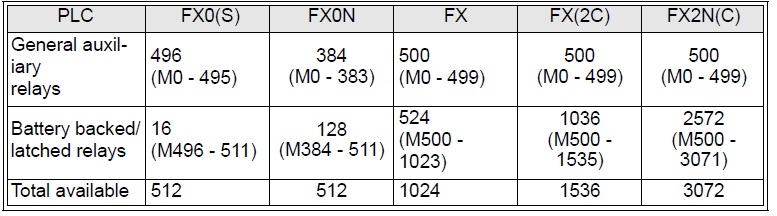
    P.S. Are there any limitations on the number of M blocks in the PLC?
  • #38 6966634
    jestam
    Automation specialist
    Posts: 1794
    Help: 210
    Rate: 144
    Quote:

    I have a motor in a mechanical ventilation system with three speed settings; I would like to control it as follows

    You need to encode 4 states, i.e. 2 auxiliary bits (status bits). In addition, you need to detect the edge on x1 and control the outputs based on x6 (the edge of x6, as in roller blinds), x2 and the status bits. I don’t have time to draw a diagram right now.

    Quote:

    I’ve made a garden watering control system for 4 circuits...

    It doesn’t seem to be working properly, or perhaps I’m missing the idea. When it’s dry (x2 = 0) and it’s past 4 am (x1 = 1), it switches on y1. After the time set by K10 has elapsed, t2 = 1, which resets y1 and sets y2. t3 starts, but it hasn’t counted down its time yet in this cycle, so nothing else happens.

    Next cycle. We have x2 = 0, x1 is still = 1 (because it’s not yet 6 am), and although y1 was reset in the previous cycle, it’s now being set again. The timer counts again, and so on. Y1 will only be reset at 6 am. Unless your control clock outputs pulses, but that isn’t very common :)

    Can it be replaced with a PLC? Of course it can. Check the documentation to see if your controller has a real-time clock function and which command can be used to read it. Using timers alone will be quite a lot of work.

    It’s also worth incorporating a mechanism to reset the time, e.g. controlling one of the inputs with a button; if it’s pressed, the controller will assume it’s, say, midnight. Otherwise, the PLC’s clock will drift further and further from real time, and you’ll have to reset it from a computer every six months :)

    Quote:

    Is it possible to create a routine where a single input performs different functions depending on the number of times it is pressed?

    We do this all the time. Raise/stop/lower/stop are four different functions.

    Quote:

    P.S. Are there any restrictions on the number of M blocks in the PLC?

    There are some; check the controller’s documentation. You shouldn’t run out in this project.
  • #39 6966642
    phonex
    Level 18  
    Posts: 364
    Help: 6
    Rate: 30
    Hmm, when a signal is sent to X1 for a moment, the controller switches the outputs on in sequence;
    I hadn’t actually thought that if 6 isn’t present, the cycle would start all over again

    What I mean is that if I press it once, output y1 will switch on; if I do a so-called double-click (i.e. two presses within, say, 2 seconds), only y2 will switch on; if I press it three times quickly, y3 will switch on again,
  • #40 6966649
    jestam
    Automation specialist
    Posts: 1794
    Help: 210
    Rate: 144
    And what if you press it slowly? Is it supposed to switch off? We need to specify exactly what ‘quickly’ means (less than x seconds?) and when something is supposed to happen. But this won’t be a single instruction; it will be a section of code that interprets these presses accordingly.
  • ADVERTISEMENT
  • #41 6966712
    phonex
    Level 18  
    Posts: 364
    Help: 6
    Rate: 30
    I’ve tested how this ‘watering’ works – it gives a 1 on X1 and stays there; the controller cycles through 1, 2, 3, 4 and switches off; it doesn’t start the cycle again
  • #42 6969237
    jestam
    Automation specialist
    Posts: 1794
    Help: 210
    Rate: 144
    On second glance. It seems fine, but there’s a catch.
    Quote:

    If x2 = 0 and it’s past 4 am (x1 = 1), then y1 is activated. After the time set by K10 has elapsed, t2 = 1, which resets y1 and sets y2. t3 starts, but as it hasn’t yet counted down its time in this cycle, nothing else happens.

    Next cycle. We have x2 = 0, x1 is still = 1 (as it is not yet 6 am); although y1 was reset in the previous cycle, it is now set again.

    The timer doesn’t even notice that y1 was once reset to zero. t2 remains at 1; the next instruction resets y1. This state (off) is written to the physical output at the end of the cycle. Then the process repeats.

    So you have a situation where, in the programme, you first enable a variable and then disable it a moment later. This poses a problem when modifying the software later on, as it’s easy to make a mistake. At the very least, mention this in a comment.
  • #43 6969329
    phonex
    Level 18  
    Posts: 364
    Help: 6
    Rate: 30
    It’s a bit complicated, but it might work as you say; I’ll mention it in a comment when putting the whole thing together.

    As for the fan, I’m thinking of it working like this:
    I press a button, speed 1 kicks in; pressing it again switches to speed 2; another press switches to speed 3; and the next press switches the fan off (let’s say we control this via input X1), with a safeguard to prevent the signal being sent to more than one output, and we’ll loop that
    Additionally, our input determining the alarm standby status (X6): when this input is in state 1 (alarm on standby), the fan switches to speed 1; whereas when the alarm is disarmed, speed 2 is activated,
    I’d like to create some indicators showing the operation of the individual speeds, e.g. using LED segments – that is, a further 3 outputs which will signal the fan’s operating speeds

    As for the double-click idea I mentioned earlier, I wanted to use it in another module of the programme, to have an emergency procedure in case there weren’t enough inputs and I needed to control several instructions with a single input by pressing it in different ways, but I still need to think it through to see if I’ll actually need something like that and exactly how it would work :)
  • #44 7005528
    jestam
    Automation specialist
    Posts: 1794
    Help: 210
    Rate: 144
    variables:
    x6 alarm standby state (1) or alarm disarmed (0)
    x6p previous state of x6
    x6_nar rising edge of x6
    x6_op falling edge of x6

    x1 control button
    x1p previous state of x1
    x1_nar rising edge of x1

    state1, state0 – two variables defining the system state
    0,0 – stop
    0,1 – speed 1
    1,1 – speed 2
    1,0 – speed 3

    state1n, state0n – new system state calculated by the programme

    outputs y1..y3 – gears 1..3; state 0 on all outputs = stop


    ; wykrywanie zboczy na wejściach
    |---|x6|---|/x6p|----------------------------(x6_nar)
    |                                            
    |---|/x6|---|xp6|----------------------------(x6_op)
    |
    |---|x1|---|/x1p|----------------------------(x1_nar)
    |
    |---|x6|-------------------------------------(x6p)
    |
    |---|x1|-------------------------------------(x1p)
    
    
    ;nowy stan układu
    
    ;zbocze na x6 (rosnące lub opadające) lub (stan1 = 0 i zbocze rosnące na x1) 
    ;lub (stan0 = 1 i brak zbocza na obu wejściach - podtrzymanie)
    
    |---|x6_nar|---------------------------------+-----(stan0n)
    |                                            |
    |---|x6_op|----------------------------------+
    |                                            |
    |---|/stan1|---|x1_nar|----------------------+
    |                                            |
    |---|stan0|--|/x1_nar|--|/x6_nar|--|/x6_op|--+
    
    ;zbocze opadające na x6 lub (stan0 = 1 i zbocze rosnące na x1)
    ;lub (stan1 = 1 i brak zbocza na obu wejściach - podtrzymanie)
    
    |---|x6_op|----------------------------------+-----(stan1n)
    |                                            |
    |---|stan0|---|x1_nar|-----------------------+
    |                                            |
    |---|stan1|--|/x1_nar|--|/x6_nar|--|/x6_op|--+
    
    ;przepisanie stanu
    |---|stan0n|------------------------------------(stan0)
    |
    |---|stan1n|------------------------------------(stan1)
    
    ;wyjścia
    |---|/stan1|---|stan0|--------------------------(y1)
    |
    |---|stan1|----|stan0|--------------------------(y2)
    |
    |---|stan1|----|/stan0|-------------------------(y3)
    
    
  • #45 7050875
    phonex
    Level 18  
    Posts: 364
    Help: 6
    Rate: 30
    I entered it like that and the x1 switch works fine, but when the X6 control is active, it switches Y1 on, and when it’s at zero, Y1 remains on and Y2 doesn’t switch on
  • #46 7051555
    jestam
    Automation specialist
    Posts: 1794
    Help: 210
    Rate: 144
    Input X6 detects a rising or falling edge, not a state. A 0->1 transition activates Y1; a 1->0 transition activates Y2. If X6 remains at 0 or 1, nothing changes.

    There is a typo in the second line
    |---|/x6|---|xp6|----------------------------(x6_op)
    it should be
    |---|/x6|---| x6p |----------------------------(x6_op)

    Check again to make sure there are no errors in the code you’ve copied. If necessary, paste an image and I’ll check it :)
  • Helpful post
    #48 7054988
    jestam
    Automation specialist
    Posts: 1794
    Help: 210
    Rate: 144
    Just a quick note: you’ve missed a line in the programme
    ---|x6|----(x6p)---
    so yours reads
    ---|x6|---(m1)---
  • ADVERTISEMENT
  • #49 7057846
    phonex
    Level 18  
    Posts: 364
    Help: 6
    Rate: 30
    I’m such a scatterbrain :( It’s working brilliantly now – I’m in your debt once again
  • ADVERTISEMENT
  • #50 7158879
    phonex
    Level 18  
    Posts: 364
    Help: 6
    Rate: 30
    And is it possible to make it so that, after a power cut, the fan remembers its settings?
  • #51 7158940
    jestam
    Automation specialist
    Posts: 1794
    Help: 210
    Rate: 144
    Every controller has non-volatile memory. Have a look in the manual. At the moment, it isn’t retaining the states of variables M1 to M...?
  • #52 7158963
    phonex
    Level 18  
    Posts: 364
    Help: 6
    Rate: 30
    Unfortunately, it doesn’t retain its settings; once the power comes back on, all outputs are switched off :(
  • Helpful post
    #53 7159065
    jestam
    Automation specialist
    Posts: 1794
    Help: 210
    Rate: 144
    The documentation will tell you the truth

    Lighting and socket control using a Mitsubishi FX PLC – pulse switching

    Use the correct M addresses
  • #54 7159079
    phonex
    Level 18  
    Posts: 364
    Help: 6
    Rate: 30
    A huge THANK YOU :)
  • #55 7171140
    phonex
    Level 18  
    Posts: 364
    Help: 6
    Rate: 30
    jestam wrote:

    
    ; zbocze na wejściu, postój, kier. był w górę
    ; - załącz jazdę w dół
    |---|weg|---|/ pg|---|/ jg|---|kg|---+---[SET njg
    |                                    +---[RES nkg
    |                                    +---[SET j1
    |                                    +---[RES k1
    |                                    +---[SET j2
    |                                    +---[RES k2
    |                                    +---[SET j..
    |                                    +---[RES k..
    
    ; zbocze na wejściu, postój, kier. był w dół
    ; - załącz jazdę w górę
    |---|weg|---|/ pg|---|/ jg|---|/ kg|-+--[SET njg
    |                                    +--[SET nkg
    |                                    +--[SET j1
    |                                    +--[SET k1
    |                                    +--[SET j2
    |                                    +--[SET k2
    |                                    +--[SET j..
    |                                    +--[SET k..
    
    ; zbocze na wejściu, trwa jazda - zatrzymaj
    |---|weg|---|/ pg|---|jg|-----------+---[RES njg
    |                                   +---[RES j1
    |                                   +---[RES j2
    |                                   +---[RES j...
    
    ; zapamiętaj stan wejścia do jako stan "poprzedni"
    |---|weg|----------------(pg)----|
    
    ; timer zlicza czas jazdy rolety
    |---|jg|-----------------(Tg)----|
    |                           K100 
    ; timer odmierzył 10 sek - zatrzymaj
    |---|Tg|------------------+---[RES njg
    |                         +---[RES j1
    |                         +---[RES j2
    |                         +---[RES j...


    Shouldn’t it be:
    
    ; zbocze na wejściu, postój, kier. był w górę
    ; - załącz jazdę w dół
    |---|weg|---|/ pg|---|/ jg|---|kg|---+---[SET njg
    |                                    +---[RES nkg
    |                                    +---[SET nj1
    |                                    +---[RES nk1
    |                                    +---[SET nj2
    |                                    +---[RES nk2
    |                                    +---[SET nj..
    |                                    +---[RES nk..
    itd.
  • #56 7171165
    jestam
    Automation specialist
    Posts: 1794
    Help: 210
    Rate: 144
    Quote:

    Shouldn’t it be:
    
    ; zbocze na wejściu, postój, kier. był w górę
    ; - załącz jazdę w dół
    |---|weg|---|/ pg|---|/ jg|---|kg|---+---[SET njg
    |                                    +---[RES nkg
    |                                    +---[SET nj1
    |                                    +---[RES nk1
    |                                    +---[SET nj2
    |                                    +---[RES nk2
    |                                    +---[SET nj..
    |                                    +---[RES nk..
    itd.


    No. Previously, ‘nj’ was rewritten as ‘j’ and ‘nk’ as ‘k’.
    
    ; przepisz nj na j1, nk na k1 
    |---|nj1|----------------(j1)----| 
    |---|nk1|----------------(k1)----| 
    

    This section concerns group control; there are separate variables `njg` and `nkg`, but you can control `j1`, `k1`, etc. directly.

    
    ; zbocze na wejściu, postój, kier. był w górę
    ; - załącz jazdę w dół
    |---|weg|---|/ pg|---|/ jg|---|kg|---+---[SET njg
    |                                    +---[RES nkg
    |                                    +---[SET j1
    |                                    +---[RES k1
    |                                    +---[SET j2
    |                                    +---[RES k2
    |                                    +---[SET j..
    |                                    +---[RES k..
    
  • #57 7171385
    phonex
    Level 18  
    Posts: 364
    Help: 6
    Rate: 30
    However, there must be ‘nj’ and ‘nk’ (as when there were just ‘j’ and ‘k’, the outputs would latch for a fraction of a second)
    Additionally, with group control, you’ve forgotten to change ‘njg’ to ‘jg’ and ‘nkg’ to ‘kg’
    After these modifications, it works: :)
  • #58 7171428
    jestam
    Automation specialist
    Posts: 1794
    Help: 210
    Rate: 144
    Of course, you need to change ‘njg’ to ‘jg’ and ‘nkg’ to ‘kg’.
    Quote:

    However, there must be ‘nj’ and ‘nk’ (as when there were just ‘j’ and ‘k’, the outputs would overlap for a fraction of a second)

    You’re telling some strange stories ;) Perhaps the difference stems from the fragments being in a different order in your programme than I had planned. But the important thing is that it works.
  • #59 7317800
    phonex
    Level 18  
    Posts: 364
    Help: 6
    Rate: 30
    Hello,
    I’ve encountered a problem:
    when controlling the roller shutters, if the control signal comes from the alarm (our X6) – namely, when X6 is active, the shutters go down; when we set X6 to zero, the shutters go up (and vice versa) – however, when this happens whilst the motor is running, the current required to switch the motor from, say, turning left to turning right is so high that the relays blow
    It would be useful to implement some sort of protection, such as a 1-second time delay, when the vehicle is in motion and the state of this input changes to the opposite; how can this be achieved?
  • Helpful post
    #60 7367135
    jestam
    Automation specialist
    Posts: 1794
    Help: 210
    Rate: 144
    It will look something like this (using the same notation as in previous posts):

    You already have this section (lines 12, 15, 18):
    Quote:

    
    ; wykrycie uzbrojenia i rozbrojenia alarmu 
      
    |---|xa|-----|/xap|--------------(al_uzb)
    | 
    |---|/xa|----|xap|---------------(al_roz)
    | 
    |---|xa|-------------------------(xap) 


    Insert something like this below (al_uzb is M7, al_roz is M8)
    
    ; aktywacja blokady wyjść na 0,5 sek
    |---|al_uzb|---+------------------[SET blok
    |              |
    |---|al_roz|---+
    |
    |---|blok|--------------------(Timer_blok)
    |                                 K 5
    |
    |---|Timer_blok|---------------[RES blok


    Add a lock to the output control lines.
    It was (in your code, lines 42 and 45; j1 is M2, k1 is M3)
    
    ; wyjścia 
    |---|j1|---|k1|---------------(wy_jazda_w_górę_1) 
    |---|j1|---| / k1|------------(wy_jazda_w_dół_1) 
    

    It should be
    
    ; wyjścia 
    |---|j1|---|k1|------|/blok|---------(wy_jazda_w_górę_1) 
    |---|j1|---| / k1|---|/blok|---------(wy_jazda_w_dół_1) 


    Do the same for the remaining outputs.
ADVERTISEMENT