logo elektroda
logo elektroda
X
logo elektroda

Lighting and socket control using a Mitsubishi FX PLC – pulse switching

phonex 18488 68
Best answers

How can I make a Mitsubishi FX PLC toggle an output on each input pulse, so one pulse turns Y001 on and the next pulse turns it off?

Yes — use a rising-edge pulse (PLS) or an equivalent previous-state bit to detect each press, then toggle the output with a latch/hold branch so the next pulse reverses it [#6931234][#6941970] If your FX model doesn’t support edge detection, emulate it with a standard counter and comparators: on count 1 turn the output on, on count 2 turn it off and reset the counter [#6933643] In the ladder shown in the thread, the first rung stores the pulse in an internal M bit for one scan, and the following rungs use that bit plus the current Y state to decide whether to set or hold Y001 [#6931234]
Generated by the language model.
ADVERTISEMENT
Treść została przetłumaczona polish » english Zobacz oryginalną wersję tematu
  • #1 6931166
    phonex
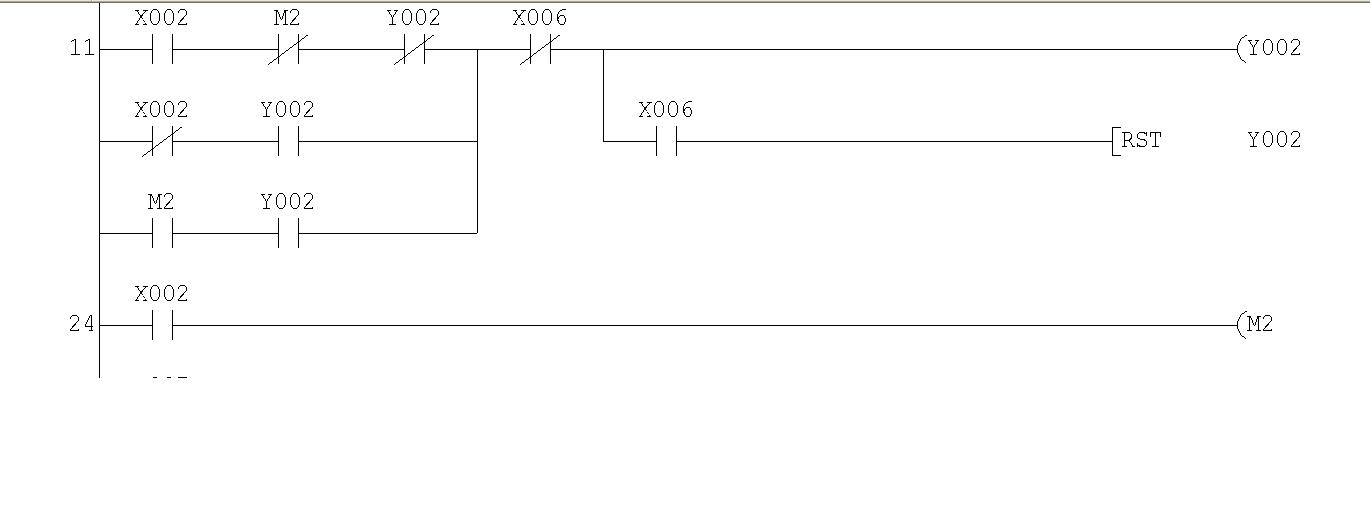
    Level 18  
    Posts: 364
    Help: 6
    Rate: 30
    I have a Mitsubishi PLC from the FX series, and I want to use it to control the lighting in my home, as well as to control sockets and so on.
    The problem I’ve come up against is as follows:
    is it possible to control an output, e.g. Y001, in such a way that a single pulse on input X001 turns the output on, whilst the next pulse turns it off? How do I do this in the ladder diagram?
  • ADVERTISEMENT
  • #2 6931234
    jestam
    Automation specialist
    Posts: 1794
    Help: 210
    Rate: 144
    e.g. like this:
    
    |---|^|-------------( )-|
        x1              m1
    
    |---| |----|/|--+---( )-|
        m1     y1   |   y1
                    |
    |---|/|----| |--+
        m1     y1


    the ^ symbol denotes an upward-pointing arrow
    at the first level, it detects a rising edge (pulse) on x1 and sets m1 to 1 for one controller cycle

    at the second level, it sets y1 to 1 when:
    - m1 = 0 and y1 was 1 (hold)
    - or m1 = 1 and y1 was 0 (turn-on)

    edit: readability of the diagram
  • #3 6933447
    phonex
    Level 18  
    Posts: 364
    Help: 6
    Rate: 30
    I’m currently trying to follow these instructions, but in MELSOFT GX DEVELOPER the ‘rising edge detection’ option isn’t highlighted – could it be that the FX-128MR doesn’t support this function?
    Edit: My PLC doesn’t support this function :/ Is there any other way to achieve this?
  • Helpful post
    #4 6933643
    papajondro
    Level 11  
    Posts: 81
    Help: 1
    Rate: 7
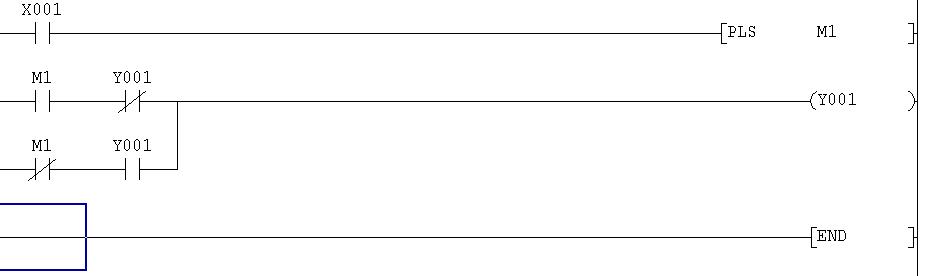
    I don’t have the manual for this controller, so I don’t know if it has a PLS function. It works in the same way as a rising edge.

    Lighting and socket control using a Mitsubishi FX PLC – pulse switching

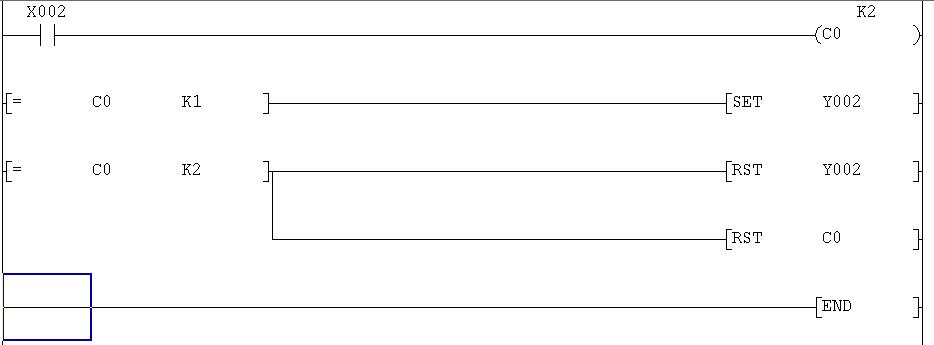
    And if you don’t have that function, you can use a standard counter and comparators: when the counter is at 1, turn on Y2, and when the counter is at 2, turn off Y2 and reset the counter.

    Lighting and socket control using a Mitsubishi FX PLC – pulse switching

    This is a programme written for the FX1N in GX Developer; I don’t know what you’re using to programme it, but the principle is the same :d

    Best regards.
  • #5 6935034
    phonex
    Level 18  
    Posts: 364
    Help: 6
    Rate: 30
    I’m programming with GX Developer :) . I’ll be at home this evening, so I’ll check if there’s a PLS function; I’ll upload this programme and let you know how it goes.
    I can see you’re all experts in this field, so I’ll be taking the liberty of asking questions whilst I’m programming. Thank you in advance for your interest and help.
  • ADVERTISEMENT
  • #6 6941551
    Narciarzr
    Level 12  
    Posts: 81
    Help: 5
    Rate: 6
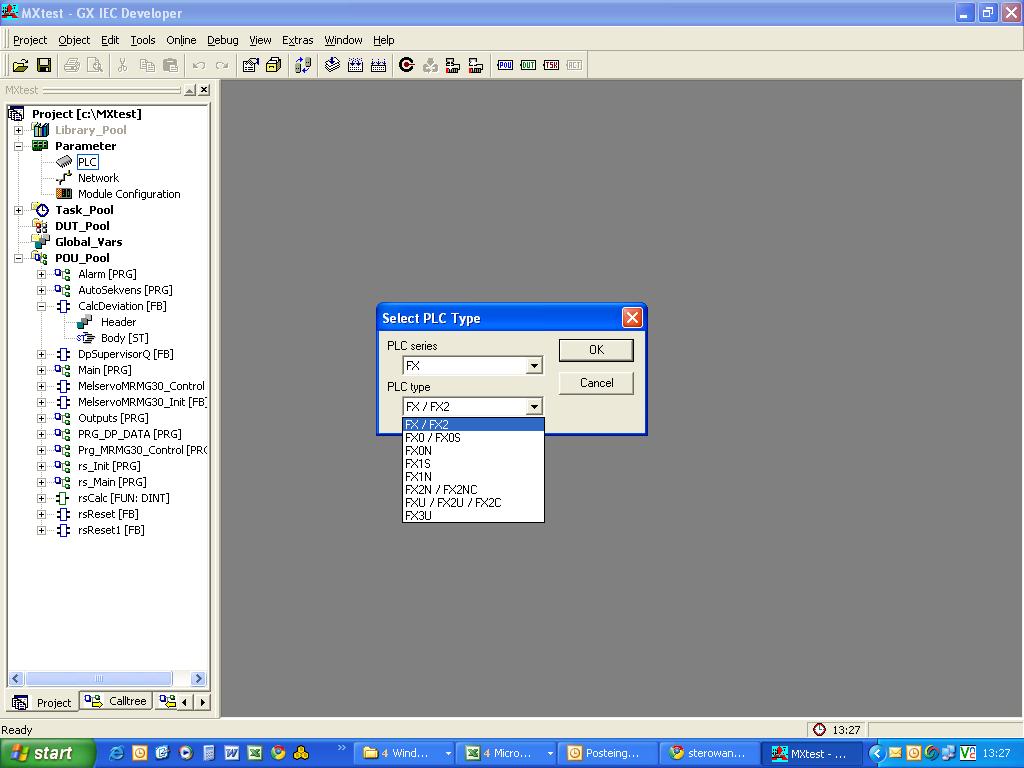
    Which group does this driver belong to?
    Lighting and socket control using a Mitsubishi FX PLC – pulse switching
    I might also try ;)

    Unfortunately, I don’t actually have one of these to test (I only have the Q02)
    What’s more, I don’t have the standard GX developer, only the IEC version.
  • #7 6941932
    papajondro
    Level 11  
    Posts: 81
    Help: 1
    Rate: 7
    The only difference I can see is that in the IEC version you have standard function blocks and use mnemonics as normal, which speeds up the work as you don’t have to use the mouse.

    I’ve attached the programme for anyone interested; it’s a course on programming Mitsubishi FX series controllers. It includes an introduction to programming and a description of the basic functions, as well as a total of 19 exercises across three levels (beginner, intermediate and advanced) to complete. All tasks are visualised to better illustrate the problem and aid understanding of the programming. It’s in English, but it’s clear and not too demanding :D
    Attachments:
    • Sw0d5c_FXTRN-BEG.rar (32.83 MB) You must be logged in to download this attachment.
  • Helpful post
    #8 6941970
    jestam
    Automation specialist
    Posts: 1794
    Help: 210
    Rate: 144
    Without edge detection
    
    
    |---| |---|/|----|/|--+---( )-| 
        x1    m1     y1   |   y1 
                          | 
    |---|/|---| |---------+ 
        x1    y1          |
                          | 
    |---| |---| |---------+ 
        m1    y1 
    
    |---| |-------------------( )-| 
        x1                    m1  


    Operation:
    m1 contains the x1 value from the previous cycle (as specified in the last line)
    y1 should be switched on when
    1. There is a rising edge on x1 and y1 = 0, i.e. x1 = 1, m1 = 0 and y1 = 0 (turn-on)
    2. y1 = 1 and there is no edge, ~(x1 = 1 and m1 = 0) (hold)

    Rewriting
    y1 = 1 and ~(x1 = 1 and m1 = 0) <=>
    y1 = 1 and (~x1 = 1 or ~m1 = 0) <=>
    y1 = 1 and (x1 = 0 or m1 = 1) <=>
    (y1 = 1 and x1 = 0) or (y1 = 1 and m1 = 1) – the second and third levels.
  • ADVERTISEMENT
  • #9 6942954
    Narciarzr
    Level 12  
    Posts: 81
    Help: 5
    Rate: 6
    papajondro wrote:
    The only difference I can see is that in the IEC version you have standard function blocks, and you use mnemonics as normal, which speeds up the work because you don’t have to use the mouse.


    The differences are huge. The whole project, from start to finish, looks different. The IEC version complies with the IEC 1131.3 standard, and you write the project as if at a higher level, only compiling it for the CPU afterwards. In theory (I’ve never checked), a project written in IEC can be recompiled for controllers from other manufacturers. But you also have to (just as in C++, for example) declare all global and local variables and the libraries used yourself.


    I haven’t managed to find out which group this controller belongs to.
  • #10 6942979
    phonex
    Level 18  
    Posts: 364
    Help: 6
    Rate: 30
    Narciarzr wrote:
    Which group does this driver belong to?
    Lighting and socket control using a Mitsubishi FX PLC – pulse switching
    I might also try ;)

    Unfortunately, I don’t actually have one of those to test (I only have a Q02)
    What’s more, I don’t have the standard GX Developer, just the IEC version.

    I’m here; I’ll get straight on with the programming. The controller is in the FX/FX2 group

    papajondro wrote:
    I don’t have a manual for this controller, so I don’t know if it has a PLS function? It works in the same way as a rising edge.

    Lighting and socket control using a Mitsubishi FX PLC – pulse switching

    I have the PLS function and it works as it should according to the diagram provided :)

    jestam wrote:
    Without edge detection
    
    
    |---| |---|/|----|/|--+---( )-| 
        x1    m1     y1   |   y1 
                          | 
    |---|/|---| |---------+ 
        x1    y1          |
                          | 
    |---| |---| |---------+ 
        m1    y1 
    
    |---| |-------------------( )-| 
        x1                    m1  


    this function also works correctly

    Now let’s add some options: I want one input to act as a reset, i.e. to switch off the specified outputs (e.g. I arm the alarm, send a signal from its outputs to the PLC, and the controller switches off all the lights in the house), and the second input acts as a PANIC function, meaning that when a signal is sent to it, it switches on all the lights (specified outputs)

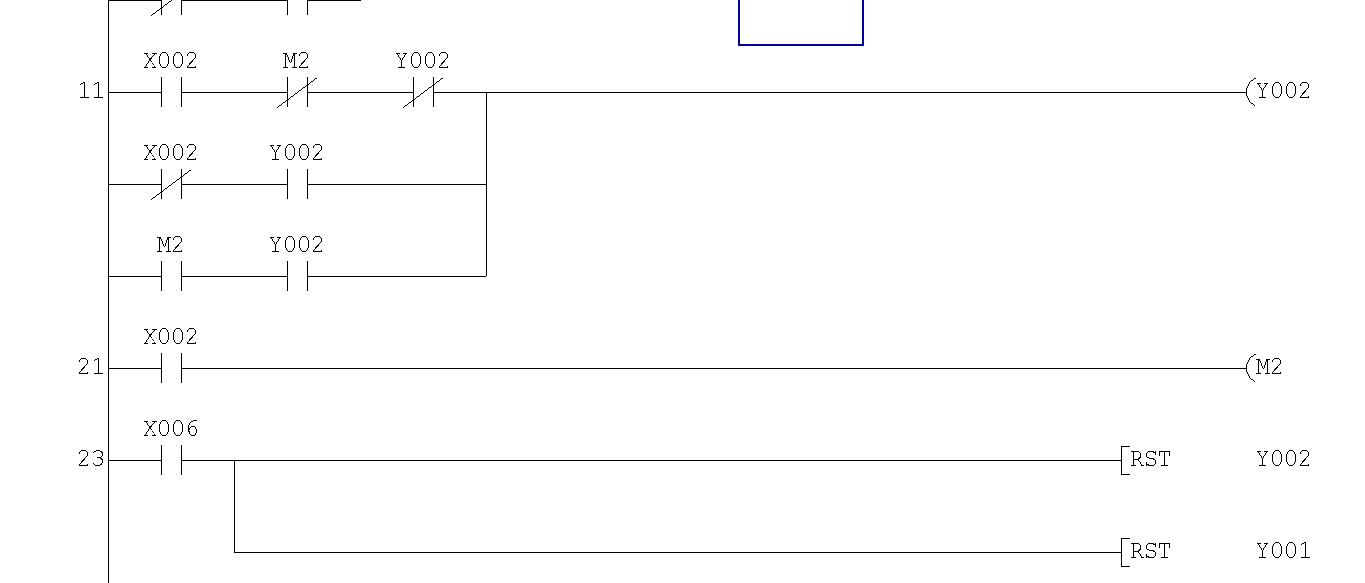
    Please check if this is possible (input 6 switches off 1 and 2); I’ve read that one should avoid sending the same output signal multiple times
    Lighting and socket control using a Mitsubishi FX PLC – pulse switching
  • #11 6944392
    jestam
    Automation specialist
    Posts: 1794
    Help: 210
    Rate: 144
    It works, but this kind of coding is not recommended in view of future modifications. The general rules are as follows (though there are, of course, exceptions)
    - write -()- or -(/)- to the output in a single location
    - set SET and reset RST so that they are visible on a single screen
    - do not combine -()- and SET/RST on a single output [this is the rule most often overlooked ;) ]

    In your case, you can add a negated x6 -|/|- in series after three parallel branches, and the PANIC function (which I assume is more important) is another parallel branch following the added x6. This is a good time to name your variables and separate the functions into distinct levels of the programme.

    What should happen after the alarm is deactivated (do the lights remain off or return to their state before the alarm was activated) and after the panic function is deactivated (do they remain on or return to their previous state)?
  • #12 6944402
    phonex
    Level 18  
    Posts: 364
    Help: 6
    Rate: 30
    jestam wrote:

    What should happen after the alarm is deactivated (do the lights remain off or return to their state before the alarm was triggered) and the panic function is deactivated (do they remain on or return to their previous state)?

    When the alarm is deactivated, the lights go out; I’d also like to have a switch on the wall to turn on all the lights in the event of an emergency
  • #13 6944436
    jestam
    Automation specialist
    Posts: 1794
    Help: 210
    Rate: 144
    I think we’ve misunderstood each other :) . Do the lights go out when the alarm is SWITCHED ON, and are they supposed to remain off after it is SWITCHED OFF? Or should they return to the state they were in before the alarm was switched on?

    You switch the lights on ‘in the event of an emergency’ via, say, input x7. What should happen once the emergency state is deactivated? Do the lights remain on, or do they return to their previous state?
  • #14 6944451
    phonex
    Level 18  
    Posts: 364
    Help: 6
    Rate: 30
    i.e. as follows: the alarm began signalling a break-in; at that moment, it sent information about this status to input x7; when it stopped sounding the alarm (e.g. after 30 seconds, as set in the control panel), the lights return to their pre-alarm state

    I don’t understand how to create another parallel branch after the added x6; I’ve done it like this and it doesn’t work:
    Lighting and socket control using a Mitsubishi FX PLC – pulse switching
  • #15 6944554
    jestam
    Automation specialist
    Posts: 1794
    Help: 210
    Rate: 144
    If the lights are to return to their previous state, the functions of switching them on and triggering the alarm must be separated.
    
    |---| |---|/|----|/|--+---( )-| 
        x1    m1     m2   |   m2 
                          | 
    |---|/|---| |---------+ 
        x1    m2          | 
                          | 
    |---| |---| |---------+ 
        m1    m2 
    
    |---| |-------------------( )-| 
        x1                    m1  
    
    |---| |---|/|---------+---( )-| 
        m2    x6          |   y1 
                          | 
    |---| |---------------+ 
        x7


    m2 stores information about the light’s state; x1 switches m2 on or off.
    Light y1 is on when m2 = 1 and the alarm is not in standby mode (x6 = 0), or when the ‘hazard’ input x7 = 1 is active.

    Name your variables or add comments, even just using what I’ve written in the posts as a description of how it works. In a week’s time, I won’t know what this does, and in six months’ time, neither will you :)
  • #16 6944798
    phonex
    Level 18  
    Posts: 364
    Help: 6
    Rate: 30
    and changing it to: x6 switches the lights off when the alarm is armed, but once the alarm is disarmed, it does not return to the state it was in before arming (i.e. I leave the house, the alarm switches off all the lights; after disarming, the lights remain off, or, for example, I set the hallway light y4 to switch on after disarming

    is it possible to add descriptions to the ladder diagrams in GX DEVELOPER? edit: it is possible in the comment :)
  • #17 6944967
    jestam
    Automation specialist
    Posts: 1794
    Help: 210
    Rate: 144
    Move x6 to the m2 control branch
    
    |---| |---|/|----|/|--+---|/|---( )-| 
        x1    m1     m2   |   x6    m2 
                          | 
    |---|/|---| |---------+ 
        x1    m2          | 
                          | 
    |---| |---| |---------+ 
        m1    m2 
    
    |---| |-------------------( )-| 
        x1                    m1  
    
    |---| |---------------+---( )-| 
        m2                |   y1 
                          | 
    |---| |---------------+ 
        x7  


    Quote:
    Alternatively, I could set, for example, the corridor light y4 to switch on when the system is disarmed

    To be more precise: y4 (m9) is to switch on WHEN the system is disarmed
    The simplest way is to add another parallel branch that detects a falling edge on x6, i.e. that x6 = 0 but was 1 a moment ago.

    
    |---| |---|/|----|/|--+---|/|---( )-| 
        x4    m8     m9   |   x6    m9 
                          | 
    |---|/|---| |---------+ 
        x4    m9          | 
                          | 
    |---| |---| |---------+ 
        m8    m9          |
                          | 
    |---| |---------------+ 
        m12               
    
    |---| |-------------------( )-| 
        x4                    m8  
    
    |---| |-------------------( )-| 
        x6                    m12  
    
    |---| |---------------+---( )-| 
        m9                |   y4
                          | 
    |---| |---------------+ 
        x7 
    
  • #18 6944992
    Narciarzr
    Level 12  
    Posts: 81
    Help: 5
    Rate: 6
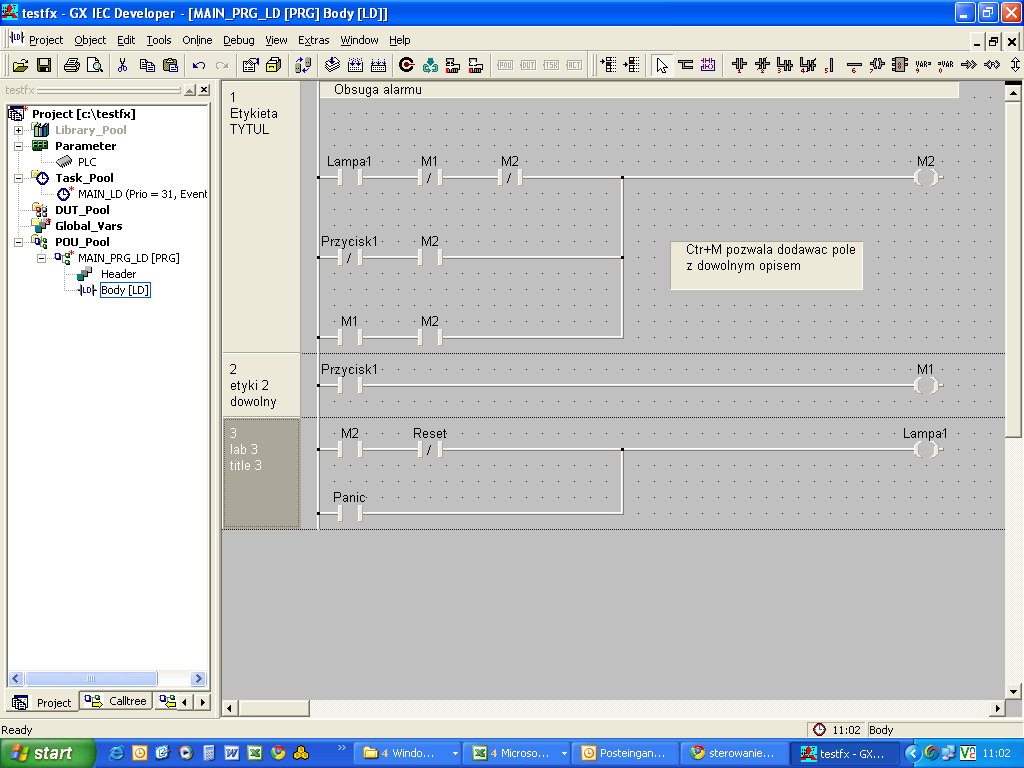
    I’m not sure if it’s the same in the GC Developer, but in the GX IEC Developer you can create global and local variables and names.
    e.g. X1 button 1 y1 lamp 1 x7 panic x6 reset
    and then use these names in the programme.
    In addition, you can give each network a title, and Ctrl+M allows you to add your own comments anywhere in the programme

    Lighting and socket control using a Mitsubishi FX PLC – pulse switching
  • #19 6945674
    phonex
    Level 18  
    Posts: 364
    Help: 6
    Rate: 30
    jestam wrote:
    move x6 to the m2 control branch
    
    |---| |---|/|----|/|--+---|/|---( )-| 
        x1    m1     m2   |   x6    m2 
                          | 
    |---|/|---| |---------+ 
        x1    m2          | 
                          | 
    |---| |---| |---------+ 
        m1    m2 
    
    |---| |-------------------( )-| 
        x1                    m1  
    
    |---| |---------------+---( )-| 
        m2                |   y1 
                          | 
    |---| |---------------+ 
        x7  


    Quote:
    Alternatively, I could set, for example, the light in the corridor (y4) to switch on when the system is disarmed

    To be more precise: y4 (m9) is to switch on WHEN the alarm is disarmed
    The simplest way is to add another parallel branch that detects a falling edge on x6, i.e. that x6 = 0 but was 1 a moment ago.

    
    |---| |---|/|----|/|--+---|/|---( )-| 
        x4    m8     m9   |   x6    m9 
                          | 
    |---|/|---| |---------+ 
        x4    m9          | 
                          | 
    |---| |---| |---------+ 
        m8    m9          |
                          | 
    |---| |---------------+ 
        m12               
    
    |---| |-------------------( )-| 
        x4                    m8  
    
    |---| |-------------------( )-| 
        x6                    m12  
    
    |---| |---------------+---( )-| 
        m9                |   y4
                          | 
    |---| |---------------+ 
        x7 


    It works correctly :) So now I copy these instructions for each light source and I have lighting control?

    Narciarzr wrote:
    I’m not sure if it’s the same in the GC Developer, but in the GX IEC Developer you can create variables and global and local names.
    e.g. X1 button 1 y1 lamp1 x7 panic x6 reset
    and then use these names in the programme.
    Additionally, you can give each network a title, and Ctrl+M allows you to add your own comments anywhere in the programme

    Lighting and socket control using a Mitsubishi FX PLC – pulse switching

    Ctrl+M doesn’t work, but as you say, you can create variables, their names and aliases globally, and these aliases will be displayed next to the ladder diagram
  • ADVERTISEMENT
  • #20 6945926
    jestam
    Automation specialist
    Posts: 1794
    Help: 210
    Rate: 144
    Yes. Give the variables names.
  • #21 6946328
    phonex
    Level 18  
    Posts: 364
    Help: 6
    Rate: 30
    Great, I’ll do the sockets in the same way too. Now I’d like some help with the following task:
    electric roller blinds, single-button control: press once to lower the blind, 2 – blind stops, 3 – blind goes up, and then the same sequence again; plus one central switch that controls all of them, and one that controls a selected group of blinds
    The limit switches will be in the motors, so there’ll be a time delay (e.g. 10 seconds maximum for raising/lowering the blind)
  • #22 6948023
    jestam
    Automation specialist
    Posts: 1794
    Help: 210
    Rate: 144
    Check which timer modules are available.
    At this link is the documentation for Mitsubishi FX controllers; have a look at subsection 2.16 (page 44) and check whether the sample programme provided there works with your hardware. A detailed description of the timers can be found in Chapter 4.9, from page 89.

    Which specific controller model do you have?
  • #23 6948033
    phonex
    Level 18  
    Posts: 364
    Help: 6
    Rate: 30
    jestam wrote:
    Check which timer modules are available.
    Under this link is the documentation for Mitsubishi FX controllers; have a look at subsection 2.16 (page 44) and check whether the sample programme provided there works with your hardware. A detailed description of the timers can be found in Chapter 4.9, from page 89.


    Mitsubishi FX-128MR-ES
    but according to this diagram there are 5 inputs, and I’d like to control two outputs (roller blind down, roller blind up) using a single input

    P.S. I have this documentation in Polish, in case anyone’s interested
  • #24 6949145
    jestam
    Automation specialist
    Posts: 1794
    Help: 210
    Rate: 144
    Quote:

    But according to this diagram, there are 5 inputs, and I’d like to control two outputs (roller blind down, roller blind up) using a single input

    This diagram isn’t the solution to your problem. I just wanted to make sure that the documentation I’m using is compatible with your tools (I don’t have GX Developer and I’m being overly cautious ;) )
  • #25 6949149
    phonex
    Level 18  
    Posts: 364
    Help: 6
    Rate: 30
    Yes, yes, the manual says that my FX supports this feature
  • #26 6949407
    jestam
    Automation specialist
    Posts: 1794
    Help: 210
    Rate: 144
    For each roller blind, you need two variables to store its status:
    - movement = 1 – the blind is moving; = 0 – the blind is stationary
    - direction = 1 – the blind is moving or was last moving upwards; = 0 – downwards

    In addition, a timer T counting down 10 seconds, an input signal and the edge of the input signal, in the same way as for the lighting.

    Variables for roller shutter 1 (assign the addresses to free memory cells yourself)
    j1 (movement), k1 (direction), we1 (input), p1 (current input state), T1 (timer).
    Additionally, nj1 and nk1 represent the next movement and direction states.

    
    ; zbocze na wejściu, postój, kier. był w górę
    ; - załącz jazdę w dół
    |---|we1|---|/ p1|---|/ j1|---|k1|---+---[SET nj1
    |                                    +---[RES nk1
    
    ; zbocze na wejściu, postój, kier. był w dół
    ; - załącz jazdę w górę
    |---|we1|---|/ p1|---|/ j1|---|/ k1|-+--[SET nj11
    |                                    +--[SET nk1
    
    ; zbocze na wejściu, trwa jazda - zatrzymaj
    |---|we1|---|/ p1|---|j1|---------------[RES nj1
    
    ; zapamiętaj stan wejścia do jako stan "poprzedni"
    |---|we1|----------------(p1)----|
    
    ; timer zlicza czas jazdy rolety
    |---|j1|-----------------(T1)----|
    |                           K100 
    ; timer odmierzył 10 sek - zatrzymaj
    |---|T1|----------------------[RES nj1
    
    ; przepisz nj na j1, nk na k1
    |---|nj1|----------------(j1)----|
    |---|nk1|----------------(k1)----|


    Repeat the above section for each roller shutter control button. For group control buttons, make the following modification: in addition to SET/RES for the group, also perform SET/RES for each of the roller shutters belonging to the group.

    
    ; zbocze na wejściu, postój, kier. był w górę
    ; - załącz jazdę w dół
    |---|weg|---|/ pg|---|/ jg|---|kg|---+---[SET njg
    |                                    +---[RES nkg
    |                                    +---[SET j1
    |                                    +---[RES k1
    |                                    +---[SET j2
    |                                    +---[RES k2
    |                                    +---[SET j..
    |                                    +---[RES k..
    
    ; zbocze na wejściu, postój, kier. był w dół
    ; - załącz jazdę w górę
    |---|weg|---|/ pg|---|/ jg|---|/ kg|-+--[SET njg
    |                                    +--[SET nkg
    |                                    +--[SET j1
    |                                    +--[SET k1
    |                                    +--[SET j2
    |                                    +--[SET k2
    |                                    +--[SET j..
    |                                    +--[SET k..
    
    ; zbocze na wejściu, trwa jazda - zatrzymaj
    |---|weg|---|/ pg|---|jg|-----------+---[RES njg
    |                                   +---[RES j1
    |                                   +---[RES j2
    |                                   +---[RES j...
    
    ; zapamiętaj stan wejścia do jako stan "poprzedni"
    |---|weg|----------------(pg)----|
    
    ; timer zlicza czas jazdy rolety
    |---|jg|-----------------(Tg)----|
    |                           K100 
    ; timer odmierzył 10 sek - zatrzymaj
    |---|Tg|------------------+---[RES njg
    |                         +---[RES j1
    |                         +---[RES j2
    |                         +---[RES j...


    The order is important: first the individual roller shutters, then the groups (as many as needed), and finally – the most important group.
    Finally, control the outputs based on the variables j... and k...

    
    ; wyjścia
    |---|j1|---|k1|---------------(wy_jazda_w_górę_1)
    |---|j1|---| / k1|------------(wy_jazda_w_dół_1)
    ...
    |---|j10|---|k10|-------------(wy_jazda_w_górę_10)
    |---|j10|---| / k10|----------(wy_jazda_w_dół_10)


    Edit: correction in the programme
  • #27 6951658
    phonex
    Level 18  
    Posts: 364
    Help: 6
    Rate: 30
    And for p, j, k (which can’t be set), what variables should I enter?
  • #28 6952057
    jestam
    Automation specialist
    Posts: 1794
    Help: 210
    Rate: 144
    p, j and k are example variable names. Assign them variables of type m, ensuring they do not conflict with those you have already used in the programme.

    Assign the timers in sequence, starting from 1.
  • #29 6952270
    phonex
    Level 18  
    Posts: 364
    Help: 6
    Rate: 30
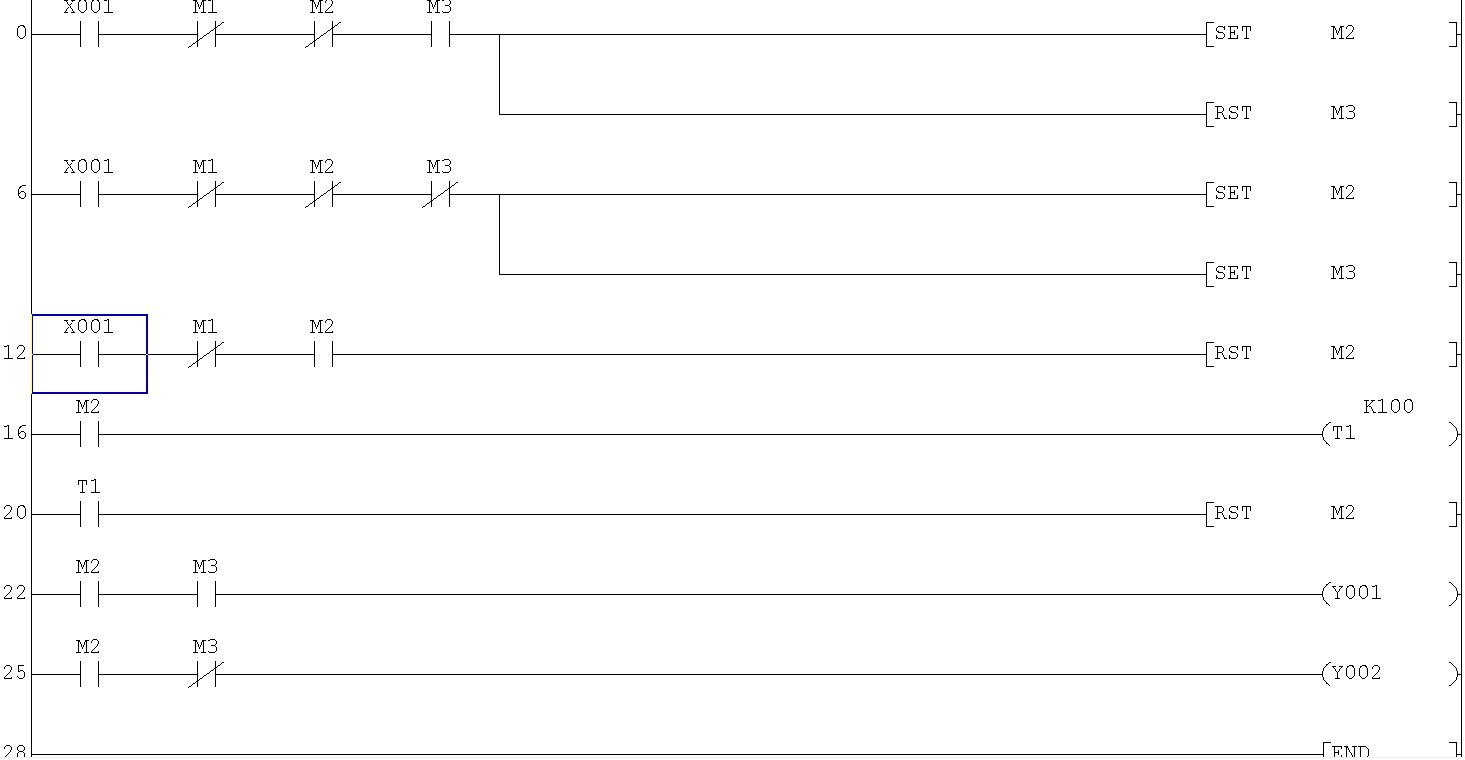
    This is what I did:
    Lighting and socket control using a Mitsubishi FX PLC – pulse switching
    and there’s no response on X1
    In the first line, I’ve set all the variables to their negated values (in theory, applying a pulse to X1 should activate the Y2 output, but it isn’t working)
    Tell me, because you’ve set the p input states to negated everywhere – as if they weren’t there at all – is that how it’s supposed to be?
  • #30 6952832
    jestam
    Automation specialist
    Posts: 1794
    Help: 210
    Rate: 144
    If p is to be set to 0, this is the previous state of the input. The programme is to respond to the edge, just like the lighting control programme, i.e. x = 1 and p = 0.

    There is one more instruction missing from the programme
    
    |---|we1|----------(p1)----| (zmienna p1 ma u Ciebie adres m1)
    

    Place it between lines 12 and 16 in your programme

    Be careful with the variable addresses. You’ve already used m1, m2, etc. to control the lighting.
ADVERTISEMENT