logo elektroda
logo elektroda
X
logo elektroda

Improving WiFi Signal Strength on Windows 7 Laptop Without Purchasing Equipment

paweo12 99906 22
Best answers

How can I improve my laptop’s weak Wi‑Fi signal in Windows 7 without buying any equipment?

Without buying hardware, you can only try a small software tweak in Device Manager, but it will not meaningfully improve a very weak Wi‑Fi signal [#9851437][#9852080][#9852202] Open the wireless card’s properties and check the Advanced/power management settings, if your adapter even offers them [#9851437][#9852202] However, increasing the card’s transmit power will not increase the received signal from the hotspot and may even reduce receiver sensitivity, so do not expect miracles [#9853974][#9855473] The thread’s consensus is that a real fix requires different hardware, such as a USB Wi‑Fi adapter with an external antenna or a better antenna setup [#9851444][#9853974][#10270644] If you truly cannot buy anything, the only practical workaround mentioned is moving closer to the access point, for example by sitting near the window [#9851995][#9877448]
Generated by the language model.
ADVERTISEMENT
Treść została przetłumaczona polish » english Zobacz oryginalną wersję tematu
  • #1 9851407
    paweo12
    Level 11  
    Posts: 41
    Rate: 26
    Hello.
    I have a laptop with W7 and poor signal strength in the neighborhood WiFi network.
    How can I improve the signal without buying any goodies?
  • ADVERTISEMENT
  • #2 9851437
    kazik70
    Level 28  
    Posts: 1375
    Help: 53
    Rate: 73
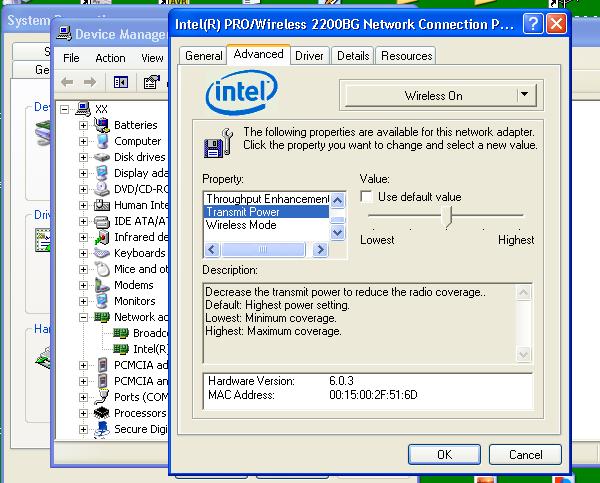
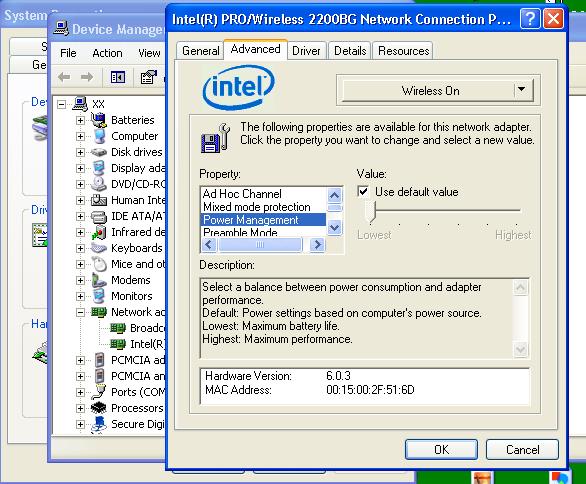
    In the device manager, in the properties of your card, you should be able to manage the power.
  • #3 9851444
    Mleczyk89
    Level 34  
    Posts: 2087
    Help: 291
    Rate: 263
    It's not possible.

    Replacing antennas or external card with better antenna.
  • ADVERTISEMENT
  • #4 9851603
    kazik70
    Level 28  
    Posts: 1375
    Help: 53
    Rate: 73
    Maybe not every card does, but it is possible!
    Attachments:
    • Improving WiFi Signal Strength on Windows 7 Laptop Without Purchasing Equipment da się 2.JPG (72.23 KB) You must be logged in to download this attachment.
    • Improving WiFi Signal Strength on Windows 7 Laptop Without Purchasing Equipment da się.JPG (74.82 KB) You must be logged in to download this attachment.
  • ADVERTISEMENT
  • #5 9851995
    paweo12
    Level 11  
    Posts: 41
    Rate: 26
    Thanks for your help, but I have Windows 7 !!!

    Added after 13 [minutes]:

    ATTENTION!!!
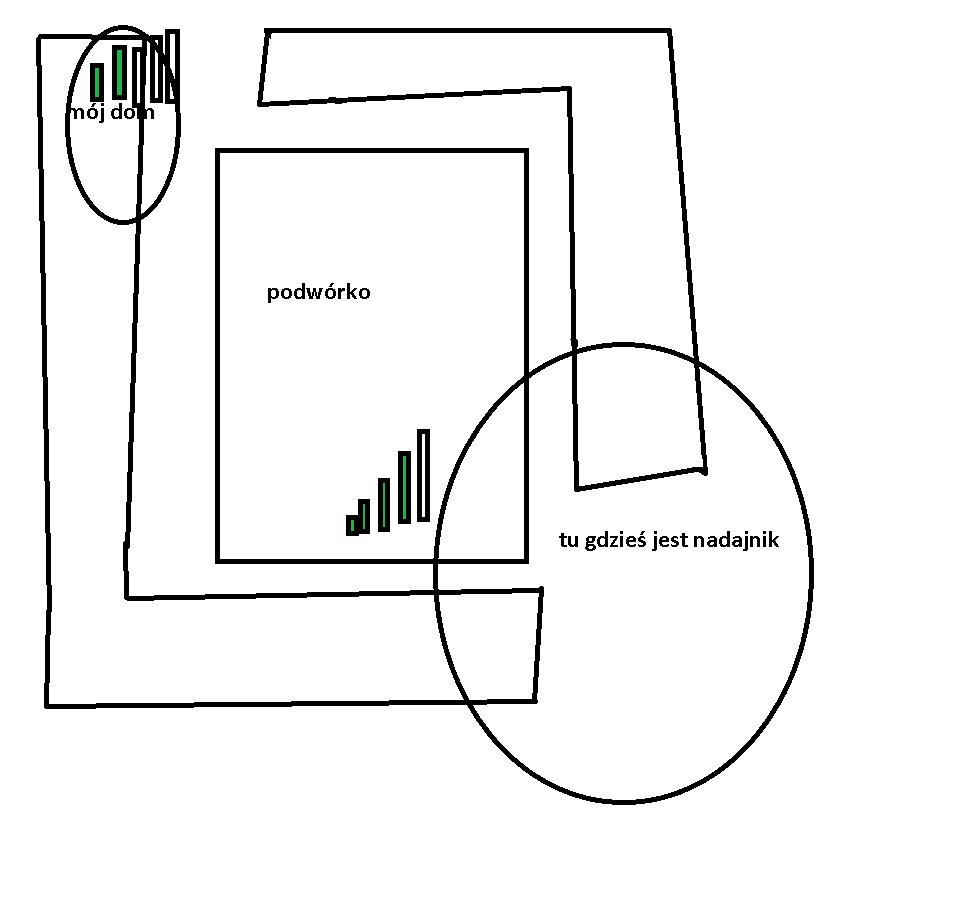
    I have a signal only through the window !!!
  • Helpful post
    #6 9852080
    kazik70
    Level 28  
    Posts: 1375
    Help: 53
    Rate: 73
    It does not matter, the device manager is the same whether it is XP or Win 7.
  • #7 9852167
    paweo12
    Level 11  
    Posts: 41
    Rate: 26
    so where should I look? Improving WiFi Signal Strength on Windows 7 Laptop Without Purchasing Equipment
  • #8 9852202
    kazik70
    Level 28  
    Posts: 1375
    Help: 53
    Rate: 73
    Advanced tab :D
  • #9 9853509
    paweo12
    Level 11  
    Posts: 41
    Rate: 26
    advanced and what next?
  • #10 9853616
    kazik70
    Level 28  
    Posts: 1375
    Help: 53
    Rate: 73
    How Do I know :D you did not write what the card is, I do not know what settings you have there, best give a photo.
  • #11 9853974
    Stanley_P
    Level 28  
    Posts: 1301
    Help: 61
    Rate: 287
    kazik70 wrote:
    In the device manager, in the properties of your card, you should be able to manage the power.


    Since the author of the thread has a weak signal from the hotspot, I would not expect miracles after increasing the transmission power of the card in the laptop. If anything, I expect an additional reduction in receiver sensitivity ;-)
    Read (you) carefully what @ Mleczyk89 wrote. This is basically the only method. At the beginning, I suggest buying a WiFi-USB card * (necessarily with an external antenna, preferably a detachable one) and possibly a USB extension cable. Install Inssider, measure the signal (you can also use the card itself in the laptop, now).
    Alternatively, the Airlive G.DUO-style wifi "amplifier" (or its substitute made of two APs) placed on the windowsill should probably do the job quite wirelessly - but the cost is higher. However, no one will give a 100% guarantee that these solutions will work immediately without additional investments (e.g. purchase / installation of better antennas) - you just have to try. Therefore, it is good to get along with the seller about the possible return of the equipment.

    Anyway, IMO without buying "different things" is impossible - because as it is commonly known such things only in the Era, or rather now in T-Mobile ;-)

    Greetings -

    Stanley

    * for example, I use Pentagram P6132-10 (5dBi omnidirectional antenna included) with 3m USB extension cable (for this "set" I paid about PLN 70: about PLN 50 card, about PLN 20 cable). The Tplink TL-WN422G card on Atheros (WN722N) was often recommended on the forum.
  • #12 9855258
    1st
    Level 23  
    Posts: 713
    Help: 58
    Rate: 168
    paweo12 wrote:
    so where should I look? Improving WiFi Signal Strength on Windows 7 Laptop Without Purchasing Equipment


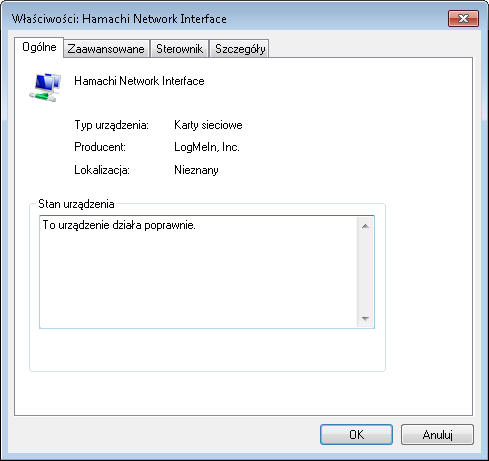
    But that's not really your WiFi card!
  • #13 9855473
    Stanley_P
    Level 28  
    Posts: 1301
    Help: 61
    Rate: 287
    1st wrote:

    But that's not really your WiFi card!


    What's the difference? ;-) After all, increasing the transmission power will not increase the signal level received .

    Greetings -

    Stanley
  • #14 9875395
    paweo12
    Level 11  
    Posts: 41
    Rate: 26
    I have a CB antenna
    can I do something with it (e.g. amplifier)?
  • ADVERTISEMENT
  • #16 9876386
    CHACA
    Level 43  
    Posts: 9660
    Help: 875
    Rate: 457
    Rather, stop worrying, just follow the previous advice (external Wi-Fi modem + antenna)
  • #17 9876464
    Stanley_P
    Level 28  
    Posts: 1301
    Help: 61
    Rate: 287
    CHACA wrote:
    Rather, stop worrying, just follow the previous advice (external Wi-Fi modem + antenna)


    Exactly. Without investment in specific WiFi equipment, there will be no more. I have the impression that the creator is looking for a philosopher's stone. Although the transformation of lead into gold is possible, indeed, it was even done in the times of the USSR. Sample link:
    http://zlotykapital.pl/2010/09/nieznane-fakty-o-zlocie/
    It's just that it's unprofitable ;-)

    Greetings -

    Stanley
  • #18 9877281
    paweo12
    Level 11  
    Posts: 41
    Rate: 26
    paweo12 wrote:
    without buying any goodies

    NO BUYING !!!
  • #19 9877448
    Szymon Tarnowski
    Level 27  
    Posts: 1286
    Help: 61
    Rate: 173
    paweo12 wrote:
    paweo12 wrote:
    without buying any goodies?

    NO BUYING !!!
    In that case, I suggest you tear down the walls or take a chair and stand closer to the transmitter with the laptop.
  • #20 9878441
    paweo12
    Level 11  
    Posts: 41
    Rate: 26
    Or maybe I will just demolish the entire estate?

    Added after 20 [minutes]:

    here you go:
    Improving WiFi Signal Strength on Windows 7 Laptop Without Purchasing Equipment
  • #21 10269663
    NIXS
    Level 12  
    Posts: 34
    without hardware interference, the soldering iron on the card will be hard, so I have not heard that someone would do it on a laptop
  • #22 10270644
    Mleczyk89
    Level 34  
    Posts: 2087
    Help: 291
    Rate: 263
    Alternatively, an option that rather few people will do, Adding an RP-SMa socket in the laptop instead of one of the built-in antennas and an external antenna, which is still associated with the investment.
  • #23 10270905
    piterus99
    Level 43  
    Posts: 8915
    Help: 1084
    Rate: 327
    Archeology?

Topic summary

✨ The discussion revolves around improving WiFi signal strength on a Windows 7 laptop without purchasing new equipment. Users suggest checking the device manager to manage power settings of the WiFi card, although some express skepticism about significant improvements without hardware changes. The conversation highlights that increasing transmission power may not enhance signal reception and that external solutions like USB WiFi cards with antennas or WiFi amplifiers could be more effective, albeit requiring investment. The author insists on avoiding purchases, leading to humorous suggestions like moving closer to the WiFi source or even demolishing walls. Overall, the consensus is that substantial improvements are unlikely without some form of investment in better equipment.
Generated by the language model.

FAQ

TL;DR: Up to 15 dB signal loss per brick wall [Cisco, 2020]. “Without investment…there will be no more” [Elektroda, Stanley_P, post #9876464] Check Windows 7 Device Manager first; if still weak, an external USB adapter with antenna raises RSSI by ~10 dB [SmallNetBuilder, 2021].

Why it matters: A few minutes of tweaking can turn an unusable hotspot into a stable 10 Mbps link.

Quick Facts

• Typical laptop Wi-Fi power: 15–20 dBm at 2.4 GHz [IEEE 802.11-2022]. • Each brick wall attenuates signal 8–15 dB [Cisco, 2020]. • USB Wi-Fi sticks with 5 dBi antenna cost €15-€25 [Amazon EU, 2023]. • Windows 7 ‘Minimum Power Consumption’ setting can cut TX power by 30 % [Microsoft, 2012]. • RSSI ≥ -67 dBm needed for smooth video calls [VoWiFi Design Guide, 2021].

Where in Windows 7 can I raise Wi-Fi transmit power?

Open Device Manager ➜ Network Adapters ➜ your Wi-Fi card ➜ Properties ➜ Advanced tab ➜ look for “Transmit Power” or “Power Output” and set to Highest [Elektroda, kazik70, post #9851437]

Why did I only see Bluetooth in the screenshot?

The displayed adapter was not your Wi-Fi card; some laptops list Bluetooth separately. Scroll for entries named Intel, Atheros or Broadcom 802.11n [Elektroda, 1st, post #9855258]

Will boosting transmit power improve received signal?

No. Higher TX helps the hotspot hear you but does not raise what your laptop hears. "Increasing the transmission power will not increase the signal level received" [Elektroda, Stanley_P, post #9855473]

What if the access point is behind a thick wall?

Expect up to 15 dB loss per brick wall; two walls can drop RSSI below ‑80 dBm, stopping video calls [Cisco, 2020]. In such cases, only repositioning or an external antenna restores margin.

Can I reuse a CB-radio antenna for Wi-Fi?

No. A CB antenna is tuned for 27 MHz; Wi-Fi uses 2.4 GHz or 5 GHz, a 90× higher frequency, so impedance and length are incompatible [Elektroda, erian, post #9875740]

Any zero-cost tricks besides power settings?

  1. Place the laptop directly at the window facing the hotspot.
  2. Lift it 1–2 m above floor; height can add 3 dB [Ofcom, 2022].
  3. Reduce USB-3.0 cable clutter; it emits 2.4 GHz noise [Intel, 2013].

When is an external USB adapter worth it?

If RSSI stays below -75 dBm after placement tweaks, a USB adapter with 5 dBi antenna can raise level by ~10 dB, often doubling throughput [SmallNetBuilder, 2021].

Edge case: What if Advanced tab lacks power options?

Some OEM-locked drivers hide those fields. Update the driver from the chipset vendor site; if still missing, the hardware does not support software power control [Intel, 2020].

Could I solder an RP-SMA jack onto the laptop card?

Technically yes, by replacing one internal U.FL lead with an RP-SMA pigtail [Elektroda, Mleczyk89, post #10270644] However, it voids warranty and risks RF mismatch that can damage the radio.

How to quickly survey Wi-Fi signals around me?

Install the free Inssider tool, walk to several spots, and log RSSI and channel use [Elektroda, Stanley_P, post #9853974] A ≥ 10 dB rise between spots pinpoints best placement.

What throughput should I expect after fixes?

With RSSI between ‑60 dBm and ‑67 dBm, 802.11n 150 Mbps cards typically sustain 40–60 Mbps TCP [Netgear Labs, 2021]. Below ‑70 dBm, speed falls exponentially.
Generated by the language model.
ADVERTISEMENT