logo elektroda
logo elektroda
X
logo elektroda

MS 7728 Motherboard: 4 Short Beeps Startup Issue, BIOS Version Unknown, ATX12V & Troubleshooting

GrYVix 7107 14
ADVERTISEMENT
Treść została przetłumaczona polish » english Zobacz oryginalną wersję tematu
  • #1 16683052
    GrYVix
    Level 6  
    Posts: 19
    Hello, I bought a new motherboard MS 7728 for an old computer, I wanted to give it to someone, at the start of the system you can hear four short sounds, I do not know the bios version, I searched for a long time on the net, but I did not find an equivalent to this motherboard, I pulled out individual frame bones, unplugged everything (drive, disks, graphics card) and then the same, I finally disconnected the ATX12V connector to support the processor and, surprisingly, the problem stopped, the computer turns on but there is nothing on the screen, I tried to reset the bios by pulling the battery, I also tried another power supply, no processor opportunity to check. I need a good and 100% diagnosis whether it's the processor or the motherboard fault because something like this is no new board but I folded the computer without the band theoretically it could somehow get damaged. I will add that it is also strange that from an efficient housing the power led pins, etc., if they do not stick at all, fall off completely and cannot be connected in a normal way.


    System: windows 7 64 bit
    CPU: i3 3240
    motherboard: MS 7728 ver 2.0
    RAM: 6 GB of RAM in two dice (4 and 2) 1600 mHz
    PSU: Corsair vs 450


    Please help, best regards.

  • ADVERTISEMENT
  • #2 16683081
    RADU23
    VIP Meritorious for electroda.pl
    Posts: 20712
    Help: 2425
    Rate: 1726
    Looked colleague in the manual what memory chips does the board support?
    MS 7728 Motherboard: 4 Short Beeps Startup Issue, BIOS Version Unknown, ATX12V & Troubleshooting

    4 BIOS signals =>
    4 short - error related to the system clock
  • ADVERTISEMENT
  • #3 16683185
    310artur
    Level 43  
    Posts: 9002
    Help: 980
    Rate: 670
    How you can give this CD away, regardless of what happens to it. Rather, avoid MS discs are CDs made of ready-made PCs, MSI but medion. In general, it is better to avoid boards from finished PCs.
    Nobody will tell you 100% if it's a CPU or a disc. Check the processor somewhere else to find out.
  • #4 16683318
    GrYVix
    Level 6  
    Posts: 19
    I bought a motherboard knowing that the ram is clocked higher, but in newer versions of motherboards from what I know buying a ram clocked higher than the motherboard lowers you to its value, besides removing both bones there are still 4 bios signals.
  • #5 16683325
    RADU23
    VIP Meritorious for electroda.pl
    Posts: 20712
    Help: 2425
    Rate: 1726
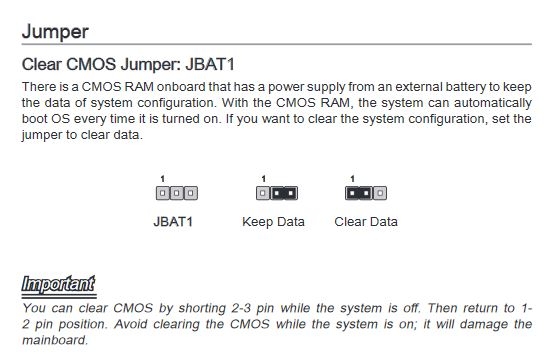
    Perform the CMOS reset with the jumper
    MS 7728 Motherboard: 4 Short Beeps Startup Issue, BIOS Version Unknown, ATX12V & Troubleshooting
  • #6 16683373
    310artur
    Level 43  
    Posts: 9002
    Help: 980
    Rate: 670
    Does this board support CPU Ivy Bridge at all? According to the manual it is not:
    Processor Support
    Intel(R) Sandy Bridge processor in the LGA1155 package

    An unsupported CPU could give such symptoms unless.
  • #7 16684485
    GrYVix
    Level 6  
    Posts: 19
    I honestly do not know, I looked at the connector i.e. what lga and I took with the thought that there will be no problem.
  • ADVERTISEMENT
  • #8 16684766
    310artur
    Level 43  
    Posts: 9002
    Help: 980
    Rate: 670
    I think the problem is and will be. On some English-language forum I found that someone started with Ivy there but one in 3 copies (it depends on the search) and this after updating the BIOS which you will not do without a CPU. Manual clearly says about the sandy bridge.
  • #9 16685905
    lisek
    Service technician RTV
    Posts: 39712
    Help: 6307
    Rate: 6802
    This plate (MS 7728 ver 2.0) was used in models from Medion Akoya
    e.g. P5364E (Model No. MD8319) / Medion 742G

    There is a socket: LGA1155 under e.g. cpu: i7-3660 / i7-2600
    Intel H61 chipset
    This was used by Medion / Advent
  • #10 16686474
    GrYVix
    Level 6  
    Posts: 19
    so the solution to the problem would be either buying a different motherboard or another processor anyway
  • ADVERTISEMENT
  • #11 16687008
    310artur
    Level 43  
    Posts: 9002
    Help: 980
    Rate: 670
    lisek wrote:
    : LGA1155 for e.g. cpu: i7-3660 / i7-2600

    So under e.g. ivy bridge or sandy bridge. @lisek, as you write wisely, give further explanations because I didn't even understand this statement.
  • #13 16687783
    Piotr160292
    Level 38  
    Posts: 5137
    Help: 374
    Rate: 282
    You will never hear an unambiguous diagnosis from a specialist if he cannot see and check the patient himself ... A fault is influenced by many factors, e.g. if the disk is pucked on RAM, it does not have to be RAM and e.g. a memory controller ... Such expectations are the highest to the fairies can be directed - such attention for the future ... As for the question is Nb yes - replacing the processor will solve the problem, but I would exchange the motherboard for Asus e.g., because Medion does not fall through production recoil, so it's better to avoid it like fire, because gifted may not enjoy the equipment for a long time and still have regrets that he got. scrap ...
  • #14 16688622
    310artur
    Level 43  
    Posts: 9002
    Help: 980
    Rate: 670
    Piotr160292 wrote:
    Clear diagnosis

    I am not asking for diagnosis but for CPU compatibility. As you can see the conflicting information continues. Because already at unserbenchmark.com the same sandy bridge and probably someone would put ivy there as if it worked. Although one thing to put together others boast ...

    Piotr160292 wrote:
    better to avoid like fire

    Here we agree and the devotion of this hack from where the author bought I suggested at the very beginning.
  • #15 16773911
    WANLAN
    Level 12  
    Posts: 8
    Rate: 2
    This board does not support 3rd generation, even after a bios upgrade.

Topic summary

✨ The discussion revolves around troubleshooting a MS 7728 motherboard that emits four short beeps during startup, indicating a system clock error. The user is uncertain about the BIOS version and has attempted various troubleshooting steps, including disconnecting components and resetting the BIOS. Responses suggest that the motherboard may not support the Ivy Bridge CPU, as it is designed for Sandy Bridge processors (LGA1155). Users recommend checking CPU compatibility and suggest that the issue may stem from using an unsupported processor. The consensus is that either a different motherboard or processor may be necessary for resolution.
Generated by the language model.

FAQ

TL;DR: MS‑7728 boot issue with “4 short beeps” points to a system clock error. As one expert put it, “4 short - error related to the system clock.” [Elektroda, RADU23, post #16683081]

Why it matters: This FAQ helps MS‑7728 owners fix no‑POST beeps, CPU support doubts, and CMOS/ATX12V pitfalls.

Quick Facts

What do 4 short beeps on an MS‑7728 mean?

They map to a BIOS system clock error on this OEM MSI/Medion board. One helper summarized: “4 short - error related to the system clock.” Check CMOS and power integrity before suspecting CPU or RAM. [Elektroda, RADU23, post #16683081]

Does the MS‑7728 support Ivy Bridge CPUs like Core i3‑3240?

Community experience says no. Owners report the MS‑7728 does not support 3rd‑gen Ivy Bridge, even after a BIOS update attempt. Use a Sandy Bridge CPU for reliable POST. [Elektroda, WANLAN, post #16773911]

Which CPUs are officially intended for the MS‑7728?

Guidance in the thread points to Sandy Bridge LGA1155 processors only. Using an unsupported CPU can mimic board failure symptoms at power‑on. [Elektroda, 310artur, post #16683373]

Why does it power on without ATX12V but show no video?

The OP found that removing the 4‑pin ATX12V stopped beeps but produced no display. That behavior indicates the CPU lacks proper power, so the platform cannot initialize graphics. Reconnect ATX12V for valid POST. [Elektroda, GrYVix, post #16683052]

How do I clear CMOS on the MS‑7728?

Use the dedicated jumper. 1) Power off and unplug. 2) Move the jumper to the reset position for a few seconds. 3) Return it, reconnect power, and test. [Elektroda, RADU23, post #16683325]

Is the MS‑7728 an MSI retail board or OEM?

It’s an OEM design used by Medion/Advent (Akoya P5364E/742G), with H61 chipset and LGA1155 socket. Expect some non‑standard headers. [Elektroda, lisek, post #16685905]

My front‑panel LED/power pins don’t match the case. Normal?

Yes, the OP reported the header didn’t accept standard case leads and “fall off completely.” OEM boards sometimes use atypical pinouts or fragile headers. [Elektroda, GrYVix, post #16683052]

I pulled all RAM and still get 4 beeps. What does that suggest?

On this board, 4 short beeps persisted even with RAM removed, supporting a system timer/clock fault rather than a memory module issue. [Elektroda, GrYVix, post #16683318]

Can I get a 100% remote diagnosis of CPU vs. motherboard?

No. As one responder noted, you must test the CPU in another system to isolate faults. Remote guesses are unreliable. [Elektroda, 310artur, post #16683185]

Should I replace the CPU or the motherboard to fix this gift PC?

Swap the board for a standard retail model (e.g., Asus) for longevity and easier support. One expert warns to avoid Medion OEM boards “like fire.” [Elektroda, Piotr160292, post #16687783]

Did anyone report partial Ivy Bridge success on MS‑7728?

One comment mentions rare success after a BIOS update, but you cannot flash without a working CPU. Treat Ivy Bridge on MS‑7728 as unreliable. [Elektroda, 310artur, post #16684766]

What real systems used MS‑7728 that I can reference?

See community‑reported builds cataloged under Medion MS‑7728. These show typical Sandy Bridge pairings and configurations. [Elektroda, Kasek21, post #16687745]

What quick minimal‑boot checklist should I try first?

Clear CMOS via jumper, install a known‑good Sandy Bridge CPU, and retest. Quote: “Perform the CMOS reset with the jumper.” This often restores sane defaults. [Elektroda, RADU23, post #16683325]

Any edge‑case to watch for with power delivery?

If unplugging ATX12V suppresses beeps, the board still won’t POST. That indicates missing CPU power, not a fixed fault. Expect no video output. [Elektroda, GrYVix, post #16683052]

What RAM detail from the case study is noteworthy?

The failing setup used 6 GB DDR3 (4 GB + 2 GB) at 1600 MHz with an i3‑3240. This statistic helps replicate and compare symptoms. [Elektroda, GrYVix, post #16683052]
Generated by the language model.
ADVERTISEMENT