How should I treat the yellowish factory thermal paste on a Ryzen 5 1600 cooler, and is it worth replacing it with Arctic MX-2 before overclocking?
The yellowish material is the factory-applied thermal interface on the stock Ryzen cooler, so it is not a defect and you can leave it there unless temperatures become a problem [#16741913][#16741422] The stock cooler can handle a moderate overclock: one user reported 3.7 GHz at about 1.27 V with 63°C after 20 minutes of Prime95, so the setup is usable, though the fan gets louder under load [#16743188][#16741839] If you want to tune it properly, use HWiNFO or the motherboard vendor’s monitoring tools instead of HWMonitor, and do not trust AUTO voltage too much because boards may overvolt [#16743932] If you later decide to upgrade, Fortis 3 or Grandis 2 were recommended as good quiet coolers, and on those mounts you only need to remove the fan to access the paste; the actual paste replacement is then straightforward [#16744109][#16782020] Another opinion in the thread was simply to keep stock clocks unless you really need the extra performance, since the gain may not be worth the extra heat and noise [#17152106]
AI summary based on the discussion. May contain errors.
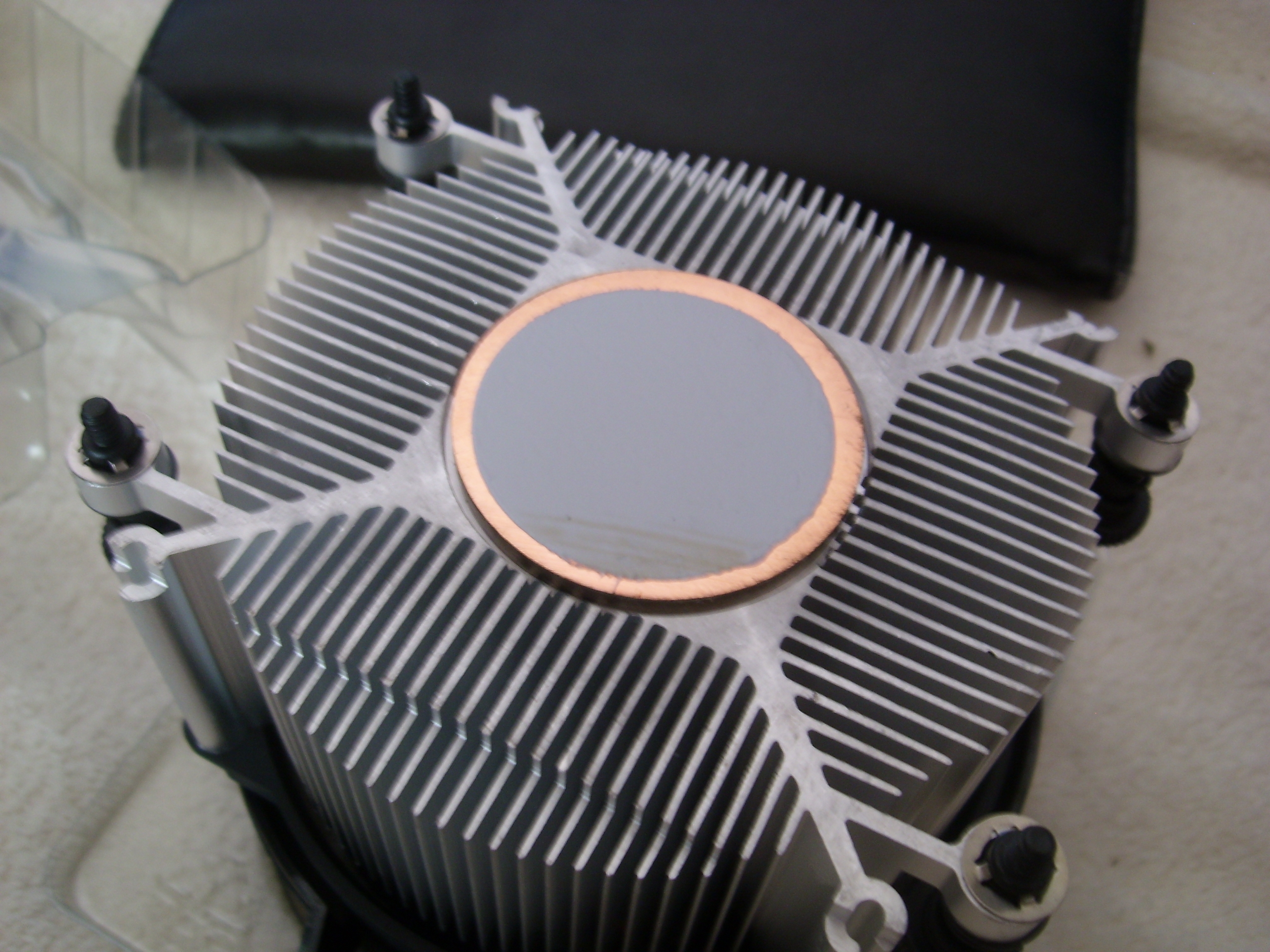
I'm wondering about this yellowish color, isn't that a problem?
If I have this Arctic MX-2, I do not know if it makes sense to replace it, the processor will be overclocked. I just don't know how to remove this paste and how to evenly apply a new one, any advice?
And what is this paste, how did it get there and why do you want to overclock on such poor cooling? It seems that this CPU is not power-hungry, but this stock cooling usually only works with the factory settings. After the OC, it will be noisy, to say the least.
@ 310artur series of questions, no one knows why ... how much on stock cooling 1600 can be turned up, it is enough to see in the reviews, the cooling is very good, but not necessarily super quiet. And the paste is pre-applied, which should be known to a friend. Anyway, the rhythms can only be turned to ~ 4GHz and it does not make a diametrical difference in temperatures.
If it is factory-made, it's nice and it can only be if the author is aware that there is (should) a foil stuck on? Because the question was a bit strange as if the author did not really know what he had in his hand. Well, since you write that it's good only loud, that's great - it's a matter of taste, but for me good can't be loud ... At most, it can be efficient, but not good. And the stupid question of replacing the toothpaste every 3-6 months? I think you run the website to recommend it so often. If I do not move the cooling, I do not change the paste as long as the temperatures are good. 2 years are good for pastes like AAB TG2 and the one on the heat sink looks similar.
Buddy, let's start with the basic information. There is no foil because it was not there. The heat sink is covered with a contoured material and the paste is not covered with anything. To make it funnier, it was exactly the same in the FX series (only there the profiled "plug" fitted better and prevented oxidation / drying out. That's one. Two - if for a friend "not necessarily super quiet" means loud, I really advise you to read the text again, this time Of course, that cooling will be less efficient than such spartan 1024, so to have a similar temperature the fan will have to spin more. And now the information from one hand - the spartan HE1024 on all loaded cores keeps the temperature ... 45 ° C. What cooling capacity do you need to have
As for the 3rd, my mistake. As for 1 and 2 - good to know. I do not work on the site, and somehow I have never convinced myself to AMD. Anyway, the foil or cap must be removed before mounting on the CPU. And the question "what to remove it" still bothers me - after all, "it" can be removed with anything, as long as the cap is removed.
I turned up the processor to 3.7GHz, auto voltage (according to HWmonitor 1.27v), after 20 minutes of prime95 the temperature is 63 * C. In idle (0-10% consumption) the temperature dropped to 38 ° C, and after another 15 minutes it stabilized at 34 ° C. After increasing the speed of the two fans in the housing from low (inaudible) to high (clearly audible), the temperature drops to 31 * C
The fan revolutions on the heat sink are max 2777 under stress and 2020 at rest, and their volume level is adequately audible but not at all disturbing and barely audible.
So, rather, no foil got tangled there.
Interestingly, the temperature of the motherboard given by HWmonitor is higher than that of the processor, the maximum was 66 * C.
I think these are good results, I haven't tweaked it higher yet.
In the future, maybe I will buy better cooling and use Arctic MX-2 paste, but for now it seems that there is no such need.
Try programs from the manufacturer of the board for monitoring temperatures and voltages. Other programs, especially HWmonitor, can distort readings. If it is an independent program, HWiNFO will be a better choice for the bank. Maybe someone else will tell you because I do not know how it is in AMD, especially new ones, but generally it's better not to rely on the AUTO voltage. The records like to give more than is needed there, especially with higher OC.
ADVERTISEMENT
Case airflow and CPU cooler recommendations for Ryzen 5 1600
According to HWinfo, it is not so colorful anymore, 78 * C with a simultaneous load on the graphics card and 72 * C when only the processor is under stress. And all this with two fans in the housing working at increased speed, when I set the speed to low and charged both the card and the temperature, it increased to 84 * C, at this point I increased the speed.
An interesting thing, however, is that after turning off the prime 95, the temperature dropped from 72 * C to 40 * C in just a few seconds, I suppose it's due to the fans in the housing. But overall these temperatures are so average to me.
Ryzenes (especially early series) did not give the temperatures correctly anyway, so I would not be so worried about Piterixos, open the side wall and measure the bottom of the heat sink with a digital window thermometer (the one with a probe) and you will know more or less what it looks like. > 80 ° C is quite a lot, as I wrote on HE1024 and with full load, not a moment where I could not touch the heat sink and hold my hand, so the temperatures do not exceed 60 ° C. You have to be careful with larger coolants on unadapted boards, they are heavy and can bend the PCB. I have not seen brackets on cheaper models, so if your friend has one, please do not overdo it with the weight.
I have a total of 6 cooling slots on the disc. The housing already has these two SilentiumPC Sigma Pro 120 fans built in, you can add 3 more. It says that the album is Military Class 4, but opinions about whether this standard means anything are divided.
But I do not know yet whether to take PWM or DC these fans, PWM will not be able to be connected to the controller in the housing, on the other hand, I do not know if it is better for me to use the controller on the board, the one in the housing allows only two speeds of rotation, one of which is not it provides too spectacular effects (although with 5 fans it could change), while at higher revs it is already a bit loud, 5 would be too much.
But DC also allows RPM control, so I think I'll take it. The question here is - what are the practical differences between the two solutions. All I found is that the DC fans may be less finely regulated at low speed. Anything else worth knowing?
Supposedly DC takes more current at low speed but this can be ignored. But they are cheaper. As for cooling, you can always hunt for something second-hand. For 140PLN you will get the termalright 120 somewhere, you will put it on a slow-running fan (800RPM is enough) and you don't even need anything else for the housing. At most one additional upstairs for exhaust. You just have to check it out with the mounting of this block because it already weighs a lot. I have a thermalrigta u90i such a smaller brother with enemax magma set at 800RPM and it effectively cools the Xeon X5470 (about 130W), so it should work almost passively for you.
For PLN 200, you can also buy [Thermal Grizzly Kryonaut] or [Gelid GC-Extreme] paste, which should additionally improve cooling.
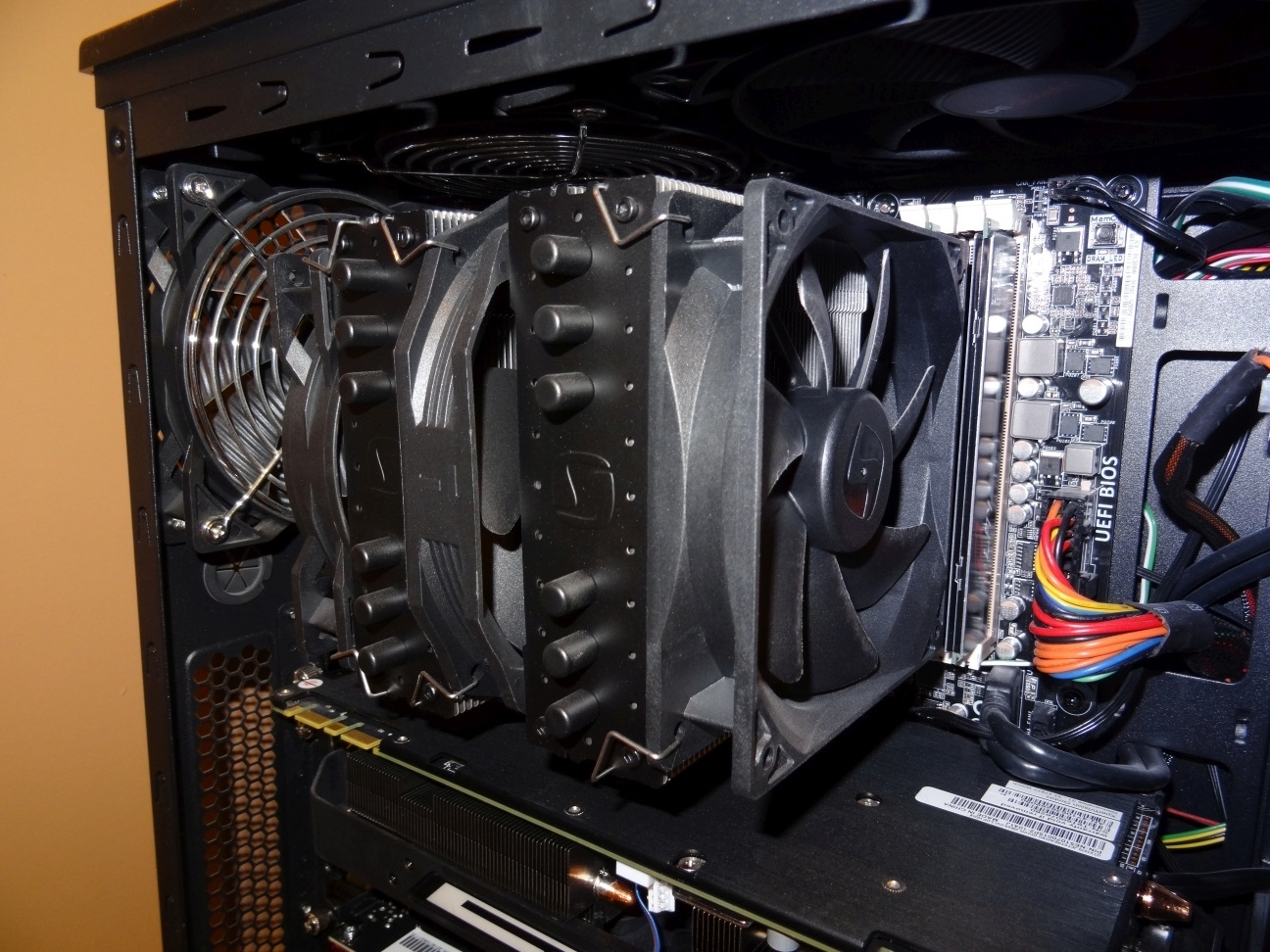
And these RAM memories can you normally insert and remove without disassembling the cooling? And doesn't the whole thing bend the motherboard too much?
I do not have to disassemble all the cooling, only the fan is enough. Although I installed the memory when folding the computer, I did not move them. :)
Nothing bends, Fera, Fortis and Grandis cooling systems have the same mounting system, which for me is a revelation, all you need is a flat screwdriver, photo, 2 fans, unscrewing 2 screws and the paste can be replaced.
Earlier, I had a cooling system [Zalman CNPS14X] in which the assembly was massacre, and without removing the CD it was a reeling for half an hour some strange 4 screws screwed on with a strangely bent key - a massacre.
Browse YouTube videos with 1600 underlined and not underlined. For me, these few fps in games at the expense of a warmer professor and a generally worse work culture does not make sense. Stock clocks are good for current games, compilations of programs, etc. I would take care of tweaking Ryzenach when it starts to run out of power and playing or whatever you do will cease to be comfortable. That's my opinion
The discussion revolves around concerns regarding the yellowish color of the stock thermal paste on the AMD Ryzen 5 1600 CPU, with users clarifying that this is due to copper and not a problem. Recommendations suggest that the stock paste can be left for 3-6 months before replacement with Arctic MX-2, although some argue that if temperatures remain stable, there may be no need for replacement. Overclocking tips are shared, noting that the stock cooling may not be sufficient for high overclocks, leading to increased noise levels. Users discuss various cooling solutions, including the SilentiumPC Fortis and Grandis models, and the importance of proper fan configuration for optimal cooling performance. The conversation also touches on the effectiveness of different thermal pastes and the necessity of monitoring temperatures accurately. AI summary based on the discussion. May contain errors.
How often should I replace the stock thermal paste?
Don’t change paste on a schedule. If you haven’t disturbed the cooler and temperatures remain good, you can leave it for years. “If I do not move the cooling, I do not change the paste.” [Elektroda, 310artur, post #16741846]
Can I overclock a Ryzen 5 1600 on the stock cooler?
Yes. Reviews and user reports show the stock unit is capable, though not super quiet under load. Expect limited thermal change up to roughly 4 GHz and more fan noise. [Elektroda, tronics, post #16741839]
What temps are typical at 3.7 GHz on stock cooling?
A real‑world example: 3.7 GHz at auto ~1.27 V reached 63 °C after 20 minutes of Prime95. Idle stabilized near 34 °C with decent case airflow. [Elektroda, Piterixos, post #16743188]
HWMonitor vs HWiNFO—why do readings differ on Ryzen?
Some tools misreport sensors on Ryzen. Use your motherboard’s utility or HWiNFO for more reliable values. “HWiNFO will be a better choice.” [Elektroda, 310artur, post #16743932]
Do early Ryzen sensors read hot?
Yes. Early Ryzen series often showed inaccurate temperatures. Cross‑check by probing the heatsink base with a small external thermometer if unsure. [Elektroda, tronics, post #16744111]
Which affordable tower cooler works well—Fortis 3 enough?
Is SilentiumPC Grandis 2 a good upgrade, and will it block RAM?
Grandis 2 is quiet and recommended. For RAM access, you can remove only the fan without dismantling the whole cooler; the mounting is straightforward. [Elektroda, atomic99, post #16782020]
Could a heavy cooler bend my motherboard?
It can. Large dual‑tower units may stress unsupported boards. Ensure proper backplate support and avoid excessive weight on budget PCBs. [Elektroda, tronics, post #16744111]
PWM vs DC case fans—what should I pick?
DC fans can draw more current at low speed but cost less. PWM offers finer control if your headers and controller support it. [Elektroda, 310artur, post #16746121]
Avoid it. AUTO often applies more voltage than needed as OC rises. Manually tune voltage after stability testing to reduce heat. [Elektroda, 310artur, post #16743932]
Is chasing a small FPS gain from overclocking worth it?
Often no. Expect only a few FPS while increasing heat and noise. Keep stock clocks until performance actually limits your tasks. [Elektroda, Mc Confusing, post #17152106]
How can I double‑check CPU temps without trusting software?
Open the side panel and tape a small probe thermometer to the heatsink base. Compare readings to your monitoring software. [Elektroda, tronics, post #16744111]
How do I replace the paste on Fortis/Grandis mounts?
Unclip and remove the fan.
Unscrew the two mounting screws, lift the cooler, clean CPU and base.
Any paste upgrades worth considering for lower temps?
Yes. Thermal Grizzly Kryonaut or Gelid GC‑Extreme are proven performers if you want a modest cooling improvement with premium pastes. [Elektroda, atomic99, post #16781777]
AI summary based on the discussion. May contain errors.