logo elektroda
logo elektroda
X
logo elektroda

Navman 5000 LM GPS: Software Installation Issue on Windows 7 - Compatibility and Solutions

polaris32 5034 7
ADVERTISEMENT
Treść została przetłumaczona polish » english Zobacz oryginalną wersję tematu
  • #1 16916673
    polaris32
    Level 9  
    Posts: 118
    Rate: 14
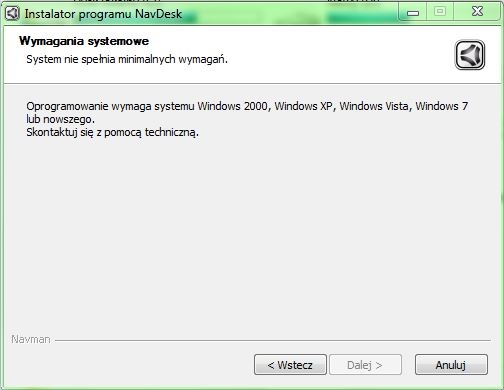
    I bought a Navman 5000 LM gps and received a program CD with it but for some reason I can't install it. Shouts that I have too old software and I have Windows 7
    Navman 5000 LM GPS: Software Installation Issue on Windows 7 - Compatibility and Solutions
  • ADVERTISEMENT
  • #2 16916684
    Freddy
    Level 43  
    Posts: 19997
    Help: 1394
    Rate: 2806
    Contact the bottom bracket, they will give you a working version. I went on about half a year ago, but unfortunately I didn't keep it because I did it to someone :(
  • ADVERTISEMENT
  • #3 16916828
    koala106
    Level 39  
    Posts: 4426
    Help: 471
    Rate: 1238
    Run the installer in Windows XP compatibility mode. Alternatively contact with support.
  • ADVERTISEMENT
  • #4 16917140
    polaris32
    Level 9  
    Posts: 118
    Rate: 14
    koala106 wrote:
    Run the installer in Windows XP compatibility mode. Alternatively contact with support.

    I've tried different configurations and nothing.
  • ADVERTISEMENT
  • #7 16918371
    Freddy
    Level 43  
    Posts: 19997
    Help: 1394
    Rate: 2806
    Try running on another computer.
    I was struggling the same with Mio480 and it was only on other equipment.
    Must have something to bite in the system.
  • #8 16919113
    koala106
    Level 39  
    Posts: 4426
    Help: 471
    Rate: 1238
    Install the virtual machine - put XP on it and it will walk. On the other hand, something is missing in the system - this version from navman is designed for all systems - including 8.1 and 10.

Topic summary

✨ The discussion revolves around installation issues with the Navman 5000 LM GPS software on Windows 7, where users encounter compatibility problems. Suggestions include contacting support for a working version, running the installer in Windows XP compatibility mode, and trying the installation on a different computer. One user recommended using a virtual machine with Windows XP to bypass the installation issues, noting that the Navman software is compatible with newer systems like Windows 8.1 and 10.
Generated by the language model.
ADVERTISEMENT