logo elektroda
logo elektroda
X
logo elektroda

Samsung Galaxy S6 Long Charging Time Issue: 9 Hours, Fast Charging Not Working, Torn Cable

Mikser254 4113 10
Best answers LABEL_AI_GENERATED

Why does my Samsung Galaxy S6 show about 9 hours to charge and not fast charge, and could a torn cable be the reason?

The most likely cause is a damaged cable or a dirty USB connector, not necessarily the charger brick [#16936377][#16936460][#16937169] Try a known-good original cable/charger and clean the phone’s USB port and cable contacts gently, because a poor or damaged cable can stop Quick Charge from appearing [#16939048][#16937169] Since another charger showed the same charging time, the fault is probably in the cable/phone connection path rather than the charger itself [#16936377][#16936460] If cleaning and cable replacement do not restore fast charging, one reply suggests checking the charging circuit/diode as a possible hardware fault [#16967460]
AI summary based on the discussion. May contain errors.
ADVERTISEMENT
Treść została przetłumaczona polish » english Zobacz oryginalną wersję tematu
  • #1 16936308
    Mikser254
    Level 8  
    Posts: 25
    Rate: 1
    Hello, I have a problem with the samsung galaxy s6. After returning from school, I wanted to charge it as usual, but when I connected the cable to it, I saw that the charging time is about 9 hours. Fast charging is not working for me. I did a hard reset and still the same. It is very possible that it is because of the torn cable I have in the original charger, but I'm not sure that's why I am writing here. I hope for an answer.
    Thanks in advance :D
  • ADVERTISEMENT
  • #2 16936377
    dzg4
    Level 31  
    Posts: 1713
    Help: 132
    Rate: 364
    Connect to another charger or computer and see the declared charging time of the phone.
  • #3 16936460
    Mikser254
    Level 8  
    Posts: 25
    Rate: 1
    I connected it to another charger and the charging time is the same.
  • ADVERTISEMENT
  • #4 16936494
    KRY5PIN
    Level 37  
    Posts: 3010
    Help: 312
    Rate: 467
    Maybe the battery was to blame.
  • #5 16937062
    dzg4
    Level 31  
    Posts: 1713
    Help: 132
    Rate: 364
    Turn off the phone, remove the battery, clean the contacts in the battery and in the phone, just do it gently dry but thoroughly, reinstall the battery, restart the phone and connect the charger, let the phone know what charging time is being declared by the phone.
  • ADVERTISEMENT
  • #6 16937137
    domasia
    Level 15  
    Posts: 168
    Help: 12
    Rate: 43
    In the S6 just remove the battery ???
  • #7 16937169
    kendzierz1
    Level 20  
    Posts: 284
    Help: 22
    Rate: 46
    Check the cable because you wrote that you only changed the charger, clean the USB connector on the phone
  • #8 16938062
    Mikser254
    Level 8  
    Posts: 25
    Rate: 1
    I will add that the charging via cable message is displayed when charging, from what I remember earlier, it probably was different
  • ADVERTISEMENT
  • #9 16939048
    gracjan55
    Level 36  
    Posts: 2986
    Help: 315
    Rate: 244
    Poor or damaged cable. Buy the original on a well-known auction site for PLN 15-20 and the problem will disappear. There should be a Quick Loading message.
  • #10 16967460
    lider-gsm
    Level 2  
    Posts: 2
    Rate: 2
    Cleaning the connector and cable. The phone does not go into quick charging - most often through a dirty connector if the cable is good. But if that doesn't help, replace the diode :)
  • #11 16971564
    el_danone
    Level 15  
    Posts: 115
    Help: 21
    Rate: 25
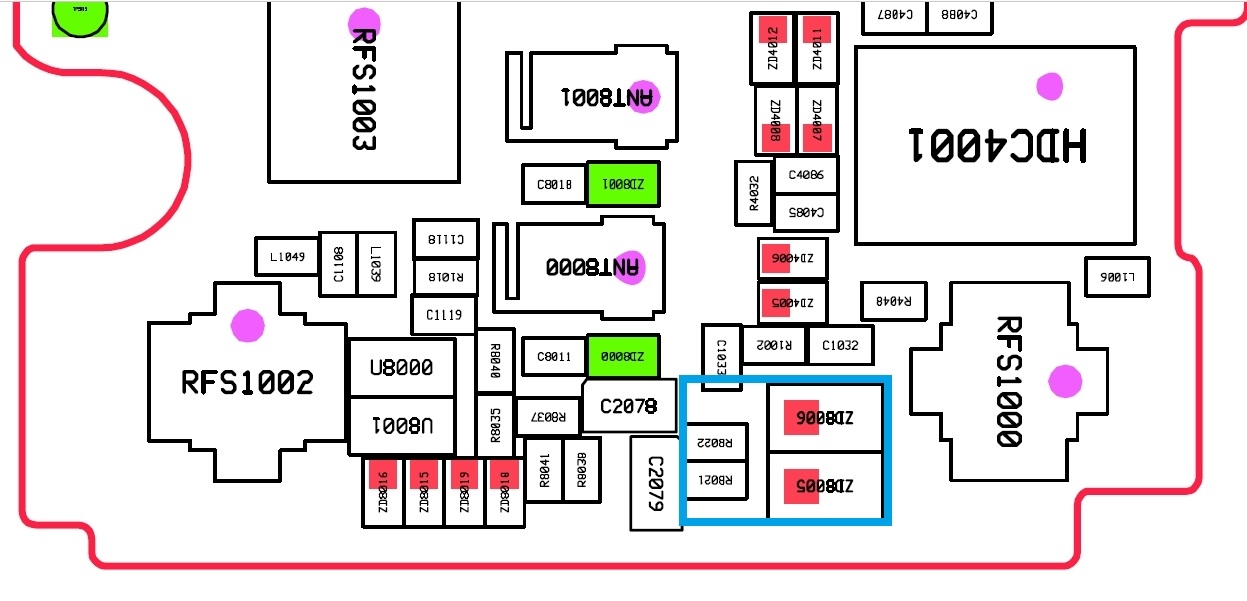
    It would be appropriate to check the power consumption of the charger. If it does not exceed 500mA, the element to be checked is marked in blue. Zenerki can be removed for testing and resistors can be bridged:

    Samsung Galaxy S6 Long Charging Time Issue: 9 Hours, Fast Charging Not Working, Torn Cable

Topic summary

LABEL_AI_GENERATED
The discussion revolves around a Samsung Galaxy S6 experiencing prolonged charging times of approximately 9 hours, with fast charging functionality not operational. The user suspects a torn charging cable may be the cause. Responses suggest various troubleshooting steps, including testing with different chargers, cleaning battery and phone contacts, and checking the USB connector for dirt. Recommendations also include replacing the damaged cable with an original one and examining the charger’s power output. Some users mention that a faulty battery or internal components may also contribute to the issue.
AI summary based on the discussion. May contain errors.
ADVERTISEMENT