logo elektroda
logo elektroda
X
logo elektroda

[Solved] USB OTG Host Adapter with Smartphone/Tablet Power Supply & Charging Capability

25134 20
Best answers

How can I build an OTG adapter with an extra charging input so I can charge a phone or tablet while using USB peripherals at the same time?

You can only do this with a model-specific OTG Y-cable or powered hub that feeds the peripherals from an external 5 V supply; it is not a universal OTG adapter. The USB device goes to D+ and D-, while the external supply provides the power, and on some phones the OTG/charging mode is selected by the ID pin rather than the usual simple OTG short [#17146383] [#17147979] For Samsung/Sony-type implementations, a 100 kΩ resistor is reported to tell the phone to enter OTG mode with charging; the value must be exact, and a different phone may need a different resistor or no resistor at all [#17147979] [#17150693] Even when it works, many cables only allow about 500 mA, so the phone may show charging but still discharge under load [#17147757] [#17147979] In practice, compatibility depends on the phone or tablet model, and some devices need software support or simply will not support charging while acting as OTG host [#17147979] [#17150693]
Generated by the language model.
ADVERTISEMENT
Treść została przetłumaczona polish » english Zobacz oryginalną wersję tematu
  • #1 17146336
    Anonymous
    Level 1  
  • ADVERTISEMENT
  • Helpful post
    #2 17146383
    makosuu
    Network and Internet specialist
    Posts: 2984
    Help: 369
    Rate: 369
    You need to connect the USB device to D + and D- and the power supply is to come from an external power supply. As you know, OTG should be properly shorted the pins so that the device gives power, but you do not do it because the power is to come from the outside. I saw a description of this somewhere.
  • #3 17146392
    Sztandar18
    Level 26  
    Posts: 852
    Help: 75
    Rate: 104
    I found something like this:
    USB OTG Host Adapter with Smartphone/Tablet Power Supply & Charging Capability

    The photo shows the Charge / OTG switch, i.e. we either charge the phone or power the peripherals connected to it.

    On the well-known auction site you can find under the entry: HUB micro 3x USB OTG Splitter + charging
  • #4 17146404
    makosuu
    Network and Internet specialist
    Posts: 2984
    Help: 369
    Rate: 369
    After all, it is known that this is not the case, because the author of the topic wants to have the phone and OTG charged at the same time.
  • ADVERTISEMENT
  • #5 17146577
    Freddy
    Level 43  
    Posts: 19997
    Help: 1394
    Rate: 2806
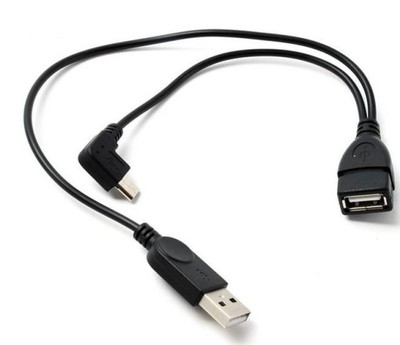
    There are special OTG Y cables.
    USB OTG Host Adapter with Smartphone/Tablet Power Supply & Charging Capability
    When ordering, ask the seller if it will work with your phone.
  • ADVERTISEMENT
  • #6 17146604
    Anonymous
    Level 1  
  • #7 17146633
    Freddy
    Level 43  
    Posts: 19997
    Help: 1394
    Rate: 2806
    What's your phone?
  • #8 17146669
    Anonymous
    Level 1  
  • #9 17146789
    Freddy
    Level 43  
    Posts: 19997
    Help: 1394
    Rate: 2806
    After all, the Galaxy S5 has a micro USB connector.
  • #10 17146793
    Anonymous
    Level 1  
  • #11 17146841
    E8600
    Level 41  
    Posts: 8868
    Help: 525
    Rate: 2475
    Chilek wrote:
    I know it is possible, because I once bought such a connector on Allegro, but it only worked in one model and when I changed the phone it became useless.

    Unfortunately, in my opinion it depends on the phone model. OTG itself also has several versions.

    USB OTG Host Adapter with Smartphone/Tablet Power Supply & Charging Capability
    Source: Link
  • ADVERTISEMENT
  • #12 17146936
    Freddy
    Level 43  
    Posts: 19997
    Help: 1394
    Rate: 2806
    Chilek wrote:
    I don't think you understand what I mean.
    Then kindly explain what you mean.
    E8600 wrote:
    OTG itself also has several versions.
    You tell a very interesting story :)
    USB OTG Host Adapter with Smartphone/Tablet Power Supply & Charging Capability
  • #13 17146957
    Anonymous
    Level 1  
  • #14 17147027
    E8600
    Level 41  
    Posts: 8868
    Help: 525
    Rate: 2475
    Freddy wrote:
    E8600 wrote:
    OTG itself also has several versions.
    You tell a very interesting story :)


    The point is that some phones with OTG also have MHL to connect to HDMI and then the equipment can support something like charging while entering OTG or MHL mode.

    There is one more issue with this connection, I do not have a quick charge, only max 500 mAh. It is the current that sustains the battery so that it does not discharge and does not charge. With intensive use, despite the charging icon, the percentage of the battery will drop down.

    One more issue of these cables is tablets on Winowsie do not have something like OTG and there it can really work on Android, it will not be so rosy.


    Below the same without any special OTG cables.


  • #15 17147757
    Freddy
    Level 43  
    Posts: 19997
    Help: 1394
    Rate: 2806
    OTG, or On The Go, is a standard that allows you to connect many different devices to smartphones and tablets.
    MHL, or Mobile High-Definition Link, is a signal transmission standard for mobile devices (max 1080p).
    Do not confuse both standards - MHL is not an OTG device!

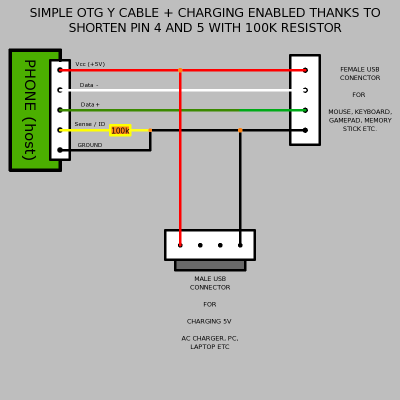
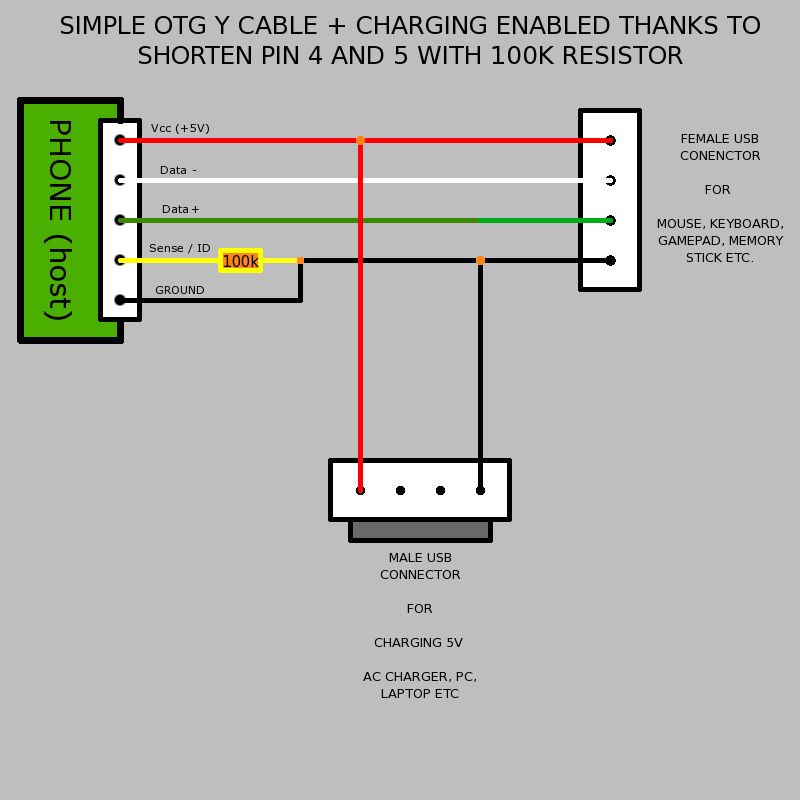
    What you showed is a USB extension with resistor and power supply that is neither OTG nor MHL connectable.
    USB OTG Host Adapter with Smartphone/Tablet Power Supply & Charging Capability
    Regarding charging, each OTG cable only allows a 500mA charging current, because it cannot be larger.
    The USB OTG Y cable will look like below.
    USB OTG Host Adapter with Smartphone/Tablet Power Supply & Charging Capability

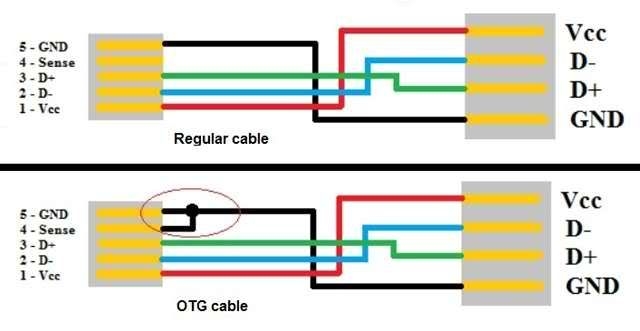
    No OTG cable allows MHL connection. The MHL cable requires all five wires to be connected.
    USB OTG Host Adapter with Smartphone/Tablet Power Supply & Charging Capability
  • #16 17147892
    E8600
    Level 41  
    Posts: 8868
    Help: 525
    Rate: 2475
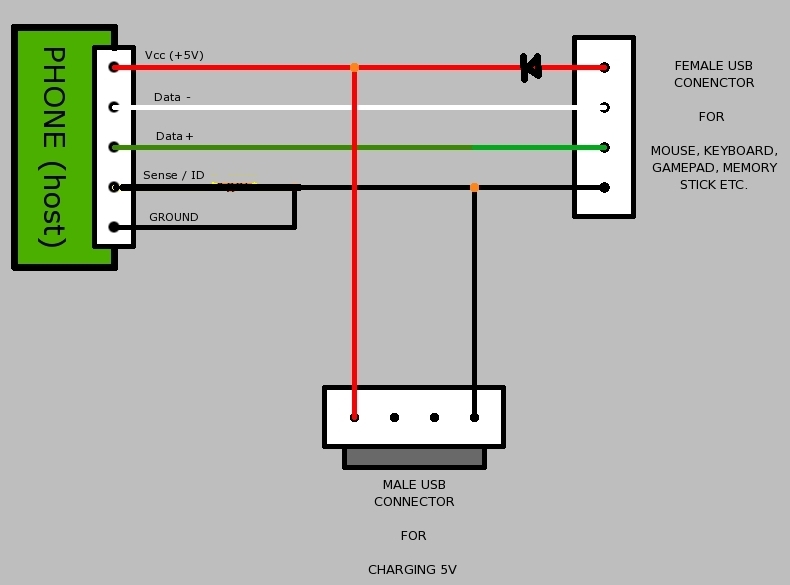
    What the colleague presented will also not work because the LED in this place is no power to USB devices.

    I did not write that OTG and MHL are the same, only that devices with MHL allow charging and such devices can also be charged with OTG in others, you will probably need to unlock something in the software.
  • #17 17147906
    Freddy
    Level 43  
    Posts: 19997
    Help: 1394
    Rate: 2806
    You can and without a diode, and it is only for devices with their own power supply.
    E8600 wrote:
    that devices with MHL allow charging and such devices can also be charged using OTG
    Like MHL, they are not OTG, there are MHL cables with additional power supply and you do not need to combine anything in the software.
  • #18 17147979
    E8600
    Level 41  
    Posts: 8868
    Help: 525
    Rate: 2475
    Either I wrote it wrong or my friend did not understand.
    Devices having MHL are more likely to support charging over an OTG connection. On the other hand, devices with OTG only may require unlocking the charging in the software (in some, even unlocking it will not help at all). These are the discrepancies in the GSM market, the same OTG standard, but it works differently depending on the model.
    It was similar with some phones (eg S3 mini), namely theoretically they did not support OTG but it could be unlocked in the software, unfortunately they required additional power supply.

    In some model, the Sony could be connected so that the phone was charging itself from its own OTG port without an external power supply. "Loading" means there was a loading icon but the% did not go up, but rather down. :)

    USB OTG Host Adapter with Smartphone/Tablet Power Supply & Charging Capability

    As for the thrown diagram, it is this 100k resistor that gives information to the phone that it is to enter the OTG mode with charging. Unfortunately, this is a patent mainly for Samsung and for others it may not work or it will be a different resistor value.
    Link

    Brands use similar circuses with resistors in order not to use substitutes for chargers. I met something like this with some HTC and Galaxy Tab.

    I will only add that I did not check the scheme personally because I have a different phone and I did not have such a need. However, if someone checks, it is welcome info that this is a department taking into account the phone model.
  • #19 17150615
    Freddy
    Level 43  
    Posts: 19997
    Help: 1394
    Rate: 2806
    E8600 wrote:
    Either I wrote it wrong or my friend did not understand.
    Devices having MHL are more likely to support charging over an OTG connection.
    I can see that you are stubborn despite the evidence provided.
    Again, MHL will not work with an OTG cable as it requires all five wires!
    The OTG standard clearly states what the conditions should be, and the fact that someone managed to get a 100k resistor is a coincidence.

    E8600 wrote:
    I will only add that I did not check the scheme personally because I have a different phone and I did not have such a need
    If you haven't checked, then don't give it because you're misleading.
    Attachments:
    • otg1_0.pdf (1.35 MB) You must be logged in to download this attachment.
  • #20 17150693
    E8600
    Level 41  
    Posts: 8868
    Help: 525
    Rate: 2475
    Freddy wrote:
    Again, MHL will not work with an OTG cable as it requires all five wires!

    I have never written anywhere that we can have MHL and OTG connected at the same time. I just meant that devices with MHL have a more written USB protocol from the software side. Which increases the chances of being able to recharge with an OTG connection.

    Freddy wrote:
    The OTG standard clearly states what the conditions should be, and the fact that someone managed to get a 100k resistor is a coincidence.

    Yes, but there was a problem of discharging the battery even faster with a standard OTG connection (connection of pins without a resistor) and manufacturers have introduced something like a new OTG standard with the possibility of charging, and in the case of Samsung and Sony, the 100 k resistor is the key.

    Enjoy reading.
    Link

    And here are some more advanced schematics from the docking station with charging and simultaneous OTG with an active hub. By the way, I myself felt like such a station, but I do not know if my Blackberry Z30 supports charging with an OTG connection. I have to test in my free time. As I have a full micro HDMI in my phone, on such a station it could be used as a PC when connected to a monitor.
    Link
    The resistor must be exactly 100k high tolerance as it is written in this article (98K or 103k will not work anymore).
  • #21 17152930
    Anonymous
    Level 1  

Topic summary

✨ The discussion revolves around creating a USB OTG (On-The-Go) host adapter that allows simultaneous charging of a smartphone or tablet while using peripherals like a mouse or external drive. Users share insights on the necessary connections, including the importance of external power supply and proper pin shorting for OTG functionality. Various solutions are proposed, including the use of OTG Y cables and the distinction between OTG and MHL (Mobile High-Definition Link) standards. The conversation highlights the challenges posed by different phone models and their compatibility with OTG connections, as well as the limitations of charging current through OTG cables. Ultimately, the original poster expresses gratitude for the assistance received and confirms they have figured out how to create the desired OTG cable.
Generated by the language model.

FAQ

TL;DR: "OTG allows you to connect many different devices," and OTG host-mode charging typically tops out around 500 mA; use a USB OTG Y-cable or powered hub, but success depends on your phone model. [Elektroda, Freddy, post #17147757]

Why it matters: This FAQ helps DIYers and fixers build or choose an OTG+charging setup that actually works with their phone without guesswork.

Quick Facts

Can I charge my phone while using OTG devices at the same time?

Yes. Use a USB OTG Y-cable or an active USB hub that feeds 5 V while the phone stays host. Device support differs by model, so confirm on your exact phone. Do not assume every handset implements charge-while-OTG. [Elektroda, Freddy, post #17146577]

What is the simplest ready-made cable for OTG + charging?

A USB OTG Y-cable splits data to the peripheral and power to the phone port. It lets the phone act as host while receiving external power. Ask the seller whether that specific Y-cable is compatible with your phone. [Elektroda, Freddy, post #17146577]

How do I build a DIY micro-USB OTG + charging cable?

Route D+ and D− from the phone to the USB device. Feed VBUS from an external 5 V supply, not from the phone. Do not short pins that force the phone to source power. How-To:
  1. Wire D+ and D− straight through.
  2. Connect external 5 V and GND to VBUS and GND.
  3. Leave the phone’s power-sourcing pin configuration untouched. This preserves data and prevents backfeeding. [Elektroda, makosuu, post #17146383]

Why did my previous OTG+charge adapter work on one phone but not another?

Implementations vary by model and brand, so signaling and power behavior differ. “OTG itself also has several versions.” Some phones require specific accessory signaling that generic adapters lack. That leads to model-dependent success or failure. [Elektroda, E8600, post #17146841]

Does the Galaxy S5 support OTG with simultaneous charging?

The S5 uses a micro-USB port, so OTG accessories can connect physically. Use a USB OTG Y-cable or a powered hub and test. Ask the seller about S5 compatibility before buying. Expect model-specific results. [Elektroda, Freddy, post #17146577]

What does the 100 ka resistor trick do, and on which phones?

Some Samsung and Sony docks signal charge + OTG by placing about 100 ka on the ID pin. Tolerance matters; off-values often fail to trigger the mode. This is not universal and depends on model firmware. “The resistor must be exactly 100k.” [Elektroda, E8600, post #17150693]

Is MHL the same as OTG, and can one cable do both?

No. OTG handles USB peripherals; MHL transports HDMI video. “MHL is not an OTG device!” MHL cables require all five micro-USB wires connected. OTG Y-cables do not provide MHL; use a dedicated MHL adapter. [Elektroda, Freddy, post #17147757]

How much current can I expect while charging in OTG host mode?

Plan on about 500 mA with USB 2.0 OTG host mode. This sustains light use but will not fast-charge the phone. Size your peripherals and workload accordingly to avoid brownouts or drain. [Elektroda, Freddy, post #17147757]

Do I need a powered USB hub for external drives and mice?

A powered hub or separate 5 V feed reduces load on the phone port. It powers peripherals and helps maintain phone charge. Wire D+ and D− for data and feed VBUS from the external supply. [Elektroda, makosuu, post #17146383]

What happens if I wire VBUS incorrectly or short the wrong pins?

Miswiring can prevent OTG mode or leave devices unpowered. Do not short pins that make the phone source power when you use external 5 V. Wrong ties can block detection and stop data. Follow the recommended wiring. [Elektroda, makosuu, post #17146383]

Will a simple USB extension with a resistor enable OTG+charging?

No. A plain extension with a resistor is neither proper OTG nor MHL. It will not enumerate devices correctly and will not carry HDMI. Use a true OTG Y-cable or powered hub. [Elektroda, Freddy, post #17147757]

How do I test compatibility before building or buying?

Use a known OTG Y-cable or hub, then connect a low-power USB device. Check detection and whether the phone indicates charging. Ask the seller to confirm compatibility with your exact model. [Elektroda, Freddy, post #17146577]

My phone shows charging during OTG, but the battery percentage still drops. Why?

Host-mode current is limited, often around 500 mA total. Under heavy use, that input cannot cover system draw. The charging icon appears, but net battery falls. This behavior is expected on many setups. [Elektroda, E8600, post #17147027]
Generated by the language model.
ADVERTISEMENT