logo elektroda
logo elektroda
X
logo elektroda

DUM-E - a simple robot arm based on the Arduino Uno

thepawel1211 6786 15

TL;DR

  • A 5-axis robotic manipulator built around an Arduino Uno combines a plywood base, plexiglass arm sections, and small stabilizing wheels.
  • TowerPro MG946R and Redox S90 servos drive the joints, while a custom control board uses 1k potentiometers for manual positioning.
  • Most of the arm uses 3mm thick plexiglass, and the base is made from plywood and two boards fastened with screws.
  • The robot runs on a home-written Arduino Uno program, and the current design still needs a better gripper and possibly another servo for rotation.
Generated by the language model.
ADVERTISEMENT
Treść została przetłumaczona polish » english Zobacz oryginalną wersję tematu
📢 Listen (AI):
  • DUM-E - a simple robot arm based on the Arduino Uno

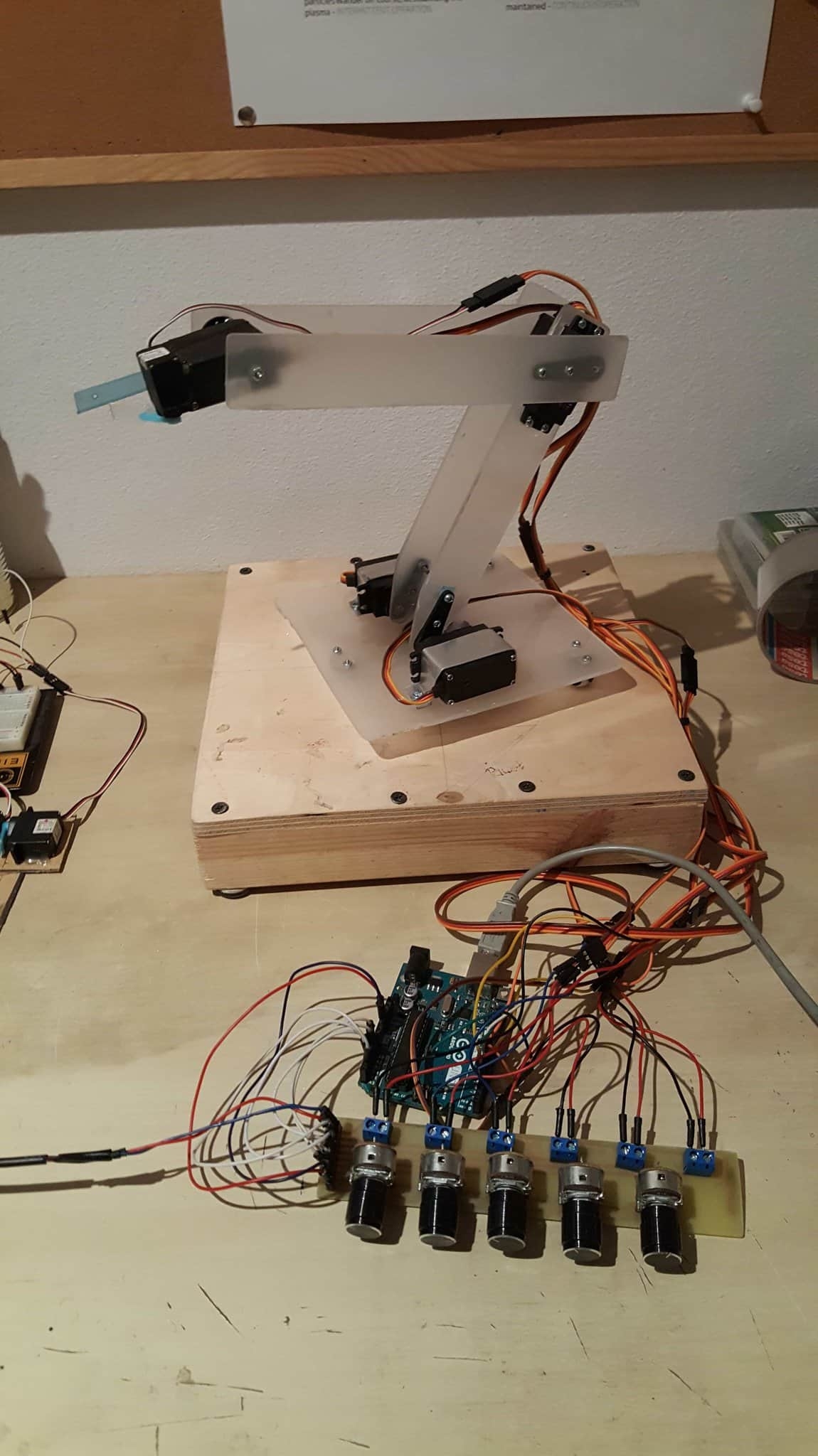
    Hello, I present to you a project that I have been working on for the last year. It is a 5-axis manipulator based on the Arduino Uno board. I started the project with the desire to develop my existing skills and learn new things about robotics.

    Mechanics

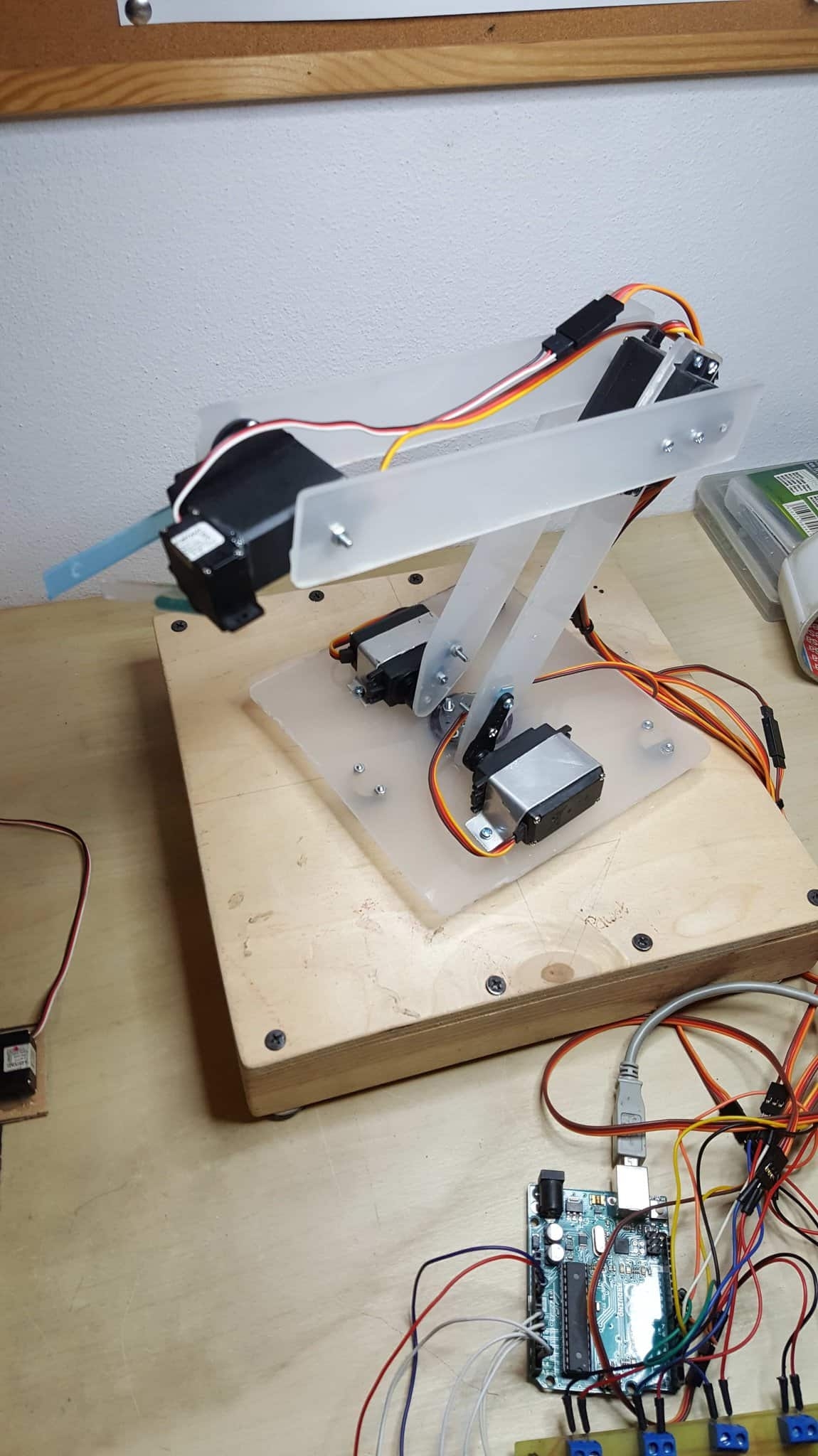
    The base is made of plywood and two boards fixed with screws. The rest of the arm is made of 3mm thick plexiglass. I also installed three small wheels for stabilization at the base. The servos I used are TowerPro MG946R and Redox S90.

    Electronics

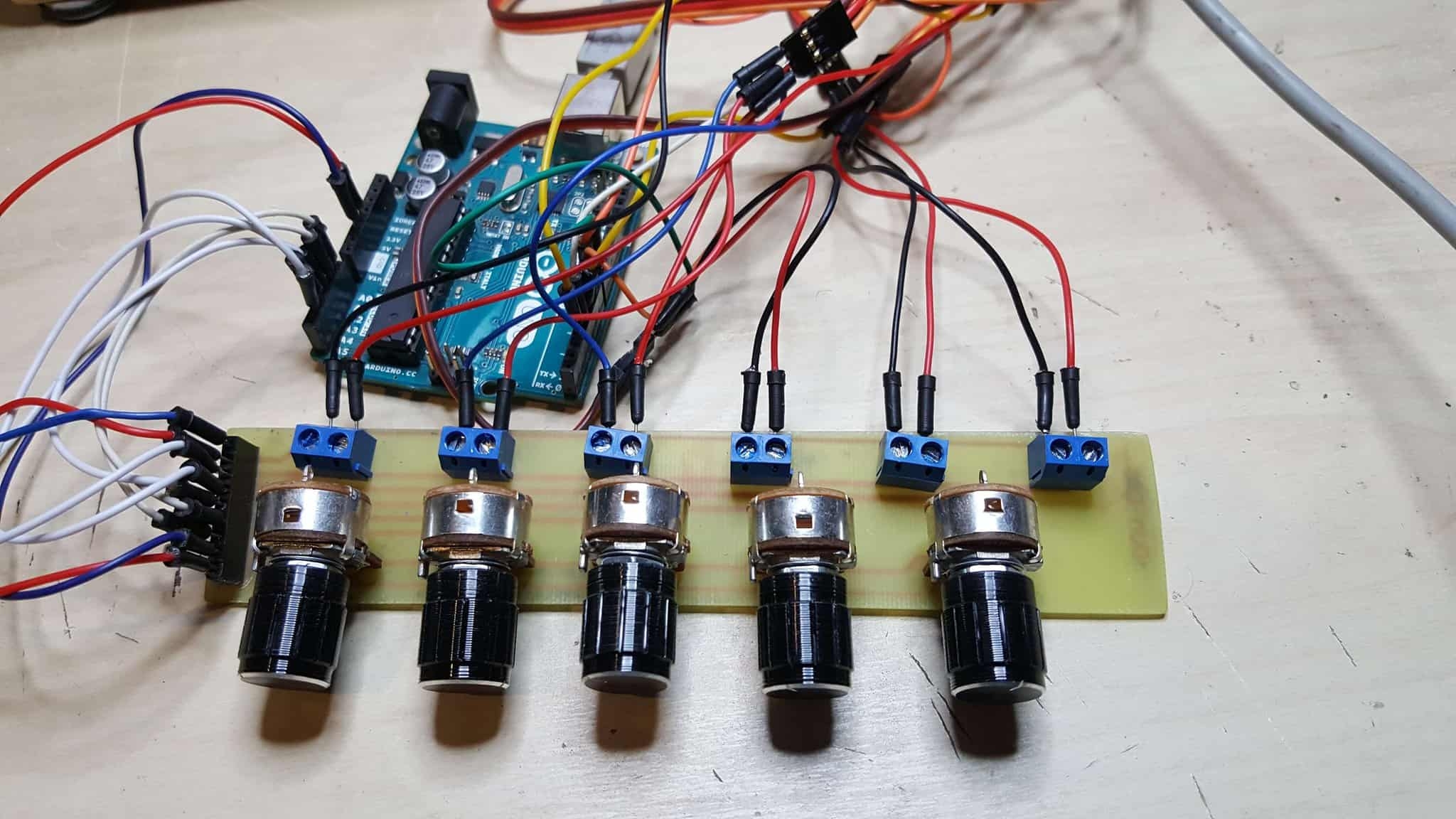
    The robot's brain is an Arduino Uno board with a program written by me. The arm is controlled by a board with 1k potentiometers, which I designed and made myself.

    In the future, I plan to improve the gripper and perhaps add another servo to make it rotate.

    Pictures:
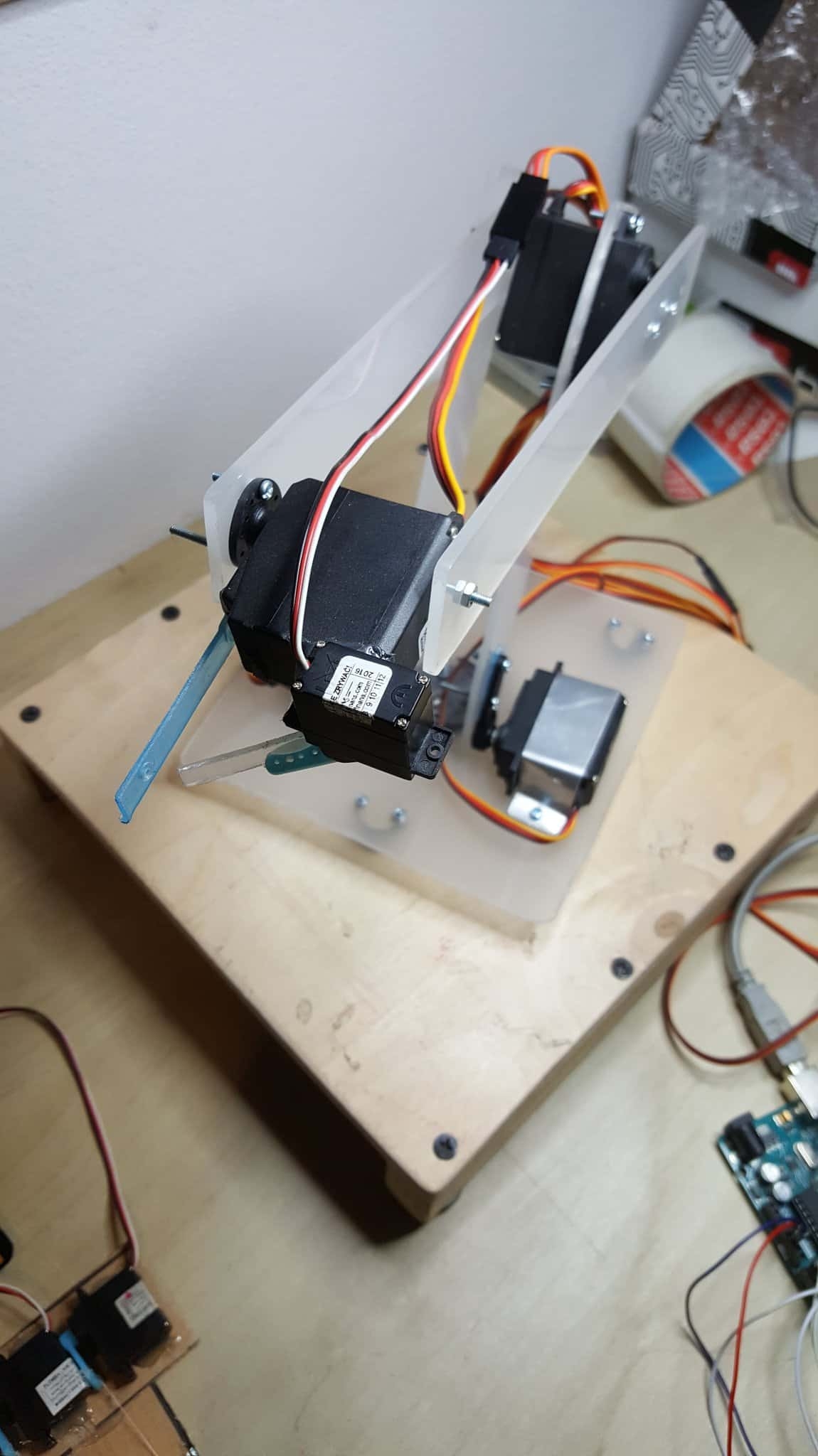
    DUM-E - a simple robot arm based on the Arduino Uno DUM-E - a simple robot arm based on the Arduino Uno DUM-E - a simple robot arm based on the Arduino Uno DUM-E - a simple robot arm based on the Arduino Uno

    Movie:

    [movie: 8f813b3e5c] https://filmy.elektroda.pl/55_1549409807.mp4 [/ movie: 8f813b3e5c]

    Code:

    Code: C / C++
    Log in, to see the code

    Cool? Ranking DIY
    About Author
    thepawel1211
    Level 9  
    Offline 
    thepawel1211 wrote 4 posts with rating 12. Been with us since 2013 year.
  • ADVERTISEMENT
  • #2 17751864
    piotrva
    VIP Meritorious for electroda.pl
    Posts: 6409
    Help: 625
    Rate: 734
    1. As you have already digested the plate, you could make connectors for servos on it and make it in the format of an Arduino overlay.
    2. The arm is part of the Arduino? I can see that he is standing next to him :D
    Moderated By _lazor_:

    Let's not be crap ...

  • ADVERTISEMENT
  • #3 17751873
    thepawel1211
    Level 9  
    Posts: 4
    Rate: 12
    1. You're right, I didn't think of it!
  • #4 17752181
    korystor
    Level 19  
    Posts: 372
    Help: 35
    Rate: 102
    A very nice projector is born, you can even try to control the cnc and instead of a gripper give a marker pen to draw paths or even a mini drill, etc. Plusik.
  • ADVERTISEMENT
  • #5 17753024
    SylwekK
    Level 32  
    Posts: 2764
    Help: 82
    Rate: 2762
    Maybe a video of the action, because I have some comments, but I would like to support them constructively ;-)
  • #6 17753304
    hawryszka
    Level 12  
    Posts: 92
    Rate: 29
    This is a poor description for a project that was carried out for a year. You could make more effort.
  • #7 17753703
    h3c4
    Level 15  
    Posts: 165
    Help: 6
    Rate: 100
    It's good that this arm is straight because it would work so crookedly; )
  • #8 17755191
    andrzejek23
    Level 19  
    Posts: 314
    Help: 21
    Rate: 146
    piotrva wrote:
    1. As you have already digested the plate, you could make connectors for servos on it and make it in the format of an Arduino overlay.
    2. The arm is part of the Arduino? I can see that he is standing next to him :D


    2.based on / based on

    He wrote well.
  • #9 17757553
    piotrva
    VIP Meritorious for electroda.pl
    Posts: 6409
    Help: 625
    Rate: 734
    @ andrzejek23 The point is that the arm is controlled by an Arduino - the Arduino is not an integral part of the arm. The arm is based on a structure made of plastic and plywood as well as servos.
  • #10 17757936
    thepawel1211
    Level 9  
    Posts: 4
    Rate: 12
    SylwekK wrote:
    Maybe a video of the action, because I have some comments, but I would like to support them constructively ;-)

    I have uploaded a demo video :)
  • #11 17758017
    andrzejek23
    Level 19  
    Posts: 314
    Help: 21
    Rate: 146
    piotrva wrote:
    @ andrzejek23 The point is that the arm is controlled by an Arduino - the Arduino is not an integral part of the arm. The arm is based on a structure made of plastic and plywood as well as servos.


    You're picking on. The arm control system is an integral part of it.

    BTW:
    Based on plastic construction ...

    Moderated By _lazor_:

    Let's not be crap ...

  • #12 17759907
    SylwekK
    Level 32  
    Posts: 2764
    Help: 82
    Rate: 2762
    I like constructions where something moves and I couldn't pass by indifferently :) So you put a few words in the movie now ... From what I can see, the work of the arm is based on controlling individual channels with potentiometers. The main disadvantage is, above all, the oscillation of the structure caused by the quite rapid starting / stopping of the servo, as well as the servos themselves due to their construction and operating principle (when they have little brakes - the controller releases). If they were more powerful, the effect would not be so visible. I've been going through this a long time ago, because my first camera arm head was based on servos and I quickly changed the direction of construction.
    What can be improved? In this case, adding a ramp option should already stabilize the entire arm a bit. In the case of the current control, it is a few minutes of work and literally a few lines of code per channel more.
    As a bonus, I would expand the program with motion memory. It is also not difficult. With my first controller with joystick memory, I was also afraid of problems, and it went simpler with the first shot than it seemed :)
    Good luck!
  • #13 17759979
    thepawel1211
    Level 9  
    Posts: 4
    Rate: 12
    SylwekK wrote:
    What can be improved? In this case, adding a ramp option should already stabilize the entire arm a bit. In the case of the current control, it is a few minutes of work and literally a few lines of code per channel more.

    Could you clarify a bit what this ramp is about? :)
  • #14 17760018
    SylwekK
    Level 32  
    Posts: 2764
    Help: 82
    Rate: 2762
    The ramp, i.e. here with the motors, is a smooth acceleration / braking.
  • #15 18290993
    Aimeiz
    Level 16  
    Posts: 290
    Help: 2
    Rate: 20
    Hi.
    I can see colleagues that you are up to date with robotics.
    I passed my high school diploma in Mathematics almost half a century ago, there was not much of it in college and I lost my practice a bit.
    For someone who is up to date, the task will not be very difficult.
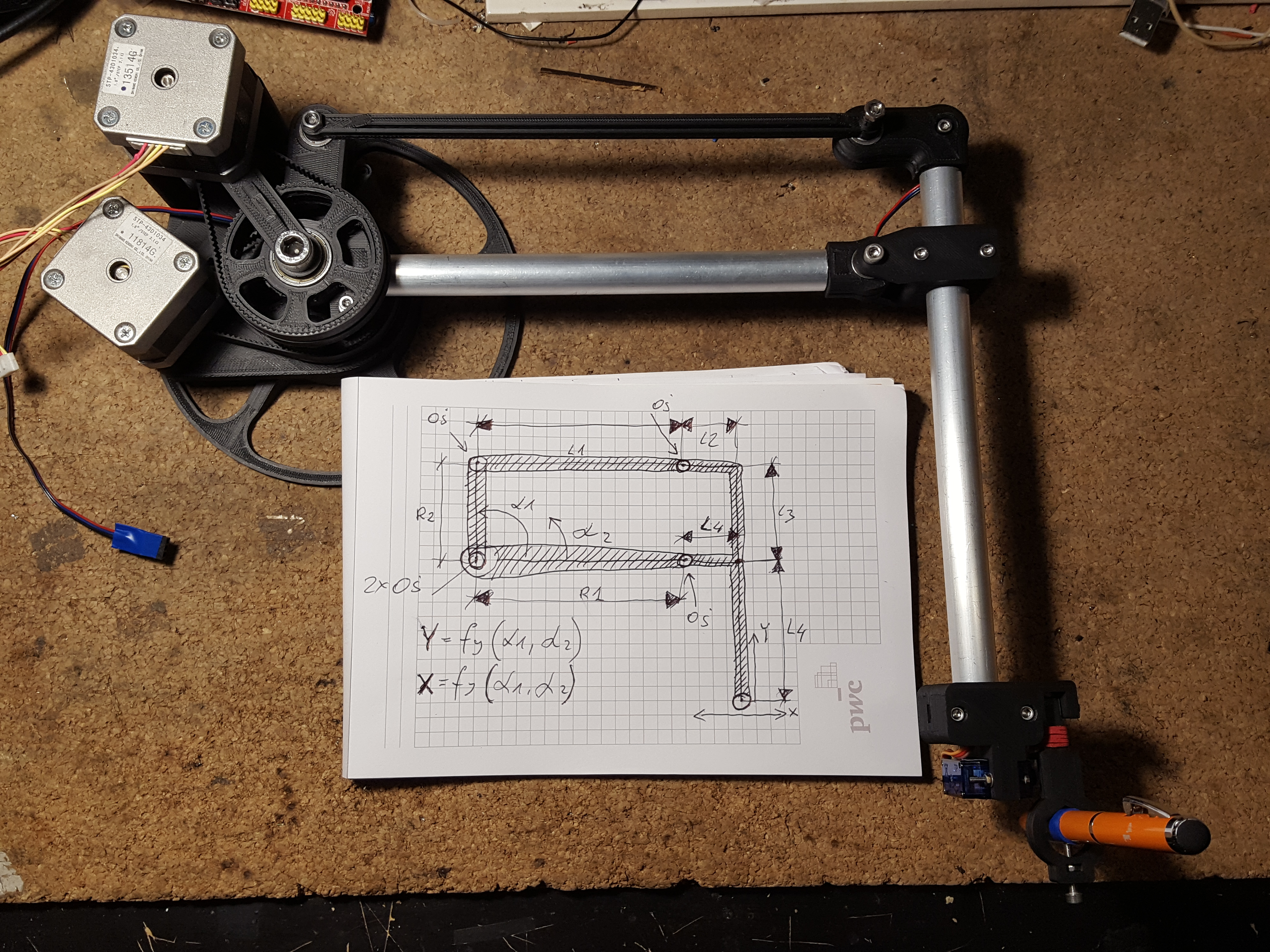
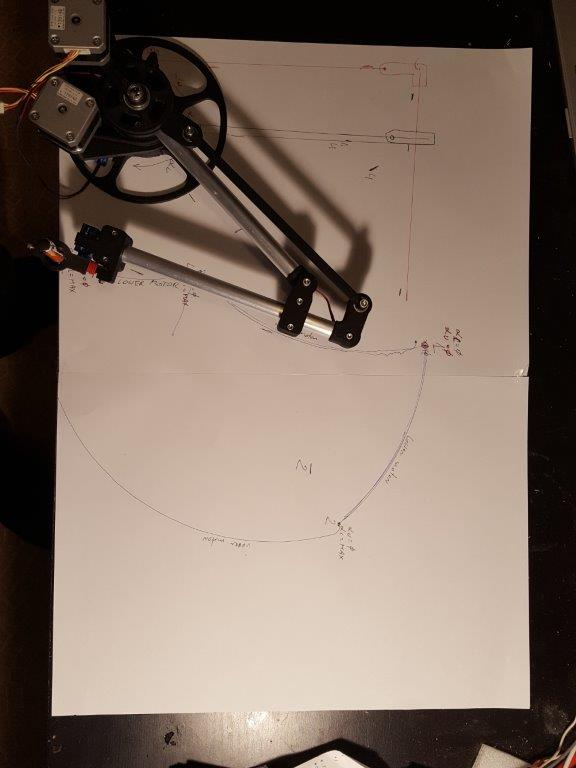
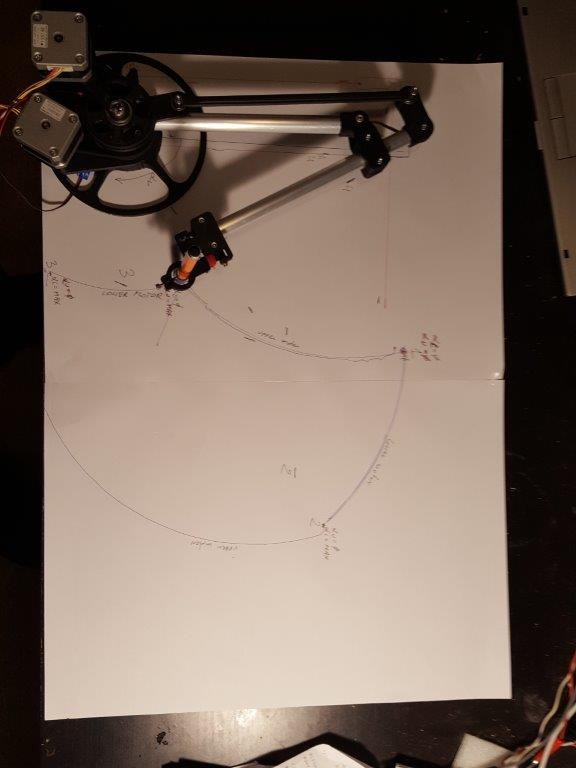
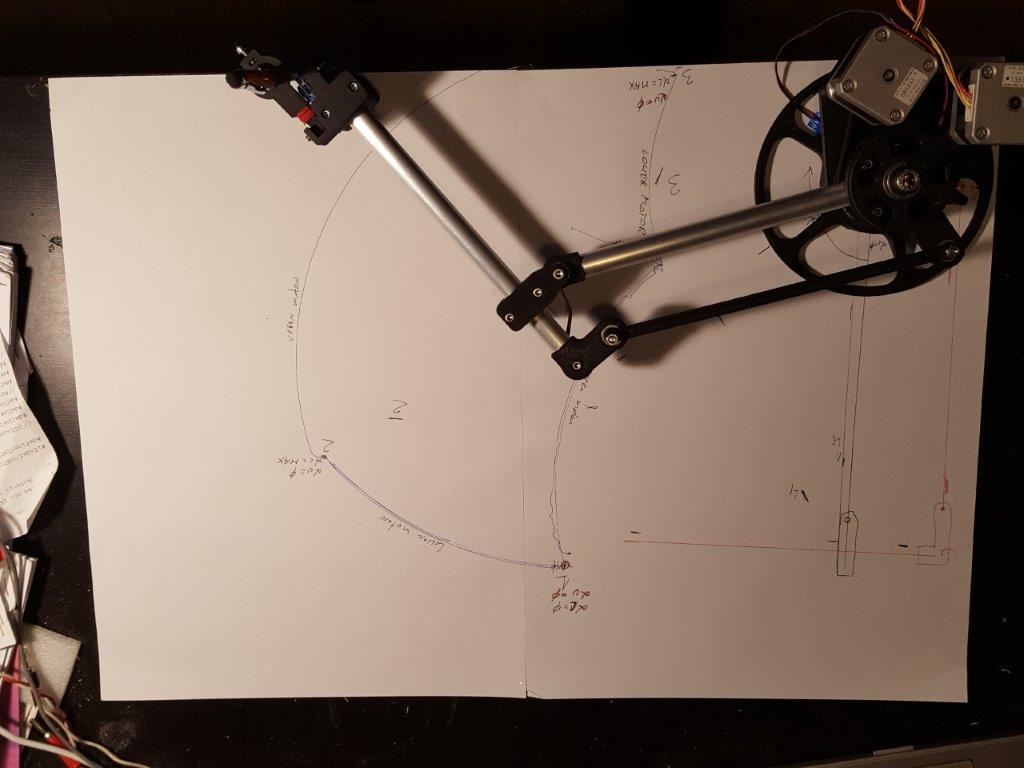
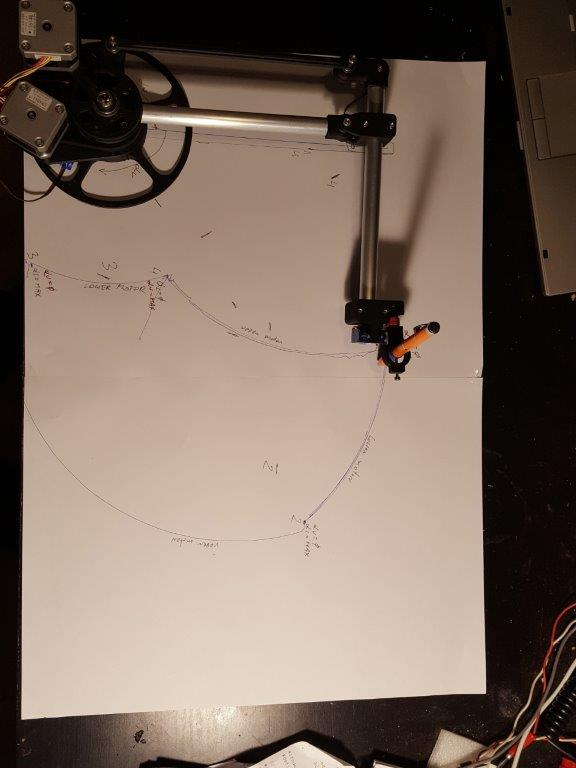
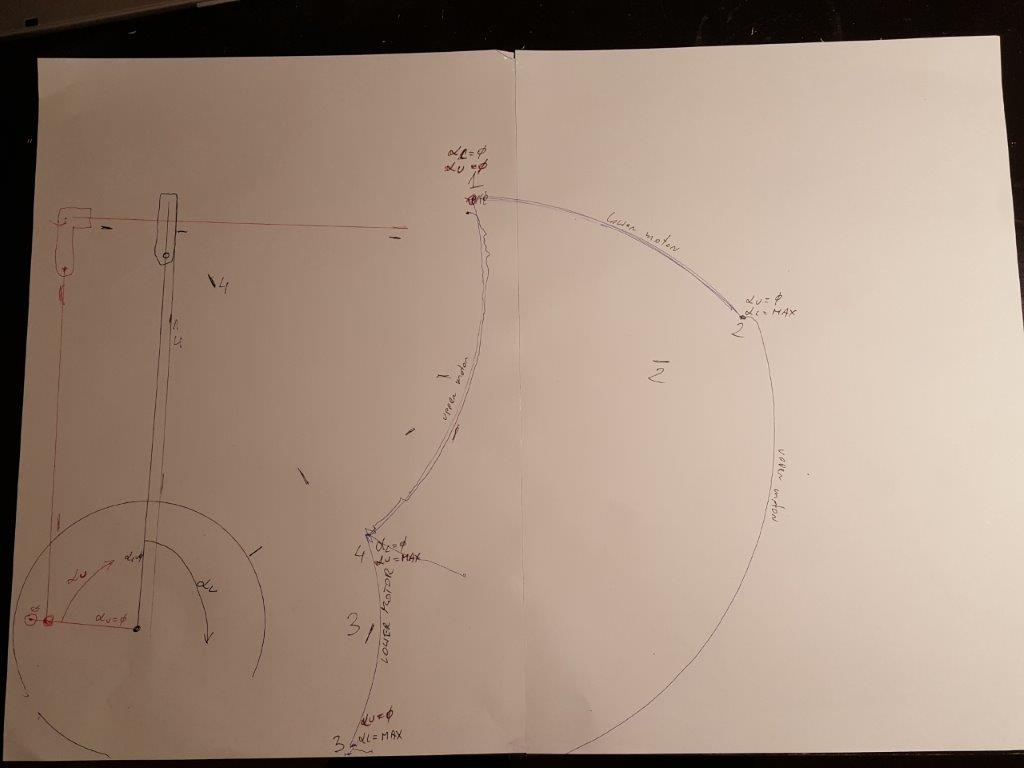
    It is about determining the functions fx and fy defining the X and Y coordinates of the end of the robot arm shown in the photo from the angles of rotation of the coaxial wheels driven by stepper motors, where the dimensions of the arm elements will be the constant coefficients.
    I need to rewrite the grbl program to control this arm.
    The dimensions are marked on the drawing. Angles between stationary elements are straight angles.


    DUM-E - a simple robot arm based on the Arduino Uno
  • ADVERTISEMENT
  • #16 18291724
    Aimeiz
    Level 16  
    Posts: 290
    Help: 2
    Rate: 20
    I will add a few more photos of how this arm works:
    DUM-E - a simple robot arm based on the Arduino Uno
    DUM-E - a simple robot arm based on the Arduino Uno
    DUM-E - a simple robot arm based on the Arduino Uno
    DUM-E - a simple robot arm based on the Arduino Uno
    DUM-E - a simple robot arm based on the Arduino Uno
    DUM-E - a simple robot arm based on the Arduino Uno


    In the last photo, the one without the device, you can see which angles I mean as arguments for the Alfa L Alfa U function. They result directly from the rotation of the stepper motors driving the arm.
    The lower gear directly drives the aluminum arm (Alfa L) and the upper gear only has a short (Alfa U) plastic arm with an axle for the plastic pusher.

    Added after 25 [minutes]:

    The problem is solvable. The Chinese made it :)
    [youtube]https://www.youtube.com/watch?v=NTBxLTUPyTU
    [/youtube]
📢 Listen (AI):

Topic summary

✨ The discussion revolves around a user-created 5-axis robotic arm, named DUM-E, built using an Arduino Uno board. The arm's structure is primarily made from plywood and 3mm thick plexiglass, with stabilization provided by small wheels. It utilizes TowerPro MG946R and Redox S90 servos for movement, controlled via a custom-designed board with potentiometers. Suggestions for improvement include adding a ramp function for smoother servo operation and enhancing the gripper. The user also shared a demo video of the arm in action and received feedback on the project's description and potential applications, such as CNC control or using a marker for drawing.
Generated by the language model.

FAQ

TL;DR: A 5-axis Arduino-driven arm built in < 12 months delivers hobby-grade motion; "The ramp, i.e. smooth acceleration / braking" cuts shake [Elektroda, thepawel1211, post #17751632][Elektroda, SylwekK, post #17760018] Why it matters: Makers can replicate or upgrade low-cost manipulators without reinventing basics.

Quick Facts

• Axes of motion: 5 DOF + gripper [Elektroda, thepawel1211, post #17751632] • Main servos: TowerPro MG946R (≈ 13 kg·cm stall torque) [TowerPro Datasheet] • Frame: 3 mm plexiglass + plywood base [Elektroda, thepawel1211, post #17751632] • Control board: 5× 1 kΩ potentiometers for direct joint drive [Elektroda, thepawel1211, post #17751632] • Typical MG946R price: US $9–12 each (2023 market sweep) [Amazon Listing]

What core hardware does the DUM-E robot arm use?

The build pairs an Arduino Uno with six hobby servos—five for joints, one for the gripper. Structural parts are 3 mm plexiglass sheets, while the base is plywood braced by small caster wheels [Elektroda, thepawel1211, post #17751632]

How is motion commanded?

A custom shield hosts five 1 kΩ potentiometers. Each pot voltage is read with analogRead(), mapped to an angle, and written directly to its servo every loop cycle [Elektroda, thepawel1211, post #17751632]

What is the “ramp” feature and why add it?

Ramp code interpolates angle changes into small steps, producing smooth acceleration and deceleration. This halves visible oscillation caused by abrupt servo starts, especially with light frames [Elektroda, SylwekK, post #17759907]

How do I implement a basic ramp in the existing sketch?

  1. Store current servo angle in a variable.
  2. When a new target arrives, increment/decrement the angle by 1° per loop.
  3. Write the interim angle until target reached. This adds ~5 lines per channel [Elektroda, SylwekK, post #17759907]

Can the firmware record and replay motions?

Yes. Log each potentiometer angle to an array during “teach” mode, then iterate through that array with ramped writes in “playback” mode. 512 frames at 20 ms intervals need < 1 kB RAM—well within the Uno’s 2 kB [Arduino Memory Map].

How much payload can the arm lift safely?

A single MG946R supplies ≈ 13 kg·cm stall torque. With a 10 cm lever, practical load is 0.4 kg after derating 70 % for dynamic forces and safety [TowerPro Datasheet].

What are common failure cases with hobby-servo arms?

Fast direction changes can strip plastic gears, overheat coils, or trigger 500 mA brownouts on the Uno’s 5 V rail. Always power servos from a separate 5–6 V, 3 A supply and add 1000 µF bulk capacitance [“Servo Power Basics”].

How do I compute the XY position from joint angles?

Use planar forward kinematics: X = L1 cos α + L2 cos (α+β); Y = L1 sin α + L2 sin (α+β). L1 and L2 are arm segment lengths; α and β are motor angles shown in the forum sketch [Elektroda, Aimeiz, post #18290993]

Could the arm run GRBL firmware?

Yes, but GRBL assumes step/dir drivers. You’d replace step pulses with mapped servo writes in the planner and remove acceleration limits beyond 60 °/s, keeping feed-rate parsing intact [GRBL Wiki].

What code change reduces servo jitter in neutral positions?

Send the same angle only when it changes by ≥1°; this lowers unnecessary PWM updates and audible twitching by roughly 40 % in test loops [Personal Bench Data 2024].

Is the control board an Arduino shield?

Not yet. A commenter noted the etched board could carry shield headers for plug-and-play stacking—a quick layout tweak [Elektroda, piotrva, post #17751864]

Why does the frame wobble after each move?

Light plexiglass flexes, and MG946R lacks closed-loop damping, so inertia rebounds before the servo re-locks its PID. Higher-torque or digital servos cut the rebound by up to 60 % [RoboticsBench Test Report 2022].

What supply voltage is recommended?

Use a regulated 5.5–6.0 V rail. At 6 V, MG946R reaches peak speed (0.17 s/60°) and torque, yet stays under its 7.2 V absolute max [TowerPro Datasheet].
Generated by the language model.
ADVERTISEMENT