logo elektroda
logo elektroda
X
logo elektroda

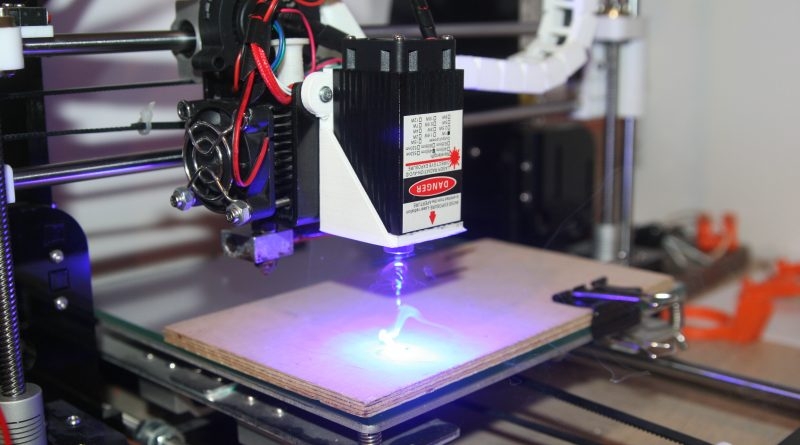
Anet A8 3D printer as laser plotter

wiktor13570 12612 28
ADVERTISEMENT
Treść została przetłumaczona polish » english Zobacz oryginalną wersję tematu
📢 Listen (AI):
  • Anet A8 3D printer as laser plotter

    Hello everyone.
    Today I wanted to demonstrate how to give the Anet A8 3D printer a new function in the form of a laser plotter.
    I have described the whole project at http://resistor.pl/anet-a8-ploter-laserowy/

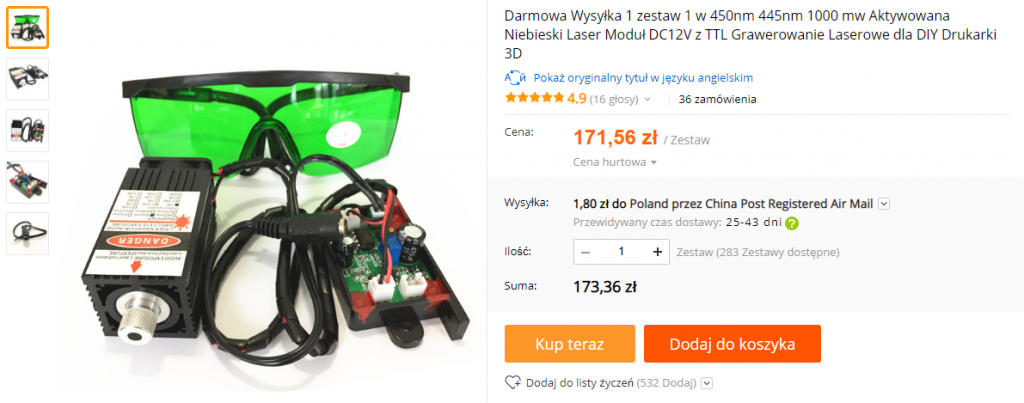
    For this project you will need a laser that we can buy in China. It is important to pay attention to its power – lasers from 500mw to 15w are available, but the price of the latter oscillates around 800PLN.
    I chose a laser with a power of 1W and a wavelength of 450nm, for which I paid around £175. The kit also included protective goggles and electronics responsible for the laser's correct operation.
    Anet A8 3D printer as laser plotter

    Mounting
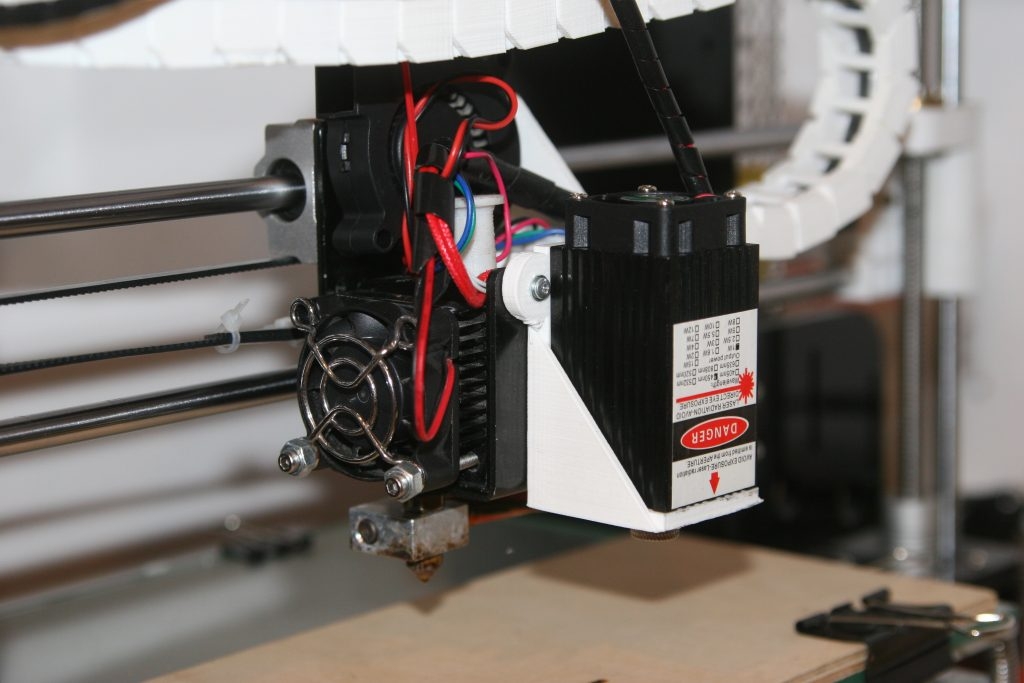
    We mount the laser next to the printer head. The best way to do this is to use a printed mount. I have included several versions of the mount that can be found on the Thingiverse:
    https://www.thingiverse.com/thing:2571185
    https://www.thingiverse.com/thing:2117275

    With three screws, we screw the laser to the printed piece, which then needs to be fixed in place of the print cooling fan (if you choose piece 1). Once the laser module is mounted, we connect the remaining electronics.
    Anet A8 3D printer as laser plotter

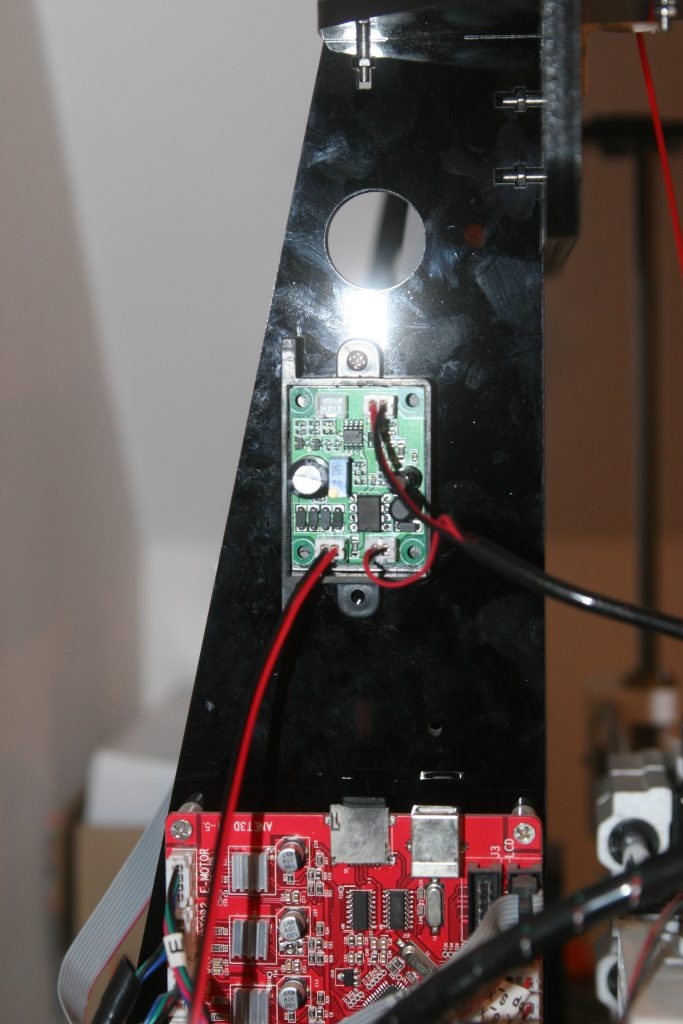
    On the board responsible for the control we find four leads. Two of these are connected in turn to the laser diode itself and to the module's cooling fan. The other two sockets are TTL and 12V AC/DC. The 12V AC/DC lead is connected to the power supply cable, which will be used to supply the appropriate voltage to control the laser. We leave the TTL socket free, as we will not use it.
    We connect a wire from 12V AC/DC to the main board of the 3D printer in place of the print cooling fan FAN2.
    Anet A8 3D printer as laser plotter

    Calibrate the laser
    We switch on and raise the Z axis to the level we have set.
    We put on the protective goggles, go to the settings and turn on the print cooling to 1% or more in case the laser spot is not yet. visible.
    Using the lens knob, we set the spot size to be as small as possible. This is best done on a white sheet of paper.
    We zero the X and Y axes and then set them at point 0 of the printer table. We read the position of these axes, which will be our offset.
    Operation and software
    To operate the laser, we will use the free program Inkscape, which can be downloaded from: inkscape.org
    We also download the plug-in for this program » Lokster’s Laser Engraving Inkscape Plugins

    In the installed program, go to the Inkscape folder and extract the downloaded plug-in there.

    Once this is done, we can create a graphic in Inkscape.
    If we are using a pre-made image, we need to convert it into a vector graphic. To do this, we select Path in the menu and then the vectorise bimap option.
    Select the finished graphic and choose Path/Object into Path
    Now go to Effects/Lokster’s Tools and click on Laser Engraving. In the window that opens we adjust the settings for our plotter.
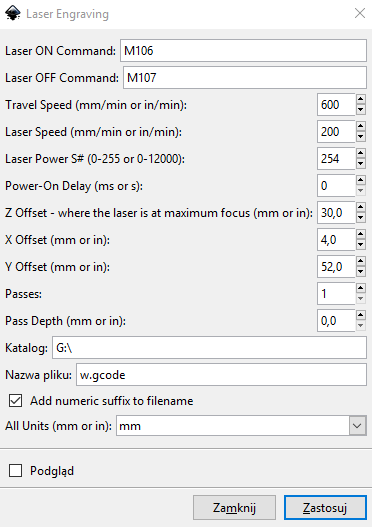
    Anet A8 3D printer as laser plotter

    After indicating the save directory, name the file and click Apply. The gcode file saved in this way is uploaded to the memory card and run on the printer.

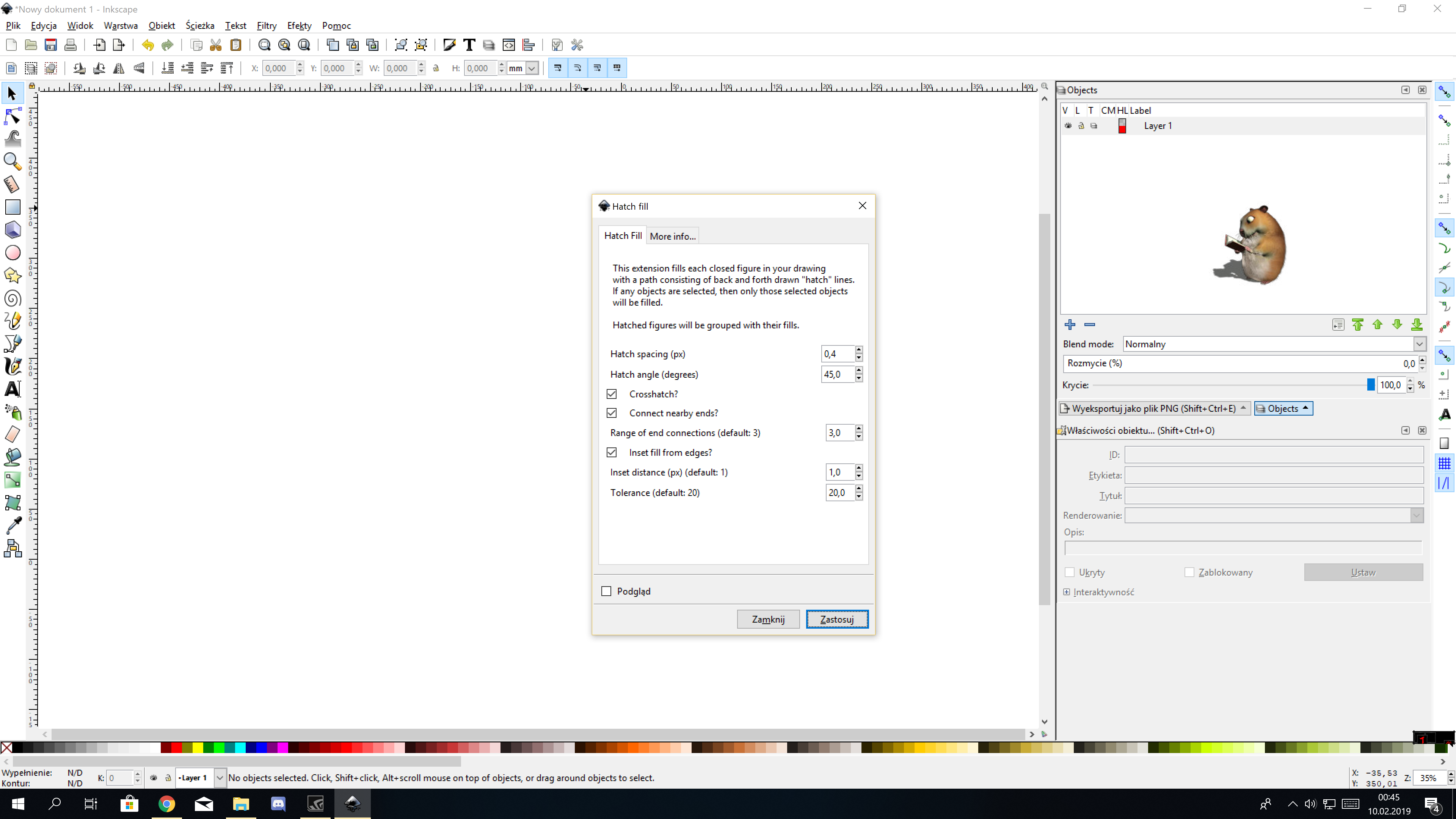
    If you want your graphic to be hatched in the middle, you can use the Hatch fill option, which can be found by going to Effects/Lockster’s Tools.

    With these settings we can adjust the hatching parameters of the interior of a given graphic.
    After applying the hatching options, we go to Laser Engraving and create a gcode file.

    Change in printer software settings
    The Anet A8 printer does not interpret the G2 and G3 commands corresponding to arcs. In order for the plotter to work correctly, it is necessary to edit the configuration_adv.h file in the SkyNet software. Enable the option as below (line approx.800).
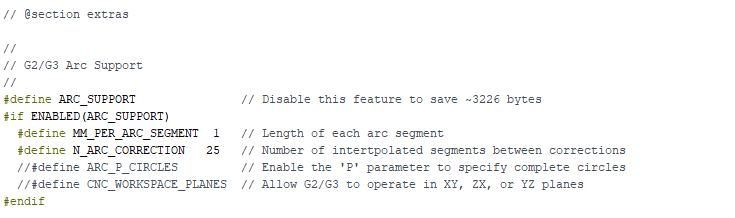
    Anet A8 3D printer as laser plotter

    After this correction we upload the software and can enjoy the new function of our printer.
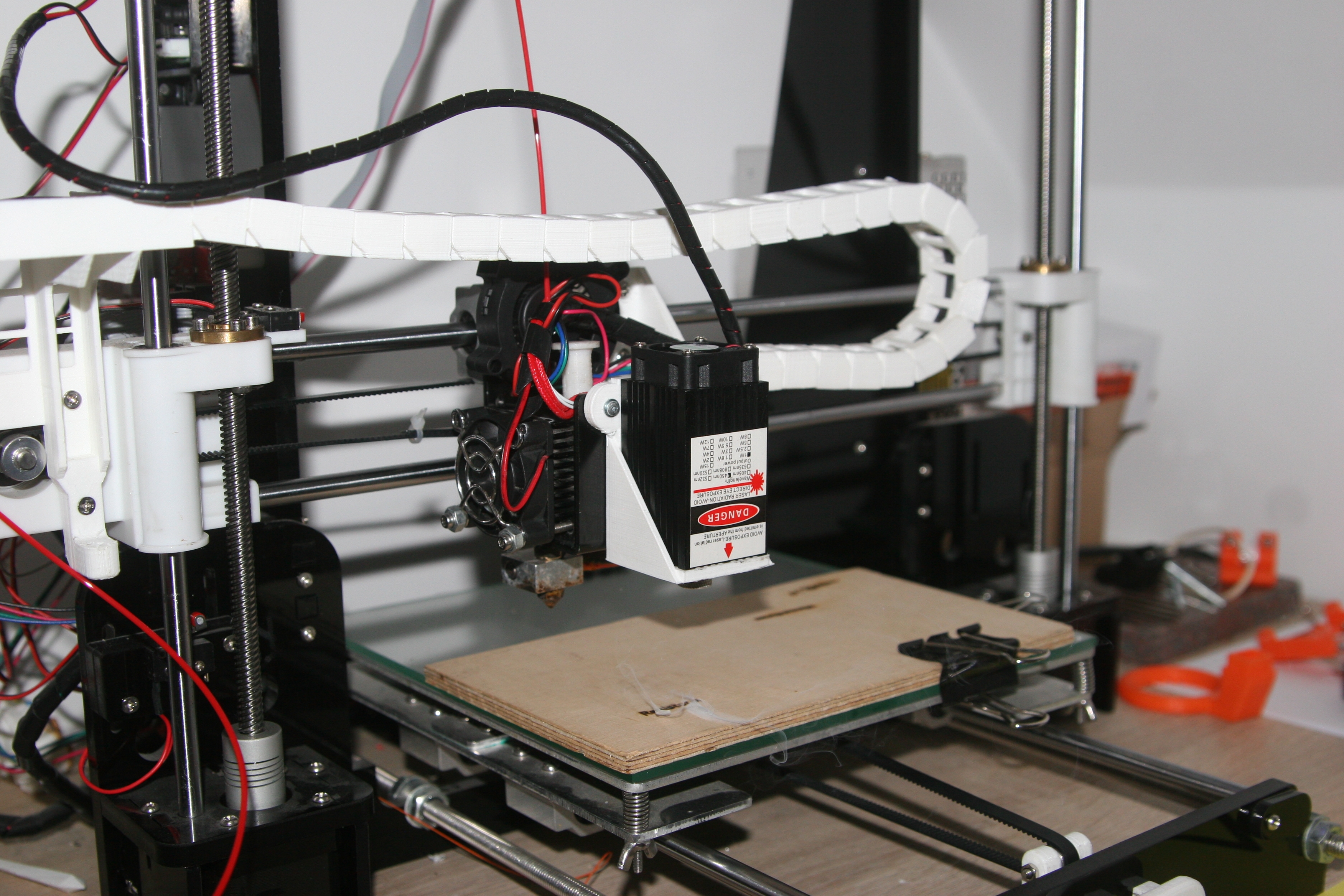
    Anet A8 3D printer as laser plotter

    Project description: http://resistor.pl/anet-a8-ploter-laserowy/
    Laser control: http://lokspace.eu/anet-a8-3d-printer-laser-engraver-mod/

    Cool? Ranking DIY
    About Author
    wiktor13570
    Level 12  
    Offline 
    wiktor13570 wrote 101 posts with rating 39, helped 4 times. Live in city Legnica. Been with us since 2016 year.
  • ADVERTISEMENT
  • #2 17763307
    Anonymous
    Level 1  
  • ADVERTISEMENT
  • #3 17763329
    wiktor13570
    Level 12  
    anmedia wrote:
    I, on the other hand, have a question, what kind of software does the laser/printer work with? Have you tried engraving something in PVC or any other component?

    I haven't yet tested any programs that the printer might work with, and I'm firing everything from a micro SD card. I have engraved in wood, leather, plastic and the laser in all of these materials works well.
  • #4 17763334
    Anonymous
    Level 1  
  • #5 17763348
    wiktor13570
    Level 12  
    The laser is switched on by the voltage supplied from the printer board output FAN2, to which the print cooling fan is connected by default. The power is controlled in the same way as the fan speed, i.e. by changing the voltage. Commands M106 and M107 are responsible for switching the laser on and off
  • #6 17763391
    locos1
    Level 12  
    Check out LaserGRBL. It might work for you. I have a typical laser plotter and it works great with it. For my own creations I use Inkscape with laser add-ons. I don't want to test anything else because I don't need it.
  • ADVERTISEMENT
  • #7 17763449
    Slawek K.
    Level 35  
    I'd be very careful with those crappy non-certified glasses, and I'd even look at a laser through them in my life, really be careful with your eyesight.

    Best regards
  • #8 17763667
    LA72
    Level 41  
    In addition to engraving, have you tried cutting anything?
    E.g.: in plywood, plexiglass.
  • #9 17763717
    mongoł2000
    Level 18  
    I'm waiting for the 15W laser :) I wonder if the plexiglass can be cut nicely.
  • #10 17763785
    wiktor13570
    Level 12  
    LA72 wrote:
    Have you tried cutting anything besides engraving?
    E.g.: in plywood, plexiglass.

    Veneer and cardboard are no problem, thin plywood (approx.2mm) gave up after a few laser passes.
  • #11 17764789
    pathirrus
    Level 11  
    The Anet A8 is powered by a 12V power supply? What is the issue with smoke and stench? Do you drain it off somehow? I also bought a laser for my Endera3, probably even the same kit as you, but no time to embrace it xD
  • #12 17764872
    wiktor13570
    Level 12  
    pathirrus wrote:
    How is the smoke and stench issue? Do you drain it somehow?

    There is so little smoke during engraving that there is no need to evacuate it, and the smell itself disappears quickly. When engraving more items I move the printer to the garage.
  • #13 17766586
    superwinder
    Level 7  
    Are there other programmes than inkscape?
  • #14 17766644
    sewek1000
    Level 15  
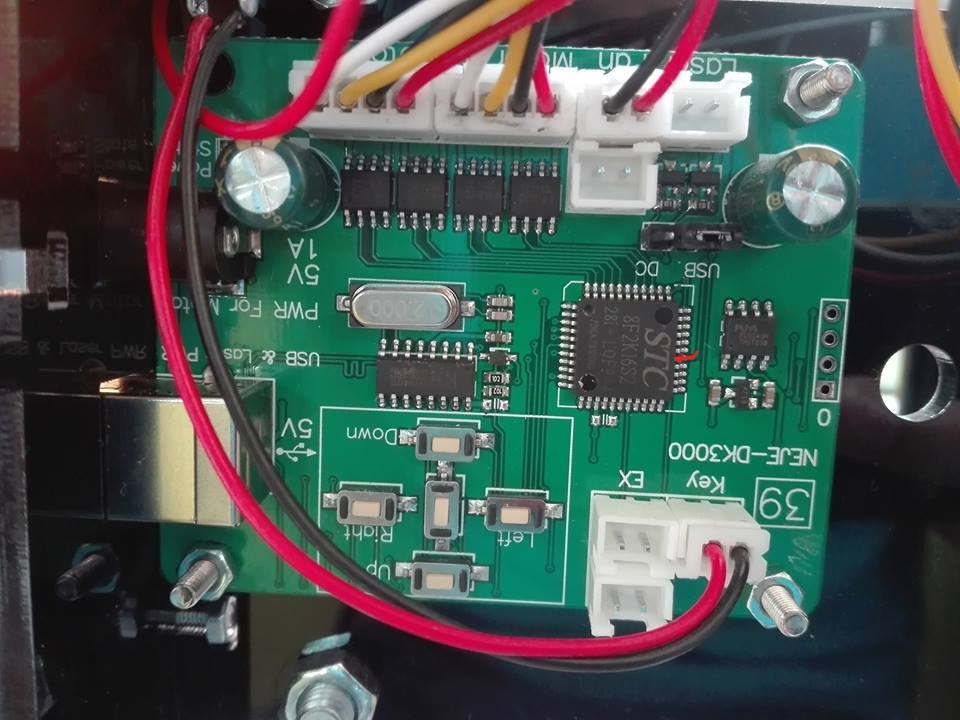
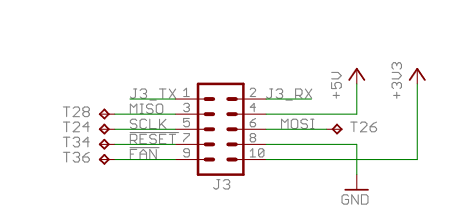
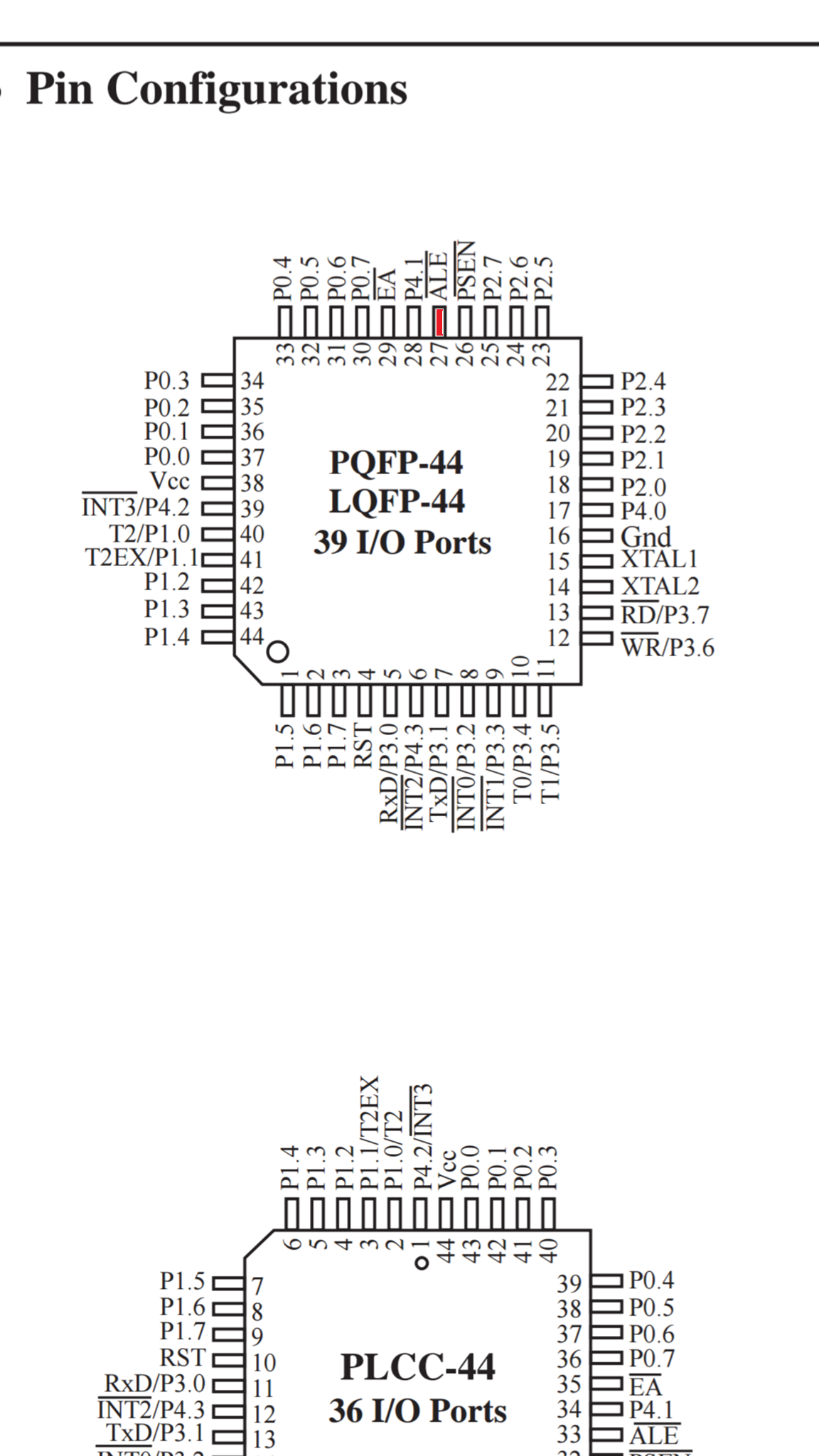
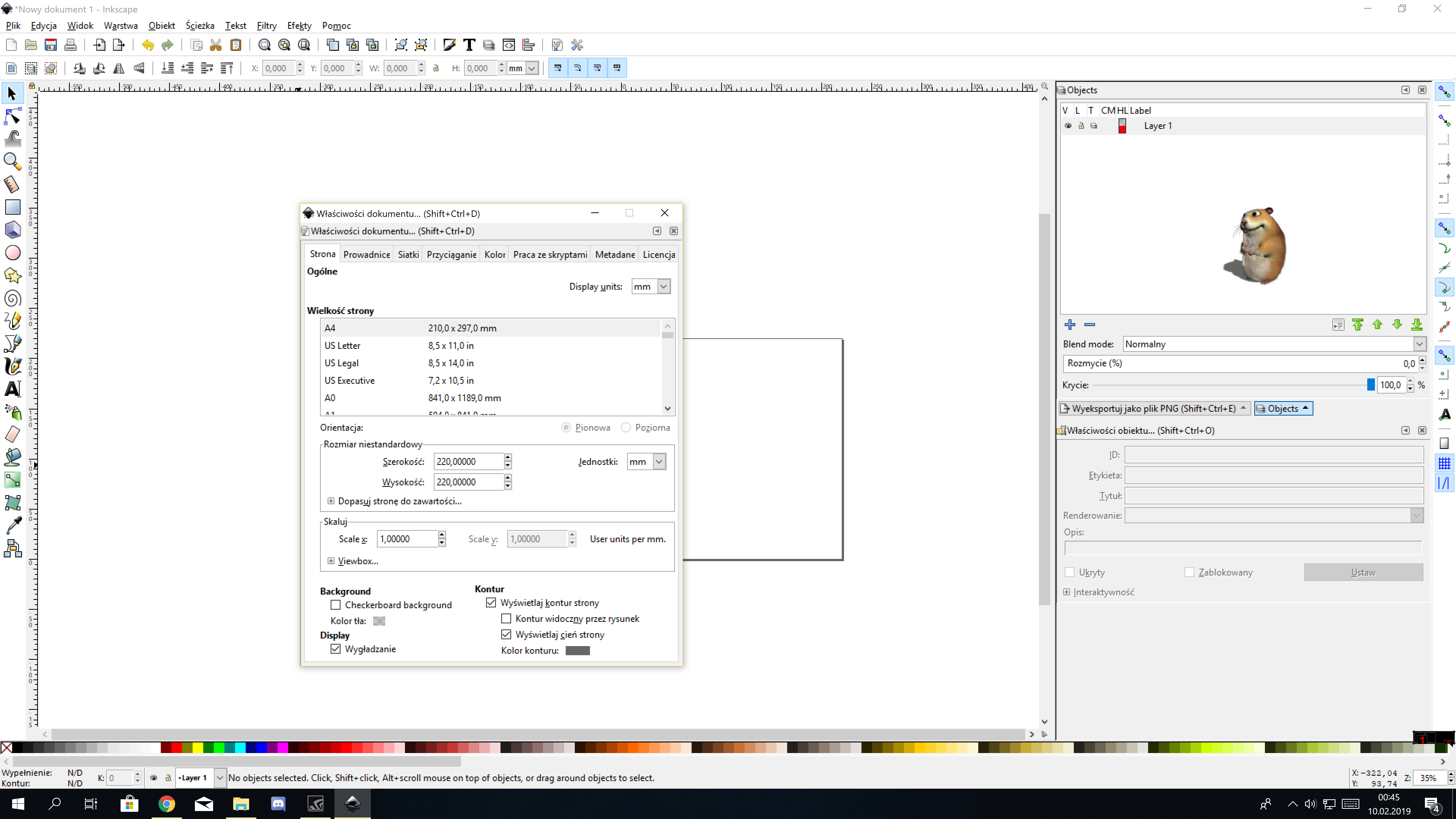
    Hello, I am also a user of Anet A8 with laser but with me it is a little bit different, I had a laser NEJE DK 8KZ, and I used its Laser Driver by connecting Uc Neje to Anet A8 under output T36 - PWM Fan Control (My laser is on 5v), I can add that it is useful hatch fill window you can change there the mode to hatch and add the distance between the lines setting the accuracy of engraving. The GRBL laser, at least in my case, works with small problems I can not get rid of the hatch effect so I could not set the line by line engraving if someone has a solution I would be happy to hear, G-code is fired by Repetier Host , To make it easier to work and I did not find this in the article Inskape program settings and set the mm and work area to mm, enter 220 x 220 and scaling 1 , so you have a real preview of where to place what and what dimensions it will have.

    Added after 4 [minutes]:

    Anet A8 3D printer as laser plotter
    Anet A8 3D printer as laser plotter Anet A8 3D printer as laser plotter

    Added after 3 [minutes]:

    In my case the axis calibrations are off because I always in Repetier do Homing before starting , and turn on the manual G1 Z29 and fan at 100% to set the focal length on the workpiece then Homing I increase or decrease the laser speed f-xxx or in Repetier Host

    Added after 8 [minutes]:

    Anet A8 3D printer as laser plotter Anet A8 3D printer as laser plotter Anet A8 3D printer as laser plotter Anet A8 3D printer as laser plotter Anet A8 3D printer as laser plotter
  • #15 17768236
    error105
    Level 14  
    Does anyone know how powerful a laser I need to cut 3mm plexiglass?
  • ADVERTISEMENT
  • #16 17769213
    maestro16s
    Level 10  
    error105 wrote:
    And does anyone know what power laser I need to have to cut 3mm plexiglass nicely ?


    To cut plexiglass without tiring it with several passes the minimum would be 15w. with 1 watt you can at most engrave and not very efficiently, without gaining depth. And better not to do it in a room on a desk :D
  • #17 17769316
    error105
    Level 14  
    I don't even print with PLA in the room so rest assured ;)
  • #18 17771186
    timo66
    Level 23  
    @maestro16s those 15 watts did you test?
  • #19 17771559
    maestro16s
    Level 10  
    timo66 wrote:
    @maestro16s these 15 W did you test?

    Tested.
    At the same time I don't claim it was a smooth job, rather so called tiring .... In any case, for plexiglass work it would be reasonable at least at 30w to also cut something thicker, because 3mm is nothing.
  • #20 17800370
    mikun
    Level 12  
    Mounting in a laser printer a cool topic, I also committed such a thing 1,5 years ago. Burned in plywood. However, I had problems to get PWM at the output of the 3D printer fan, with a frequency higher than 15-20Hz, and I needed 1kHz


  • #21 17810873
    mongoł2000
    Level 18  
    I have checked my 15W(continuous about 7-8W) laser. Attached is the result of a clash with 3mm PMMA. Not a problem and the speed was very similar to 3D printing.
    As for the quality - the edges are straight but not as smooth as with a professional machine. You can observe how the molten plastic kind of 'cooks'.
    The next step is to add a nozzle to the laser to blow air from a ~3Bar compressor at the same time.
    In order for there to be some flow, it would be necessary to use a base with many small holes, e.g. in the shape of a honeycomb, so that the gases can flow through freely.
    Do you have any ideas on how else to gain quality?

    As for increasing the power by 100% - maybe it would be worth developing a pulse driver for these diodes to get those 15W out :) Maybe someone has already done such a marvel?
  • #22 17887941
    Witia1976
    Level 2  
    Hello, firstly let me say hello as this is my first post. As for that 15W solid state laser from the Chinese, it is only possible in pulse. Even if you were to force it to run continuously, it will boil off momentarily. The actual power obtained from the individual diodes used in such lasers is a maximum of about 7 W of continuous operation. Larger powers from laser diodes are already sets of diodes properly focused. Even one Chinese manufacturer officially writes about it on his website that he puts out 15W to attract interest in his offer and in the description he explains the situation regarding the power offered on various sites. Personally, I'm now struggling with a diode sold as 5.5w, but the Chinese guy indicated in the description that the optical power is about 4.8W. However, I think that also this value is overestimated after the operating parameters of this diode are about 3.5A and 5V.
  • #23 17894470
    Anonymous
    Level 1  
  • #24 17913273
    bobycob
    Level 21  
    The option is always :D .
    The only connection to the printer is the output to power the fan. If you do not damage it, e.g. by short-circuiting it, there is not much to spoil.
  • #25 18286436
    kamnow97
    Level 2  
    Hello,
    Let me dig up the topic a bit. I'm currently trying on a similar project, except that my laser has a claimed 2.5W. Does any of my colleagues know what maximum current can be loaded on the "FAN2" connector in the Aneta? Is it worth connecting the laser via an additional transistor?
  • #26 18286461
    wiktor13570
    Level 12  
    kamnow97 wrote:
    Let me dig up the topic a bit. I'm currently trying on a similar project, except that my laser has a claimed 2.5W. Does any of my colleagues have any idea what the maximum current for the "FAN2" connector on the Aneta can be? Is it worth connecting the laser via an additional transistor

    In my opinion, it would be most sensible to power a laser of this power via a transistor from the aneta socket, as the paths on the board leading to the fan socket do not look like they are designed for high currents.
  • #27 18288687
    pathirrus
    Level 11  
    kamnow97 wrote:
    Hello,
    Let me dig up the topic a bit. I'm currently trying on a similar project, except that my laser has a claimed 2.5W. Does any of my colleagues know what is the maximum current you can load the "FAN2" connector on the Aneta? Is it worth connecting the laser via an additional transistor?


    It seems to me that you should only use this "FAN2" connector as a control connector, not a power connector. If you have a laser that has a TTL input, I would connect the signal from "FAN2" there myself, and power the laser normally from the power supply. Then you will avoid too high a load on the "FAN2" connector. Of course, you need to remember to match the voltage level from the "FAN2" output to the TTL input (or described as PWM) in the laser driver.
  • #28 19053686
    Ogoorr
    Level 1  
    Hello
    Do you have any idea how to mount a laser on an Ender 3 printer?
    Is this at all possible?
    Greetings
  • #29 19053954
    wiktor13570
    Level 12  
    Ogoorr wrote:
    Hello
    Do you have any idea how to mount a laser on an Ender 3 printer?
    Is it at all possible?
    Greetings


    As you can often read on the electrode "please type into the Google search box". I won't type it like that, here you have a video on laser assembly https://youtu.be/K7X78C0qoxc
    You can also find ready-made kits for assembling a laser to an ender, it popped up in an ad for me somewhere😉
📢 Listen (AI):
ADVERTISEMENT