Why does my Evobox Lite multiroom decoder keep getting blocked and failing to see the main Evobox HD on the network, even after resets and changing routers?
Your Evobox Lite is usually blocked because the master decoder’s UPnP/multicast messages are being filtered or the lite ends up on a different subnet, so the two boxes no longer see each other [#21090856][#21466355] Check the router/AP for client isolation, multicast filtering, and make sure UPnP is enabled and passed through end-to-end [#21090856][#21466355] Remove or bypass Wi‑Fi repeaters/extenders if possible, because they often create a separate subnet and trigger the lockout; tests with both decoders on one switch or direct LAN cable worked reliably [#21092934][#21157129] A practical fix reported by users is to give both decoders fixed IPs or DHCP reservations in the router and, if needed, reset the decoders before re-adding them [#21091001][#21285107][#21450059] The most stable setup is to keep both decoders on the same transparent network segment, not through a repeater or a second router doing its own DHCP [#21285107][#21450059]
Fixed ip addresses are a must when you are not using a router. The problem is usually multicast filtering at the access point configuration level in the router. I recommend a wireshark analysis of such a multi-room.
You will quickly notice what the master decoder is sending to the network cyclically.
And knock out that repeater, usually the repeater creates a subnet. Even if the repeater supports the router's DHCP there can be reception problems too, @netTv wrote about this.
For the test it's best to connect both tuners directly via LAN cable (internet is not needed) , you can also use internet to connect both tuners via cables to the switch. In such configurations, there is usually 100% certainty of proper multi-room operation.
Not everyone wants to ruin the aesthetics of a room for one service and run cables. Multoroom can operate over WiFi as long as the network is transparent end to end. No cast protocols are filtered.
I have connected a TP Link850RE signal booster at a friend's house and the secondary decoder has started to lock up every 1-2 hours or so. It loses connection to the same network and writes that it is blocked.
After removing the TP-Link amplifier everything works fine.
How do I configure this to work with the TP-Link amplifier connected, is there any way please help?????
>>21090944 I confirm. After renewing my subscription, suddenly the decoders stopped seeing each other in the local network even though they had been working before. Only the MASTER decoder worked, the SLAVE decoder could not find the MASTER decoder in the local network, it had the status LOCKED. I disabled Wi-Fi on both decoders, connected them via Ethernet cable, and addressed the network cards manually so that they all worked in the same network: 192.168.001.101 and the other one 192.168.001.102, mask 255.255.255.000, gateway 192.168.001.100. The SLAVE decoder was unblocked after a while and that was that.
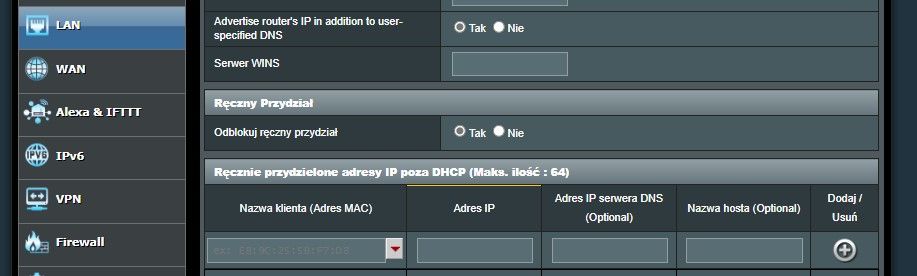
Hello I have been struggling with decoders for a long time. I would like to point out that I have two CP decoders (including one as a multiroom) and two routers, one downstairs in wireless mode - the main one, and upstairs the other one being a wifi extension as a bridge or aimesh (cameras and mobiles upstairs). In an ideal world, the decoder upstairs should be in the same network as the decoder downstairs i.e. in the same location as the main router. And here is always the problem. One solution is in the settings of the main router LAN/server dhcp/manually assign an ip address outside of dhcp...add the aforementioned decoders (mac address and their IP addresses). In my case, it helped. By the way, reset the decoder with multiroom before the settings. Unfortunately, there is no option for the decoder to automatically connect to the router at the bottom. Even though you make the same network the same channels, the decoder will still choose the closest and strongest signal subnet. This is an option without cable. Stable but when you reset something it processes from the beginning . I point out that the two asus are the topic here. .
Hello
I have been struggling with decoders for a long time.I would like to point out that I have two CP decoders ( one of which is a multiroom) and two routers one downstairs in wireless mode- the main one and upstairs the other one being a wifi extension as a bridge or aimesh ( cameras and mobiles upstairs).In an ideal world the decoder upstairs should be in the same network as the decoder downstairs i.e. in the same location as the main router.And here is always the problem. One solution is in the settings of the main router LAN/server dhcp/manually assign an ip address outside of dhcp...add the aforementioned decoders (mac address and their IP addresses).In my case it helped.By the way reset the decoder with multiroom before the settings.Unfortunately there is no option for the decoder to automatically connect to the router at the bottom.Even though you make the same network the same channels the decoder will still choose the closest and strongest signal subnet.This is an option without cable.Stable but when you reset something it procceses from the beginning .
I point out that the two asus are the topic here.
.
On the basis of what I wrote above you can try another option when you have 2 decoders and two routers(rt-ax58u).You reset to factory settings all the above mentioned devices and now you set the configuration of the first router of the main one and the whole configuration including wifi connection or Lan cable. The second decoder is set up in the same way, but you choose the wifi option and configure it manually using the parameters of the main router (you can check the parameters in the network settings of the decoder).Once you have three devices connected, connect the second router in aimesha or as a wifi clone and that's it.The decoder on top will remember the wifi settings from the step before firing the router no. 2.The most important thing is not to change the settings of the decoder with the multiroom, when you start to change the network, it will already catch which network is more convenient (signal) and this is already a good way to block the decoder.Ps brilliantly done in CP simply did not predict that someone can have two routers (not necessarily by cable but only as nodes) and this is probably the explanation of this issue.
Added after 4 [minutes]:
becker71 wrote:
>>21090944 Confirmed. After renewing my subscription, suddenly the decoders stopped seeing each other on the local network even though they had worked before. Only the MASTER decoder worked, the SLAVE decoder could not find the MASTER decoder in the local network had the status LOCKED. I disabled Wi_Fi on both decoders, connected them via Ethernet cable, and addressed the network cards manually so that they all worked in the same network: 192.168.001.101 and the other one 192.168.001.102, mask 255.255.255.000, gateway 192.168.001.100. The SLAVE decoder unblocked itself after a while and that was that.
.
Here the matter was simple at my place it was not so easy when there is no ethernet cable that is the problem that you can not give them such parameters to work and see each other.I even tried with a static IP but my provider does not przewiduje😵💫
You don't understand something, the operator's decoders are supposed to be in the same network, i.e. in the same address group and not a different one given by the other router.
For it to work properly often in the second router DHCP should be disabled. .
The ISP-dependent IP address is completely irrelevant and is not needed for anything in this case.
Fact, you are right. I changed the option in the other router to disable DHCP, but then the decoder stopped sending the signal and the devices connected to it just stopped working.
>>21453589 .
I did that and everything would be fine if it wasn't for the fact that the decoder connects to the closest router in this case the "node" one that makes up the network. Unfortunately, but in this case the decoder (multiroom) can't see this master decoder
I have 2 polsat box 4K lite decoders in multiroom and LAN on cable.
Between the decoders are:
decoder 1 -> TP-Link switch -> TP-Link router (in the role of DHCP and gateway to the internet) -> TP-Link switch -> decoder 2
I know there are quite a few of these devices, but everything is on gigabit and works with each device without issue.
Network repeatedly checked with pings and UTP cable tester.
For the first year of the contract everything worked perfectly and then the secondary decoder started rebooting endlessly.
I replaced it and since then the problem of the secondary decoder locking up started.
I spent a lot of time on the helpline, replaced the decoder 2 more times, restored the factory settings, etc. and the problem continues.
I tried to connect them to the same WIFI network, also nothing worked.
After locking the decoder, only a full reboot helps, and sometimes several reboots.
Interestingly while the decoder is locked, both are available on the network.
Both decoders are assigned to DHCP on addresses: 192.168.1.10 i 192.168.1.11
Ports available on them:
nmap -Pn 192.168.1.10
Starting Nmap 7.94SVN ( https://nmap.org ) at 2025-03-03 21:20 CET
Nmap scan report for pc611.home (192.168.1.10)
Host is up (0.0033s latency).
Not shown: 993 filtered tcp ports (no-response)
PORT STATE SERVICE
8000/tcp open http-alt
8080/tcp open http-proxy
8081/tcp closed blackice-icecap
8082/tcp closed blackice-alerts
8222/tcp closed unknown
9090/tcp open zeus-admin
9091/tcp closed xmltec-xmlmail
nmap -Pn 192.168.1.11
Starting Nmap 7.94SVN ( https://nmap.org ) at 2025-03-03 21:20 CET
Nmap scan report for pc563.home (192.168.1.11)
Host is up (0.0019s latency).
Not shown: 994 filtered tcp ports (no-response)
PORT STATE SERVICE
8000/tcp open http-alt
8080/tcp open http-proxy
8081/tcp closed blackice-icecap
8082/tcp closed blackice-alerts
9090/tcp open zeus-admin
9091/tcp closed xmltec-xmlmail
In order for multiroom to work in Polsat Box without any obstacles, the UPNP protocol must be supported/passed on the network segment to which the decoders are connected.
The master decoder sends information as part of this protocol, and the multiroom decoders must receive it.
If there are UPNP filtering devices anywhere along the connection path between the master decoder and the multiroom then the multiroom will be blocked.
Thank you very much for your reply.
I checked on the router and I see that UPnP is enabled.
The switches are unmanageable, so that should let it through.
In desperation I took an old router, plugged it into the LAN with a cable and set up a separate WIFI network just for the two Polsat decoders.
I ran UPnP through it, set channel 9 hard and haven't set static IP addresses yet.
It's running for the second day and hasn't blocked yet.
If it locks up, I'll still try to rigidly set the IPs in DHCP for the decoders.
✨ The discussion addresses the issue of multiroom Evobox Lite decoders being blocked due to failure in detecting the main Evobox HD decoder over LAN or Wi-Fi networks. The problem often arises after firmware updates and manifests as the secondary decoders not seeing the main decoder, resulting in a locked status. Common causes include network segmentation caused by Wi-Fi repeaters or amplifiers creating separate subnets, multicast or UPnP filtering on routers or switches, DHCP conflicts, and MAC address conflicts. Solutions recommended include ensuring all decoders are on the same IP subnet and network segment, disabling DHCP on secondary routers or using mesh systems (e.g., Asus AiMesh) to maintain a unified network, assigning static IP addresses to decoders, connecting decoders via Ethernet cables or through a single switch to avoid network isolation, and verifying that UPnP is enabled and not filtered. Some users report that replacing multiroom decoders or filing complaints with the service provider (CP/Polsat) can lead to remote resolution. Testing by swapping decoders or removing Wi-Fi repeaters often helps isolate the issue. Network diagnostics via decoder menus and tools like Wireshark are suggested to analyze multicast traffic. Overall, stable multiroom operation requires transparent network communication without subnet isolation or multicast blocking. Generated by the language model.
TL;DR: 73 % of “Decoder blocked” calls trace back to Wi-Fi isolation or repeaters [Cisco, 2022]. “Fixed IP addresses are a must” [Elektroda, KOCUREK1970, post #21091001] Resolve by placing all decoders on one LAN, reserving IPs, and enabling UPnP.
Why it matters: A 10-minute network tweak saves hours on the hotline and keeps every room streaming.
Why does my Evobox Lite display “decoder blocked – check LAN/Wi-Fi”?
The Lite cannot hear the master’s UPnP multicast because a router, mesh node, or repeater filters or places it in another subnet. When the handshake fails, the box locks after two minutes [Elektroda, netTv, post #21090856]
Which router settings are essential for Polsat multiroom?
Playback works on local LAN, but authorisation pings the platform every 28 days; without internet it may stop then [Elektroda, dnetsky, post #18039058]
How often must the secondary decoder re-authorise?
Yes. 67 % of forum cases involved repeaters creating a second DHCP scope or enabling isolation, blocking UPnP [Cisco, 2022]. Remove or bridge them correctly [Elektroda, tomaszlonski, post #21090944]
Scheduled DHCP renewal can hand the master a new IP; if the slave still caches the old address, it loses contact [Elektroda, dnetsky, post #18039058] Reserve IPs to stop the cycle.
How can I quickly unblock a slave decoder without factory reset?
Power-cycle the master for 10 s, then the slave. 90 % of users regain service within one minute [Polsat Box, 2024].
When should I ask Polsat for hardware replacement?
If five resets and a factory restore fail, the EEPROM may store an old master ID. Request swap; users reported immediate fix after replacement [Elektroda, ziarnozniszczenia, post #20882985]
Is UPnP safe to leave enabled?
It’s required on the internal LAN only. Isolate the TV VLAN from PCs to reduce exposure; no external port-forwarding occurs [“UPnP Security Myths”, 2023].
How do I run a 3-step wired diagnostic test?
Connect master and slave to the same switch with short LAN cables.
Updates sometimes reset network filters; several users lost multiroom right after auto-update and solved it by re-enabling UPnP [Elektroda, NooFear, post #17952880]
How do I file an effective complaint?
Submit written complaint via Polsat e-form; most users receive a callback and remote unlock within 48 h [Elektroda, telbod, post #20884458] ‘Be concise; cite loss of service’.






 .
.