logo elektroda
logo elektroda
X
logo elektroda

ESP8266 D1 mini fails to execute code after exiting deepsleep

sen_soltysa 3186 17
Best answers

Why does my ESP8266 D1 mini wake from deep sleep but fail to run the program until I press reset again?

Your board is likely having a hardware/reset-wake problem, not a code problem: on some D1 mini/ESP-12 clone modules the GPIO16 (D0) wake pulse to RST is too short, so the chip wakes but does not restart cleanly until a manual reset [#18016923][#18017046] Make sure D0 is actually connected to RST for deep sleep, and verify that D3 (GPIO0) and D4 (GPIO2) are held up to 3.3 V with resistors; adding 10 kΩ pull-ups for testing was suggested [#18015954][#18015962] If you do anything before sleeping, add a small delay and decide what the radio should do after wake-up [#18015954] Also try compiling with the board set to "Wemos D1 R1" instead of the D1 mini profile [#18016801] If the behavior is unchanged across firmware and power supplies, the thread concludes the module/board is likely bad or incompatible and should be replaced [#18016923][#18017046]
Generated by the language model.
ADVERTISEMENT
Treść została przetłumaczona polish » english Zobacz oryginalną wersję tematu
  • #1 18015895
    sen_soltysa
    Level 10  
    Posts: 10
    Rate: 1
    Hi.
    I have a problem with the ESP8266 D1 mini (specifically this board: https://www.aliexpress.com/item/D1-mini-Mini-...ment-board-based-ESP8266-by/32651747570.html).

    The problem is that after exiting deepsleep (which can be seen on the port monitor in the Arduino IDE), the board no longer executes code. Only something like this appears on the console:

    ets Jan 8 2013,rst cause:5, boot mode:( 3,6)

    ets_main.c

    Nothing happens after that. If I press reset again I get this:

    ets Jan 8 2013,rst cause:2, boot mode:( 3,6)

    And the program still does not stratify.
    I press reset again and then only the program starts.

    I've tried some more with shorting D0 and RST (although apparently on this board you don't need to), but the end result is similar, only cause is "2".

    ets Jan 8 2013,rst cause:2, boot mode:( 3,6)

    What is wrong. A broken board? If I am not using deepsleep then the tile is working correctly.
    Deepsleep is fired by the command:
    ESP.deepSleep(10 * 1000000);
    I have tried even the simplest application which does nothing but send a teskt to the serial - it does not help.
  • ADVERTISEMENT
  • #2 18015954
    kaczakat
    Level 34  
    Posts: 1748
    Help: 317
    Rate: 229
    If you do something before sleep then add some delay, I guess you should decide what to do with the radio after waking up:
    Code: C / C++
    Log in, to see the code
    .
    You have possible options in your comment.
    I understand you have an IO16 connected to the RST?
    SLEEP_TIME2 simply is the number defined at the beginning of the sketch.
    Edit:
    GPIO16 is just D0 on the Wemos, but always check the pinout of the board, those Dcos markings can sometimes be confusing on different boards. And in my case I have it connected to RESET with a cable to make it work. When it's connected I have trouble programming, so it's not likely to be done permanently on any board. I remove this connection for the duration of programming.
    Helpful post? Buy me a coffee.
  • #3 18015962
    Anonymous
    Level 1  
  • #4 18015986
    sen_soltysa
    Level 10  
    Posts: 10
    Rate: 1
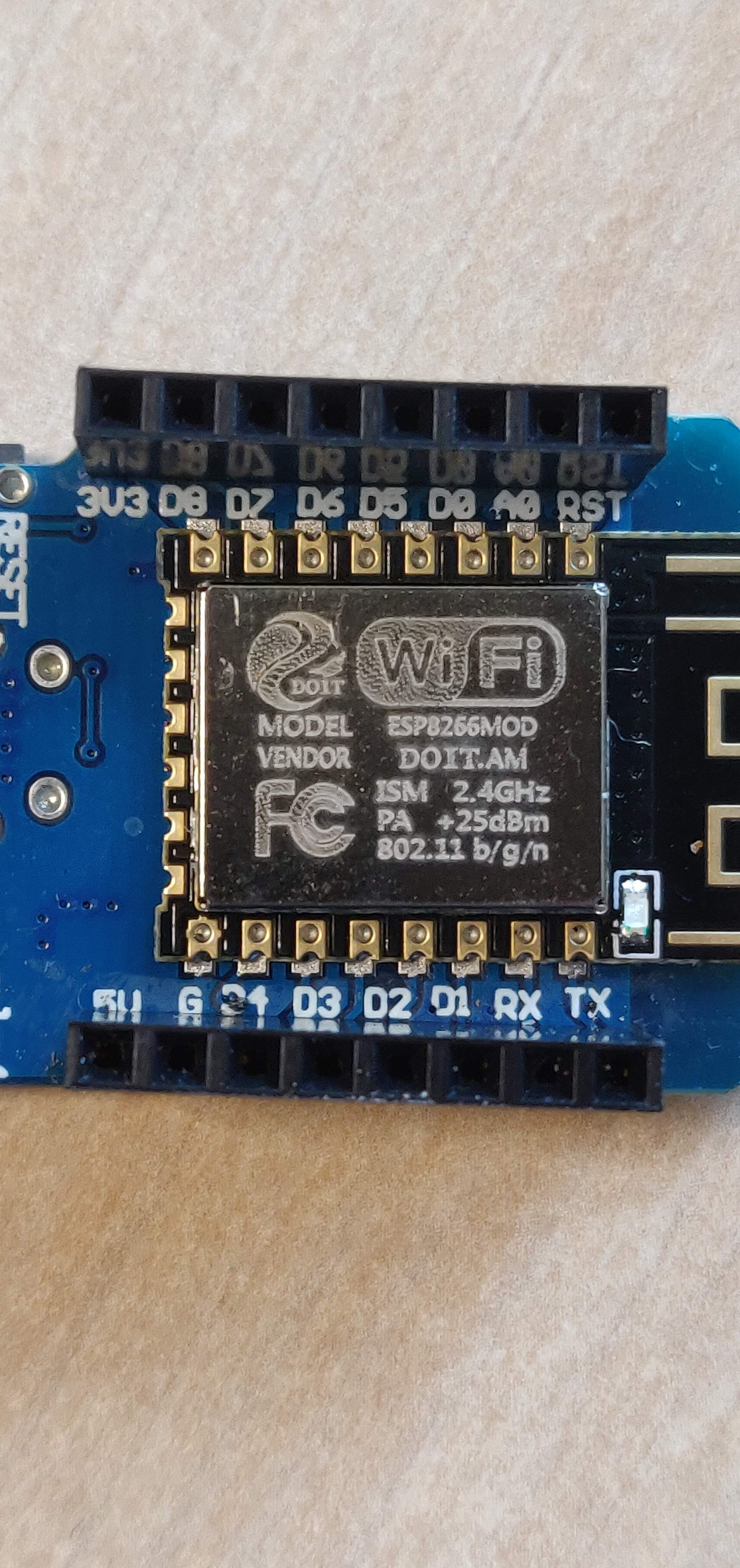
    This is what the board looks like up close - can anyone take a peek: https://photos.app.goo.gl/tBWyDVT9Ks8JPHi86
    As for this WAKE_RFCAL I have taken it to a lower level ie it also doesn't wake up in an app where there is no wifi. As far as programming goes, obviously there is no D0/RST jumper when uploading the app,
  • #5 18016046
    kaczakat
    Level 34  
    Posts: 1748
    Help: 317
    Rate: 229
    I recently had some crappy Wemos board, powered from USB it worked with varying degrees of efficiency, the problem was solved when I powered it directly to the 5V pin. Maybe you have one from the same series? I actually used it for a server with WIFI and after a random time it stopped working.
    Helpful post? Buy me a coffee.
  • #6 18016295
    Anonymous
    Level 1  
  • ADVERTISEMENT
  • #7 18016750
    sen_soltysa
    Level 10  
    Posts: 10
    Rate: 1
    I checked the external power supply (PIN G and PIN 5V) - the board works, but the effect is the same i.e. after connecting the power supply the application connects to the wifi, then I give the application deepsleep for 10 seconds, after this time you can see that the board wakes up (short LED flashing), but the connection to the wifi does not happen. So exactly the same as when powering up via USB.

    As for what is selected in the Arduino IDE, I have it set to: LOLIN(WEMOS) D1 R2 & mini.
    PS. I've tried refalsh - in both the factory firmware and Ai-Thinker exactly the same thing happens.
  • #9 18016801
    Anonymous
    Level 1  
  • #10 18016923
    kaczakat
    Level 34  
    Posts: 1748
    Help: 317
    Rate: 229
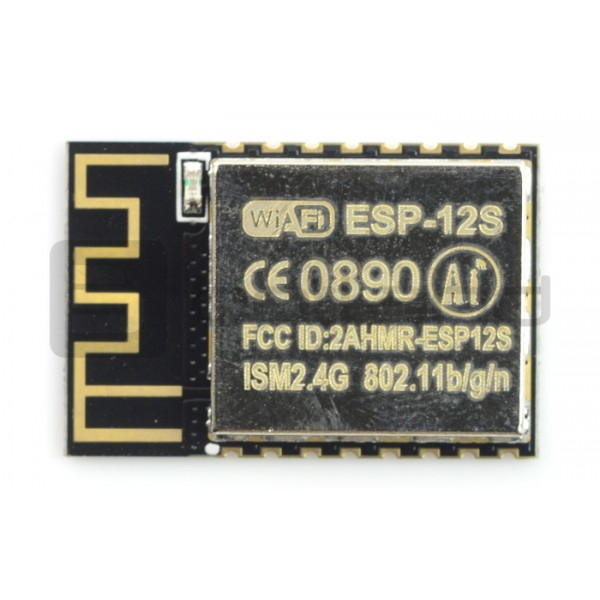
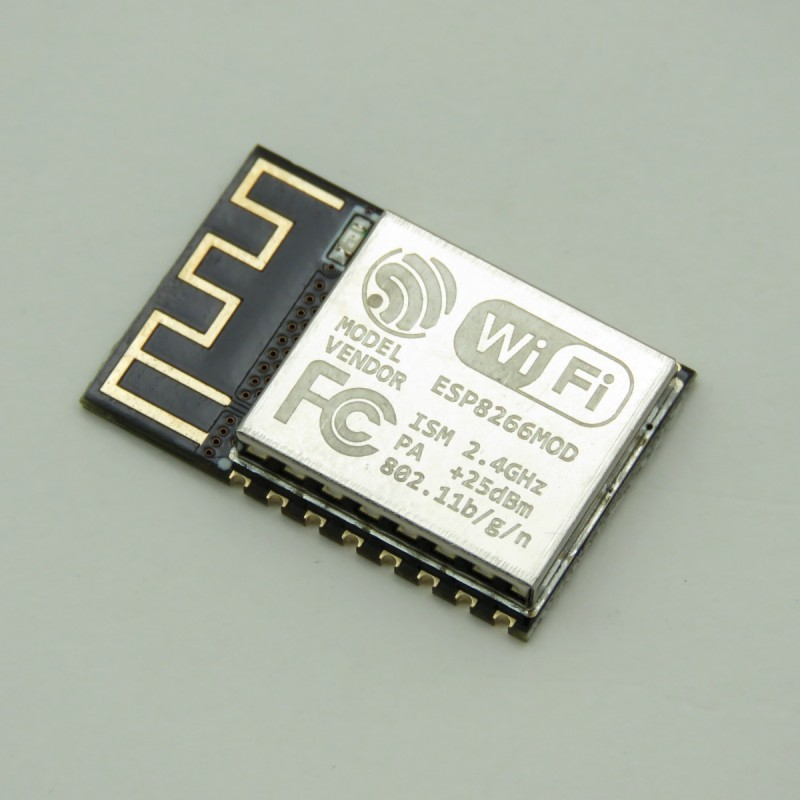
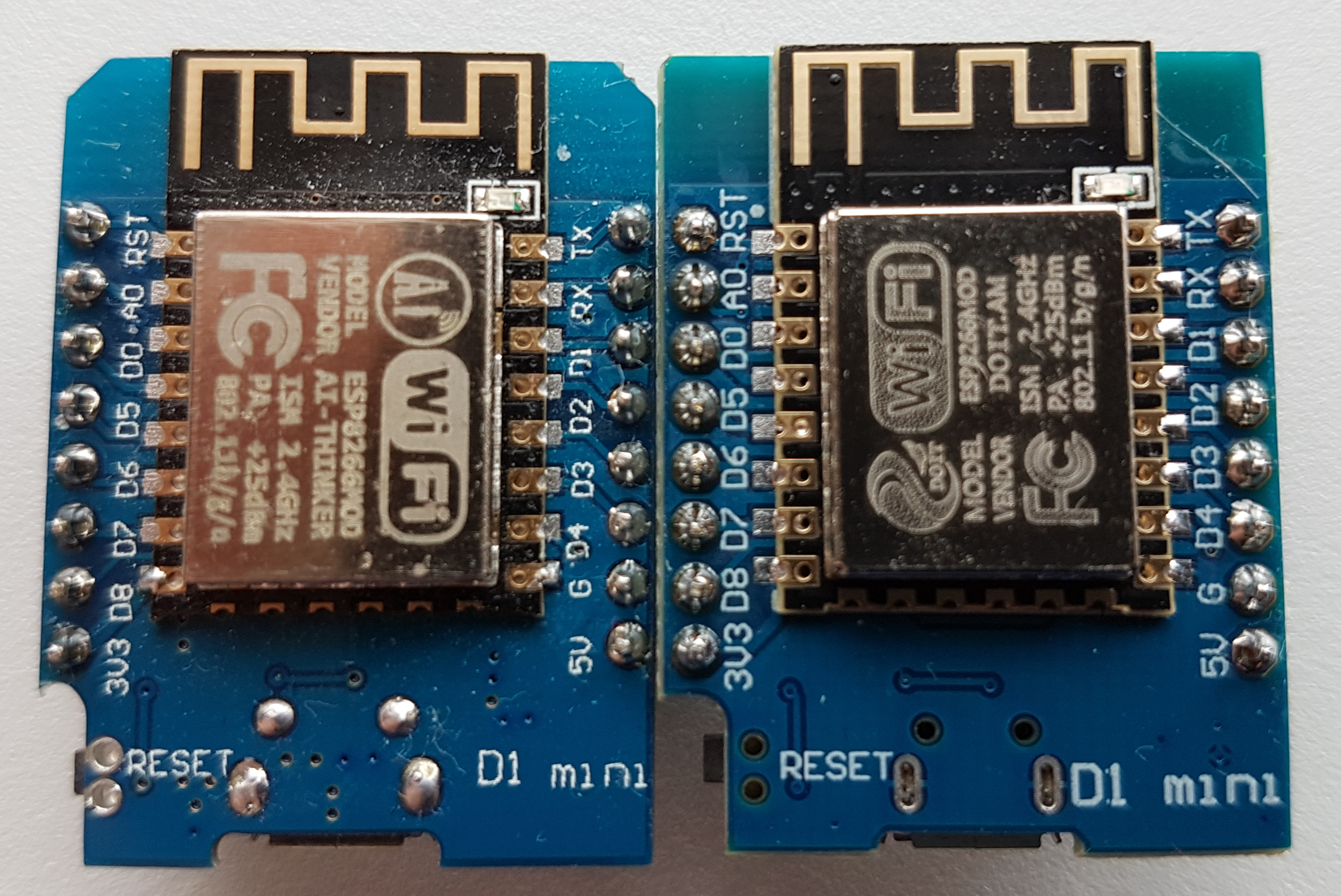
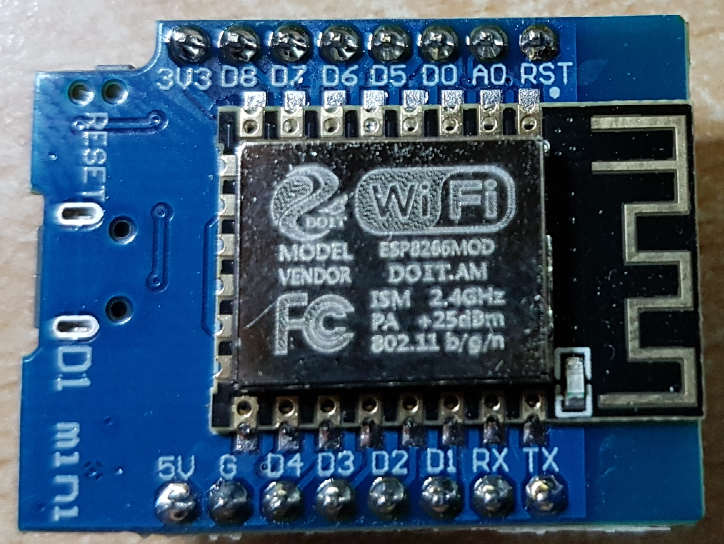
    You can't see much from your photo, but from what I've found out it's a hardware problem, take a peek if your ESP8266 looks like this:
    ESP8266 D1 mini fails to execute code after exiting deepsleep .
    well one of mine looks like this and there is the same problem with it. The reset signal from GPIO16 (D0) is too short and ineffective. Quite a few people have this problem, you will have to be careful when buying, https://github.com/esp8266/Arduino/issues/6007.
    Several people have replaced the Wemos mini board with the ESP module described DOIT - as in the photo above.
    Helpful post? Buy me a coffee.
  • ADVERTISEMENT
  • #11 18017046
    sen_soltysa
    Level 10  
    Posts: 10
    Rate: 1
    This is exactly the chip - DOIT.AM. I read the thread you provided and the same behaviour is described there.
    I can already see that I have to advertise this board to the dealer and look for another one.
    Thank you for providing this link!
  • ADVERTISEMENT
  • #12 18017137
    Anonymous
    Level 1  
  • #13 18017361
    sen_soltysa
    Level 10  
    Posts: 10
    Rate: 1
    I think mine is "EX" - This is what the Arduino IDE displays to me:

    esptool.py v2.6
    Serial port COM5
    Connecting....
    Chip is ESP8266EX
    Features: WiFi

    So the problem is probably wider than that.

    ESP8266 D1 mini fails to execute code after exiting deepsleep .
  • #15 18017407
    kaczakat
    Level 34  
    Posts: 1748
    Help: 317
    Rate: 229
    It's not likely to apply only to the ESP-12S since people are reporting problems with the ESP-12F there (that's where the thread started). It's also hard to tell from the logo on the tin how the chip will behave, as you can probably order with your design ( and necessarily with FCC lettering). It's half bad as I ordered one Wemos module at all in the last year, but some people bought 100 chips there and don't know what to do with them. The ESP-12S module is immediately recognisable from the casing, the flash pins are not routed to the bottom edge. I still have a soldered module on an ESP-12 board and that didn't wake up either, but it was the first one I bought and I just figured that type had it that way.
    Helpful post? Buy me a coffee.
  • #16 18017413
    Anonymous
    Level 1  
  • #17 18017548
    kaczakat
    Level 34  
    Posts: 1748
    Help: 317
    Rate: 229
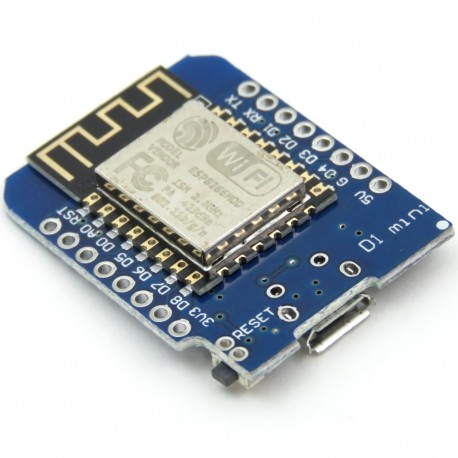
    I don't know, do you mean that you can recognise it by its appearance in the shop window? I also have a Wemos like the one in photo #16 and the wake-up works OK. There are ESP-12S modules sold on Ali and they are more expensive than ESP-12E or ESP-12F, maybe the economic value is noticed on a larger scale....
    ESP8266 D1 mini fails to execute code after exiting deepsleep .
    How do you know the one on the right won't work? The shape of the laminate because they saved will also not contribute anything, because I have one without cut corners and it also wake-up works.
    In addition, even if you look at it before you buy it, you still don't know what the module will actually look like. Also, he doesn't test the module immediately after unpacking, as with him with sleeping. But you will have to start.
    Helpful post? Buy me a coffee.
  • #18 18017570
    Anonymous
    Level 1  
  • Topic summary

    ✨ The discussion revolves around issues faced with the ESP8266 D1 mini board after exiting deep sleep mode. The user reports that the board fails to execute code post-deep sleep, displaying error messages related to reset causes. Various suggestions are provided, including adding delays before entering deep sleep, ensuring proper connections of GPIO pins to the power supply, and checking the board's power source. Users also discuss potential hardware issues, particularly with the ESP-12S module, which is known for unreliable performance. Recommendations include using different board settings in the Arduino IDE and considering alternative modules like the DOIT board for better reliability.
    Generated by the language model.

    FAQ

    TL;DR: If your Wemos D1 mini won’t run after deepsleep, note deep‑sleep current is ≈20 µA and “GPIO16 must be connected to the RESET pin” for wake to work. Some clones break this path. [ESP8266EX Datasheet]

    Why it matters: This FAQ helps makers fix ESP8266 deep‑sleep wake issues on D1 mini/clone boards for reliable, battery‑friendly projects.

    Quick facts:

    Quick Facts

    How do I fix a Wemos D1 mini that won’t execute code after exiting deepsleep?

    Wire D0 (GPIO16) to RST, add a short delay before sleeping, and use WAKE_RFCAL. How‑To: 1. delay(50) before deepSleep. 2. Call ESP.deepSleep(SLEEP_US, WAKE_RFCAL). 3. Jumper D0→RST; remove for uploading if needed. [Elektroda, kaczakat, post #18015954]

    Do I need to connect D0 (GPIO16) to RST for deepsleep wake on ESP8266?

    Yes. The RTC asserts GPIO16 low to reset the chip and exit deep‑sleep. Without D0→RST, the ESP8266 won’t auto‑resume. [ESP8266EX Datasheet]

    What do “rst cause:5” and “rst cause:2” mean on the serial log?

    Cause 5 indicates a wake from deep‑sleep. Cause 2 indicates an external reset, like pressing the RST button. [ESP8266 NONOS SDK API Reference]

    Which wake mode should I use: WAKE_RFCAL or WAKE_RF_DISABLED?

    Use WAKE_RFCAL for reliable Wi‑Fi rejoin after wake. WAKE_RF_DISABLED often fails to reconnect to the network. [Elektroda, kaczakat, post #18015954]

    Why does my board only start after I press reset twice?

    Some clones output a too‑short D0 reset pulse, so the first auto‑reset fails. “Reset signal from GPIO16 (D0) is too short and ineffective.” Replace the module or avoid that variant. [Elektroda, kaczakat, post #18016923]

    Is my DOIT.AM or ESP‑12S‑based D1 mini affected by deepsleep wake bugs?

    It can be. Reports link ESP‑12S variants to unreliable wake behavior. Avoid ESP‑12S modules when deep‑sleep is required. [Elektroda, khoam, post #18017137]

    Which Arduino IDE board profile should I select for Wemos D1 mini?

    Use LOLIN(WEMOS) D1 R2 & mini. If wake issues persist, try compiling with the Wemos D1 R1 profile. [Elektroda, khoam, post #18016801]

    Will reflashing firmware fix this wake problem?

    Unlikely. Users reported identical failures with factory and Ai‑Thinker firmware, indicating a hardware‑side issue. [Elektroda, sen_soltysa, post #18016750]

    Should I add pull‑ups to GPIO0 (D3) and GPIO2 (D4)?

    Yes. Ensure both are pulled up to 3V3; test with 10 kΩ resistors to stabilize boot strapping on suspect boards. [Elektroda, khoam, post #18015962]

    Is USB power a factor when ESP8266 fails after deepsleep?

    Yes. Some boards behave erratically on USB. Powering via the 5V pin improved stability during wake cycles. [Elektroda, kaczakat, post #18016046]

    What’s the typical deep‑sleep current on ESP8266, and why care?

    Typical deep‑sleep current is about 20 µA. This enables long battery life if wake and Wi‑Fi rejoin work reliably. [ESP8266EX Datasheet]

    What does “ESP8266EX” in esptool.py output mean?

    It’s the official name of the ESP8266 chip variant used on your module. This is normal and expected. [Elektroda, khoam, post #18017365]

    How can I tell if my issue is hardware, not code?

    Run a minimal sketch that prints, sleeps 10s, then wakes. If it logs cause:5 yet stalls until manual resets, suspect hardware. [Elektroda, sen_soltysa, post #18016750]

    Do I need to remove the D0→RST jumper when uploading sketches?

    Often, yes. Keep D0 connected to RST for wake, but remove that link during programming to avoid upload issues. [Elektroda, kaczakat, post #18015954]
    Generated by the language model.
    ADVERTISEMENT