logo elektroda
logo elektroda
X
logo elektroda

[Solved] Title: Huawei B818 on Play Network: Best Antenna for 2600 LTE & 1.9 km BTS Distance

lalek63 14103 42
Best answers

What external antenna should I buy for a Huawei B818 to improve Play LTE 2600 reception at 1.9 km from the BTS?

You probably do not need a new antenna yet; the B818 already shows very good LTE2600/LTE2100 signal, so the limitation is more likely BTS load and aggregation behavior than antenna gain [#18622885][#18686937] If you still want an external antenna, the thread recommends a dual-polarized MIMO antenna for 1800-2600 MHz, such as the Cybertech LTE-A 4G 17 dBi or a similar model, with the correct Huawei B818 TS9 adapters [#18645290][#18622905] Use a good low-loss 5 m cable such as LMR400, because connectors and RF cable losses on high bands can easily cost 1-3 dB or more [#18645756][#18644683] Test it in the evening hours and compare single-band results with LTEInspecteur or HManager; force LTE2600, LTE2100 and LTE1800 aggregation, and skip LTE800 because it is usually congested [#18645077][#18622885][#18645290] The thread’s conclusion was that the window-sill/no-antenna setup may already be close to optimal, so the best improvement may come from band testing and placement rather than changing antennas [#18686937]
Generated by the language model.
ADVERTISEMENT
Treść została przetłumaczona polish » english Zobacz oryginalną wersję tematu
  • #31 18646480
    lalek63
    Level 6  
    Posts: 57
    Rate: 25
    Above are the photos, it follows from the same BTS
  • ADVERTISEMENT
  • #32 18656356
    lalek63
    Level 6  
    Posts: 57
    Rate: 25
    I ordered the antenna, cybertech 1800-2600, greetings and thanks.
  • #33 18684271
    lalek63
    Level 6  
    Posts: 57
    Rate: 25
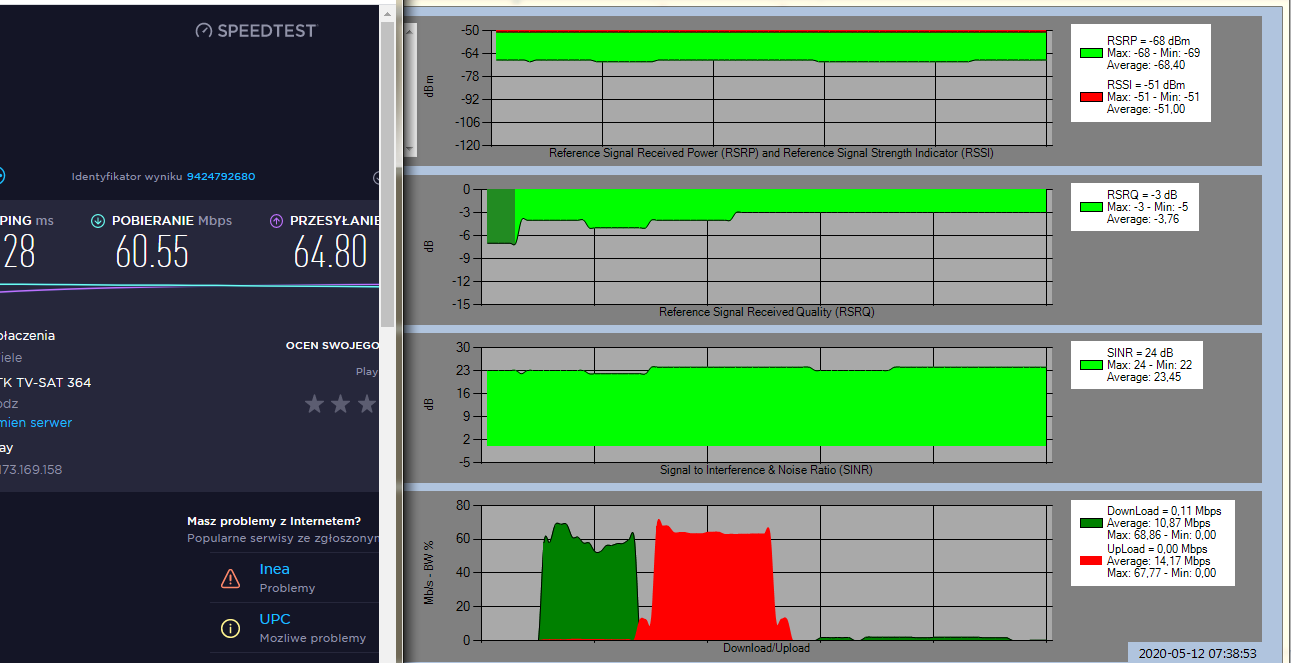
    I go back to the topic, I set up a cybertech 1800-2600 antenna and the speed was much worse than without the antenna and even with soresen. I aimed as best I could. What could be wrong?
    Attachments:
    • Title: Huawei B818 on Play Network: Best Antenna for 2600 LTE & 1.9 km BTS Distance 2020-05-11_09h57_40.png (109.8 KB) You must be logged in to download this attachment.
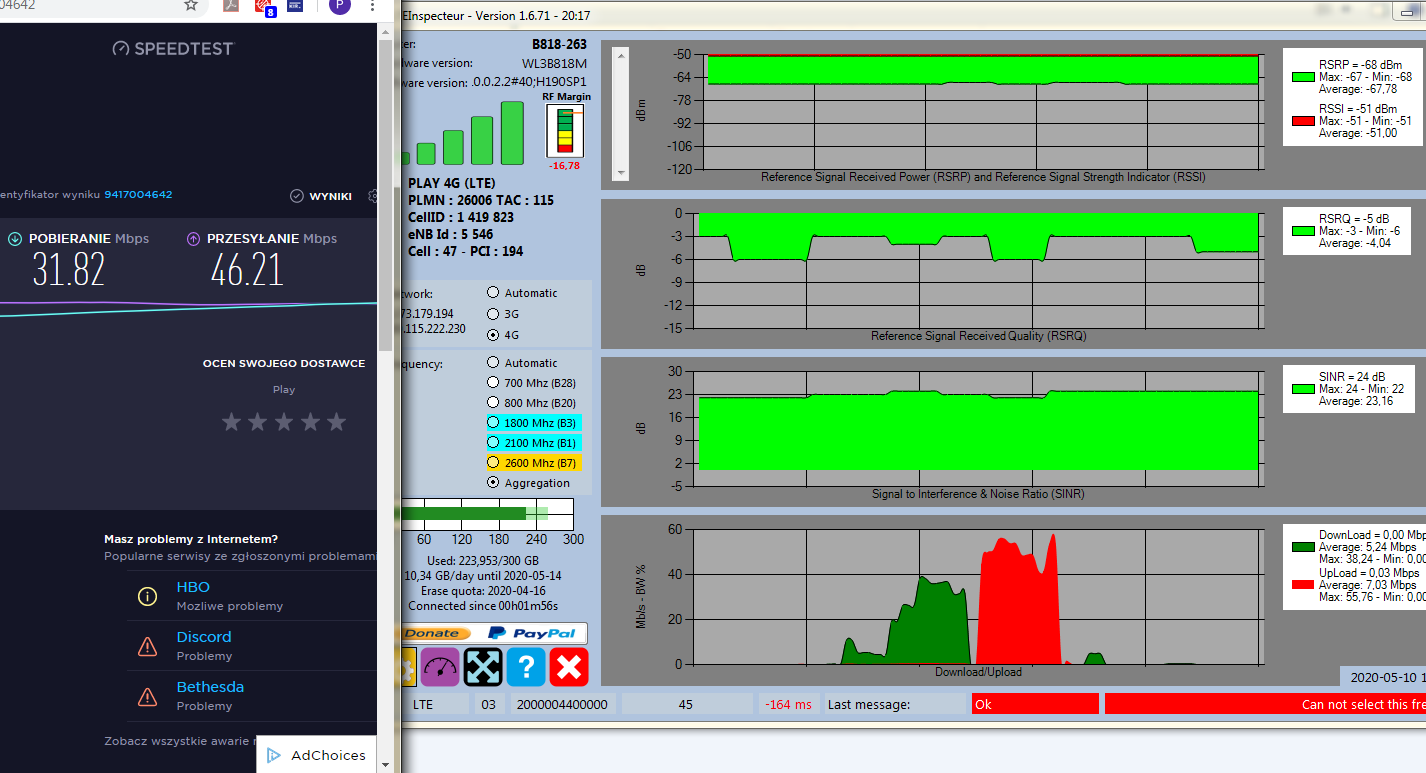
    • Title: Huawei B818 on Play Network: Best Antenna for 2600 LTE & 1.9 km BTS Distance 2020-05-10_19h05_24.png (126.81 KB) You must be logged in to download this attachment.
  • ADVERTISEMENT
  • #34 18686635
    lalek63
    Level 6  
    Posts: 57
    Rate: 25
    and such a measurement in the morning. Take a look at the parameters and tell me what could be wrong with the antenna in terms of download speed. Upload speed has improved significantly,
    Attachments:
    • Title: Huawei B818 on Play Network: Best Antenna for 2600 LTE & 1.9 km BTS Distance 2020-05-12_07h39_11.png (75.47 KB) You must be logged in to download this attachment.
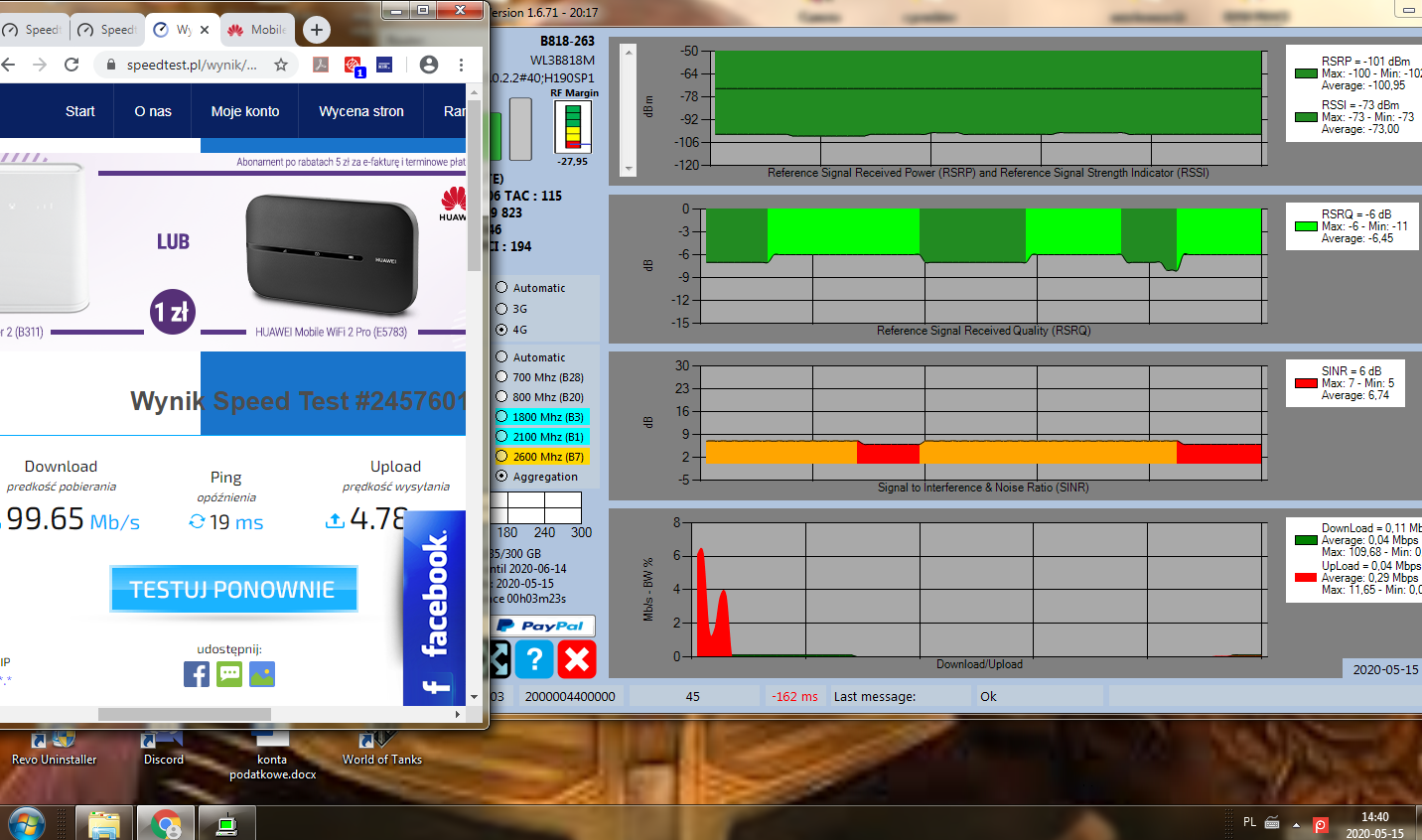
  • Helpful post
    #35 18686937
    Anonymous
    Level 1  
  • ADVERTISEMENT
  • #36 18695098
    lalek63
    Level 6  
    Posts: 57
    Rate: 25
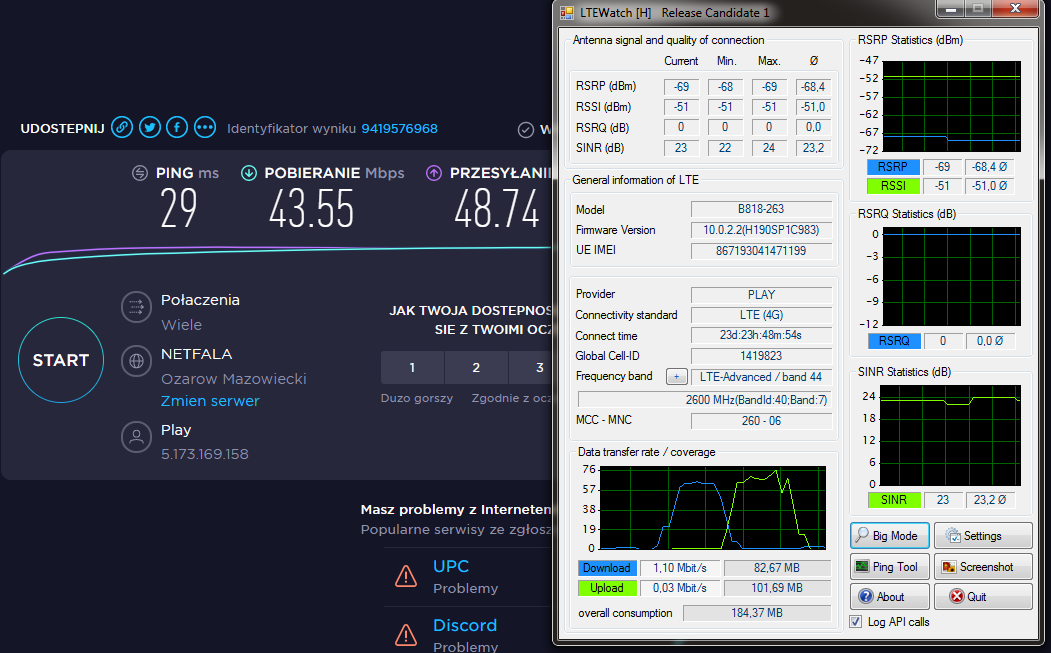
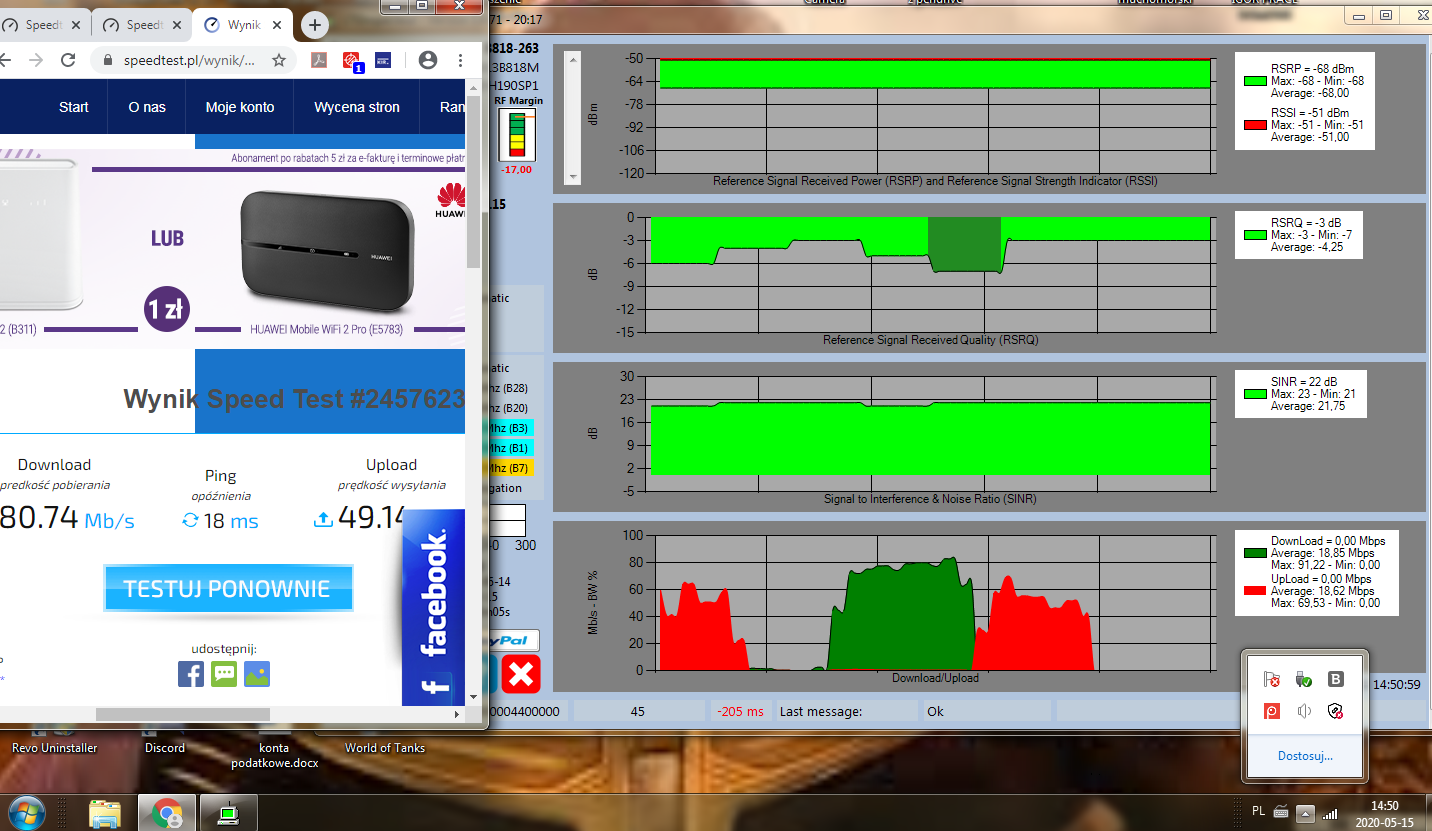
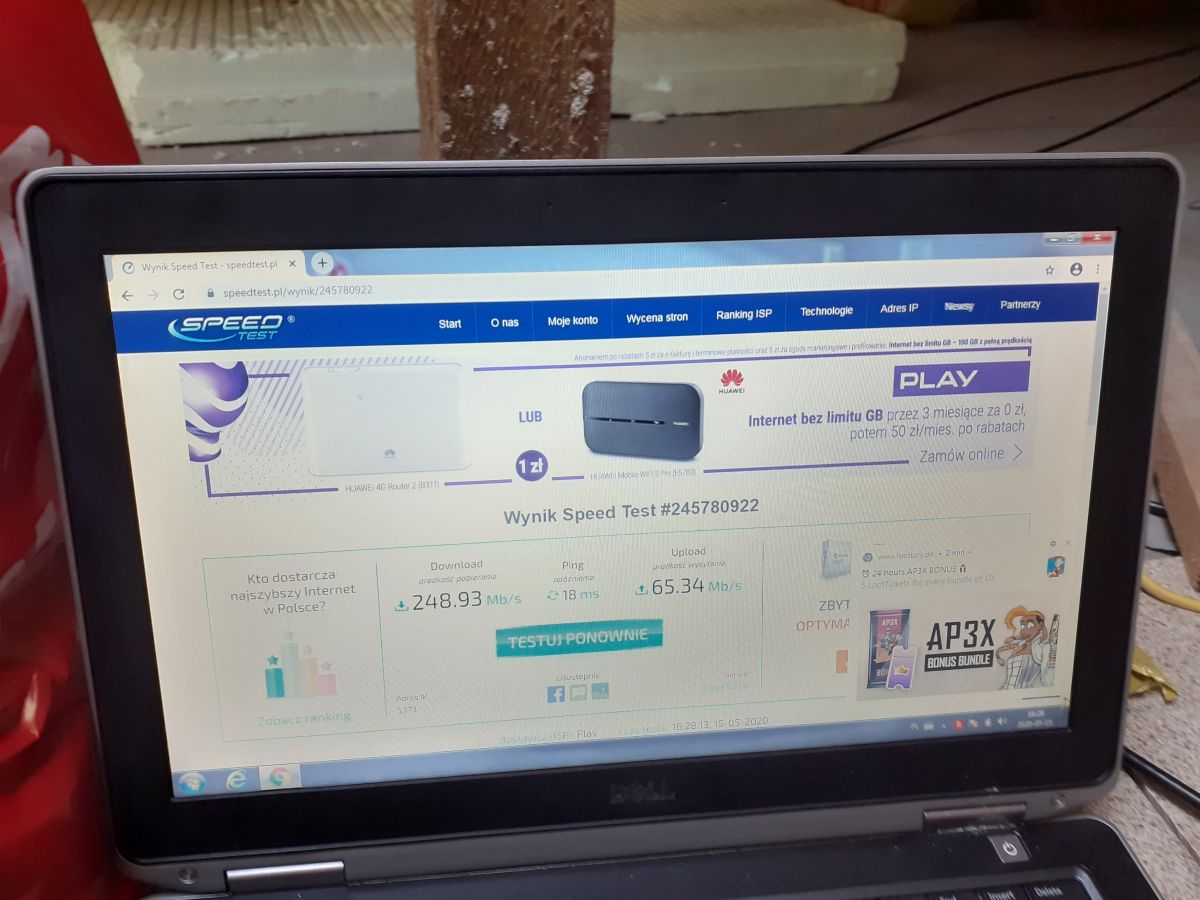
    okay gentlemen, I take the ladder off the roof, it stays as it is, but I still can't understand how the modem on the windowsill achieves higher speeds than the antenna. Pictures below at the same time.
    1. window sill, ground floor
    Title: Huawei B818 on Play Network: Best Antenna for 2600 LTE & 1.9 km BTS Distance
    2nd antenna
    Title: Huawei B818 on Play Network: Best Antenna for 2600 LTE & 1.9 km BTS Distance
    I thought that with the antenna it would raise to 150 maybe :(
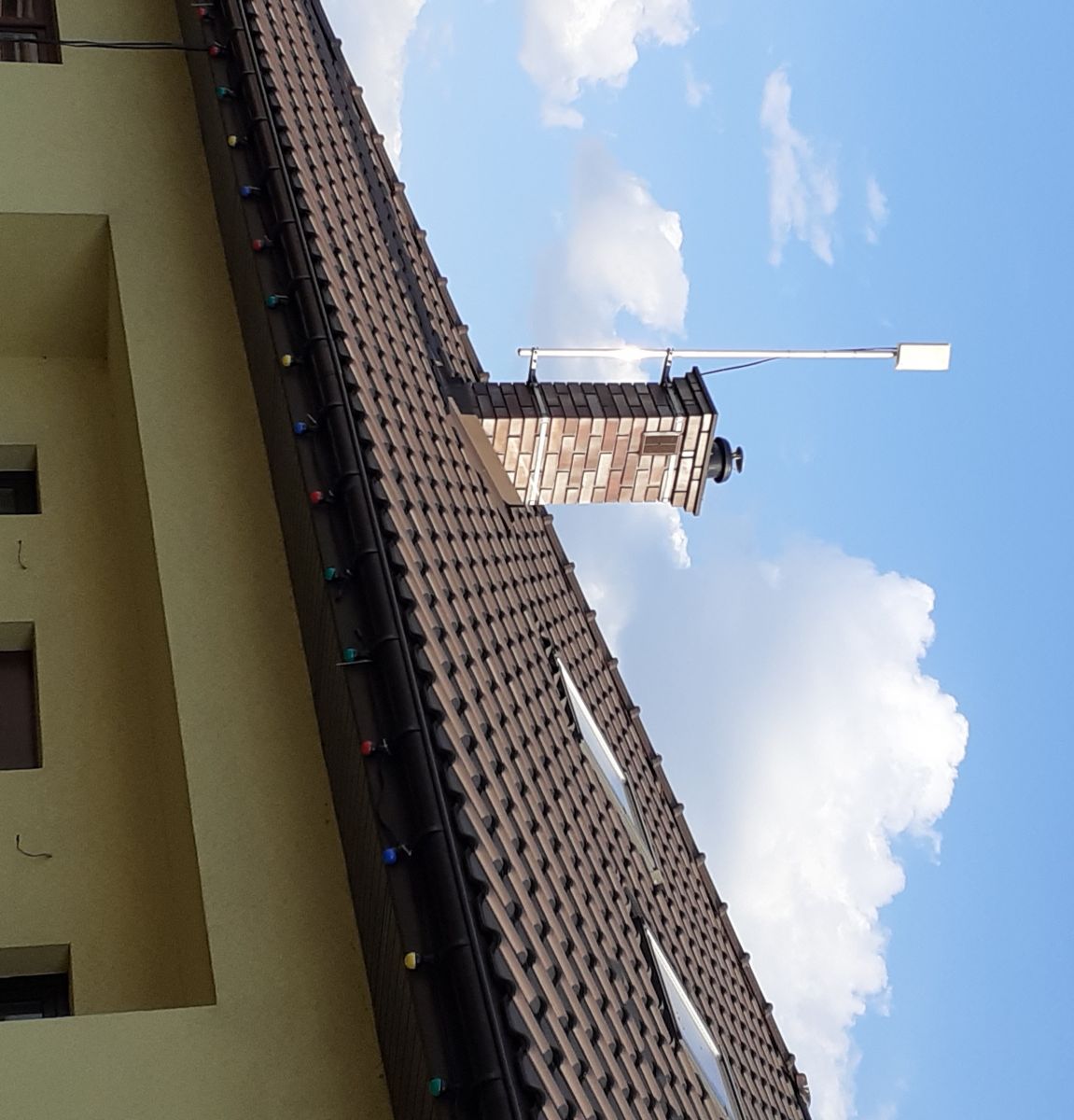
    3. old antenna
    Title: Huawei B818 on Play Network: Best Antenna for 2600 LTE & 1.9 km BTS Distance
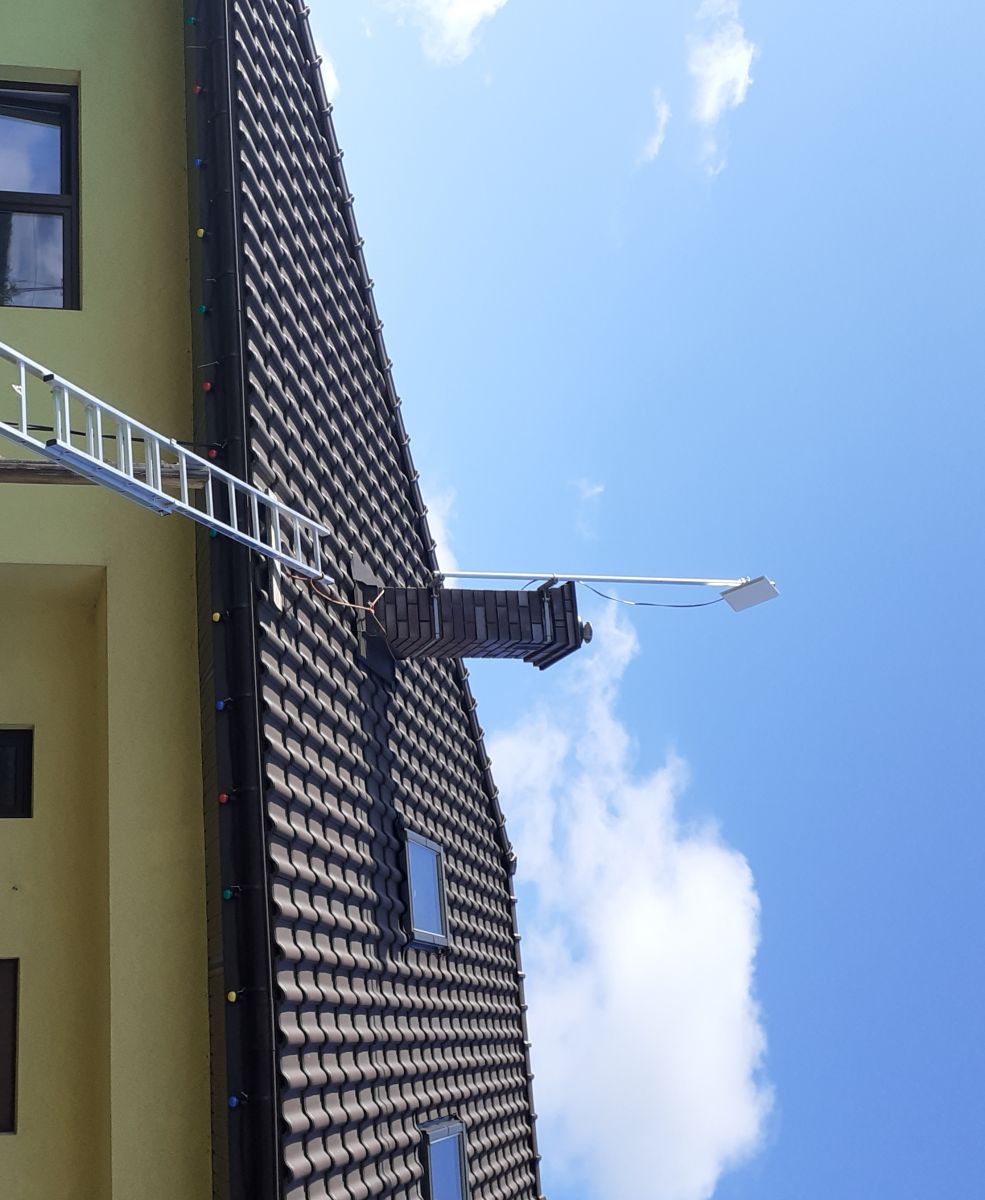
    4. new antenna
    Title: Huawei B818 on Play Network: Best Antenna for 2600 LTE & 1.9 km BTS Distance
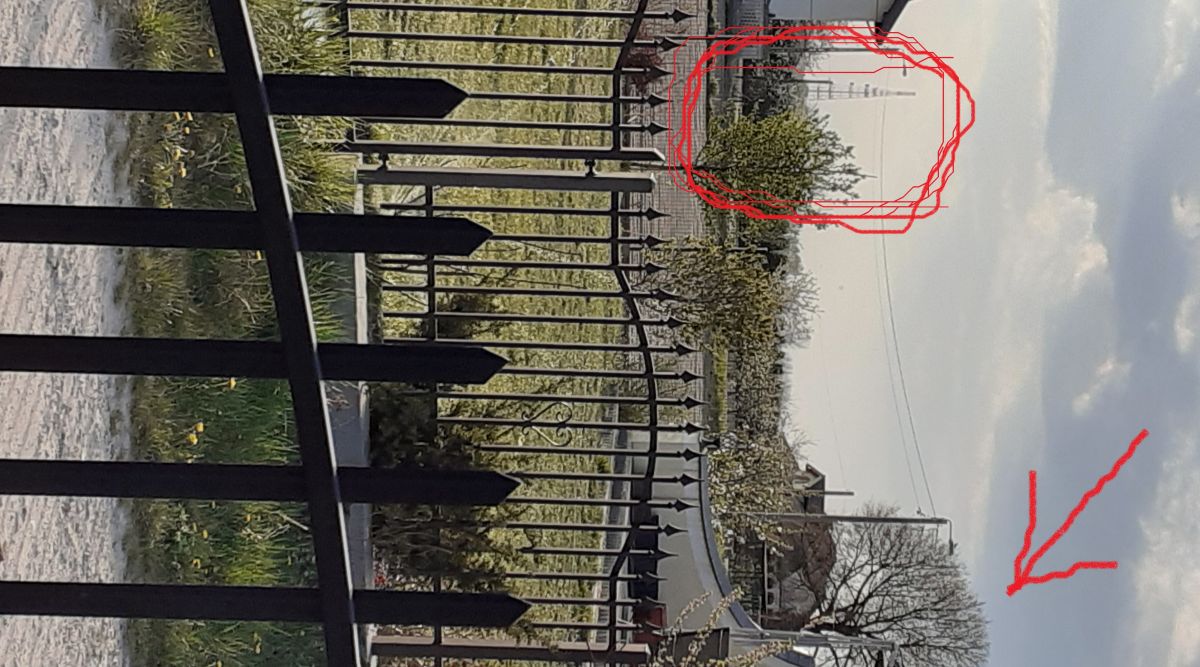
    5. the tree that grows centrally in front of the mast, maybe it's because of it heheh :D
    I exhausted the topic, I thought it would be faster internet with an antenna than without.

    Added after 47 [seconds]:

    Title: Huawei B818 on Play Network: Best Antenna for 2600 LTE & 1.9 km BTS Distance

    I will only check the last thing, but not today, I will go with the laptop to the attic, connect the cable to the router and check the speed, because from the router with the cable I have the net to the modem and from it in the chat and I found that with the modem about 20 mega faster than directly from the router, because the signal is weaker.
  • #37 18695159
    Anonymous
    Level 1  
  • #38 18695167
    lalek63
    Level 6  
    Posts: 57
    Rate: 25
    TP-Link WR-841N

    Added after 2 [minutes]:

    _cheetah_ wrote:
    BTS trims you on DL on external antennas as a heavy-caliber heavy user, knowing how great you got on the antennas and how much you could pull off of them.
    You've been calling me from Play for a week now, and you'll hear it :)

    And how do they know what parameters I have, some habits from the previous years, they need to know everything heheh

    in the internet contract I have 300gb, which I am not even approaching, why are they cutting me?
  • #39 18695189
    Anonymous
    Level 1  
  • #40 18695193
    lalek63
    Level 6  
    Posts: 57
    Rate: 25
    yes, with a router for wifi.

    Added after 1 [minutes]:

    but with this router it is so that now when you connect to it via wifi it is 20 less than after the modem, the wifi signal strength is 3/4 dash because it is on the ceiling
  • #41 18695200
    Anonymous
    Level 1  
  • ADVERTISEMENT
  • #42 18695205
    lalek63
    Level 6  
    Posts: 57
    Rate: 25
    ok, thanks, although I already know that I did the right thing mechanically, I just wanted to make sure that I did the best I could, I take the ladder off and let go of this topic from my construction site.

    Added after 36 [minutes]:

    buddy, you were very right, I connected the router to my laptop and measured the speed, and this is what I would like to have around the apartment
    Title: Huawei B818 on Play Network: Best Antenna for 2600 LTE & 1.9 km BTS Distance
    will you tell me what can I improve?
  • #43 20143859
    lalek63
    Level 6  
    Posts: 57
    Rate: 25
    I set up a cybertech LTE-A/LTE/4G/3G antenna in the 1800-2600 MHz band plus an Archer TX3000E and speeds of 300Mbs with a ping of 4-9.

Topic summary

✨ The discussion revolves around optimizing the internet connection using a Huawei B818 router with a Play Network LTE service, specifically at a distance of 1.9 km from the nearest BTS. The user initially experienced poor speeds with a chimney antenna and sought advice on a suitable antenna for LTE 2600. Various responses suggested using a dual antenna with oblique polarization for the 1800-2600 MHz range, along with necessary connectors for the B818's TS9 ports. The user reported mixed results after installing a new Cybertech antenna, experiencing lower speeds compared to the router placed on a windowsill. The conversation highlighted the importance of signal parameters, potential bandwidth limitations from the BTS, and the impact of environmental factors on signal quality.
Generated by the language model.

FAQ

TL;DR: At 1.9 km you already see ~100 Mbps download on the Huawei B818 stock antennas [Elektroda, Raycoreti, post #18622925] “Don’t buy a new antenna for now” [Elektroda, matek451, post #18622885] Add a dual-MIMO 17 dBi 1800-2600 MHz panel only for uplink boosts.

Why it matters: Correct kit selection stops you wasting €100-€150 on unnecessary hardware.

Quick Facts

• Huawei B818-263: LTE Cat 19, 4×4 MIMO on band 7 (2 600 MHz), peak 1.6 Gbps [Huawei, 2020] • External ports: 2× TS9; pair of TS9-to-SMA pigtails ≈ 15 PLN [Elektroda, matek451, post #18622912] • Cybertech dual-17 dBi panel: 1800-2600 MHz, gain 12-17 dBi, price ≈ 249 PLN [Cybertech, 2023] • 5 m LMR400 coax attenuates ~0.6 dB at 2.6 GHz [Times Microwave, 2021] • Evening (19-22 h) Play LTE throughput can fall by 40-60 % versus morning [Elektroda, Range1, post #18645290]

1. Which antenna gives the best results for Play’s 2600 MHz band at ~2 km?

A dual-polarised 17 dBi panel covering 1800–2600 MHz (e.g., Cybertech) pairs well with the B818 and supports 2×2 MIMO aggregation of 2600 + 1800 + 2100 MHz [Elektroda, Range1, post #18645290]

2. Do I really need an external antenna at 1.9 km?

Probably not for download: internal antennas already deliver ~100 Mbps [Elektroda, Raycoreti, post #18622925] Add an outdoor panel only when you need a stronger, more stable uplink or roof-level installation.

3. What adapters and cable should I order?

Buy two TS9-to-SMA pigtails plus 5 m of low-loss LMR400; total link loss stays under 1 dB @ 2.6 GHz [Times Microwave, 2021; Elektroda, matek451, #18622912].

5. How do I test individual LTE bands on a Huawei B818?

Use LTEInspecteur or HManager.
  1. Select the router IP, click “Bands”.
  2. Tick only band 7, 3 or 1 and apply.
  3. Run a speed-test, record DL/UL, then repeat for each band. [Elektroda, matek451, post #18622885]

7. Could my TP-Link WR-841N be the bottleneck?

Yes. Its 100 Mbps LAN/WAN limits wired or Wi-Fi throughput to ~95 Mbps; bypass it when measuring >100 Mbps links [Elektroda, cheetah, post #18695189]

8. How should I aim a MIMO panel quickly?

Point the front face toward the BTS, then rotate ±10° while watching RSRP in LTEInspecteur; stop at the highest SINR. Tighten brackets once both polarised leads read within 2 dB of each other.

9. How can I verify if my self-crimped coax is still good?

Check DC continuity and short-to-shield with a multimeter [Elektroda, cheetah, post #18644683] If speeds fluctuate >20 %, inspect for kinks; even a 1 mm nick can raise loss by 0.5 dB on 2600 MHz.

10. What edge case gives perfect signal but slow speed?

Heavy evening congestion: RSRP −65 dBm and SINR 20 dB looked ideal, yet speed dropped below 40 Mbps because the BTS was saturated [Elektroda, Range1, post #18645290]

11. How much data can I burn on Play LTE plans?

Current Play contracts offer 300 GB base with +100 GB for 20 PLN; users rarely exhaust it when phones contribute 80 GB more [Elektroda, lalek63, post #18622929]

12. Will this 1800-2600 MHz antenna work for 5G?

It covers LTE bands 3/7 but misses 5G n78 (3.5 GHz). You’ll need a 3300-3800 MHz panel for full 5G later [“3GPP NR bands”].
Generated by the language model.
ADVERTISEMENT