logo elektroda
logo elektroda
X
logo elektroda

[Solved] Configuring Razer Sila Router with T-Mobile Optical Fiber: GPON, Bridge Mode, and Equipment

Garoz666 67752 67
Best answers

Can I use my Razer Sila router with T-Mobile fiber, and what equipment and settings are needed for the connection (GPON/ONT, bridge mode, PPPoE, VLAN)?

No—you should not buy your own GPON device; T-Mobile’s fiber uses an operator-provided ONT, and your router connects behind it over Ethernet, not directly to the fiber [#18970322][#18972857] The Internet link is configured as PPPoE with VLAN ID 35, using the login and password from the contract/SMS, and one user noted VLAN priority 0 as well [#19032433][#19012002][#19012029] So the router must support PPPoE and 802.1Q/VLAN tagging; 802.1Q is the VLAN standard [#19011942][#18972896] A user checked the Razer Sila and found that it does not support PPPoE, so it will not work for this T-Mobile fiber service [#19041422] T-Mobile support was also reported to say their supplied routers do not support bridge mode, so the practical setup is ONT + a compatible router rather than trying to bridge the fiber device [#19007598]
Generated by the language model.
ADVERTISEMENT
Treść została przetłumaczona polish » english Zobacz oryginalną wersję tematu
  • #61 19045315
    Garoz666
    Level 5  
    Posts: 44
    Rate: 22
    bbartek93 wrote:
    Te Link + is something like Mesh. It's always better to do APka by cable, if you want to put the floor below.


    Unfortunately, with the cable it is a revolution for half of the house, and in addition I have no one to do it to me properly, so either Link + or a wi-fi amplifier is at stake.

    Well, I have a second, say, Huawei AX3 and after unpacking, I first do its normal start, the so-called first start, e.g. by connecting via WAN to the current Huawei AX3, it updates the firmware and what should I do to make it work after Link + the second because the instructions in the box do not I can find nothing but a quick start-up of the router?
  • ADVERTISEMENT
  • #62 19045632
    bbartek93
    Level 16  
    Posts: 110
    Help: 19
    Rate: 29
    Nie używam tego, ale według Huaweia powinno samo się wszystko skonfigurować jak włączysz tę opcję na obydwu urządzeniach.

    Quote:
    Smart configuration: The network configurations of all devices connected to the HUAWEI Link+(formely HiLink) network can be managed using the router. You only have to make configuration changes on the main router and the changes will be automatically synchronized on all devices connected to the HUAWEI Link+(formely HiLink) network. Having to change configurations on all devices is finally a thing of the past.
  • ADVERTISEMENT
  • #63 19046359
    Garoz666
    Level 5  
    Posts: 44
    Rate: 22
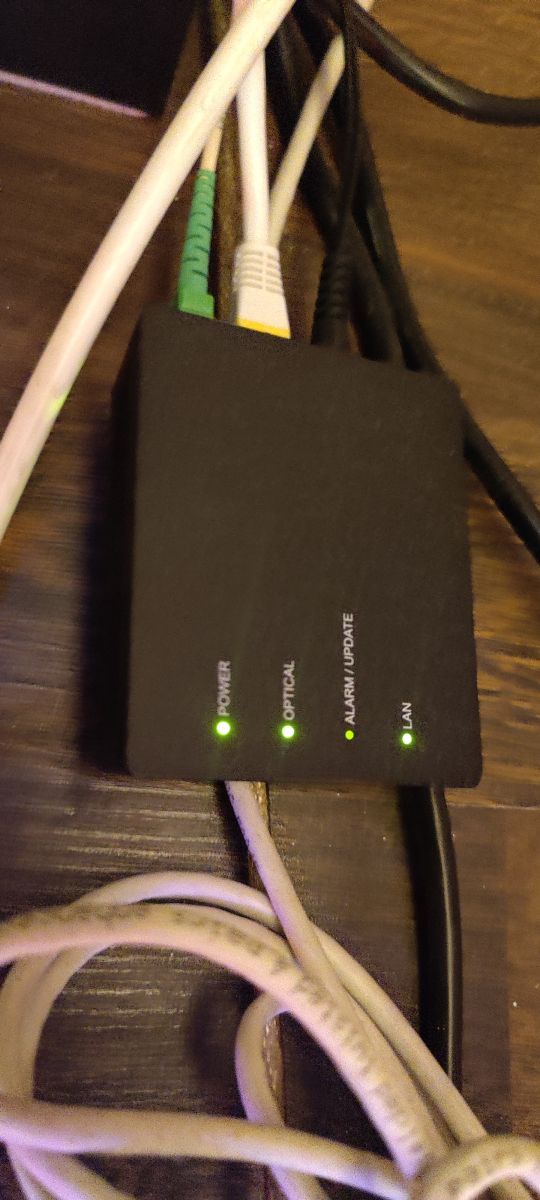
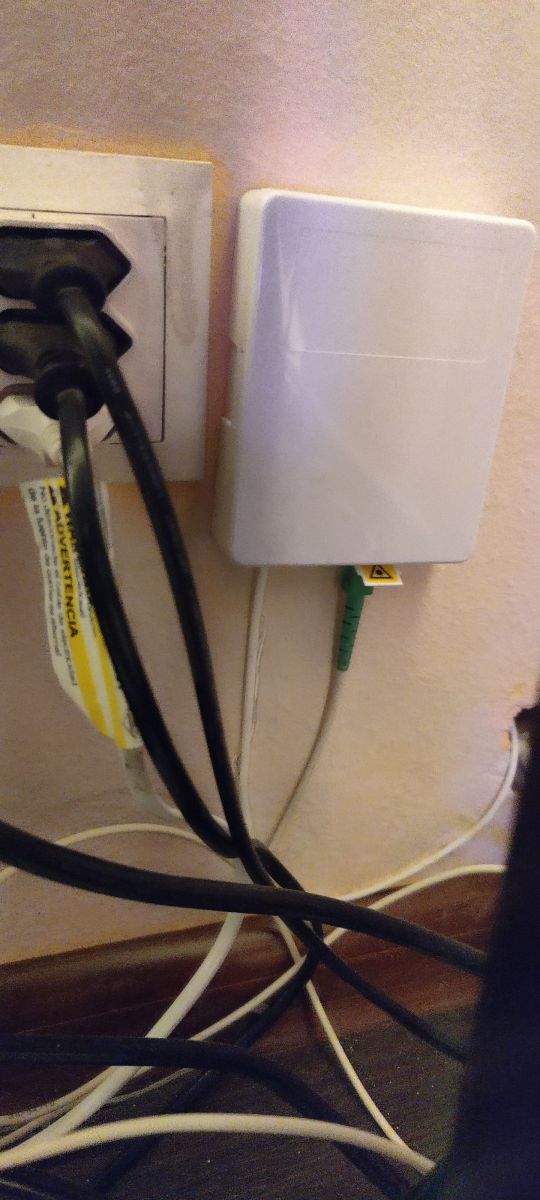
    Could someone show a picture of what this "Optical Termination of a Fiber Optic Network" looks like
    ONT "from T-Mobile from those that T-Mobile has already connected to them? I would like to know what it is about and what it looks like.
  • #64 19051266
    bbartek93
    Level 16  
    Posts: 110
    Help: 19
    Rate: 29
    A bit poor photos because it's dark under the desk and a bit of shit with the cables .. But you know what's going on :D

    1. Nest
    Configuring Razer Sila Router with T-Mobile Optical Fiber: GPON, Bridge Mode, and Equipment
    2.Terminal ONT
    Configuring Razer Sila Router with T-Mobile Optical Fiber: GPON, Bridge Mode, and Equipment
  • ADVERTISEMENT
  • #65 19051777
    Garoz666
    Level 5  
    Posts: 44
    Rate: 22
    A mess indeed :D At least I would pinch them with titles because it would piss me off :D
    Thanks for the photo, and the ONT white does not fit nicely ?? :D :D Mine likes everything white :D

    From about 7th grade in elementary school I had Neostrada then and now LTE, with about 600Mb / s, I will want to download the entire internet :D :D

    One week of waiting and it will be fun at home :P Half a year ago, I found it impossible that he would live :D 100-120 meters from the road they have to lead to a single-family house and so on and for free, but Santa will be earlier this year :D

    Thanks to everyone for the discussion, I will gladly share my impressions of the warmth, because they are the most important :)
  • Helpful post
    #66 19052839
    bbartek93
    Level 16  
    Posts: 110
    Help: 19
    Rate: 29
    I don't know if they have white, Orange definitely used white ONT too, you would have to ask.
    And I have a mess in the cables, because I painted the room recently, unbuttoned everything and moved and I do not want to take too much and improve the cable. :D
  • ADVERTISEMENT
  • #67 19054720
    Garoz666
    Level 5  
    Posts: 44
    Rate: 22
    And the dream spell broke like vodka after dinner :D

    T-Mobile has postponed installations for February 2021 for technical reasons. Sołtysowa, they are pushing contracts for optical fiber from the entire village, mainly T-Mobile, and there is no optical cable in the entire village and there are currently tenders for laying the cable in the village, but when and if anyone will win them, nobody knows.

    Also after the weekend, he will probably resign from the contract because there is no point in keeping it.

    Tell me because I have a Huawei B818 and AX3, or if I do the main one with B818, this Link + AX3 will detect it and what is possible from the data, it will download and get along, or not necessarily? Both have this Link + in the settings.
  • #68 19056135
    Garoz666
    Level 5  
    Posts: 44
    Rate: 22
    The problem with the configuration of the optical fiber on a router other than the suppliers from T-Mobile, solved in the topic.

Topic summary

✨ The discussion revolves around configuring a Razer Sila router with T-Mobile's optical fiber service, specifically addressing the use of GPON technology and the need for Bridge Mode. Users express uncertainty about the equipment provided by T-Mobile, particularly whether it supports Bridge Mode and how to connect their own routers. The conversation highlights the importance of understanding the ONT (Optical Network Terminal) setup, the necessity of VLAN configuration (specifically VLAN ID 35), and the implications of using PPPoE for internet connectivity. Users share experiences with T-Mobile's service, noting that it often operates behind NAT with private IP addresses, complicating port forwarding and external access. The discussion also touches on the performance of various routers, including the Razer Sila, and the potential need for additional equipment to enhance Wi-Fi coverage.
Generated by the language model.

FAQ

TL;DR: 90 % of T-Mobile fibre installs use INEA back-haul [Elektroda, Garoz666, post #19041898]; “Login and password PPPoE, VLAN ID 35 and that’s it” [Elektroda, bbartek93, post #19032433] Configure PPPoE on VLAN 35 or switch the operator router to Bridge Mode to unlock the full 900 Mb/s line.

Why it matters: Mis-configuring VLAN 35 or skipping PPPoE leaves the link completely offline.

Quick Facts

• Operator keeps the GPON ONT; subscriber may only add a router behind it [Elektroda, Anonymous, post #18970322] • Internet VLAN ID 35, Priority 0 [Elektroda, Garoz666, #19011997; #19012029] • Access uses PPPoE plus 802.1Q tagging; both must be in the router [Elektroda, Garoz666, post #19007598] • T-Mobile “Standard” & “Premium” routers still lack Bridge Mode (Oct 2020) [Elektroda, Garoz666, post #19007598] • Measured speed on 900/300 plan: 620 Mb/s down, 91 Mb/s up [Elektroda, Garoz666, post #19041861]

Can I replace the T-Mobile GPON with my own device?

No. T-Mobile retains the GPON ONT for security, monitoring, and remote diagnostics [Elektroda, Anonymous, #18970322; WMichał, #18970753]. You may only connect your own Ethernet router behind the ONT.

Do the supplied T-Mobile routers support Bridge Mode?

As of October 2020 the operator’s Standard and Premium units do not offer Bridge Mode [Elektroda, Garoz666, post #19007598] You must double-NAT or add your own PPPoE router behind them.

Which consumer routers are confirmed compatible?

TP-Link Archer C9, Huawei AX3 Dual- and Quad-Core both authenticate at 900 Mb/s after applying PPPoE + VLAN 35 [Elektroda, bbartek93, #19032433; #19041828].

How can I verify if my address is public or private?

Compare the WAN address shown in your router with whatismyip.com. Matching values mean public IP. A mismatch—typically router 100.64.x.x vs. website 46.x.x.x—indicates NAT [Elektroda, -Zuzia, post #19028579]

What cable grade do I need for 600 Mb/s?

Cat 5e handles 1 Gb/s when undamaged and under 100 m [Elektroda, Anonymous, post #19012747] Choose Cat 6a if you’re rewiring for future 2.5 Gb/s services.

What does the ONT look like and where is it placed?

The installer mounts a wall-plate fibre socket, then connects a small white or black ONT box that exposes one RJ-45 Gigabit port [Elektroda, bbartek93, post #19051266]

How do I create a Huawei Link+ (Mesh) network without extra cabling?

  1. Turn on Link+ on both AX3 units. 2. Place the second router within Wi-Fi range; power it. 3. Wait until LEDs steady—settings (SSID, password, schedule) sync automatically [Huawei Guide].

What real-world performance can I expect?

Users report 92 MB/s downloads on Origin and ~70 MB/s on Steam, with stable 10–20 ms pings to Valve Luxembourg [Elektroda, bbartek93, #19032433; #19035782].

Edge case: what if my router lacks 802.1Q or PPPoE?

The session cannot authenticate, leaving you with no internet. This occurred with Razer Sila, forcing its return [Elektroda, Garoz666, post #19041422]

How do I perform a basic speed-test checklist?

  1. Connect a Gigabit PC via Cat 5e/6 to the router. 2. Disable Wi-Fi to avoid wireless bottlenecks. 3. Run three tests on speedtest.net’s nearest INEA server; average the results. Any sustained rate below 550 Mb/s merits a support ticket.
Generated by the language model.
ADVERTISEMENT