logo elektroda
logo elektroda
X
logo elektroda

ZTE MF258K PLAY Freezes, Signal Interruption & Speed Fluctuations - Antenna Direction Issues?

empe6 11751 15
ADVERTISEMENT
Treść została przetłumaczona polish » english Zobacz oryginalną wersję tematu
  • #1 19191275
    empe6
    Level 11  
    Posts: 63
    Rate: 15
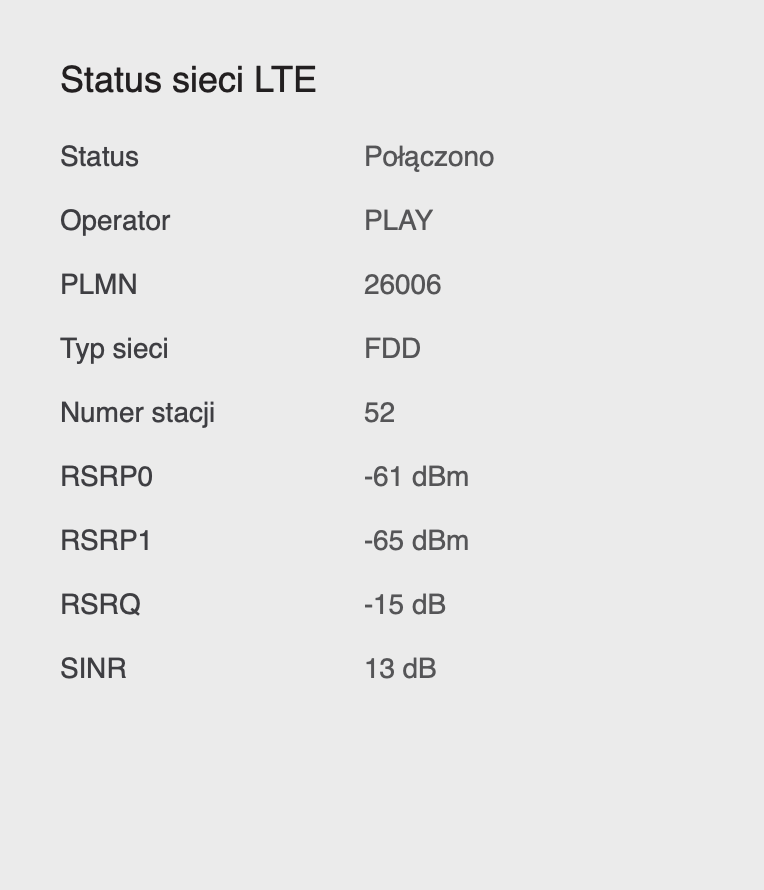
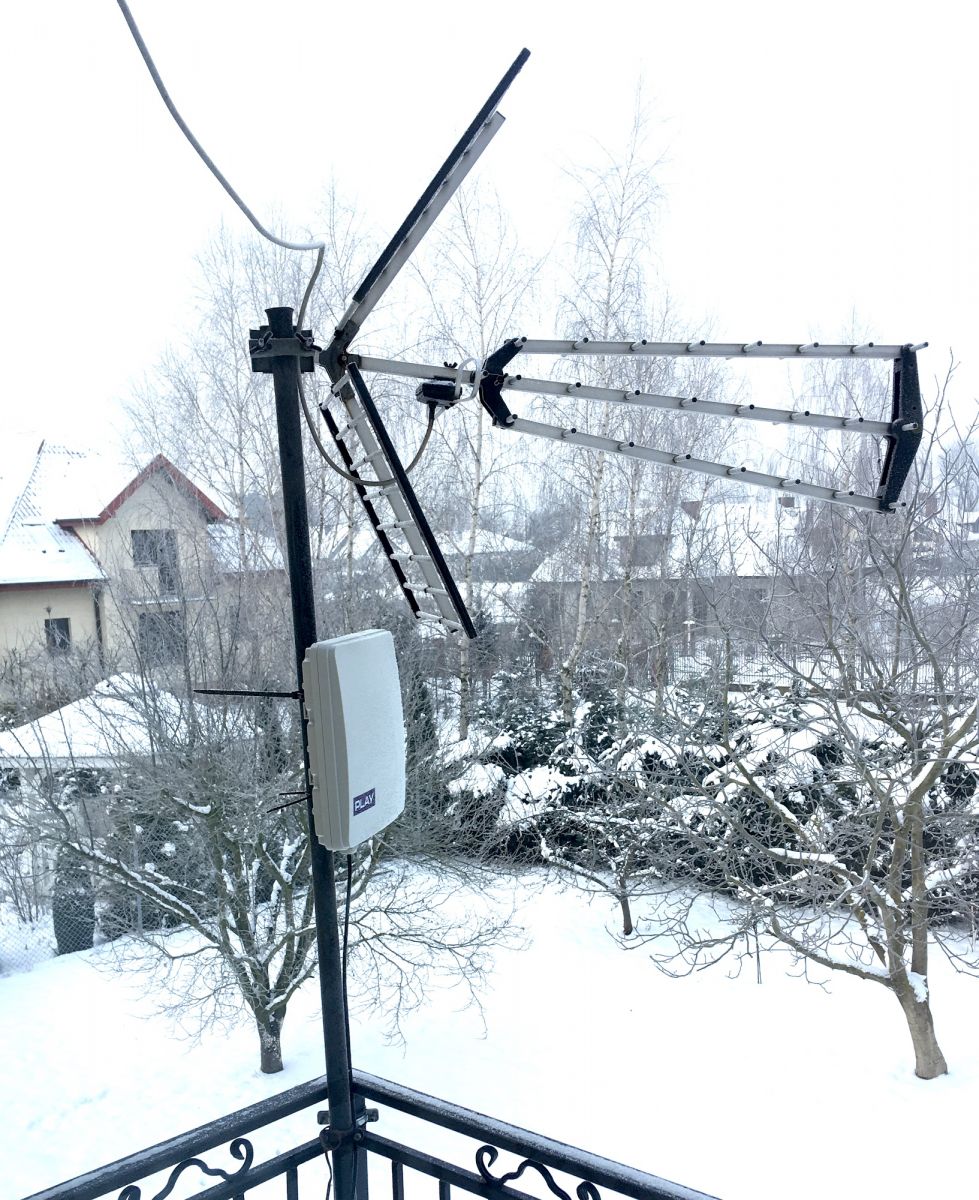
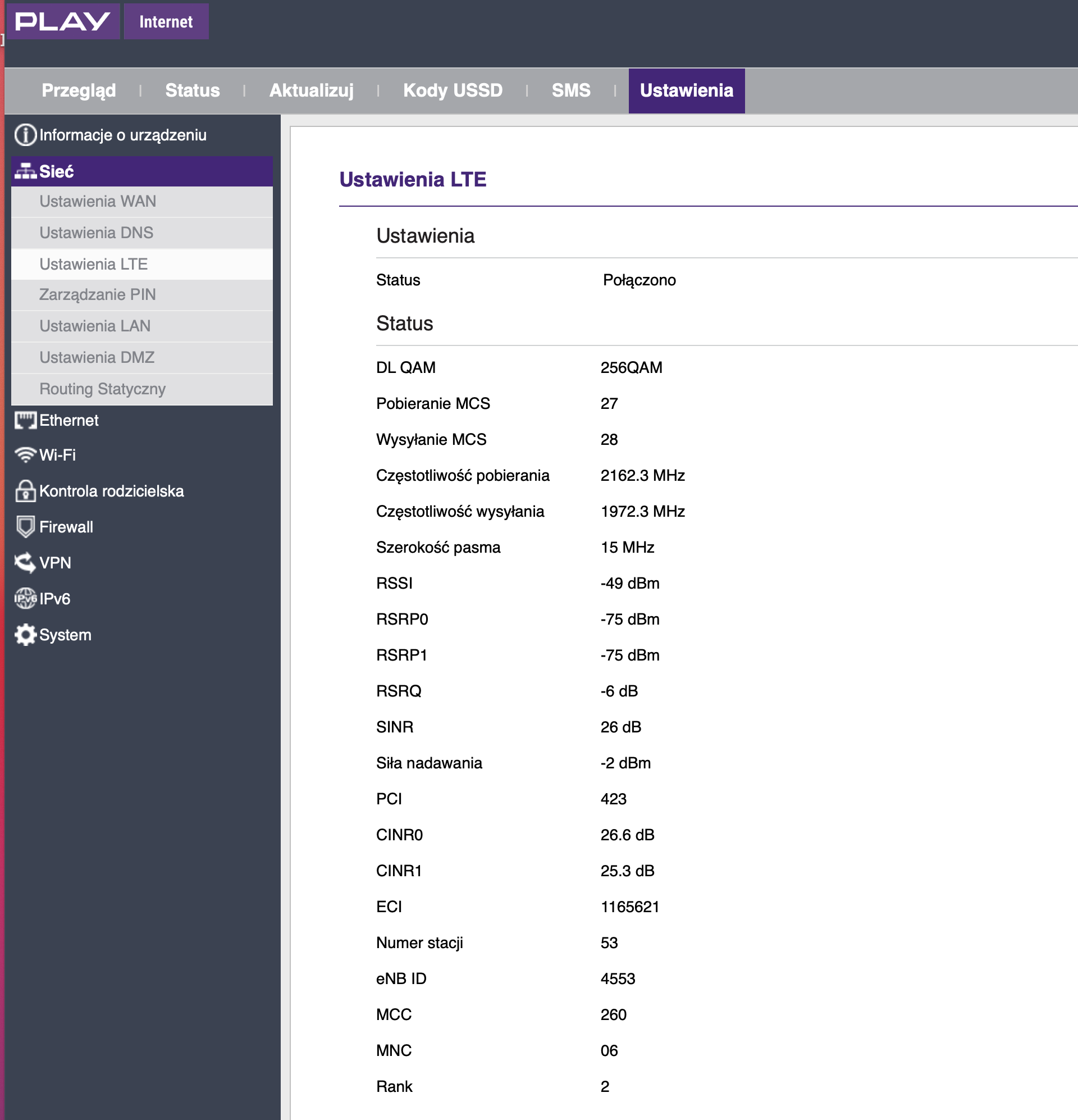
    Hello. Recently, I have a ZTE MF258K set from the PLAY network. I have about 0.5 km to the nearest transmitter and I directed the antenna at it. Unfortunately, I am worried that the internet can freeze for several minutes from time to time. The signal interruption usually lasts 2-3 minutes and then everything returns to normal until the next time.
    I am also wondering about the jumps in speed. Once the download is at 90 Mbps and 20 Mbps in a moment. At times, it can drop to 1 Mbps for a moment, and in a moment it is, say, 40 Mbps. There was one day when a record measurement showed me for several nice hours after measuring 200 - 260 Mbps.
    ZTE MF258K PLAY Freezes, Signal Interruption & Speed Fluctuations - Antenna Direction Issues?
  • ADVERTISEMENT
  • #3 19191462
    empe6
    Level 11  
    Posts: 63
    Rate: 15
    Please:

    ZTE MF258K PLAY Freezes, Signal Interruption & Speed Fluctuations - Antenna Direction Issues?
  • ADVERTISEMENT
  • #4 19191503
    matek451
    Level 43  
    Posts: 31046
    Help: 4313
    Rate: 5707
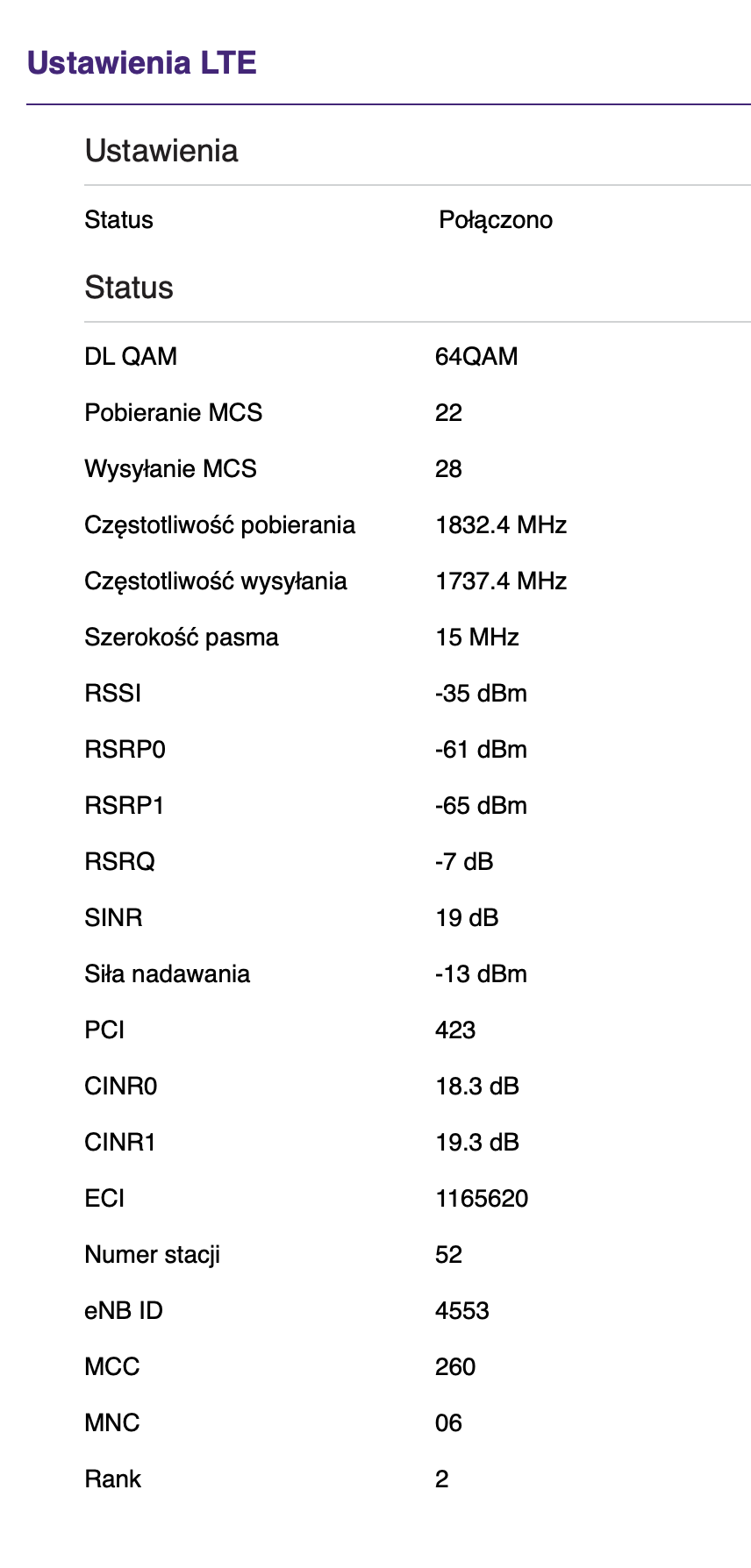
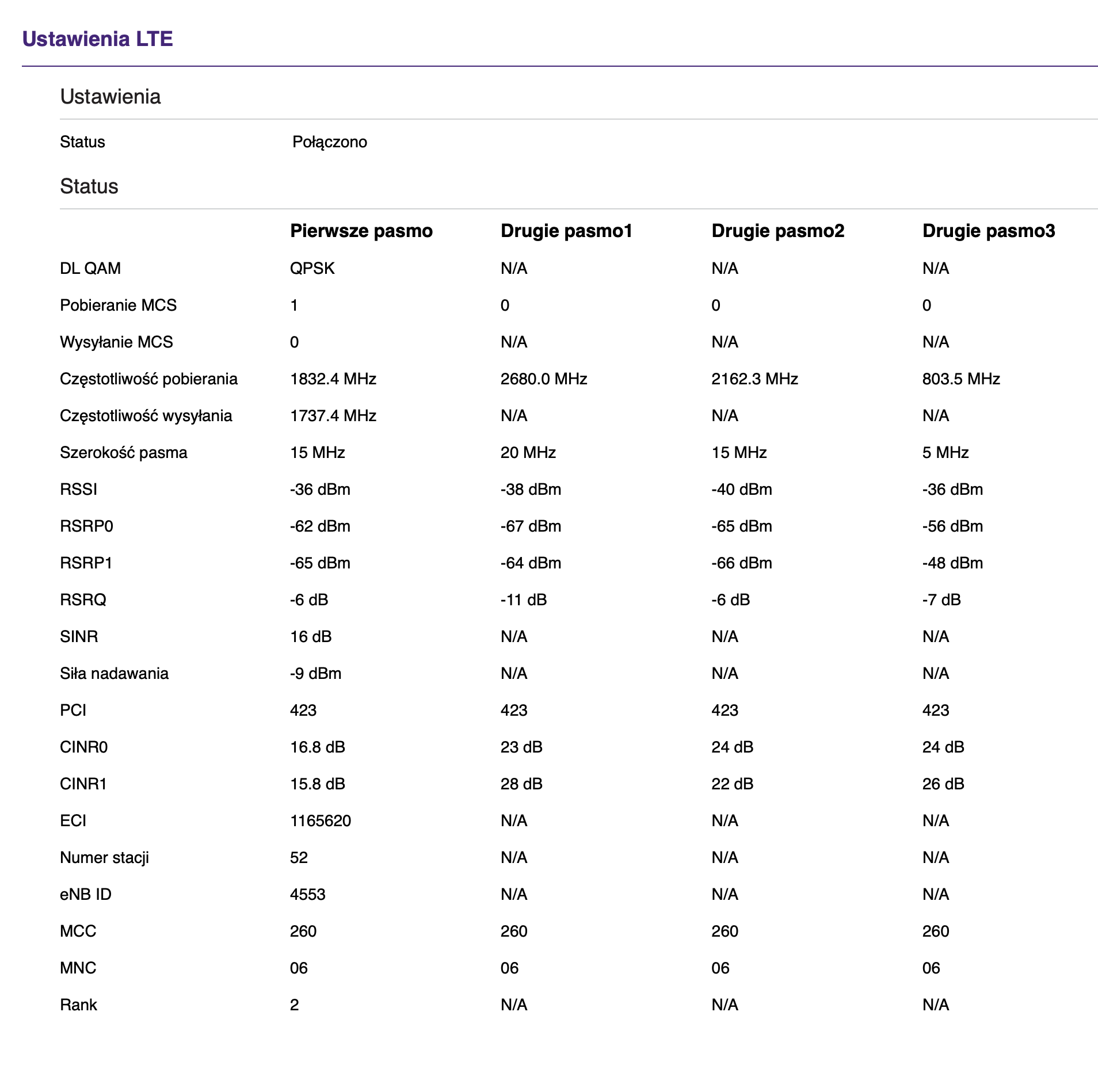
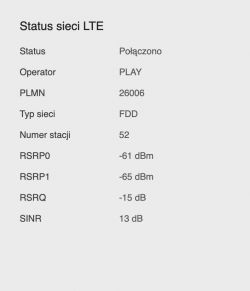
    BTS Gulczewo with aggregation of 4 LTE bands, but you connect to LTE1800 on the screenshots, see if aggregation was activated during the speedtest.
    Helpful post? Buy me a coffee.
  • #5 19191524
    empe6
    Level 11  
    Posts: 63
    Rate: 15
    How can I tell if aggregation has turned on during SpeedTest?
  • ADVERTISEMENT
  • #7 19191565
    empe6
    Level 11  
    Posts: 63
    Rate: 15
    No, they didn't show up and I took the test several times. Only when I restored the router to the factory settings (although I did not change anything in it), additional bands immediately appeared. But the speed is weak, in the range of 15 - 50 Mbps ZTE MF258K PLAY Freezes, Signal Interruption & Speed Fluctuations - Antenna Direction Issues?

    edit. now it was rocking - 180 Mbps. Where do these jumps and differences come from?
    edit2 no And it breaks, two minutes. no internet

    Or is it a problem that the antenna is right next to the Dvb-t antenna?

    ZTE MF258K PLAY Freezes, Signal Interruption & Speed Fluctuations - Antenna Direction Issues?
  • ADVERTISEMENT
  • #9 19192248
    m.jastrzebski
    Network and Internet specialist
    Posts: 5238
    Help: 679
    Rate: 862
    empe6 wrote:

    edit. now it was rocking - 180 Mbps. Where do these jumps and differences come from?
    edit2 no And it breaks, two minutes. no internet

    This is mobile internet. You have big differences, but in general NOTHING in terms of speed is not guaranteed.

    If you have an internet connection and you cannot open a website, for example www.onet.pl. this suggests to do a ping but directly to the IP address of such a site. Check beforehand what it is.
    You will then see if you have no connection or a DNS problem. I resigned from Play six months ago in favor of the competition that has transmitters closer, but with Play I have recently had problems with DNS. Playing with ping and nslookup (asking a specific DNS server for name resolution) showed strange behavior. The ping to the DNS server was flying, but it did not respond to the DNS query. This happened for just periods of single minutes. It was returning to normal spontaneously. The smarter ones suggested that Play may be caching DNS queries and has a problem with it. I did not pursue the topic because, as I mentioned, I moved to the competition, but something was definitely going on.
  • #10 19193210
    jarek7714
    Level 27  
    Posts: 826
    Help: 85
    Rate: 117
    m.jastrzebski wrote:

    This is mobile internet. You have big differences, but in general NOTHING in terms of speed is not guaranteed.
    You pay extra for the guaranteed speeds, with the proper operation of the service and equipment, there is no option that it is 200-260Mbps and 1Mbps per minute or at all. @ empe6 if this modem has the option to select the band permanently, check / scan each of them. Once you know which works best / least hassle-free, select them for aggregation.
    m.jastrzebski wrote:

    You will then see if you have no connection or a DNS problem. I resigned from Play six months ago in favor of the competition that has transmitters closer, but with Play I have recently had problems with DNS. Playing with ping and nslookup (asking a specific DNS server for name resolution) showed strange behavior. The ping to the DNS server was flying, but it did not respond to the DNS query. This happened for just periods of single minutes. It was returning to normal spontaneously. The smarter ones suggested that Play may be caching DNS queries and has a problem with it. I did not pursue the topic because, as I mentioned, I moved to the competition, but something was definitely going on.
    This is the specialty of this operator and if nothing helps, to finally rule out a hardware problem, buy a prepaid Plus / Orange card and confront it.
  • #11 19205738
    empe6
    Level 11  
    Posts: 63
    Rate: 15
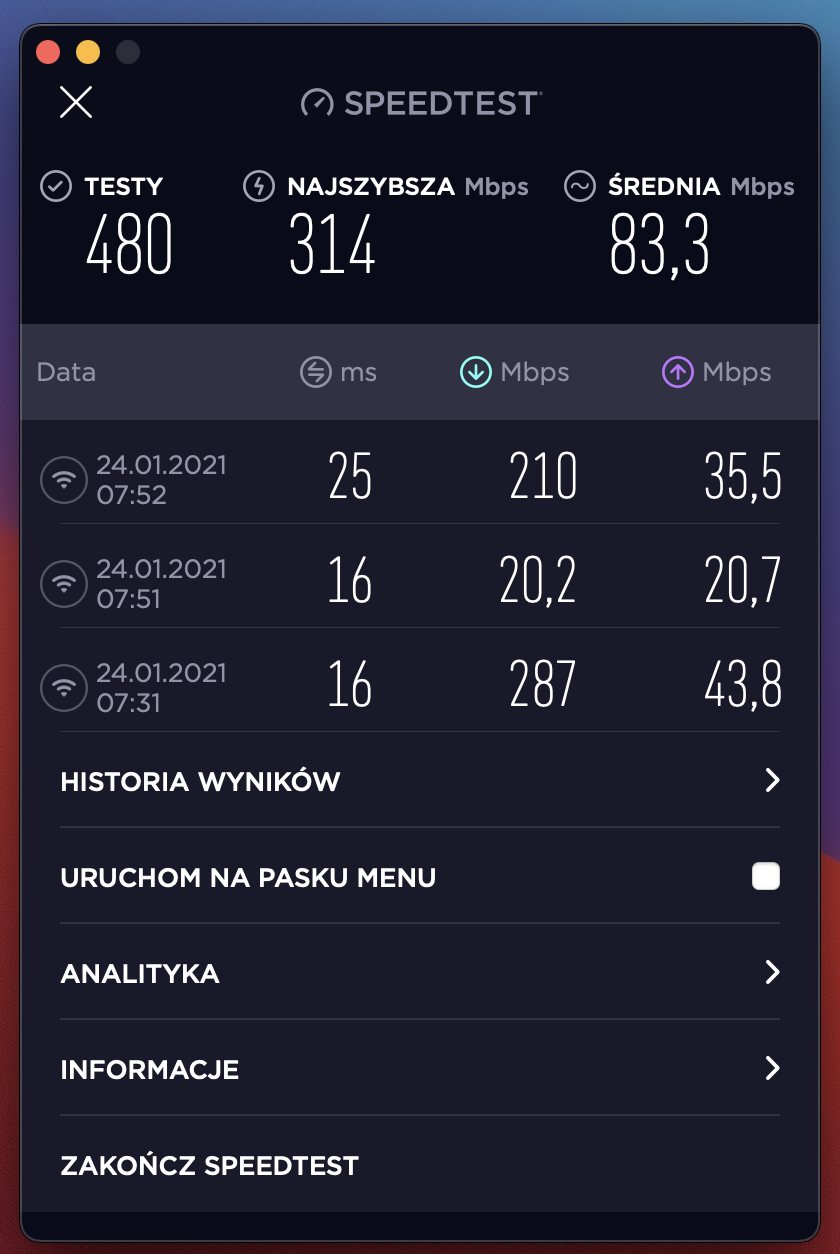
    07:31 - 287Mbps
    After 10 min. only 20Mbps
    And back 210Mbps in another minute

    Such drastic jumps are probably not normal. I am constantly looking for the cause of the problem: /

    ZTE MF258K PLAY Freezes, Signal Interruption & Speed Fluctuations - Antenna Direction Issues?
  • #12 19206018
    Anonymous
    Level 1  
  • #13 19206128
    empe6
    Level 11  
    Posts: 63
    Rate: 15
    I will try to figure out something else with the antenna.

    The SINR at the moment ranges between 21 and 27dB
    I'm just wondering why the rest of the bands disappeared again? I suspect that I will restore the factory settings and they will show up again.

    ZTE MF258K PLAY Freezes, Signal Interruption & Speed Fluctuations - Antenna Direction Issues?

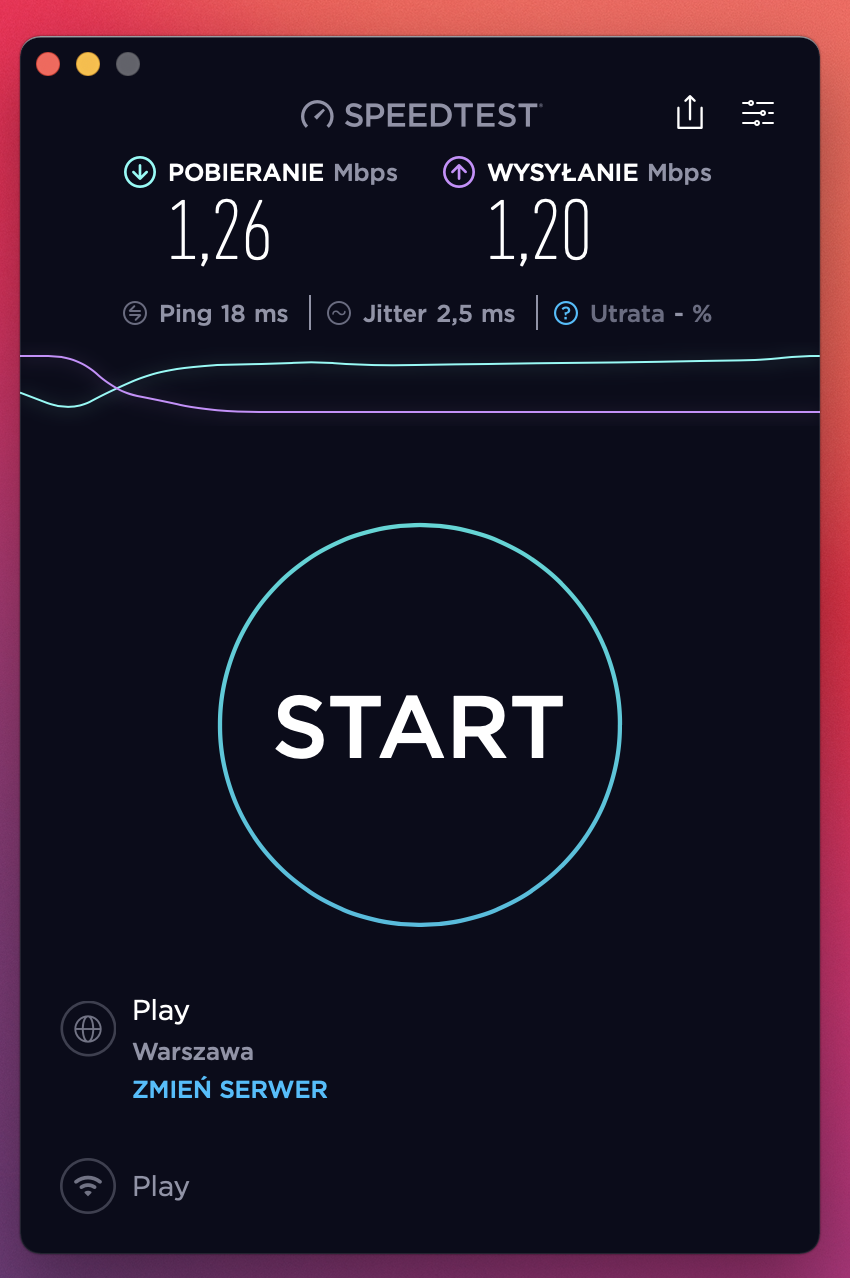
    I was just doing the measurement, it was over 100Mbps
    and after ten minutes: :(

    ZTE MF258K PLAY Freezes, Signal Interruption & Speed Fluctuations - Antenna Direction Issues?

    The SINR value during a speed decrease does not change
  • #14 19206227
    Anonymous
    Level 1  
  • #15 19221462
    empe6
    Level 11  
    Posts: 63
    Rate: 15
    Gentlemen, I replaced the SIM card in the Play lounge, it didn't help. Then I replaced the complete set with a second one and no changes either. Once there is a speed of 3Mb, in a few minutes even 270Mb, and in the next moment it can completely silt up. I don't know where else could I look for the cause?
  • #16 19221486
    Anonymous
    Level 1  

Topic summary

✨ The discussion revolves around issues experienced with the ZTE MF258K modem from the PLAY network, including internet freezing, signal interruptions, and fluctuating speeds. The user reports a distance of 0.5 km to the nearest transmitter and has directed the antenna towards it. Despite high signal levels, speed tests show drastic variations, ranging from 1 Mbps to over 200 Mbps. Participants suggest checking LTE settings for band aggregation, potential interference from nearby DVB-T antennas, and the possibility of hardware issues. Recommendations include adjusting antenna positioning, monitoring SINR values, and testing with different SIM cards or networks to identify the root cause of the connectivity problems.
Generated by the language model.

FAQ

TL;DR: On Play with ZTE MF258K, speed swings often align with carrier aggregation and modulation changes: QAM256 can be ~30% faster than QAM64, and "BTS decides to enable aggregation." Start by checking CA status, SINR, and basic DNS tests. [Elektroda, Anonymous, post #19206227] Why it matters: It helps you separate network-side scheduling from local setup issues so you can fix drops and stabilize speed.

Quick Facts

Why does my ZTE MF258K on Play freeze for a couple of minutes?

Short outages can be DNS-related. One user saw minute-long failures where DNS queries stalled while pings worked. Use ping and nslookup to confirm whether name resolution fails during the freeze. If DNS stalls, switch DNS temporarily and retest. If ping to IP also fails, the link itself dropped. "This happened for just periods of single minutes." [Elektroda, m.jastrzebski, post #19192248]

How do I check if carrier aggregation is active during a Speedtest on MF258K?

Open the router GUI and go to LTE Settings. Start a Speedtest and watch the band list in real time. "You are looking if other bands will appear in LTE Settings." If only one band shows, CA is not active at that moment. [Elektroda, matek451, post #19191547]

Why do my speeds swing from hundreds of Mbps down to tens within minutes?

Rapid swings can happen when your device reselects a sector or even a different BTS. That changes radio conditions and scheduling, altering throughput. "Such jumps could result in jumping over BTSs or sectors from a given BTS." Aligning the antenna and confirming CA state can reduce these swings. [Elektroda, Anonymous, post #19221486]

Is my DVB‑T antenna placement causing LTE drops?

Side‑by‑side mounting can slightly worsen LTE reception and may interfere with DVB‑T. Keep at least 0.5 m separation. However, this proximity is unlikely to cause drastic speed jumps or total loss of internet by itself. Improve spacing if possible, then retest performance. [Elektroda, Anonymous, post #19206018]

What SINR should I aim for, and what does it unlock?

Aim for SINR above 20 dB. That can enable QAM256, which is about 30% faster than QAM64 when available. As one expert noted, "QAM256 jumped in." Optimize antenna alignment to maximize SINR while watching modulation and CA status. [Elektroda, Anonymous, post #19206227]

How can I rule out DNS as the cause of the drops?

Use this quick check:
  1. Ping a known IP address of a site you use.
  2. Ping your DNS server, then run nslookup for the same site.
  3. If pings work but nslookup stalls, the outage is DNS-related. This isolates DNS from link loss. [Elektroda, m.jastrzebski, post #19192248]

Could a WatchDog setting be forcing reconnections?

Check System‑Settings for WatchDog. Verify if it is enabled and how it triggers. If misconfigured, it can interrupt sessions by resetting connectivity. Disable or tune it, then observe whether freezes persist during testing. [Elektroda, matek451, post #19192215]

Carrier aggregation disappears until I factory‑reset—why?

The BTS decides whether to enable CA for your device. If CA appears only after resets, the behavior is suspicious. "There may be a modem failure in such a system." Monitor CA state during load and consider cross‑testing the SIM in another device. [Elektroda, Anonymous, post #19206227]

Should I lock specific LTE bands on the MF258K to stabilize results?

Yes. Scan and test each band individually to find the most stable performer. Then select those bands for aggregation. This reduces handoffs and inconsistent combinations that hit throughput. It’s a practical way to stabilize speed on variable cells. [Elektroda, jarek7714, post #19193210]

Is this just how mobile internet behaves on Play?

Some variability is normal, but large swings can signal issues. As one user put it, "NOTHING in terms of speed is not guaranteed." Combine CA checks, DNS tests, and band locking to narrow root causes beyond typical mobile fluctuation. [Elektroda, m.jastrzebski, post #19192248]

Could strong signals be the problem here?

Yes, very strong signals can complicate performance. One suggestion was to try moving the antenna inside to slightly attenuate the signal. That can moderate levels and reduce overload or interference effects. Test indoors and compare stability and throughput. [Elektroda, Anonymous, post #19221486]

Will swapping the SIM or the entire router kit fix this?

In the reported case, replacing the SIM in a Play lounge did not help. Replacing the entire MF258K kit also brought no change. That points away from a single faulty unit and toward network or configuration factors. [Elektroda, empe6, post #19221462]

Should I try a SIM from another operator to rule out the network?

Yes. Buy a prepaid SIM from another operator, like Plus or Orange, and compare performance. This helps separate operator issues from hardware or installation. If the other network is stable, escalate with Play support. [Elektroda, jarek7714, post #19193210]

How do I align the antenna for best SINR on each band?

Use a per‑band alignment:
  1. In LTE Settings, lock the router to one band.
  2. Rotate/tilt slowly to maximize SINR, then note the angle.
  3. Repeat for other bands, then choose the best compromise or a separate mount. Recheck CA after alignment. [Elektroda, Anonymous, post #19206018]

Can a phone confirm if CA works on my line?

Yes. Test the Play SIM in a CA‑capable phone and monitor bands during a speed test. If the phone aggregates while the MF258K does not, focus on the router or its settings. "Do you have the possibility to check the sim on the phone with aggregation?" [Elektroda, Anonymous, post #19206227]
Generated by the language model.
ADVERTISEMENT