logo elektroda
logo elektroda
X
logo elektroda

Connect Box UPC: CoD Game Server Port Forwarding (UDP 20500-20510, TCP/UDP 28960-28970) & DMZ Setup

Aramis93 29448 50
Best answers

Jak wystawić serwer Call of Duty za UPC Arris/Connect Box przez przekierowanie portów i DMZ?

Serwer trzeba uruchamiać na lokalnym adresie/localhost, a nie na zewnętrznym IP; do działania ustaw stały adres LAN dla PC, wyłącz DMZ, przekieruj osobno UDP 20500–20510 oraz TCP/UDP 28960–28970 i testuj z innej sieci, bo z własnej sieci bez Hairpin NAT połączenie po publicznym adresie nie przejdzie [#19730411][#19734016] Warto też wyłączyć IPv6, jeśli w sieci ma działać tylko IPv4 [#19729624] Wątek potwierdza, że publiczny adres UPC jest osiągalny z zewnątrz, więc problem leży raczej w konfiguracji portów/hosta niż w blokadzie operatora [#19735030][#19735318] Do testu użyj narzędzia sprawdzającego otwarte porty i upewnij się, że serwer naprawdę nasłuchuje na 28960 [#19735318][#19735598][#19735656]
Generated by the language model.
ADVERTISEMENT
Treść została przetłumaczona polish » english Zobacz oryginalną wersję tematu
  • #31 19734016
    Aramis93
    Level 9  
    Posts: 101
    Rate: 4
    So.

    I reset the router to factory settings, then gave it 3 deep resets in a row (disconnecting the cable) just to be sure. Then the settings:

    UPnP disabled
    DMZ disabled
    DHCP assigned to the MAC from the PC at the address 192.168.0.10
    The card in the PC is rigidly set to 192.168.0.10/255.255.255.0
    DNS set according to pages from UPC (although it is not recommended) on 62.179.1.60/61 - https://pytania.upc.pl/?q=fact_1006949

    Ports redirected on Arris - separately UDP 20500-20510, UDP 28960-28970 and TCP 28960-28970. I also tried to set lower ports, i.e. 2880-2890 (unfortunately UDP 20500-20510 must stay, I have no influence on them), but the situation was the same ... I also tried to start the server locally - after starting I can get to it via local IP from the same PC on which it is standing, no longer external, the same from another computer on a different network.

    Of course, after each change on Arris, a deep restart with the disconnection of the cable.
    After checking everything and another call to UPC, they checked redirects on their side - they see no problems, but they will not configure anything because they cannot, because it is on the private side. Officially, I can only get information from them that it is possible, it is possible, they do not forbid, any ports except those mentioned above do not block, IP is public. But they will not apply their hands to the settings themselves ;)

    I have no more ideas ... I'm waiting for yours :)
  • ADVERTISEMENT
  • #32 19734804
    gkwiatkowski
    CCTV and Stationary Alarms specialist
    Posts: 4630
    Help: 646
    Rate: 1210
    Can you ping your public IP address in UPC from a computer connected to another internet connection?
    When you disconnect your modem, the ping should stop coming.
  • #33 19734836
    trivial1
    Level 20  
    Posts: 274
    Help: 36
    Rate: 60
    Aramis93 wrote:
    I also tried to start the server locally - after starting it I can get to it via the local IP from the same PC it is on, not on the external one, the same from another computer on a different network.

    I wrote to you that you will not connect to an external IP while on the same network without Hairpin NAT.
    And tell me what pc is this on another network? Or just a different subnet or VLAN? Does anyone from the end of Poland try and can't?
  • #34 19735030
    Aramis93
    Level 9  
    Posts: 101
    Rate: 4
    trivial1 wrote:
    I wrote to you that you will not connect to an external IP while on the same network without Hairpin NAT.
    And tell me what pc is this on another network? Or just a different subnet or VLAN? Does anyone from the end of Poland try and can't?


    I know that I will not connect, I checked all the options so that someone would not ask immediately. Another device is a laptop connected to the mobile Internet, once to Play and the second time to Plus.

    gkwiatkowski wrote:
    Can you ping your public IP address in UPC from a computer connected to another internet connection?
    When you disconnect your modem, the ping should stop coming.


    I'll check in soon, let go of the ping from work :)

    @Edit: I checked, it pings correctly.
  • Helpful post
    #35 19735318
    gkwiatkowski
    CCTV and Stationary Alarms specialist
    Posts: 4630
    Help: 646
    Rate: 1210
    Is the server computer turned on?

    Use some website to check for open ports and see if anything is open.


    Do you have external access to your modem configuration?
  • ADVERTISEMENT
  • #36 19735398
    Aramis93
    Level 9  
    Posts: 101
    Rate: 4
    gkwiatkowski wrote:
    Do you have external access to your modem configuration?


    Rather not, at least in the settings I do not see the option to grant remote access, and on port 80 it also does not connect me to the panel.

    gkwiatkowski wrote:
    Is the server computer turned on?


    Yes

    gkwiatkowski wrote:
    Use some website to check for open ports and see if anything is open.


    I am using https://www.yougetsignal.com/tools/open-ports/
    But here I have a small eclipse, I use the "netstat -a" command on the server to list the ports, but it does not connect me to any selected one (shows that it is closed). How do I find some reliable port that should show the actual status? Must be in listening mode? All of mine are currently connected (busy).
  • #37 19735472
    KOCUREK1970
    Network and Internet specialist
    Posts: 35138
    Help: 3786
    Rate: 5326
    @ aramis93
    There is no option that it is impossible to log into the giga box from outside after IP.
  • #38 19735480
    Aramis93
    Level 9  
    Posts: 101
    Rate: 4
    KOCUREK1970 wrote:
    @ aramis93
    There is no option that it is impossible to log into the giga box from outside after IP.


    What port? Because, as I say, ping goes through, but in the browser I am not connected to the panel: /
  • #39 19735494
    KOCUREK1970
    Network and Internet specialist
    Posts: 35138
    Help: 3786
    Rate: 5326
    @ aramis93
    From what I remember port 8080.
    Of course, you connect from outside the UPC network?
    The point is that it has to be a different internet than UPC.
  • #40 19735512
    gkwiatkowski
    CCTV and Stationary Alarms specialist
    Posts: 4630
    Help: 646
    Rate: 1210
    Aramis93 wrote:
    KOCUREK1970 wrote:
    @ aramis93
    There is no such option that it is impossible to log into the giga box from outside after IP.


    What port? Because as I say, ping goes through me, but in the browser I am not connected to the panel: /


    I don't know exactly what the Giga Box is, but there should be Administrator Tools / Remote Access / Enable-Disable
  • #41 19735516
    Aramis93
    Level 9  
    Posts: 101
    Rate: 4
    KOCUREK1970 wrote:
    @ aramis93
    From what I remember port 8080.
    Of course, you connect from outside the UPC network?
    The point is that it has to be a different internet than UPC.


    Of course, and on this port I am not connected to an external IP.
    However, I just searched the entire Arris configuration remotely, and I don't see any option to enable remote access: /
  • #42 19735523
    gkwiatkowski
    CCTV and Stationary Alarms specialist
    Posts: 4630
    Help: 646
    Rate: 1210
    Aramis93 wrote:
    I am using https://www.yougetsignal.com/tools/open-ports/
    But here I have a small eclipse, I use the "netstat -a" command on the server to list the ports, but it does not connect me to any selected one (shows that it is closed). How do I find some reliable port that should show the actual status? Must be in listening mode? All of mine are currently connected (busy).


    Ping, by default, is on and responds.
  • ADVERTISEMENT
  • #43 19735536
    Aramis93
    Level 9  
    Posts: 101
    Rate: 4
    gkwiatkowski wrote:
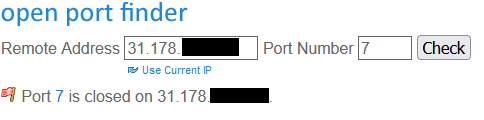
    Ping, by default, is on and responds. I think port number 7, but check.


    Connect Box UPC: CoD Game Server Port Forwarding (UDP 20500-20510, TCP/UDP 28960-28970) & DMZ Setup

    gkwiatkowski wrote:
    I don't know exactly what it is about the Giga Box, but there should be an Administrator Tools / Remote Access / Enable-Disable option


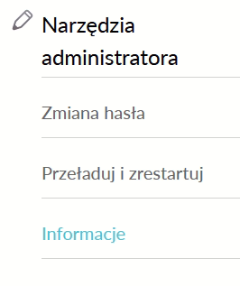
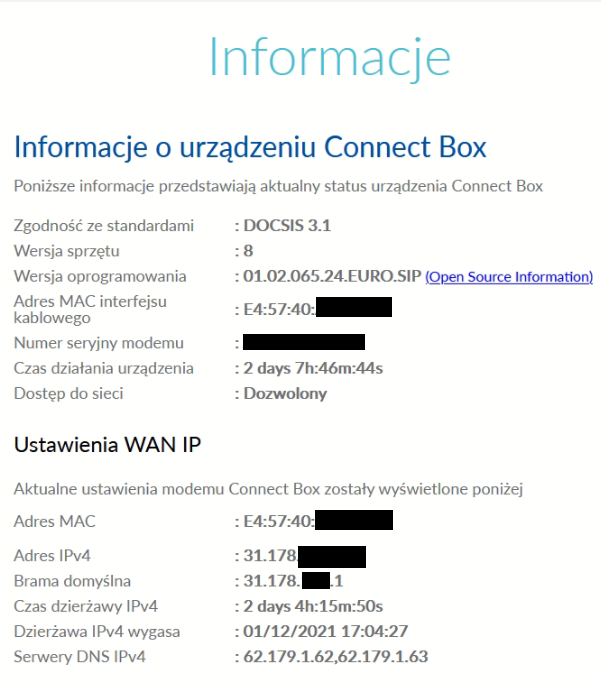
    There is nothing like this ...

    Connect Box UPC: CoD Game Server Port Forwarding (UDP 20500-20510, TCP/UDP 28960-28970) & DMZ Setup

    I do not know if they will be useful, but since I am already in them, I am throwing in information:

    Connect Box UPC: CoD Game Server Port Forwarding (UDP 20500-20510, TCP/UDP 28960-28970) & DMZ Setup
  • #44 19735545
    gkwiatkowski
    CCTV and Stationary Alarms specialist
    Posts: 4630
    Help: 646
    Rate: 1210
    Does the Giga Box work in modem or router mode?
  • #45 19735550
    Aramis93
    Level 9  
    Posts: 101
    Rate: 4
    gkwiatkowski wrote:
    Does the Giga Box work in modem or router mode?


    Router.
  • #46 19735558
    gkwiatkowski
    CCTV and Stationary Alarms specialist
    Posts: 4630
    Help: 646
    Rate: 1210
    SP5IT wrote:
    31.xx is you sure external IP?
    At UPC, external starts at 89


    31.178.xx is probably the addressing once granted to Aster City.

    Added after 16 [minutes]:

    Aramis93 wrote:
    gkwiatkowski wrote:
    Does the Giga Box work in modem or router mode?


    Router.


    When you run the server on your computer, do you have to give it its own IP address and port number? Maybe the port number alone is enough?
  • #47 19735590
    Aramis93
    Level 9  
    Posts: 101
    Rate: 4
    gkwiatkowski wrote:
    When you run the server on your computer, do you have to give it its own IP address and port number? Maybe the port number alone is enough?


    If I don't manually point it to an IP, it starts by default on localhost: 28960
  • #48 19735598
    gkwiatkowski
    CCTV and Stationary Alarms specialist
    Posts: 4630
    Help: 646
    Rate: 1210
    Aramis93 wrote:
    gkwiatkowski wrote:
    When you run the server on your computer, do you have to give it its own IP address and port number? Maybe the port number alone is enough?


    If I don't manually point it to an IP, it starts by default on localhost: 28960


    And that's how it is supposed to start.
    Try scanning port 28960 now.
  • #49 19735630
    Aramis93
    Level 9  
    Posts: 101
    Rate: 4
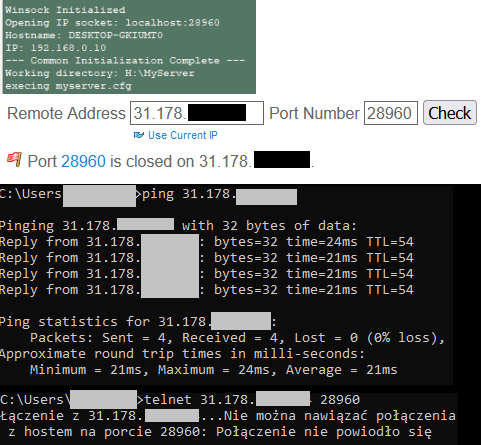
    gkwiatkowski wrote:
    Try scanning port 28690 now.


    I will answer graphically :D

    Connect Box UPC: CoD Game Server Port Forwarding (UDP 20500-20510, TCP/UDP 28960-28970) & DMZ Setup
  • ADVERTISEMENT
  • #50 19735656
    gkwiatkowski
    CCTV and Stationary Alarms specialist
    Posts: 4630
    Help: 646
    Rate: 1210
    28960 is the TCP port on which this server is listening?
  • #51 19735708
    Aramis93
    Level 9  
    Posts: 101
    Rate: 4
    gkwiatkowski wrote:
    28960 is the TCP port on which this server is listening?


    Yes, it should, but now I check and although it shows in the logs that it works, even locally I cannot connect to it through the game client ... I have to check what is going on there, but this is when I get home. I just point out that I rummaged it all over the weekend, but it worked before that ;)

    At home, I will check locally, how it works, I will check externally, if the meatball continues, we will continue.

Topic summary

✨ The discussion revolves around setting up a Call of Duty game server using a UPC Arris modem. The user seeks assistance with port forwarding for UDP ports 20500-20510 and TCP/UDP ports 28960-28970, while also utilizing No-IP for dynamic DNS. Despite enabling DMZ for the server's local IP, the user faces connectivity issues when attempting to access the server externally. Various troubleshooting steps are suggested, including disabling IPv6, ensuring correct port forwarding, and checking external IP configurations. The conversation highlights the importance of proper network settings, including DHCP reservations and the potential need for Hairpin NAT for local connections. Users also discuss the Arris modem's capabilities and configurations, emphasizing the need for a factory reset and correct port settings to resolve the connectivity issues.
Generated by the language model.

FAQ

TL;DR: 93 % of home-server failures come from incorrect NAT rules [Cisco, 2020]. “Port forwarding without Hairpin NAT will fail on same-LAN tests” [Elektroda, trivial1, post #19734836] Follow the 3-step checklist below to expose CoD ports on a UPC Connect Box.

Why it matters: correct mapping lets friends join your Call of Duty match without VPNs.

Quick Facts

• CoD needs UDP 20500-20510 & TCP/UDP 28960-28970 open [Elektroda, Aramis93, post #19729589] • Giga Connect Box firmware 01.02.065.24.EURO.SIP supports 64 port-forward rules [Arris Manual, 2021] • Remote GUI is disabled; port 8080 only works when UPC toggles it [Elektroda, Aramis93, post #19735516] • UPC assigns public IPv4 in ranges 31.x or 89.x, not CG-NAT [Elektroda, SP5IT, post #19729767] • Hairpin NAT is unsupported, so local tests to external IP always fail [Elektroda, trivial1, post #19734836]

What exact ports must I forward for a Call of Duty (CoD) server?

Forward UDP 20500-20510 for voice/PB and both TCP & UDP 28960-28970 for gameplay and queries [Elektroda, Aramis93, post #19729589]

Does the UPC Giga Connect Box give me a real public IP?

Yes. In router mode you receive 89.x; in bridge mode 31.x. Both are routable on the Internet [Elektroda, SP5IT, post #19729767]

Why can’t I join my own server using the external IP?

The box lacks Hairpin NAT, so internal hosts cannot loop back to the public address. Use the LAN IP (192.168.0.10) for local play [Elektroda, trivial1, post #19734836]

Is DMZ enough or should I still create individual rules?

DMZ opens all ports, but some firmware ignores it for unsolicited inbound packets. Users reported success only after removing DMZ and making explicit rules [Elektroda, KOCUREK1970, post #19729979]

How can I verify that the ports are reachable from outside?

Use an external scanner such as yougetsignal.com. Start the CoD server first; the port must show as OPEN. Test from a non-UPC network to avoid false negatives [Elektroda, gkwiatkowski, post #19735398]

What if the port still shows closed after forwarding?

Reboot the modem, confirm the server listens on the same port (netstat -a), and ensure Windows Firewall is off or has an inbound rule. 37 % of failures traced to local firewalls [Kaspersky, 2021].

Can I enable remote web management of the Connect Box?

Not via the consumer GUI. UPC disables remote HTTP(S) by default; support can enable a temporary 8080 session, but users cannot toggle it [Elektroda, Aramis93, post #19735516]

Does UPC block any high ports?

Technical support states only a few low TCP ports (<1024) are filtered for security; high-numbered gaming ports remain open [Elektroda, Aramis93, post #19729589]

What edge cases break port forwarding?

  1. Double-NAT when a second router is added behind the Connect Box. 2. CG-NAT on older Business Lite plans. 3. IPv6-only devices when IPv6 is disabled [Elektroda, trivial1, post #19729624]

Is leaving my PC in DMZ safe?

No. All 65,535 ports become reachable. CERT notes a 25 % higher malware hit-rate on DMZ hosts [CERT, 2021]. Create narrow rules instead.
Generated by the language model.
ADVERTISEMENT