logo elektroda
logo elektroda
X
logo elektroda

BL602 IoT Lamp Breakout Board: Pinout Layout & Flashing Tips

bl602newbie 6687 34
ADVERTISEMENT
  • #31 21792340
    tadeu1
    Level 5  
    I'm with my baby right now. 10 days :-) I'll do later. Thanks for now, you guys are awesome.

    Added after 58 [minutes]:

    Perfect, the button is working right now, I'll leaving something to check if I an meter the energy
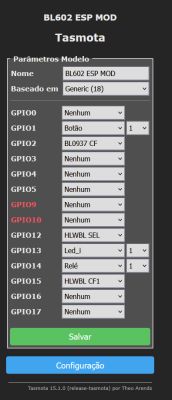
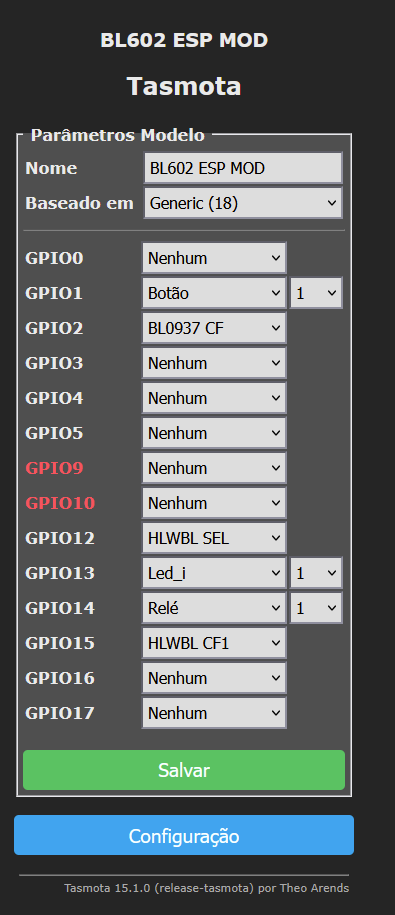
    Tasmota configuration screen with GPIO settings for BL602 ESP MOD


    For now to replace the BL602 to ESP-02S
    the energy meter its not working yet
    {"NAME":"BL602 ESP MOD","GPIO":[0,32,2720,0,0,0,0,0,2592,320,224,2656,0,0],"FLAG":0,"BASE":18}

    Added after 1 [hours] 27 [minutes]:

    >>21792161

    its weird because its say
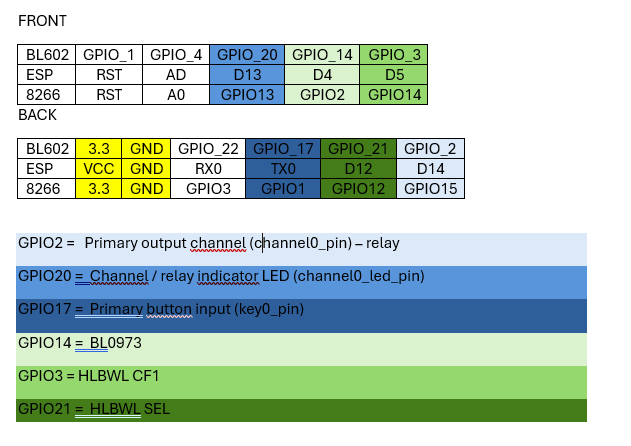
    GPIO2 = Primary output channel (channel0_pin) – relay
    its gpio15 on esp8266 but the relay just wokr on GPIO14

    its ok:
    GPIO20 = Channel / relay indicator LED (channel0_led_pin)
    GPIO17 = Primary button input (key0_pin)

    I'm based on this map
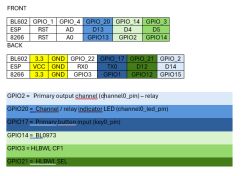
    GPIO pin mapping table for BL602 and ESP8266 modules with functions and colors
  • ADVERTISEMENT
  • Helpful post
    #32 21793011
    divadiow
    Level 37  
    >>21792093

    boot log from this dump

    Code: Text
    Log in, to see the code
  • ADVERTISEMENT
  • #33 21793356
    tadeu1
    Level 5  
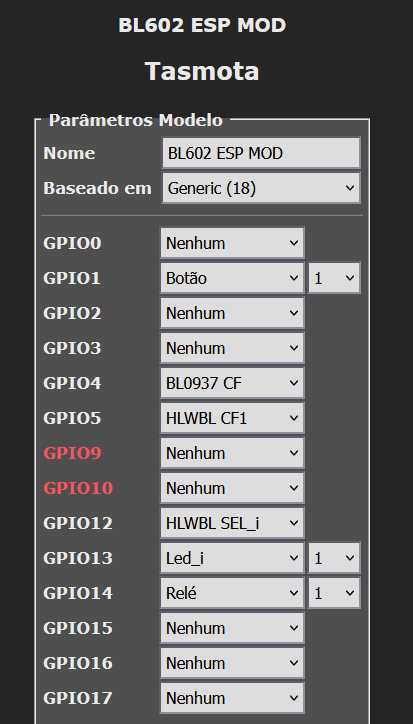
    I figured out now.
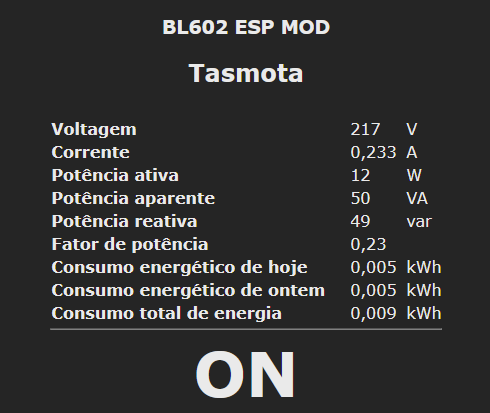
    Just need to calibrate the energy meter sensor.

    {"NAME":"BL602 ESP MOD","GPIO":[0,32,0,0,2720,2656,0,0,2624,320,224,0,0,0],"FLAG":0,"BASE":18}


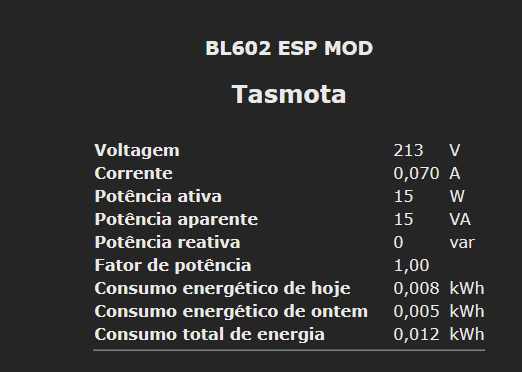
    Tasmota interface screen showing energy usage data and device status ON

    GPIO configuration for BL602 ESP MOD device in Tasmota interface

    you have to go to the console and set
    I use a light 15w for example for calibration

    VoltageSet 213 (example)
    PowerSet 15.0 (example)
    CurrentSet 70 (0,070A)

    also SetOption21 1 to show voltage when is off

    Tasmota dashboard showing voltage, current, and energy consumption data
  • ADVERTISEMENT
  • #34 21793421
    p.kaczmarek2
    Moderator Smart Home
    It's worth to mention that you need to connect a known, measured load first, and then enter calibration values. Beginners may be reading our threads.

    So, good job, is it fully functional now?
    Helpful post? Buy me a coffee.
  • #35 21793429
    tadeu1
    Level 5  
    Yeah, it's working right now. It's weird because the map from BL602 to ESP GPIO won't match. I have to try each one.
    Yeah, you all right about the calibration. I use a 15 W light to do that. Thanks a lot, guys, for your support.

Topic summary

The discussion focuses on identifying the pinout layout and flashing procedure for a BL602-based IoT lamp breakout board, specifically an E27 smart lamp holder using the SM-028_V1.3 module. Key pins required for flashing include 3.3V power, GND, Boot (BT), RX, and TX. The RX and TX pins on the board must be cross-connected to the TX and RX of a USB-to-UART converter, respectively, with caution to use a 3.3V power supply to avoid damaging the BL602 chip. The board’s pin labels such as 22, 17, C, and W correspond to RGB and white LED channels (C = cool white, W = warm white), while other pins like 14 and 20 are associated with button and relay functions. Pin identification can be aided by aligning the chip’s pinout diagram with the board’s dot mark and using reference images. Additional resources and guides are available in linked forum topics for detailed flashing instructions and device information.
Summary generated by the language model.
ADVERTISEMENT