logo elektroda
logo elektroda
X
logo elektroda

TL;DR

  • Built a personalized Nixie tube clock with LC-516 lamps and the name DOROTA illuminated by 96 miniature RGB LEDs.
  • Separated the design into two PCBs: an LED board and a lamp board, driven by an ATmega64, PCF8563 RTC, and 74574 latches.
  • The LED board uses 96 SMD 1206 RGB LEDs and 36 74574 chips, with multiplexed color control and 288 mini-tin jumpers.
  • Replacing the weak MPSA42 boost stage with an IRF740/MC34064 converter raised nixie current to 20 mA and made the tubes shine at full power.
  • Huge PCBs made transfer-etching, alignment, and soldering difficult, and permanently soldering the LC-516 tubes is generally not recommended.
Generated by the language model.
ADVERTISEMENT
Treść została przetłumaczona polish » english Zobacz oryginalną wersję tematu
📢 Listen (AI):
  • Handcrafted nixie tube clock with colorful LED backlighting.

    A special person deserved an equally special gift, and since I`m not a fan of buying surprises, I decided to "make" something with my own hands.


    1. Introduction, motivation
    2. Outline of the structure
    3. Board with diodes - design (connecting diodes)
    4. Board with diodes - design (latches)
    5. Eagle - commands
    6. Board with diodes - execution
    7. Tile with lamps - design
    8. Plate with lamps - execution
    9. Buttons
    10. Nixie boost converter.
    11. Housing
    12. Software
    13. Final result


    1. Introduction, motivation
    A special person deserved an equally special gift, and since I`m not a fan of buying surprises, I decided to "make" something with my own hands.
    Sometimes it`s hard to find someone`s taste, especially if we don`t know much about them, so I chose something universal and practical: a clock with Nixie tubes (after all, everyone likes to know what time it is).

    However, to emphasize the `uniqueness` of the surprise and to make the recipient feel even more that it was something especially for her, I decided to personalize the gift in some way and put her name in it.

    Since DOROTA has 6 letters and most of them have bellies inside, I came up with the idea that each letter would contain one number - a nixie lamp. The letters of the name will be illuminated with LED diodes, which will additionally add visual variety to the somewhat austere appearance of this type of clocks and give it a certain modernity.
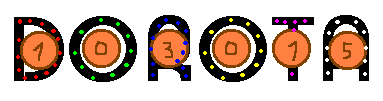
    Diagram of a Nixie clock project with LED lights
    //idea.png

    As LEDs, I decided to choose miniature RGB LEDs in SMD 1206 RGB housing. I wanted to be able to control each of the R/G/B components of each diode separately, which would open the door to many different interesting effects.
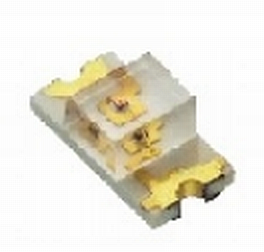
    Miniature RGB LED in SMD 1206 package.
    //led.png

    Initially, I had the idea to place 16 diodes per letter (16 * 6 = 96), but then I came to the conclusion that some of the letters were more complicated, others less, so in the end I stayed with 96 pieces in total, but the division was as follows:
    * (D) - 16 diodes
    * (O) - 14 diodes
    * (R) - 20 diodes
    * (O) - 14 diodes
    * (T) - 12 diodes
    * (A) - 20 diodes

    2. Outline of the structure
    For the construction, I decided to use domestically produced DOLAM LC513 or LC516 lamps (I wasn`t decided yet).
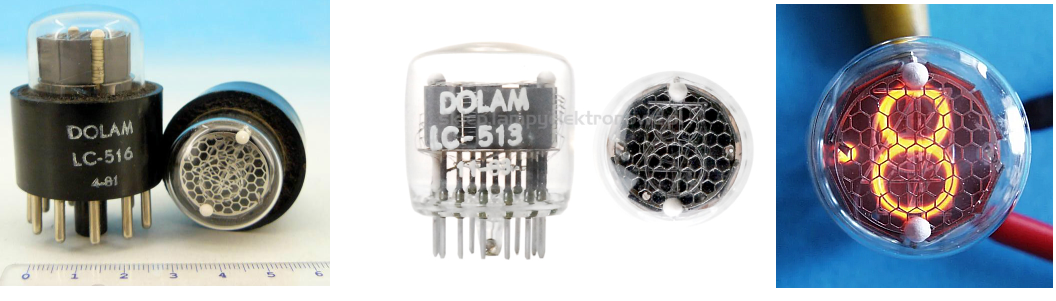
    Nixie tubes LC-513 and LC-516: view from different angles.
    //lc513_516.png

    Most clocks of this type are built on a single printed circuit board, but in this case, due to the relatively high height of the nixie lamps (several cm), the diodes should be placed flush with the very tip of the lamp, which forced the creation of two printed circuit boards - the first one with diodes. (and holes cut out), and the second one with lamps.
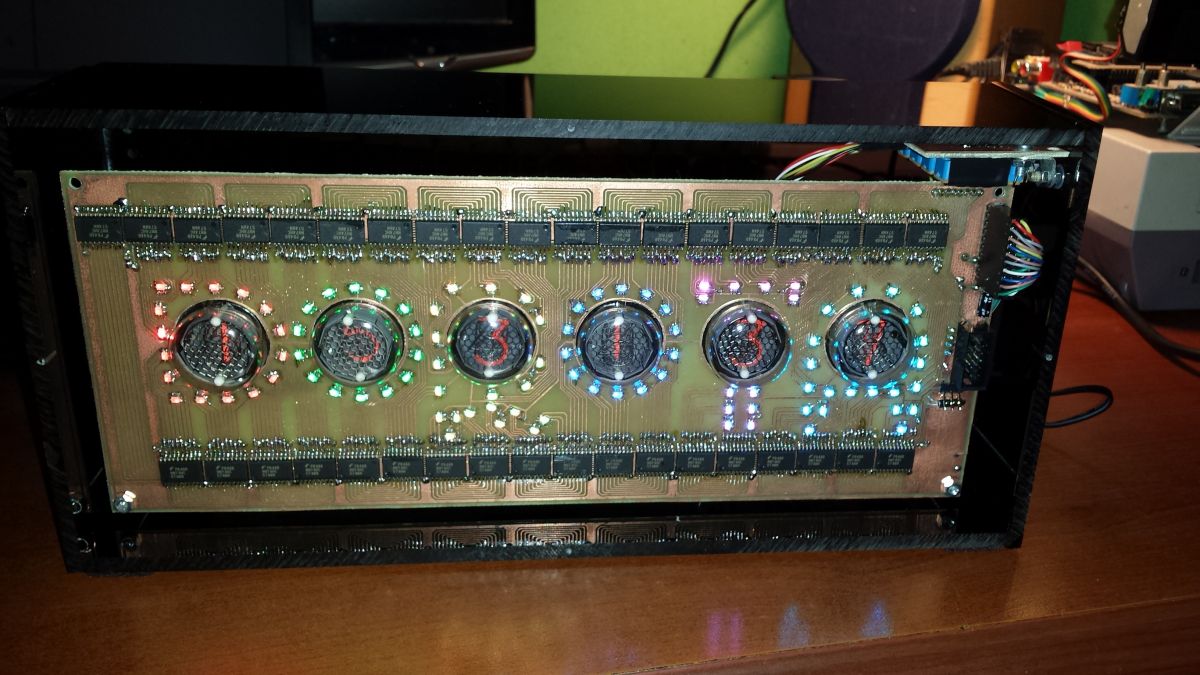
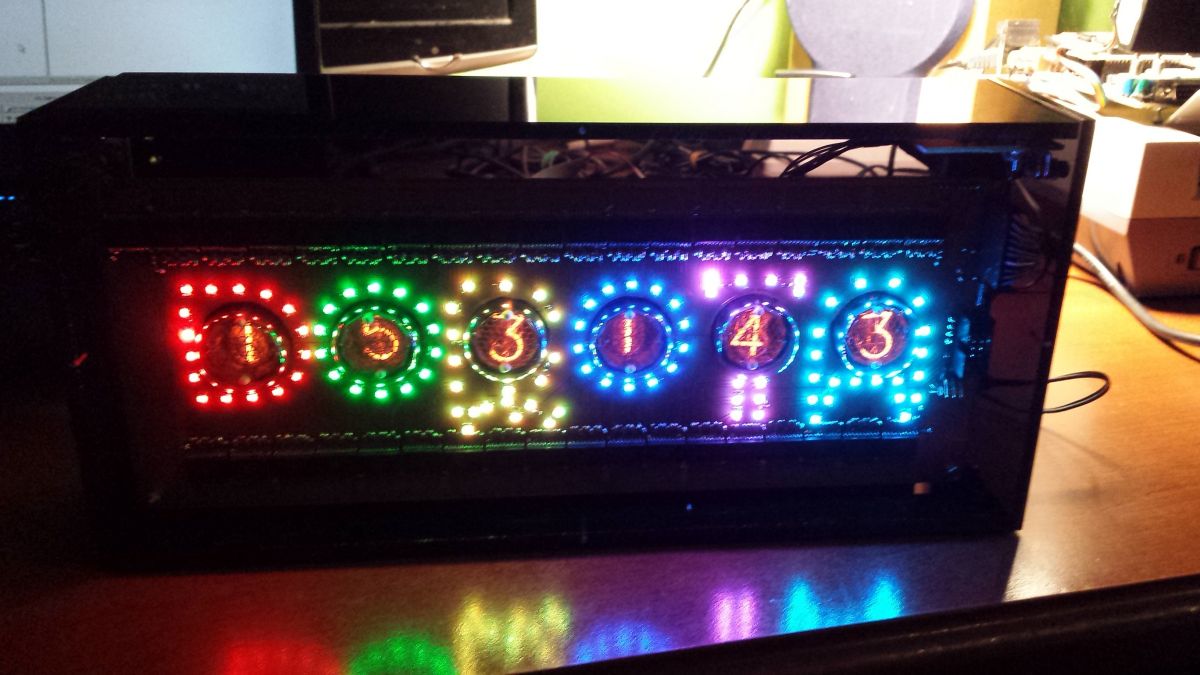
    Nixie tube clock in a plexiglass case with LED backlighting.
    //20231229_153127.jpg

    3. Board with diodes - design (connecting diodes)
    Most (all?) RGB LEDs have either all anodes or all cathodes connected and there are 4 pins available on the outside. My diodes have a common anode. Controlling many such diodes can be done in several ways:

    (1) The anodes of all diodes to +5V, a separate resistor in series with each cathode
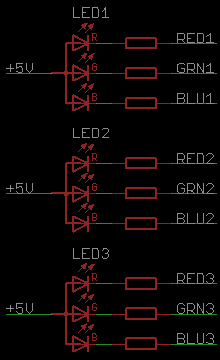
    RGB LED connection diagram with resistors.
    //led_con1.png
    + Possibility to control each of the components separately
    - Need to solder resistors 3 times the number of LEDs

    (2) A single resistor in series with the anode
    + Fewer resistors
    - Only one of the components (R/G/B) of each diode can be lit at a time, because exposing a low level to each of them at once will cause only the diode with the lowest voltage drop (red) to light up. To be able to control all colors, you need to multiplex (1/3 of the time we turn on the R components, 1/3 of the time G and 1/3 of the time B)
    - Single resistor = different current for each component
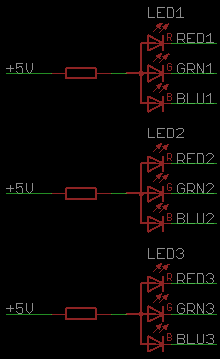
    Circuit diagram of LED connections in series with a resistor.
    //led_con2.png

    (3) Since only one of the components is lit at a time, a modification of the above method is to control each anode separately and connect all cathodes of the same color together and pull only the one that is to be lit to ground.
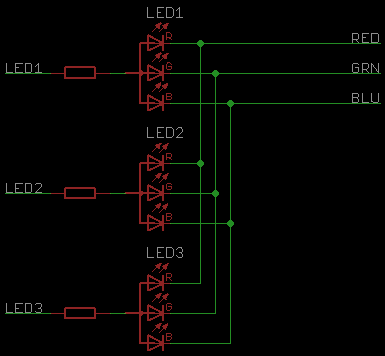
    RGB LED connection schematic with resistors and paths.
    //led_con3.png
    +/- Advantages and disadvantages as above
    + Saves the number of pins
    - previously, only the +5V line had to go around each diode, which could be successfully implemented on one layer without vias (blue line = +5V)
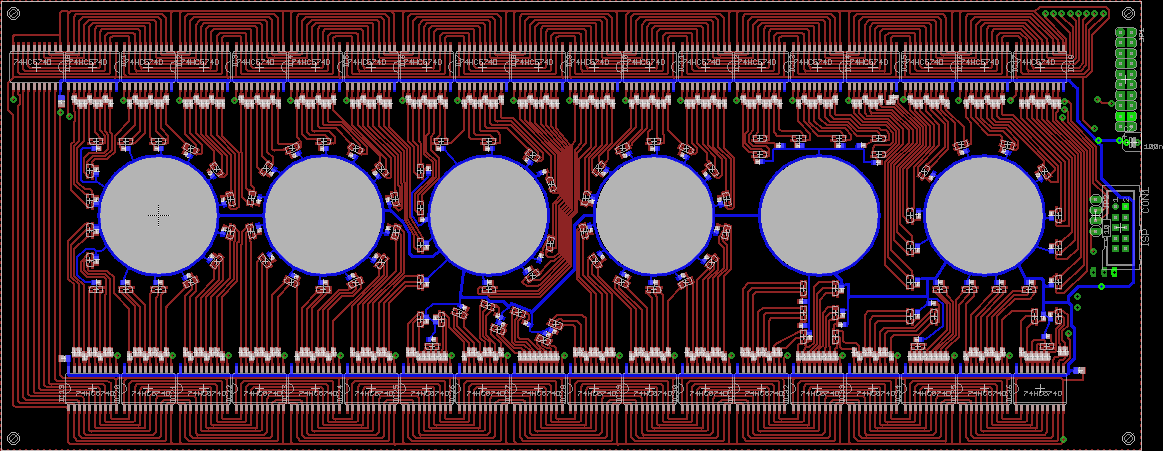
    PCB design with LED diodes and nixie clock
    //vcc.png
    and now they must be three lines (R, G, B), which requires the use of 2 layers and 2 or even 3 vias per diode.

    4. Board with diodes - design (latches)
    In addition to all this, there is also the choice of how to expand the number of I/O pins of the microcontroller - with 96 diodes, 96 * 3 = 288 pins are needed. For example, shift registers (74595) or regular octal registers (74574) can be used.
    Registers 74595 seem to be a good idea at first glance (small number of microcontroller I/O pins involved):
    * single serial data input signal
    * common serial shift clock signal for all registers,
    * possibly also a separate common serial latching clock signal,
    * possibly also a common zeroing signal
    However, the 14-pin housing of these registers has a certain drawback - the QB, QC, QD, QE, QF, QG, QH outputs are located on one side of the housing, and the QA output is on the other - this complicates the routing of the paths, because now the entire signal bundle (GND, VCC) , CLK, RST, OE) must properly go around all the chips, and the QA pin on the other side will get in the way, which will force part of the track to go to the second layer - two additional vias for each chip.
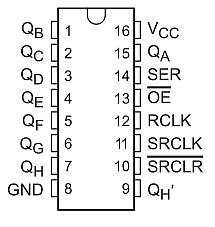
    Diagram of a 74595 integrated circuit with pin descriptions.
    //74595.png

    That`s why I preferred 74574 chips: 96 diodes * 3 components / 8 outputs per chip = 36 chips
    Here, each system requires a separate clock line (36 clocks) and a common 8-bit data bus (36 + 8 = 44 pins)
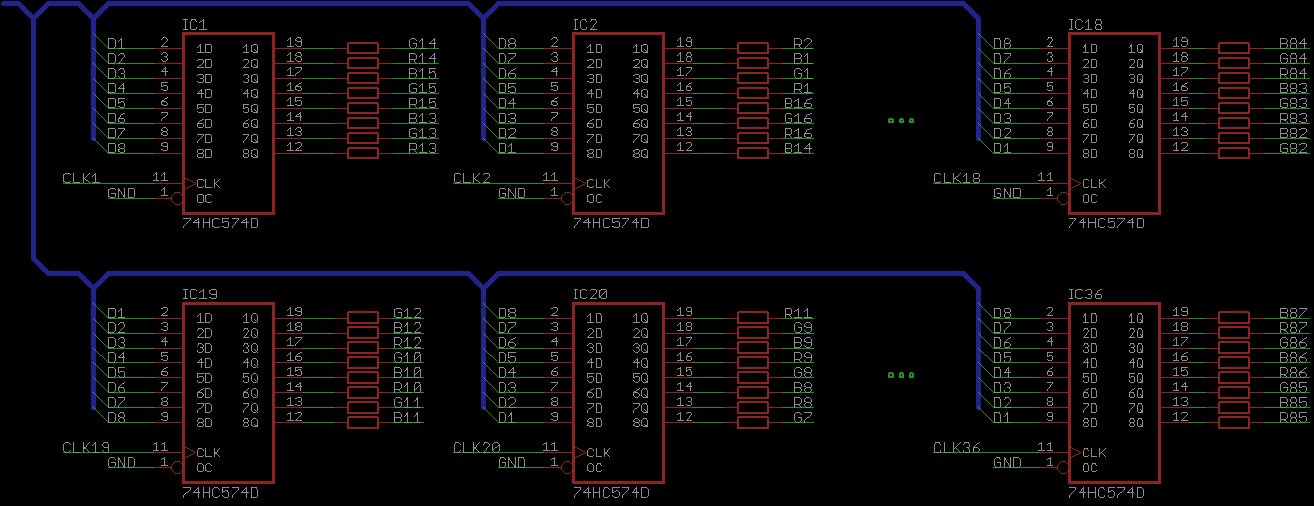
    Schematic of connecting integrated circuits for LED control
    //74574_1.png

    However, I connected them in such a way that each upper and lower chip has a common clock, while all the upper chips have their own and the lower ones have their data bus (18 + 8 + 8 = 34 pins)
    Both buses are not controlled directly from the microcontroller, but an additional 37 buffer latches data from one bus to the other, which reduced the number of pins to: 18 + 8 + 1 clock for the switch = 27)
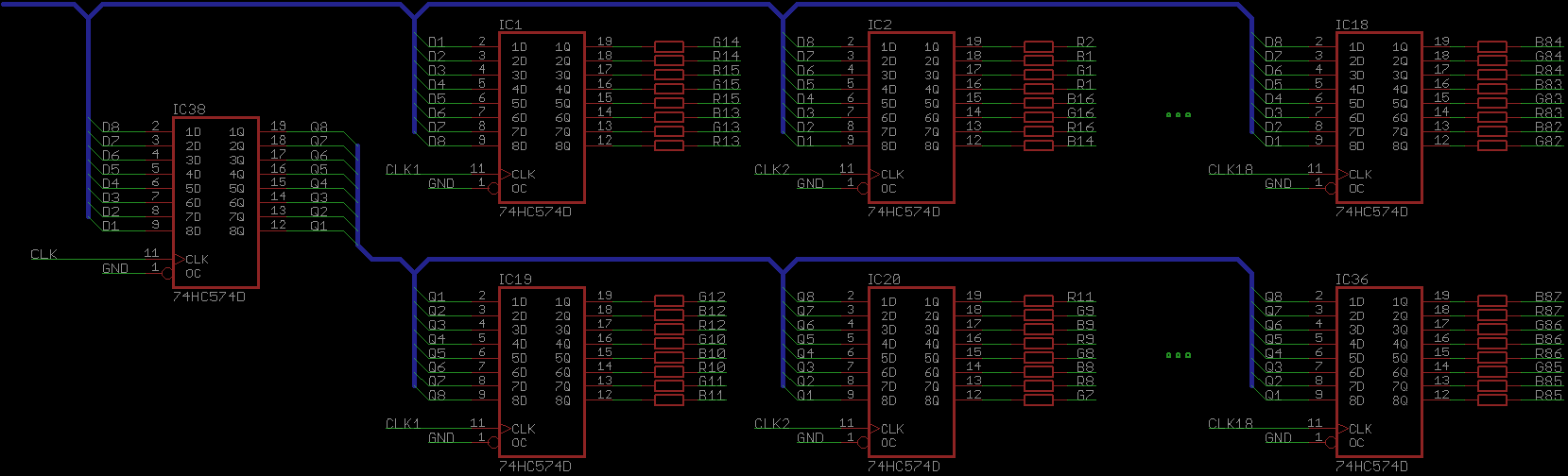
    Circuit diagram of IC and resistor connections with red and blue traces
    //74574_2.png

    Additionally, as you can see, the inputs of one latch are arranged as D1..D8 and the next one as D8..D1, thanks to which the "serpentine" of paths can be shorter:
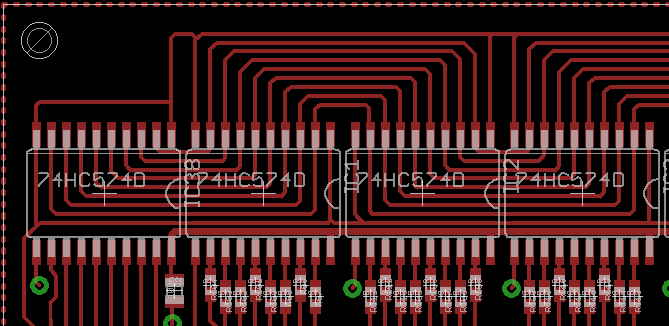
    Close-up of PCB track design with 74HC240 ICs.
    //paths1.png

    5. Eagle - commands
    Here, as a small interlude, I will insert something very useful in Eagle.
    Few users probably know (or use) the so-called command - e.g. by typing
    MOVE IC1 (1.0mm 1.0mm)
    we move the element called IC1 to the position with coordinates X=1.0 mm y=1.0 mm, thanks to which we save clicking.
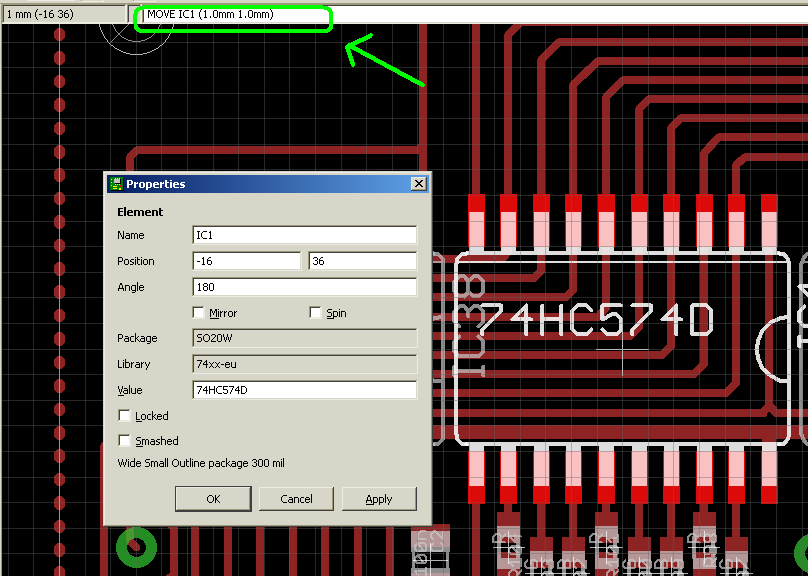
    Eagle software screen showing positioning of IC component on a PCB layout.
    //commands.PNG

    But even fewer people probably know that Eagle allows you to perform the so-called scripts (ULP files).
    Such a file is nothing more than a program in a language very similar to C, which allows you to execute these commands.
    And, for example, if we want to place 18 IC1 ... IC18 systems next to each other so that they lie on the coordinates
    (-16 36), (-2.5 36), ...
    then just call the program like this:
    
    string cmd = "";
    for (i = 1; i <= 18; ++i) {
    	real x = -16 + 13.5 * (i - 1);
    	real y = 36
    	angle = 180;
    	
    	sprintf(cmd, "%sMOVE IC%d (%1f %1f);\r\n", cmd, i, x, y);
    	sprintf(cmd, "%sROTATE =R%f IC%d;\r\n", cmd, angle, i);
    }
    	
    
    exit(cmd);


    I`m saying this because manually placing diodes on the arcs that form the letters would look crooked, but it`s elegant.
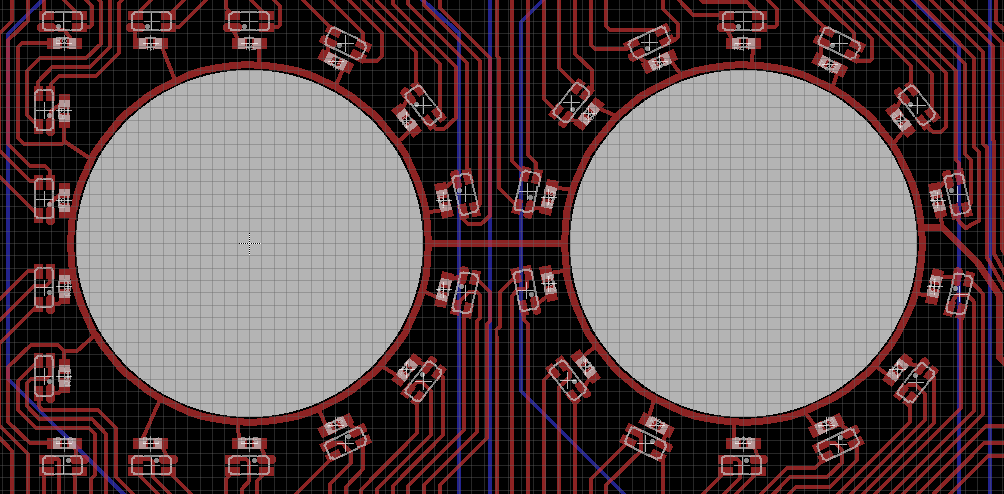
    PCB design with SMD LEDs arranged for a custom-designed nixie clock.
    //script1.png

    These scripts also make it very easy to create cases for your own components. In 2 minutes I created a housing for a nixie lamp, which has 11 pins evenly distributed around a circle and, additionally, by rotating them by such an angle that, by changing the type of "pad" from round to "offset", they were arranged concentrically.
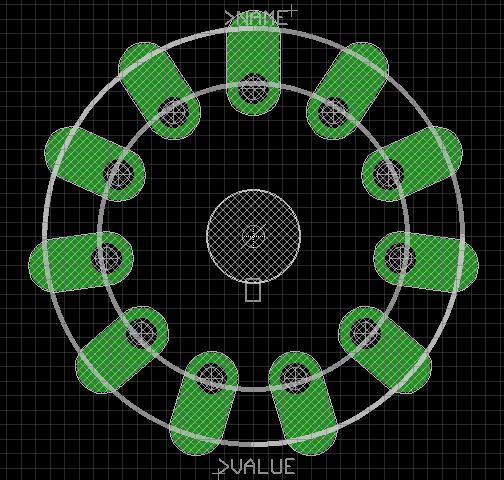
    Eagle PCB design for Nixie tubes
    //script 2.png

    A serious limitation was the need to fit the board onto an A4 sheet of paper. The margin of reserve was about a centimeter. And you have to be careful, because the eagle does not warn you if the tile does not fit on the paper, it will "silently" reduce the printout to fit.

    As for how to connect the diodes - I wasn`t entirely sure, so I gave myself the option of placing a resistor both at the anode and at each of the cathodes (if I decide on one of them, I will simply connect the second resistors with tin).

    After a dozen or so hours spent on Eagle, I had a ready version of the board.
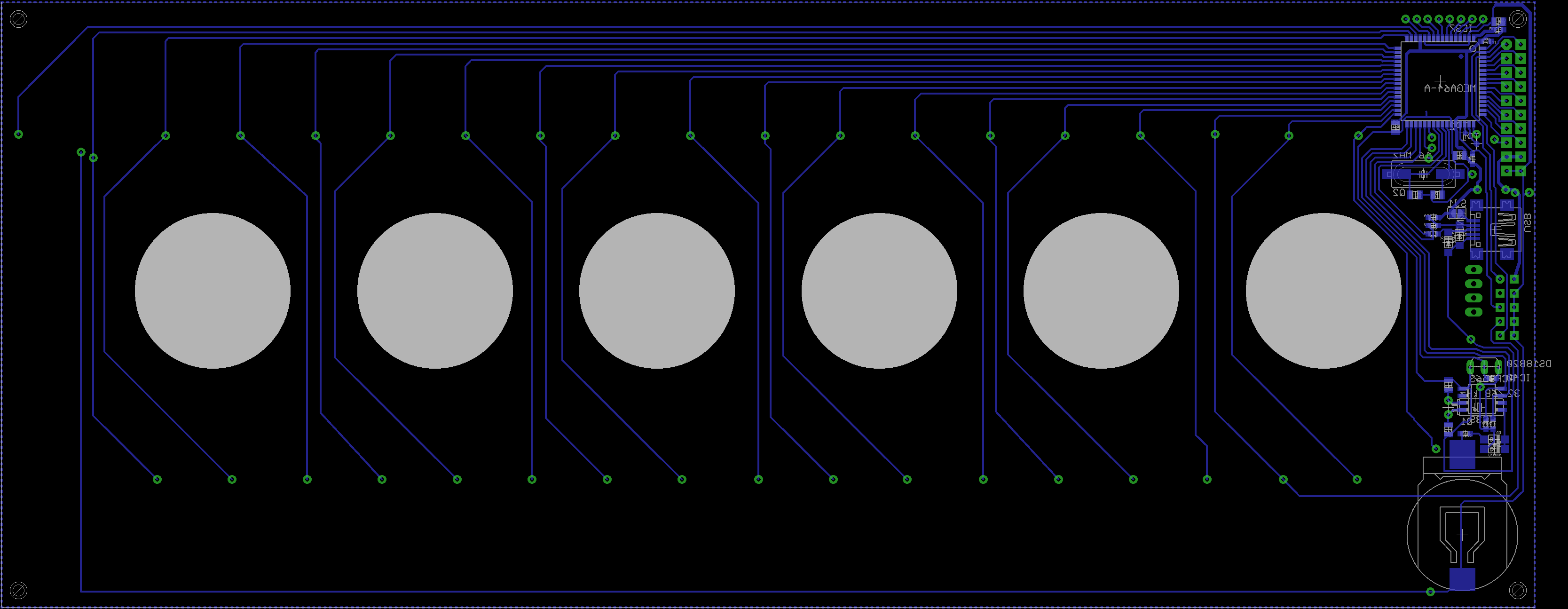
    The whole thing, which I didn`t mention, is powered by an Atmega 64 microcontroller. The board also has a real-time clock with a battery that maintains the date, a USB socket in the board if I wanted to use it somehow, a pin strip for connecting the control buttons and a 20-pin connector for connecting the board with nixie lamps (10 digit segments + 6 lamps + 2*GND + 2*5V)
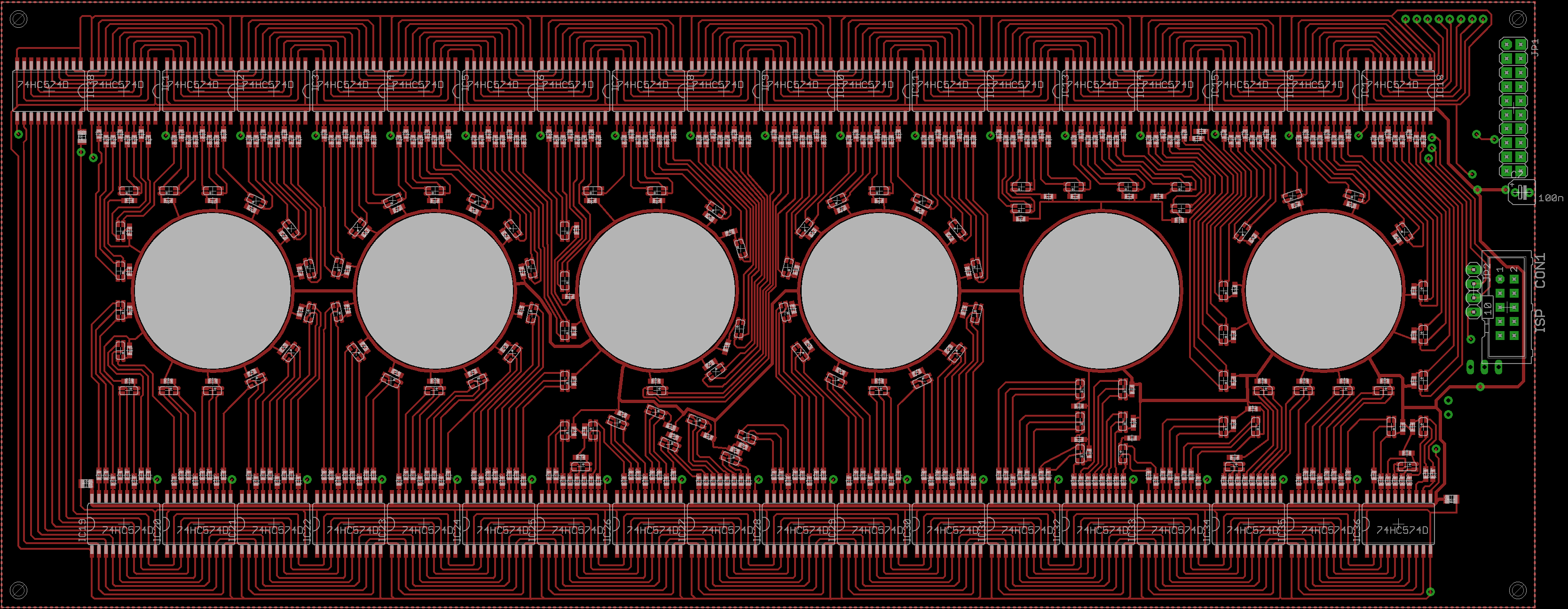
    Nixie clock PCB design with lamps and LED components PCB design with circular holes and traces
    //pcb1-top.png, pcb1-bottom.png

    The board turned out really elegant, practically everything was placed on the upper layer, on the lower layer there are only clock lines going to the latches and a microcontroller with peripherals.

    6. Board with diodes - execution
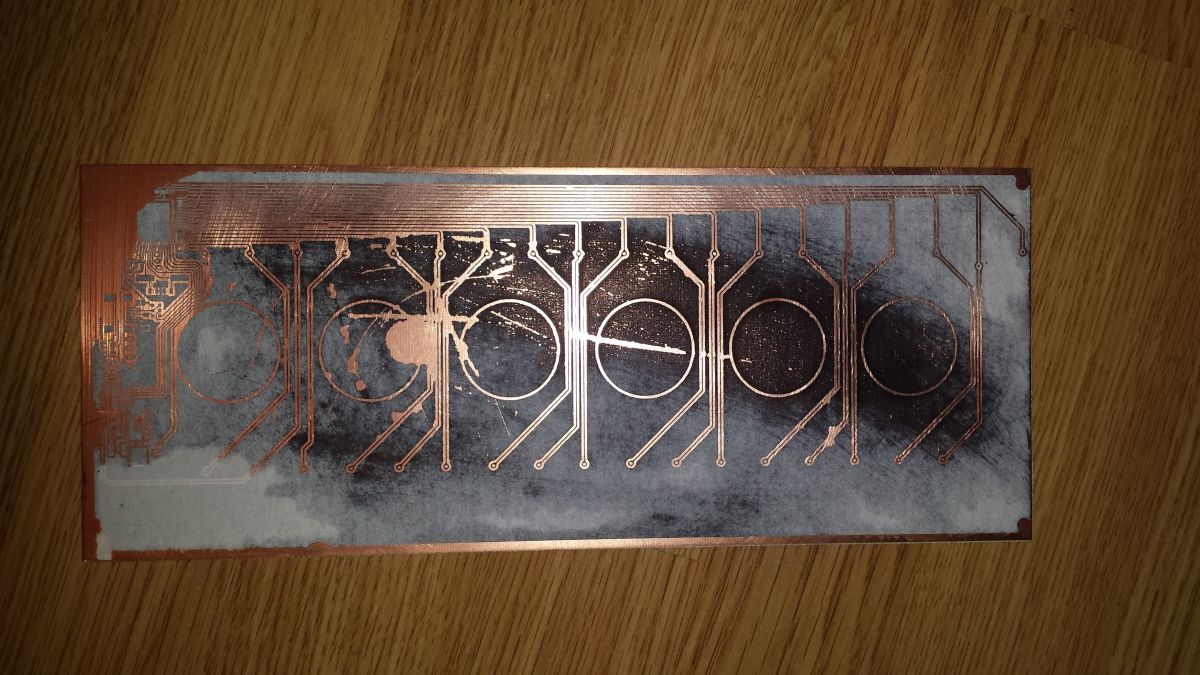
    It was finally time to make the board (thermal transfer). I didn`t know for sure whether I was going crazy with the sun, because I had never digested such a large slab in my life. And there were many obstacles
    1) merging two layers of such a large plate is extremely difficult - even if you manage to fit all the corners, something inside will always be a millimeter apart because the paper in the printer has waved. Therefore, when ripping, the area with the microcontroller was the most important (there is a high density of vias there).
    2) Pressing such a large tile with a laminator takes a lot of time - copper loses heat quickly and needs to be passed through the laminator several times.
    3) Soaking the paper - unfortunately, for the first time, the plate did not fit into the plastic container with water, powder and dishwashing liquid and I had to move to... the sink, having previously clogged the drain with a cork
    4) The millimeter-sized tile fits in my etching machine, but with such dimensions it is impossible to ensure that the whole thing etches evenly, unless we have a beautifully aerated etching machine.

    The first time I failed on the second point - I don`t know if I didn`t sand the laminate with sandpaper or if it wasn`t warm enough, but the toner didn`t stick to one of the corners. Discouraged by this pace of work, I had to take a break for 2 weeks...
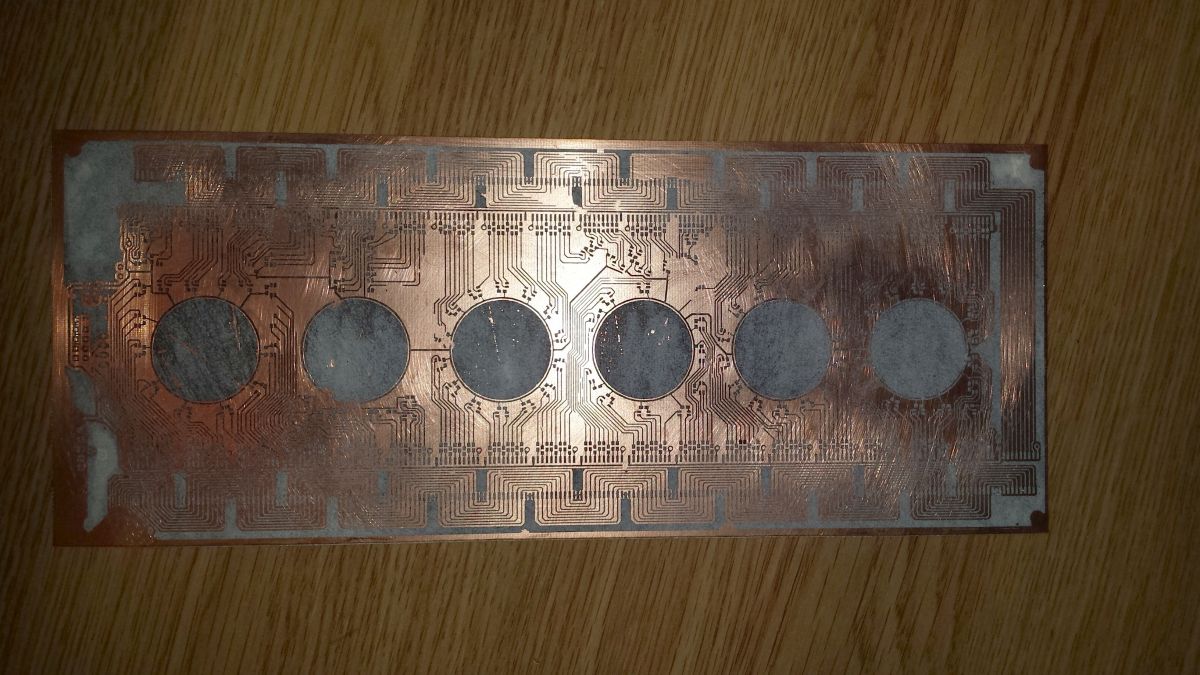
    Printed circuit board with cutouts for nixie tubes. Printed circuit board during the etching process.
    //20231220_094921.jpg 20231220_094928.jpg

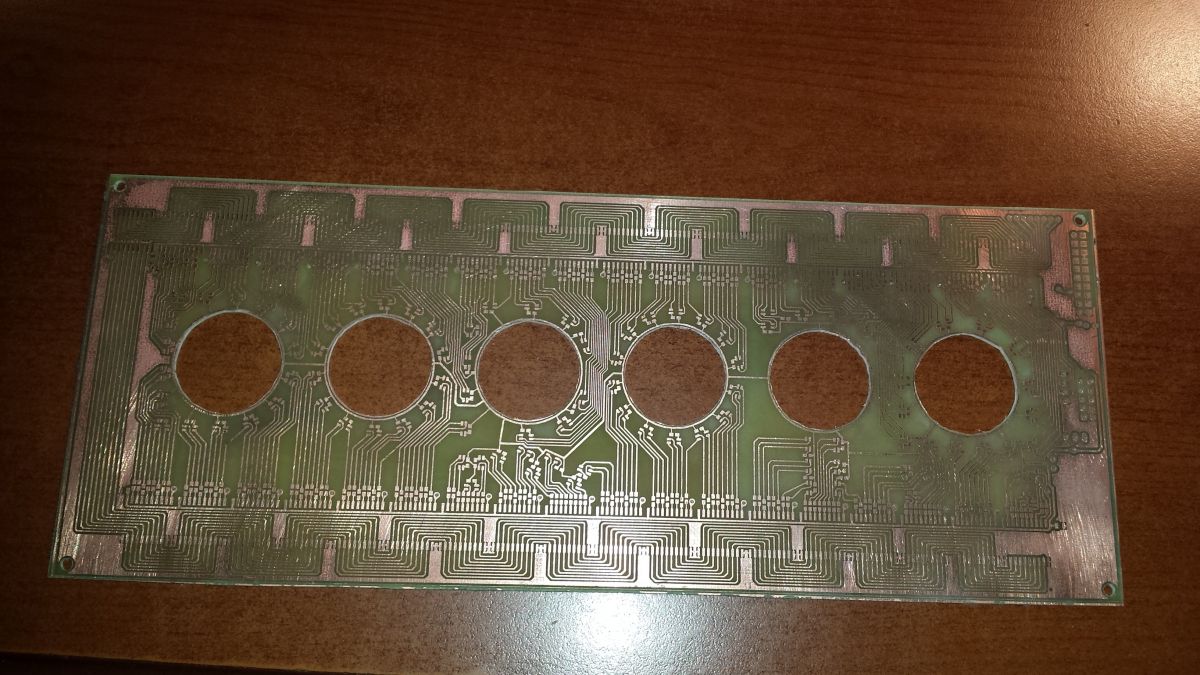
    After 2 weeks I came back, made a second attempt and... I got the most beautiful plate in my life. I was terribly worried about the etching, because it took over an hour, I took the plate out several times and put it into the etching machine, rotated, to "average" the effect of etching on different areas. It turned out great because the copper layer was thick (no etching), the etching mixture was weak and the toner layer was thick.
    I had the most "fun" with milling the holes for the nixie tubes - because there was a power path around them and I felt a bit like a surgeon.
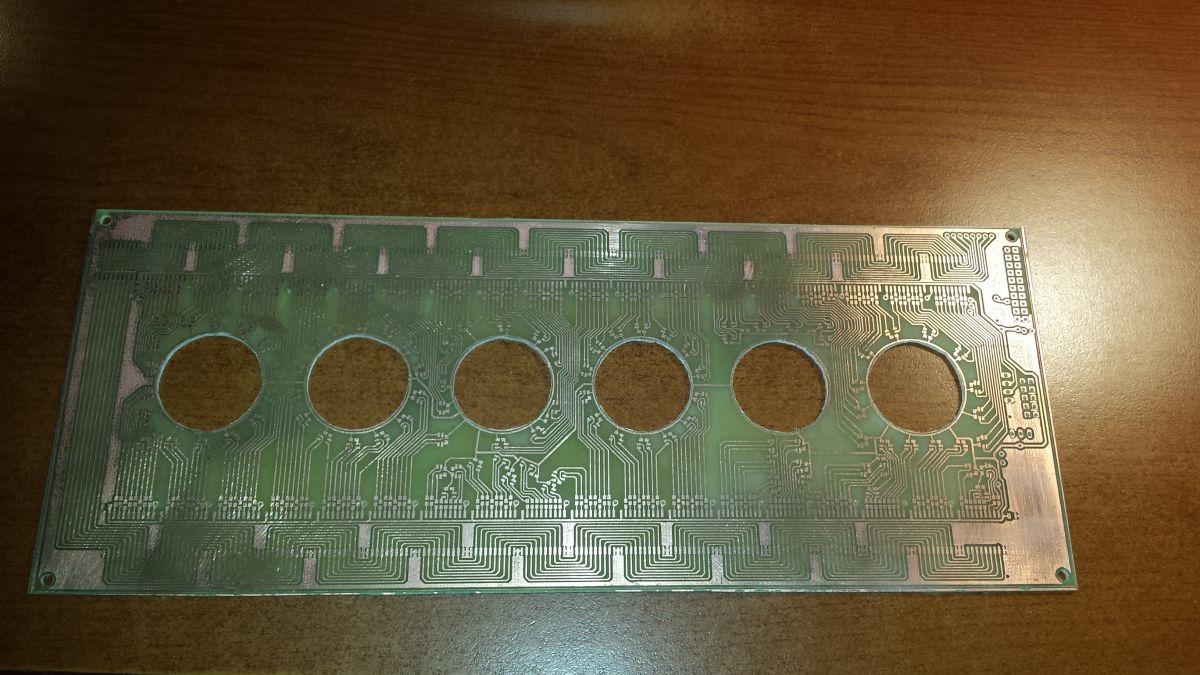
    Printed circuit board with six large round holes and intricate traces. Printed circuit board with cutouts for tubes.
    //20231220_182126.jpg 20231220_182136.jpg

    Then it was time for soldering - 96 diodes, 96 resistors and... 288 mini-tin jumpers placed so close to each other that at times I had the impression that I was doing miracles with a soldering iron. I soldered the diodes to the first letter (A) for about 1.5 hours, then I gained practice and it took me about 30 minutes per letter. I was actually afraid whether I would be able to solder the diodes manually with such a small pitch, but it turned out great. I had to unsolder several diodes with hot air and solder them again, but each of them survived - I think they are extremely resistant.
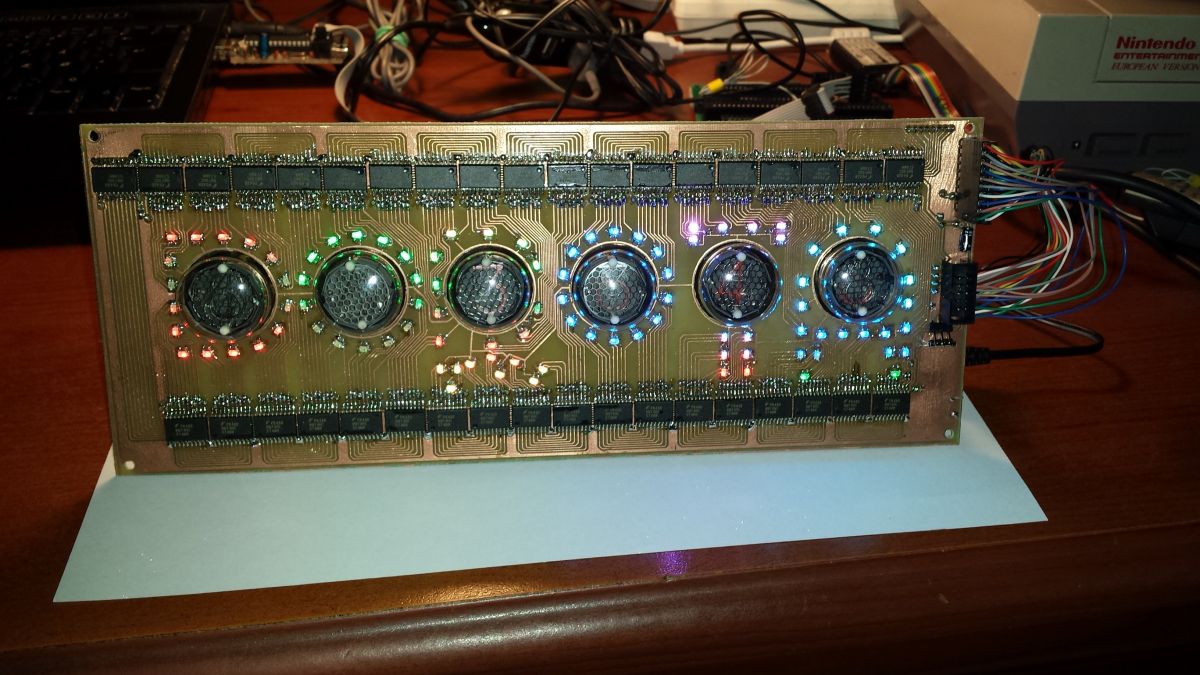
    Nixie clock with LED lights on a circuit board
    //20231222_120605.jpg

    7. Tile with lamps - design
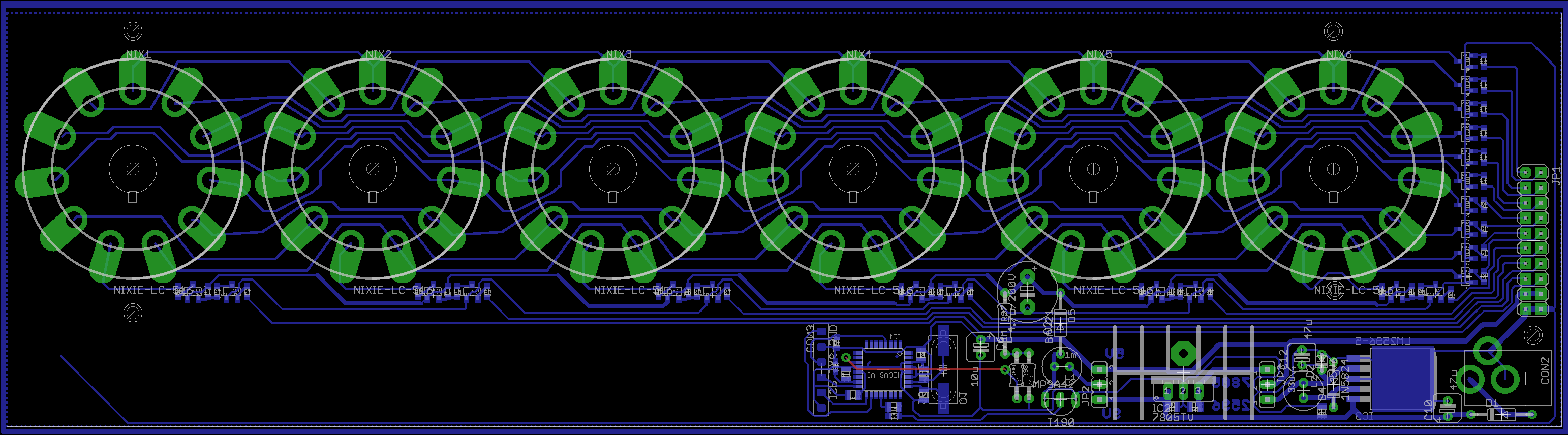
    With the first board ready, now it`s time for the lamps. However, I decided to use LC-516 because I had more of them. They are larger, but with the size of the clock they will probably fit in even better. 6 nixie tubes, multiplexed on transistors.
    In addition, a 180V voltage converter based on Atmega8. Previously, this type of converters increased my voltage from 5V because I powered them directly from USB. However, here the whole thing will be powered by a 9V power supply, so I gave myself the opportunity to choose whether it would be better to supply 5V or 9V to the converters (selected with a jumper).

    There is also a power supply block for diodes and microcontroller: 9V->5V. Here, I was also not sure whether it would be better to use a regular 7805 + heat sink, or maybe with so many diodes there would be less losses if I use a step-down converter (LM2596). I also gave a choice of how to obtain 5V with a jumper.

    After a few hours, the board was also very polished - all in one layer and only one grommet (!)
    PCB design for a nixie tube clock
    //pcb2-top.png

    Here again the "tricks" in Eagle came in handy - as you can see, many fragments of the paths connecting the segments (digits) of the lamps look identical. In Eagle, all you need to do is connect all segments of one lamp with the neighboring one, and then select, copy, paste and transfer the ready-made mosaic of paths to the neighboring lamp. Eagle will give these pasted paths new names (adding the number 1 at the end or increasing the number by 1 if they ended in a number). Just change the name again and you don`t have to run so many paths manually.

    8. Plate with lamps - execution
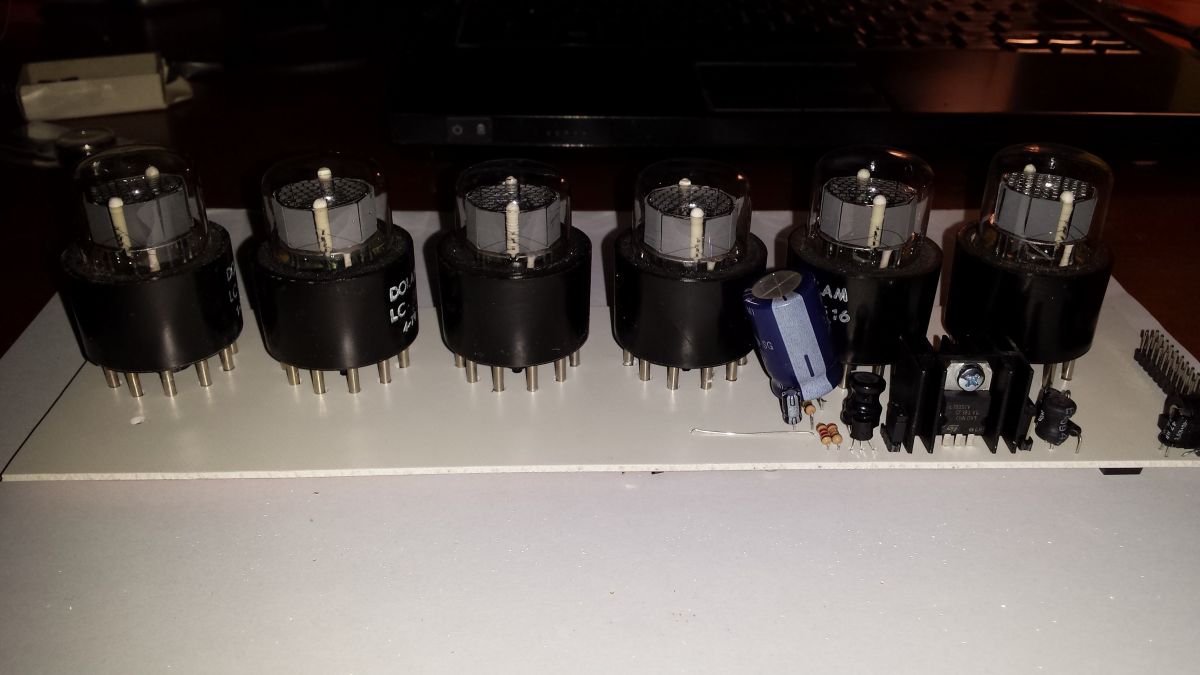
    The tile turned out to be huge again (almost the same width, but half the height). I didn`t want another large plate of the same size to save myself from digestive problems again. Moreover, it looks visually more elegant when assembled when the back plate is smaller (it resembles a TV picture tube) than a sandwich made of two identical plates.
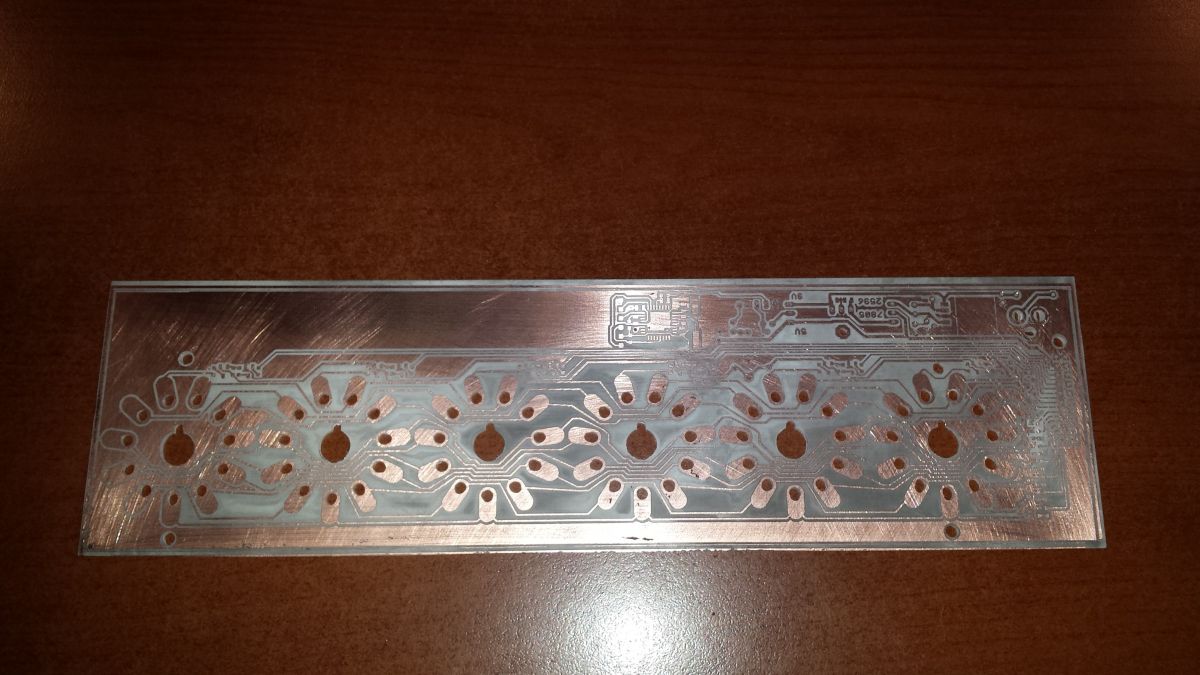
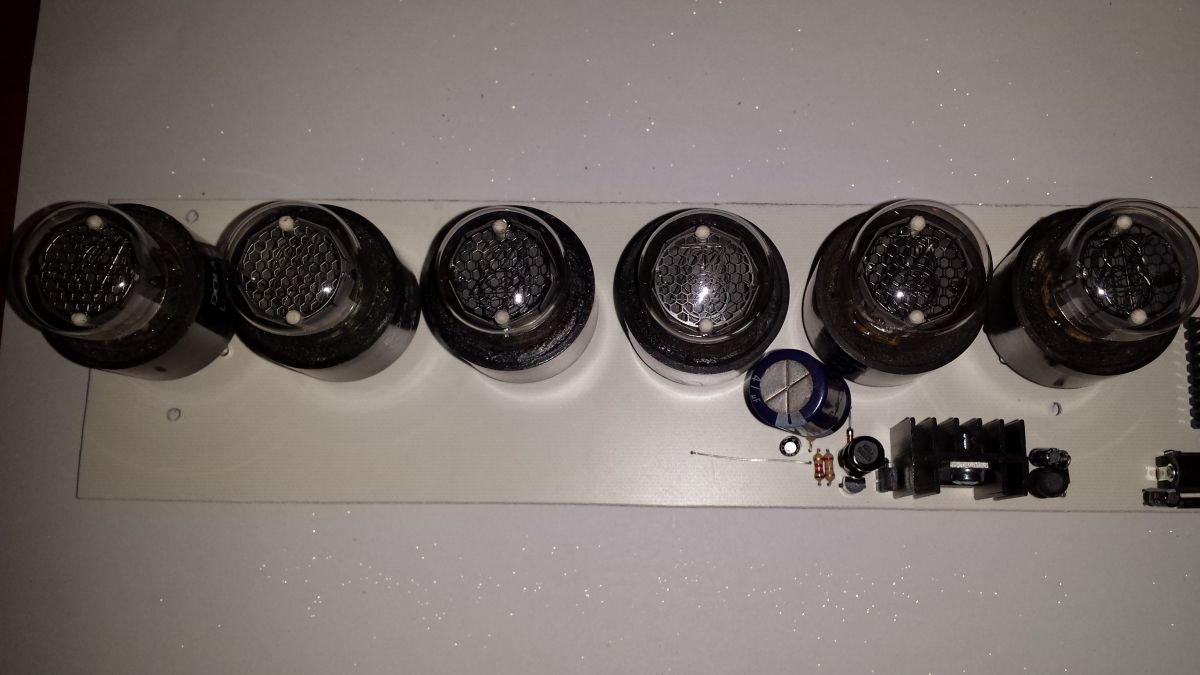
    Printed circuit board with holes and copper traces. Nixie tube board on a white background with unmounted components. Nixie tube board on a white background Printed circuit board with LEDs ready for assembly
    //20231221_221511.jpg 20231222_003152.jpg 20231222_003159.jpg 20231222_003212.jpg

    Oh, I didn`t use lamp sockets, I just soldered them permanently. Generally, I do not recommend soldering lamps (metal and glass have different thermal expansion coefficients, which may negatively affect the durability of such a lamp after heating and cooling of the contacts).
    However, as an excuse, I will add that the LC-516 lamps have a large base, so the metal contacts do not lead directly to the glass envelope. Moreover, the contact tips were already tinned, which made soldering much easier.

    At the same time, I improved the method of etching such large tiles - instead of horizontally, I immerse them halfway vertically and grab them with a carpenter`s clamp to the desired depth. After etching one half, I do the same with the other half. It turned out to be a bomb.
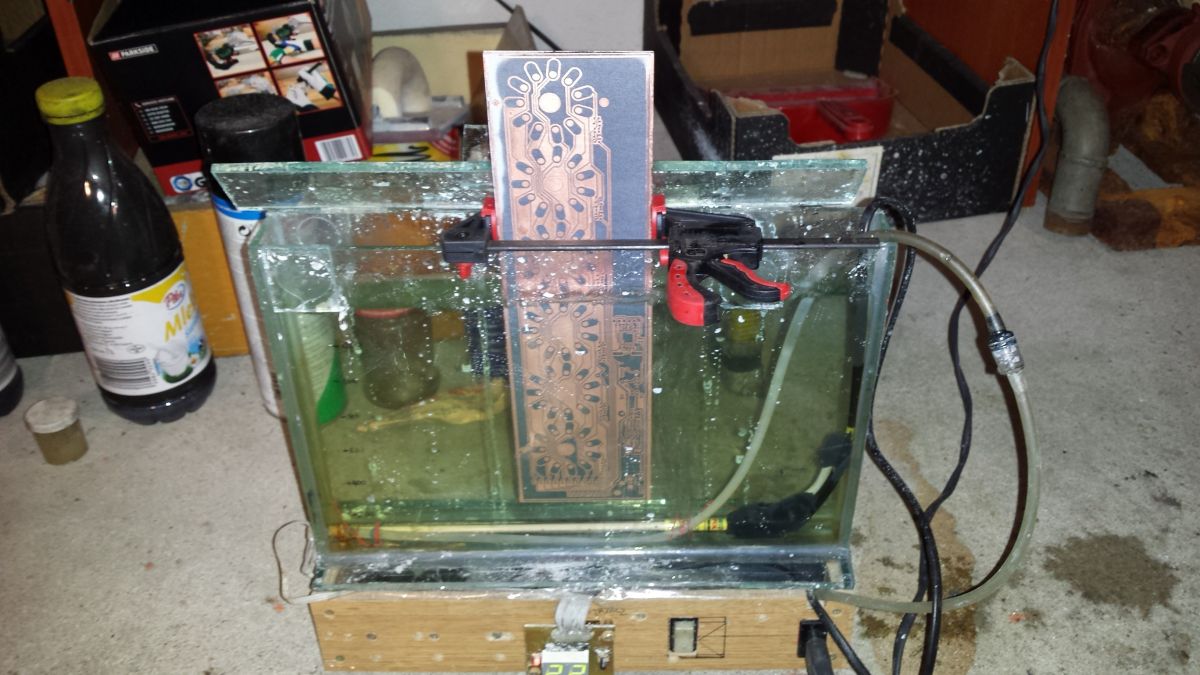
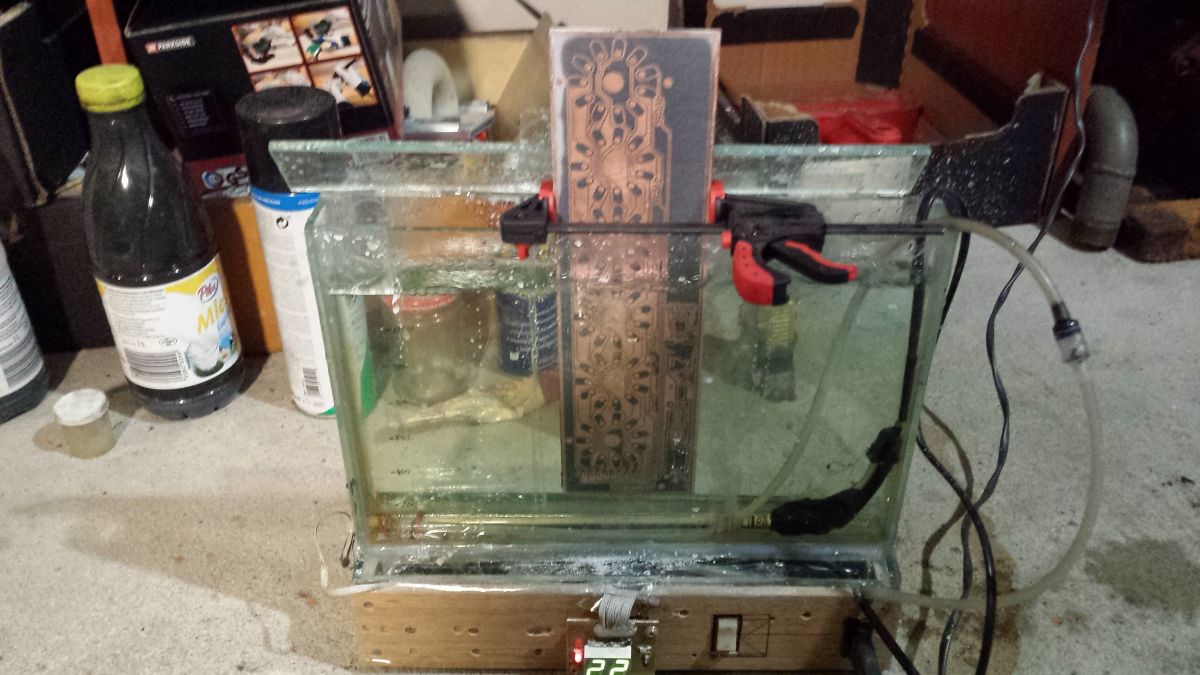
    A printed circuit board is immersed vertically in an etching solution inside a glass etcher. PCB etching process in a tank filled with etching solution.
    //20231221_203801.jpg 20231221_203808.jpg
    length of 1 led cycle 778us

    9. Buttons
    I did not place the buttons permanently on any of the above boards because I had no idea where they were supposed to be. So I designed a third board with buttons (3 buttons, 4 spare), connected to the previous one with a cable.
    I wanted to use regular tact switches, but I didn`t have 10mm long ones at hand, so I used nice Connfly isostats. The isostats I had were bistable, and I needed monostable ones. Here again, as a curiosity, I will say that it was enough to "push" the C-shaped metal wire outwards to conjure up monostable ones from bistable ones.. There are also 10n capacitors on the board to physically eliminate the phenomenon of contact vibration.

    * The first button turns on/off the LED backlight
    * The second button changes the time display format HHMMSS / HHMM
    * The third button is used to set the time (after pressing it, button 1 selects one of the 6 digits, button 2 changes its value 0-9; pressing button 3 again accepts the time change)
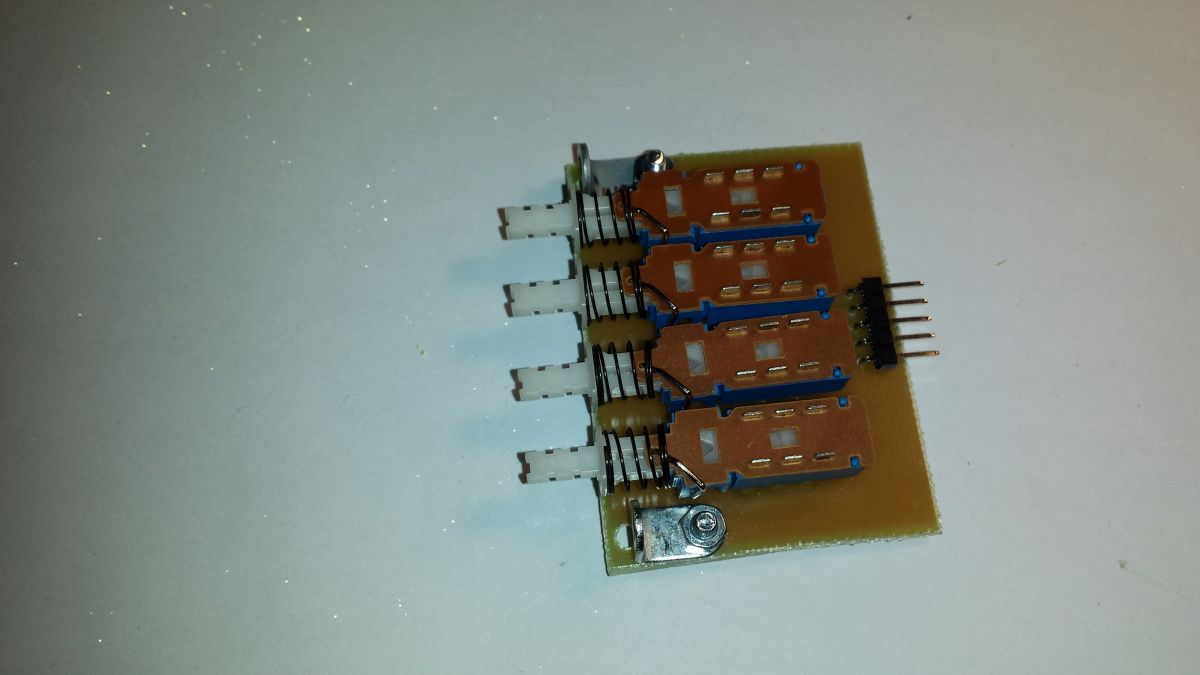
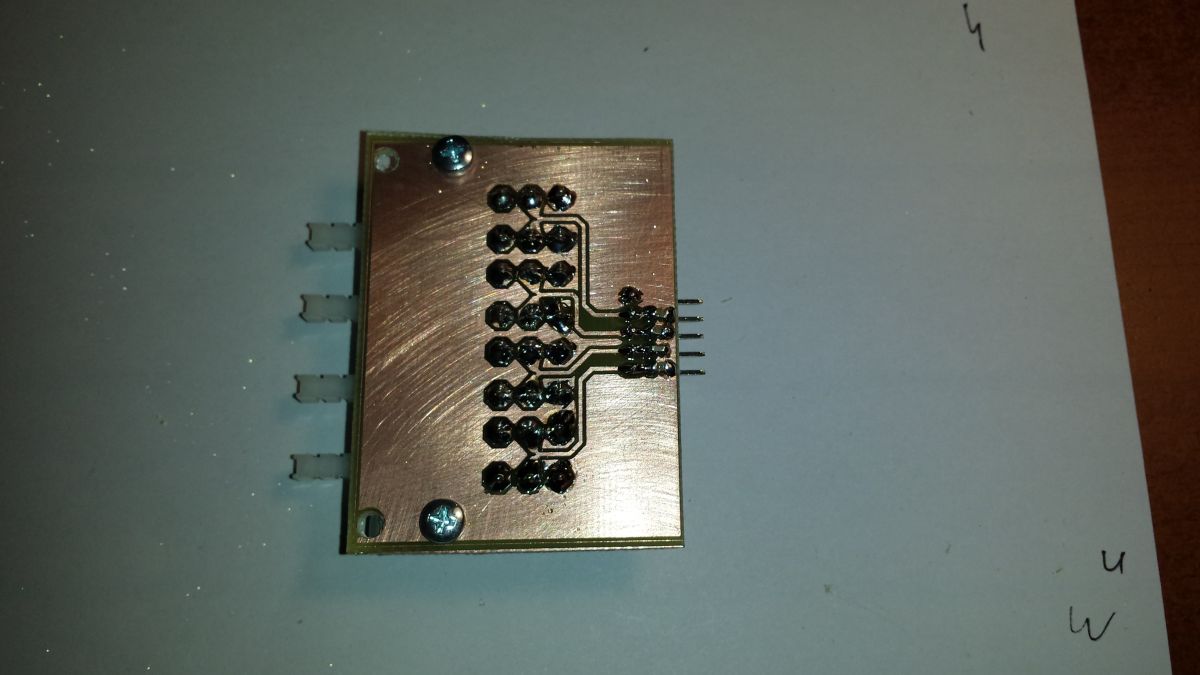
    Printed circuit board with three switches and electronic components. Close-up of a circuit board with soldered components.
    //20231229_120917.jpg 20231229_120925.jpg

    10. Nixie boost converter .
    After assembling everything, everything seemed to work, but the Nixie lamps were much too dark compared to the LEDs. Unfortunately, the converter using a single NPN MPSA 42 transistor was unable to produce more than about 1mA of current, which was definitely too little for 6 lamps.
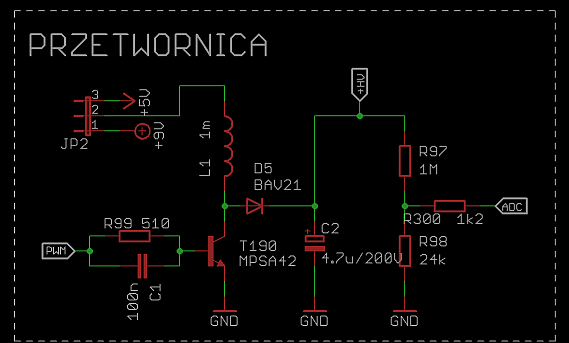
    Voltage converter schematic for nixie tubes with MPSA42 and MC34064 circuits.
    //mpsa_stepup.png

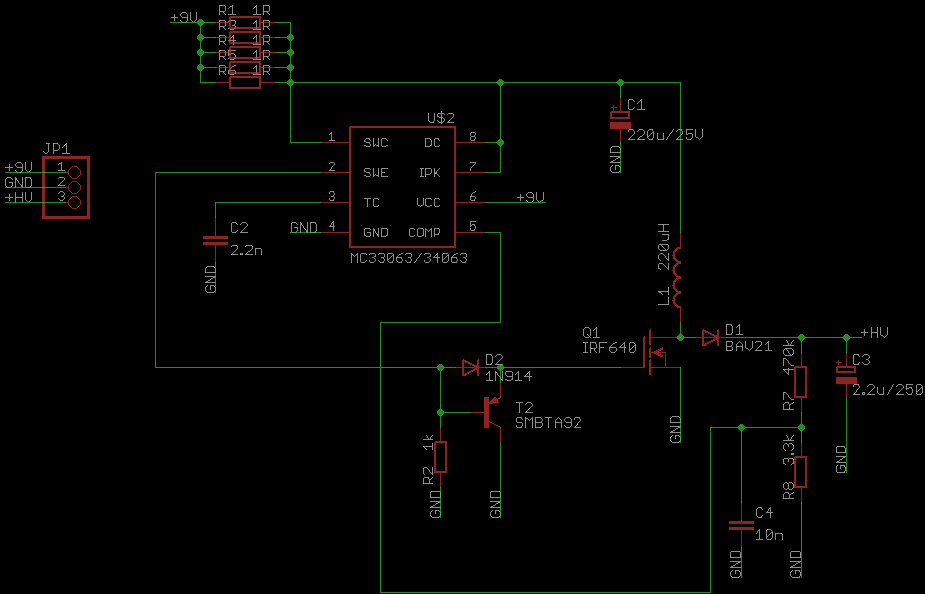
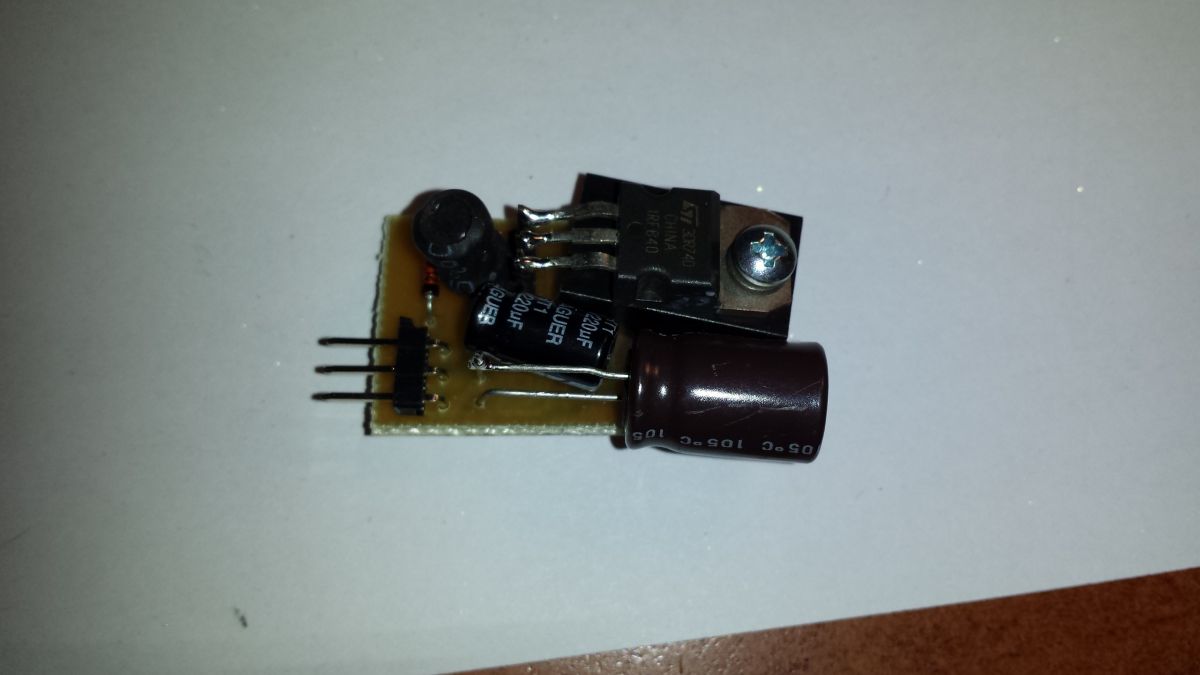
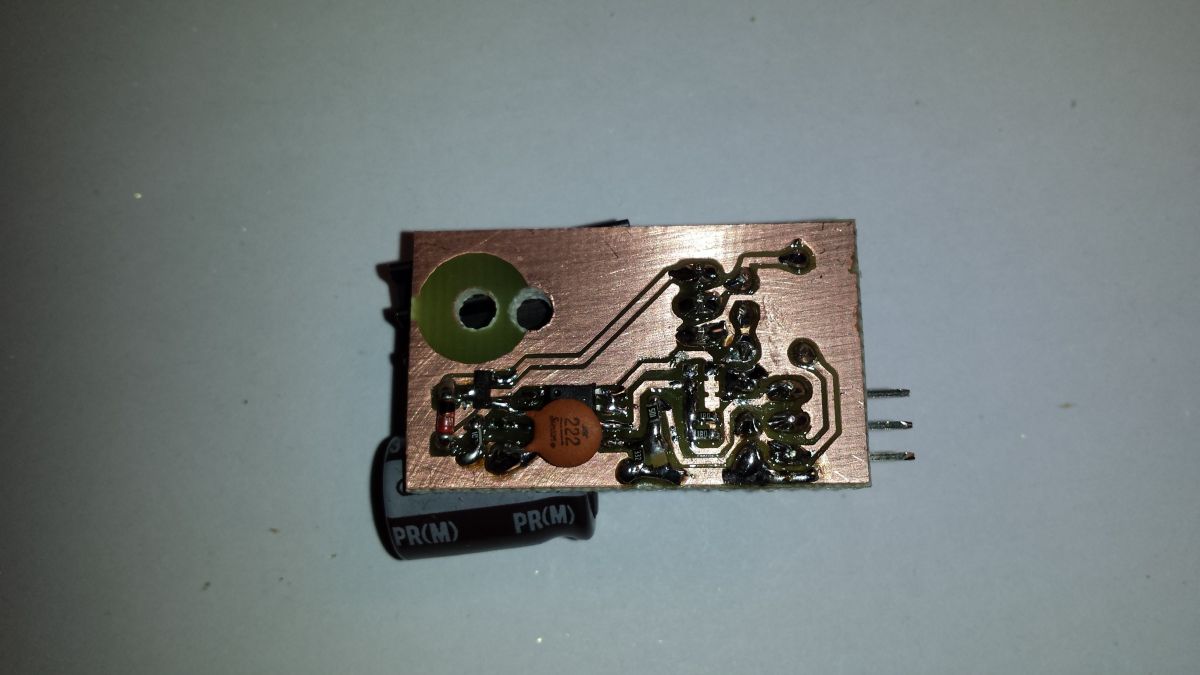
    Since the time to give the gift was pressing, I didn`t want to experiment anymore and I used the "proven" converter design from https://threeneurons.wordpress.com/nixie-power-supply/, based on the N-MOSFET IRF740 and the MC34064 system.
    It would probably be enough to just replace the NPN with N-MOSFET in my board and add a transistor to control it (so that the mosfet gate could not be controlled directly by 5V from the microcontroller, but could be fed 9V to it through the transistor).
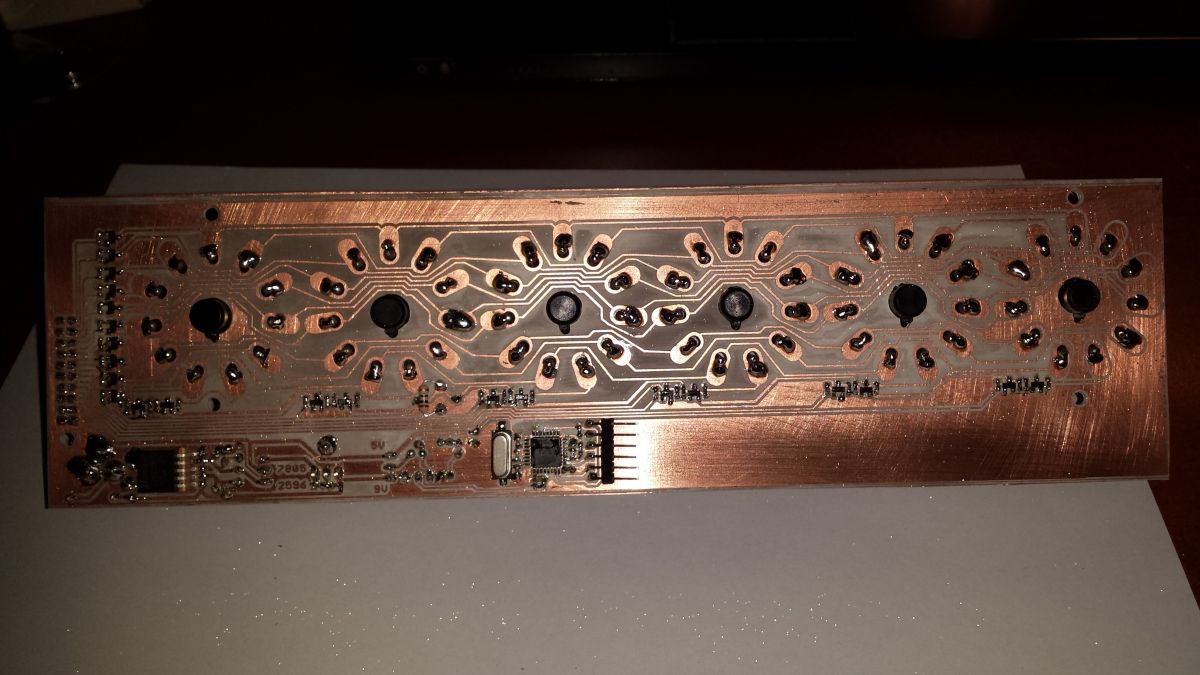
    But in order not to reinvent the wheel, I limited my contribution to using the diagram from the above website and based on it I designed a mini-board with a converter, which replaced the existing, inefficient one. The difference in operation is immediately visible, the new one gives 20 mA without any problems. The lamps shined at full power.
    Converter on a printed circuit board with electronic components. Printed circuit board with electronic components and holes. Voltage converter schematic with electronic components
    //20231229_104705.jpg 20231229_104710.jpg mosfet-sch.png

    11. Housing
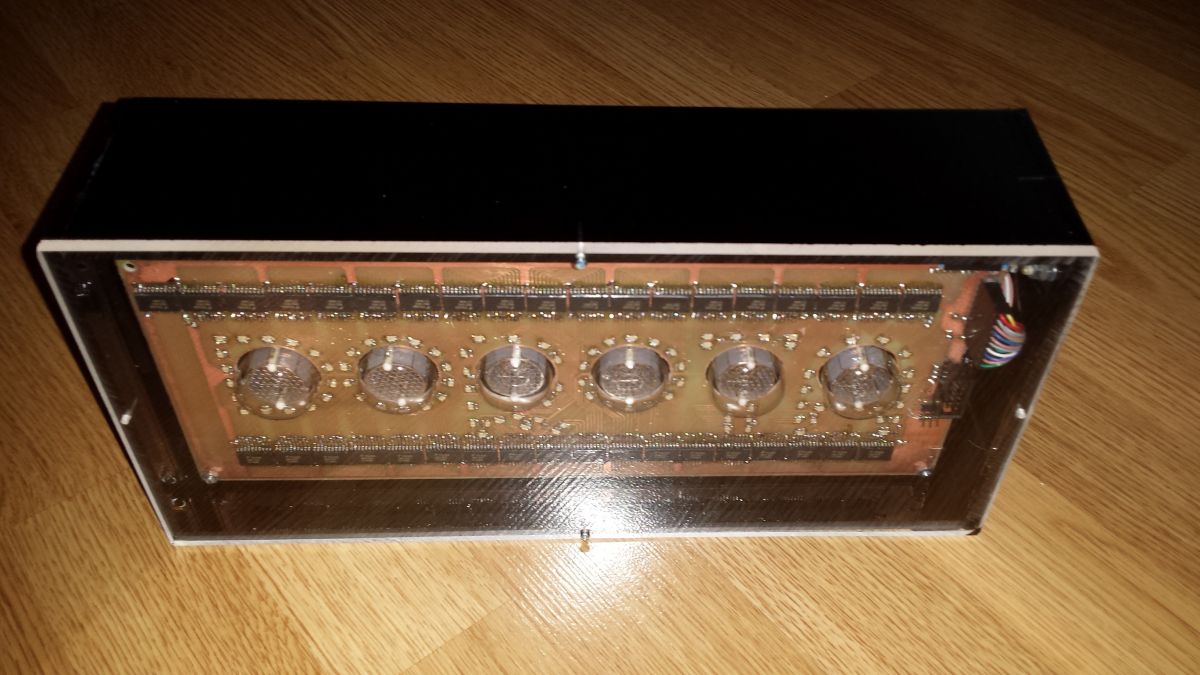
    The last, and most important from an aesthetic point of view, element of the design is the casing. Makers encase this type of clocks in wood and glass. However, I chose plexiglass due to the lack of carpentry facilities (and my attempts at cutting glass with an oil knife were, to put it mildly, average).

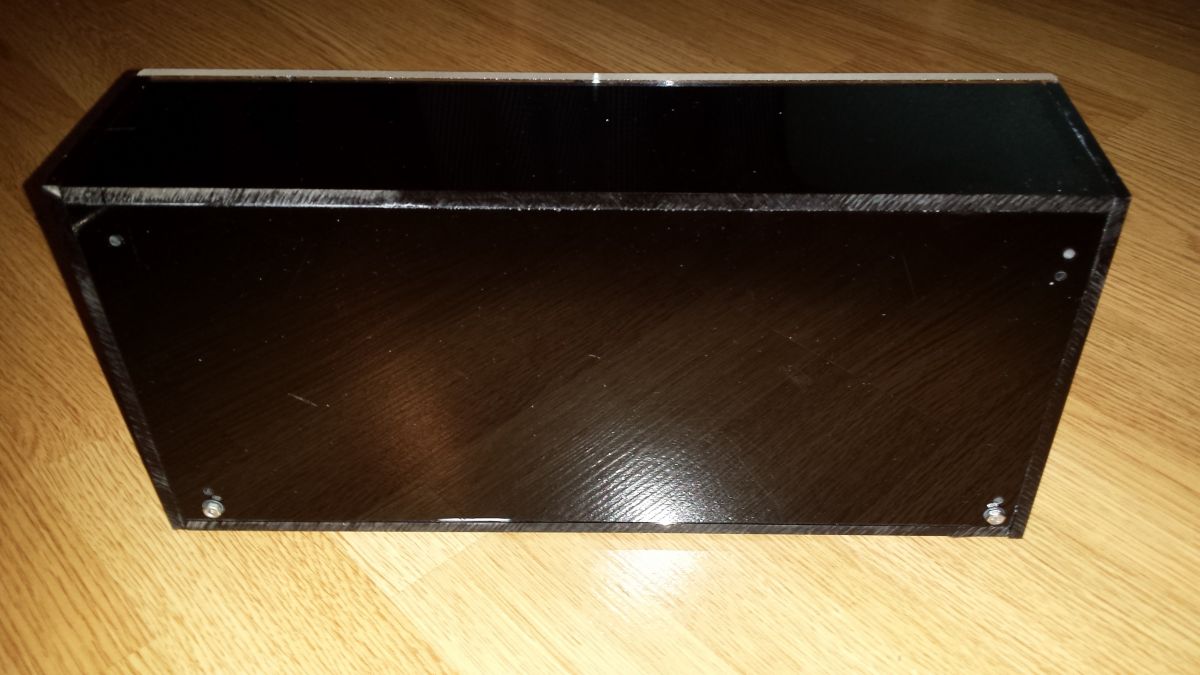
    So I ordered 6 pieces of cut-to-size plexiglass. The recipient of the gift is crazy about the color black, so I chose graphite-colored smoked plexiglass (semi-transparent, allows about 20% of light through). Only the front glass is made of transparent plexiglass.
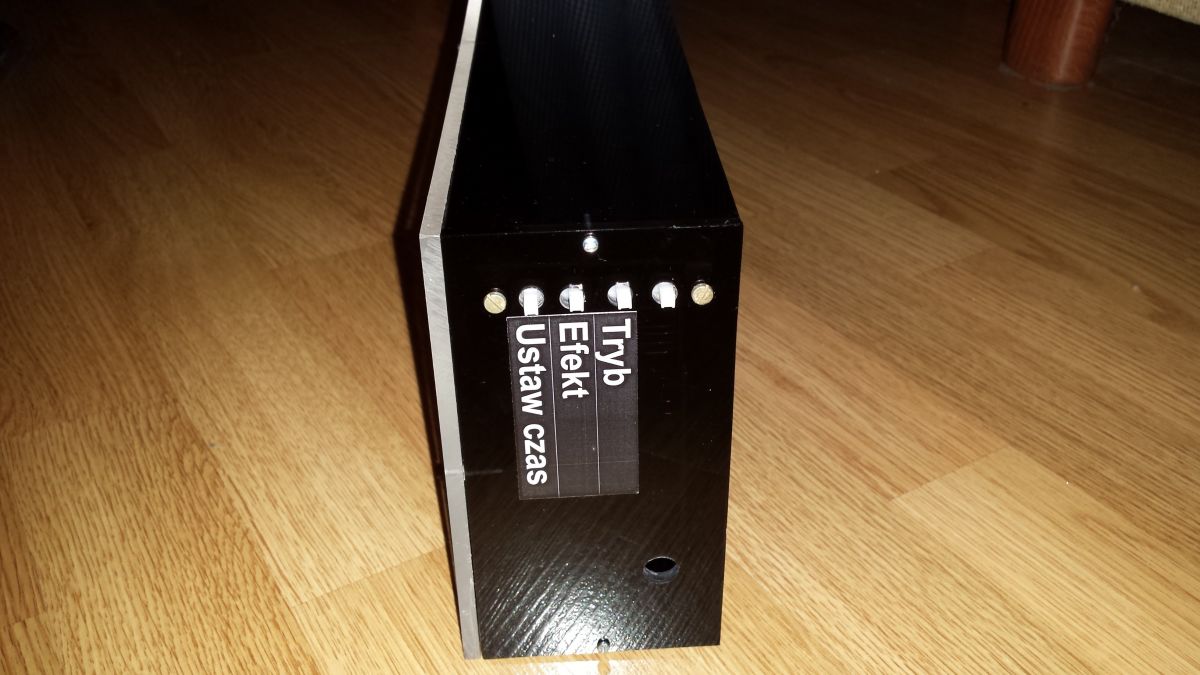
    I glued the bottom, top, left and back boards with cyanoacrylate. I connected the right and front ones with M2 screws to make it possible to disassemble them if necessary. I drilled the large holes for the buttons and the power plug with a stepped conical drill at low speed.
    I haven`t had much experience with plexiglass before, but I see that it`s a cool material. Only drilling/cutting requires either extremely slow speed or cooling. Otherwise it melts and smells like a dentist`s. And maybe if it wasn`t so electrified and didn`t attract all kinds of dust.
    Nixie clock in a plexiglass case with exposed tubes and electronic components. Control panel of nixie tube clock with buttons on a black casing Black plexiglass enclosure on a wooden floor Handcrafted nixie tube clock with colorful LED backlighting.
    //20231229_154752.jpg 20231229_154801.jpg 20231229_154808.jpg 20231229_153133.jpg

    12. Software
    I defined such a nice bit structure
    
    #define COLOR_LEVELS_BITS 2
    
    struct rgb_t {
    	uint8_t r : COLOR_LEVELS_BITS;
    	uint8_t g : COLOR_LEVELS_BITS;
    	uint8_t b : COLOR_LEVELS_BITS;
    	uint8_t a : COLOR_LEVELS_BITS;
    };
    

    thanks to which each component can take 4 different values and I can encode 64 colors on one byte.

    The main variable storing the state of what I want to display on the diodes is the buffer
    
    #define LED_COUNT 96
    volatile struct rgb_t leds[LED_COUNT + 1];


    thanks to this, if I want to set which diodes should be lit - just set the appropriate components of a given diode, e.g. turning on the LED10 in yellow:
    
    leds[10].r = 3;
    leds[10].g = 3;
    leds[10].b = 0; 


    Initially, the idea was that counter 0 reports an interrupt at least 540 (60 * 3 * 3) times per second and
    * after 1 request, we turn on the R component of all diodes if its component R = 1,2,3 in the buffer
    * after the second request, we turn on the R component of all diodes if its component R = 2.3 in the buffer
    * after the third notification, we turn on the R component of all diodes if its component R = 3 in the buffer
    * after the 4th request, we turn on the G component of all diodes if its component G = 1,2,3 in the buffer
    * after the 5th notification, we turn on the G component of all diodes if its component G = 2.3 in the buffer
    * after the 6th notification, we turn on the G component of all diodes if its G component = 3 in the buffer
    * after the 7th request, we light the G component of all diodes if its B component in the buffer = 1,2,3
    * after the 8th request, we light the G component of all diodes if its B component in the buffer = 2.3
    * after the 9th request, we turn on the G component of all diodes if its B component = 3 in the buffer

    Thanks to this, if the component:
    =0 - the diode is on for 0/9 of the time
    =1 - the diode lights for 1/9 of the time
    =2 - the diode lights for 2/9 of the time
    =3 - the diode lights for 3/9 of the time

    (lighting time proportional to the component value and you can actually get 64 different colors).

    Timing diagram for RGB LED control.
    //timer1.png

    However, even when turned on only 1/9 of the time, the diodes were too bright compared to the Nixie lamps (I used 330R resistors for the diodes, which forced a current of 10mA for the R diode and 5mA for the G/B diode.
    To dim the LED world, I added additional dead periods in which none of the LEDs are lit. I also had to increase the counter frequency to 1953 Hz (16MHz / prescaler 32 / overflow every 256 cycles).
    The counter frequency must be selected so that a single color does not flash less than 60 times per second - otherwise unpleasant shaking will be visible.

    The nixie tubes are also multiplexed in the same interrupt.

    Real-time clock support
    The PCF8563 clock uses the I2C protocol, but hardware implementation was not possible because the SCL (PD0) line is used as USBD+ in the V-USB driver, so I had to write a simple software implementation.

    13. Final result
    After two months of work, I think it worked. In the attached video you can see the flashing, but in reality it is of course not there. And although a real smile cannot be bought or made, the recipient seemed to like it.
    KCD


    Cool? Ranking DIY

    About Author
    phanick
    Level 28  
    Offline 
    phanick wrote 2949 posts with rating 2833, helped 65 times. Live in city Warszawa. Been with us since 2007 year.
  • ADVERTISEMENT
  • #2 20885931
    simw
    Level 27  
    Posts: 754
    Help: 94
    Rate: 286
    "01 Jan 2024 00:04" :)
    First plus this year :)
  • #3 20886263
    TechEkspert
    Editor
    Posts: 7109
    Help: 16
    Rate: 5485
    It looks impressive, a huge amount of work but a very nice effect.

    Interesting tricks in Eagle using ULP can be useful in creating various panels.

    When using the MC34064 chip, there are often jokes that it is a 555 type excavator and low efficiency, but in such applications it simply works. :) so it`s OK.

    Considering the amount of work, I would consider the minute resolution and shortening the name to DORI ;)
  • #4 20886374
    chemik_16
    Level 27  
    Posts: 999
    Help: 74
    Rate: 127
    Nixie+LED combination will always be a desecration ;D
  • #5 20886445
    Citizen75
    Level 30  
    Posts: 2389
    Help: 155
    Rate: 460
    The casing can be made of a material called "dibond" (or "tubond") used in advertising. It is a polyethylene plate coated on both sides with a thin aluminum sheet 0.3 mm thick. Depending on your choice, dibond can be white on one or both sides (printable). Matte, glossy and brushed in various colors, including black. This material is cheaper than plexiglass of the same thickness. A casing is milled out of it, something like a box to be assembled. In the places where the sides are bent, a V-groove is milled to a depth of approximately 2.7 mm. It is done similarly to light boxes used in advertising. Only the front panel remains made of plexiglass.
  • ADVERTISEMENT
  • #6 20887199
    acctr
    Level 39  
    Posts: 4534
    Help: 389
    Rate: 1996
    phanick wrote:
    I don`t know if I didn`t sand the laminate with sandpaper or if it wasn`t warm enough, but the toner didn`t stick to one of the corners.

    It seems that the temperature there was too low and the toner did not stick well. The laminator has rollers attached at the ends and there is no chance for even pressure, especially in the middle when the tile is large. I had a similar problem and a small camping iron set to ••• helped.
    Helpful post? Buy me a coffee.
  • #7 20887589
    clubber84
    Level 38  
    Posts: 5037
    Help: 434
    Rate: 1675
    At the end of the movie, when individual letters are highlighted, time stops and after the cycle ends, time resumes from the point where it stopped, i.e. 56 seconds, but the timer jumps one higher, and when the seconds reach the end, the timer starts again one higher, as if it was losing a minute somewhere.
  • #8 20887630
    pier
    Level 24  
    Posts: 2445
    Help: 40
    Rate: 1891
    Great respect for the amount of work put into it. I know perfectly well how difficult it is to make such a large tile at home, and even a double-sided one...
    And that`s where the praise ends. Just one LED for the nixie completely spoils the whole charm and here... just wow.
  • #9 20887712
    phanick
    Level 28  
    Posts: 2949
    Help: 65
    Rate: 2833
    clubber84 wrote:
    At the end of the movie, when individual letters are highlighted, time stops and after the cycle ends, time resumes from the point where it stopped, i.e. 56 seconds, but the timer jumps one higher, and when the seconds reach the end, the timer starts again one higher, as if it was losing a minute somewhere.


    This was a time setting demonstration.
  • #10 20888022
    efi222
    Level 21  
    Posts: 712
    Help: 12
    Rate: 1180
    The design of this watch is a combination of two worlds. If someone likes it... then there is nothing to discuss.
    In any case, the author put a lot of work into it and I greatly respect it.
    When it comes to the laminator, you can try to reduce the pressure of the rollers. Less chance of bending.
  • ADVERTISEMENT
  • #11 20888048
    clubber84
    Level 38  
    Posts: 5037
    Help: 434
    Rate: 1675
    phanick wrote:
    This was a time setting demonstration.

    Well then, I have no questions and congratulations on your work. 👍
  • ADVERTISEMENT
  • #12 20888557
    tplewa
    Level 39  
    Posts: 6727
    Help: 222
    Rate: 988
    chemik_16 wrote:
    Nixie+LED combination will always be a desecration ;D


    Maybe I don`t have such a radical approach - I just noticed the delicate backlighting of vertical Nixie lamps from below, which even looked nice. Unfortunately, the large number of diodes here kills the atmosphere of the Nixie tubes, or at least in the photos they come out too much in the foreground.
  • #13 20888737
    damian1115
    Level 37  
    Posts: 3238
    Help: 393
    Rate: 899
    You put a lot of work into this project, which is a plus.
    However, I agree with the opinions of previous speakers - the effect you achieved by combining lamps with diodes is neither nice nor aesthetic.
    I would even say chaotic, and it resembles a drawing by a preschooler who had a whole range of colored crayons at his disposal.
  • #14 20888795
    dj_volt
    Level 26  
    Posts: 847
    Help: 77
    Rate: 171
    For me, you ruined the entire effect of the lamps with these LEDs. I have a six IN-12 clock in my living room that has been working for about 18 years. It is not backlit, the housing is partly made of plexiglass (guts on top). Believe me, whoever sees it will be delighted with the warmth of the lamps and their form. How many "orders" have I heard for such clocks? :-D Maybe it`s time to think about production.

    But... "one person likes cucumbers, the other likes the daughter`s gardener" as my grandmother used to say.
    Respect for your willingness and tackling the project. For not copying something from the Internet for the thousandth time, but for tackling the project yourself.
  • #15 20888804
    phanick
    Level 28  
    Posts: 2949
    Help: 65
    Rate: 2833
    Fortunately, the LEDs can be turned on/off with one button and there will only be lamps to soothe your eyes :)
  • #16 20888829
    damian1115
    Level 37  
    Posts: 3238
    Help: 393
    Rate: 899
    phanick wrote:
    The LEDs can be turned on/off with one button and only the lamps will be left to soothe your eyes

    And keep it up, turn them off as often as possible. However, if the inscription you made is dedicated to someone close to you, make it separately, they will also enjoy it.
  • #17 20888971
    chemik_16
    Level 27  
    Posts: 999
    Help: 74
    Rate: 127
    The LEDs can flash as an alarm, which will make you want to turn it off faster ;)
  • #18 20889259
    TechEkspert
    Editor
    Posts: 7109
    Help: 16
    Rate: 5485
    In many DIY and corporate constructions I have seen backlighting of electron tubes, both NIXIE and those used in audio equipment, in most cases the backlighting can be turned off or its intensity changed. Everyone can set it the way they like.
    Depending on the casing, sometimes it looks nice and sometimes it looks bad. The backlighting from the bottom of the lamp looks quite good (this is possible in those with a transparent glass base without, for example, an ebonite insert).
  • #19 20889270
    acctr
    Level 39  
    Posts: 4534
    Help: 389
    Rate: 1996
    TechEkspert wrote:
    Depending on the casing, sometimes it looks nice and sometimes it looks bad.

    Color is important.
    In my opinion, the orange backlight looks the nicest. However, I don`t understand why the lamps should be illuminated in blue.
    The LEDs that lightly blink to the music look very impressive.
    Helpful post? Buy me a coffee.
  • #20 20889486
    neverForce
    Level 11  
    Posts: 6
    Rate: 3
    The design is cool and interesting. Actually, I wonder why the author didn`t think about programmable diodes? There would be no registers, etc., because the diodes are controlled by one pin and there would not be so much fiddling with how to route the paths. :)

    Of course, a huge plus for the structure and a few interesting facts :)
  • #21 20889873
    diamonxxx
    Level 10  
    Posts: 48
    Hi :) great project, very interesting and time-consuming
  • #22 20889946
    efi222
    Level 21  
    Posts: 712
    Help: 12
    Rate: 1180
    Maybe combine this LED sign with a chime on the hour? Smoothly fade in and out according to the number of hours? :)
  • #23 20890862
    nouki
    Level 25  
    Posts: 1222
    Help: 28
    Rate: 96
    And it wasn`t easier to use digital diodes. How much less work is it?
  • #24 20891698
    _Avalanche_
    Level 7  
    Posts: 19
    Rate: 9
    The project is indeed complicated, I respect that.
    But the visual effect for me is tragic with these LEDs, it would have been better to engrave an inscription on plexiglass and place it on the top of the clock, and put a WS strip with variable effects underneath it, and narrow the clock and leave it as it is.
  • #25 20894725
    pier
    Level 24  
    Posts: 2445
    Help: 40
    Rate: 1891
    nouki wrote:
    And it wasn`t easier to use digital diodes. How much less work is it?

    Compare the size of both diodes...
  • #26 20897046
    nouki
    Level 25  
    Posts: 1222
    Help: 28
    Rate: 96
    Does it matter with such a large tile? If so, why 1206 and not 402? Additionally, they offer many more possibilities and combinations. Not counting 36 systems and the number of control lines. Additionally, the simplicity of the tile. There`s no accounting for taste, but... It would look better with engraved plexiglass, each letter painted separately on the sides in black or glued, and with invisible top-bottom lighting.
  • #27 20918495
    vstm
    Level 15  
    Posts: 149
    Help: 8
    Rate: 82
    And what does Dorota say?
📢 Listen (AI):

Topic summary

✨ The discussion revolves around the DIY project of creating a Nixie clock named 'Dorothy'. The author expresses motivation to craft a unique gift, opting for a clock with Nixie tubes due to their universal appeal. Various aspects of the project are covered, including the design and execution of the circuit boards, housing materials, and software. Participants commend the effort involved but critique the aesthetic integration of LEDs with Nixie tubes, suggesting that the combination detracts from the charm of the Nixie display. Suggestions for improvement include using different materials for the casing, adjusting LED brightness, and considering programmable diodes for easier control. The conversation highlights the challenges of DIY electronics, particularly in achieving a visually pleasing result while maintaining functionality.
Generated by the language model.

FAQ

TL;DR: Built for DIY makers planning a personalized Nixie clock, this project uses 96 RGB LEDs and 6 Nixie tubes; one reviewer called it “a huge amount of work.” The builder solved three hard problems at once: fitting one digit inside each DOROTA letter, routing hundreds of LED signals, and matching LED brightness to the tubes with a stronger high-voltage supply. [#20885918]

Why it matters: This build shows how to combine decorative RGB lettering with classic Nixie readouts without losing serviceability, routing control, or usable brightness.

Option Why it was considered Main advantage Main drawback
74595 shift registers Fewer MCU pins Serial control is simple Package pinout complicates routing and adds vias
74574 octal latches Chosen solution Cleaner PCB routing for 96 RGB LEDs Needs many clock lines and extra latch logic
7805 + heatsink 9 V to 5 V option Simple linear regulation More heat with many LEDs
LM2596 buck converter Alternative 5 V option Lower losses at higher LED load More complex than 7805
Plexiglass enclosure Chosen housing Easy to order cut panels, semi-transparent look Melts and attracts dust during machining

Key insight: The decisive design move was splitting the clock into two PCBs and choosing routing-friendly 74574 latches. That made the personalized front panel manufacturable at home and left the Nixie section electrically separate enough to fix brightness later.

Quick Facts

  • The display uses 6 letters, 6 Nixie digits, and 96 RGB LEDs distributed as D=16, O=14, R=20, O=14, T=12, A=20. [#20885918]
  • The LED driver plan would have needed 288 control lines at 96 LEDs × 3 channels, so the builder reduced the interface to 27 microcontroller pins using 74574 latches plus an extra buffer latch. [#20885918]
  • The clock runs from a 9 V supply, then generates 5 V for logic and LEDs and about 180 V for the Nixie tubes. [#20885918]
  • The first boost converter delivered only about 1 mA, while the replacement design provided 20 mA, which made the LC-516 tubes visibly brighter. [#20885918]
  • LED multiplex timing was pushed to about 1953 Hz, and one measured LED cycle was 778 µs, to reduce visible flicker while dimming the LEDs against the tubes. [#20885918]

How was the personalized "Dorothy" Nixie clock designed so that each letter of DOROTA contains one nixie digit and RGB LEDs?

It was designed so each of the 6 letters in DOROTA surrounds one Nixie tube digit. The builder chose the name because it has 6 letters and many enclosed shapes, then arranged 96 SMD 1206 RGB LEDs around the letters for edge lighting and effects. LED counts were tailored per letter: 16, 14, 20, 14, 12, and 20. That let the front panel act as both a readable clock and a personalized nameplate gift. [#20885918]

Why did the project use two separate PCBs—one for the RGB LEDs and one for the LC-513/LC-516 Nixie tubes—instead of a single board?

It used two PCBs because the Nixie tubes were too tall for a single flat board layout. The LEDs had to sit flush with the top area of each lamp to light the letters correctly, while the tubes themselves needed separate mechanical support and high-voltage routing. Splitting the design into a front LED board and a rear lamp board simplified geometry, reduced visual compromise, and made the assembly look cleaner from the front. [#20885918]

What are the pros and cons of driving common-anode RGB LEDs with separate cathode resistors versus a single anode resistor in a large multiplexed display?

Separate cathode resistors give full per-channel control, while a single anode resistor saves parts but forces multiplexing tradeoffs. With separate cathode resistors, all R, G, and B channels can light independently, but 96 RGB LEDs would need 288 resistor paths. With one anode resistor, only one color channel can be active at a time or red dominates because it has the lowest forward drop. That reduces part count, but current differs by color and control becomes more complex. [#20885918]

74595 vs 74574 latches—what made 74574 a better choice for routing and pin expansion in this 96-RGB-LED clock?

74574 was better because its pin arrangement made PCB routing cleaner on a very large board. The builder noted that the 14-pin 74595 puts QA on the opposite side from QB–QH, which forces extra detours and two added vias per chip. Using 74574 latches meant 36 chips for 288 LED channels, then a shared-bus scheme reduced the microcontroller requirement from 44 pins to 27. That routing win mattered more than the lower pin count of serial shift registers. [#20885918]

How do you use Eagle ULP scripts and MOVE/ROTATE commands to place components precisely on arcs and generate custom footprints?

You use Eagle commands to place parts by exact coordinates, then let a ULP script repeat the pattern automatically. The builder showed MOVE IC1 (1.0mm 1.0mm) and scripted loops that calculated X, Y, and rotation values for many parts at once. That made curved LED placement on letter arcs look even instead of hand-placed and crooked. The same method also generated a custom Nixie footprint with 11 pins evenly spaced on a circle in about 2 minutes. [#20885918]

What's the best way to make and etch very large double-sided PCBs at home using thermal transfer without layer misalignment or uneven toner adhesion?

The safest home method is to control alignment, heat, and etch depth in separate steps. 1. Align both layers by prioritizing the densest area, because large paper sheets wave and inner features can shift by about 1 mm. 2. Run the board through the laminator multiple times so the copper stays hot and toner bonds evenly. 3. Etch vertically in halves with a clamp, not flat in one bath, to improve uniformity on oversized boards. The first attempt failed from weak toner adhesion; the second worked after process changes. [#20885918]

Why did the original Nixie boost converter with an MPSA42 transistor only deliver about 1 mA, and how did the MC34063 + IRF740 replacement solve the brightness problem?

The original boost stage was current-limited and could deliver only about 1 mA, which was too little for 6 multiplexed Nixie tubes. The builder replaced it with a proven converter using an IRF740 N-MOSFET and an MC34063-based design on a small daughterboard. That new supply delivered about 20 mA without trouble and immediately made the LC-516 lamps bright enough to compete with the LED lettering. The fix was electrical, not cosmetic. [#20885918]

How can you balance LED brightness against multiplexed Nixie tube brightness when the LEDs are still too bright even at low duty cycle?

Balance them by reducing LED on-time further and increasing refresh frequency to avoid flicker. The builder first used 2-bit PWM-style color levels, where each LED channel could be on for 0/9 to 3/9 of the cycle, yet the LEDs still overpowered the tubes. He then inserted dead periods where no LEDs were lit and raised the timer rate to about 1953 Hz. With 330 Ω resistors, red was about 10 mA and green or blue about 5 mA, so duty-cycle control mattered more than resistor value alone. [#20885918]

What is a ULP file in Eagle, and how can it automate repetitive PCB layout tasks?

“ULP” is a scripting file format in Eagle that runs small C-like programs to automate layout actions, including repeated moves, rotations, naming, and footprint generation. In this project, ULP scripts placed multiple ICs in exact rows, positioned LEDs along curved letter shapes, and helped create a custom Nixie-lamp package quickly. That replaced tedious clicking with calculated placement and made the large front board more consistent. [#20885918]

What is dibond or tubond, and how does it compare with plexiglass for making a clock enclosure?

“Dibond” or “tubond” is an aluminum-composite sheet with a polyethylene core and thin aluminum skins that bends after V-groove milling, making it suitable for folded box enclosures. A commenter suggested it as a cheaper enclosure material than same-thickness plexiglass. In this thread, plexiglass won because it was easy to order cut to size and fit the smoked-black look, but dibond would likely machine into a cleaner folded shell with only the front left transparent. [#20886445]

7805 with heatsink vs LM2596 buck converter—which is better for generating 5 V in a Nixie clock with many RGB LEDs?

LM2596 is better when LED load is high, while 7805 is simpler when heat is acceptable. The builder powered the clock from 9 V and deliberately put both options on the board, selectable by jumper, because many RGB LEDs can waste substantial power in a linear regulator. He expected the buck converter to reduce losses, but kept the 7805 plus heatsink as a simpler fallback. In a mixed-display clock, current draw decides the better choice. [#20885918]

In a project like this, how can programmable LEDs such as WS2812 addressable diodes compare with discrete 1206 RGB LEDs plus external latches?

Programmable LEDs would simplify wiring, but they trade off size and layout freedom. Two commenters noted that digital LEDs could cut out the 36 latch chips, reduce control lines, and make routing much easier because one data line can control many LEDs. Another commenter pushed back that package size matters, especially when the LEDs must follow narrow letter strokes. In this build, the discrete 1206 RGB parts fit the typography better, even though the electronics became far more complex. [#20889486]

What is the safest and most reliable way to mount LC-516 Nixie tubes—direct soldering or sockets—and what are the durability risks?

Sockets are safer and more reliable than direct soldering. The builder soldered the LC-516 tubes directly and explicitly said he does not recommend that method, because metal pins and glass have different thermal expansion and repeated heating can shorten lamp life. He accepted the risk because LC-516 tubes have a large base, the leads do not enter the glass envelope immediately, and the tips were already tinned. That made assembly easier, not safer. [#20885918]

How do you convert bistable Connfly isostats into monostable buttons and debounce them with capacitors in a clock control panel?

You can convert them mechanically, then tame bounce electrically. 1. Push the internal C-shaped metal wire outward to change a bistable Connfly isostat into a monostable action. 2. Mount the switches on a separate control PCB connected by cable. 3. Add 10 nF capacitors across the button lines to suppress contact bounce physically. In this clock, three buttons handled LED on/off, HHMMSS versus HHMM display, and time-setting mode. [#20885918]

What did Dorota think of the finished "Dorothy" Nixie clock gift?

The thread does not include Dorota’s own comment, but the builder said the recipient seemed to like it. His closing note says that after about 2 months of work, the finished gift appeared successful and the recipient’s reaction looked positive. That is the only direct evidence in the thread about her response. [#20885918]
Generated by the language model.
ADVERTISEMENT