


logo elektroda
logo elektroda
X
logo elektroda

Laptop Battery Draining While Completely Shut Down – Causes and Possible Fixes?

nolanmaris 1632 6
ADVERTISEMENT
  • #1 21455883
    nolanmaris
    Level 1  
    Hello

    I’ve noticed that my laptop battery keeps draining even when the device is completely shut down. If I leave it off overnight with a full charge; by morning, the battery percentage drops significantly. This happens even when Fast Startup is disabled in Windows & the laptop is not in sleep or hibernation mode.

    I’ve checked BIOS/UEFI settings; disabled Wake-on-LAN and USB charging, but the issue persists. Could this be a hardware-related problem, like a faulty battery or motherboard component, or is there a deeper firmware/software setting that might be causing this? Has anyone else faced this issue, and what solutions worked for you? Checked https://answers.microsoft.com/en-us/windows/forum/all/battery-is-draining-after-shutting-down-the-laptop/5132887d-6111-446c-9dea-b36d1961d0a3 DevOps guide related to this and found it quite informative.

    Any advice on diagnosing or fixing this would be greatly appreciated! Looking forward to insights from the community.


    Thank you !!
  • ADVERTISEMENT
  • #2 21455920
    tkordus
    Level 26  
    Is it possible to remove the battery from the laptop and if so, will the battery left alone also discharge ?
  • ADVERTISEMENT
  • ADVERTISEMENT
  • #4 21491307
    Luacs
    Level 11  
    Hello, I have the same problem on my Dell Latitude 5501, and I have also disabled all options as you wrote in BIOS/UEFI. I have the latest firmware and UEFI. The problem is a faulty battery that has small internal shorts: "Older or damaged batteries can lose power faster. Checking the condition of the battery and replacing it if necessary may be necessary."
  • #5 21492059
    lisek
    Service technician RTV
    Or an internal battery fault (as written)
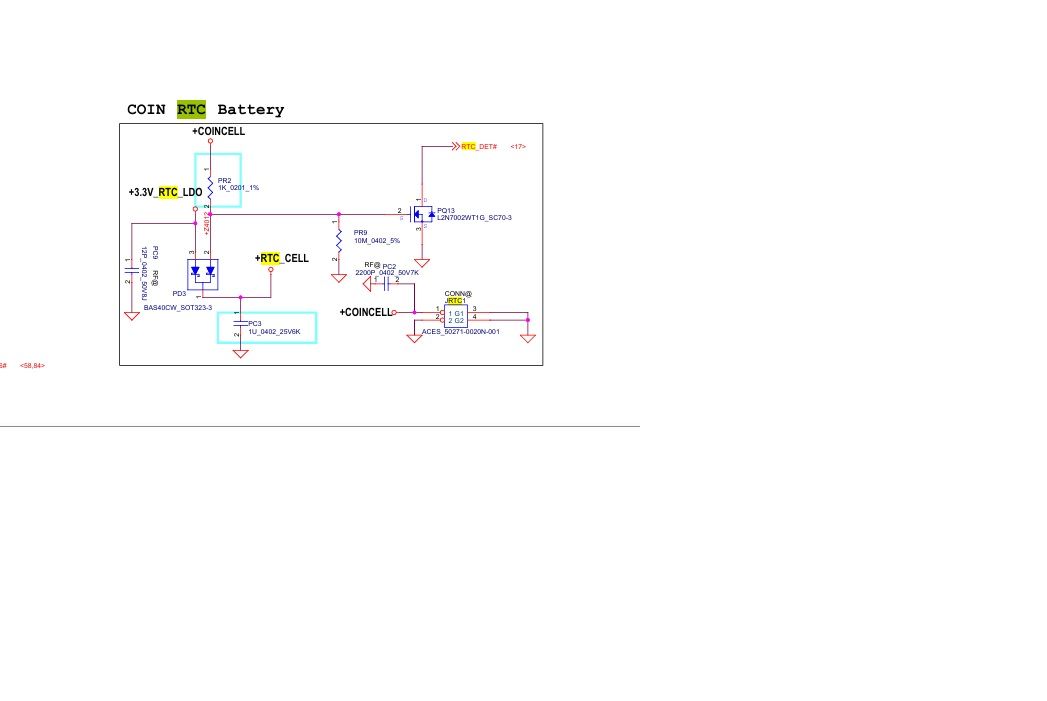
    Or a fault in the RTC line (chipset or "combo" (i.e. cpu with integrated chipset,)

    E.g. d;a Dell Latitude 5501
    i5-9400H / MX150
    - is the LA-H182P board (p/nr. Dell:K5GPT )
    It is SM under (EDC42 LA-H171P)/ ( LA-H181P)

    RTC battery circuit connections diagram on a motherboard. .
  • #6 21500598
    Luacs
    Level 11  
    >>21455920 Gentlemen, I did a final test today:
    I charged the battery to 100%.
    I disconnected the battery from the laptop, and left it overnight.
    The next day, after 15 hours, I plugged it back in.
    I booted the laptop, loaded Windows 10 and logged in. The battery is now at 30%.
    That's how much of it is left after 5 years.
    The conclusion is simple: the motherboard, UEFI and other components are not draining it. It's just old.
  • ADVERTISEMENT
  • #7 21761873
    cattani43
    Level 10  
    Hi. ProBook 455 G8: from new, 10 days, no battery life — laptop off, not in sleep. USB port also turned off. HP service claimed all OK; BIOS changes, etc., nothing helped. This is a deliberate action by the manufacturers, and the case of a poor self-discharging battery is a rare case where the battery has either an internal short circuit or is already out of capacity. The laptop cost 5.5k. I have an old 10-year-old Xiaomi Air 13 on an i5 and this fact does not occur, although the battery is much weaker than when I bought it, but it does not self-discharge. I stress that these are supposed to be mobile hardware and my new laptop has failed all over the place. If you find something like this in new equipment, THEN, WITHOUT WAITING, return this piece of junk and do not buy it because it is an intentional flaw.

Topic summary

The discussion revolves around a laptop battery that drains significantly even when the device is completely shut down. The original poster has disabled Fast Startup, Wake-on-LAN, and USB charging in BIOS/UEFI settings, yet the issue persists. Responses suggest potential causes including a faulty battery with internal shorts, or issues with the RTC line related to the chipset. One user specifically mentions experiencing this problem with a Dell Latitude 5501, indicating that older or damaged batteries may lose power more rapidly. Suggestions for diagnosis include checking the battery's condition and considering replacement if necessary.
Summary generated by the language model.
ADVERTISEMENT