logo elektroda
logo elektroda
X
logo elektroda

How to compile and run custom firmware for ALI M3801 and other chips from tuners?

p.kaczmarek2 3570 45

TL;DR LABEL_AI_GENERATED

  • A minimalist custom firmware demo for the ALI M3801 MIPS processor was built from the ali_sdk GitHub project and tested on an old Comsat TE 1050 HD tuner.
  • The firmware starts with UART Hello World, then reuses M36XX-style GPIO register mappings to scan buttons and read the chip ID directly from memory-mapped addresses.
  • Compilation only worked on Ubuntu, and the chip ID readback returned 0x3811 from an ALI M3801 board.
  • Button scanning works, with eight pins packed into one byte and displayed in a loop, but the main on/off button is not detected.
  • UART remains unstable: the CH341 likely mishandles even parity, blocking receive logic drops characters, and the next step is interrupt-driven UART support.
AI summary based on the discussion. May contain errors.
ADVERTISEMENT
Treść została przetłumaczona polish » english Zobacz oryginalną wersję tematu
Listen:
  • #31 21803405
    p.kaczmarek2
    Moderator Smart Home
    Posts: 14791
    Help: 659
    Rate: 12937
    And isn't it enough to give a header like in my iterate.cpp? CRC we can already count. I'm talking about the maincode partition. I need to check with mips decompiler if there are normally commands after this header.
    Helpful post? Buy me a coffee.
  • ADVERTISEMENT
  • #32 21803726
    maciej_333
    Level 38  
    Posts: 4249
    Help: 488
    Rate: 1607
    One would still need to know where to RAM the bootloader loads the application from these partitions in flash. As if knowing this would be enough in the SDK to change the address where the code is and maybe just add the appropriate header. CRC actually we already know how to count. The application is not compressed?
  • ADVERTISEMENT
  • LZMA decoder library identified for un7zip path

    #33 21804202
    p.kaczmarek2
    Moderator Smart Home
    Posts: 14791
    Help: 659
    Rate: 12937
    Do you mean the excerpt from un7zip?
    Code: C / C++
    Log in, to see the code

    So far I have not been able to reproduce this in my C program. I did, however, find another clue - the test_rsa_ram function

    Added after 11 [minutes]:

    Here is the LZMA library used: https://github.com/erwinbsbqq/PDK_GoDroid/blo...65fd0ff291e9a3263f95/uboot/lib/lzma/LzmaDec.c
    Helpful post? Buy me a coffee.
  • Ali emulator now prints Hello World and boots first loader

    #34 21812801
    p.kaczmarek2
    Moderator Smart Home
    Posts: 14791
    Help: 659
    Rate: 12937
    @maciej_333 any progress?

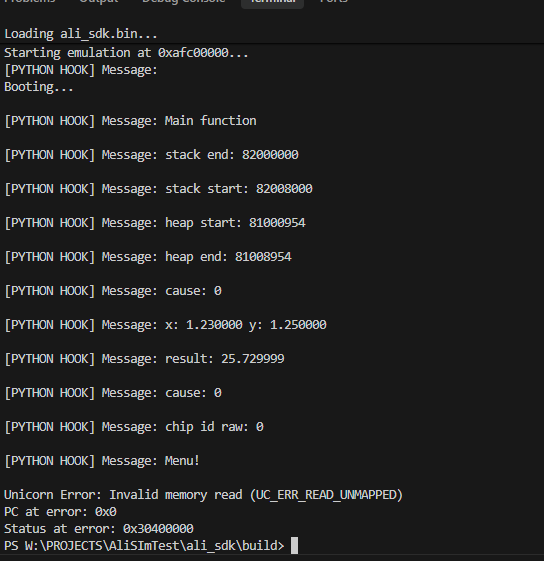
    For my part I am putting together an emulator for Ali, my Hello World bin is already displaying text:
    Terminal console with emulator logs and memory read error
    First via the printf hook and then normally already - reading from the register to send via the UART.

    I also managed to pass the first bootloader, the C pseudocode:
    Code: C / C++
    Log in, to see the code

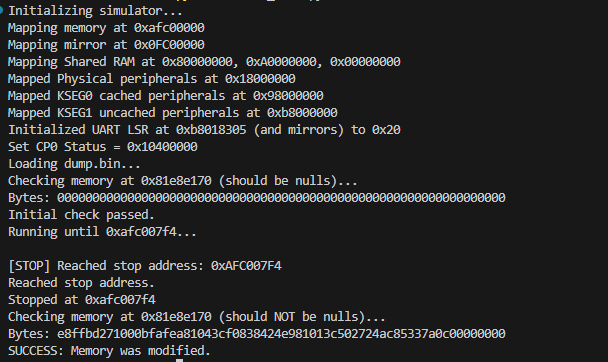
    It copies the data to RAM at address 81e8e170 and then performs functions there:
    MIPS emulator console showing successful RAM memory modification
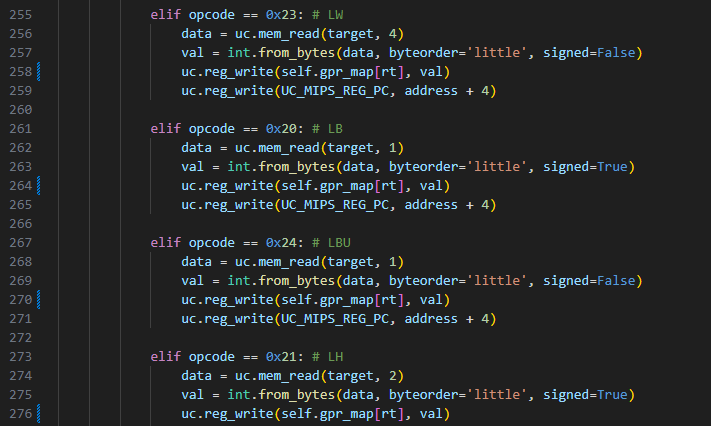
    I supposedly use the off-the-shelf CPU engine but it has a lot messed up and I have to manually handle the instructions:
    Python code fragment emulating MIPS load instructions in an emulator

    I don't know how functional this will be, time will tell.
    Helpful post? Buy me a coffee.
  • #35 21812810
    maciej_333
    Level 38  
    Posts: 4249
    Help: 488
    Rate: 1607
    p.kaczmarek2 wrote:
    You mean the part with un7zip?

    Yes, that's what I was thinking of.

    p.kaczmarek2 wrote:
    @maciej_333 any progress?

    Unfortunately I haven't dealt with it since then.

    Congratulations on the great progress on Ali.
  • ADVERTISEMENT
  • #36 21812926
    p.kaczmarek2
    Moderator Smart Home
    Posts: 14791
    Help: 659
    Rate: 12937
    I still tried at the time to copy these unzip to my project and call on the flash dump, but it didn't work.

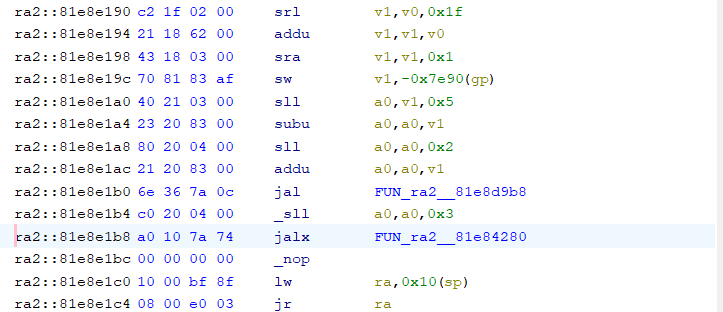
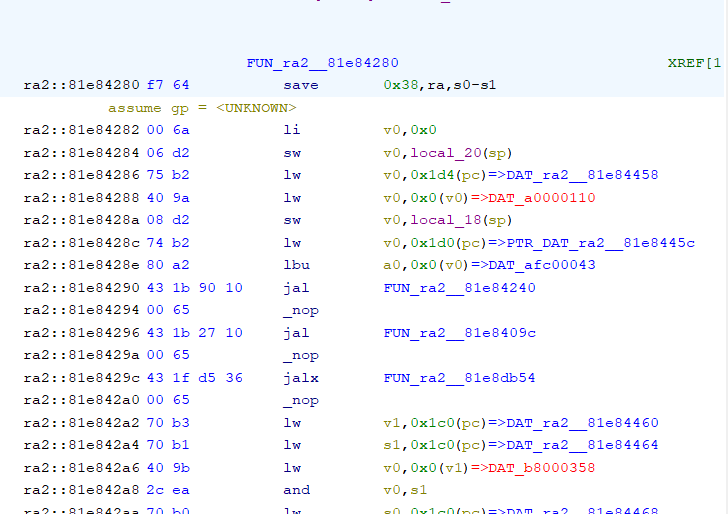
    As for trying to make an emulator, I encountered another surprise. Here are mixed 32 and 16 bit commands. E.g:
    Screenshot of disassembled code showing mixed 16- and 32-bit MIPS instructions
    And a moment later:
    Screenshot of decompiled MIPS code with mixed 16- and 32-bit instructions
    Helpful post? Buy me a coffee.
  • Request for compiled boot binary to test loader output

    #37 21932968
    JacekTorun
    Level 18  
    Posts: 244
    Help: 7
    Rate: 34
    Good morning.
    Could you please share the compiled boot in binary format?

    I have a Globo set-top box with an ALI3801 processor and I’d like to run a few tests on it.
    The most important part of the test will be trying to run a small piece of code from another set-top box (some sort of loader). On the original hardware, the log from this loader isn’t displayed, but the files show that it should be, so I want to check whether anything will be displayed here.
    If there’s a ‘go xxxxx’ command, I’ll check it out. If there isn’t, I’ll have a bit of a play around with it.
  • ADVERTISEMENT
  • UART console lacks go command; bootloader image available

    #38 21932983
    maciej_333
    Level 38  
    Posts: 4249
    Help: 488
    Rate: 1607
    JacekTorun wrote:
    If there’s a ‘go xxxxx’ command, I’ll check it out. If not, I’ll have a bit of a play with it.

    There’s no such thing. This is a very basic UART console. However, there are some commands, and I’ve even managed to figure it out. Luxuries such as modifying RAM via UART, ‘help’, command descriptions and ‘go’ are available on Mstar, for example for the MSD7818.

    As for the compiled code, it’s in this post: >>21797094 . This image was created by my colleague @p.kaczmarek2 . It replaces the original bootloader and actually works, albeit poorly. You can flash it via UART: >>21797468 .

    Alternatively, if you need the full flash image, it’s here .
  • #39 21932991
    p.kaczmarek2
    Moderator Smart Home
    Posts: 14791
    Help: 659
    Rate: 12937
    @JacekTorun, let me know how it goes. Do you perhaps have a copy of the original batch from your tuner? I’ve been struggling with the ALI emulator for a while now and it would be useful for my tests.
    Helpful post? Buy me a coffee.
  • External flash socketed for faster firmware tests

    #40 21933067
    JacekTorun
    Level 18  
    Posts: 244
    Help: 7
    Rate: 34
    I’m only just starting the tests and, as usual, I’m having a problem with communication right from the off.
    HyperTerminal isn’t displaying the log, but it does respond to ‘cccc’.
    Another programme displayed the log from when the decoder started up:
    APP init!
    bl_panel_init!
    bl_flash_init!
    bl_verify_sw
    success!
    MC: APP init ok
    << SDK4.0ba.4.0_20101217 >>
    Libcore version 8.13.0(_at_)SDK4.0bd.8.13_20130731(gcc version 3.4.4 mipssde-6.06.01-20070420)(Vic.Wang@ Thu 1 Aug 15:38:18 2013)
    Application version 1.0.0(_at_)SDK4.0ba.7.4_20120227


    I have the memory readout and am attaching it.

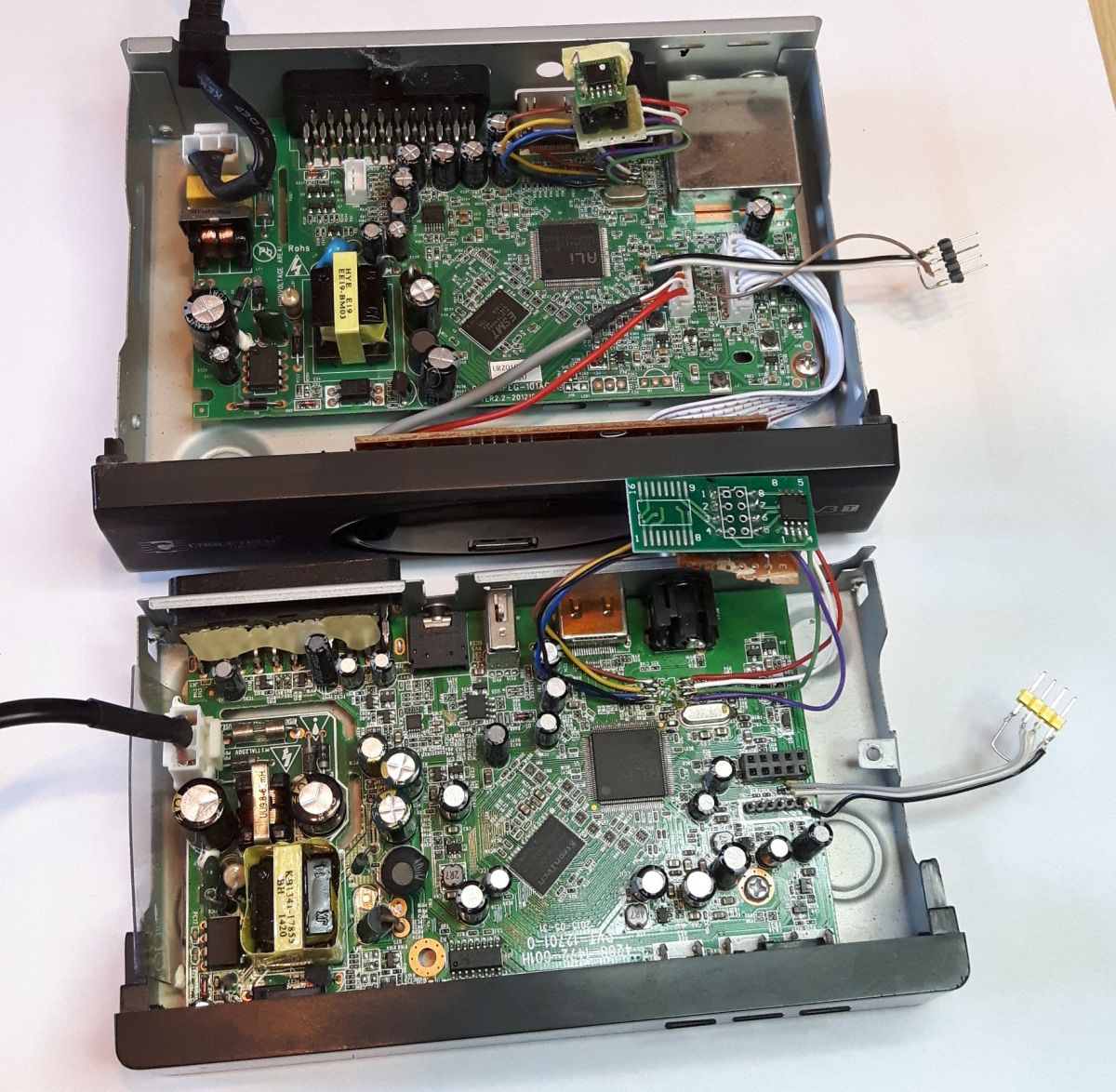
    I’ve desoldered the memory chip; I’ve fitted a socket and mounted the memory on a separate board so that I can program it externally quickly and easily. I’ve got a few ideas about what to check and I’ll let you know how it goes.
    (I also have a decoder with an MSD7818 processor and plan to check whether Globo will boot from that decoder.)
    Attachments:
    • Ali_3801_Globo_DVBT_dump SPI 4mb.bin (4 MB) You must be logged in to download this attachment.
  • HyperTerminal parity fixed; MSD7818 boot still fails

    #41 21933125
    JacekTorun
    Level 18  
    Posts: 244
    Help: 7
    Rate: 34
    p.kaczmarek2 wrote:
    Let me know the results.


    1. The HyperTerminal log is now working; I’d got the parity setting wrong.
    2. The firmware for the set-top box with the MSD7818 processor (also Mipsel) won’t boot. Or rather, it shows no signs of life, as I don’t know whether it’s trying to boot or whether it stops the boot attempt at the CHIP-ID check. (The RAM in these decoders is different, and probably not just that.)
    3. I’ve uploaded a mini test boot, checked it, and all I can see in the log is a series of UP UP UP.
    The rest of what should appear, including the Globo with the ALI3801 processor, isn’t working. But the important thing is that you can see something is working.
    Perhaps the processor is different in some way after all.
  • UART configuration likely missing despite UP messages

    #42 21934390
    JacekTorun
    Level 18  
    Posts: 244
    Help: 7
    Rate: 34
    I managed to get the mini boot to start, but it took some doing.

    First, I booted into the original software, swapped the memory load for the boot loader, and after a reset, the boot loader displayed the log.

    After issuing the ‘reboot’ command, the mini boot started up, but it kept resetting itself in a loop after reading the processor ID. I performed a quick power reset and it started up as it should, but it only worked once, as the power interruption must be almost instantaneous. Alternatively, I need to add a button to reset the decoder without losing power.

    Log:
    APP init!
    bl_panel_init!
    bl_flash_init!
    bl_verify_sw
    success!
    MC: APP init ok

    << SDK4.0ba.4.0_20101217 >>
    Libcore version 8.13.0(_at_)SDK4.0bd.8.13_20130731(gcc version 3.4.4 mipssde-6.06.01-20070420)(Vic.Wang@ Thu 1 Aug 15:38:18 2013)
    Application version 1.0.0(_at_)SDK4.0ba.7.4_20120227

    CCCCCCCCCCCCC: Unknown command!
    >help
    DELETE TOUCH READ RCU FLAG PWMGPIO MAINCODE CHANNELS VERSION CLS HEAP SENDMSG HMSG TIME GPIOCONFIG ADDDUMMY HELP EXIT REBOOT
    >reboot
    Rebooting...

    Booting...
    Main function

    stack end: 82000000

    stack start: 82008000

    heap start: 8100093c

    heap end: 8100893c

    cause: 10000000

    x: 1.230000 y: 1.250000

    result: 25.729999

    cause: 10000000

    chip id raw: 3811

    Booting...

    It booted successfully after the second reset.

    Booting...
    Main function

    stack end: 82000000

    stack start: 82008000

    heap start: 8100093c

    heap end: 8100893c

    cause: a0000008

    x: 1.230000 y: 1.250000

    result: 25.729999

    cause: a0000008

    chip id raw: 3811
    UP

    Pin 9 is now UP!
    UP

    Pin 13 is now UP!
    UP

    Pin 14 is now UP!
    UP

    Pin 21 is now UP!
    UP

    Pin 23 is now UP!
    UP

    Pin 24 is now UP!
    UP

    Pin 25 is now UP!
    UP

    Pin 26 is now UP!
    UP

    Normally, it starts up like this:
    UP
    UP
    UP
    UP
    UP
    UP
    UP

    Clearly, some setting is missing in the UART configuration, as it isn’t displaying any data.
    It’s interesting that it does display the ‘UP’ messages. And instead of other data, there seem to be only zeros, because these ‘UP’ messages appear halfway down the line, so it looks as though some data is coming through, but it isn’t visible.
    I’ve been logging in binary format and they’re not visible there either. Perhaps a different baud rate needs to be set?

    P.S.

    I accidentally discovered how to get the mini-boot log to appear.
    I held down Enter and plugged in the power cable. Then the mini-boot log appeared. It’s just that I still don’t get any feedback when I type anything on the keyboard.
    I’m running the test on an old computer, and it used to work fine with many set-top boxes, but there’s some sort of problem here.
    I also checked using a bin logging programme (e.g. card log) and it didn’t show the log either, so the set-top box wasn’t sending it. This isn’t just a problem with data reception, because the log was there when using the original software.
    (The echo still isn’t working.)
  • UART output depends on preloaded register values

    #43 21938303
    JacekTorun
    Level 18  
    Posts: 244
    Help: 7
    Rate: 34
    Good morning.
    Uboot for ALI processors will be a useful tool for repairing set-top boxes, but unfortunately there’s a problem with UART communication.

    I bought a second set-top box to check whether it was down to the processor settings, but I don’t think that’s the case. I’ll outline the tests point by point to make it easier to understand the problem.
    1. The Globo N3 set-top box displays messages after booting the original software, after a reset, and after switching to U-Boot without turning off the power. So it works if there are any entries left in the registers.
    2. The Globo set-top box sometimes displayed text from uboot if, before switching on the set-top box via uboot, I held down the Enter key on my computer’s keyboard, which sent a signal to the set-top box via HyperTerminal. This method rarely works and only on the Globo. It didn’t work even once on the second set-top box.
    3. I bought a Cabletech 195 set-top box with the same processor. It has no buttons on the front panel. There is no test tool on this set-top box. Launching u-boot after a reset does not display any text other than ‘UP’.
    4. I checked how uboot works using a disassembler, and it appears that it only displays ‘UP’ because this is shown by the command 0x2573, i.e. %s.
    Other commands – 2566, 2578 and 2561 – which are used, do not display anything.
    I reckon there’s some sort of error in the registers where the addresses of the data to be displayed are written. If the original software writes something there, the text is displayed; if not, it isn’t.

    The ‘UP’ text is displayed slightly differently, as it is written to register 2, not 0.
    ROM:AFC04FF0 C1 AF 02 3C 40 94 42 24 la $v0, aUp # "UP"
    ROM:AFC04FF8 03 00 00 10 b loc_AFC05008 # Branch Always
    ROM:AFC04FFC 00 00 00 00 nop
    ROM:AFC05000 # ---------------------------------------------------------------------------
    ROM:AFC05000
    ROM:AFC05000 loc_AFC05000: # CODE XREF: sub_AFC04E0C+1DC
    ROM:AFC05000 C1 AF 02 3C 44 94 42 24 la $v0, aDown # "DOWN"
    ROM:AFC05008
    ROM:AFC05008 loc_AFC05008: # CODE XREF: sub_AFC04E0C+1EC ctej
    ROM:AFC05008 25 30 40 00 move $a2, $v0 <<<<<<<<<<<<<< Here, the address of the ‘UP’ label is written to register 2 and this is displayed, whilst the data from register 0 is only displayed occasionally.
    ROM:AFC0500C 18 00 C5 8F lw $a1, 0x70+var_58($fp) # Load Word
    ROM:AFC05010 C1 AF 02 3C lui $v0, 0xAFC1 # Load Upper Immediate
    ROM:AFC05014 4C 94 44 24 addiu $a0, $v0, (aPinDIsNowS - 0xAFC10000) # "Pin %d is now %s!\n\r"
    ROM:AFC05018 25 01 F0 0F jal sub_AFC00494 # Jump And Link
    ROM:AFC0501C 00 00 00 00 nop

    You could try copying the register that the subroutine receives for displaying text somewhere into RAM and comparing what is written without the original software with what is written after a reset…
    I can’t find it at the moment. I don’t know enough about MIPS.

    5. I’ve managed to get something that could be called an ‘echo’ after sending data.
    If I don’t touch anything after start-up, pressing the up key after a few minutes causes ‘UP’ to be displayed.
    However, if, after switching it on, I press and hold a key on the keyboard for about 10–20 seconds, pressing a key on the panel will no longer display ‘UP’, but rather ‘hex characters’..
    This is an extract from the binary log.
    FF E0 FF FF
    00 00 FF FF FF FF FF
    FF FF FF
    FF FF FF FF FF FF
    E0 FF FF
    FF FF FF FF FF FF
    C0 FF
    FF FF E0
    00 FF FF FF 00 00
    Clearly, pressing a key triggers a response, but the word ‘UP’ is no longer displayed.


    I would ask the author of this thread to add a read operation to the U-Boot at start-up for processor register B8000000, perhaps with a size of 0x100. Since the PIO pin states are displayed, a list could be provided and it could read those 40 positions. The read address can be changed later using a hex editor to read something else, such as the UART or I2C registers, etc. Alternatively, you could write the data from the registers displaying the messages to RAM and replace the U-Boot with one that shows this result, thereby helping to identify the problem.
    The original boot process checks the hardware version somewhere around B80000xx.
  • Wrong MIPS target may be causing bad instructions

    #44 21938823
    JacekTorun
    Level 18  
    Posts: 244
    Help: 7
    Rate: 34
    I have an idea as to what might be causing the problem.

    Perhaps I need to select a different MIPS processor type during compilation?
    I used a disassembler and it didn’t recognise a few instructions used in the programme. Perhaps the decoder doesn’t recognise them either, which is why it isn’t populating the registers correctly, and subsequently everything behaves ‘erratically’; however, after restarting from the original software, the logs appear as they should, because the original software wrote the correct data.
    I remember that about 20 years ago, a programme compiled on computers with Intel processors wouldn’t run on AMD ones, because Intel had added a few new instructions. There might be a similar, rather trivial problem here too.
  • Registers likely misconfigured, not custom MIPS instructions

    #45 21938857
    maciej_333
    Level 38  
    Posts: 4249
    Help: 488
    Rate: 1607
    As I understand it, you’ve left the original bootloader in the flash memory. So, at what offset did you flash the programme code to the flash? Do you have the same code as the one here, or did you make any changes to it and compile it? Since the original bootloader is present (that’s what the log suggests), it should already have set quite a few things in the registers. So the application should work there somehow.

    Also, when I decompiled the MIPS code (on an Mstar, mind you) in Ghidra, it didn’t recognise some of the instructions. In fact, the manufacturer might even have added some custom instructions of their own. However, the standard MIPS instructions should work, and that should be enough for everything. At least that was the case on the Mstar. So, in my opinion, that’s not the issue; rather, there’s something wrong with the registers.
  • Swapping boot modules to test firmware variants

    #46 21939788
    JacekTorun
    Level 18  
    Posts: 244
    Help: 7
    Rate: 34
    I can switch programmes because I have memory modules in the sockets; I just insert a different one into the decoder and, after a reset, it will boot from a different one. (I swap the memory whilst the set-top box is running. Perhaps I’ll make two memory modules on a single board and just change the control lines, but for now there are separate memory modules on separate boards. I’ve attached a photo. Nothing spectacular – the socket is soldered into the set-top box using wires, but it works.)
    How to compile and run custom firmware for ALI M3801 and other chips from tuners?

    The original boot loader and this test one are both assigned to the same address, AFC00000. I’m unable to move it.
    During testing, I only changed the combinations of characters %d, %s, %x, and %, a, b, f, to see what works and what doesn’t.
    Entering %s works, and I also managed to display something binary (4F0101), but I entered a few new commands at that point and I’m not sure whether that was a read from addresses B8xxxxxx or something random.
    Apart from adding a few display commands, I didn’t change anything else.

    https://obrazki.elektroda.pl/6393353600_1784226089.jpg
Listen:
ADVERTISEMENT