logo elektroda
logo elektroda
X
logo elektroda

[BK7238 / T1] TH08E and TH08C LCD Calendar/clock/temperature/humidity

tplewa 1833 15
ADVERTISEMENT
Treść została przetłumaczona polish » english Zobacz oryginalną wersję tematu
📢 Listen (AI):
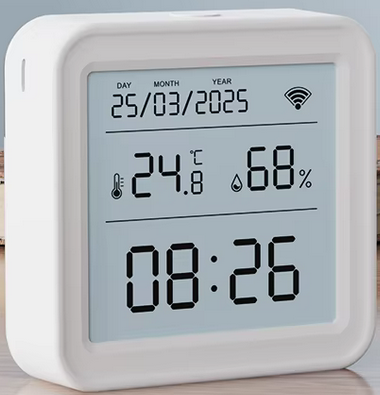
  • White clock with LCD showing date, time, temperature, and humidity

    Hello :)

    I recently bought some Tuya modules to play with, with a view to playing with OpenBK.
    Among them the TH08(??? E ???) and TH08C modules mentioned in the title. The TH08C version has the ability to switch with a button (the number of clicks of the button that normally turns on the backlight) the 12h/24h time format and the temperature units i.e. C and F.

    Both versions are based on the module T1-U-HL (BK7238)

    PCB appearance of the TH08E version (as to this E I am not sure but this is how it was described on Aliexpress):
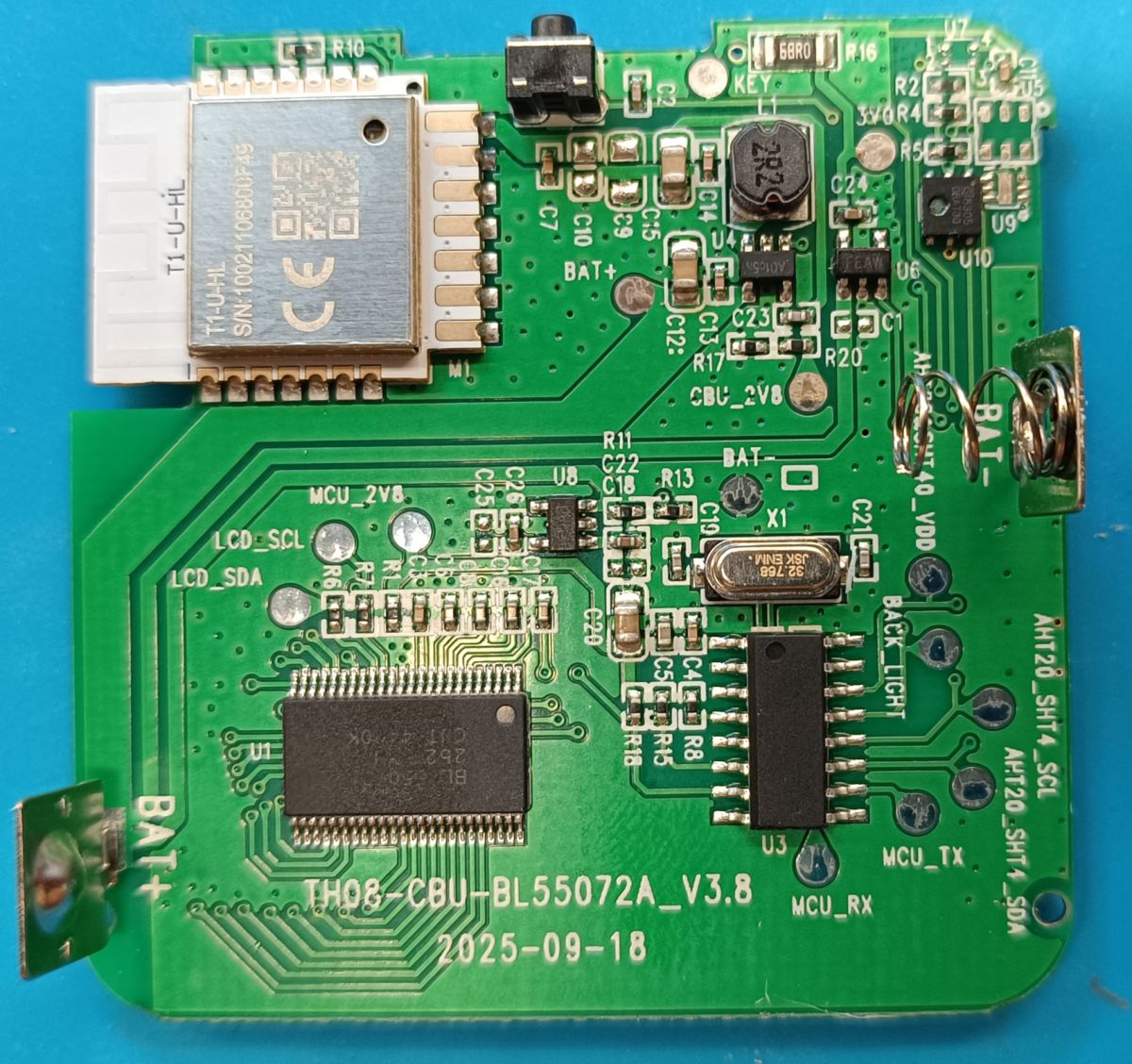
    Close-up of TH08E PCB with T1-U-HL module and labeled signal paths

    PCB described as "TH08-CBU-BL55072A_V3.8 2025-09-18"


    PCB appearance of the TH08C version (this is how it is described in the user manual):
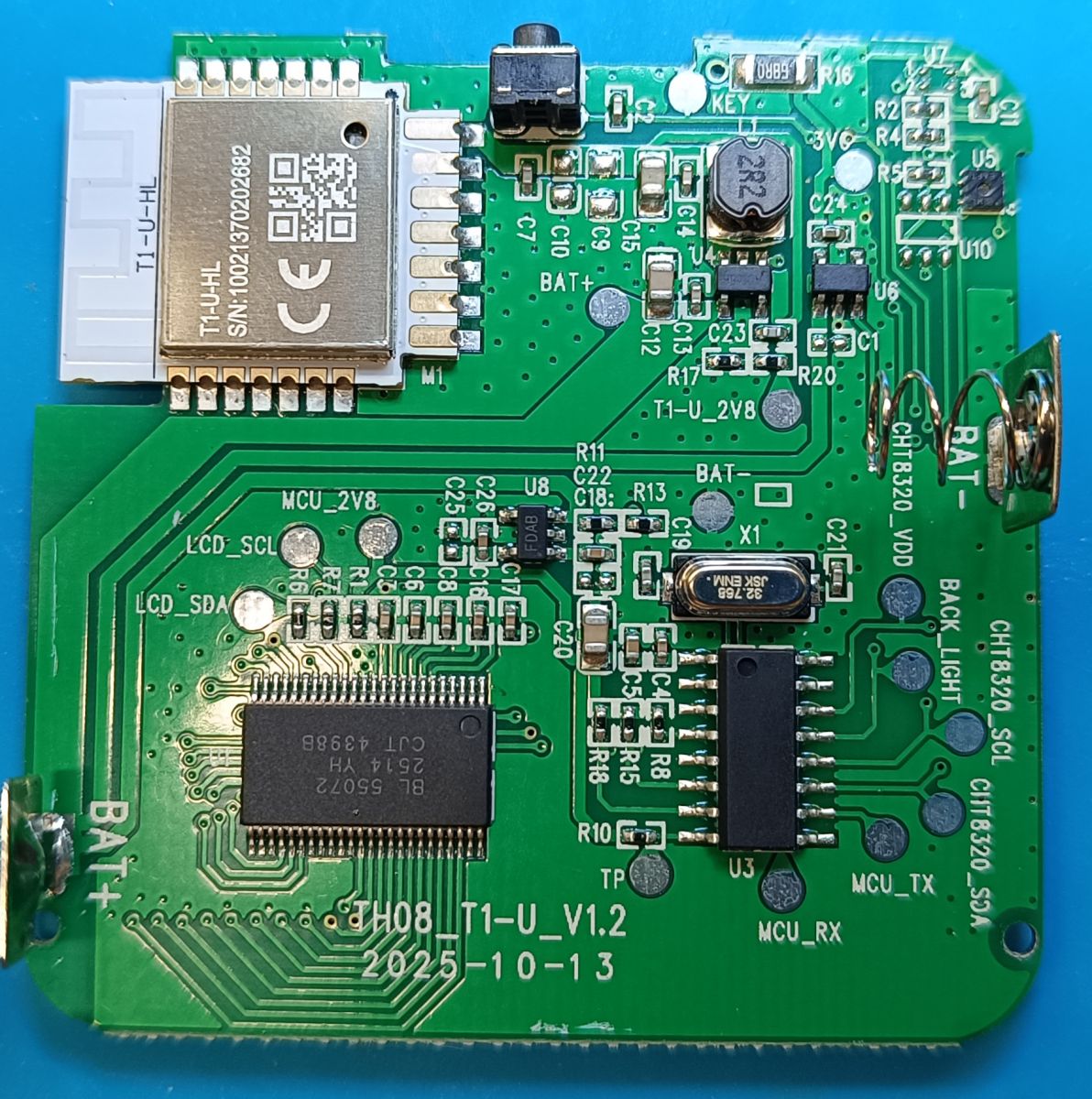
    TH08C PCB with T1-U-HL module and label TH08_T1-U_V1.2 2025-10-13

    PCB described as "TH08-T1-U_V1.2 2025-10-13"

    In principle, both temperature/humidity sensors are similar in design to the TH08 module with BK7231N already described here:

    [BK7231N ] Interior of TH08 LCD Calendar/clock/temperature/humidity

    At the moment I have uploaded the OpenBK software to the TH08E version (TH08C I have not yet touched and will probably post information about the protocol later). Ot the log data is quite a lot and I don't want to make a fuss with two versions at the moment. As soon as I manage to do something with TH08E I will take up TH08C and see how the communication is with this version....

    So for the moment I am focusing on TH08E i.e. PCB "TH08-CBU-BL55072A_V3.8 2025-09-18"

    Unfortunately, the communication with the TuyaMCU looks a bit different than in the TH08 module described on the forum (BK7231N) - so for the moment it was not possible to move it.

    It is apparent that several packages are missing e.g. 55 AA 00 90 and in the documentation (Tuya Developer) Serial Port Protocol at least I could not find information about package 90....


    Edited Post added after time: ok regarding package 90 I found is this Get cached DP command (0x90) - description here: Basic Features MCU Standard Protocol


    All in all, I've only been playing with OpenBK for a day (managed to rewire the PIR detectors) and I may be mixing things up. I've actually looked at the OpenBK code but I don't yet understand how it works enough to make any modifications myself.

    Maybe colleague @p.kaczmarek2 can advise and help here :) Below what I managed to log regarding TH08E module communication....

    In firmware configured WiFi/MQTT/NTP (this works) and set flags 10, 37, 43 to this disconnected line CEN - here basically behavioural problems with bad communication similar to the TH08 described in the forum....

    Effect:

    The TuyaMCU tries to commune with the T1-U-HL (BK7238) and after a period of time shuts down its power supply. The date and time on the display is not updated....


    TH08E TuyaMCU communication with original firmware - T: 28.0C H: 26%
    
    Received by WiFi module:
    55 AA	03	00		00 01	00	03	
    HEADER	VER=03	Heartbeat		LEN	00	CHK	
    
    Sent by WiFi module:
    55 AA	00	00		00 00		FF	
    HEADER	VER=00	Heartbeat		LEN		CHK	
    
    Sent by WiFi module:
    55 AA	00	01		00 00		00	
    HEADER	VER=00	Product		LEN		CHK	
    
    Received by WiFi module:
    55 AA	03	01		00 37	7B2270223A22623876716D646A6D7073776261703171222C2276223A22312E302E30222C226D223A302C226E223A312C22736D223A307D	57	
    HEADER	VER=03	Product		LEN	{"p":"b8vqmdjmpswbap1q","v":"1.0.0","m":0,"n":1,"sm":0}	CHK	
    
    Received by WiFi module:
    55 AA	03	02		00 00		04	
    HEADER	VER=03	McuConf		LEN		CHK	
    
    Sent by WiFi module:
    55 AA	00	02		00 00		01	
    HEADER	VER=00	McuConf		LEN		CHK	
    
    Sent by WiFi module:
    55 AA	00	03		00 01	02	05	
    HEADER	VER=00	WifiState		LEN	02	CHK	
    
    Received by WiFi module:
    55 AA	03	03		00 00		05	
    HEADER	VER=03	WifiState		LEN		CHK	
    
    Sent by WiFi module:
    55 AA	00	03		00 01	03	06	
    HEADER	VER=00	WifiState		LEN	03	CHK	
    
    Received by WiFi module:
    55 AA	03	03		00 00		05	
    HEADER	VER=03	WifiState		LEN		CHK	
    
    Sent by WiFi module:
    55 AA	00	08		00 00		07	
    HEADER	VER=00	QueryInitStatus		LEN	INVALID date			CHK	
    
    Sent by WiFi module:
    55 AA	00	03		00 01	04	07	
    HEADER	VER=00	WifiState		LEN	04	CHK	
    
    Received by WiFi module:
    55 AA	03	03		00 00		05	
    HEADER	VER=03	WifiState		LEN		CHK	
    
    Sent by WiFi module:
    55 AA	00	08		00 00		07	
    HEADER	VER=00	QueryInitStatus		LEN	INVALID date			CHK	
    
    Received by WiFi module:
    55 AA	03	90		00 04	03091718	D1	
    HEADER	VER=03	Unk		LEN	03091718	CHK	
    
    Received by WiFi module:
    55 AA	03	24		00 00		26	
    HEADER	VER=03	Unk		LEN		CHK	
    
    Sent by WiFi module:
    55 AA	00	90		00 02	0100	92	
    HEADER	VER=00	Unk		LEN	0100	CHK	
    
    Sent by WiFi module:
    55 AA	00	24		00 01	BB	DF	
    HEADER	VER=00	Unk		LEN	BB	CHK	
    
    Received by WiFi module:
    55 AA	03	1C		00 00		1E	
    HEADER	VER=03	Date		LEN		CHK	
    
    Sent by WiFi module:
    55 AA	00	1C		00 08	011A01170A342105	BA	
    HEADER	VER=00	Date		LEN	bOk=1 26/1/23 10:52:33	CHK	
    
    Received by WiFi module:
    55 AA	03	22		00 15	090400010017020004000000001802000400000000	82	
    HEADER	VER=03	Unk		LEN	090400010017020004000000001802000400000000	CHK	
    
    Sent by WiFi module:
    55 AA	00	23		00 01	01	24	
    HEADER	VER=00	Unk		LEN	01	CHK	
    
    Received by WiFi module:
    55 AA	03	22		00 15	0102000400000118020200040000001A0304000102	85	
    HEADER	VER=03	Unk		LEN	0102000400000118020200040000001A0304000102	CHK	
    
    Sent by WiFi module:
    55 AA	00	23		00 01	01	24	
    HEADER	VER=00	Unk		LEN	01	CHK	


    TuyaMCU communication with original firmware - T: 39.7CC H: 14%
    
    Received by WiFi module:
    55 AA	03	00		00 01	00	03	
    HEADER	VER=03	Heartbeat		LEN	00	CHK	
    
    Sent by WiFi module:
    55 AA	00	00		00 00		FF	
    HEADER	VER=00	Heartbeat		LEN		CHK	
    
    Sent by WiFi module:
    55 AA	00	01		00 00		00	
    HEADER	VER=00	Product		LEN		CHK	
    
    Received by WiFi module:
    55 AA	03	01		00 37	7B2270223A22623876716D646A6D7073776261703171222C2276223A22312E302E30222C226D223A302C226E223A312C22736D223A307D	57	
    HEADER	VER=03	Product		LEN	{"p":"b8vqmdjmpswbap1q","v":"1.0.0","m":0,"n":1,"sm":0}	CHK	
    
    Received by WiFi module:
    55 AA	03	02		00 00		04	
    HEADER	VER=03	McuConf		LEN		CHK	
    
    Sent by WiFi module:
    55 AA	00	02		00 00		01	
    HEADER	VER=00	McuConf		LEN		CHK	
    
    Sent by WiFi module:
    55 AA	00	03		00 01	02	05	
    HEADER	VER=00	WifiState		LEN	02	CHK	
    
    Received by WiFi module:
    55 AA	03	03		00 00		05	
    HEADER	VER=03	WifiState		LEN		CHK	
    
    Sent by WiFi module:
    55 AA	00	03		00 01	03	06	
    HEADER	VER=00	WifiState		LEN	03	CHK	
    
    Received by WiFi module:
    55 AA	03	03		00 00		05	
    HEADER	VER=03	WifiState		LEN		CHK	
    
    Sent by WiFi module:
    55 AA	00	08		00 00		07	
    HEADER	VER=00	QueryInitStatus		LEN	INVALID date			CHK	
    
    Sent by WiFi module:
    55 AA	00	03		00 01	04	07	
    HEADER	VER=00	WifiState		LEN	04	CHK	
    
    Received by WiFi module:
    55 AA	03	03		00 00		05	
    HEADER	VER=03	WifiState		LEN		CHK	
    
    Sent by WiFi module:
    55 AA	00	08		00 00		07	
    HEADER	VER=00	QueryInitStatus		LEN	INVALID date			CHK	
    
    Received by WiFi module:
    55 AA	03	90		00 04	03091718	D1	
    HEADER	VER=03	Unk		LEN	03091718	CHK	
    
    Sent by WiFi module:
    55 AA	00	90		00 02	0100	92	
    HEADER	VER=00	Unk		LEN	0100	CHK	
    
    Received by WiFi module:
    55 AA	03	24		00 00		26	
    HEADER	VER=03	Unk		LEN		CHK	
    
    Sent by WiFi module:
    55 AA	00	24		00 01	BC	E0	
    HEADER	VER=00	Unk		LEN	BC	CHK	
    
    Received by WiFi module:
    55 AA	03	1C		00 00		1E	
    HEADER	VER=03	Date		LEN		CHK	
    
    Sent by WiFi module:
    55 AA	00	1C		00 08	011A01170A371505	B1	
    HEADER	VER=00	Date		LEN	bOk=1 26/1/23 10:55:21	CHK	
    
    Received by WiFi module:
    55 AA	03	22		00 15	090400010017020004000000001802000400000000	82	
    HEADER	VER=03	Unk		LEN	090400010017020004000000001802000400000000	CHK	
    
    Sent by WiFi module:
    55 AA	00	23		00 01	01	24	
    HEADER	VER=00	Unk		LEN	01	CHK	
    
    Received by WiFi module:
    55 AA	03	22		00 15	010200040000018D020200040000000E0304000102	EE	
    HEADER	VER=03	Unk		LEN	010200040000018D020200040000000E0304000102	CHK	
    
    Sent by WiFi module:
    55 AA	00	23		00 01	01	24	
    HEADER	VER=00	Unk		LEN	01	CHK	


    TH08E TuyaMCU communication with original firmware - sensor removed from Tuya account
    
    Received by WiFi module:
    55 AA	03	00		00 01	00	03	
    HEADER	VER=03	Heartbeat		LEN	00	CHK	
    
    Sent by WiFi module:
    55 AA	00	00		00 00		FF	
    HEADER	VER=00	Heartbeat		LEN		CHK	
    
    Sent by WiFi module:
    55 AA	00	01		00 00		00	
    HEADER	VER=00	Product		LEN		CHK	
    
    Received by WiFi module:
    55 AA	03	01		00 37	7B2270223A22623876716D646A6D7073776261703171222C2276223A22312E302E30222C226D223A302C226E223A312C22736D223A307D	57	
    HEADER	VER=03	Product		LEN	{"p":"b8vqmdjmpswbap1q","v":"1.0.0","m":0,"n":1,"sm":0}	CHK	
    
    Sent by WiFi module:
    55 AA	00	02		00 00		01	
    HEADER	VER=00	McuConf		LEN		CHK	
    
    Received by WiFi module:
    55 AA	03	02		00 00		04	
    HEADER	VER=03	McuConf		LEN		CHK	
    
    Received by WiFi module:
    55 AA	03	03		00 00		05	
    HEADER	VER=03	WifiState		LEN		CHK	
    
    Sent by WiFi module:
    55 AA	00	03		00 01	02	05	
    HEADER	VER=00	WifiState		LEN	02	CHK	
    
    Received by WiFi module:
    55 AA	03	03		00 00		05	
    HEADER	VER=03	WifiState		LEN		CHK	
    
    Sent by WiFi module:
    55 AA	00	03		00 01	03	06	
    HEADER	VER=00	WifiState		LEN	03	CHK	
    
    Sent by WiFi module:
    55 AA	00	08		00 00		07	
    HEADER	VER=00	QueryInitStatus		LEN	INVALID date			CHK	
    
    Received by WiFi module:
    55 AA	03	00		00 01	01	04	
    HEADER	VER=03	Heartbeat		LEN	01	CHK	
    
    Sent by WiFi module:
    55 AA	00	00		00 00		FF	
    HEADER	VER=00	Heartbeat		LEN		CHK	
    
    Sent by WiFi module:
    55 AA	00	01		00 00		00	
    HEADER	VER=00	Product		LEN		CHK	
    
    Received by WiFi module:
    55 AA	03	01		00 37	7B2270223A22623876716D646A6D7073776261703171222C2276223A22312E302E30222C226D223A302C226E223A312C22736D223A307D	57	
    HEADER	VER=03	Product		LEN	{"p":"b8vqmdjmpswbap1q","v":"1.0.0","m":0,"n":1,"sm":0}	CHK	
    
    Received by WiFi module:
    55 AA	03	02		00 00		04	
    HEADER	VER=03	McuConf		LEN		CHK	
    
    Sent by WiFi module:
    55 AA	00	02		00 00		01	
    HEADER	VER=00	McuConf		LEN		CHK	
    
    Received by WiFi module:
    55 AA	03	03		00 00		05	
    HEADER	VER=03	WifiState		LEN		CHK	
    
    Sent by WiFi module:
    55 AA	00	03		00 01	01	04	
    HEADER	VER=00	WifiState		LEN	01	CHK	
    
    Sent by WiFi module:
    55 AA	00	00		00 00		FF	
    HEADER	VER=00	Heartbeat		LEN		CHK	
    
    Received by WiFi module:
    55 AA	03	00		00 01	01	04	
    HEADER	VER=03	Heartbeat		LEN	01	CHK	
    
    Received by WiFi module:
    55 AA	03	00		00 01	01	04	
    HEADER	VER=03	Heartbeat		LEN	01	CHK	
    
    Sent by WiFi module:
    55 AA	00	00		00 00		FF	
    HEADER	VER=00	Heartbeat		LEN		CHK	
    
    Received by WiFi module:
    55 AA	03	00		00 01	01	04	
    HEADER	VER=03	Heartbeat		LEN	01	CHK	
    
    Sent by WiFi module:
    55 AA	00	00		00 00		FF	
    HEADER	VER=00	Heartbeat		LEN		CHK	
    
    Sent by WiFi module:
    55 AA	00	00		00 00		FF	
    HEADER	VER=00	Heartbeat		LEN		CHK	
    
    Received by WiFi module:
    55 AA	03	00		00 01	01	04	
    HEADER	VER=03	Heartbeat		LEN	01	CHK	


    In contrast, this is what the communion with OpenBK (TH08E) looks like:

    For autoexec.bat with startDriver tmSensor
    
    startDriver TuyaMCU
    startDriver tmSensor
    startDriver NTP
    ntp_setServer 194.146.251.100
    ntp_timeZoneOfs 1


    Log:
    
    Received by WiFi module:
    55 AA	03	01		00 37	7B2270223A22623876716D646A6D7073776261703171222C2276223A22312E302E30222C226D223A302C226E223A312C22736D223A307D	57	
    HEADER	VER=03	Product		LEN	{"p":"b8vqmdjmpswbap1q","v":"1.0.0","m":0,"n":1,"sm":0}	CHK	
    
    Sent by WiFi module:
    55 AA	00	01		00 00		00	
    HEADER	VER=00	Product		LEN		CHK	
    
    Received by WiFi module:
    55 AA	03	02		00 00		04	
    HEADER	VER=03	McuConf		LEN		CHK	
    
    Sent by WiFi module:
    55 AA	00	02		00 01	03	05	
    HEADER	VER=00	McuConf		LEN	03	CHK	
    
    Received by WiFi module:
    55 AA	03	02		00 00		04	
    HEADER	VER=03	McuConf		LEN		CHK	
    
    Sent by WiFi module:
    55 AA	00	02		00 01	04	06	
    HEADER	VER=00	McuConf		LEN	04	CHK	


    and log with autoexec.bat removed startDriver tmSensor :
    
    Received by WiFi module:
    55 AA	03	00		00 01	00	03	
    HEADER	VER=03	Heartbeat		LEN	00	CHK	
    
    Sent by WiFi module:
    55 AA	00	00		00 00		FF	
    HEADER	VER=00	Heartbeat		LEN		CHK	
    
    Sent by WiFi module:
    55 AA	00	01		00 00		00	
    HEADER	VER=00	Product		LEN		CHK	
    
    Received by WiFi module:
    55 AA	03	01		00 37	7B2270223A22623876716D646A6D7073776261703171222C2276223A22312E302E30222C226D223A302C226E223A312C22736D223A307D	57	
    HEADER	VER=03	Product		LEN	{"p":"b8vqmdjmpswbap1q","v":"1.0.0","m":0,"n":1,"sm":0}	CHK	
    
    Sent by WiFi module:
    55 AA	00	02		00 00		01	
    HEADER	VER=00	McuConf		LEN		CHK	
    
    Received by WiFi module:
    55 AA	03	02		00 00		04	
    HEADER	VER=03	McuConf		LEN		CHK	
    
    Sent by WiFi module:
    55 AA	00	08		00 00		07	
    HEADER	VER=00	QueryInitStatus		LEN	INVALID date			CHK	
    
    Received by WiFi module:
    55 AA	03	00		00 01	01	04	
    HEADER	VER=03	Heartbeat		LEN	01	CHK	
    
    Sent by WiFi module:
    55 AA	00	00		00 00		FF	
    HEADER	VER=00	Heartbeat		LEN		CHK	
    
    Sent by WiFi module:
    55 AA	00	08		00 00		07	
    HEADER	VER=00	QueryInitStatus		LEN	INVALID date			CHK	
    
    Received by WiFi module:
    55 AA	03	03		00 00		05	
    HEADER	VER=03	WifiState		LEN		CHK	
    
    Sent by WiFi module:
    55 AA	00	03		00 01	00	03	
    HEADER	VER=00	WifiState		LEN	00	CHK	
    
    Sent by WiFi module:
    55 AA	00	08		00 00		07	
    HEADER	VER=00	QueryInitStatus		LEN	INVALID date			CHK	
    
    Received by WiFi module:
    55 AA	03	00		00 01	01	04	
    HEADER	VER=03	Heartbeat		LEN	01	CHK	
    
    Sent by WiFi module:
    55 AA	00	00		00 00		FF	
    HEADER	VER=00	Heartbeat		LEN		CHK	
    
    Sent by WiFi module:
    55 AA	00	08		00 00		07	
    HEADER	VER=00	QueryInitStatus		LEN	INVALID date			CHK	
    
    Received by WiFi module:
    55 AA	03	00		00 01	01	04	
    HEADER	VER=03	Heartbeat		LEN	01	CHK	
    
    Sent by WiFi module:
    55 AA	00	00		00 00		FF	
    HEADER	VER=00	Heartbeat		LEN		CHK	
    
    Sent by WiFi module:
    55 AA	00	08		00 00		07	
    HEADER	VER=00	QueryInitStatus		LEN	INVALID date			CHK	
    
    Sent by WiFi module:
    55 AA	00	08		00 00		07	
    HEADER	VER=00	QueryInitStatus		LEN	INVALID date			CHK	
    
    Received by WiFi module:
    55 AA	03	00		00 01	01	04	
    HEADER	VER=03	Heartbeat		LEN	01	CHK	
    
    Sent by WiFi module:
    55 AA	00	00		00 00		FF	
    HEADER	VER=00	Heartbeat		LEN		CHK	
    
    Sent by WiFi module:
    55 AA	00	08		00 00		07	
    HEADER	VER=00	QueryInitStatus		LEN	INVALID date			CHK	
    
    Sent by WiFi module:
    55 AA	00	00		00 00		FF	
    HEADER	VER=00	Heartbeat		LEN		CHK	
    
    Received by WiFi module:
    55 AA	03	00		00 01	01	04	
    HEADER	VER=03	Heartbeat		LEN	01	CHK	
    
    Sent by WiFi module:
    55 AA	00	08		00 00		07	
    HEADER	VER=00	QueryInitStatus		LEN	INVALID date			CHK	
    
    Received by WiFi module:
    55 AA	03	03		00 00		05	
    HEADER	VER=03	WifiState		LEN		CHK	
    
    Sent by WiFi module:
    55 AA	00	03		00 01	04	07	
    HEADER	VER=00	WifiState		LEN	04	CHK	
    
    Received by WiFi module:
    55 AA	03	90		00 04	03091718	D1	
    HEADER	VER=03	Unk		LEN	03091718	CHK	
    
    Sent by WiFi module:
    55 AA	00	08		00 00		07	
    HEADER	VER=00	QueryInitStatus		LEN	INVALID date			CHK	
    
    Received by WiFi module:
    55 AA	03	00		00 01	01	04	
    HEADER	VER=03	Heartbeat		LEN	01	CHK	
    
    Sent by WiFi module:
    55 AA	00	00		00 00		FF	
    HEADER	VER=00	Heartbeat		LEN		CHK	
    
    Sent by WiFi module:
    55 AA	00	08		00 00		07	
    HEADER	VER=00	QueryInitStatus		LEN	INVALID date			CHK	
    
    Received by WiFi module:
    55 AA	03	00		00 01	01	04	
    HEADER	VER=03	Heartbeat		LEN	01	CHK	
    
    Sent by WiFi module:
    55 AA	00	00		00 00		FF	
    HEADER	VER=00	Heartbeat		LEN		CHK	
    
    Sent by WiFi module:
    55 AA	00	08		00 00		07	
    HEADER	VER=00	QueryInitStatus		LEN	INVALID date			CHK	
    
    Sent by WiFi module:
    55 AA	00	08		00 00		07	
    HEADER	VER=00	QueryInitStatus		LEN	INVALID date			CHK	
    
    Sent by WiFi module:
    55 AA	00	00		00 00		FF	
    HEADER	VER=00	Heartbeat		LEN		CHK	
    
    Received by WiFi module:
    55 AA	03	00		00 01	01	04	
    HEADER	VER=03	Heartbeat		LEN	01	CHK	
    
    Sent by WiFi module:
    55 AA	00	08		00 00		07	
    HEADER	VER=00	QueryInitStatus		LEN	INVALID date			CHK	
    
    Sent by WiFi module:
    55 AA	00	00		00 00		FF	
    HEADER	VER=00	Heartbeat		LEN		CHK	
    
    Received by WiFi module:
    55 AA	03	00		00 01	01	04	
    HEADER	VER=03	Heartbeat		LEN	01	CHK	
    
    Sent by WiFi module:
    55 AA	00	08		00 00		07	
    HEADER	VER=00	QueryInitStatus		LEN	INVALID date			CHK	
    
    Sent by WiFi module:
    55 AA	00	08		00 00		07	
    HEADER	VER=00	QueryInitStatus		LEN	INVALID date			CHK	
    
    Sent by WiFi module:
    55 AA	00	00		00 00		FF	
    HEADER	VER=00	Heartbeat		LEN		CHK	
    
    Received by WiFi module:
    55 AA	03	00		00 01	01	04	
    HEADER	VER=03	Heartbeat		LEN	01	CHK	
    
    Sent by WiFi module:
    55 AA	00	08		00 00		07	
    HEADER	VER=00	QueryInitStatus		LEN	INVALID date			CHK	
    
    Received by WiFi module:
    55 AA	03	00		00 01	01	04	
    HEADER	VER=03	Heartbeat		LEN	01	CHK	
    
    Sent by WiFi module:
    55 AA	00	00		00 00		FF	
    HEADER	VER=00	Heartbeat		LEN		CHK	
    
    Sent by WiFi module:
    55 AA	00	08		00 00		07	
    HEADER	VER=00	QueryInitStatus		LEN	INVALID date			CHK	
    
    Sent by WiFi module:
    55 AA	00	08		00 00		07	
    HEADER	VER=00	QueryInitStatus		LEN	INVALID date			CHK	
    
    Sent by WiFi module:
    55 AA	00	00		00 00		FF	
    HEADER	VER=00	Heartbeat		LEN		CHK	
    
    Received by WiFi module:
    55 AA	03	00		00 01	01	04	
    HEADER	VER=03	Heartbeat		LEN	01	CHK	
    
    Sent by WiFi module:
    55 AA	00	08		00 00		07	
    HEADER	VER=00	QueryInitStatus		LEN	INVALID date			CHK	
    
    Received by WiFi module:
    55 AA	03	00		00 01	01	04	
    HEADER	VER=03	Heartbeat		LEN	01	CHK	
    
    Sent by WiFi module:
    55 AA	00	00		00 00		FF	
    HEADER	VER=00	Heartbeat		LEN		CHK	
    
    Sent by WiFi module:
    55 AA	00	08		00 00		07	
    HEADER	VER=00	QueryInitStatus		LEN	INVALID date			CHK	
    
    Sent by WiFi module:
    55 AA	00	08		00 00		07	
    HEADER	VER=00	QueryInitStatus		LEN	INVALID date			CHK	
    
    Sent by WiFi module:
    55 AA	00	00		00 00		FF	
    HEADER	VER=00	Heartbeat		LEN		CHK	
    
    Received by WiFi module:
    55 AA	03	00		00 01	01	04	
    HEADER	VER=03	Heartbeat		LEN	01	CHK	
    
    Sent by WiFi module:
    55 AA	00	08		00 00		07	
    HEADER	VER=00	QueryInitStatus		LEN	INVALID date			CHK	
    
    Received by WiFi module:
    55 AA	03	00		00 01	01	04	
    HEADER	VER=03	Heartbeat		LEN	01	CHK	
    
    Sent by WiFi module:
    55 AA	00	00		00 00		FF	
    HEADER	VER=00	Heartbeat		LEN		CHK	
    
    Sent by WiFi module:
    55 AA	00	08		00 00		07	
    HEADER	VER=00	QueryInitStatus		LEN	INVALID date			CHK	
    
    Sent by WiFi module:
    55 AA	00	08		00 00		07	
    HEADER	VER=00	QueryInitStatus		LEN	INVALID date			CHK	
    
    Sent by WiFi module:
    55 AA	00	00		00 00		FF	
    HEADER	VER=00	Heartbeat		LEN		CHK	
    
    Received by WiFi module:
    55 AA	03	00		00 01	01	04	
    HEADER	VER=03	Heartbeat		LEN	01	CHK	
    
    Sent by WiFi module:
    55 AA	00	08		00 00		07	
    HEADER	VER=00	QueryInitStatus		LEN	INVALID date			CHK	
    
    Sent by WiFi module:
    55 AA	00	00		00 00		FF	
    HEADER	VER=00	Heartbeat		LEN		CHK	
    
    Received by WiFi module:
    55 AA	03	00		00 01	01	04	
    HEADER	VER=03	Heartbeat		LEN	01	CHK	
    
    Sent by WiFi module:
    55 AA	00	08		00 00		07	
    HEADER	VER=00	QueryInitStatus		LEN	INVALID date			CHK	
    
    Sent by WiFi module:
    55 AA	00	08		00 00		07	
    HEADER	VER=00	QueryInitStatus		LEN	INVALID date			CHK	
    
    Sent by WiFi module:
    55 AA	00	00		00 00		FF	
    HEADER	VER=00	Heartbeat		LEN		CHK	
    
    Received by WiFi module:
    55 AA	03	00		00 01	01	04	
    HEADER	VER=03	Heartbeat		LEN	01	CHK	
    
    Sent by WiFi module:
    55 AA	00	08		00 00		07	
    HEADER	VER=00	QueryInitStatus		LEN	INVALID date			CHK	
    
    Sent by WiFi module:
    55 AA	00	00		00 00		FF	
    HEADER	VER=00	Heartbeat		LEN		CHK	
    
    Received by WiFi module:
    55 AA	03	00		00 01	01	04	
    HEADER	VER=03	Heartbeat		LEN	01	CHK	
    
    Sent by WiFi module:
    55 AA	00	08		00 00		07	
    HEADER	VER=00	QueryInitStatus		LEN	INVALID date			CHK	
    
    Sent by WiFi module:
    55 AA	00	08		00 00		07	
    HEADER	VER=00	QueryInitStatus		LEN	INVALID date			CHK	
    
    Received by WiFi module:
    55 AA	03	00		00 01	01	04	
    HEADER	VER=03	Heartbeat		LEN	01	CHK	
    
    Sent by WiFi module:
    55 AA	00	00		00 00		FF	
    HEADER	VER=00	Heartbeat		LEN		CHK	
    
    Sent by WiFi module:
    55 AA	00	08		00 00		07	
    HEADER	VER=00	QueryInitStatus		LEN	INVALID date			CHK	
    
    Sent by WiFi module:
    55 AA	00	00		00 00		FF	
    HEADER	VER=00	Heartbeat		LEN		CHK	
    
    Received by WiFi module:
    55 AA	03	00		00 01	01	04	
    HEADER	VER=03	Heartbeat		LEN	01	CHK	
    
    Sent by WiFi module:
    55 AA	00	08		00 00		07	
    HEADER	VER=00	QueryInitStatus		LEN	INVALID date			CHK	
    
    Sent by WiFi module:
    55 AA	00	08		00 00		07	
    HEADER	VER=00	QueryInitStatus		LEN	INVALID date			CHK	
    
    Received by WiFi module:
    55 AA	03	00		00 01	01	04	
    HEADER	VER=03	Heartbeat		LEN	01	CHK	
    
    Sent by WiFi module:
    55 AA	00	00		00 00		FF	
    HEADER	VER=00	Heartbeat		LEN		CHK	
    
    Sent by WiFi module:
    55 AA	00	08		00 00		07	
    HEADER	VER=00	QueryInitStatus		LEN	INVALID date			CHK	
    
    Received by WiFi module:
    55 AA	03	00		00 01	01	04	
    HEADER	VER=03	Heartbeat		LEN	01	CHK	
    
    Sent by WiFi module:
    55 AA	00	00		00 00		FF	
    HEADER	VER=00	Heartbeat		LEN		CHK	
    
    Sent by WiFi module:
    55 AA	00	08		00 00		07	
    HEADER	VER=00	QueryInitStatus		LEN	INVALID date			CHK	


    Added after 1 [hour] 54 [minutes]:

    OK Next entry ;)

    There is a little progress after adding the option to autoexec.bat tuyaMcu_defWiFiState 4 the communication went on and the date and time was set :)
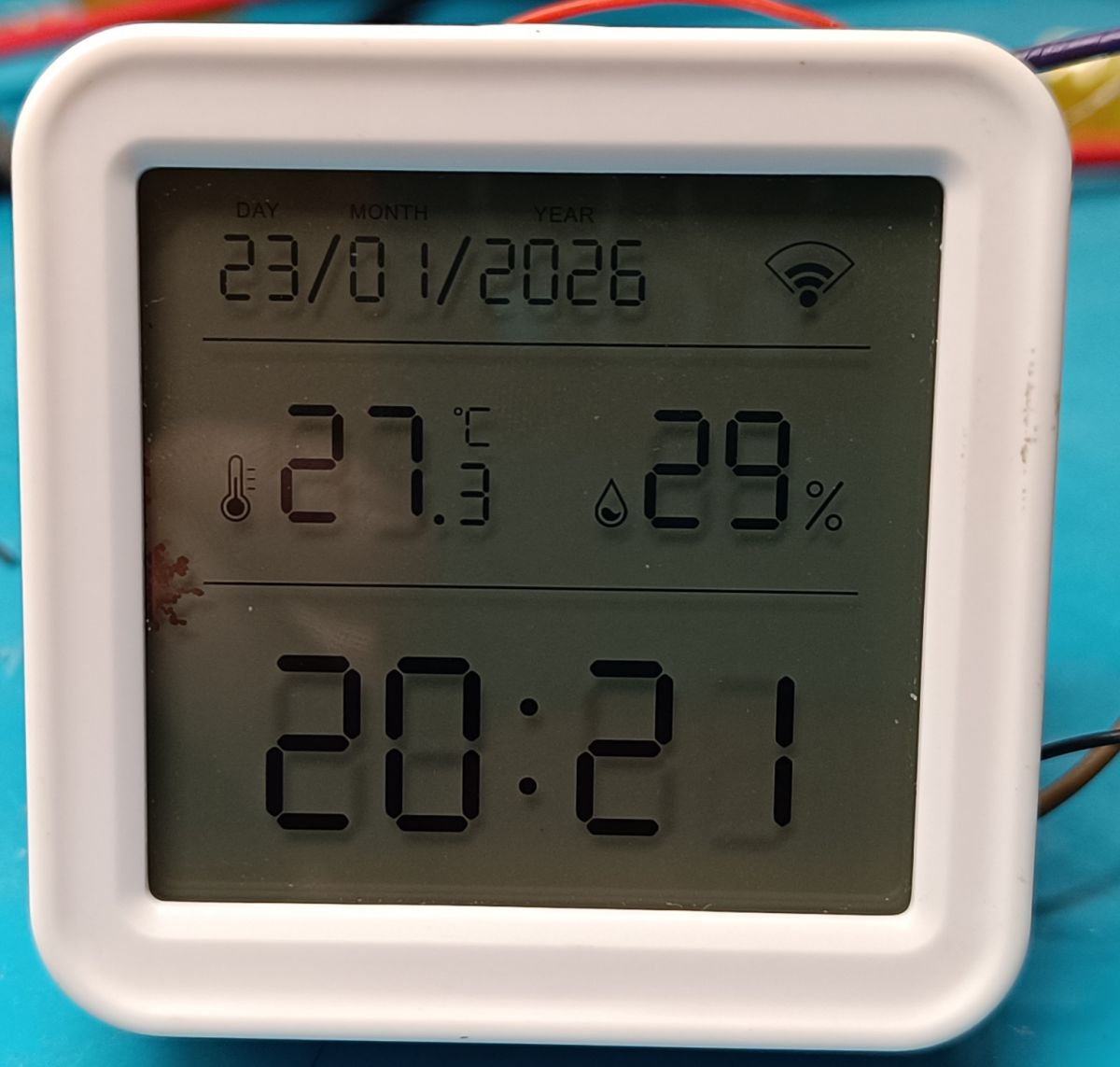

    LCD of TH08E sensor showing 27.5°C temperature and 29% humidity


    As before with option startDriver tmSensor communication cuts off as above.

    Although there have been a couple of power-ups where the time/date failed to be set and the BK7238 was cut off (probably not connecting to WiFi - I haven't logged that one). Hmm any ideas ?

    What remains now is the issue of sending data to MQTT....
    ...which are sent as Report status (sync) (0x022) - that is multiple DPs...

    e.g. from the following log:
    55 AA 03 22 00 15 090400010017020004000000001802000400000000 82
    55 AA 03 22 00 15 0102000400000115020200040000001A0304000102 82

    hmm how can this be extracted to individual channels ?

    Originally it was also possible to set temperature and humidity correction and alarms - but from what I have read in the thread regarding the TH08 based on BK7231N this I understand is not yet supported ?

    Current autoexec.bat :
    
    startDriver TuyaMCU
    tuyaMcu_defWiFiState 4
    startDriver NTP
    ntp_setServer 194.146.251.100
    ntp_timeZoneOfs 1


    Log:
    
    Received by WiFi module:
    55 AA	03	00		00 01	00	03	
    HEADER	VER=03	Heartbeat		LEN	00	CHK	
    
    Sent by WiFi module:
    55 AA	00	00		00 00		FF	
    HEADER	VER=00	Heartbeat		LEN		CHK	
    
    Sent by WiFi module:
    55 AA	00	01		00 00		00	
    HEADER	VER=00	Product		LEN		CHK	
    
    Received by WiFi module:
    55 AA	03	01		00 37	7B2270223A22623876716D646A6D7073776261703171222C2276223A22312E302E30222C226D223A302C226E223A312C22736D223A307D	57	
    HEADER	VER=03	Product		LEN	{"p":"b8vqmdjmpswbap1q","v":"1.0.0","m":0,"n":1,"sm":0}	CHK	
    
    Received by WiFi module:
    55 AA	03	02		00 00		04	
    HEADER	VER=03	McuConf		LEN		CHK	
    
    Sent by WiFi module:
    55 AA	00	02		00 00		01	
    HEADER	VER=00	McuConf		LEN		CHK	
    
    Sent by WiFi module:
    55 AA	00	08		00 00		07	
    HEADER	VER=00	QueryInitStatus		LEN	INVALID date			CHK	
    
    Received by WiFi module:
    55 AA	03	00		00 01	01	04	
    HEADER	VER=03	Heartbeat		LEN	01	CHK	
    
    Sent by WiFi module:
    55 AA	00	00		00 00		FF	
    HEADER	VER=00	Heartbeat		LEN		CHK	
    
    Sent by WiFi module:
    55 AA	00	08		00 00		07	
    HEADER	VER=00	QueryInitStatus		LEN	INVALID date			CHK	
    
    Received by WiFi module:
    55 AA	03	03		00 00		05	
    HEADER	VER=03	WifiState		LEN		CHK	
    
    Sent by WiFi module:
    55 AA	00	03		00 01	04	07	
    HEADER	VER=00	WifiState		LEN	04	CHK	
    
    Received by WiFi module:
    55 AA	03	90		00 04	03091718	D1	
    HEADER	VER=03	Unk		LEN	03091718	CHK	
    
    Sent by WiFi module:
    55 AA	00	08		00 00		07	
    HEADER	VER=00	QueryInitStatus		LEN	INVALID date			CHK	
    
    Received by WiFi module:
    55 AA	03	00		00 01	01	04	
    HEADER	VER=03	Heartbeat		LEN	01	CHK	
    
    Sent by WiFi module:
    55 AA	00	00		00 00		FF	
    HEADER	VER=00	Heartbeat		LEN		CHK	
    
    Sent by WiFi module:
    55 AA	00	08		00 00		07	
    HEADER	VER=00	QueryInitStatus		LEN	INVALID date			CHK	
    
    Sent by WiFi module:
    55 AA	00	00		00 00		FF	
    HEADER	VER=00	Heartbeat		LEN		CHK	
    
    Received by WiFi module:
    55 AA	03	00		00 01	01	04	
    HEADER	VER=03	Heartbeat		LEN	01	CHK	
    
    Sent by WiFi module:
    55 AA	00	08		00 00		07	
    HEADER	VER=00	QueryInitStatus		LEN	INVALID date			CHK	
    
    Sent by WiFi module:
    55 AA	00	08		00 00		07	
    HEADER	VER=00	QueryInitStatus		LEN	INVALID date			CHK	
    
    Sent by WiFi module:
    55 AA	00	00		00 00		FF	
    HEADER	VER=00	Heartbeat		LEN		CHK	
    
    Received by WiFi module:
    55 AA	03	00		00 01	01	04	
    HEADER	VER=03	Heartbeat		LEN	01	CHK	
    
    Sent by WiFi module:
    55 AA	00	08		00 00		07	
    HEADER	VER=00	QueryInitStatus		LEN	INVALID date			CHK	
    
    Sent by WiFi module:
    55 AA	00	03		00 01	04	07	
    HEADER	VER=00	WifiState		LEN	04	CHK	
    
    Received by WiFi module:
    55 AA	03	03		00 00		05	
    HEADER	VER=03	WifiState		LEN		CHK	
    
    Sent by WiFi module:
    55 AA	00	24		00 01	BE	E2	
    HEADER	VER=00	Unk		LEN	BE	CHK	
    
    Received by WiFi module:
    55 AA	03	24		00 00		26	
    HEADER	VER=03	Unk		LEN		CHK	
    
    Sent by WiFi module:
    55 AA	00	1C		00 08	011A011714103A05	B9	
    HEADER	VER=00	Date		LEN	bOk=1 26/1/23 20:16:58	CHK	
    
    Received by WiFi module:
    55 AA	03	1C		00 00		1E	
    HEADER	VER=03	Date		LEN		CHK	
    
    Sent by WiFi module:
    55 AA	00	23		00 01	01	24	
    HEADER	VER=00	Unk		LEN	01	CHK	
    
    Received by WiFi module:
    55 AA	03	22		00 15	090400010017020004000000001802000400000000	82	
    HEADER	VER=03	Unk		LEN	090400010017020004000000001802000400000000	CHK	
    
    Sent by WiFi module:
    55 AA	00	23		00 01	01	24	
    HEADER	VER=00	Unk		LEN	01	CHK	
    
    Received by WiFi module:
    55 AA	03	22		00 15	0102000400000115020200040000001A0304000102	82	
    HEADER	VER=03	Unk		LEN	0102000400000115020200040000001A0304000102	CHK	
    

    Cool? Ranking DIY
    About Author
    tplewa
    Level 39  
    Offline 
    tplewa wrote 6708 posts with rating 974, helped 222 times. Live in city Warszawa. Been with us since 2003 year.
  • ADVERTISEMENT
  • #2 21817834
    p.kaczmarek2
    Moderator Smart Home
    An interesting device, and with the new BK. More and more of it on the market.

    It's nice to see someone messing about with it, although I myself prefer to use Zigbee for battery-powered devices, WiFi I love for mains-powered ones.

    tuyaMcu_defWiFiState 4 is needed, otherwise the device is waiting on MQTT to report that it is 'connected to the cloud', from what I remember, although I guess blank fields in MQTT are also considered a sign that it doesn't need to be checked.

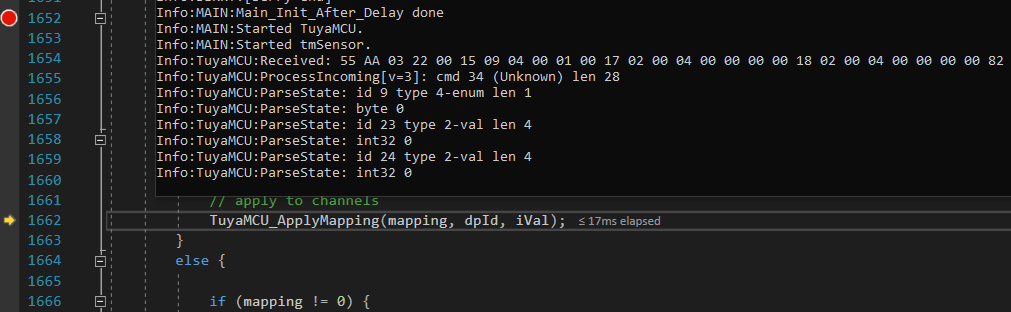
    I checked your packet 55 AA 03 22 00 15 090400010017020004000000001802000400000000 82 and I can see that it is normally parsed by OBK. You just have to map the dpIDs available there to channels, as you normally do. linkTuyaMCUOutputToChannel
    Screenshot of code editor with TuyaMCU logs and channel mapping function
    Helpful post? Buy me a coffee.
  • #3 21817840
    tplewa
    Level 39  
    p.kaczmarek2 wrote:
    An interesting device, and one with a new BK. More and more of it on the market.

    Nice to see someone messing around with it, though I myself prefer to use Zigbee for battery-powered devices, WiFi I love for mains-powered ones.


    Yes I know ZigBee works better for such equipment.... ...although this is more fun than any serious home automation hehe. I just put HA on the VM to practice a bit and implement integrations with my BMS.... ...and by the way I got the idea that maybe I could do some light control.

    Unfortunately, from what I've read the ZigBee gateways also have some problems and not everything works under HA, and the server with the virtualisation is in such a place that it was difficult for me to get the antenna out of the ZigBee dongle under USB to have any meaningful range.

    However, there is a network and WiFi (I separated an isolated VLAN just for IoT), and the flat is rented, and the prices of these gadgets on Ali are ridiculously low, so I bought some stuff to play with ;) I will probably still bring up the subject of presence sensors on 5GHz and 24GHz, which I also want to convert to OpenBK.... On the other hand, these temperature sensors are probably more for fun I bought hehe

    And thanks for the info that the 0x22 package is parsed.... in the morning I'll change autoexec and try to map dpId to channels - ehh in addition I didn't check in Tuya what is under given Id so it will have to be described yet (well, you learn) ;) I'll see maybe from firmware backup it can be pulled out....
  • #4 21817844
    p.kaczmarek2
    Moderator Smart Home
    Go ahead and redesign your next device, I'll try to help too.

    Post a firmware backup then we'll try, maybe @divadiow can help.

    I would personally think of a slightly different form of experiment though. There is a BL 55072 there, yes? I can see in one of the pictures. It has I2C after all, you could potentially drive it from the BK itself, and then either power the chip by wire, or already loosely deepsleep in the OBK to run, without fighting with the MCU.

    We don't have a driver for the BL 55072, but one could be made.
    Helpful post? Buy me a coffee.
  • ADVERTISEMENT
  • #5 21817856
    tplewa
    Level 39  
    p.kaczmarek2 wrote:
    There is BL 55072, yes?


    Exactly BL55072 going over I2C.

    Here, you could boldly knock out the TuyaMCU and plug directly into the BL55072....
    ...except that the segments would have to be configurable, because from what I checked the displays in those I have are different. Ot the one that has switching has additional AM/PM and C and F segments....

    The price of these thermometers in promotions is not high so you can confidently experiment without any major concerns - just if something goes wrong there is no great financial loss ;)

    Regarding other stuff, i.e. microwave sensors, there will be more fun - I still have to read how to create my own HTML with settings in OpenBK and use RestAPI etc. to configure sensors etc. At the moment it is a black magic for me ;) Ot after reworking a few other things (bulbs, switches, thermometers) I will probably get down to it :)

    As for the firmware, once I've checked where my passwords, ssid etc are sitting to get them out I'll post.


    However, I've now extracted a JSON from the firmware that describes the Id in part, and even though it doesn't have names it's possible to guess something by looking at the data being sent....


    The aforementioned JSON:
    Code: JSON
    Log in, to see the code


    The id itself coincides with the JSON posted by colleague @divadiow in post #241 of the twin thread #241 [BK7231N ] Interior TH08 LCD Calendar/Timer/Temperature/Humidity

    (let me copy this JSON here)
    Code: JSON
    Log in, to see the code


    Well, and here the dissected data posted in an earlier post (data for T: 39.7C H: 14%):

    55 AA 03 22 00 15

    (ID = 9, Val = 0)
    09 04 00 01 00

    (ID = 23, Val = 0)
    17 02 00 04 00 00 00 00

    (ID = 24, Val = 0)
    18 02 00 04 00 00 00 00

    82

    --------------------------------------------------


    55 AA 03 22 00 15

    (ID = 1, Val = 0x018D = 397 = 39.7C)
    01 02 00 04 00 00 01 8D

    (ID = 2, Val = 0x0E = 14%)
    02 02 00 04 00 00 00 0E

    (ID = 3, Val = 02)
    03 04 00 01 02

    EE
  • #6 21818531
    sq3evp
    Level 39  
    Which standard is more economical? Tuya or Zigbee?
    I have some on Tuya, not sure if Zigbee is worth it?
    Radio coverage who has better?
  • ADVERTISEMENT
  • #7 21818668
    tplewa
    Level 39  
    Ok... TH08E works with OpenBK although from what I've noticed sometimes it doesn't download data from NTP and the date and time on the display is erased - there were also a few cases that it sent values equal to zero - although this probably doesn't happen anymore (we'll see how long it works). At the moment added uploading of battery status, temperature and humidity.

    If anyone has such a module, corrections are welcome if you manage to set things up better....
    Similarly, if someone manages to use and send calibration data for the sensor - that is the option available in TuyaMCU (i.e. support for Id 23 and 24)... Unfortunately, at the moment I know too little about OpenBK to implement this - probably when I get to know the software a little better I will do something about it.

    We'll see what the communication with TH08C looks like, that is the version which allows to set time mode 12/24h and temperature units (C/F) using a switch - I'll probably get to it today...


    Settings

    Flags:
    2 10 19 37 51

    autoexec.bat:
    
    startDriver TuyaMCU
    
    tuyaMcu_defWiFiState 4
    
    setChannelType 1 temperature_div10
    linkTuyaMCUOutputToChannel 1 val 1
    
    setChannelType 2 Humidity
    linkTuyaMCUOutputToChannel 2 val 2
    
    setChannelType 3 ReadOnlyLowMidHigh
    setChannelLabel 3 "Battery"
    linkTuyaMCUOutputToChannel 3 val 3
    
    startDriver NTP
    
    ntp_timeZoneOfs 1
    ntp_setServer 194.146.251.100
    waitFor NTPState 1


    sq3evp wrote:
    Which standard is more economical? Tuya or Zigbee?
    I have some on Tuya, not sure if it's worth Zigbee?
    Radio range who has a better one?


    Tuya is sort of a cloud based smart home management system something like Google Home, Home Assistant etc. Basically the same functions as Tuya (it's the same app) are offered by several other companies (using all the API created by Tuya) e.g. Smart Life etc.

    ZigBee on the other hand is a way of communication and here devices communicating over ZigBee, WiFi, Bluetooth can work with Tuya/Smart Life. Except that ZigBee needs an additional gateway that connects ZigBee to the network (can be a ZigBee gateway to WiFi or Ethernet). In the same way, some of the functionality that we create in Tuya can be supported by a ZigBee gateway - so there is an advantage and not everything will stop working when the internet connection goes down.

    Personally, however, if I were making a smart home, I would rather base everything possible on a wired installation. However, it is known that such a thing is more likely to happen when building a house or doing a complex overhaul of the electrical system.

    In fact, when I was considering such a system for a house I was thinking of something like Grenton, Ampio or Loxone.

    Although these systems don't quite appeal to me ot lacking, for example, some cool microwave presence sensors.... ...but I have been doing FMCW radars or more complex ones with MIMO on 24GHz and with such a sensor you could, for example, even divide a room into zones and assign system reactions to the zones, and so on. Nowadays it is even easier to realise something like that since, due to the commonness of radars in Automotive, there are a lot of ready-made radars in one chip, and at 120GHz even such where the whole radar + antennas is in the chip, so there is no need to design your own antennas on a PCB as in the case of 24GHz + the need to use quite expensive Teflon laminates (Rogers etc.).

    I also have an idea of using Home Assistant and my own electronics - but this has a disadvantage as it is unusual and basically if something happens to me there is no chance of servicing as opposed to off-the-shelf systems....

    On the other hand if I'm not mistaken Amio is also based on RB Pi + Debian + Node+Red. Loxone again has a processor inside from Rockchip (RK3328) and here too probably Linux etc.

    In principle, you could make such a module with some CPU on a DIN rail yourself + add I/O of some CAN or RS485 for communication with modules, etc. +. possibly some kind of radio e.g. ZigBee....
  • #8 21819855
    tplewa
    Level 39  
    A little summary of the fight against TH08E and TH08C...


    1. Problem with identical MAC addresses after uploading OpenBK

    Unlike the fact that these thermometers are based on the BK7238, at least for the moment there is a problem after changing the firmware to OpenBK (this will probably be corrected in the future). After uploading the OpenBK firmware, we have devices with the same MAC addresses which poses a problem. To work around this, you need to restore the RF area in the Flash memory from the backup file after uploading OpenBK.

    - Restore MAC address after OpenBK upload

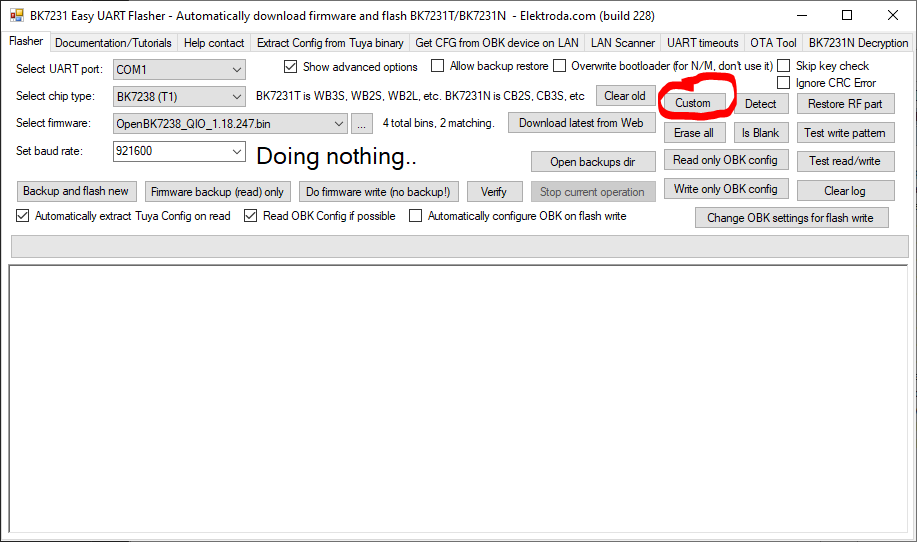
    a) In the Flasher checkbox "Show advanced options" and then click on the button "Custom"

    Screenshot of BK7231 Easy UART Flasher with Custom button highlighted

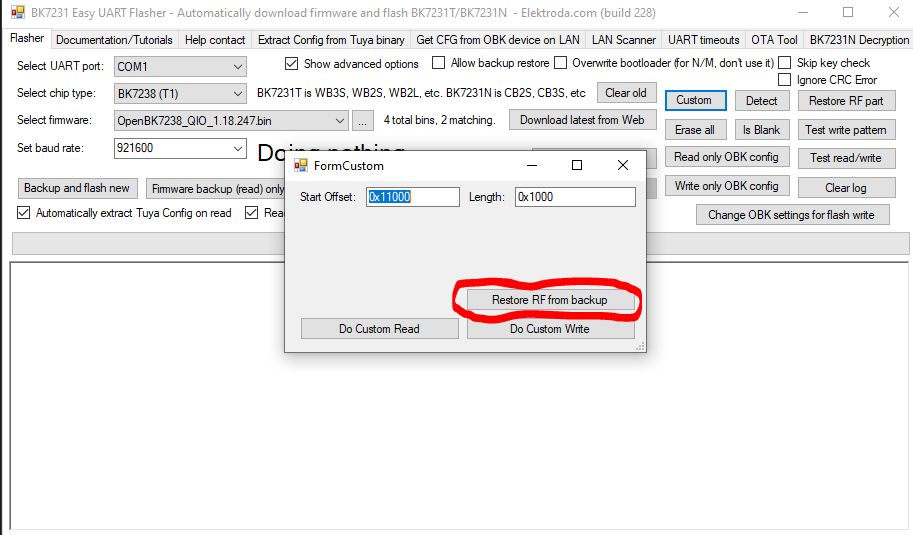
    b) Then select the option "Restore RF from backup" and select the binary of the firmware backup you made before uploading OpenBK

    BK7231 Easy UART Flasher window with Restore RF from backup option highlighted

    And that's basically it, after this step we already have the MAC address as it was before the OpenBK upload.

    2. Differences between TH08E and TH08C 2

    I am specifically describing the difference between the PCBs TH08-CBU-BL55072A_V3.8 2025-09-18 and "TH08-T1-U_V1.2 2025-10-13"

    Basically, apart from the other temperature/humidity sensors, what is important when changing the firmware is in "TH08-T1-U_V1.2 2025-10-13" TuyaMCU has no CEN signal connection from the T1-U-HL module.

    Specifically, Pin 8 of the TuyaMCU (U3) is not connected to Pin 18 of the T1-U-HL module - here, for this PCB and firmware upload, you may only need to raise/disconnect the RX and TX pins of the TuyaMCU chip (Pin 9 - MCU_RX and Pin 10 - MCU_TX).


    In the same way, the firmware of the TuyaMCU version TH08C (PCB "TH08-T1-U_V1.2 2025-10-13" ) does not send dpID 09 (Temperature Unit Convert)

    here are the frames that are sent (from the log)

    55 AA 03 22 00 10

    (ID = 23)
    17 02 00 04 00 00 00 00

    (ID = 24)
    18 02 00 04 00 00 00 00

    6F

    --------------------------------------------------

    55 AA 03 22 00 15

    (ID = 1)
    01 02 00 04 00 00 01 18

    (ID = 2)
    02 02 00 04 00 00 00 18

    (ID = 3)
    03 04 00 01 02

    83


    And the file JSON from the original firmware

    Code: JSON
    Log in, to see the code


    and data from Tuya Cloud i.e. https://iot.tuya.com/
    (Standard Status Set) for the TH08C:
    
    va_temperature	Integer	
    
    {
      "unit": "℃",
      "min": -99,
      "max": 600,
      "scale": 1,
      "step": 1
    }
    
    va_humidity	Integer	
    
    {
      "unit": "%",
      "min": 0,
      "max": 100,
      "scale": 0,
      "step": 1
    }
    
    battery_state	Enum	
    
    {
      "range": [
        "low",
        "middle",
        "high"
      ]
    }


    3. Final OpenBK firmware settings

    In both of these modules there were some communication problems e.g. sometimes what I mentioned there was a problem with setting the time and date. Likewise there were occasionally problems sending data to MQTT.

    From what I noticed in order for TuyaMCU to react and send us the sensor data and ask for the date it waits for the information that the WiFi is in state 4. I previously solved this with "tuyaMcu_defWiFiState 4" in autoexec.bat

    After receiving this information i.e. rami 55 AA 00 03 00 01 04 07 modules send packet 0x90 Get cached DP command (0x90)

    for TH08E it is frame 55 AA 03 90 00 04 03 09 17 18 D1
    whereas for TH08C 55 AA 03 90 00 03 02 17 18 C6

    for the aforementioned package should be answered with 55 AA 00 90 00 02 01 00 92

    As I mentioned earlier with the setting in autoexec.bat startDriver tmSensor there was a lack of communication (no WiFi status information was sent). On the other hand, without this option, when we compare the log of the original communication with what is sent by OpenBK, there is a little difference in the order of sent packets, which also caused some strange behaviour of the TuyaMCU chip from time to time. The communication worked one time, the other time it did not work.

    In the end I did a workaround using autoxexec.bat. It's not a perfect solution, but without changing the TuyaMCU driver code it's the only thing I could think of....

    The final solution here is to first wait for the time to be set from NTP and for the WiFi status to be set to a value of 4 and then manually send information about this and with some interval a response to the 0x90 command. Unfortunately when we enable startDriver tmSensor there is no automatic response to this command.
    I have implemented this in autoexex.bat and the response is sent after a fixed time (delay 1s) - not ideal but it works ;) Maybe someone has an idea how to solve this better ?

    Maybe here colleague @p.kaczmarek2 can think of some workaround for this problem in the driver code.

    In the end I used the same settings in both modules:

    Flags: 2 10 19 37 51

    autoexec.bat
    
    PowerSave 1
    startDriver NTP
    
    ntp_setServer 194.146.251.100
    ntp_timeZoneOfs 1
    
    startDriver TuyaMCU
    startDriver tmSensor
    
    setChannelType 1 temperature_div10
    linkTuyaMCUOutputToChannel 1 val 1
    
    setChannelType 2 Humidity
    linkTuyaMCUOutputToChannel 2 val 2
    
    setChannelLabel 3 Battery
    setChannelType 3 ReadOnlyLowMidHigh
    linkTuyaMCUOutputToChannel 3 val 3
    
    waitFor WiFiState 4
    waitFor NTPState 1
    
    uartSendHex 55AA000300010407
    
    delay_s 1
    
    uartSendHex 55AA00900002010092


    4. Logs, Logs, Logs...

    To conclude, I paste some more logs from the TH08C module communication....


    Communication of original firmware with TuyaMCU (device added)
    
    Received by WiFi module:
    55 AA	03	00		00 01	00	03	
    HEADER	VER=03	Heartbeat		LEN	00	CHK	
    
    Sent by WiFi module:
    55 AA	00	00		00 00		FF	
    HEADER	VER=00	Heartbeat		LEN		CHK	
    
    Sent by WiFi module:
    55 AA	00	01		00 00		00	
    HEADER	VER=00	Product		LEN		CHK	
    
    Received by WiFi module:
    55 AA	03	01		00 37	7B2270223A2269756E697661687039327A6C6C643064222C2276223A22312E302E30222C226D223A302C226E223A312C22736D223A307D	18	
    HEADER	VER=03	Product		LEN	{"p":"iunivahp92zlld0d","v":"1.0.0","m":0,"n":1,"sm":0}	CHK	
    
    Received by WiFi module:
    55 AA	03	02		00 00		04	
    HEADER	VER=03	McuConf		LEN		CHK	
    
    Sent by WiFi module:
    55 AA	00	02		00 00		01	
    HEADER	VER=00	McuConf		LEN		CHK	
    
    Sent by WiFi module:
    55 AA	00	03		00 01	02	05	
    HEADER	VER=00	WifiState		LEN	02	CHK	
    
    Received by WiFi module:
    55 AA	03	03		00 00		05	
    HEADER	VER=03	WifiState		LEN		CHK	
    
    Sent by WiFi module:
    55 AA	00	03		00 01	03	06	
    HEADER	VER=00	WifiState		LEN	03	CHK	
    
    Received by WiFi module:
    55 AA	03	03		00 00		05	
    HEADER	VER=03	WifiState		LEN		CHK	
    
    Sent by WiFi module:
    55 AA	00	08		00 00		07	
    HEADER	VER=00	QueryInitStatus		LEN	INVALID date			CHK	
    
    Sent by WiFi module:
    55 AA	00	03		00 01	04	07	
    HEADER	VER=00	WifiState		LEN	04	CHK	
    
    Received by WiFi module:
    55 AA	03	03		00 00		05	
    HEADER	VER=03	WifiState		LEN		CHK	
    
    Sent by WiFi module:
    55 AA	00	08		00 00		07	
    HEADER	VER=00	QueryInitStatus		LEN	INVALID date			CHK	
    
    Received by WiFi module:
    55 AA	03	90		00 03	021718	C6	
    HEADER	VER=03	Unk		LEN	021718	CHK	
    
    Sent by WiFi module:
    55 AA	00	90		00 02	0100	92	
    HEADER	VER=00	Unk		LEN	0100	CHK	
    
    Received by WiFi module:
    55 AA	03	24		00 00		26	
    HEADER	VER=03	Unk		LEN		CHK	
    
    Sent by WiFi module:
    55 AA	00	24		00 01	C1	E5	
    HEADER	VER=00	Unk		LEN	C1	CHK	
    
    Received by WiFi module:
    55 AA	03	1C		00 00		1E	
    HEADER	VER=03	Date		LEN		CHK	
    
    Sent by WiFi module:
    55 AA	00	1C		00 08	011A011817162806	B2	
    HEADER	VER=00	Date		LEN	bOk=1 26/1/24 23:22:40	CHK	
    
    Received by WiFi module:
    55 AA	03	22		00 10	17020004000000001802000400000000	6F	
    HEADER	VER=03	Unk		LEN	17020004000000001802000400000000	CHK	
    
    Sent by WiFi module:
    55 AA	00	23		00 01	01	24	
    HEADER	VER=00	Unk		LEN	01	CHK	
    
    Received by WiFi module:
    55 AA	03	22		00 15	010200040000011802020004000000180304000102	83	
    HEADER	VER=03	Unk		LEN	010200040000011802020004000000180304000102	CHK	
    
    Sent by WiFi module:
    55 AA	00	23		00 01	01	24	
    HEADER	VER=00	Unk		LEN	01	CHK	


    Communication of the original firmware with TuyaMCU (device removed)
    
    Received by WiFi module:
    55 AA	03	00		00 01	00	03	
    HEADER	VER=03	Heartbeat		LEN	00	CHK	
    
    Sent by WiFi module:
    55 AA	00	00		00 00		FF	
    HEADER	VER=00	Heartbeat		LEN		CHK	
    
    Sent by WiFi module:
    55 AA	00	01		00 00		00	
    HEADER	VER=00	Product		LEN		CHK	
    
    Received by WiFi module:
    55 AA	03	01		00 37	7B2270223A2269756E697661687039327A6C6C643064222C2276223A22312E302E30222C226D223A302C226E223A312C22736D223A307D	18	
    HEADER	VER=03	Product		LEN	{"p":"iunivahp92zlld0d","v":"1.0.0","m":0,"n":1,"sm":0}	CHK	
    
    Received by WiFi module:
    55 AA	03	02		00 00		04	
    HEADER	VER=03	McuConf		LEN		CHK	
    
    Sent by WiFi module:
    55 AA	00	02		00 00		01	
    HEADER	VER=00	McuConf		LEN		CHK	
    
    Sent by WiFi module:
    55 AA	00	03		00 01	01	04	
    HEADER	VER=00	WifiState		LEN	01	CHK	
    
    Received by WiFi module:
    55 AA	03	03		00 00		05	
    HEADER	VER=03	WifiState		LEN		CHK	
    
    Received by WiFi module:
    55 AA	03	00		00 01	01	04	
    HEADER	VER=03	Heartbeat		LEN	01	CHK	
    
    Sent by WiFi module:
    55 AA	00	00		00 00		FF	
    HEADER	VER=00	Heartbeat		LEN		CHK	
    
    Sent by WiFi module:
    55 AA	00	00		00 00		FF	
    HEADER	VER=00	Heartbeat		LEN		CHK	
    
    Received by WiFi module:
    55 AA	03	00		00 01	01	04	
    HEADER	VER=03	Heartbeat		LEN	01	CHK	
    
    Sent by WiFi module:
    55 AA	00	00		00 00		FF	
    HEADER	VER=00	Heartbeat		LEN		CHK	
    
    Received by WiFi module:
    55 AA	03	00		00 01	01	04	
    HEADER	VER=03	Heartbeat		LEN	01	CHK	
    
    Sent by WiFi module:
    55 AA	00	00		00 00		FF	
    HEADER	VER=00	Heartbeat		LEN		CHK	
    
    Received by WiFi module:
    55 AA	03	00		00 01	01	04	
    HEADER	VER=03	Heartbeat		LEN	01	CHK	
    
    Received by WiFi module:
    55 AA	03	00		00 01	01	04	
    HEADER	VER=03	Heartbeat		LEN	01	CHK	
    
  • #9 21820000
    sq3evp
    Level 39  
    Interesting device - must buy and test.
    Thanks for the material - it will be motivation to buy and play with reprogramming.
  • #10 21820216
    tplewa
    Level 39  
    @sq3evp - if you have some spare time why not. On Chinese portals you can buy such freebies relatively cheaply so the entry threshold is relatively low.
    I myself, as I mentioned, fired up Home Assistants for a slightly different purpose and by the way I just ordered such a fuck to test what it's worth :) Just the same it will be some kind of learning of HA configuration itself (ot until now I had no need to use this type of software)....
  • #11 21821593
    p.kaczmarek2
    Moderator Smart Home
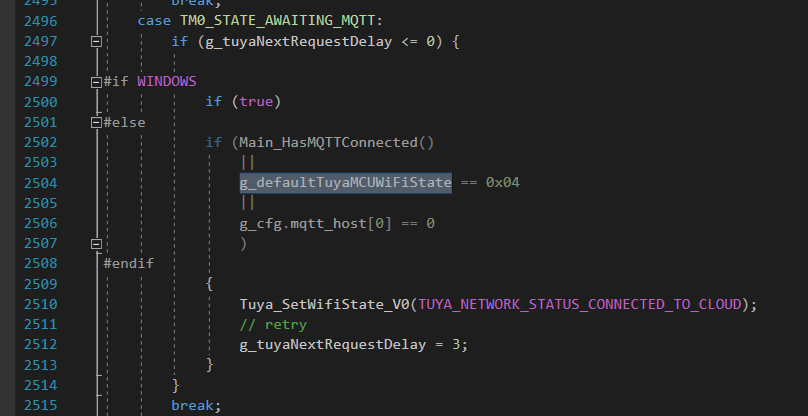
    It seems to me that the date problem could be solved here:
    C code fragment with condition checking MCU WiFi state and MQTT connection
    You need to add a condition to send an acknowledgement only after the response from NTP.

    This could also be done with a script. We have WaitFor and NTPState:
    
    waitFor NTPState 1
    tuyaMcu_defWiFiState 4
    

    Then only the state "connected to cloud" is sent as we receive a response from NTP.
    Helpful post? Buy me a coffee.
  • #12 21821630
    tplewa
    Level 39  
    @p.kaczmarek2

    I was thinking of something like that with NTP. However, it has to be included in the code that this condition is only taken into account when the ntp driver is loaded...

    So far, as you write tozwiem it in autoexec.bat but a little differently.

    
    waitFor WiFiState 4
    waitFor NTPState 1
    
    uartSendHex 55AA000300010407


    why yes because setting tuyaMcu_defWiFiState 4 does nothing and does not send the 0x03 command....

    Generally as there is a tmSensor driver the communication looks different than it was with the original firmware on BK....

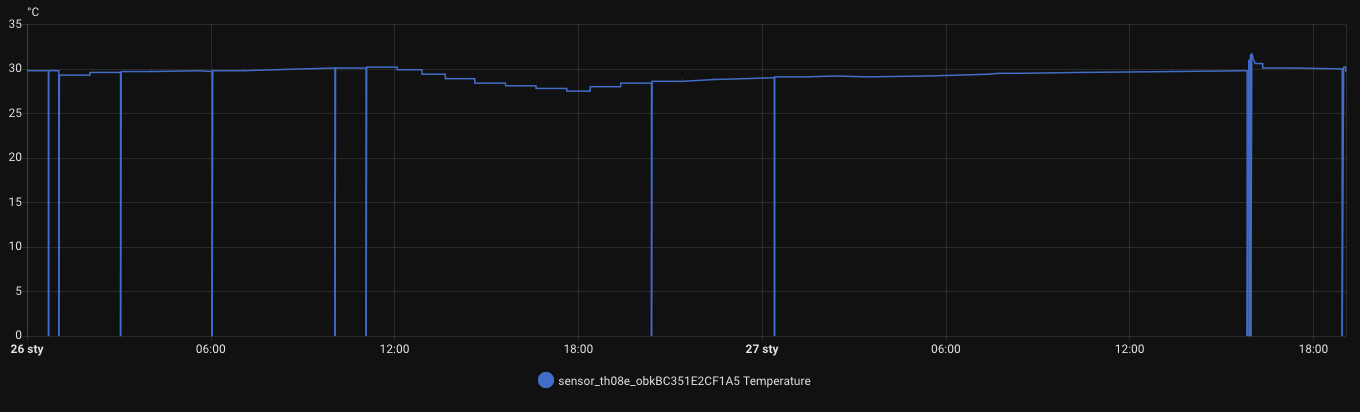
    Seemingly it works but strange things happen sometimes - i.e. as if empty data is sent to MQTT and we have something like this on the temperature graph (same for humidity and battery.... ...sometimes only one value is as zero e.g. battery) :

    Temperature chart from OBK sensor showing periodic drops to zero

    or maybe TuyaMCU disconnects power from BK before it sends data....


    I'm trying to understand some of the assumptions in drv_tuyaMCU.c - but I don't understand everything there ;)

    In the original firmware the start of the communication looked like this (to send the 0x90 command - after that the date setting already flies and the tuyaMCU sent the data)

    Generally, when tmSensor is set, the communication with tuyaMCU ends with McuConf

    ot basically just Product and McuConf....

    here the start of the original communication....
    
    
    Received by WiFi module:
    55 AA	03	00		00 01	00	03	
    HEADER	VER=03	Heartbeat		LEN	00	CHK	
    
    Sent by WiFi module:
    55 AA	00	00		00 00		FF	
    HEADER	VER=00	Heartbeat		LEN		CHK	
    
    Sent by WiFi module:
    55 AA	00	01		00 00		00	
    HEADER	VER=00	Product		LEN		CHK	
    
    Received by WiFi module:
    55 AA	03	01		00 37	7B2270223A2269756E697661687039327A6C6C643064222C2276223A22312E302E30222C226D223A302C226E223A312C22736D223A307D	18	
    HEADER	VER=03	Product		LEN	{"p":"iunivahp92zlld0d","v":"1.0.0","m":0,"n":1,"sm":0}	CHK	
    
    Received by WiFi module:
    55 AA	03	02		00 00		04	
    HEADER	VER=03	McuConf		LEN		CHK	
    
    Sent by WiFi module:
    55 AA	00	02		00 00		01	
    HEADER	VER=00	McuConf		LEN		CHK	
    
    Sent by WiFi module:
    55 AA	00	03		00 01	02	05	
    HEADER	VER=00	WifiState		LEN	02	CHK	
    
    Received by WiFi module:
    55 AA	03	03		00 00		05	
    HEADER	VER=03	WifiState		LEN		CHK	
    
    Sent by WiFi module:
    55 AA	00	03		00 01	03	06	
    HEADER	VER=00	WifiState		LEN	03	CHK	
    
    Received by WiFi module:
    55 AA	03	03		00 00		05	
    HEADER	VER=03	WifiState		LEN		CHK	
    
    Sent by WiFi module:
    55 AA	00	08		00 00		07	
    HEADER	VER=00	QueryInitStatus		LEN	INVALID date			CHK	
    
    Sent by WiFi module:
    55 AA	00	03		00 01	04	07	
    HEADER	VER=00	WifiState		LEN	04	CHK	
    
    Received by WiFi module:
    55 AA	03	03		00 00		05	
    HEADER	VER=03	WifiState		LEN		CHK	
    
    Sent by WiFi module:
    55 AA	00	08		00 00		07	
    HEADER	VER=00	QueryInitStatus		LEN	INVALID date			CHK	
    
    Received by WiFi module:
    55 AA	03	90		00 03	021718	C6	
    HEADER	VER=03	Unk		LEN	021718	CHK	


    and this is how it looks in OBK when I do not send WIFiState (0x03) manually
    queryInitStatus, Heartbeat are also missing from the communication...


    Received by WiFi module:
    55 AA	03	01		00 37	7B2270223A22623876716D646A6D7073776261703171222C2276223A22312E302E30222C226D223A302C226E223A312C22736D223A307D	57	
    HEADER	VER=03	Product		LEN	{"p":"b8vqmdjmpswbap1q","v":"1.0.0","m":0,"n":1,"sm":0}	CHK	
    
    Sent by WiFi module:
    55 AA	00	01		00 00		00	
    HEADER	VER=00	Product		LEN		CHK	
    
    Received by WiFi module:
    55 AA	03	02		00 00		04	
    HEADER	VER=03	McuConf		LEN		CHK	
    
    Sent by WiFi module:
    55 AA	00	02		00 01	03	05	
    HEADER	VER=00	McuConf		LEN	03	CHK	
    
    Received by WiFi module:
    55 AA	03	02		00 00		04	
    HEADER	VER=03	McuConf		LEN		CHK	
    
    Sent by WiFi module:
    55 AA	00	02		00 01	04	06	
    HEADER	VER=00	McuConf		LEN	04	CHK	
    
  • #13 21821719
    p.kaczmarek2
    Moderator Smart Home
    tplewa wrote:

    I was thinking of something like this with NTP. Except that in the code it must be taken into account that this condition is only taken into account when ntp driver is loaded...

    However, we cannot do this rigidly, because e.g. door sensors do not need NTP.

    tplewa wrote:


    So far, as you write it is in autoexec.bat except that it is a bit different.

    
    waitFor WiFiState 4
    waitFor NTPState 1
    
    uartSendHex 55AA000300010407


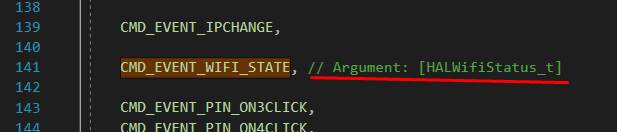
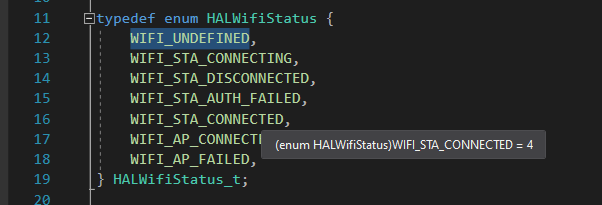
    Values look ok:
    Code screenshot showing CMD_EVENT_WIFI_STATE line and comment
    HALWifiStatus enum definition with various Wi-Fi connection states


    tplewa wrote:

    Generally as there is a tmSensor driver the communication looks different than it was with the original firmware on BK....

    Full capture (sorted according to what when sends which side - not two separate captures) and you can combine in Windows Simulator.


    tplewa wrote:

    Seemingly it works but strange things happen sometimes - i.e. as if blank data is sent to MQTT and we have something like this on the temperature graph (same for humidity and battery.... ...sometimes only one value is as zero e.g. battery) :

    Temperature chart from OBK sensor showing periodic drops to zero

    or maybe TuyaMCU disconnects power from BK before it sends data....

    TuyaMCU does not disconnect power, rather it is MQTT that performs the publish before TuyaMCU sends data. This is a known problem. A potential work-around is to set the startup channels value to -1, i.e. remembering the previous measurement, but this is not ideal. You could also play with flags, "broadcast self state on connect" or the mqtt_broadcastItemsPerSec command or manually do publishChannel.
    It would be best to give a patch for this in code, but battery-powered devices are a bit less of a priority because most people use Zigbee for this.


    tplewa wrote:

    here the start of the original communication...
    
    
    Received by WiFi module:
    55 AA	03	00		00 01	00	03	
    HEADER	VER=03	Heartbeat		LEN	00	CHK	
    
    Sent by WiFi module:
    55 AA	00	00		00 00		FF	
    HEADER	VER=00	Heartbeat		LEN		CHK	
    
    Sent by WiFi module:
    55 AA	00	01		00 00		00	
    HEADER	VER=00	Product		LEN		CHK	
    
    Received by WiFi module:
    55 AA	03	01		00 37	7B2270223A2269756E697661687039327A6C6C643064222C2276223A22312E302E30222C226D223A302C226E223A312C22736D223A307D	18	
    HEADER	VER=03	Product		LEN	{"p":"iunivahp92zlld0d","v":"1.0.0","m":0,"n":1,"sm":0}	CHK	
    
    Received by WiFi module:
    55 AA	03	02		00 00		04	
    HEADER	VER=03	McuConf		LEN		CHK	
    
    Sent by WiFi module:
    55 AA	00	02		00 00		01	
    HEADER	VER=00	McuConf		LEN		CHK	
    
    Sent by WiFi module:
    55 AA	00	03		00 01	02	05	
    HEADER	VER=00	WifiState		LEN	02	CHK	
    
    Received by WiFi module:
    55 AA	03	03		00 00		05	
    HEADER	VER=03	WifiState		LEN		CHK	
    
    Sent by WiFi module:
    55 AA	00	03		00 01	03	06	
    HEADER	VER=00	WifiState		LEN	03	CHK	
    
    Received by WiFi module:
    55 AA	03	03		00 00		05	
    HEADER	VER=03	WifiState		LEN		CHK	
    
    Sent by WiFi module:
    55 AA	00	08		00 00		07	
    HEADER	VER=00	QueryInitStatus		LEN	INVALID date			CHK	
    
    Sent by WiFi module:
    55 AA	00	03		00 01	04	07	
    HEADER	VER=00	WifiState		LEN	04	CHK	
    
    Received by WiFi module:
    55 AA	03	03		00 00		05	
    HEADER	VER=03	WifiState		LEN		CHK	
    
    Sent by WiFi module:
    55 AA	00	08		00 00		07	
    HEADER	VER=00	QueryInitStatus		LEN	INVALID date			CHK	
    
    Received by WiFi module:
    55 AA	03	90		00 03	021718	C6	
    HEADER	VER=03	Unk		LEN	021718	CHK	


    Are you sure that the order of the packages here is ok? If so, you could put this into the automatic tests and look for why something is behaving differently.
    Helpful post? Buy me a coffee.
  • #14 21821750
    tplewa
    Level 39  
    As for the values, yes only the names in the OBK are a bit misleading ;)

    CMD 0x02 - McuConf - According to the documentation (Tuya Developer) Serial Port Protocol "Report the network status of the device"

    CMD 0x03 - WifiState - According to documentation (Tuya Developer) Serial Port Protocol "Reset Wi-Fi"


    hehe that's why it's a bit difficult for me to analyse this driver code ;)

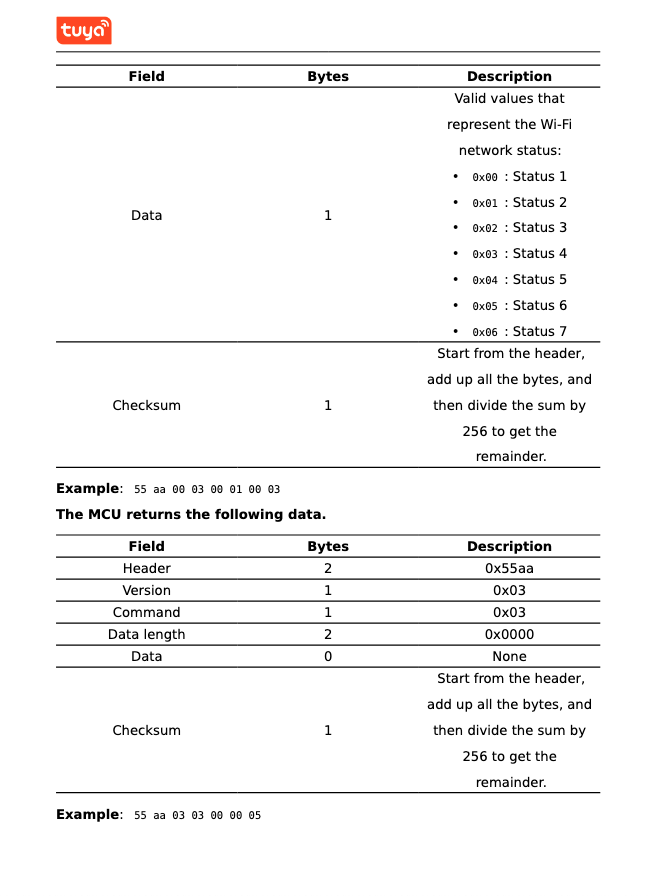
    But what else wouldn't be rosy is that there are other names in the "Basic Features" pdf and it fits more like 0x03 as far as the format is concerned than the one described in (Tuya Developer) Serial Port Protocol....

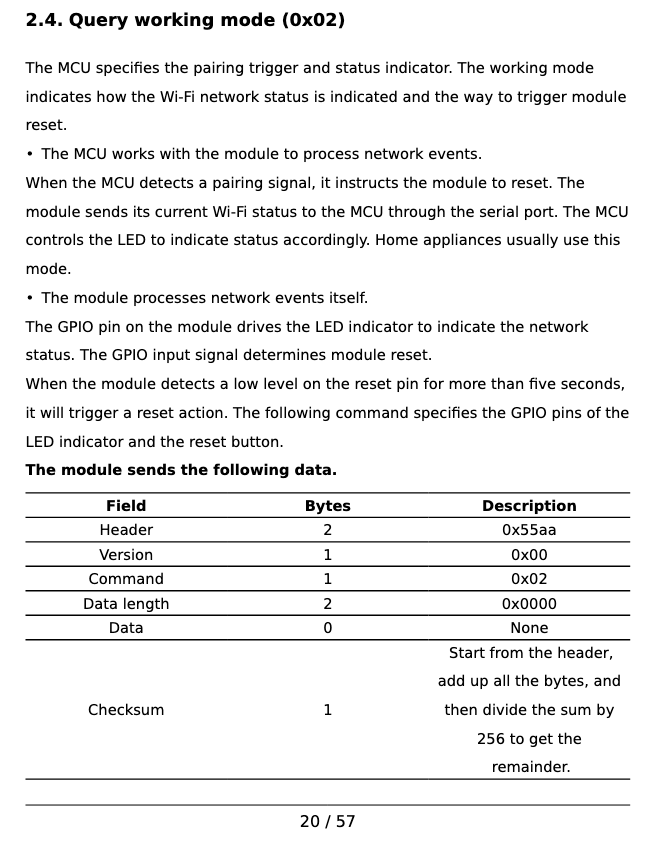
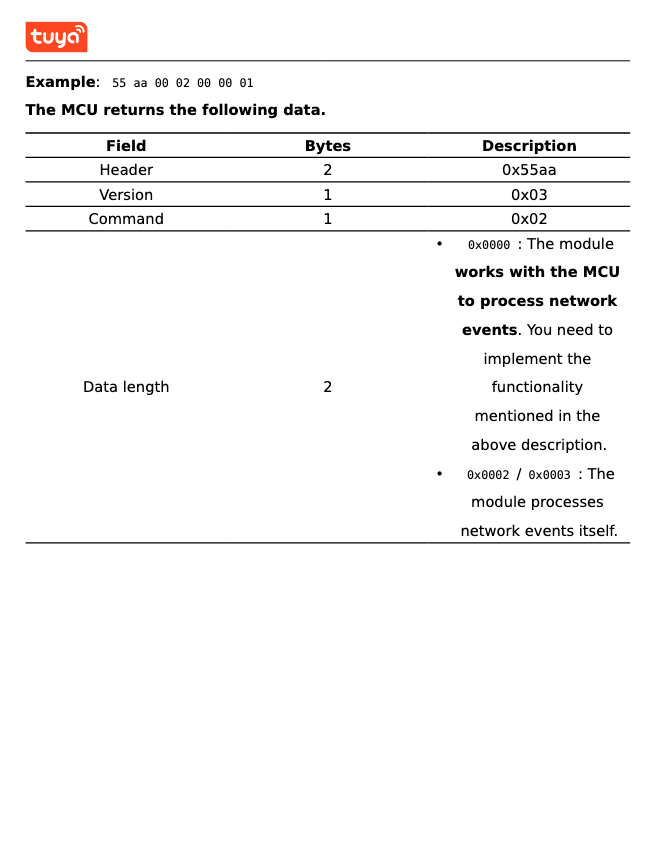
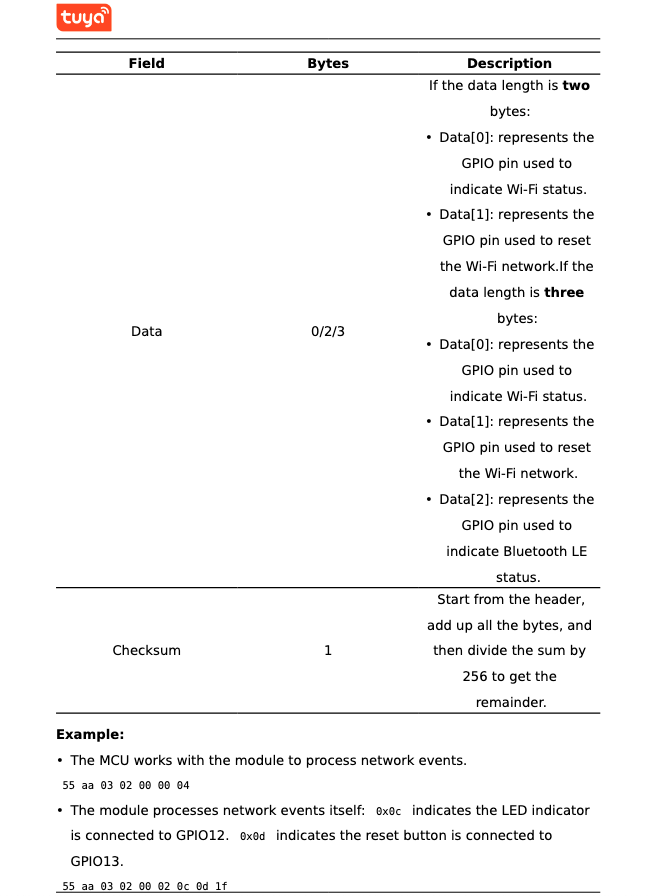
    and here CMD 0x02 - this is Query working mode
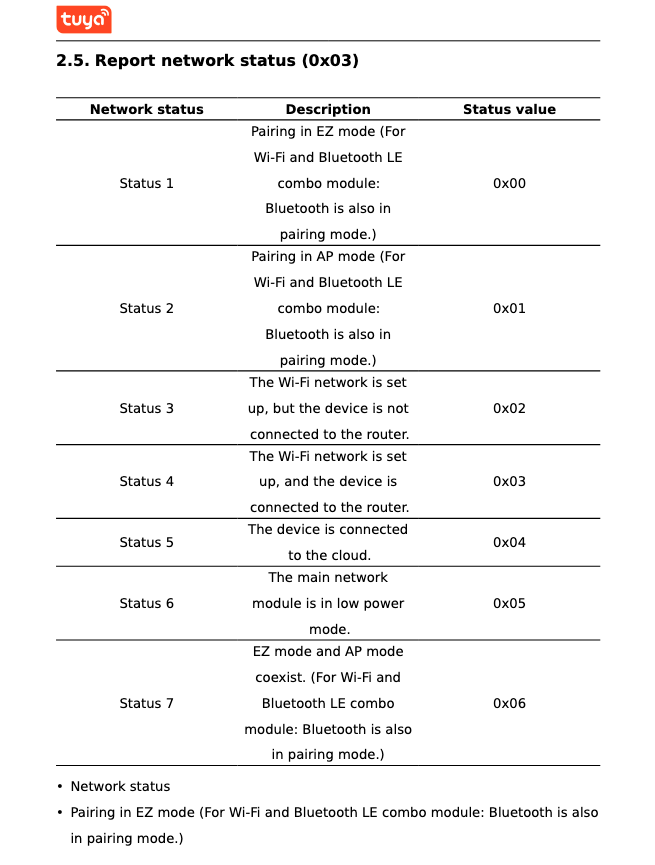
    and CMD 0x03 - is Report network status


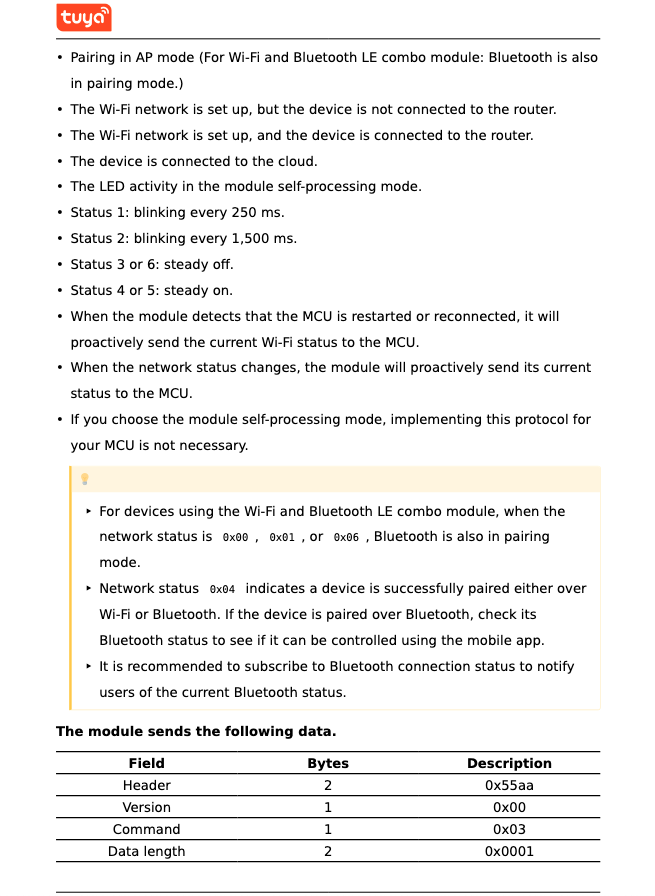
    CMD 0x02 command table from Tuya documentation showing data structure Tuya documentation snippet showing data format for command 0x02 Tuya documentation excerpt: CMD 0x03 command description with usage examples Network status table for CMD 0x03 in Tuya protocol (Report network status) Tuya documentation snippet showing network statuses and CMD 0x03 data structure Tuya protocol table with CMD 0x03 field descriptions and example data frames


    As for the fact that MQTT sends the data before it receives it, that's possible - that's why the sensor without the display works ok for me, and here there is some delay because we are waiting for NTP. Well, and here as it takes more time MQTT sends zeros.... This ties up into a logical whole.

    As for the patch in the code, hmm maybe I would try something but I don't even have a clue where in the code the sending is done ;) Probably you would have to give a flag as battery powered and some semaphore as the data is already ready to be sent.... Unfortunately there's a lot of this code and so I'm slowly analysing it but a lot will come down as I get a grasp of what the whole data flow in the code looks like and what the dependencies are.... ...and I don't want to do something on the spur of the moment because it's not hard to break ;)


    As for the order, I would say yes, if the analyser does not swap with the order then yes. I always logged on a clean buffer and then copy&paste to a txt file with a description of what I logged.

    Here looking at the communication when tmSensor is on we have in sequence:

    1. Product request and response - this is OK
    2. Sending cyclic CMD 0x02 that is McuConf

    What is missing here is CMD 0x03 which, when I manually send it with autoexec.bat, the TuyaMCU processor continues - it just stands there and does not ask for anything....

    Further, there was a problem with CMD 0x90 - I also did that with autoexec.bat - but now I have the corrected tuyaMCU driver where I added that and it flies on without that.

    There are actually two issues remaining, namely this NTP and the lack of CMD 0x03
  • ADVERTISEMENT
  • #15 21821773
    p.kaczmarek2
    Moderator Smart Home
    This is the skeleton of the automatic TuyaMCU test, which can be fired up on Windows:
    Code: C / C++
    Log in, to see the code

    Here you simply type in what you expect the OBK to send, and then simulate the packets from TuyaMCU. This works in visual Studio, and you can debug.
    https://github.com/openshwprojects/OpenBK7231...mmit/f0c275a03c0ad16ffe844f90de7ba6435b7ef47f
    I'll see further tomorrow, but this should make testing easier.
    Helpful post? Buy me a coffee.
  • #16 21821778
    tplewa
    Level 39  
    @p.kaczmarek2

    Okay I think I have a problem - although today I can barely see out of my eyes and I'm falling on my snout from fatigue ;)

    namely CMD 0x02:

    55 AA 03 02 00 00 04 - this is "Query working mode" ( cmd 0x02 V3)

    and

    55 AA 00 02 00 00 01 - this is "Report the network status of the device" (cmd 0x02 V0)

    Heh driver TuyaMCU doesn't distinguish which version it is and it gets messy in communication because in this one mine sends V3 commands.... and the code responds as if to a V0 command

    ot instead of getting WiFi status in CMD 0x03 V3 "Report network status (0x03)" I get WiFi status in CMD 0x02 V0


    well generally there is a lot of code to improve ;) checking with Tuya's documentation for V0 and V3

    Added after 7 [hours] 24 [minutes]:

    @p.kaczmarek2

    Okay I've done probably the only right thing ;) I've brought the drv_tuyaMCU code to this state (so that it compiles):

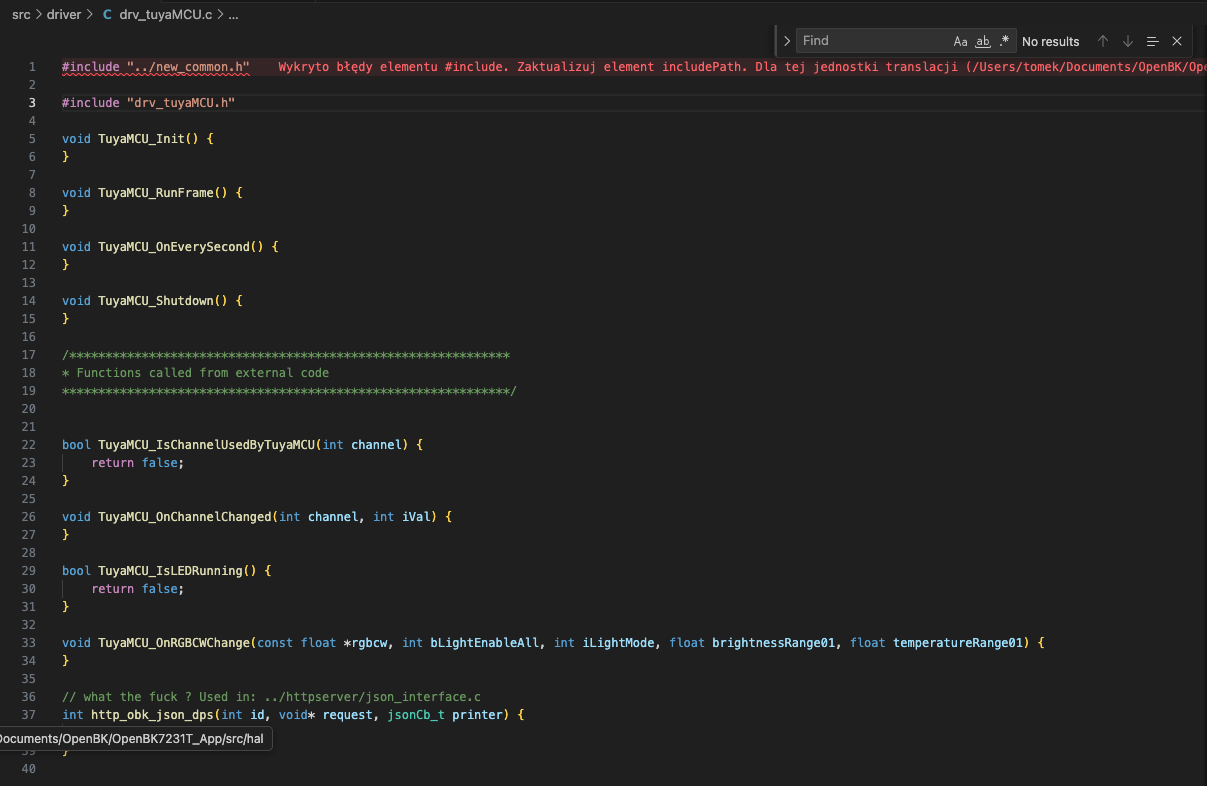
    Screenshot of code editor showing drv_tuyaMCU.c with include path error

    Patching the code further probably makes no sense, it would be quicker to rewrite according to Tuya's documentation.... ;)

    On top of that, you need to clean up and get rid of such bloomers from the driver code as http_obk_json_dps (the JSON parsing part for the web server related to the dpId) because it's damn near unreadable if someone has to develop the code later....
    All in all, I was quite surprised when I knocked the code out of this driver and on compilation it popped up that something related to JSON in the HTTP server was missing ;)

    Possibly at least rename it so that it's clear that it's in drv_tuyaMCU....
    All in all, I will still think about what to do with such "flowers" - i'd rather leave that for last...
📢 Listen (AI):
ADVERTISEMENT