logo elektroda
logo elektroda
X
logo elektroda

Piezo self-levelling sensor for 3D printers - instead of BL-Touch

yego666 1836 29

TL;DR

  • A piezoelectric self-levelling sensor for 3D printers replaces BLTouch-style probes and aims to improve first-layer calibration on a CoreXY printer running Klipper and Octoprint.
  • The probe mounts with a single screw and one sensitivity potentiometer, and Klipper setup only requires a few entries in printer.cfg.
  • The article cites BLTouch-type probes with 15 to 25 microns repeatability, while piezo elements can be replaced in five minutes for two zloty.
  • In tests, the sensor handled initialization, G28, repeatability checks and G29, giving better table-geometry measurements and first layers.
  • The main limitation is that both the nozzle and bed must stay perfectly clean so filament residue does not distort the measurement.
Generated by the language model.
ADVERTISEMENT
Treść została przetłumaczona polish » english Zobacz oryginalną wersję tematu
📢 Listen (AI):
  • Hello to all 3D printing enthusiasts.


    Black-and-white icon of a 3D printer nozzle over a bed with a vibration waveform


    Recently, 3D printers have become more widespread, which is very positive given their advantages.
    However, nothing comes without pain.

    Have you had problems with insufficient adhesion of the first print layer, resulting in its deformation?
    Have you had problems with the nozzle-to-table distance compensation when printing the first layer?
    Do you get tired of having to carry out the "paper test" over and over again with minimal changes to the head geometry?
    Do you get tired of having to determine the distance of the level probe from the nozzle tip after each replacement or repositioning of a clogged nozzle?
    Aren't you tired of the constant "knocking" of the level probe's extendable and retractable pin?
    Haven't you noticed that almost all samplers have a repeatability of 15 to 25 microns, not to mention thermal drift?
    Have you not had to replace a sampler due to loss of precision caused by mechanical wear or damage?

    If you answer yes to any of the above questions, then you will probably be interested in a sensor solution,
    that relieves you of all these problems.

    You have probably already seen many 'mods' of 3D printers by their owners.
    Most often, the mechanics, control electronics or operating system are modified, but rarely does the subject of modifying the level sampler come up.
    There are many different samplers on the market, but BLTouch samplers or close clones of these dominate.
    Inductive, capacitive and mechanical sensors are also available.
    A separate group of samplers are piezoelectric samplers,
    however, in all the solutions I am familiar with, far-reaching modifications to the head are required to install such a sampler.
    This is obviously cumbersome and sometimes requires considerable skill in "handiwork",
    hence the low popularity of such solutions, which is a pity, since a properly installed piezo sampler frees the user from the pains indicated in the questions at the beginning of the post.
    Of course, apart from the advantages, piezo samplers also have disadvantages. One of them is the need to keep both the nozzle and the table perfectly clean,
    so that filament residues do not distort the measurement of the table's vertical geometry.
    However, this is not really a disadvantage, as in order to achieve a 'perfect' first layer, we should take care of the accuracy of the measurement,
    so that the compensation works accurately, resulting in the print we want.
    As some users of 3D printers treat them a little lightly, it is not surprising that there is reluctance to use piezo sensor samplers.
    Apart from the disadvantages, piezo samplers have one big advantage.
    We are always almost 100 per cent sure of the distance between the nozzle tip and the table, and this translates directly into the quality of the first layer.
    The accuracy and repeatability of the measurement is an order of magnitude better than with other types of samplers, whether mechanical or inductive/capacitive.
    In addition, piezo samplers do not wear out and do not lose precision even after ten years of operation, and even if the piezo element itself were to break down,
    its replacement is a matter of five minutes and costs two zloty.

    In order not to bore readers with listing the advantages and disadvantages of each type of sampler, I have included below short videos showing my piezo sampler in action.
    I am using a very average CoreXY type printer under Klipper and Octoprint.
    Despite the 'lousiness' of the equipment, thanks to the piezo sampler, I get surprisingly good measurements of the table geometry and, consequently, better first layers of my "works".
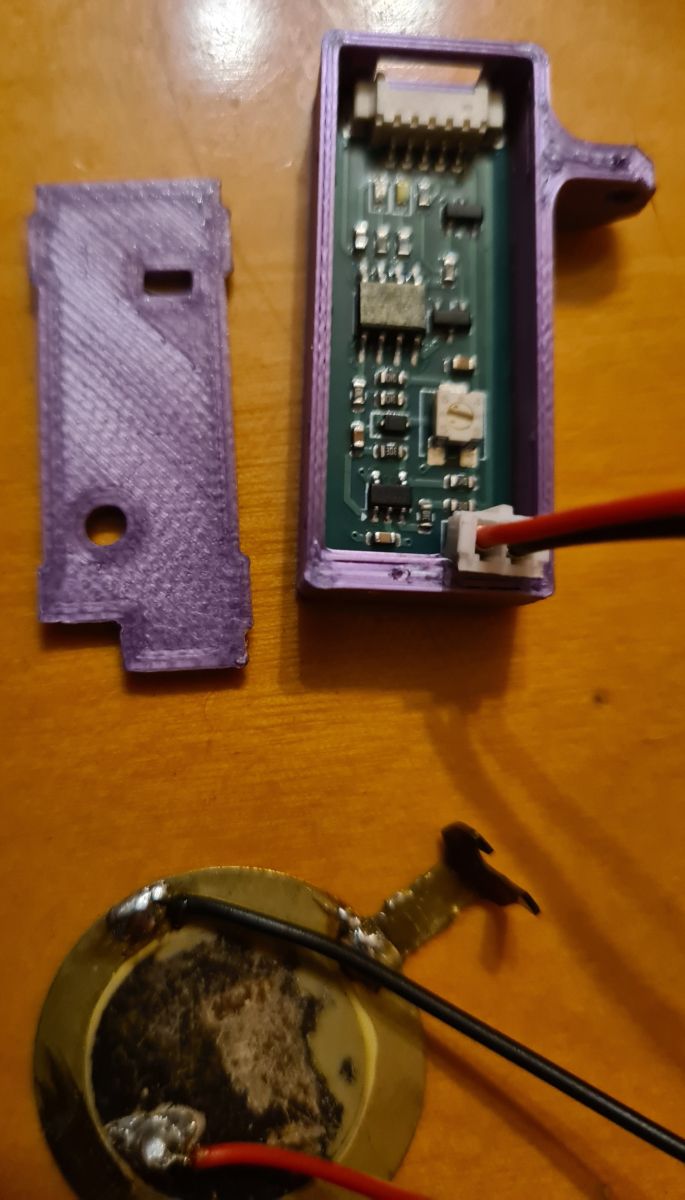
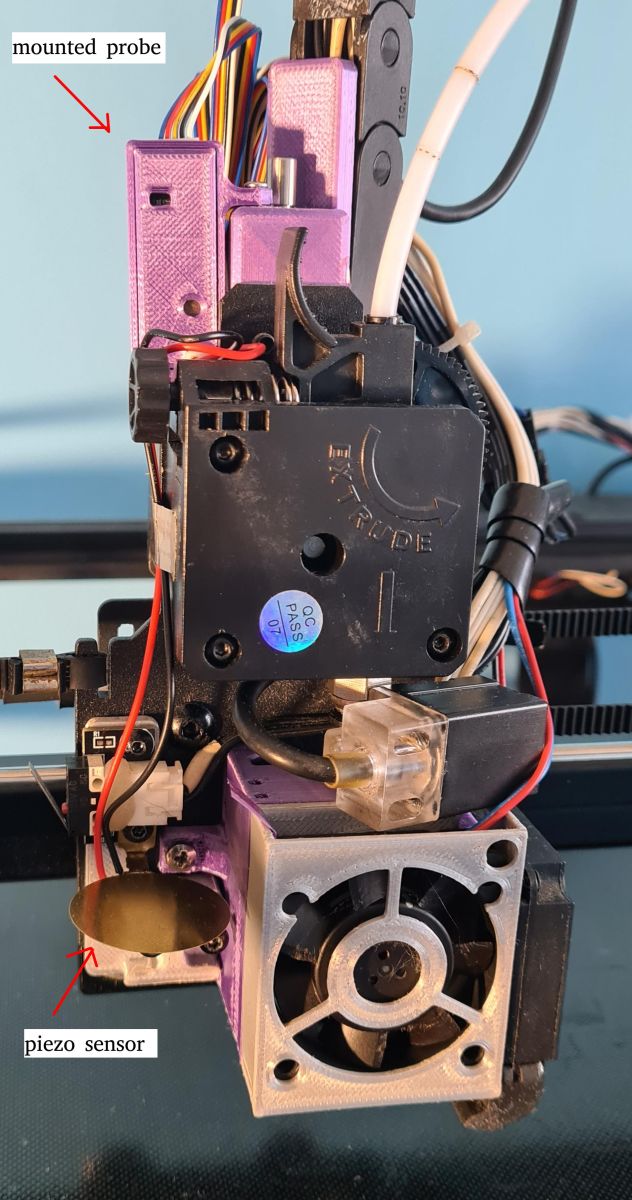
    As I mentioned, the available piezo samplers require quite a bit of dexterity for installation, which is in contrast to my solution,
    which only requires the tightening of a single screw securing the piezo sensor.
    There are no other requirements for mechanical installation, so anyone who can handle a screwdriver can undertake such an installation.
    The issue of configuration under Klipper is also trivial and comes down to making a few entries in the printer.cfg file.
    The sampler has a single potentiometer for adjusting the sensitivity depending on the 'noisiness' of our printer.

    And here are some short videos showing how the sampler works:
    1. Initialisation.


    2. G28.


    3. Repeatability test.


    Repeatability test

    4. What you see on the terminal during the test.


    5. G29.


    6. What can be seen at the terminal during G29.


    And that's all the elements of the presentation.
    I dare not write a summary, as everyone can draw their own conclusions from the above material.

    If any esteemed colleagues would be interested in learning more about the Sampler, I invite you to contact me on PW.
    I am posting this topic with the knowledge and permission of Gulson, for which I am very grateful.

    Cool? Ranking DIY
    About Author
    yego666
    Level 33  
    Offline 
    yego666 wrote 2175 posts with rating 564, helped 239 times. Been with us since 2004 year.
  • ADVERTISEMENT
  • #2 21846093
    chemik_16
    Level 27  
    I have 3 3d printers and never understood the levelling issue and the point of all these sensors. The last levelling I did was probably about 2 years ago, until now it's ok.
  • #3 21846160
    jarewa
    Level 35  
    yego666 wrote:
    In addition to the disadvantages piezo samplers have one big advantage.


    But they also have a huge disadvantage, try testing yourself on PEI or similar boards. These sensors have been known and tried for over 6 years for sure but have not caught on
  • #4 21846177
    yego666
    Level 33  
    It's good that you mentioned this, as I was about to write it myself but somehow it slipped my mind. Thanks.

    Of course these samplers are not without their faults.
    It is with them as with tyres. Winter ones are good for snow and summer ones for dry roads.
    The table has to be relatively hard and give a 'voice' when the nozzle is touched, hence the requirement that there should be no filament residue on the nozzle or table to dampen the echo of the impact received by the sensor. Soft tables, therefore, won't work with piezo sensors either, but hard tables, such as glass, work just fine.
    I have a glass table with one side smooth and the other with a fine texture. Both work perfectly with my sensor.
    As far as I know, quite a few 3D printers have tables like this.
  • #5 21846189
    efi222
    Level 21  
    chemik_16 wrote:
    I have 3 3d printers and never understood the levelling problem

    Well unfortunately with budget printers the table drifts due to temperature. Try to print a larger part with a thickness of 0.2mm (one layer) . It happens to me quite often to print something like this from white filament on glass as an optical matte.
  • ADVERTISEMENT
  • #6 21846199
    yego666
    Level 33  
    efi222 wrote:

    Well unfortunately with budget printers the table will drift under temperature. Try printing a larger part with a thickness of 0.2mm (one layer) .

    Full agreement.
    The materials used in budget equipment are unfortunately not of the highest quality, hence the thermal deformation.
    My glass just holds the shape scanned cold, but many times when taking the model off, it happens to press the table a little harder, and already the geometry to be corrected.
    Then a quick G28 and G29 and you can continue printing. The sampler works on both cold and hot tables, as long as the nozzle does not leak.
  • #7 21846243
    jarewa
    Level 35  
    It's just that nowadays hard tables are becoming a thing of the past, I can't imagine printing on "glass" any more, magnetic pads of all sorts trump everything else, the convenience the pleasure of tearing off the print. And most importantly you don't have to wait until you tear it off just put another one on and move on.

    efi222 wrote:
    Try printing a larger piece with a thickness of 0.2mm (one layer)


    What's so thick? Let him try <0.1 first layer then maybe he'll understand why these sensors need to be.
  • #8 21846346
    chemik_16
    Level 27  
    >>21846243
    I have several glasses and I detach them with the print ;)

    I've never had the need to do such flat prints, and if I did it didn't matter if they were 0.05 or 0.2 realistically
  • #9 21846353
    efi222
    Level 21  
    jarewa wrote:
    I can no longer imagine printing on "glass"

    I may have "backwards" regarding what is on the market.
    Are there pads that will give me glass smoothness comparable to a glass table?
    Mirror print on one side.
  • ADVERTISEMENT
  • #10 21846387
    jarewa
    Level 35  
    They come in a variety of designs or even with a pattern


    chemik_16 wrote:
    >>21846243
    I have a couple of glasses and detach them with the print ;)

    I've never had the need to make such flat prints, and if I did it didn't matter if they were realistically 0.05 or 0.2

    There are no perfect even table surfaces , therefore a map is needed to correct the curvature of the table, I do not believe that you print the first layer of 0.05mm without a map
  • ADVERTISEMENT
  • #11 21846949
    kombo
    Level 14  
    The problem with glass is that sometimes when PETG is printed it clings to the table so strongly that pieces of glass break off and the table top has to be thrown away.
    A good quality inductive sensor plus a magnetic table will do the trick.
    The repeatability of such a solution is surprisingly satisfactory.
    If you print with PLA or rubber the accuracy is not so important, it will stick well to the base every time.
    What is different is ABS, Nylon.
  • #12 21846972
    efi222
    Level 21  
    kombo wrote:
    The problem with glass is that, sometimes with PETG printing, it clings so tightly to the table that pieces of glass break off

    I don't know how it is with PETG, but with PLA it is enough to put the glass with the print in the freezer for a few minutes.
  • #13 21848969
    yego666
    Level 33  
    jarewa wrote:
    Only that today hard tables are becoming a thing of the past, I can no longer imagine printing on "glass" magnetic pads of various kinds trump everything else convenience pleasure of tearing off the print. And most importantly you don't have to wait until you tear it off just put another one on and move on.

    It is true that magnetic pads dominate in new equipment, but in "better" i.e. non-budget printers glass still dominates. There, it is the quality and not the ease of peeling that counts :)

    But even 20% of glass tables ( the old ones and the professional ones) are probably a million pieces.
  • #14 21849982
    Fimek
    Level 16  
    Howdy,

    In my opinion, the positioning method does not (fundamentally) matter if the table testing takes place physically next to the nozzle and not at the nozzle. And the problem is if the sensor has moving parts. Whether it samples with a tap, some kind of rod or whatever - whatever, they all have something movable, it's not elegant. To be clear, I use Creality (below, it worked best for me). In your case, the moving part is the operator who has to place and remove the sensor :)

    I have tested such things:

    1. A sensor with a limit switch and servo
    https://obrazki.elektroda.pl/9033491600_1568228256.jpg
    https://obrazki.elektroda.pl/9634839900_1566861862.jpg

    Pros: shrinks, probably the most repeatable
    Disadvantages: large, pointlessly cumbersome mechanically, heavy.

    2. BLTouch
    Pros: small, works
    Cons: the stylus sensor is on the Hall, making it temperature dependent

    3. BLTouch counterpart from Creality:
    https://www.ceneo.pl/132896616?fto=422080780&...s&utm_medium=organic&utm_campaign=css
    Pros: the stylus sensor is optical, thus eliminating the main disadvantage of the BLTouch
    Disadvantages: a little thicker than BLTouch (not quite compatible in dimensions), still mechanical (and therefore can fail).

    4. Optical sensor (remote)
    https://www.aliexpress.com/p/tesla-landing/in...pc_item_bridge&productId=1005001594649470
    Pros: tiny, no mechanical components, responds to relative brightness difference, should be insensitive to surface,
    Disadvantages: not very repeatable in practice (I think overly simplistic scheme, but concept good).


    All sensors have one basic flaw in common: they do not measure where the nozzle is, but next to it. I assure you - this does not erase the problems of printer geometry, and in our printers such problems always occur. It's worth thinking about - I think you can put it this way: the accuracy of the sensors next to the nozzle is proportional to the gradient (or derivative) of the table curvature and the geometry of the head movement. That is, they reduce the problem, but do not remove it.

    Only a sensor that samples the table strictly with the nozzle (or right next to it) would solve these problems. This could be a camera (looking from the side, of course, after the nozzle has been cleaned), an electrical contact sensor (perhaps measuring electrical capacitance?) a shock sensor (either on the table or on the head), an acoustic sensor, etc
  • #15 21850007
    yego666
    Level 33  
    Fimek wrote:
    All sensors have one basic flaw in common: they do not measure where the nozzle is, but next to it. I assure you - this does not erase the printer's geometry problems, and in our printers such problems always occur. It's worth thinking about - I think you can put it this way: the accuracy of the sensors next to the nozzle is proportional to the gradient (or derivative) of the table curvature and the geometry of the head movement. That is, they reduce the problem, but do not remove it.

    Only a sensor that samples the table strictly with the nozzle (or right next to it) would solve these problems. This could be a camera (looking from the side, of course, after cleaning the nozzle), an electrical contact sensor (perhaps measuring electrical capacitance?) a shock sensor (either on the table or on the head), an acoustic sensor, etc


    And that is exactly what the Piezo sensor I have presented here is.
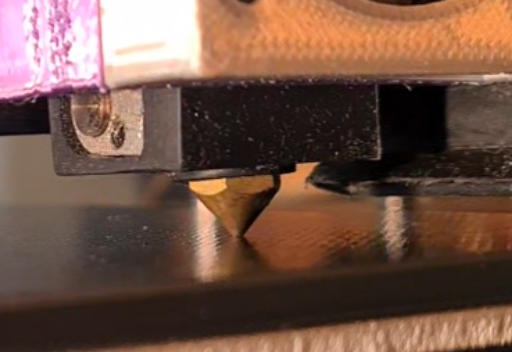
    It measures exactly at the point of contact between the nozzle tip and the table .
    Obviously, tables made of glass, garolith or ceramic "work" best. In other words hard, giving a strong, undamped echo of the impact of the nozzle tip against the table surface.

    As you wrote, no sensor "overrides" the problems of printer geometry and mechanics, hence my concept, which measures exactly at the point of contact .

    The repeatability of the Z-axis table movement also influences the measurement result. The finer the microstepping, the more difficult it is for the printer to stop in the same place on the Z-axis.
    In addition, 'wobbling' the table away from the support points also worsens the measurement results, as can be seen in the repeatability listing, but the discrepancies are still an order of magnitude better than for typical sensor solutions.

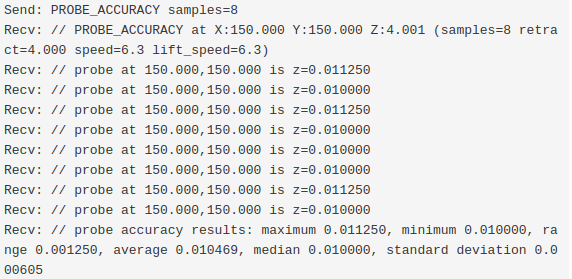
    Let's look at the typical measurement results made with my sensor:


    Screenshot of PROBE_ACCURACY log with multiple Z readings and a probe accuracy summary.

    You can see here exactly how microstepping affects the results of individual measurements.
    My printer has 8mm pitch trapezoidal screws and is set to 32 microsteps, which you can immediately see from the photo above that the measurement results vary by an exact multiple of the microstep size i.e. N x 1.25 micrometres.

    The conclusion to be drawn from this is that:
    1. The accuracy of the sensor is better than the precision of the printer itself,
    2. Measurement inaccuracies tell us how imperfect a printer we have.
  • #16 21850015
    Fimek
    Level 16  
    >>21850007

    In that case I apologise, I missed this and it's very important, indeed most important :)

    I thought that the sensor itself sampled the piezo (contact) and that instead of the methods (that I cited) you used the piezo sensor for contact detection, but fundamentally the problem remains the same.

    But in my defence I will write that the idea of operation is not so clear from your description. However, you actually wrote about removing the problem with the distance between the sensor and the nozzle, which means that perhaps reading with understanding lies :)

    Greetings!
  • #17 21850031
    yego666
    Level 33  
    Actually, I did not write this explicitely, which you have just made me aware of :)

    I hope my post above explains exactly how the sensor works.

    The results of the measurements in that post speak for themselves as to the precision of the measurements.
  • #18 21850143
    ms22908
    Level 2  
    I was very interested to see your article on the piezo sensor as I am always on the lookout for improvements to the technology of FFF 3D printers. I have used piezo sensors as my preferred method for more than 10 years, and, disregarding thermal effects and external mechanical noise, I can get repeatability of better than 1 micron and sense pressures of better than 1 gram. Additionally, I can detect plastic on the nozzle using the piezo sensor. To do this I use two sensors, a touch probe to map the bed and a single under-bed sensor to get the Z-Offset and also to check the quality of contact—that is, the nozzle cleanliness.
    There are two videos on YouTube showing different instances of this method:-
    A Delta printer with a dockable touch probe at https://www.youtube.com/watch?v=DQXM4nrcsr4
    The touch probe on this printer maps the bed very close to directly under the nozzle.
    The second one is a twin headed printer and this can be seen at https://www.youtube.com/watch?v=waXIr_ytukw
  • #19 21850171
    yego666
    Level 33  
    ms22908 wrote:
    I was very interested in your article on the piezoelectric sensor, as I am always looking for improvements in FFF 3D printer technology. I have been using piezoelectric sensors as my preferred method for over 10 years and, ignoring thermal effects and external mechanical noise, I can achieve repeatability better than 1 micron and sense pressure better than 1 gram. In addition, I can detect the plastic on the nozzle using a piezoelectric sensor. To do this, I use two sensors, a touch probe to map the bed and a single sensor under the bed to get the Z offset and also check the quality of the contact - that is, the cleanliness of the nozzle.


    Very cool video footage, but more interesting is the solution you mentioned at the beginning.
    Why don't you show it on the Forum?
    Did you construct it yourself, because 10 years ago FDM was just starting to use any sensors for leveling :) ?
  • #20 21850290
    ms22908
    Level 2  
    My first entry on the RepRap forum was on https://reprap.org/forum/read.php?1,635075, and this work was based on work done in 2015 by Njål Brekk,e which is shown on https://www.youtube.com/watch?v=Zn9X-WGBuvQ
    Before this, I had tried to use piezo disks with one to generate a sound and one to pick it up, but I gave this up as it was very unpredictable. For a while, I tried using a number (typically 3) of piezo disks under the bed, but this had its own problems with the dynamics of vibrating plates.
    For the detection of plastic on a nozzle, I used analysis of the pressure signal from the piezo disk: soft contamination, such as plastic, blunts the knee of the pressure signal. - There is a plot on the bottom entry on https://reprap.org/forum/read.php?1,635075,page=20 which shows this. If the upslope on the red trace is too shallow, then contamination is present.
  • #21 21850469
    piodmo
    Level 11  
    >>21846045 But what is it? First a pile of generalities, then some videos of damn knows what for, and further nothing is known. I don't know what this piezo sensor is, how it works, what you did there, what it's better at, what it's made of, nothing.
    A pile of pouring water like from some prompt, some generalities, you just wasted my time.
    Does anyone out there look at what's being published, is there a review or something?
    What conclusions am I supposed to draw when you haven't presented anything? And why should I contact you?
    Maybe you should start with an honest presentation of the project, some description of operation, advantages in relation to the company's solution, because on these videos I don't even know where the sensor is and what it costs here. Well, unless these flashing LEDs are supposed to make an impression and that's enough.
    Is this some kind of travesty in the style of an 'Opel for sale' advert?
  • #22 21850537
    jarewa
    Level 35  
    yego666 wrote:
    And that is exactly what the Piezo sensor I have presented here does.
    It measures exactly at the point of contact between the nozzle tip and the table.
    Obviously, tables made of glass, garolith or ceramic "work" best. In other words hard, giving a strong, undamped echo of the impact of the nozzle tip against the table surface.


    But a bit of a bad solution because you don't have nozzle cleaning. Bambu Lab as it does the measurement with the nozzle because it is like that, before the measurement it has cleaning procedures the nozzle wipes against the metal with holes and in older versions it cleaned against the table. And surprisingly in the older ones there were piezo sensors under the table and in the newer ones there is an eddy (eddy current sensor) which performs the two functions of auto levelling and nozzle filament pressure.

    And nozzle measurement has also had voron on the optical sensor for a long time - also a good solution and I would even say better, because you do not need to "hit"
    Also already in the 2000s the first printers had nozzle measurement but on a strain gauge beam.
  • #23 21850553
    yego666
    Level 33  
    jarewa wrote:
    But a bit of a bad solution because you don't have nozzle cleaning. Bambu Lab as it does the measurement with the nozzle because it is like that, before the measurement it has cleaning procedures the nozzle wipes against the metal with holes and in older versions it cleaned against the table.

    There is no problem with these routines.
    Under Klipper you make a macro with whatever method you want to clean the nozzle before measuring or right after printing and you are good to go again with a clean nozzle.

    Marlin I haven't practised as I have long since moved away from it.
    The constant recompilation at the slightest change was tiring.

    In Klipper, there is no such problem.
    You wrap everything up in the configuration files and the printer is immediately ready with new parameters or cleaning macros.

    And if you are so fancy with printers like the Flying Gantry or the Core XZ, for example, you can easily put the piezo sensor under the table, because the vibrations are lowest there and the echo is strong.
  • #24 21850873
    ms22908
    Level 2  
    Just a brief point on putting piezo sensors, or any other sensors for that matter, under the bed (table): this can be unreliable as pressure or vibrations can cancel, giving rise to weak signals and possibly undetected nozzle contact. I am not saying that this can't be made to work, Bambu and many other manufacturers have used single or multiple under-bed sensors successfully, but the dynamic behaviour of a plate can be unpredictable - having many probing zones that are good does not mean that probing on other parts of the bed will be equally good.
    I had to investigate this in depth some years ago when I heard about an unreliability that I had not seen at that time. I reported on my investigations on the RepRap forum at https://reprap.org/forum/read.php?424,865620
  • #25 21850891
    yego666
    Level 33  
    ms22908 wrote:
    A brief note on placing piezo sensors or any other sensors under the bed (table): this can be unreliable as pressure or vibration can cancel each other out, causing weak signals and possibly undetected contact with the nozzle.

    Indeed, such a phenomenon occurs, as seismic/sound waves are interfered with in the volume of the table, making some areas almost deaf.
    This effect depends on the shape of the table, on the frequency of the waves, on the material (speed of signal propagation), and of course on where the signal is generated.
    We all probably remember from one school or another the famous Kundt tube experiment :) .
    The effect you mention is particularly noticeable at the extremities of the table, but it does not distribute evenly as if the geometry suggested, and, more importantly, under real-world conditions it often migrates around the table in unpredictable ways.

    I haven't tested my sampler under the table as I don't have a suitable printer, but I've had indications from people who have already tested the sampler that in flying gantry and CoreXZ designs it works fine, although it does require a bit of patience when choosing a particular location.
  • #26 21851657
    yego666
    Level 33  
    If interested, please visit the repository for this sampler at Github : Link

    Open purple enclosure with a PCB and wires on a wooden surface
    Close-up of a 3D printer toolhead with mounted probe and piezo sensor, labeled with arrows
    Side macro close-up of a 3D printer nozzle near the build plate
  • #27 21852448
    yego666
    Level 33  
    I would like to show Fellows how my sensor performs in action.
    I have chosen a small model for this purpose and placed it in the top right corner of the table to better demonstrate a detail.
    Klipper has recently introduced what it calls Native Adaptive Mesh Scan. This involves scanning only the section where our model will be, instead of scanning the whole table.
    This saves time as well as kilometres done by the printer, so it is worth implementing.
    In addition, instead of sampling the centre of the table to determine a zero reference point for further measurements, I configured Klipper so that this point is instead dynamically selected at the geometric centre of the base of our model. This can be seen at the beginning of the video where the probe double samples the centre of the model.
    Such a change may not be significant, but it improves the accuracy a little, as the level reference point is in the centre of the model outline.


  • #28 21856145
    hetm4n
    Level 20  
    Just reading out of curiosity. I have an Anycubic Kobra S1 printer and there the levelling is based on a strain gauge. The hotend head is mounted on a strain gauge angle gauge. It works very accurately.
  • #29 21859590
    noel200
    Level 27  
    Fimek wrote:
    4. Optical sensor (remote)
    https://www.aliexpress.com/p/tesla-landing/in...pc_item_bridge&productId=1005001594649470
    Advantages: tiny, no mechanical components, responds to relative brightness difference, should be insensitive to surface,
    Disadvantages: in practice it is not very repeatable (too simplistic scheme I think, but concept good).

    I have had this sensor for many years. It works very well and reproducibly. And with this offset I don't understand the problem, after all in the software you specify the offset of the level sensor from the nozzle. At least in merlin.
  • #30 21860419
    Fimek
    Level 16  
    >>21859590

    In my case it showed a different zero when the chamber was closed, i.e. it showed a dependence on its own temperature. Additionally, the fact that I have a PEI sheet metal with a fine texture probably didn't help.
📢 Listen (AI):

FAQ

TL;DR: Piezo self‑levelling can improve first‑layer accuracy by ~10× compared with 15–25 µm repeatability probes; “We are always almost 100% sure of the distance between the nozzle tip and the table.” [Elektroda, yego666, post #21846045]

Why it matters: Better first layers, fewer re-levels, and quieter probing for Klipper/OctoPrint users who want reliable Z calibration without BLTouch hassles.

Quick Facts

What is a piezo self‑levelling sensor for 3D printers?

It is a Z‑probe that detects the nozzle’s contact with the bed using a piezoelectric element. The impact generates a voltage that signals touch. This avoids offset drift from separate probes and directly references the nozzle tip. It aims for higher repeatability and stable first layers when correctly installed and tuned. The design discussed mounts with one screw and uses a single sensitivity potentiometer, simplifying adoption versus BLTouch‑style pin probes. [Elektroda, yego666, post #21846045]

Why choose piezo instead of BLTouch, inductive, or capacitive sensors?

Piezo measures the nozzle‑to‑bed contact directly, reducing offset errors and thermal drift. The author reports an order‑of‑magnitude better repeatability than typical 15–25 µm probes and no mechanical wear. It avoids the audible pin clicking of BLTouch. Quote: “We are always almost 100 per cent sure of the distance between the nozzle tip and the table.” If you want cleaner first layers and fewer recalibrations, piezo fits well. [Elektroda, yego666, post #21846045]

Will a piezo sensor work on PEI spring‑steel or similar textured sheets?

Expect issues. Users report that piezo triggers can be unreliable on PEI or similar plates. The surface and compliance can damp the impact “voice,” reducing detection. If you run flexible or coated spring steel, validate with repeatability tests before relying on it for mesh generation. Consider switching to a harder, more rigid surface for probing if misses occur. This limitation has been observed over several years of attempts. [Elektroda, jarewa, post #21846160]

Which beds pair well with piezo—glass, textured, or soft surfaces?

Use hard plates that transmit a clear tap. Glass works well on both smooth and fine‑texture sides in the shared build. Soft beds tend to damp the signal and can cause missed triggers. If you must use a softer top, probe on a hard insert or temporarily mount glass for calibration to build your mesh. Keep surfaces consistent between probing and printing. [Elektroda, yego666, post #21846177]

How important is cleanliness of the nozzle and bed?

Critical. Filament residue on the nozzle or bed can distort the contact event and corrupt height readings. Clean both before probing to prevent false or delayed triggers. This is a trade‑off for the higher accuracy you gain from direct nozzle contact. Establish a quick wipe routine before G28/G29 or your mesh build. Accuracy in measurement directly improves the first layer. [Elektroda, yego666, post #21846045]

How do I install this one‑screw piezo sensor design?

  1. Mount the sensor and tighten the single securing screw.
  2. Connect the signal to your controller’s probe input as with other Z‑probes.
  3. Power up and set the onboard potentiometer for sensitivity, then test taps. This approach avoids major hotend carriage redesigns common with older piezo mods. Anyone comfortable with a screwdriver can complete it. Validate with a simple tap test before homing. [Elektroda, yego666, post #21846045]

How do I configure a piezo probe in Klipper?

Add a few lines in printer.cfg to declare the probe pin and behavior. Home Z with the probe (G28), then generate your mesh (G29 if mapped). Watch the terminal during tests to confirm clean triggers. The shared build shows initialization, homing, repeatability checks, and mesh probing videos, which mirror typical Klipper workflows. Keep sensitivity set to avoid false positives from vibrations. [Elektroda, yego666, post #21846045]

What repeatability should I expect from piezo vs other probes?

Many samplers repeat within 15–25 µm. The author states piezo can be about ten times better when installed and tuned. This tighter repeatability directly improves first‑layer uniformity. Run a tap test and log triggers in the terminal to verify stability. If spread increases, clean the nozzle, retune sensitivity, and confirm the bed is rigidly mounted. [Elektroda, yego666, post #21846045]

How do I tune sensitivity and deal with printer vibrations?

Use the onboard potentiometer to set the trigger threshold for your machine’s noise. Start conservative, then increase until light nozzle taps register reliably without false triggers. Recheck after changing fans, accelerations, or head mass. Quote: the sensor includes “a single potentiometer for adjusting the sensitivity depending on the ‘noisiness’ of our printer.” [Elektroda, yego666, post #21846045]

Do I really need auto‑levelling if my printer stays stable?

Some users rarely re‑level and still print fine. One reports the last levelling was about two years ago across three printers. If your motion system, frame, and bed are very stable, you may rely on manual tramming and skip probes. However, a probe helps catch small geometric shifts over time, especially with nozzle swaps. Evaluate your results and first‑layer consistency. [Elektroda, chemik_16, post #21846093]

What common failure modes should I watch for with piezo?

Missed or late triggers occur when filament residue cushions the tap. Clean both surfaces and retune sensitivity. Another edge case is very soft or compliant beds, which dampen the signal and reduce repeatability. Swapping the piezo disk is fast if it fails; the element is inexpensive and accessible. Verify by watching terminal messages during probe cycles. [Elektroda, yego666, post #21846045]

Does this approach work with CoreXY printers, OctoPrint, and typical workflows?

Yes. The demonstrated setup runs on an average CoreXY with Klipper and OctoPrint. It shows initialization, G28 homing, a repeatability test, terminal output, and G29 meshing. This mirrors common open‑source printer stacks and helps validate triggers live. If your machine differs, follow the same test sequence and adjust sensitivity to your vibration profile. [Elektroda, yego666, post #21846045]

How long will a piezo sensor last and what if it breaks?

The piezo approach has no wearing mechanics and maintains precision over years. If the ceramic disk fails, replacement takes about five minutes and costs around 2 PLN. Keep a spare disk on hand with leads prepped. After replacement, retune the potentiometer and confirm consistent triggering in a brief repeatability test. [Elektroda, yego666, post #21846045]

Why might my piezo probe miss taps on certain surfaces?

If the bed is too soft or compliant, it will not transmit a clear impact “voice” to the sensor. Hard beds like glass, smooth or fine‑textured, transmit the signal well. For problematic sheets, probe on glass to build a mesh, or stiffen the stack for calibration. Keep the nozzle and bed free of filament that can dampen contact. [Elektroda, yego666, post #21846177]

What does the full probing sequence look like in practice?

The shared build documents sensor initialization, Z‑homing with G28, a repeatability test with terminal readout, and bed mesh generation with G29. Watching terminal messages helps correlate physical taps with firmware triggers. Use the same sequence after any nozzle change or carriage work to confirm stability before long prints. [Elektroda, yego666, post #21846045]
Generated by the language model.
ADVERTISEMENT