A tiny MQTT broker/server runs directly on OBK/Beken/ESP32 devices, including BK7231 and ESP32, instead of needing a Raspberry Pi, cloud service, or full server.
It uses non-blocking sockets, a single QuickTick polling loop, and queue-based client and subscription lists to avoid threads and fixed-size arrays.
The implementation targets 32 platforms and can run with limited RAM, but TCP fragmentation forced per-client receive buffers and ongoing reallocations.
The server handles connect, subscribe, unsubscribe, publish, ping, and disconnect packets, and Berry scripts can react to topics or republish values.
Only one user is supported, and per-client packet buffers increase RAM use despite the otherwise lightweight queue-based design.
AI summary based on the discussion. May contain errors.
As a rule of thumb, it has been accepted that the MQTT broker must be a high-performance server, a cloud service, or at least a Raspberry Pi-style microcomputer. The question, however, is - are you sure? Wouldn't it be possible to realise a simple MQTT server on a chip like the ESP32 or BK7231, with a limited RAM size of, say, a dozen or so kilobytes? In this topic, I will try to show that it is possible and that MQTT is not at all as resource-intensive a protocol as it may seem. I will present here my implementation considerations, the problems I encountered and the treatments I used to reduce memory usage, and then I will present the results of my work.
What is MQTT? MQTT (Message Queuing Telemetry Transport) is a lightweight application layer communication protocol designed to exchange messages in a subscription-based model. Communication is via a broker that mediates between clients that publish data and clients that subscribe to specific topics, eliminating the need for direct connections between the two and providing clients with only the data that pertains to them. In addition, subscriptions can include wildcards, giving greater control over what information is communicated.
Architecture of a simple MQTT server One MQTT server serves multiple clients, and multiple clients means multiple threads, isn't that a logical implication? Well, no - I implemented my server based on non-blocking sockets (sockets). This significantly reduces the resource requirement on the operating system side and does not require the creation of additional threads. I first create one non-blocking socket that waits for new connections:
Code: C / C++
Log in, to see the code
Then, in the "QuickTick" function (kind of the equivalent of a loop - refresh), I perform a so-called polling from the main OBK thread to receive new connections.
Code: C / C++
Log in, to see the code
For new connections I only allocate the client structure. I keep the client structures in a queue rather than a list - that way I don't have to know the size of the queue in advance. To make an array, I would either have to specify its size (e.g. MAX_CLIENTS) or dynamically expand it by realloc, and the queue is implemented so that each client simply has a pointer to the next one, which reduces the memory overhead,
Similarly, this is how the clients are handled and the queue iterated:
Code: C / C++
Log in, to see the code
The rest is just about processing packets according to the MQTT standard, password checking, etc., but the data structures used can still be quoted. I also use the queue for the subscription list:
Code: C / C++
Log in, to see the code
As you can see above, there are not a lot of variables or complex mechanisms at all. The packet processing itself also basically boils down to a few types of queries, such as:
- logging (with response)
- subject subscription (with response)
- de-subscription (with response)
- data publishing (with confirmation)
- ping or heartbeat - maintaining online status, "device still alive" style notification
- disconnection from the server ("goodbye")
Packet enumeration below:
Code: C / C++
Log in, to see the code
However, you can already see the rest in my project on GitHub, I didn't want to do a full documentation of the MQTT protocol in this topic, because that can be found on the web.
Problems with Tasmota Initial tests showed that the MQTT client from OpenBeken works, while the one from Tasmota does not show subscribed topics. OpenBeken uses MQTT with LWIP, while Tasmota uses PubSubClient. I have started to diagnose step by step where the difference is and where the communication breaks down.
Info:GEN:MQTTS: parse offset=0 lenBytes=2 remLen=138 pktTotal=141 raw=[10 8A 01 00]
Info:GEN:MQTTS: pkt type=1 flags=0x0 remLen=138 from ''
Info:GEN:MQTTS: client 'DVES_476739' connected
Info:GEN:MQTTS: recv 27 bytes from 'DVES_476739' [31 1F 00 17 74 ...]
Info:GEN:MQTTS: recv 139 bytes from 'DVES_476739' [4F 6E 6C 69 6E ...]
Info:GEN:MQTTS: parse offset=0 lenBytes=1 remLen=110 pktTotal=112 raw=[4F 6E 6C 69]
Info:GEN:MQTTS: pkt type=4 flags=0xf remLen=110 from 'DVES_476739'
Info:GEN:MQTTS: recv 724 bytes from 'DVES_476739' [31 FA 04 00 25 ...]
Info:GEN:MQTTS: parse offset=0 lenBytes=2 remLen=634 pktTotal=637 raw=[31 FA 04 00]
Info:GEN:MQTTS: pkt type=3 flags=0x1 remLen=634 from 'DVES_476739'
Info:GEN:MQTTS: parse offset=637 lenBytes=1 remLen=85 pktTotal=87 raw=[31 55 00 26]
Info:GEN:MQTTS: pkt type=3 flags=0x1 remLen=85 from 'DVES_476739'
It quickly became apparent that the packets from Tasmota are bundled into a single sequence of bytes , TCP probably fragments them further. TCP doesn't guarantee that the whole thing will arrive in one frame, recv may read part of the packet and some appear later. As a result, I had to give up the global buffer for recv and move this buffer to the client structure:
Code: C / C++
Log in, to see the code
I allocate and expand the buffer on an ongoing basis as needed. As a rule, after a few reallocations this buffer settles down. It's a bit of a shame that there is a need for this, as it increases RAM usage, but it's hard.
Practical presentation We compile ( possible online ) OBK with the MQTTServer driver enabled in obk_config.h:
I also recommend compiling with Berry, as Berry in OBK already has integrations of this server.
The driver to be started - startDriver MQTTServer. Preferably in autoexec.bat:
It can also be configured:
- ms_publish Topic Value
- ms_user UserName
- ms_pass Pass
- ms_port 123
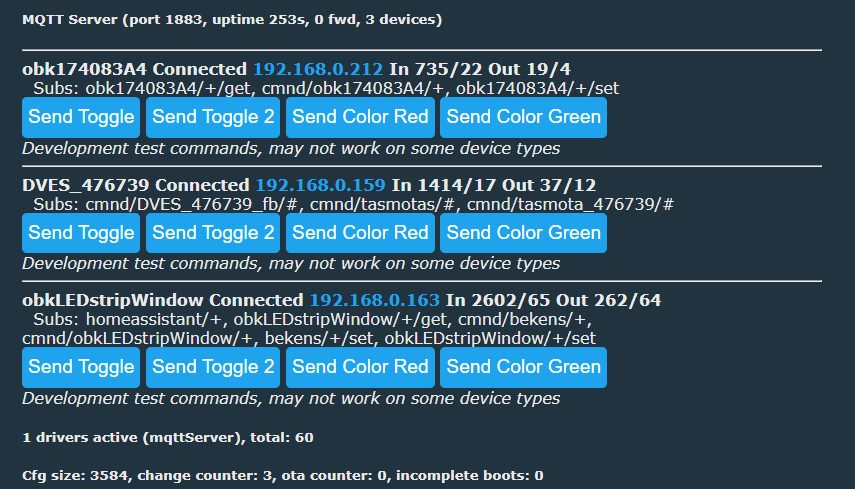
Only one user is supported. We enter the set data on other devices - I've tested with OBK and Tasmota - it should appear on the panel with us, although this list of them is here for testing and debugging only:
The list includes buttons that send Tasmota commands (also OBK-compatible), but this too is only for testing.
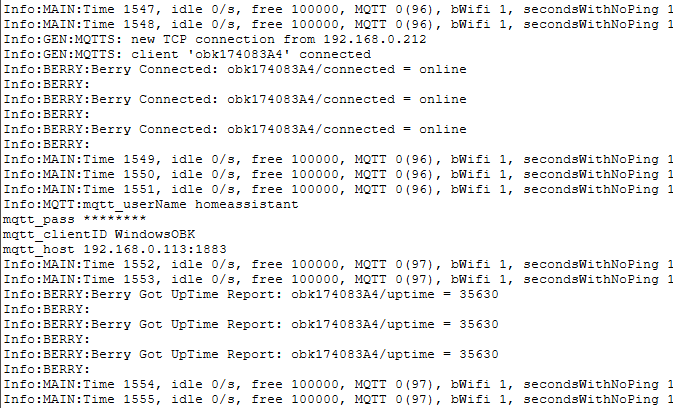
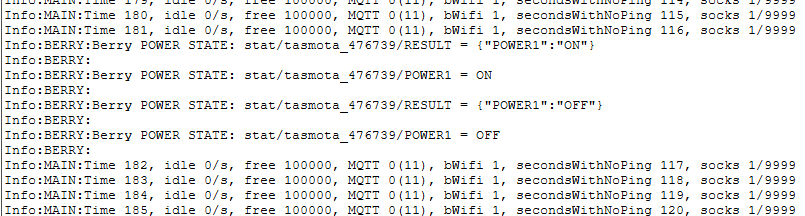
More possibilities open up for us with the Berry scripting language. Below is a sample autoexec.be script listening for selected topics from connected devices (command ms_subscribe ):
Results:
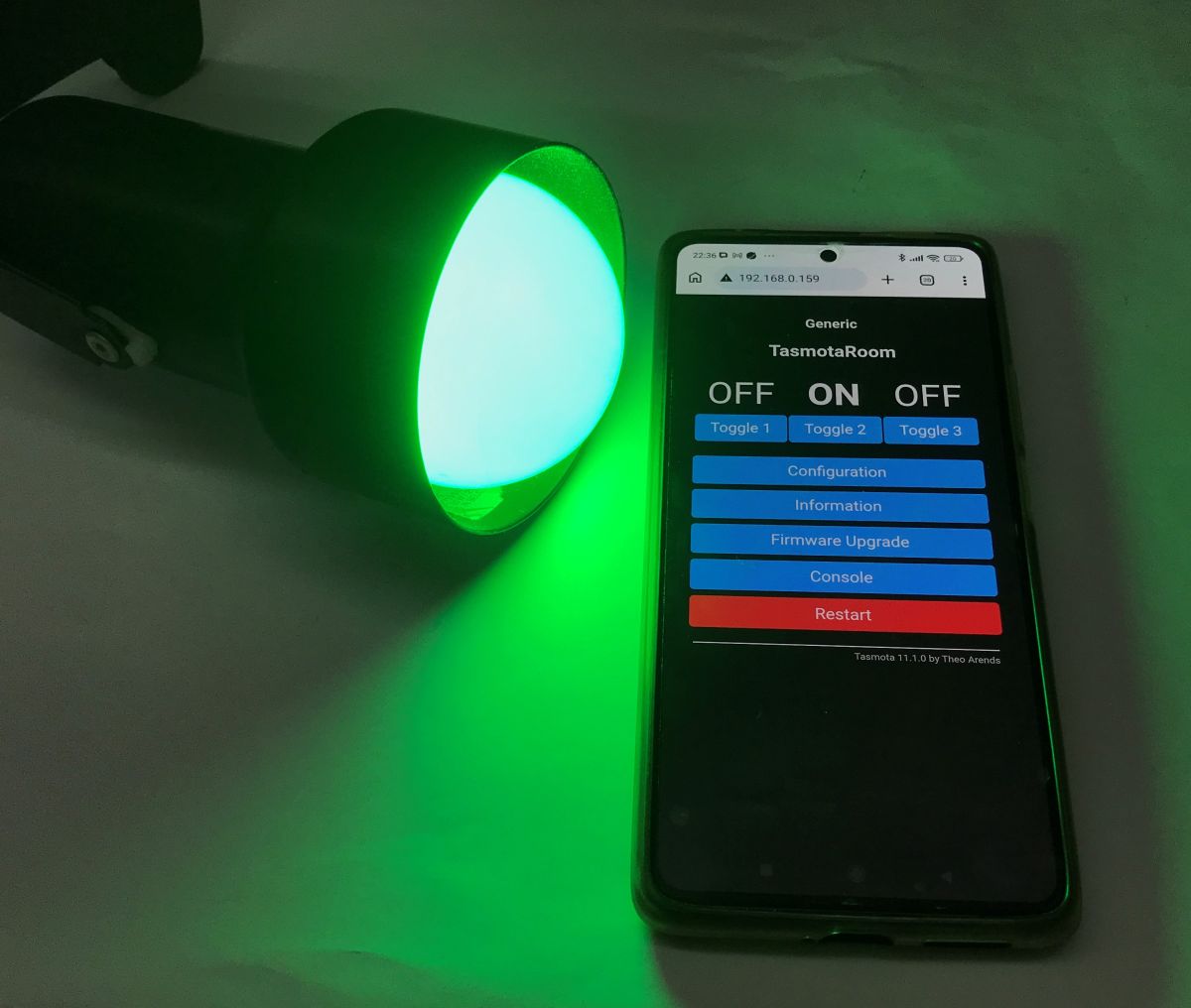
Berry is not just about listening, however. We can also publish data (command ms_publish ). Various automations can be done in this way. For example, the script below transmits the state of the second relay on the light switch to the LED light. It's worth mentioning here that this switch, I have mounted in a box with wires to one lamp, and yet it has as many as three buttons - one of them controls the lamp, the other two are for automation.
In this way, you can also make more complex mechanisms, for example:
- button reactions (OBK supports button events, single click, double click, etc., press)
- timed events (Berry in OBK has a wait function)
- time-based events (OBK has a calendar system - addClockEvent)
Summary There is no problem running a simple MQTT server directly on a chip such as the BK7231, and if necessary you can switch to an ESP32 with additional PSRAM (you then gain a few megabytes from 100 kB of RAM). Flash memory is essentially not limiting at all here, and it's not too bad with RAM either, although the requirement to keep separate buffers for packets for each client increases consumption somewhat. Other than that, the client and subscription lists themselves are fairly lightweight and don't take up much.
The developed MQTT server works and isn't that demanding at all - I've implemented everything threadless thanks to the use of non-blocking sockets, and the client and subscription lists are queue-based, so they don't allocate excessive amounts of memory at start-up while not being size-constrained.
An interesting observation might be that the MQTT standard with OBK, where each value is a separate 'publish' is much lighter in terms of RAM than the Tasmota standard, where the whole thing is published as a single JSON, which has to be held in memory for a while for processing.
The additional integration with Berry makes the possibilities get really big. You can program yourself any logic you like and mirror the operation of the Home Assistant on a tiny microcontroller.
Further plans: - add more examples of the Berry scripting language for MQTT support
- add a separate driver that, like a Home Assistant, receives HASS Discovery and shows the devices on the OBK panel by itself, without any scripting and without writing any code
- check the server driver on different platforms and investigate how many devices can be supported on the BK7231, which usually has about 100 kB RAM free, and how many on the ESP32 with PSRAM (8 MB RAM or more)
Do you see any uses for such a smaller MQTT server? It seems to me that this could be a good alternative for people who don't want to put up a full Home Assistant.
Very cool! This opens some interesting possibilities. I am also curious how many devices and also messages per second different boards can handle. e.g. 8266, ESP32. Thanks for posting this cool projec... [Read more]
Pomarańczowy_Piotruś
03 Mar 2026 22:22
Surely you will find a use. Not even a small part of your knowledge. Me various chats, for many ordeals have made an esp32-c3 broker with AP. There are a couple of esp8266's plugged in. It runs. It downloads... [Read more]
FAQ
TL;DR: A working MQTT broker now runs directly on OpenBeken devices, including BK7231 (~100 kB free RAM) and ESP32 with PSRAM (≥8 MB). "MQTT is not at all as resource‑intensive as it may seem." [Elektroda, p.kaczmarek2, post #21849274]
Why it matters: This lets you host local automations without a Pi, cloud, or full Home Assistant—ideal for small, offline, or low‑power setups.
OpenBeken is a multi‑platform IoT firmware that runs on 32 targets (including BK7231, ESP32, and Windows) to provide drivers, scripting, and now an embedded MQTT server, enabling local automation without external brokers. [Elektroda, p.kaczmarek2, post #21849274]
What is the MQTT server described here?
It’s a lightweight MQTT broker implemented inside OBK using non‑blocking sockets and queue‑based client/subscription lists, designed to run on constrained chips like BK7231 (~100 kB free RAM) or ESP32 with PSRAM (≥8 MB). [Elektroda, p.kaczmarek2, post #21849274]
What is Berry in OBK?
Berry is a lightweight embedded scripting language integrated into OBK that lets you subscribe to topics, react to messages, and publish commands (ms_subscribe, ms_publish) for on‑device automations without external controllers. [Elektroda, p.kaczmarek2, post #21849274]
What is BK7231?
BK7231 is a Wi‑Fi microcontroller platform supported by OBK that typically leaves about 100 kB of free RAM, sufficient to host the integrated MQTT server for small client sets and local messaging. [Elektroda, p.kaczmarek2, post #21849274]
What is ESP32 with PSRAM?
ESP32 with PSRAM is an ESP32 variant augmented with external pseudo‑static RAM, offering several megabytes (≈8 MB or more) to accommodate more MQTT clients and larger message buffers within OBK’s embedded broker. [Elektroda, p.kaczmarek2, post #21849274]
Can an MQTT broker really run on BK7231 or ESP32?
Yes. The author implemented an MQTT server in OBK that runs on BK7231 (~100 kB free RAM) and scales up on ESP32 with PSRAM (≥8 MB), proving the protocol’s modest resource needs. “MQTT is not at all as resource‑intensive as it may seem.” [Elektroda, p.kaczmarek2, post #21849274]
How do I enable the embedded MQTT server in OBK?
Enable the driver and start it: 1. Compile OBK with ENABLE_DRIVER_MQTTSERVER 1. 2. Run startDriver MQTTServer (e.g., in autoexec.bat). 3. Optionally set ms_publish, ms_user, ms_pass, and ms_port. This starts a non‑blocking TCP listener. [Elektroda, p.kaczmarek2, post #21849274]
Why do some Tasmota subscriptions not show up?
Tasmota can coalesce multiple MQTT packets in one TCP stream. TCP may split frames, so a global recv buffer fails. The fix is per‑client recv buffers that expand as needed to parse remLen (e.g., 634 bytes observed). [Elektroda, p.kaczmarek2, post #21849274]
Does the server use threads?
No. It uses a single non‑blocking listen socket and polls clients in QuickTick. Client and subscription lists are queue‑based, minimizing fixed allocations and avoiding thread overhead on tiny MCUs. [Elektroda, p.kaczmarek2, post #21849274]
How do I subscribe and publish using Berry?
Use ms_subscribe to attach callbacks and ms_publish to send messages. Example: subscribe to cmnd/+/POWER, print payloads, and mirror POWER2 to another device topic—fully on‑device for low‑latency automations. [Elektroda, p.kaczmarek2, post #21849274]
What authentication does the embedded broker support?
It supports a single user with password via ms_user and ms_pass. This simple model fits small LANs and testbeds; harden your network if exposing beyond local segments. [Elektroda, p.kaczmarek2, post #21849274]
Is OBK’s publish style more memory‑efficient than Tasmota’s?
Yes. OBK publishes each value separately, which the author observed is lighter in RAM than Tasmota’s single JSON blob that must be fully buffered for processing on constrained devices. [Elektroda, p.kaczmarek2, post #21849274]
How many MQTT clients can it handle on BK7231?
Client capacity is bounded by RAM and the configured MQTT_MAX_CLIENTS. BK7231 typically has ~100 kB free, while fuller scaling tests and per‑platform limits are on the roadmap. [Elektroda, p.kaczmarek2, post #21849274]
What port and identifiers does it use?
You choose the TCP port (e.g., ms_port 123). The implementation shows a 64‑byte clientID buffer and per‑client IP tracking, aiding logging and access control on microcontrollers. [Elektroda, p.kaczmarek2, post #21849274]
How do I fix packet fragmentation or combined frames?
Allocate a per‑client recv buffer and grow it as needed. Parse MQTT’s Remaining Length to extract complete packets, even when TCP combines or splits frames. “TCP doesn’t guarantee one frame per packet.” [Elektroda, p.kaczmarek2, post #21849274]
Can this replace Home Assistant for small setups?
For basic automations, yes. With Berry scripts, you can mirror states, react to buttons, schedule events, and process HA‑Discovery‑like flows directly on the device, avoiding a full HA stack. [Elektroda, p.kaczmarek2, post #21849274]
Example: how to mirror a switch to a light using Berry?
Do this: 1. ms_subscribe to stat//POWER2. 2. In the callback, ms_publish to cmnd//POWER with the received payload. 3. Log events for debugging. This mirrors relay state locally. [Elektroda, p.kaczmarek2, post #21849274]
AI summary based on the discussion. May contain errors.








Comments
Very cool! This opens some interesting possibilities. I am also curious how many devices and also messages per second different boards can handle. e.g. 8266, ESP32. Thanks for posting this cool projec... [Read more]
Surely you will find a use. Not even a small part of your knowledge. Me various chats, for many ordeals have made an esp32-c3 broker with AP. There are a couple of esp8266's plugged in. It runs. It downloads... [Read more]