






logo elektroda
logo elektroda
X
logo elektroda
Dostępna jest polska wersja

Czy wolisz polską wersję strony elektroda?

Nie, dziękuję Przekieruj mnie tam

Choosing a home automation system: Sterbox vs PLC2011A0 – reviews and experiences

student_Wojtek 70163 99
Best answers

Which controller is better for home automation of blinds, lighting, heating and garden watering: Sterbox or PLC2011A0, and what are users’ experiences with them?

If you want the safer choice for security-related automation, users leaned toward PLC2011A0/B0; if you want more features per złoty and can live with rougher setup, many people chose Sterbox [#10704254][#9873711][#9926483] Sterbox was praised as practical, with easy basic setup, helpful vendor support, e-mail notifications, and successful use for lighting, sockets, blinds and watering [#9878411][#9880700][#10904094] But several users complained that Sterbox has poor documentation, awkward programming, limited timers, no 1Wire/PWM support, only 0–3 V analog inputs, and weak heating control unless you build logic around hysteresis and monoflops yourself [#11085199][#10722636][#11131755][#11190155][#11180320] PLC2011A0/B0 was described as having encryption, built-in buffered power supply, opto-isolated 230 VAC inputs, PC/Android software, and good fit for gates, door locks and alarm/security functions [#9873711][#9926483][#9980856] On the downside, some users still considered the PLC2011 alarm features less complete than a dedicated alarm panel, while others felt Sterbox communicated between controllers better and offered twice the capabilities for half the price [#10704254][#9926483]
Generated by the language model.
ADVERTISEMENT
Treść została przetłumaczona polish » english Zobacz oryginalną wersję tematu
  • #31 11085199
    Polikon
    Level 14  
    Posts: 179
    Help: 1
    Rate: 28
    Hello.
    I received the Sterbox I’d bought a few days ago.
    And so far, I’m very dissatisfied. This is because of the timers that can be set on this device. There are eight timers, but in my case, it’s more like having one timer with eight settings. Because each timer can only be set to switch on and off once a day. Of course, I could have checked its capabilities before buying it, but I didn’t, and now I’m left holding the baby, because it was precisely these timers I cared about most. I don’t know what the developers of this marvel were thinking to limit its functionality in this way. Because if we connect, say, a boiler to it, we can forget about other timer-controlled functions. In my opinion, every timer should have at least 4 or 5 on/off cycles.
    Further shortcomings of this Sterbox.
    We’re programming the control of relay k4, yet we have to use the name ww3 in the programme. Do we always have to make life difficult for ourselves? Wouldn’t it be better to label the relays as k0 to k3, so that we’d have k3=ww3
    No option to manually set the current time. There is information stating that entering a time in the „zg8” field will automatically set the clock in the Sterbox. But there is no such „zg8”8221; in the settings.
    To test the Sterbox, I used the configuration diagram titled „Example of connecting and programming the Sterbox for
    resetting a router, modem, etc. in the event of a loss of
    Internet (WAN)”
    I set up the Sterbox exactly as described, and what do you know, nothing happened I disconnected the telephone cable from the router, waited, and there was no reaction from the Sterbox. It was only when I disconnected the RJ45 from the Sterbox that the router restart procedure began. So the Sterbox doesn’t control Internet access, as the manufacturer claims, but only whether it has access to any network at all. In my case, the Sterbox was content with just the home network without the Internet.
    Whilst testing the Sterbox, I noticed that a proper manual describing its internal functions would be useful.
    For example, to reset the router in the ‘macrocell’ settings tab, we enter commands and an image appears – or, if you prefer, a diagram of the macrocell. How many and what sort of built-in diagrams are there in this Sterbox? And as if that weren’t enough, when setting up the Sterbox, there are various options to configure, including input and output points for a given gateway or macrocell – and everything would be fine, except that when testing the macrocell settings, we don’t enter anything in the output fields, so how are we supposed to know where the signals from that macrocell are going?
    After a few hours of playing around with this Sterbox, I could go on complaining, but it’s a waste of space.
    There’s certainly plenty of potential in the Sterbox, but it lacks a proper user manual.
    So if anyone’s planning to buy a Sterbox, they should think it through carefully and have a go on a virtual Sterbox to see if it’ll meet their requirements.

    I have two questions for the esteemed forum members.
    Does anyone know of any user forums dedicated to the Sterbox?
    And as I mentioned earlier, I’m disappointed with the functionality of the timers in Sterbox and am looking for a timer similar to Sterbox, but one where a single timer can perform several on/off functions throughout the day. LAN control, of course.
  • ADVERTISEMENT
  • #33 11085780
    Zibiland
    Level 13  
    Posts: 179
    Rate: 12
    Polikon wrote:
    Hello.
    A few days ago I received the Sterbox I’d bought.
    And so far I’m very dissatisfied. This is because of the timers that can be set on this device. We have eight timers, but in my case it’s more like having one timer with eight settings. Because each of the timers can only be set to switch on and off once a day. Of course, I could have checked its capabilities before buying it, but I didn’t, and now I’m left holding the baby, because it was precisely these timers I cared about most. I don’t know what the developers of this marvel were thinking to limit its functionality in this way. Because if we connect, say, a boiler to it, we can forget about other timer-controlled functions. In my opinion, every timer should have at least 4 or 5 on/off cycles.
    Further shortcomings of this Sterbox.
    We’re programming the control of relay k4, yet we have to use the name ww3 in the programme. Do we always have to make life difficult for ourselves? Wouldn’t it be better to label the relays as k0 to k3, so that we have k3=ww3
    No option to manually set the current time. There is information stating that entering a time in the „zg8” field will automatically set the clock in the Sterbox. But there is no such „zg8” field8221; in the settings.
    To test the Sterbox, I used the configuration diagram titled „Example of connecting and programming the Sterbox for
    resetting a router, modem, etc. in the event of a loss of
    Internet (WAN)”
    I set up the Sterbox exactly as described, and what do you know, nothing happened I disconnected the telephone cable from the router, waited, and there was no reaction from the Sterbox. It was only when I disconnected the RJ45 from the Sterbox that the router restart procedure began. So the Sterbox doesn’t control Internet access, as the manufacturer claims, but only whether it has access to any network at all. In my case, the Sterbox was content with just the home network without the Internet.
    Whilst testing the Sterbox, I noticed that a proper manual describing its internal functions would be useful.
    For example, to reset the router in the ‘macrocell’ settings tab, we enter commands and an image appears – or, if you prefer, a diagram of the macrocell. How many and what sort of built-in diagrams are there in this Sterbox? And as if that weren’t enough, when setting up the Sterbox, there are various options to configure, including input and output points for a given gateway or macrocell – and everything would be fine, except that when testing the macrocell settings, we don’t enter anything in the output fields, so how are we supposed to know where the signals from that macrocell go?
    After a few hours of playing around with this Sterbox, I could go on complaining, but it’s a waste of space.
    There’s certainly plenty of potential in the Sterbox, but it lacks a proper user manual.
    So if anyone’s planning to buy a Sterbox, they should think it through carefully and have a go on a virtual Sterbox to see if it’ll meet their needs.

    I have two questions for the esteemed forum members.
    Does anyone know of any user forums dedicated to the Sterbox?
    And as I mentioned earlier, I am disappointed with the functionality of the timers in Sterbox and am looking for a timer similar to Sterbox, but one where a single timer can perform several on/off functions throughout the day. Naturally, controlled via LAN.

    The relays are designated as ww0 to ww3, so k3 is ww3 :)
    As for controlling the heating, Sterbox isn’t suitable. The timers have got me down too :( As for the ZG8, first set the time in the general settings and then the real time will update automatically.
    My router restarts without any issues :)
    I’ve used the Starbox to control lighting, gates and sockets, and it works well for that. As for heating, the seller himself said it isn’t suitable for that. It only performs simple on/off functions
  • #34 11086268
    Dinkss
    Level 12  
    Posts: 34
    Help: 1
    Rate: 2
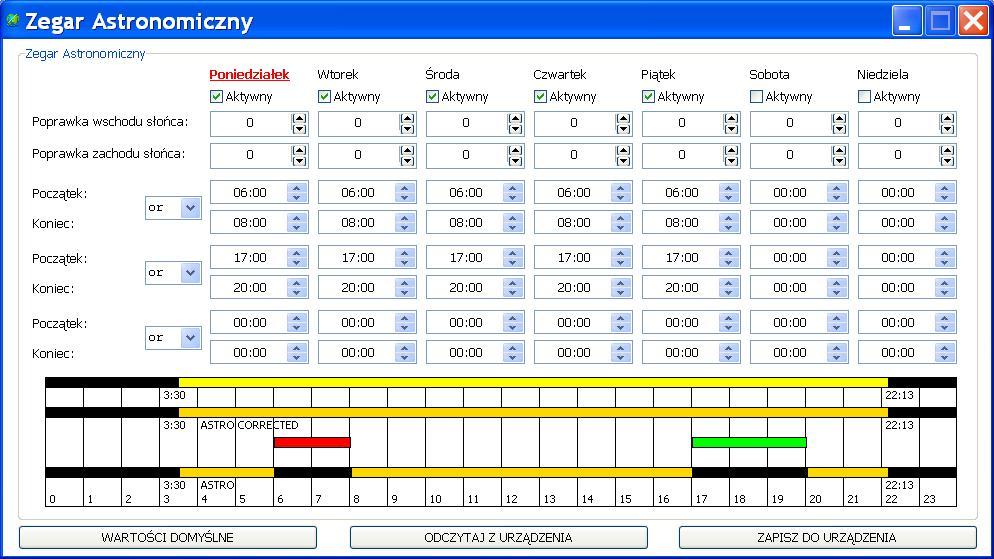
    I’m also thinking about buying one, but I’ve been put off by those timers.

    Is it possible to set it so that one relay operates as follows:

    6:00 ON
    8:00 OFF
    17:00 ON
    20:00 OFF
    from Monday to Friday

    ?


    One more question: is it possible to send readings from the connected temperature sensors, e.g. every 10 minutes, to an FTP server?
  • #35 11087279
    palacz997
    Level 12  
    Posts: 35
    Help: 1
    Rate: 2
    Dinkss wrote:
    I’m also thinking about buying one and these timers have put me off.

    Is it possible to set it so that one relay operates:

    6:00 ON
    8:00 OFF
    17:00 ON
    20:00 OFF
    from Monday to Friday
    ?
    One more question: is it possible to send data from connected temperature sensors, e.g. every 10 minutes, to an FTP server?


    You can even download data every second, or even write your own script for downloading and calculating. The software even supports LabVIEW; you can load the controller into LV and do whatever you want in LV..

    I’ve set it up for you as you wanted. You can retrieve data from any of these time lines, combine them logically, as you wish. Yours are the red and green ones marked as R and G
    Choosing a home automation system: Sterbox vs PLC2011A0 – reviews and experiences

    On top of that, there are 4 open-collector outputs, 2 +12V outputs, and you can connect 8 relays via 1-wire. At a pinch, with these 8 relays you can control gates, centralised roller shutters, sort out the lighting in the garage and outside the house – whether manually controlled or astronomically – and you have 4 thermostats, 32 DS18B20 thermometers and a fully-fledged alarm. 16 outputs in total.
  • ADVERTISEMENT
  • #36 11088069
    Dinkss
    Level 12  
    Posts: 34
    Help: 1
    Rate: 2
    OK, but I’m just wondering about the Sterbox because it would be enough for what I need and costs 600, whereas if I bought your solution I’d be looking at a cost of 2000 because I’d have to buy both A and B :(
  • #37 11088323
    palacz997
    Level 12  
    Posts: 35
    Help: 1
    Rate: 2
    Dinkss wrote:
    OK, but I’m considering the Sterbox because it would be enough for what I need and costs 600, whereas if I bought your solution I’d have to reckon with a cost of 2000 because I’d have to buy A and B :(


    Why do you need both? B0 has outputs too. You can connect external relays to the bus.
    If you’re talking about inputs, sure, you can apply voltage directly to A0.
  • ADVERTISEMENT
  • #38 11088325
    stkop
    Level 15  
    Posts: 121
    Help: 14
    Rate: 7
    Dinkss wrote:
    OK, but I’m just thinking about the Sterbox because it would be enough for what I need and costs 600, whereas if I bought your solution I’d have to reckon with a cost of 2000 because I’d have to buy A and B :(


    So maybe you could test this invention for the forum users. Only 120 zł gross.

    "Key features:

    5 analogue inputs:
    measurement of temperature, voltage and current, and indirectly other physical quantities
    2 digital inputs: for monitoring
    1 relay (NC, NO, C)
    4 outputs for switching relays, transistors, etc.
    1 PWM output 2.6 kHz to 4 MHz\

    Key features:

    management via web interface or SNMP v2.
    Upgrade via TFTP protocol
    Real-time data reading without the need to refresh the page
    Ability to switch up to 5 relays directly from the web page
    Event table for each input and output, programmable by the user
    Scheduler (activating outputs at specific times during the week)
    IP Watchdog for up to 5 IP devices
    monitoring of additional devices, e.g. sensors, position statuses
    measurement of ambient temperature and device supply voltage
    measurement of voltage, temperature and current from connected sensors
    power and energy measurement for DC voltage
    option to connect an additional board with 4 relays or 4 switchable PoE ports
    time setting manually or via an NTP server
    option to calibrate sensor readings
    control of PWM frequency and duty cycle
    notification via email or SNMP TRAP of programmed events
    automatic transmission of sensor values and status at specified intervals to an SNMP server
    Supported protocols: HTTP, SNMP, SMTP, SNTP, ICMP, DNS, DHCP."

    Just in case anyone is testing this, it would be better to post the descriptions in a new thread. Because this is off-topic here.
  • #39 11089759
    Polikon
    Level 14  
    Posts: 179
    Help: 1
    Rate: 28
    Dinkss
    On Sterbox, you can combine these eight timers into a single timer with eight on/off functions for the whole year and assign it to any output. You can simply connect them in series.

    stkop
    And how many of these timers are there? Because there’s nothing about that in the description. It only says ‘switching outputs on’, but how many and how many times a day?

    As for the modem, my Sterbox detects the modem as the Internet. I was running tests yesterday; on the Sterbox home page there are icons that are downloaded from a server each time, and if there’s no internet, those icons aren’t there either, yet the Sterbox still doesn’t restart the modem. The LED next to the RJ-45 port flashes slowly in green, and according to the manual, this means there is an Internet connection. Only when I unplug the RJ cable does the LED start flashing alternately red and green, and the modem begins to restart.
  • #40 11090993
    stkop
    Level 15  
    Posts: 121
    Help: 14
    Rate: 7
    Polikon wrote:
    And how many of these watches does it have? Because there’s nothing about that in the description. It just says “output switching” But how many and how many times a day?


    This LAN controller is such an abstract example... The device itself doesn’t offer a very flexible schedule (one output, one command, at one time on selected days of the week for a set duration) Link to the manual but the device itself apparently has functions for configuring outputs via a link . So you can easily create your own web interface for virtually any number of these controllers, and implement complex scheduling functions, for example, via an old 24/7 PC running Windows [ using the task scheduler ]. But that’s off-topic again, and I won’t write any more here about the LAN Controller, especially as I’ve never actually seen one, only read about it. Best regards.
  • #41 11092081
    Polikon
    Level 14  
    Posts: 179
    Help: 1
    Rate: 28
    Zibiland wrote:

    The relays are designated as ww0 to ww3, so k3 corresponds to ww3 :)
    As for controlling the heating, Starbox isn’t suitable. The timers got me down too :( and as for ZG8, first set the time in the general settings and then the real time will pop up automatically.
    My router restarts without any problems :)

    That’s right, and it’s exactly as you say. But please show me where the K0 relay is on this diagram. Since all inputs and outputs start their numbering from zero, why are the relays on this diagram marked from one?
    And this leads to situations where I set the router reset (according to the manual) to output ww3, but relay k4 is operating.
    And just to be precise, ww3=k4
    I forgot to add that on the housing, the LEDs indicating relay operation are also numbered from 1 to 4, and the fourth LED indicates the operation of output ww3
    Such a small typo, yet it can cause quite a bit of confusion. All it takes is a moment’s inattention when typing.
    As for that zg8, it simply isn’t there. When I tried to enter something, in the general settings under ‘time’, nothing was accepted (maybe I was typing it wrong), because it only accepted the changes once it had set the time itself from the internet. Because the time wasn’t right for me.
    Attachments:
    • Choosing a home automation system: Sterbox vs PLC2011A0 – reviews and experiences Sterbox.JPG (26.33 KB) You must be logged in to download this attachment.
  • #42 11092552
    neodym
    Level 14  
    Posts: 90
    Help: 2
    Rate: 36
    Polikon wrote:

    As for the modem, my Sterbox detects it as an Internet connection. I was running some tests yesterday; on the Sterbox homepage there are icons that are downloaded from a server each time, and if there’s no internet connection, those icons don’t appear either, yet the Sterbox still doesn’t restart the modem.


    What a joke. They’re even spying on the customer to see which IP address they’re connecting from and what device they’ve got installed. This is outrageous – the NWO. What do they care where or if I’m installing it? Maybe Google Maps will be added next, with a link to show the location on the map straight away? In two years’ time, someone will break into the house and it’ll be interesting, because the blinds opened by themselves :-)
  • #43 11092793
    Zibiland
    Level 13  
    Posts: 179
    Rate: 12
    neodym wrote:
    Polikon wrote:

    As for the modem, my Sterbox detects it as an Internet connection. I was running some tests yesterday; on the Sterbox home page there are icons that are downloaded from a server each time, and if there’s no internet connection, those icons don’t appear either, yet the Sterbox still doesn’t restart the modem.


    What a joke. They’re even spying on the customer to see which IP address they’re connecting from and what device they’ve got installed. This is outrageous – the NWO. What do they care where or if I’m installing it? Maybe Google Maps will give them a link to pinpoint it on the map straight away? In two years’ time, someone will break into the house and it’ll be interesting, because the blinds opened by themselves :-)

    Strange, it doesn’t download anything from the site for me, unless you’re using mobile apps to control Starbox, in which case it downloads graphics from the server. I created my own control app and built it exactly how I wanted. It’s all based on HTML files.
  • ADVERTISEMENT
  • #44 11092833
    Polikon
    Level 14  
    Posts: 179
    Help: 1
    Rate: 28
    Zibiland wrote:
    neodym wrote:
    Polikon wrote:

    As for the modem, my Sterbox detects the modem as the Internet. I was running tests yesterday; on the Sterbox home page there are icons that are downloaded from a server each time, and if there’s no internet connection, those icons don’t appear either, yet the Sterbox still doesn’t restart the modem.


    What a joke. They’re even spying on the customer to see which IP address they’re connecting from and what device they’ve got installed. This is outrageous – the NWO. What do they care where or if I’m installing it? Maybe Google Maps will give them a link to pinpoint it on the map straight away? In two years’ time, someone will break into the house and it’ll be interesting, because the blinds opened by themselves :-)

    Strange, it doesn’t download anything from the site for me, unless you’re using mobile apps to control Starbox, in which case it downloads graphics from the server. I created my own control app and built exactly what I wanted. It’s all based on HTML files.
    Then go to the Sterbox website where the buttons are, of course after disconnecting it from the internet, and see if you have icons showing the status of the relays; there are also no settings or help icons, and the fields are empty. I don’t think it’s about spying, just about memory space on the Sterbox.

    As for the Sterbox not reacting to the lack of an internet connection, I’ve just received a reply explaining what might be the cause. Well, when my modem isn’t logged in with the internet provider, it sends me a page with the modem settings, and the Sterbox probably recognises this as a connection.
  • #45 11092850
    Zibiland
    Level 13  
    Posts: 179
    Rate: 12
    [quote="Polikon"][quote="Zibiland"]
    neodym wrote:
    Polikon wrote:

    -----------------
    Strange, it doesn’t download anything from the site for me, unless you’re using mobile apps to control Starbox, in which case it downloads graphics from the server. I created my own control app and got exactly what I wanted. It’s all based on HTML files.
    Go to the Sterbox website where the buttons are, of course after disconnecting it from the internet, and see if you have icons showing the relay status; there are also no settings or help icons, and the fields are empty. I don’t think it’s about spying, just about memory space on the Sterbox.

    As for the Sterbox not reacting to the lack of an internet connection, I’ve just received a reply explaining what might be the cause. Well, when my modem isn’t logged in with the internet provider, it sends me a page with the modem settings, and the Sterbox probably recognises this as a connection.


    If the graphics, specifically the buttons, are stored on the server, it’s only natural that it will fetch the graphics from the server; below is an example of the code for one of the buttons:
    unction example_ajax_request() {
    $('stb').html('<img src="images/wykonuje.jpg" width="239" height="84" />');
    setTimeout('example_ajax_request_go()', 2500);
    }
    function example_ajax_request_go() {
    $('stb').html('<a href="http://192.168.0.177/00?x008=kl8" target="STB1"><img style="border: 0px solid ; width: 239px; height: 84px;" alt="" src="images/17-v1.jpg" onclick="example_ajax_request()"></a>');
    }
      </scrip

    As you can see, there are two image files, wykonuje.jpg and 17-v1.jpg, which are downloaded from the server or from a local drive in my case, and the relay address hidden behind this button
  • #46 11093903
    Polikon
    Level 14  
    Posts: 179
    Help: 1
    Rate: 28
    But I don't think you've read what I wrote. I'm not talking about the buttons. Because the buttons work even without an internet connection.
    I wrote, “icons showing the status of the relays, there’s no settings or help icon either, the fields are empty”,
    So those lights at the bottom left of the screen, and right at the very bottom on the left you have an icon with a link to help, and on the right a link to settings. And those icons aren’t there if you don’t have an internet connection.

    And from the codes you provided, it appears that the JPEGs are retrieved from the Sterbox’s memory and are available even without an internet connection.
  • #47 11094107
    Zibiland
    Level 13  
    Posts: 179
    Rate: 12
    Polikon wrote:
    But I don’t think you’ve read what I wrote. I’m not talking about the buttons. Because the buttons work even without an internet connection.
    I wrote, “icons showing the status of the relays, there’s no settings or help icon either, the fields are empty”,
    So those lights at the bottom left of the screen, and at the very bottom left you have an icon with a link to help, and on the right a link to settings. And those icons aren’t there if you don’t have an internet connection.

    And from the codes you provided, it appears that the JPEGs are retrieved from the Sterbox’s memory and are available even without an internet connection.


    Perhaps we’ve misunderstood each other – are you referring to the standard Sterbox control panel or to mobile apps?

    I’m talking about the mobile apps, which you can customise as you like.
    You keep image files, e.g. JPGs, on a drive or server where you can access them; in my case, they’re on my tablet rather than in the Sterbox’s memory.

    Here’s a demo of the Sterbox app: http://www.sterbox.eu/index.php/demox

    That arrow is at http://www.zetkom.com.pl/temp/p.jpg

    That is why I use my own app, modelled on the one in this video http://www.youtube.com/watch?feature=player_embedded&v=nP8STNog50U
  • #48 11094345
    neodym
    Level 14  
    Posts: 90
    Help: 2
    Rate: 36
    From the PLC2011 manual: Section 1.1, page 4/109
    -------------------------------------------
    http://www.elkom.com.tw/m/PLC2011B0_Instrukcja_polska.pdf

    QUOTE:

    The Windows-based software supporting the PLC2011B0 Programmable Alarm does not
    contain any user-spying functions. It does not steal data, nor does it connect
    automatically to unknown addresses on the internet or to the manufacturer or author of the software.
    No data is written to the Windows registry, and all settings and configuration files
    are created exclusively in the directory where the
    *.EXE. This programme does not check for updates automatically, so as not to accidentally log
    the operator’s IP address. No such functions have been implemented.
    Using this programme is extremely safe. Especially when you want to
    operate the alarm yourself whilst being away from it. We can safely expose the device’s IP address
    and its port to the public internet address pool or set up port forwarding on
    the router without fear of the device being hacked.
    It is impossible to hack the device itself as it does not have an operating system
    capable of executing externally supplied code. This type of problem does not exist at all
    due to the device’s design.
  • #49 11096099
    palacz997
    Level 12  
    Posts: 35
    Help: 1
    Rate: 2
    Exactly. It’s like writing your PIN on your credit card, or attaching a tag with the owner’s address to your house or car keys. Such devices should operate discreetly and not give too much away about where they are installed, particularly to those who know that a packet attempting to upload an image originates from that device. Admittedly, the operator records the connection for data retention purposes, but it is the operator, not the seller, who can assign the task. There is no justification whatsoever for devices to connect to the manufacturer. It is as if Satel control panels were sending packets to the retailer... “here I am, and I know when the user arms the alarm”.
  • #50 11096263
    jestam
    Automation specialist
    Posts: 1794
    Help: 210
    Rate: 144
    Z instrukcji PLC2011 wrote:
    We can safely expose the device’s IP address
    and port to the public internet address pool or set up port forwarding on the router without fear of the device being hacked.


    Why without fear? Not because nobody will find this device – the author isn’t that naive. Without fear, because:

    Z instrukcji PLC2011 wrote:

    It is impossible to hack the device itself because it does not have an operating system
    capable of executing externally supplied code. This type of problem does not exist at all due to the device’s design.


    A strong contender for the idiocy of the year.

    Do these people have anything to do with the security of anything? An argument against this system. Who knows what else has been done in this style.
  • #51 11104724
    Polikon
    Level 14  
    Posts: 179
    Help: 1
    Rate: 28
    That is why I believe that such systems should not be connected to the internet. Only if the device needs to send a message should it connect, send the message, and then disconnect from the internet. But if someone wants to be able to use such a system from outside the home, they should be aware of the risk of the system being hacked. It goes without saying that most people who install such systems in their homes are wealthy.
  • #52 11104831
    Zibiland
    Level 13  
    Posts: 179
    Rate: 12
    Polikon wrote:
    That is why I believe that such systems should not be connected to the internet. Only if the device needs to send a message should it connect, send the message and then disconnect from the internet. But if someone wants to be able to use such a system from outside the home, they should be aware of the risk of the system being hacked. It goes without saying that most people who install such gadgets at home are wealthy.

    Following this line of reasoning, anyone who uses routers, access points, mobile phones, and other devices running any kind of application should be aware of the risk.
    So let’s switch everything off and everything will be fine :P .

    To hack into such a device, you usually have to go through the router first. Each of these devices is secured. Every website we visit knows our IP address at any given moment, and somehow nobody feels uncomfortable about it.
    Most people have a dynamically assigned IP address, so it changes every 24 or 48 hours anyway.

    No one forces you to use the built-in software that contains a link to the manufacturer’s website, as is the case with most devices, such as routers. You can create your own software to manage the set-top box and there will be no problem.

    It is only a lack of knowledge about basic network security that is a cause for concern and could have disastrous consequences.
  • #53 11105249
    Polikon
    Level 14  
    Posts: 179
    Help: 1
    Rate: 28
    Yes, yes. But not everyone wants to learn about internet security. And I don’t think there’s any security measure that can’t be bypassed, and there’s little difference between a computer used on a daily basis and leaving your home wide open to intrusion. There’s one sure-fire security measure: unplug the socket, and that’s the end of the problem
  • #54 11105271
    jestam
    Automation specialist
    Posts: 1794
    Help: 210
    Rate: 144
    Zibiland wrote:
    To hack into such a device, you usually have to go via a router first.

    Actually, no!
    Z instrukcji PLC2011 wrote:
    We can safely expose the device’s IP address
    and its port to the public internet address pool or forward the port on the router without fear of the device being hacked.

    :)

    One could discuss the security of ICT systems and the acceptable level of security in a specific case at great length.

    Manufacturers will claim that their systems are secure. End users trust the manufacturers, because how are they supposed to assess this themselves? Are they expected to be security experts?

    Here, the starting point is the manufacturer’s bold claim: “The device itself cannot be hacked because it does not have an operating system capable of executing externally supplied code. This type of problem does not exist at all due to the device’s design.” The manufacturer isn’t even distorting reality; they’re denying it! In this context, I fully agree with my colleague’s words:
    Zibiland wrote:
    a lack of knowledge about basic network security is a cause for concern and can have disastrous consequences.
  • #55 11106675
    Zibiland
    Level 13  
    Posts: 179
    Rate: 12
    Polikon wrote:
    Yes, yes. But not everyone wants to learn about internet security. And I don’t think there’s any security measure that can’t be bypassed, and there’s little difference between a computer used on a daily basis and leaving your home wide open to intrusion. There is one sure-fire security measure: plug it out of the socket and that’s the end of the problem

    No security measure is perfect, but you can always make life harder for potential intruders :)
    jestam wrote:
    Zibiland wrote:
    To hack into such a device, you usually have to go through the router first.

    Actually, no!
    ......................................................

    If someone only has a router switched on without port forwarding and remote access via HTTP, you’ll probably have to hack into that first :) . In the case of port forwarding on the router, things are simpler, but there is always a DZM that separates the device in question from the network.
  • #56 11106922
    jestam
    Automation specialist
    Posts: 1794
    Help: 210
    Rate: 144
    Zibiland wrote:
    someone has only their router switched on without port forwarding


    then it cannot

    PLC2011 wrote:
    handle the alarm on its own whilst being away from it.


    The device acts as a server, and the software for its remote operation acts as a client.

    Zibiland wrote:
    and remote access via http

    Remote access to what?

    Zibiland wrote:
    If ports are forwarded on the router, things are simpler, but there is always a DMZ that separates the device from the network.


    Who configures a DMZ on a router bought from a shop for 50 zł? The manufacturer of the PLC2011 does not require this, and in fact claims that a DMZ is unnecessary. In any case, a DMZ is a weak security measure for the servers located within it; the purpose of a DMZ is to protect backend servers.
  • #57 11107095
    Polikon
    Level 14  
    Posts: 179
    Help: 1
    Rate: 28
    Zibiland
    I checked the code to see what was being downloaded from the internet and it turned out that the GIFs showing the output status are downloaded from http://www.zetkom.com.pl/temp/bu.gif and http://www.zetkom.com.pl/temp/zof.gif
    http://www.zetkom.com.pl/temp/st.gif
    And now, if you don’t have an internet connection, you have no control over the states of the individual outputs.
    I’m referring to the page retrieved from a Sterbox connected to a PC

    Dinkss
    Sorry for misleading you about those timers. I was going by the manufacturer’s information.
    I’ve been trying for three days to set up a simple clock-controlled circuit and it’s been a complete failure.
    Today I realised the problem lies with the clocks. When I connect my circuit to a single clock, everything works; but when I add a second clock on the so-called virtual wire, the clocks stop working.
    I’ve tried using just the clocks connected directly to a single output, but it’s no good – it doesn’t work. I’ve connected each clock to a different output, but it’s still no good – it doesn’t work.
    After many attempts, I get the feeling that these clocks are freezing up
  • #58 11108212
    Polikon
    Level 14  
    Posts: 179
    Help: 1
    Rate: 28
    I have another question.
    Does anyone know of a forum where people discuss Sterbox exclusively?
    Because I’m going mad trying to get it set up.
    I’ve tried two of the setup examples from the manufacturer’s website. So, resetting the router doesn’t work. Connecting the timers via a virtual wire doesn’t work either.
  • #59 11108431
    Zibiland
    Level 13  
    Posts: 179
    Rate: 12
    Polikon wrote:
    I have another question.
    Does anyone know of a forum where people discuss only the Sterbox?
    Because I’m going mad trying to set it up.
    I’ve tried two of the setup examples from the manufacturer’s website. So, resetting the router doesn’t work. Connecting the clocks via the virtual wire doesn’t work either.


    There isn’t another forum, which is a shame :(
    You could make a lot of changes to how Sterbox works if you could upload additional or modified *.cgi files, but that’s just wishful thinking :(

    I kept pestering the manufacturer; I had a problem setting up the raising of two groups of roller blinds. The requirements were:
    1. the ability to control each group virtually independently and all of them centrally
    2. the ability to control each blind independently and centrally via a physical button

    I struggled a bit on my own, but with the seller’s help I got it set up properly; thanks to our collaboration, a diagram was created and posted on the Sterbox website.
    The lighting was easier :) ;. I wasted quite a bit of time fiddling with the heating, three kettles and timer control. There isn’t much you can do about that. Unless you have open-plan rooms, e.g. a living room, kitchen, hallway and underfloor heating, in which case you can treat them all as a single room and use sensors and timers to control the actuators.

    I also played around with the router at the start and everything worked :)

    Polikon wrote:
    Zibiland
    I checked the code to see what was being downloaded from the internet and it turned out that the GIFs showing the output status are downloaded from http://www.zetkom.com.pl/temp/bu.gif and http://www.zetkom.com.pl/temp/zof.gif
    http://www.zetkom.com.pl/temp/st.gif
    And now, if you don’t have an internet connection, you have no control over the status of individual outputs.
    I’m referring to the page downloaded from a Sterbox connected to a PC

    this is just a GIF; the button will still redirect you to the destination.
  • #60 11108622
    palacz997
    Level 12  
    Posts: 35
    Help: 1
    Rate: 2
    I’ve found out how it works in PLC2011. So, here’s the reply I received by email:

    “If the FPGA fails to decrypt the data correctly and cannot find the digital signature of the data or the current time stamp, it ignores the incoming data entirely. You could send it the entire internet over Ethernet, byte by byte, because there are 2 to the power of 256 combinations and the chance of hitting the correct sequence is zero.
    The FPGA is a cryptographic accelerator; once programmed, its contents cannot be changed because the FPGA uses antifuse technology. Please google the word ‘antifuse’ and read up on it....”

    It follows that if the user cannot be caught entering their password on someone else’s computer – for example, via a keylogger or by someone watching over their shoulder – and the password must be at least 15 characters long, then they are safe. Lose your password, lose your security. However, I have been informed that USB tokens are also available for purchase, which encrypt and time-stamp the data themselves, meaning the client holds half the password, whilst the other half consists of random numbers within the token.
ADVERTISEMENT