






logo elektroda
logo elektroda
X
logo elektroda
Dostępna jest polska wersja

Czy wolisz polską wersję strony elektroda?

Nie, dziękuję Przekieruj mnie tam

Choosing a home automation system: Sterbox vs PLC2011A0 – reviews and experiences

student_Wojtek 70163 99
Best answers

Which controller is better for home automation of blinds, lighting, heating and garden watering: Sterbox or PLC2011A0, and what are users’ experiences with them?

If you want the safer choice for security-related automation, users leaned toward PLC2011A0/B0; if you want more features per złoty and can live with rougher setup, many people chose Sterbox [#10704254][#9873711][#9926483] Sterbox was praised as practical, with easy basic setup, helpful vendor support, e-mail notifications, and successful use for lighting, sockets, blinds and watering [#9878411][#9880700][#10904094] But several users complained that Sterbox has poor documentation, awkward programming, limited timers, no 1Wire/PWM support, only 0–3 V analog inputs, and weak heating control unless you build logic around hysteresis and monoflops yourself [#11085199][#10722636][#11131755][#11190155][#11180320] PLC2011A0/B0 was described as having encryption, built-in buffered power supply, opto-isolated 230 VAC inputs, PC/Android software, and good fit for gates, door locks and alarm/security functions [#9873711][#9926483][#9980856] On the downside, some users still considered the PLC2011 alarm features less complete than a dedicated alarm panel, while others felt Sterbox communicated between controllers better and offered twice the capabilities for half the price [#10704254][#9926483]
Generated by the language model.
ADVERTISEMENT
Treść została przetłumaczona polish » english Zobacz oryginalną wersję tematu
  • #91 12639174
    pekota
    Level 10  
    Posts: 26
    Rate: 8
    Hello,

    It’s been quite a while since my first post and question.
    Is there currently any chance of getting specific pros and cons regarding these two devices? I’m at the stage of choosing and buying, so I’d appreciate some specific and practical advice.

    I would like to use a few Arduinos with Relay Shields + XBee Wi-Fi in my system with a PLC or Sterbox, so that I can also control devices in places where I don’t have cables. For example, a pump in a well for emergency water drainage when one sensor detects rainfall and the other determines that the water level is too high.
  • ADVERTISEMENT
  • #92 12642908
    stycznik
    Level 2  
    Posts: 2
    Hello
    I bought a PLC2011B0 quite a while ago with the intention of installing it at home for an alarm system and to monitor temperatures (it might come in handy for something else too).
    I’m currently in the process of installing it. At the moment, I’ve connected the temperature sensors. I’ve saved the password and carried out the synchronisation. Everything worked for a few days.
    Now I can’t log in to the device.
    Does anyone know if I need to lug my laptop around again and perform the synchronisation?

    I should mention that the battery is fine; the voltage has been stable the whole time, as I have other measurements to confirm this.
  • ADVERTISEMENT
  • #93 12718606
    lokmen
    Level 12  
    Posts: 88
    Rate: 5
    Hello.

    Could someone help me with the Sterbox settings?

    I’ve started putting the system together, and part of it is controlled by the Sterbox. I have the controller + the RaT8NO extension + RaT8Wg

    The light is connected, as are the gates. I had no problem with that. My problem is getting the buttons to work as a bistable relay. At the moment, when I press a button, the light comes on; when I let go, it goes off.

    I read in the manual that I need to use the "T-flip-flops" option
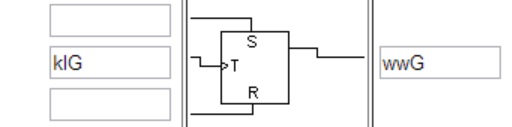
    So here’s the situation: I have a light bulb connected to the wwG output, and a button connected to the klG input.
    In the T-flip-flop, I enter

    Choosing a home automation system: Sterbox vs PLC2011A0 – reviews and experiences

    Unfortunately, this doesn’t work.
    The problem is that the bulb only lights up when I press and hold the button.

    I’d be grateful for any help.
  • ADVERTISEMENT
  • #94 12719628
    Master-Slave
    Level 10  
    Posts: 13
    Rate: 2
    You’re almost there, but you’ve got it slightly wrong because you’ve used the default settings. Note that ‘klG’ is merely a key label, and this label cannot be linked to the T flip-flop input. You cannot simultaneously connect the ‘wwG’ output (i.e. use it as a relay) and the input as ‘wwG’.
    The correct configuration is:
    Select the input/output in Sterbox to which you are connecting the button.
    In the port settings, tick the ‘input only’ box. (You can now enter the name of this input in the ‘Description’ field, and in the ‘Link’ field it’s best to come up with a name as well. Let’s say ‘light1’. Now, in the T-flipflop’s input field, enter that name, i.e. ‘light1’. In the flip-flop’s output, enter the name of the selected output to be controlled. Here too, I suggest renaming it to avoid any conflicts later. For example, “onswiat1”, and enter this exact name in the link for that output. Please remember what I wrote earlier: you cannot use the same input as an output at the same time, and vice versa.
    Then, of course, you can also select a screen key, choose the pulse function for it, and enter "swiat1" in the association. And you have control via both an external button and a key.
    Any key can be used as you wish. It is only initially assigned 1:1 to an output.
  • #95 12729183
    lokmen
    Level 12  
    Posts: 88
    Rate: 5
    Thanks, it works.

    Could you also tell me how to make the key I use to turn on the light in the hall turn off all the lights at the same time? I think I need to assign something to the letter R in the T-switch, but what exactly?

    Best regards, and sorry to bother you, but their manual is written for people with PhDs in electronics. Unfortunately, an ordinary working man has to struggle with it.
  • #96 12953467
    Frredd
    Level 13  
    Posts: 256
    Rate: 23
    Good morning,

    Can those who installed home automation systems a long time ago now, with the benefit of hindsight, share their thoughts on the matter? Would they choose the same devices again? And if not, why not? What would they do differently?
  • #97 13019273
    cinek731111
    Level 2  
    Posts: 2
    Does anyone have the PLC2011C0 working properly?
    Have you managed to get 1-Wire and Modbus TCP or UDP communication up and running, and is it working correctly?

    Please let me know. Which firmware version are you using for the controller mentioned above?
    Does anyone know where to find the firmware for the controller, as the link on the website (www.elkom.com.tw/relay_a/xxxxx.zip) isn’t working?
    Where else can this firmware be downloaded?

    Is the project still being developed, or has the Chinese developer ‘pulled a fast one’?
    If anyone has a correctly functioning version of the firmware for the controller or a link to a copy of it, please let me know.
  • #98 15806439
    mariusz.lubicz
    Level 24  
    Posts: 708
    Help: 44
    Rate: 146
    I’ve been using Modbus on the PLC2011C1 for a long time. I use it to send data from thermometers to another PLC. If you have the C0 version, all you need to do is upload the C1 firmware.
    The firmware is available here
    https://elkom.com.tw/pl/?noredirect=pl_PL
  • #99 15870345
    palacz997
    Level 12  
    Posts: 35
    Help: 1
    Rate: 2
    All the controllers have been in the PLC2011x1 version for quite some time now. The old ones have been out of circulation for ages. The newer software is packed with new features, such as conditional statements like ‘if this, then that, and otherwise something else’. Very good devices. There is also a dedicated computer for the boiler room.
  • ADVERTISEMENT
  • #100 21580897
    pnark1
    Level 1  
    Posts: 1
    Hello, I’m looking for people who currently own and use the PLC2011. It seems ELKOM went out of business a long time ago. I’d like to discuss a few things. I can share an updated APK for the latest version of Android
ADVERTISEMENT