logo elektroda
logo elektroda
X
logo elektroda
Dostępna jest polska wersja

Czy wolisz polską wersję strony elektroda?

Nie, dziękuję Przekieruj mnie tam

Choosing a home automation system: Sterbox vs PLC2011A0 – reviews and experiences

student_Wojtek 70163 99
Best answers

Which controller is better for home automation of blinds, lighting, heating and garden watering: Sterbox or PLC2011A0, and what are users’ experiences with them?

If you want the safer choice for security-related automation, users leaned toward PLC2011A0/B0; if you want more features per złoty and can live with rougher setup, many people chose Sterbox [#10704254][#9873711][#9926483] Sterbox was praised as practical, with easy basic setup, helpful vendor support, e-mail notifications, and successful use for lighting, sockets, blinds and watering [#9878411][#9880700][#10904094] But several users complained that Sterbox has poor documentation, awkward programming, limited timers, no 1Wire/PWM support, only 0–3 V analog inputs, and weak heating control unless you build logic around hysteresis and monoflops yourself [#11085199][#10722636][#11131755][#11190155][#11180320] PLC2011A0/B0 was described as having encryption, built-in buffered power supply, opto-isolated 230 VAC inputs, PC/Android software, and good fit for gates, door locks and alarm/security functions [#9873711][#9926483][#9980856] On the downside, some users still considered the PLC2011 alarm features less complete than a dedicated alarm panel, while others felt Sterbox communicated between controllers better and offered twice the capabilities for half the price [#10704254][#9926483]
Generated by the language model.
ADVERTISEMENT
Treść została przetłumaczona polish » english Zobacz oryginalną wersję tematu
  • #1 9860392
    student_Wojtek
    Level 16  
    Posts: 238
    Help: 2
    Rate: 32
    Hi
    I’m building a house and I’d like to automate it a bit.
    At first, I wanted to control the blinds, lights, heating and garden watering using a standard PLC – something like a Fatec or a Siemens... but those are expensive solutions ;/
    I’ve found something interesting:
    the Steronik PLC2011A0 programmable controller for 997 zł, which looks pretty good.
    Unfortunately, it has fewer features, but let’s say it suits me – a compromise between price and capabilities.

    Yesterday I also came across Sterbox! http://www.sterbox.com.pl/
    Similar capabilities – perhaps a bit more complicated, but the price the seller sent me is staggering... 300 PLN each, and you can expand it with more I/O

    Has anyone had any experience with these and can advise me against them or recommend them?

    Cheers in advance
    Wojtek
  • ADVERTISEMENT
  • #2 9861588
    gravess
    Level 11  
    Posts: 46
    Rate: 3
    If you're interested, I've got some Trend IQ 2xx controllers for sale, but the problem is that I can't get hold of the software to write 'SET' strategies :/
  • #3 9864783
    student_Wojtek
    Level 16  
    Posts: 238
    Help: 2
    Rate: 32
    What do you think of Hall 2007?
  • #4 9867704
    gravess
    Level 11  
    Posts: 46
    Rate: 3
    Hi, I don’t know what you’re up to, but I’m also building a house at the moment (I’m not installing roller blinds, so I can’t help there). As for the lighting, I’ve used a Lutron controller, but only on the ground floor – an open-plan kitchen and living area of 50m² with four LED lighting zones (it works really well). As for the heating, there’s underfloor heating throughout the house (a Viessmann condensing boiler and a 100-litre water tank, hot water with a circulation system); downstairs there are 6 underfloor heating zones and upstairs 5 zones; the pump in the mixer is energy-efficient with a built-in inverter.
    An electronic thermostatic valve is fitted to each valve – 15 in total, plus one main limiting valve.

    A Trend outdoor temperature sensor (which controls the water temperature throughout the heating system (i.e. limits the water temperature)) + Trend sensors in every room that control the valves.

    Everything is currently connected to two TREND controllers

    http://www.energycontrolsonline.co.uk/shop/CD/pdf/en-ta103498-uk0yr0406.pdf

    At the moment, I’m struggling to figure out exactly how to write the strategies for this system (the problem is getting hold of the software)
  • ADVERTISEMENT
  • #5 9873711
    mariusz.lubicz
    Level 24  
    Posts: 708
    Help: 44
    Rate: 146
    student_Wojtek wrote:
    The PLC2011A0 programmable controller for 997 zł, which looks quite good.
    Unfortunately, the capabilities are more limited, but let’s say it suits me – a compromise between price and capabilities.


    I bought the PLC2011A0 and PLC2011B0, and I think I’ll buy one more A0 and that’ll be it.
    I chose it because of the software for PC and Android and for security reasons, as I use it to open my front door and gates and to control the alarm.

    For example, from my mobile, I can send commands to multiple PLCs with a single button press, like macro commands, and I can define whether I’m leaving or returning.
    These are the only costs involved. Everything is built-in, including the buffer power supply. All you need is a gel battery and an RJ45 plug. You can change the input type yourself – whether 230VAC or 12-24VAC/DC – by opening the casing. You just need to set the jumpers. Both modes are opto-isolated.

    Have a look at the videos http://www.youtube.com/watch?v=gz4AQiIf2lo
    There are about 40 of them. Alternatively, contact the seller on Allegro and they’ll give you the password and IP address of a relay so you can have a go with it. It doesn’t really matter where it’s located, as the PC software acts as a real-time simulator.

    Added after 7 [minutes]:

    gravess wrote:
    Trend external temperature sensor (which controls the water temperature throughout the heating system (i.e. limits the water temperature))+ Trend sensors in every room that control the valves.

    Everything is currently connected to two TREND controllers

    At the moment, I’m struggling to figure out exactly how to write the strategies for this system (the problem is getting hold of the software)


    Simply controlling room temperatures by turning down the zones is the worst thing you can do. It’s a complete waste of energy. Underfloor heating should be balanced to ensure even heat distribution, with the valves fully open. It is the weather-compensated controller for the boiler or heat pump that should decide the rest, not the zone valves or radiator valves.
  • #6 9873831
    student_Wojtek
    Level 16  
    Posts: 238
    Help: 2
    Rate: 32
    Thanks, so I’ll read up more on the PLC2011A0 and B0.

    Tell me, is it possible, for example, to edit the software? I’d like to write it with a slightly better graphical interface.


    P.S. What sort of sensor do you have in the front door to check whether it’s locked?
    A contact sensor in the door frame?
  • #7 9876975
    student_Wojtek
    Level 16  
    Posts: 238
    Help: 2
    Rate: 32
    After speaking to the PLC211A0 sales representative, I now know everything.
    I also spoke to the Sterbox sales representative. It seems to offer more features, and costs half as much. It’s just that setting it up is a bit more complicated.

    Has nobody really set up a Sterbox before?
  • #8 9878411
    Master-Slave
    Level 10  
    Posts: 13
    Rate: 2
    I bought a Sterbox device on Allegro and set it up. It’s very practical.
    Actually, you can see what it can do on YouTube by searching for ‘STERBOX’.
    The company that sells it – I can’t remember the name, but it’s shown in the video – gave me plenty of advice and has some interesting solutions for roller blinds. It’s: poork.pl – I’ve checked it out.
    It’s also handy that it sends emails with information about completed tasks.
    And you can also send emails to it.
  • #9 9880517
    student_Wojtek
    Level 16  
    Posts: 238
    Help: 2
    Rate: 32
    Was the setup itself difficult? Was the documentation supplied with the device sufficient to get everything up and running?
  • #10 9880700
    Master-Slave
    Level 10  
    Posts: 13
    Rate: 2
    Generally speaking, getting the Sterbox up and running is no problem at all.
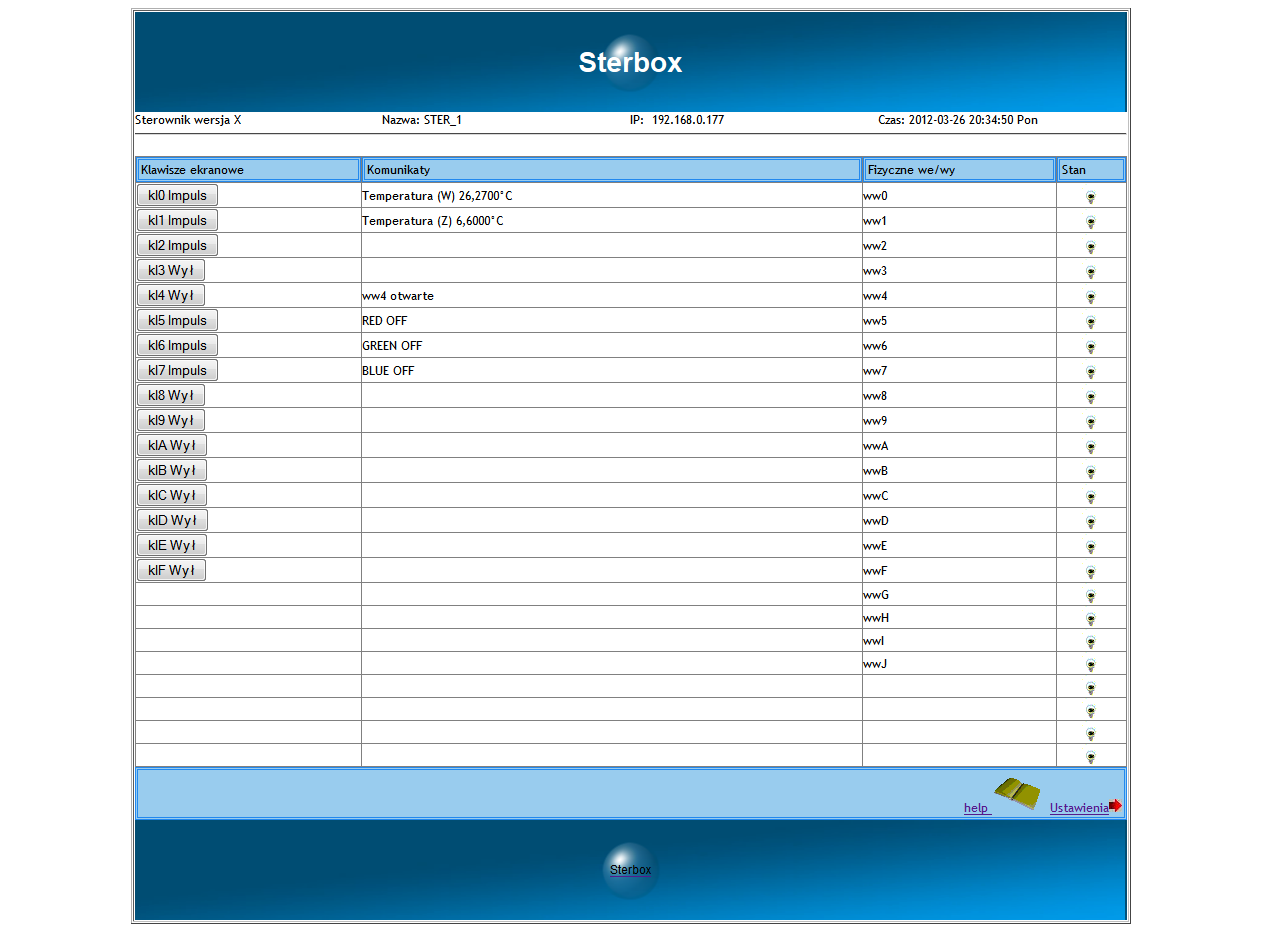
    It comes pre-configured as standard, and once switched on, you can immediately perform basic operations such as switching it on and off via the internet or a web browser.
    Once connected to the LAN, simply enter its default IP address and the login page will appear, followed by the control or settings menu.
    The rest is simply a matter of familiarising yourself with the controller.
    The manual was included on the CD.
    But it’s also available on the company’s website. You can download it and have a look.
  • #11 9905119
    mstean
    Level 2  
    Posts: 2
    Choosing a controller is always a matter of personal preference or budget, or whether you’ve had experience with them or not; in my case, I went for the Sterbox and I’m not complaining. I needed a controller to manage my garden lighting,watering and switching on the electric hot water boiler. As far as the lighting is concerned, the advantage is that you can connect any number of bell-type switches in parallel, which allows you to switch the lights on from practically anywhere, not counting the web browser, of course. I managed to set up the lighting exactly as I wanted: press once and the light comes on, press again and it goes off; but even if I don’t switch it off, it will turn off automatically after a set time.
    As for controlling the boiler, until now I’d been using a cheap controller from Allegro; in a way, it did the job, but there’s always a ‘but’ – it was set to switch on in the morning at a specific time (still on the night-time tariff) and there were no complaints about that, but the ‘but’ came in the afternoon, when the switch-on times varied and were often hard to predict. We managed to solve the problem by controlling it via email: you send an email with a pre-set message and the boiler switches on,you come home to hot water, and sending an email from a mobile phone is no problem at all and can be done anytime, anywhere; what’s more, every switch-on can be confirmed by email. And switching on the boiler at home is a huge convenience, given that you used to have to go down to the basement to turn it on, whereas now you can install a switch yourself or control it via the web. I’ll just need to find a spare moment to set it up so that once switched on, it runs for a set time in case ‘someone’ forgets to switch it off.
    You can do something similar with watering the garden, but I suppose that’s a matter for next season.
    Overall, I’m pleased with it; it offers great possibilities. I’ve got a few more uses in mind, but that’s a matter of having a bit of a play around and testing it out on those long autumn evenings.
  • #12 9910483
    Master-Slave
    Level 10  
    Posts: 13
    Rate: 2
    This Sterbox has a feature that displays pre-programmed text messages on the main screen. I’ve managed to programme it so that when I switch the device on or off, a message appears saying something like ‘living room light on’ or ‘living room light off’. It works really well. Have you perhaps tried connecting a temperature sensor to those 0-3V analogue inputs and, for example, displaying the water temperature in the boiler, so that if it exceeds a certain value, it sends an email and switches the boiler off?
    And my second question is: have you connected two Sterbox units together?
  • #13 9926483
    palacz997
    Level 12  
    Posts: 35
    Help: 1
    Rate: 2
    On the other hand, the PLC2011A0 and B0 feature a cryptographic system for securing data transmission based on an encryption accelerator. Using a standard web browser is just asking for someone to break into your home.
    If I were to control the systems responsible for property security – i.e. roller shutters, gates, door locks and alarms – I’d only go for the PLC2011
    I’ve been reading the documentation and it appears that it has inputs ready for 230V AC without additional circuits, and they’re isolated too. So, when you compare the Sterbox to the PLC2011 in terms of the number of inputs and outputs and the ability to control circuits, it works out to be the same financially.
    It depends on what is needed and by whom. The PLC1011 comes in versions A0 and B0. B0 is for measurement and alarm functions.
  • #14 9928864
    Master-Slave
    Level 10  
    Posts: 13
    Rate: 2
    The PLC2011A0 controller does indeed have encryption. However, I would disagree with you regarding the security of the Sterbox. Not because I use it myself, but because there are plenty of ways to secure a local network – which is the kind of environment it should operate in. Such encryption certainly provides additional security.
    Generally speaking, the PLC2011A0 controller is also an interesting device; I even considered it at the start. Then the financial aspect and intended use came into play, but since the Sterbox fully met my expectations, I saved a few pennies.:D . Generally speaking, one could write something about every device, but the final choice is up to the user anyway, and our descriptions on the forum are meant to help us. As you wrote, it depends on what each person needs.
  • #15 9929165
    Dinkss
    Level 12  
    Posts: 34
    Help: 1
    Rate: 2
    Has anyone here already set up the temperature sensor on this Sterbox?
  • ADVERTISEMENT
  • #16 9929292
    mstean
    Level 2  
    Posts: 2
    Dinkss wrote:
    Has anyone managed to get the temperature sensor working on this Sterbox yet?


    I’ve connected the LM35 temperature sensor and it works. The LM35 costs just a few zlotys; it can be powered from 12V, has three wires, and connecting it isn’t particularly difficult and doesn’t require any additional components.It is used in the server room where it measures the temperature; once a certain temperature is exceeded, it switches on a fan and, at the same time, sends an email about the incident.
  • #17 9956112
    lukas_t1
    Level 10  
    Posts: 6
    Has anyone here installed an IB system, for example on a Sterbox or one of the other models mentioned above? I’m asking because I’m considering one of these solutions myself, but as a beginner, I’ve got a few questions


    PS If anyone would like to read up on or help with my project, you can find me here:
  • ADVERTISEMENT
  • #18 9980856
    palacz997
    Level 12  
    Posts: 35
    Help: 1
    Rate: 2
    I have the PLC2011A0 and PLC2011B0 and I’m very happy with them. This controller has practically everything you need, so there’s no need to buy anything else – just some small gel rechargeable batteries. The buffer power supply with charging is built in. The B0 model is particularly good, and with both of them together, there’s no need to buy anything more expensive.
    http://www.elkom.com.tw/relay_b/PLC2011B0_Instrukcja_polska_036.pdf
  • #19 10637939
    Zibiland
    Level 13  
    Posts: 179
    Rate: 12
    palacz997 wrote:
    I have the PLC2011A0 and PLC2011B0 and I’m very happy with them. This controller has practically everything you need, so there’s no need to buy anything else. Just some small gel rechargeable batteries. The buffer power supply with charging is built in. The B0 model is particularly good, and with both of them together, there’s no need to buy anything more expensive.
    http://www.elkom.com.tw/relay_b/PLC2011B0_Instrukcja_polska_036.pdf


    Could you send me details of how you connected the roller shutter and garage door controls?
    I’m interested in the option to open/close all the roller shutters and open/close the balcony roller shutter.
    I’m also interested in one more thing: what happens if the controller breaks down? How do I open the roller shutters and switch on the lights, etc.?
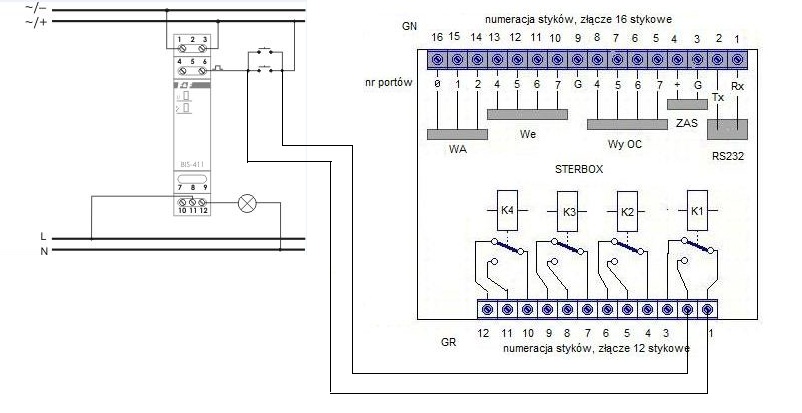
    I know that the PLC2011A0 controller can function as a staircase light switch, and we are setting up the system in the same way as for a staircase installation, except that the final component is the controller’s relay.
  • #20 10639214
    Ligi
    Level 11  
    Posts: 16
    I’d also like to ask for a wiring diagram for connecting the controller to the roller shutters and the gate. I’d like to be able to control each roller shutter individually using switches and the controller, and also have a single switch that closes all the roller shutters. I’d also like to control the lighting and the entrance gate. If anyone could send me a diagram so I know how to wire it up at home and how many controllers I need to buy, I’d be very grateful.
  • #21 10703163
    Zibiland
    Level 13  
    Posts: 179
    Rate: 12
    Ligi wrote:
    I’d also like to ask for a wiring diagram for connecting the controller to the roller shutters and the gate. I’d like to be able to control each roller shutter individually using switches and the controller, and also have a single switch that closes all the roller shutters. I would also like to control the lighting and the entrance gate. If anyone could send me a diagram so that I know how to connect it at home and how many controllers to buy, I would be very grateful.


    I was also looking for a solution like this, and following discussions with Mr Piotr Modrzejewski from POORK, diagrams showing various ways of connecting roller shutters have been posted on the website http://www.sterbox.eu/instrukcje/Rolety_silnik.pdf. The same will apply to gates and similar devices.

    I am interested in a slightly different connection option, namely connecting the roller shutters and lighting in such a way that, in the event of a controller failure, manual control via buttons is possible. To implement this idea for the lighting, I routed everything through bistable relays, with the controller’s relay acting as one of the switches.
    Choosing a home automation system: Sterbox vs PLC2011A0 – reviews and experiences .
    This setup allows me to switch the lighting on using the buttons or remotely, e.g. via a phone.
    The problem I need to solve is sending a signal to the controller that the light has been switched on via the button and is now lit. The same applies to switching it off. I was thinking of sending a signal to the input, but I still need to work that out. If anyone has another idea, I’d be grateful for suggestions.

    In the case of the roller blinds, I wanted local control via buttons, central control via a button, and remote control via a mobile phone, etc. The concept is already in place; I just need to draw it up.
  • #22 10704254
    Anonymous
    Anonymous  
  • #23 10722636
    ghost-001
    Level 11  
    Posts: 18
    Choosing a home automation system: Sterbox vs PLC2011A0 – reviews and experiences

    Hello

    I own a Sterbox with RS485 and I use it more as a bit of a toy.
    In my humble opinion, it has many shortcomings and flaws:
    - it does not support the 1Wire bus
    - no PWM control
    - analogue inputs are only 0-3V instead of 0-10V, which also ‘have a mind of their own’ – i.e. the values fluctuate, and even inputs with nothing connected to them already display some value, like a cheap multimeter
    - programming involves navigating through numerous web browser windows and using logical operators
    I contacted a representative regarding the introduction of 1Wire and PWM support, but unfortunately they have other priorities.
    They were also supposed to improve support for analogue inputs in the new software version, but I haven’t noticed any difference in how the LM335 temperature sensor is handled.
    Whilst playing around with it, I spotted numerous shortcomings, ranging from typos to strange behaviour after using certain functions

    Perhaps they will fix the issues I’ve mentioned above in software version 3.x.x.

    Best regards
  • #24 10723735
    Anonymous
    Anonymous  
  • #25 10724123
    ghost-001
    Level 11  
    Posts: 18
    I also asked these questions on their YouTube channel; some of them have been answered there.
    Link
    I won’t quote the email correspondence; there’s quite a lot of it.
  • #26 10904094
    Zibiland
    Level 13  
    Posts: 179
    Rate: 12
    I’ve installed a total of two Sterbox systems that control the lighting, sockets, blinds and garden watering (I haven’t set that up yet) – 24 relays in all – and I’ve got no complaints. As for the setup, it is indeed a problem for a layman. The manufacturer is very helpful and assists in resolving any issues.
    I’m currently planning to buy two more for controlling the heating. I had a problem with the setup, but Mr Piotr quickly sent me instructions on what to do and how to set it up.
  • #27 10918885
    mariusz.lubicz
    Level 24  
    Posts: 708
    Help: 44
    Rate: 146
    student_Wojtek wrote:
    Thanks, so I’ll read up more on the PLC2011A0 and B0
    Tell me, is it possible, for example, to edit the software? I’d like to write it with a slightly better graphical interface.


    After all, there are DLL libraries for several programming languages. You can create whatever user interface you like and send it a command from the programme. I’m currently writing in C#. It’s dead simple:

    First, we process the password once by concatenating the password and salt strings and calling a single function:

    
    EL_process_password(textBox1.Text + textBox2.Text); // This executes the key expamsion and all SHA256 stuff


    Then, for example, we send states to the inputs and outputs using the appropriate code 0x01, 0x02, 0x05 etc., depending on what we want to do:

    
    EL_send_a
    (
      (byte)'A',                               // Device type we send the command to
      0,                                       // Delay command by 0 to 255 seconds (delay is inside the PLC)
      textBox3.Text.Trim(),                    // String IP Address of the relay ex: "10.0.5.100"
      Convert.ToInt32(textBox4.Text.Trim()),   // Int UDP port of the relay ex: 27136
      1000,                                    // Transmit timeout over the network in miliseconds
      "Central European Standard Time",        // The name of the standard timezone where the relay is located
      0x01, 0x01, 0x01, 0x01, 0x01, 0x01,      // byte: INPUT1, INPUT2...INPUT6
      0x01, 0x01, 0x01, 0x01, 0x01, 0x01, 0x01 // byte: RELAY1, RELAY2...RELAY7
    );


    And it’s sent to the device. The DLL handles the networking, encryption and all the sending and receiving. And what’s above is our only interaction with the hardware.
    I’m currently learning to code in C#, but there are also DLLs available for Delphi and C++.
    I don’t need to worry about variables containing passwords and keys, as the DLL takes care of that.
    Actually, I mainly create my own graphics. I’m very happy with it.
  • #28 10919183
    palacz997
    Level 12  
    Posts: 35
    Help: 1
    Rate: 2
    mariusz.lubicz wrote:

    After all, there are DLL libraries for several programming languages. You can create whatever user interface you like and send it a command from the programme. I’m currently writing in C#. It’s dead simple:


    What language is it programmed in? How much do the programming tools cost? Could you write a bit more about the programming? Where do the examples you’re giving come from?
  • #29 10961820
    Zibiland
    Level 13  
    Posts: 179
    Rate: 12
    Does anyone use the PLC2011A0 or PLC2011B0 for heating control, and could you share how it works for you?

    I’ve had no luck with my Sterbox in this regard; it can switch on the boiler and other devices, but I can’t, for example, programme several different temperatures throughout the day. There’s no smooth way to adjust the temperature, and it’s limited to just three analogue sensors :( .

    I am looking for another solution for the following requirements:
    Gas boiler heating.
    There are central heating distribution units on both the ground floor and the first floor, with solenoid valves fitted on each circuit (5 circuits each). Every room has a temperature sensor.
    I am looking for a controller – two in total – which will switch the solenoid valves on or off based on the set temperature in a given room and allow several temperatures to be set throughout the day, e.g.
    06:00-08:00 – temp. 21°C
    08:00–15:00 – temp. 18°C
    15:00–22:00 – temp. 21°C
    22:00–06:00 – temp. 18°C
  • #30 11041263
    palacz997
    Level 12  
    Posts: 35
    Help: 1
    Rate: 2
    Zibiland wrote:
    Does anyone use the PLC2011A0 or PLC2011B0 for heating control, and could you tell me how it works?


    I’ve just switched over the system. I’m currently in the process of refurbishing the boiler room and the automation system. I’ve set it up so that it uses two thermostats with the PLC2011B0. All I can say is that you can set a normal temperature and a reduced temperature, the so-called night-time reduction. You can also exclude an additional 3 time slots from normal heating to reduced heating. Everything can be programmed there. The best part is the internet integration.

    And here is a diagram showing how to build and connect the lighting circuit so that you still have light in the event of an electronics failure. An interesting diagram, I recommend taking a look:

    http://www.elkom.com.tw/m/PLC2011A0_PLC2011B0_PLC2011C0_circuits.pdf
    Attachments:
    • PLC2011A0_circuits_lights01.pdf (169.68 KB) You must be logged in to download this attachment.
ADVERTISEMENT