logo elektroda
logo elektroda
X
logo elektroda
Dostępna jest polska wersja

Czy wolisz polską wersję strony elektroda?

Nie, dziękuję Przekieruj mnie tam

Choosing a home automation system: Sterbox vs PLC2011A0 – reviews and experiences

student_Wojtek 70163 99
Best answers

Which controller is better for home automation of blinds, lighting, heating and garden watering: Sterbox or PLC2011A0, and what are users’ experiences with them?

If you want the safer choice for security-related automation, users leaned toward PLC2011A0/B0; if you want more features per złoty and can live with rougher setup, many people chose Sterbox [#10704254][#9873711][#9926483] Sterbox was praised as practical, with easy basic setup, helpful vendor support, e-mail notifications, and successful use for lighting, sockets, blinds and watering [#9878411][#9880700][#10904094] But several users complained that Sterbox has poor documentation, awkward programming, limited timers, no 1Wire/PWM support, only 0–3 V analog inputs, and weak heating control unless you build logic around hysteresis and monoflops yourself [#11085199][#10722636][#11131755][#11190155][#11180320] PLC2011A0/B0 was described as having encryption, built-in buffered power supply, opto-isolated 230 VAC inputs, PC/Android software, and good fit for gates, door locks and alarm/security functions [#9873711][#9926483][#9980856] On the downside, some users still considered the PLC2011 alarm features less complete than a dedicated alarm panel, while others felt Sterbox communicated between controllers better and offered twice the capabilities for half the price [#10704254][#9926483]
Generated by the language model.
ADVERTISEMENT
Treść została przetłumaczona polish » english Zobacz oryginalną wersję tematu
  • #61 11108667
    Master-Slave
    Level 10  
    Posts: 13
    Rate: 2
    As for the timers, the answer is very simple. You cannot set Timer 1, Clock 2 and Clock 3 to just one output. It’s as if we’d connected a mechanical switch, then fed a ‘1’ from it, and wanted to remove that ‘1’ using a second mechanical switch, with the switches connected in parallel.
    OR macrocells are used for this configuration. We feed the clocks into their inputs and the output is assigned to just one of the above-mentioned outputs, remembering to remove the link to the Sterbox key, otherwise the phenomenon described above will persist.
    Someone previously wrote that you have to use predefined terms like ww0 etc.
    That is completely untrue. Instead of ww0 or other designations, you can enter your own names suggesting what they are intended for.
    One more thing regarding timers: a single timer can trigger monoflops in which we set the time. With a simple configuration using monoflops and NOT gates, we can set several time intervals.
    When I read the comments on the forum, :idea: it makes my hair stand on end to see people, out of ignorance, describing and criticising something they haven’t properly understood. This doesn’t apply to everyone, as some of the comments are very sensible.
    I have been using Sterbox units for over a year now. I have also installed quite a few of them and have neither seen nor experienced such problems.
    Warm regards to everyone.
  • ADVERTISEMENT
  • #62 11108682
    palacz997
    Level 12  
    Posts: 35
    Help: 1
    Rate: 2
    Master-Slave wrote:
    As for the timers, the answer is very simple. You cannot set Timer 1, Clock 2 and Clock 3 to just one of the above outputs. It’s as if we’d connected a mechanical switch, then sent a ‘1’ signal from it, and wanted to remove that ‘1’ using a second mechanical switch, with the switches connected in parallel.


    Somehow, in PLC2011, this can be done without any trouble. PLC2011 offers both event-driven control and continuous, linear control. You can connect several events to a single output and even take manual control if you don’t like the fact that something is currently switched on when you don’t want it to be; it will revert automatically at the next event.
  • #63 11108748
    Master-Slave
    Level 10  
    Posts: 13
    Rate: 2
    Well, this just goes to show that you’re having trouble with the Sterbox device, as you haven’t even read what I wrote properly. You write: You can connect several events to a single output and even take manual control if you don’t like it. And that’s exactly what I wrote: that by using OR macrocells, you can perform precisely such a task. That is, manually control timers and other logic elements via a single output.
    But there’s no point wasting a Sunday on writing this. Something made me want to respond to all these accusations. I have no intention of promoting Sterbox or other controllers, which are also great and do the job. Even this PLC2011 is fine.
    I’ll pop back onto the forum sometime to see how things are going.
    Best regards.
  • #64 11108818
    neodym
    Level 14  
    Posts: 90
    Help: 2
    Rate: 36
    Polikon wrote:
    Zibiland
    I checked the code to see what is being downloaded from the internet and it turned out that the GIFs indicating the status of the outputs are downloaded from http://www.zetkom.com.pl/temp/bu.gif and http://www.zetkom.com.pl/temp/zof.gif
    http://www.zetkom.com.pl/temp/st.gif
    And now, if you don’t have an internet connection, you have no control over the status of individual outputs.


    That’s a deal-breaker. How can a device designed to protect property reveal its installation location to the SELLER? Perhaps it also sends some statistics ‘anonymously’ – go and check. And web access without SSL, of course? And even if there were SSL, who would pay for a certificate from VeriSign? Without an SSL certificate, it’s useless. Besides, it’s easy to trick a browser and redirect the user to a page where they enter their login details. This device isn’t worth the hassle.
    I mean, inside a building, without internet connectivity, it might be of some use, but as a device controlled via the internet, it’s a failure. And then there’s the lack of those timer functions...
  • #65 11109331
    Polikon
    Level 14  
    Posts: 179
    Help: 1
    Rate: 28
    Zibiland
    Everything would make sense, except that the device description makes no mention of the lack of control over the outputs from a PC if the Sterbox isn’t connected to the internet. It looks as though the user is being forced to share their internet connection with this device.
    Last night, I had a situation where I had an internet connection and the Sterbox was trying to force a restart of the modem.
    And what will happen in a few years’ time if (knock on wood) the company goes bust and there’s no website from which to download the icons? Or perhaps a potential user didn’t plan to connect it to the internet. There should be an option to install an application to control the Sterbox from a PC independently of the internet.
    Or I set up the Sterbox exactly as described here http://www.zetkom.pl/sterbox/p4.html and it doesn’t work. (I’m currently in the process of setting up this example.)
    This seems like a complete disregard for the potential buyer.
    I won’t even mention programming this marvel. No one could have come up with a more complicated procedure. If you’re not a digital specialist, you’ve got little chance of setting this thing up correctly and reasonably quickly.
    All it would take is a small program where you could configure the elements to be downloaded from the libraries; the program would test the layout and you could send it to the device with a single click. Sales of such a device would certainly be higher if anyone could program it easily. Not to mention young people learning digital technology. After all, it would be fun for whole evenings.
    As I wrote earlier, we like to make life difficult for ourselves.
    I’ll try to create my own website based on the original Sterbox code and use it to control the Sterbox. I’ll have a look at those Android and iPhone apps and maybe cobble something together for the PC.

    Added after 19 [minutes]:

    Master-Slave wrote:
    As for the timers, the answer is very simple. You cannot set timer 1, clock 2 and clock 3 to just one output. It’s as if we’d connected a mechanical switch, then sent a ‘1’ signal from it, and wanted to remove that ‘1’ using a second mechanical switch, with the switches connected in parallel.
    OR macrocells are used for this configuration. We feed the clocks to their input and the output is assigned to just one of the above-mentioned outputs, remembering to remove the link to the Sterbox key, otherwise the phenomenon described above will persist.
    Someone previously wrote that you have to use predefined terms like ww0, etc.
    That is completely untrue. Instead of ww0 or other designations, you can enter your own labels suggesting what they are intended for.
    One more thing regarding timers: a single timer can trigger the monoflops in which we set the time. With a simple configuration using monoflops and NOT gates, we can set several time intervals.
    Reading through the forum posts, :idea: it makes my hair stand on end to see people, out of ignorance, describing and criticising something they haven’t properly understood. This doesn’t apply to everyone, as some of the comments are very sensible.
    I’ve been using Sterbox units for over a year now. I’ve installed quite a few of them and haven’t encountered any such problems.
    Best regards to everyone.

    Thanks for the information regarding the timers. But I connected the timers to an OR gate (as the Sterbox service technician suggested) and that didn’t work either. Although I did manage to get one circuit working with two timers, obviously with the help of an OR gate and a generator.
    Two clocks control one relay and, at the same time, the generator, which controls the second relay. On the other hand, the fact that one clock sends a 0 because it’s switched off and the other sends a 1 because it’s switched on. That will cause a conflict. I’m not an IT specialist, but this makes sense. What doesn’t make sense is what’s on this page http://www.zetkom.pl/sterbox/p4.html, and I think an IT specialist is suggesting this? There you have two clocks connected to a single ww7 output.

    If anyone has any leads on the input and output state diagrams for these macrocells from Sterbox, I’d be grateful. Because how can you configure something if you don’t know how a particular gate behaves?

    Added 1 [hour] ago 29 [minutes]:

    Master-Slave
    You’ve put me on the right track. The mistake I made when routing the clocks to the OR macrocells was that I routed six clocks to two OR macrocells and to a relay, whereas it was supposed to be such that the output from the two macrocells was to be routed to the next macrocell and only then to the relay.
    I don’t know, maybe I’m a masochist. Because I’ve been working on this for three nights now and almost the whole day today, with breaks of course. But I have another task. I have two automatic circuits set up and I’d like to be able to switch them on using keys, and additionally, using two keys independently of the automatic circuit, to switch these relays on manually.
  • #66 11110058
    jestam
    Automation specialist
    Posts: 1794
    Help: 210
    Rate: 144
    palacz997 wrote:
    "If the FPGA fails to decrypt the data correctly and cannot find the digital signature of the data and the current time stamp, it ignores the incoming data entirely. You could send it the entire internet over Ethernet, byte by byte, because there are 2 to the power of 256 combinations and the chance of hitting the correct sequence is zero.
    The FPGA is a cryptographic accelerator; once programmed, its contents cannot be changed because the FPGA uses antifuse technology. Please google the word ‘antifuse’ and read up on it....”

    Of course, there are no errors in this FPGA, because it uses antifuse technology. And the TCP/IP stack is handled by dwarves. Oh well...
  • #67 11110123
    Polikon
    Level 14  
    Posts: 179
    Help: 1
    Rate: 28
    Master-Slave
    Just one small suggestion, but look how much it can help. I’ve already set up the keys to manually switch the automatic system on and off, and to switch the same circuit on and off independently of the automatic system.
    Based on the example suggested earlier on the manufacturer’s website (I think) of connecting timers on a virtual wire, I assumed that the outputs of the individual components of this device were isolated backwards. Just as I use such isolation with diodes when I create bypasses in computer-controlled machines. If I want to be able to switch a relay on manually, because I can’t do it from the computer, I route the signal from the computer and from my „left-hand’ source through diodes, and I’m sure I won’t burn anything out in the computer’s output circuit.
    If they’d used this sort of isolation in this Sterbox, just think how many gates we could save.
    Now for the next task.
    Create my own website to control the Sterbox, something like this Android app but for the lift.
  • ADVERTISEMENT
  • #68 11115508
    Polikon
    Level 14  
    Posts: 179
    Help: 1
    Rate: 28
    Zibiland wrote:

    I created my own control app and got exactly what I wanted. It’s all based on HTML files.

    Couldn’t you share that app? Why reinvent the wheel?

    I’ve just bought this little gem, the LAN Controller; it’ll be with me in two weeks, so I’ll have a play with it.
    I don’t have a specific use for it yet, but it’s fun to play around with.

    Today I struggled a bit with my own Sterbox website and the buttons are working now, but I’d like them to change so you can see the status of a given output.
    Does anyone have any ideas??
    Added 20-07-2012

    I’ve noticed that even the manufacturer (or perhaps just the distributor) doesn’t include confirmation of a command’s execution in their mobile apps. (I’m not talking about connecting to Sterbox from a phone and using its internal interface.) And in the promotional videos, they seem to avoid showing what appears on the tablet after the ‘executing’ icon.
    I was thinking of some sort of overlay for the original Sterbox website.
    What do you think of that?

    And one more thing.
    I need to correct what I wrote earlier, that without the internet we don’t get confirmations in the form of lights on the Sterbox’s internal screen.
    We do get confirmations, you just have to wait a bit; the same applies to the settings tabs. You need the patience of a saint to wait for all the icons to appear on a tab, e.g. the one with macrocells. And given that every time we change something, we have to apply the „save„ command individually to each item", if we don’t have internet access, we (at least I) need to stock up on some Relanium.:) ))
  • #69 11131755
    Polikon
    Level 14  
    Posts: 179
    Help: 1
    Rate: 28
    ghost-001 wrote:
    I also asked these questions on their YouTube channel; some of them have been answered there.
    Link
    I won’t quote the email correspondence; there’s quite a lot of it.


    I suppose they were getting too much flak, because the message „Commenting on this video is disabled” appeared. Under all the videos featuring Sterbox.

    Apart from that, I’ve had a go with this marvel and can, in all conscience, advise against using Sterbox to control a home.
    In my opinion, Sterbox was created solely to make money. It has very little to do with a smart home. A central heating boiler is a basic necessity and quite expensive to run. And what does Sterbox offer in terms of the boiler? Just switching it on and off and viewing the temperature – not to be confused with temperature control. The inability to set a setpoint hysteresis rules out any form of temperature regulation.
    And here’s another interesting example.
    Let’s say I’ve connected a boiler (with its own electronics) to the Sterbox.
    I’m going away with my family for a few days; I leave the house and click on the panel to switch off the boiler.
    My wife comes out (women usually come out later) and thinks she needs to switch off the boiler, so she clicks on the boiler icon. And she thinks she’s switched off the boiler. But in fact, she has switched it on. You might say ‘blonde’, but I’d say that those who designed the Sterbox and its software are blondes with a capital B.
    How can you design a control panel without any confirmation that the command has been executed?
    I leave the basement, close the door, walk over to the panel, switch off the light, and who can guarantee that the light has actually gone out?
    You could write a whole thesis on the flaws of this marvel.
    Sterbox is useful for practising if, when designing your own smart home, you want to avoid mistakes and unnecessary purchases.
  • #70 11171493
    szumi
    Level 11  
    Posts: 13
    Polikon, what you’re writing just shows a lack of familiarity with this controller and a complete lack of knowledge about electronics.
    I’ve set up several Sterbox units and I’ve got no complaints about any of them.

    Compared to other controllers that are expensive and incomparably difficult to programme, Sterbox is brilliant and works exactly as you want and are able to programme it.

    I control the boiler via Sterbox, and it is precisely the hysteresis that allows the boiler to switch on and off according to the set temperature (you can’t programme this, yet you’re acting all clever).

    Let your blonde wife take a look at the control panel and see if the FURNACE is ON or OFF; what’s more, in the new version of Sterbox, the BACKGROUND changes when the switch is turned on.
    But then again, what can you expect from your wife when you...

    Sterbox obviously monitors the status, which you should know; the status of each input and output is displayed in three places (the ON/OFF button, the button’s background, and the status light). This is yet another example of your lack of knowledge about Sterbox.

    In a word, you know nothing about this device called Sterbox.
    You don’t know how to approach this, and it isn’t ‘Plug and Play’
    People like this, who can’t do anything but just whinge and complain, are simply ‘amateurs’ who take it out on the device because they can’t programme it.

    Mr Piotr from Sterbox support provides very helpful tips and advice, and sometimes even sends ready-made screenshots showing how to programme something, but if someone doesn’t know how to go about it, they can just play around with the lighting in the room they’re sitting in, just like you.
    I use this device myself, and when I see what you and others are writing, it really gets my blood boiling.
    I’ve also installed other controllers and know a thing or two about them. First and foremost, this is a PLC controller, not a smart home controller like the typical gadgets found in smart homes. You have to create the ‘INTELLIGENCE’ yourself from the PLC controller, and in this case, it can be highly advanced. There are no rigid schemes here; you are limited only by YOUR OWN INTELLIGENCE.
  • #71 11171911
    Polikon
    Level 14  
    Posts: 179
    Help: 1
    Rate: 28
    Have you actually thought about what you’ve written?
    I’ve got a feeling that this Mr Piotr is actually you (he only just got back from holiday yesterday and a post appeared straight away), and you’re promoting this controller so heavily.

    szumi wrote:
    Blondynka’s wife should take a look at the Control Panel and see if the HEATER is ON or OFF; also, in the new version of Sterbox, the BACKGROUND changes when the switch is turned on.
    Well, what can you expect from a wife when you ......
    I was writing about the Android app, and there’s no way to check what’s currently switched on.
    szumi wrote:
    I control the boiler via Sterbox, and it is precisely the hysteresis that allows the boiler to switch on and off according to the set temperature (you can’t programme it, yet you’re acting all clever).
    I figured that out too, after many attempts. Because the manual doesn’t even mention hysteresis. And from what I, as a layman, understand, hysteresis means the difference between the moment of switching on and switching off. Try entering „set H” a difference of 5 degrees. You’ll see what happens.
    szumi wrote:
    Compared to other controllers which are expensive and incomparably difficult to program, Sterbox is brilliant and works exactly as you want and are able to program it.
    You’re right about that. A controller like the APB-24MRDL 12-24V (net price: 499 PLN) is very „difficult” to configure. You have an app where you can set up and test almost anything you can think of. And you don’t need to connect anything to the controller to check whether a particular setup will work, given the poorly labelled and incorrectly described inputs and outputs in the manual. Add to this the Sterbox’s very limited resources compared to other controllers, and the Sterbox doesn’t hold a candle to them. One drawback of the controller I gave as an example (APB-24MRDL 12-24V) is the lack of LAN support.
    szumi wrote:
    In a word, you know nothing about this device, the Sterbox.
    You don’t know how to approach this, and it isn’t ‘Plug and Play’
    People like that, who can’t do anything but just whinge and complain, are simply ‘laymen’ who take it out on the device because they can’t programme it.
    That’s exactly as you wrote „In a word”, if someone selling a device completely ignores the need to write a reliable and accurate user manual, they must expect reactions such as my posts regarding the Sterbox.
    I’ll give you two examples from the manual.
    Monostable flip-flops. Quote: “After a rising edge trigger is applied to the input, the flip-flop changes its state to a logical one for a specified time. The condition is that a reset signal must be maintained at the inputs.” Applying a rising edge trigger to the input again extends the output pulse by a certain time. Applying a logic 1 to the reset input sets the output to 0 and resets the timer.”
    What should be maintained at the reset inputs: a logical one, a zero, or something else?
    Or here.
    Choosing a home automation system: Sterbox vs PLC2011A0 – reviews and experiences
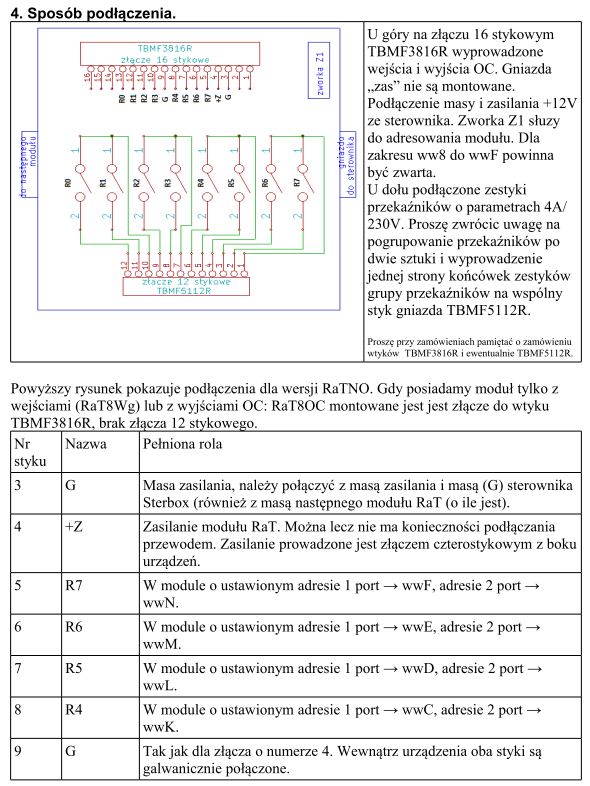
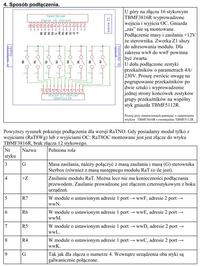
    And now I’m reading Pin No. 7, Name R5. And in the diagram, does pin 7 correspond to a name? None, because it’s a relay input. Pin No. 8, Name R4. And in the diagram, R3.
    Quote from the description of pin 5: “In a module with address 1 set to wwF port, address 2 set to wwN port”
    And how can one trust the manual when, in the diagram, all relay inputs are labelled as 1 and outputs as 2?.

    The user manual is essential, especially for devices like these. And I’m not surprised that Mr Piotr is inundated with emails. As he wrote to me himself.

    Added after 1 [hours] 9 [minutes]:

    And I’ll stoke the fire ‘cos it’s cold
    As a complete novice, I read the manual and put together the appropriate circuit, assigning the circuit’s output to the first contact (no. 2) of the relay marked R7 on the additional module. And using the manual for the module I have, I find out that this port is assigned to the name wwF. I check the circuit’s operation, and it doesn’t work. So I check and check, and after studying the manuals for other modules, it turns out that it’s not wwF but ww8, and the circuit started working.
    I’m now at the stage of finding the correct inputs so as not to burn anything out.
  • #72 11175213
    Polikon
    Level 14  
    Posts: 179
    Help: 1
    Rate: 28
    szumi wrote:
    I control the boiler via Sterbox, and it is the hysteresis setting that allows the boiler to switch on and off according to the set temperature (you can’t programme it yourself, yet you’re acting all clever).
    You say you have the boiler connected to Sterbox.
    I’m trying to achieve a delayed switch-off of the circulation pump so that, after the boiler has switched off completely, the pump continues to run for a specified time. The aim is to extract heat when the timer switches off the boiler, whilst it is still heated to the maximum set temperature.
    Could you let me know how you solved this?
  • #73 11180113
    szumi
    Level 11  
    Posts: 13
    Polikon wrote:
    Have you actually thought about what you’ve written?
    I have a feeling that this Mr Piotr is actually you (he only just returned from holiday yesterday and a post appeared straight away) and you’re promoting this controller so heavily.


    I have a feeling it’s NOT YOU, you’re writing such nonsense.
    I rang Mr Piotr specifically to find out when he’d returned, and it turned out he was abroad until Saturday inclusive; yet it seems to me you’re doing everything you can to DAMAGE the reputation of this device.
    I already know Mr Piotr personally because I live in Warsaw and have visited them several times, and I think that both the controller and the support are fine.
    Polikon wrote:

    szumi wrote:
    Blondynka’s wife should take a look at the Control Panel and see if the HEATER is ON or OFF; additionally, in the new version of Sterbox, the BACKGROUND changes when the switch is turned on.
    Well, what can you expect from your wife when you ......
    I was writing about the Android app, and there’s no way to check what’s currently switched on.
    [/quote]
    The Android app is an Android app, whereas Sterbox isn’t fully compatible with Android; perhaps one day it will display the status on third-party apps (I’m waiting for that myself and I know they’re working on something in that direction).

    Polikon wrote:

    szumi wrote:
    I control the boiler via Sterbox and it is Hysteresis that allows the boiler to switch on and off according to the set temperature (you can’t programme it but you’re acting all clever).

    I figured that out too, after many attempts. Because the manual doesn’t even mention hysteresis. And from what I, as a layman, know, hysteresis means the difference between the moment of switching on and off. And try entering a difference of 5 degrees in the ‘set H’ field (on the Sterbox). You’ll see what happens.

    And it works exactly like a heating controller: if you enter 21°C to 23°C, the high state will appear below 21°C and remain up to 23°C, and conversely, if the temperature drops, the heater will switch on below 21°C.
    That’s the whole philosophy of hysteresis.
    szumi wrote:

    Compared to other controllers which are expensive and incomparably difficult to programme, Sterbox is brilliant and works exactly as you want and are able to programme it.
    Polikon wrote:
    Yes, you’re right there. A controller like the APB-24MRDL 12-24V (net price: 499 PLN) is very ‘difficult’ to set up. You have an app where you can configure and test almost anything you can think of. And you don’t need to connect anything to the controller to check whether a particular setup will work, given the poorly labelled and incorrectly described inputs and outputs in the manual. Add to this the very limited resources of the Sterbox compared to other controllers, and the Sterbox doesn’t hold a candle to them. One drawback of the controller I gave as an example (APB-24MRDL 12-24V) is the lack of LAN support.

    I am not familiar with this controller, but the drawback you mentioned (lack of LAN) already rules it out of my circle of interest in it.
    And LAN in a Sterbox is not only very useful for controlling it via, say, a phone, but it also allows you to send commands between Sterboxes, which opens up a lot of possibilities.
    Quote:

    szumi wrote:
    In a word, you know nothing about this device called the Sterbox.
    You don’t know how to go about it, and it’s not exactly ‘plug and play’.
    People like that, who can’t do anything but moan and complain, are simply ‘amateurs’ who take it out on the device because they can’t programme it.
    That’s exactly as you wrote „In a word”, if someone selling a device completely ignores writing a reliable and correct user manual, they must expect reactions such as my posts regarding the Sterbox.
    I’ll give you two examples from the manual.
    Monostable flip-flops. Quote: „After a rising edge trigger is applied to the input, the flip-flop changes its state to a logical one for a specified time. The condition is that a reset signal must be maintained at the inputs. Applying a rising edge trigger to the input again extends the output pulse by a certain time. Applying a logic 1 to the reset input causes the output to be set to 0 and the timing to be reset.”
    What is supposed to be maintained at the reset inputs – a one, a zero or something else?

    I’ve set this up many times and it always works.
    You’re probably making some basic mistakes somewhere, since so many of the functions aren’t working for you.
    Mate, a monostable flip-flop has a reset for this very reason: as you wrote above, applying a ‘1’ to the reset input causes a reset.
    If it’s “0”, the reset does nothing. So 0 is maintained.
    Quote:

    Or here.
    Choosing a home automation system: Sterbox vs PLC2011A0 – reviews and experiences
    And now I’m reading: Pin No. 7, Name R5. But in the diagram, does pin 7 correspond to a name? None, because it’s a relay input. Pin No. 8, Name R4. But in the diagram, it’s R3.
    Quote from the description of pin 5: “In a module with address 1 set to port wwF, address 2 set to port wwN”
    And how can one trust the manual when, in the diagram, all relay inputs are labelled as 1 and outputs as 2?

    Somehow it didn’t bother me; everything is going according to plan and I check things for myself anyway.
    Quote:

    The user manual, especially for devices like this, is essential. And I’m not surprised that Mr Piotr is inundated with emails. As he wrote to me himself.

    Added after 1 [hours] 9 [minutes]:

    And I’ll stoke the fire ‘cos it’s cold
    As a complete novice, I read the manual and put together the appropriate circuit, assigning the circuit’s output to the first contact (no. 2) of the relay marked R7 on the additional module. And using the manual for the module I have, I find out that this port is assigned to the name wwF. I check the circuit’s operation, and it doesn’t work. So I check and check, and after studying the manuals for other modules, it turns out that it’s not wwF but ww8, and the circuit started working.
    I’m now at the stage of finding the correct inputs so as not to burn anything out.

    With all due respect, if finding 5 or 8 inputs is a problem for you, you really shouldn’t be touching electrical equipment, or your house might just blow up.

    That’s why you’re having trouble; to create a function in a PLC, you need to know how it works.
    That’s why I think you’re showing off too much and YOU’RE SPOUTING NONSENSE !

    HARMING the reputation of a great device
    – I’ve come to realise This controller works pretty well, and I can do all sorts of things with it so easily and quickly that I’m actually quite pleased with it.

    Since all your problems stem from your lack of knowledge about how to program it! Perhaps you should seek professional help from someone who knows a bit about electronics and stop talking nonsense.

    Added after 45 [minutes]:

    Polikon wrote:
    szumi wrote:
    I control the boiler via Sterbox and it is precisely the hysteresis that allows the boiler to switch on and off according to the set temperature (you can’t programme this but you’re acting all clever).
    You say you have the boiler connected to the Sterbox.
    I’m trying to achieve a delayed switch-off of the circulation pump so that, after the boiler has switched off completely, the pump continues to run for a set period of time. The aim is to extract heat when the timer switches off the boiler, whilst it is still heated to the maximum set temperature.
    Could you please explain how you solved this?


    You want to do something – you don’t know how, so you’re slagging off the product because of your own incompetence .

    It’s not Plug and Play.

    I don’t use anything like that myself.

    Use a monostable flip-flop to delay the pump switch-off.
  • #74 11180320
    pmmisiek
    Level 15  
    Posts: 234
    Help: 7
    Rate: 4
    Hello,

    @szumi, I see you know the Sterbox quite well.

    Is this controller suitable for controlling heating?
    From the post above, I can see that the hysteresis can be set after all. The question is whether it’s possible to lower the temperature, for example, after arming the alarm (using the output from the control panel). I’ve also heard that newer Sterbox units will have more analogue inputs, which would make them even better suited for controlling heating.

    Regards.
  • #75 11180433
    Polikon
    Level 14  
    Posts: 179
    Help: 1
    Rate: 28
    What hypocrisy.
    You have the nerve to write that I’m telling lies.
    And what about the description of connecting the clocks via a wire?
    And what about the router’s restart function not working? I checked on two different routers and it doesn’t work on either of them.
    And what happens if, whilst searching for the correct inputs and outputs, we connect something to the analogue input?
    That’s what the user manual is for – to know what goes with what. Not so that the user has to figure out for themselves what to connect where and how to set it up.
    Everything I’ve written is backed up by evidence, in the form of photos and descriptions.

    And I have no intention of damaging the brand of this device, because the company selling it is doing itself a disservice.
    My intention is that anyone who wants to buy this marvel should know what lies ahead and what to expect during programming and connection.
    Perhaps the distributor of this device will take all these described errors to heart and write a correct and comprehensive manual.
    Besides, a database of ‘prohibited’ texts would be useful —that is, texts already in use in Sterbox. I’ve already come across texts (obviously without any diacritics or other strange characters) in combinations that Sterbox refused to process.

    And one more note for those who buy it and want to build something based on Sterbox.
    It’s important to remember that Sterbox retains certain settings. So, if a relay is activated during testing, simply removing that relay’s assignment from a circuit isn’t enough. You must first deactivate it and only then remove the assignment.
    The same applies to the text settings that are to appear on the Sterbox page.
    If you enter text into a field, you cannot remove it simply by deleting the text itself from the text list or the „Set Text” section. You must enter something there. For example, just a space.

    Added after 9 [minutes]:

    pmmisiek wrote:
    Hello,

    @szumi, I see you know the Sterbox quite well.

    Is this controller suitable for controlling heating?
    From the post above, I can see that the hysteresis can be set after all. The question is whether it is possible to lower the temperature, e.g. after arming the alarm (using the output from the control panel). I’ve also heard that newer Sterbox units will have more analogue inputs, which would make them even better suited for controlling heating.

    Regards.

    After numerous tests, I connected a single temperature sensor to all the analogue inputs. And I have the outputs of these analogue inputs set up as follows
    One set for normal boiler operation. The second to switch off the circulation pump and the third for automatic emergency boiler activation, so that it does not freeze and maintains the temperature at 7 degrees.
  • ADVERTISEMENT
  • #76 11180566
    szumi
    Level 11  
    Posts: 13
    Polikon wrote:
    What hypocrisy.
    You have the nerve to write that I’m telling lies.
    What about the description of connecting the clocks via a wire?
    And what about the router’s restart function not working? I checked on two different routers and it doesn’t work on either of them.
    And what happens if, whilst searching for the correct inputs and outputs, we connect something to the analogue input?
    That’s what the user manual is for – to know what goes with what. Not so that the user has to figure out for themselves what to connect where and how to set it up.
    Everything I’ve written is backed up by evidence, in the form of photos and descriptions.

    And I have no intention of damaging the brand of this device, because the company selling it is damaging itself.
    My intention is that anyone who wants to buy this marvel should know what lies ahead and what to expect during programming and connection.
    Perhaps the distributor of this device will take all these described errors to heart and write a correct and comprehensive manual.
    Besides, a database of ‘forbidden’ texts would be useful —that is, texts already in use in Sterbox. I have already come across texts (obviously without any diacritics or other strange characters) in combinations that Sterbox refused to process.

    And one more note for those who buy it and want to build something based on Sterbox.
    You must remember that Sterbox retains certain settings. So, if a relay is activated during testing, simply removing the relay’s assignment from a circuit isn’t enough. You must first deactivate it and only then remove the assignment.
    The same applies to the text settings that are to appear on the Sterbox page.
    Once you’ve entered some text into a field, you can’t remove it simply by deleting the text itself from the text list and the “Assign Text”. You must enter something there. For example, just a space.

    Added after 9 [minutes]:

    pmmisiek wrote:
    Hello,

    @szumi, I can see you know the Sterbox quite well.

    Is this controller suitable for controlling heating?
    From the post above, I can see that the hysteresis can be set after all. The question is whether it is possible to lower the temperature, e.g. after arming the alarm (using the output from the control panel). I’ve also heard that newer Sterbox units will have more analogue inputs, which would make them even better suited for controlling heating.

    Regards.

    After numerous tests, I connected a single temperature sensor to all the analogue inputs. And I have the outputs of these analogue inputs set up as follows
    One set for normal boiler operation. The second to switch off the circulation pump and the third for automatic emergency boiler activation, so that it doesn’t freeze and maintains the temperature at 7 degrees.


    There’s no point in arguing with you!

    You’re making a fuss over nothing because you can’t do anything.

    And what will happen if you get a 230V shock when connecting it?

    Your comments only demonstrate a complete lack of knowledge about logic circuits, as well as a lack of logical thinking.

    I’ll say it again Sterbox is a PLC controller
    The intelligence of a PLC controller is determined by the programmer; the more intelligent the programmer, the more intelligent the device..

    I believe the Moderator/Administrator should address Palikon’s comments
    as they are biased and only serve to MISLEAD readers.

    They do not help anyone in any way; in fact, they are harmful because readers may then purchase more expensive controllers, the programming of which is also more expensive.

    I will report Palikon’s comments to Sterbox; let them deal with the comments you are posting, and let them report this officially to the Elektroda support team.

    Besides, I already had a solution ready for YOU, and I wanted to help you, but there’s no point because PEOPLE like YOU aren’t worth helping.

    I’ll just add that I sorted out your pump control in under 10 minutes!!!!!!!.

    Added after 3 [minutes]:

    pmmisiek wrote:
    Hello,

    @szumi, I see you know the Sterbox quite well.

    Is this controller suitable for controlling heating?
    From the post above, I can see that the hysteresis can be set after all. The question is whether it is possible to lower the temperature, e.g. after arming the alarm (using the output from the control panel). I’ve also heard that newer Sterbox units will have more analogue inputs, which would make them even better suited for controlling heating.

    Regards.


    Yes, the Sterbox is perfectly suitable for heating control.
    All control functions can be implemented through skilful programming.
    In your case, it is sufficient to feed the status from the alarm control panel to the Sterbox input, and use logic circuits to create a so-called high-temperature lockout.
  • ADVERTISEMENT
  • #77 11180765
    Polikon
    Level 14  
    Posts: 179
    Help: 1
    Rate: 28
    szumi wrote:
    I’ll just add that I sorted out your pump control in under 10 minutes!!!!!!!.

    See how clever you are.
    Why don’t you share how you sorted it out? You’d be helping to solve one of the Sterbox settings puzzles. And I suppose that’s what this is all about.
    You’re denying the obvious facts. You haven’t yet challenged any of the issues I’ve raised here. Apart from stating that you can figure out (well, almost) everything yourself.
    Of course, despite the Sterbox’s very modest capabilities, you can build quite a bit with it.
    And this confirms what I wrote in my earlier post.
    The Sterbox is a bit of a guessing game, but very good for learning how to use such devices.
    And just as an aside.
    Since you’re so keenly promoting the super Sterbox and you know the person selling it, perhaps you know why comments under Sterbox adverts on YouTube have been disabled.
    I’m already planning to buy an additional controller with significantly more resources than the Sterbox, and use the Sterbox to control it. And just like the question in the thread ‘Sterbox or PLC2011A0’
    Having looked into the matter, this is how I would answer.
    A Sterbox with as many outputs as possible + something from the APB family (or something similar), and we have a powerful setup at our disposal for around 1,200 zł.
  • #78 11181312
    retrofood
    VIP Meritorious for electroda.pl
    Posts: 31317
    Help: 1140
    Rate: 4789
    I would just like to add that your comments are being monitored. Please submit your requests in due course.
  • #79 11181838
    szumi
    Level 11  
    Posts: 13
    Polikon wrote:
    szumi wrote:
    I’ll just add that I sorted out your pump control in less than 10 minutes!!!!!!!.

    See how clever you are.
    Why don’t you share how you sorted it out? You’d be helping to solve one of the Sterbox settings puzzles. And I suppose that’s what this is all about.


    The answer is above – read carefully.

    Quote:
    You’re denying the obvious facts. You haven’t yet refuted any of the issues I’ve raised here. Apart from stating that you can figure everything (well, almost everything) out for yourself.


    I won’t be checking every single accusation one by one because it’s a waste of my time; it’s clear you’re slandering the product.

    Quote:
    Of course, despite Sterbox’s very modest resources, you can build quite a bit from it.


    It depends on the settings...

    Quote:
    And this confirms what I wrote in my earlier post.
    Sterbox is a bit of a guessing game, but very good for learning how to use such devices. Just as an aside.

    Sterbox is a PLC controller, not a router with UPnP.

    Quote:
    Since you’re so keen to promote the amazing Sterbox and you know the person selling it, perhaps you know why comments under Sterbox adverts on YouTube have been disabled.


    I know because, like every other customer, I buy Sterbox units, and as I live nearby, I can pop round.
    I’m not advertising it, but when I see your posts that are negative and critical, it really gets my blood boiling.

    You’re slandering it and I’m defending it, because I know him and I think that for anyone who’s had to deal with PLC controllers, the Sterbox is a godsend.

    Instead of asking how to do something, you come up with insults
    And then you expect help?

    You can’t use a gate, a negation or a flip-flop, yet you write that Sterbox isn’t suitable!

    I can see you’re one of those people who’s just looking for a place to give someone a hard time.
    Take Elektroda and YouTube, for example, where I’m sure most of the insults were your doing.

    Seeing what you’re up to and what you’re posting on Elektroda, I can already guess how many negative posts you’ve made in various places and how many emails you’ve sent to Sterbox support.
    And then, as if nothing had happened: ‘Please help me’ – and you expect help.
    You’re burning your own bridges, and those who might have helped you after reading what you write
    certainly won’t do so.

    Is the forum a place to discuss potential errors in the manual?

    Such things should be reported to the manufacturer, not broadcast to the four winds because Mr Palikon has found a fault and has to boast about it everywhere – on YouTube, as he himself wrote, and on Elektroda, and who knows where else.

    This is clearly defamation of the product and probably falls under some clause in Elektroda’s terms and conditions.

    If you report an error, you have to wait for them to check and correct it, and you should be glad that you can prove yourself to the manufacturer.

    I’m sorry, but it’s clear you’ve been underappreciated for a long time!

    Quote:
    I’m already planning to buy an additional controller with significantly greater resources than the Sterbox, and use the Sterbox to control it. And just like the question in the thread „Sterbox or PLC2011A0”
    , having looked into the matter, I would answer as follows.
    Sterbox with as many outputs as possible + something from the APB family (or something similar) and we have a powerful setup at our disposal for around 1200 zł.
    [/quote]

    No driver is perfect enough to please everyone, and certainly not those who would reshape the whole world in their own image.
  • #80 11182534
    palacz997
    Level 12  
    Posts: 35
    Help: 1
    Rate: 2
    You lot are all chatting away, but there’s new firmware, new software and loads of new features for the PLC2011A0 and PLC2011B0. All the available software is now in newer versions. Anyone who uses it will know what I mean and will be delighted. A feast for the soul :-)
  • #81 11190155
    szumi
    Level 11  
    Posts: 13
    I believe we need to clear up a misunderstanding regarding @Palikon’s instructions

    Quote:
    Or here.
    Choosing a home automation system: Sterbox vs PLC2011A0 – reviews and experiences
    And now I read Pin No. 7 Name R5. And in the diagram, does pin 7 correspond to a name? None, because it is a relay input. Pin No. 8 Name R4. And in the diagram, R3.
    Quote from the description of pin 5: “In a module with address 1 set to port wwF, address 2 set to port wwN”
    And how can one trust the manual when, in the diagram, all relay inputs are labelled as 1 and outputs as 2?

    The user manual, especially for such devices, is fundamental. And I’m not surprised that Mr Piotr is inundated with emails. As he wrote to me himself.


    I have looked into the alleged error and it appears to be yet another example of the manual not being read properly.

    The relays are on the 12-pin LOWER connector!

    The description quoted refers to the 16-pin OC input/output connector, i.e. the UPPER CONNECTOR.

    Just look: ground G is on pin 3, then we have +Z on pin 4, and so on, as can be seen both in the diagram provided and in the description.

    PS. The relay has no inputs or outputs, only normally open contacts.

    Hysteresis thread:
    I believe a correction is needed regarding the thread on the inability to set hysteresis and the inability to control boilers/heating

    Hysteresis

    I will demonstrate the hysteresis setting for the LM35 using the example of two temperatures, 18 to 22 degrees.

    In the analogue inputs, set Hysteresis

    name - multiply - set - clear - link
    wa1 - 100.00 - 18 <+H - 22 - ww0

    We disconnect the link from screen key kl1 by deleting the entry ww0 in the screen keys.

    The furnace control based on Hysteresis is now working.
    It will start below 18 degrees, heat up to 22 degrees, and when the temperature drops to 18 degrees, the heating will switch on again.


    As you can see, Sterbox will control our heater in a simple way, and no specialist knowledge is required to set it up.
  • #82 11190409
    Polikon
    Level 14  
    Posts: 179
    Help: 1
    Rate: 28
    szumi wrote:
    I have looked into the error report and it appears that this is yet another example of the instructions not being read properly.
    The relays are located on the lower 12-pin connector.
    The description quoted refers to the 16-pin OC input/output connector, i.e. the UPPER CONNECTOR.
    Just look: ground G is on pin 3, then we have +Z on 4, etc., which can be seen both in the diagram provided and in the description.

    Yes, that’s correct; the manual describes the 16-pin socket (the top one).
    And there is no description at all for the 12-pin socket (the bottom one).
    But since the diagram shows every pin labelled, both the top and bottom ones. So, given that during programming we can assign only one function to a single input or output – either as an input or as an output.
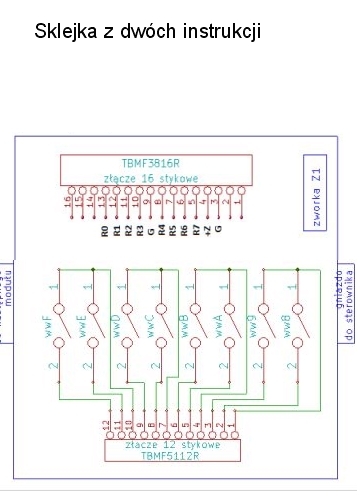
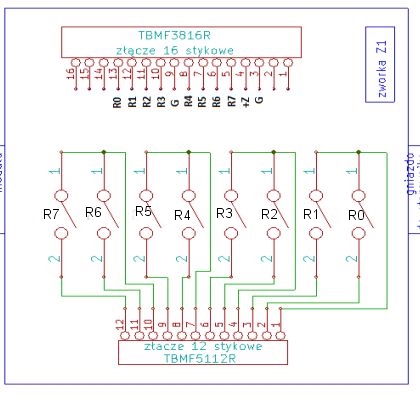
    Logically speaking, if I want to assign the wwF port as an output, and in the manual it is described in the jumper-set module as R7 on the upper 16-pin socket. And the relay on the 12-pin socket is described in the same way (R7), so I assume that this is port wwF set as an output.
    But that is not the case, because it is actually the output of port ww8. And the actual output of port wwF corresponds to the pin described on the lower socket as R0.
    Wouldn’t it be better, rather than arguing on the forum and trying to prove your point, to include such a diagram in the manual? This is a composite of two manuals. The top socket is from the manual for my module, and the bottom one is from a different module.
    Choosing a home automation system: Sterbox vs PLC2011A0 – reviews and experiences
    Or like this.
    Choosing a home automation system: Sterbox vs PLC2011A0 – reviews and experiences
    szumi wrote:
    Hysteresis thread:
    I believe a correction is needed regarding the thread about the inability to set hysteresis and the inability to control stoves/heating
    Hysteresis
    I will demonstrate the hysteresis setting for the LM35 using the example of two temperatures, 18 to 22 degrees.
    In the analogue inputs, we set the Hysteresis
    name - multiply - set - clear - link
    wa1 - 100.00 - 18 - 22 - ww0
    We disconnect the link from screen key kl1 by deleting the entry ww0 in the screen keys.
    The furnace control based on hysteresis is now working.
    It will start at 18 degrees, heat up to 22 degrees, and when the temperature drops to 18 degrees, the heating will switch on again.
    As you can see, Sterbox will control our oven in a simple way and no specialist knowledge is required to set it up.

    And the same as above.
    Wouldn’t it be better to include this information from the manual with an example?
    Because that’s all we have in the manual.
    Choosing a home automation system: Sterbox vs PLC2011A0 – reviews and experiences
    We have to figure out the rest by trial and error.
    If I were the seller of these devices, I would post all the examples sent and answers to users’ questions on my website. For example, in the section „Settings Tips” and I bet there wouldn’t be so many negative comments about Sterbox in this thread.

    And just a minor point.
    A quote from the section of the manual posted above.
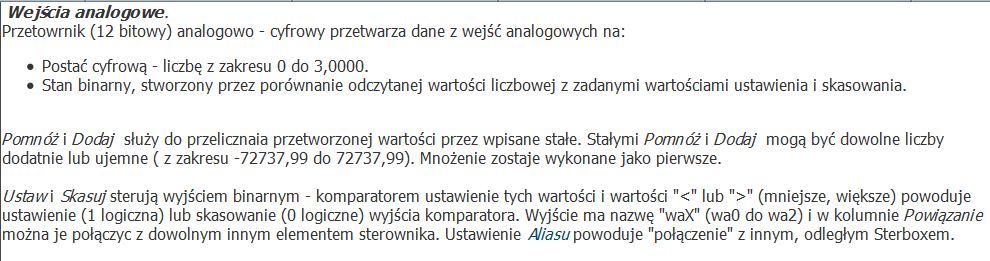
    “The output is called waX (wa0 to wa2)”
    But shouldn’t it be:
    The inputs are called waX (wa0 to wa2)
  • #83 11194737
    neodym
    Level 14  
    Posts: 90
    Help: 2
    Rate: 36
    From the looks of it, this Sterbox is a right old piece of rubbish, and it keeps crashing too.
  • #84 11195292
    Master-Slave
    Level 10  
    Posts: 13
    Rate: 2
    It seems the forum is turning into a "black PR" campaign.
    Perhaps we should just help each other out – that’s what this forum is for, after all – and if anyone’s struggling, they should just ask questions.
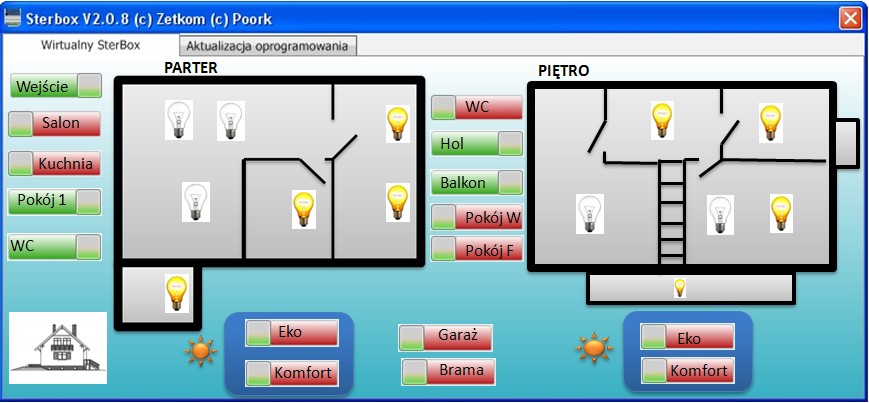
    And Sterbox showed something really cool in the news today. A visualisation programme for the PC.
    Choosing a home automation system: Sterbox vs PLC2011A0 – reviews and experiences

    Sterbox doesn’t crash for me. Thankfully, I don’t have those sort of problems.
    One more thing – I’ve tested this programme – it’s not suitable for everyone ...........
    But you can do some cool things with it.
  • #85 11211948
    Polikon
    Level 14  
    Posts: 179
    Help: 1
    Rate: 28
    stkop wrote:
    Dinkss wrote:
    OK, but I’m just thinking about the Sterbox because it would be enough for what I need and costs 600, whereas if I bought your solution I’d have to reckon with a cost of 2000 because I’d have to buy A and B :(


    So maybe you could test this invention for the forum users. Only 120 zł gross.

    "Key features:

    5 analogue inputs:
    measurement of temperature, voltage and current, and indirectly other physical quantities
    2 digital inputs: for monitoring
    1 relay (NC, NO, C)
    4 outputs for switching relays, transistors, etc.
    1 PWM output 2.6 kHz to 4 MHz\


    They have recently released an additional software version and, depending on what it is used for, you can upload the appropriate software. The watchdog has been removed, and you can now connect 4 1-Wire temperature sensors to it. And even as an extension to another controller, it’s a great bit of kit for 120 zł.
    And there’s a time zone setting function. It’s a small thing, but it makes you happy :D
    Of course, this is a dig at another device. :D
  • #86 11229132
    Polikon
    Level 14  
    Posts: 179
    Help: 1
    Rate: 28
    Master-Slave wrote:
    It seems the forum is turning into a "black PR" campaign.
    Perhaps we should help each other out – that’s what this forum is for, after all – and if anyone’s struggling, they should just ask questions.
    And Sterbox showed something really cool in the news today. A visualisation programme for the PC.
    Choosing a home automation system: Sterbox vs PLC2011A0 – reviews and experiences

    Sterbox doesn’t crash for me. Thankfully, I don’t have those sort of problems.
    One more thing – I’ve tested this programme – it’s not suitable for everyone ...........
    But you can do some cool things with it.

    I’ve had a go at this little programme, and the idea is very cool, but the functionality leaves something to be desired.
    I’ll base my observations on the photo posted above.
    In it, we can see the little light bulbs lit up, indicating that the light is on. But when we run this programme, all the bulbs will appear to be off. We can only see the actual lighting status in the fields with the switches. If we want to see the actual lighting status on the light bulb icons, we have to switch each light point on or off individually. The situation is worse if we have a switch set to pulse mode; in that case, we have no indication at all of what is on and what is off whilst running this program.
    The only element we can place on the programme’s screen that checks the status of a given output when the programme starts is ‘Coupled Output’, i.e. a switch.
    Perhaps one day they will add some additional functions to the field called “Digital Input” (this is the only place where we can set visible icons or images).
    For example, adding a switch function to the “Digital Input” field. This would save space on the screen, and clicking on a dimmed light bulb icon would turn it on, or vice versa.
    We’ll wait and see; for now, I’m putting this programme on the back burner.
  • #88 11800291
    Anonymous
    Anonymous  
  • #89 11800994
    Polikon
    Level 14  
    Posts: 179
    Help: 1
    Rate: 28
    You’re pulling our leg a bit.
    You mention two controllers. But the caption under the video is slightly different, namely
    “PLC2011C0 + Android 4.21 DX512 RGBW 1-Wire DS18B20 + PLC2011A0”
    So what’s the real story? And how much did it all cost?
  • #90 11801030
    retrofood
    VIP Meritorious for electroda.pl
    Posts: 31317
    Help: 1140
    Rate: 4789
    I would ask everyone posting here to refrain from using emoticons in their posts, as this is meant to be a technical forum, not a gossip forum. Let’s leave emoticons for use in the Hyde Park subforum and in threads that aren’t necessarily serious. There are plenty of those, I assure you, in the appropriate places.
ADVERTISEMENT