









The installation described here can be done by anyone who wants to start their adventure with electronics. I hope that this manual will be clear even to people with no electronics basics, and that the execution of the installation described here will be a sometimes enjoyable exploration of the deposits of technical knowledge.
--------------------------------------------
This publication has been compiled for the benefit of all interested parties.
Corrections, additions, distribution, appreciation of the author's time and willingness are not necessary, but will always be welcomed.
Regards,
Krzeszewski Marcin
Most of the people I met who were considering at least partial self-sufficiency were not thinking of giving up electricity altogether. Rather, they are all unanimously thinking about reducing it. The first step in this direction is to carry out an audit of the energy consumption of all household electrical appliances and look into the possibility of replacing the most power-consuming ones with either energy-efficient or simply non-electric ones. Thus, we can replace an electric dryer for fruit, mushrooms, etc. with a solar dryer, and a solar cooker on sunny days with a simple solar oven. An audit can easily be carried out with an electricity meter. In this article, however, I focus on reducing the electricity used for lighting. I also encourage everyone to work with natural light.
The installation described can be done by anyone who wants to get started with electronics. I hope that this manual will be clear to everyone and that the execution itself, a sometimes enjoyable exploration of the deposits of technical knowledge. Intelligent lighting may be too much to say, but every evening I appreciate the convenience it brings.
1. Introduction
Lighting made using LED technology has several advantages. First of all, it is more energy efficient, but also completely resistant to frequent switching on and off, does not draw more energy at the start and does not need time to warm up to shine at full power. It is also resistant to shocks and vibrations. The LEDs shine in a spot (directional) manner. For some, this is an advantage, and for those who are bothered by this, manufacturers offer bulbs designed so that the LEDs shine in all directions. Photo 1 shows an incandescent bulb that emits directional light, and Photo 2 shows a so-called 360˚ (degree) bulb.
As far as the disadvantages, or even dangers, of using low-quality LED lighting are concerned, one can mention the blue colour of the light, flickering and too strong a light beam concentrated on a small area causing glare. However, I have found a solution to two of these drawbacks. Buy warm white bulbs. If you already have blue, also known as cold white, bulbs, use yellow shades. This will bring the colour closer to neutral, but will also reduce the brightness somewhat. In order to avoid glare and the negative effect on our eyesight, I recommend using light frosted glass shades on 360 degree lamps or reflecting the light of spotlights on larger white surfaces, such as ceilings.
The installation I made, which I have been using for more than two years, is only used as supplementary lighting. After dark, everyone in the house can forget where the light switches are and what it's like to walk „in the dark”. The incandescent bulbs I use, at 1W each, are sufficient to move around the house without fear of tripping. If I wish to illuminate each room with a stronger light, I use high-voltage main lighting, lit by standard switches at each door.
It is worth mentioning that, considering the environmental impact and the energy consumed in exploiting the elemental deposits needed to produce LED bulbs, things look a little worse. It is also made worse by the need for transport, usually from other continents. The best balance would be to use incandescent bulbs that were produced in the early 19th century. The world's oldest incandescent bulb was screwed in in 1901 and has already shone for 113 years (http://www.centennialbulb.org/cam.htm). Traditional light bulbs could be produced cheaply and reliably. It is also important that, unlike LED bulbs, they can be easily recycled. The overall energy balance will therefore come out much better once manufacturers start making things that last, from materials that are easily recycled.
However, in this day and age, when traditional light bulbs have been phased out of production, I recommend rearranging your own daily rhythm. This will allow us to take advantage of the free, natural lighting that the sun gives us and to enjoy the fact that when our bodies are exposed to sunlight, the body produces the vitamin D we need so much. I recommend reducing the use of artificial lighting to a minimum.
2. Audit the rooms to be illuminated and design the installation
Before purchasing bulbs, sensors or switches, it is a good idea to carry out an audit of the rooms in which you want to use LED lighting, so that you know how many of these elements and how much cable you will need to purchase.
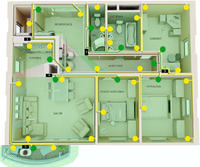
We start by drawing up a layout of the rooms. This can be done by hand, preferably on a grid, measuring the rooms with a tape measure and keeping the proportions to a fixed scale. The flat on which I will design the installation is shown in Fig. 1 on page 8.
SENSOR PLACEMENT PRINCIPLES
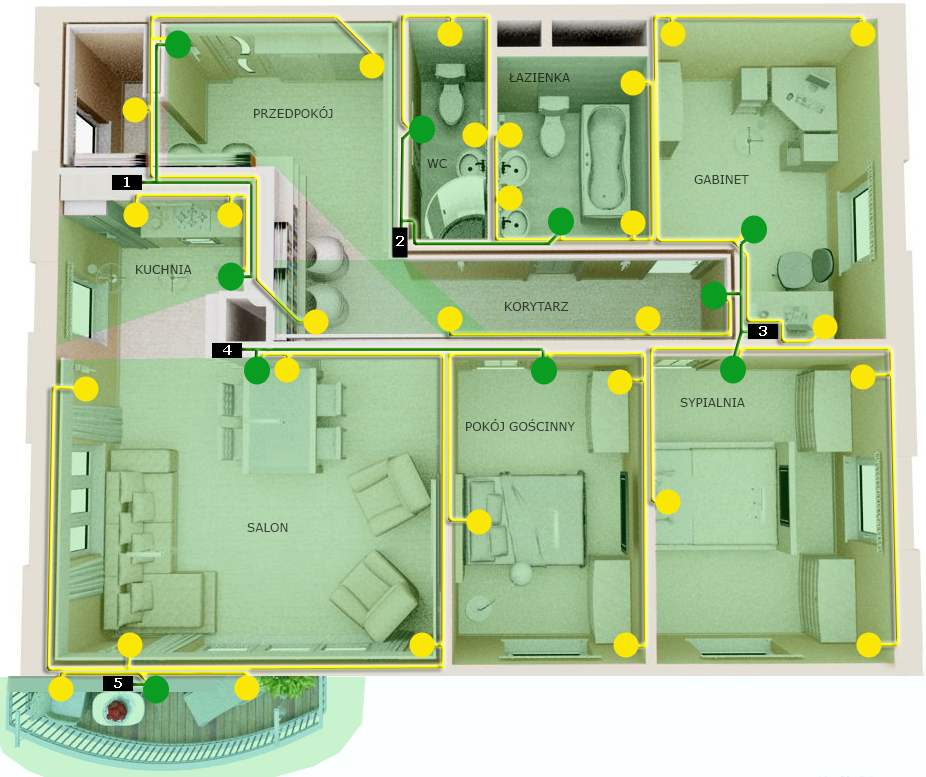
Once the rooms have been plotted on the drawing, we can proceed with the arrangement of the sensors. As shown in Fig. 2, there is one sensor per room.
When positioning the sensors, the manufacturer's specified range should be taken into account. This parameter is given in metres. The sensors I use have a much greater range than the rooms I use them in, so there is no need to worry that the lights will not turn on when you leave the living room to go to the corridor (see Fig. 2 – the sensor on the left turns on the lights first).
The selection of „fields of view” of the motion sensors is also key. I have represented these in Fig. 2 as green areas. A person appearing in such a zone will cause that particular sensor to immediately activate the bulbs that are connected to it. As you can see, the areas of two of them overlap in the corridor. It is worth remembering to position the sensor so as to eliminate the possibility of triggering the lighting of room X by making a movement in room Y. The idea is that the sensor will not switch on the lights in a room you are not in. This is mainly important in cases where we leave doors open between rooms, or when we have rooms with combined functions. In the example shown, these are a living room with a kitchen and dining room or a hallway with a corridor. In general terms, each sensor is intended to switch on the lighting only when entering a particular room or part of a room. So I deliberately placed the sensor in the hallway in such a way as to eliminate the possibility of it being switched on from the living room, which is open to this space.
A similar situation occurs in the kitchen, where I placed the sensor in such a way that its „field of view” is limited to just the kitchen. With this positioning, the lights in the kitchen will only switch on when someone enters it and the people in the living room will not be annoyed by the light in the kitchen switching on at their every move.
At this point, I would also like to point out to people with pets that they should locate the sensors so that their pets do not trigger the lights. Sometimes the quickest and most convenient solution is to stick a piece of rubberised insulating tape over part of the sensor to „cut off” a section of „the environment observed” by the sensor. I would use the same method in rooms. Putting tape on the sensor to exclude only the area where the bed is, will eliminate the lights turning on when you turn to the other side while sleeping. You could also use a switch for this part of the lighting somewhere close to the bed, but I know myself that it's more convenient if you just extend your arm or leg out of the bed area when you want to switch the light on.
It is still worth mentioning here about the sensor motion detection itself. Sensors (not all) have a weaker ability to detect the movement of a person approaching the sensor in a straight line.
Installing sensors in the ceiling solves this problem. However, all pets will then switch on the lighting.
I recommend getting sensors that have an adjustable bulb burning time. The sensor starts counting down the set time as soon as there is no movement in its field of vision and then switches off the bulbs.
BULB PLACEMENT PRINCIPLES
The bulbs I use are 1W and give light comparable to a regular 10W bulb. As I wrote earlier, my installation is only to support the main lighting of the house, where the household members do all the activities i.e. cooking, DIY, cleaning, etc. Nevertheless, locating the bulbs in the right places will many times avoid lighting „for a moment” the main lights. It is therefore a good idea to place the bulbs close to the places where you most often do some activity. In the example discussed here, I placed two bulbs in the kitchen. One between the sink and the dish dryer, and the other above the table. This way, I don't need to switch on the main light, even when I want to rinse something over the sink at night or do something vague at the table. In the rooms, the lights are placed above the beds and next to the dressers, as this is where they perform their function best. It is therefore up to each individual to adapt these places to the needs of all members of the household.
When arranging the light bulbs, it is also important to minimise the length of the cable used to connect the power supply from the sensor to the light bulbs (yellow colour in Fig. 3).
Before fixing all bulbs permanently, it is worth thinking about the bulb holders. Of course, I recommend making the holders yourself; there is a lot of fun to be found in that too!
POWER SUPPLY PLACEMENT PRINCIPLES
Taking into account the total power consumed by the bulbs in each room, divide the installation into separately powered sections. If you are building a new house, you can already consider the location of the sockets for the power supplies at the electrical design stage. In an existing house, I suggest connecting power supplies to sockets that are little used. As the installation will be switched on continuously, it is important to ensure that the power supplies are placed in an airy location. For safety reasons, the power supplies must not be covered with anything, as this may lead to a fire. At best, such treatment will considerably shorten their service life. I have marked the power supplies in the drawing with black rectangles with numbers.
SWITCHES should be used where we want to be able to switch off parts of our installation. We may, for example, want to switch off a circuit on a veranda or balcony when, during windy weather, plants bending in the wind unnecessarily switch on the lighting there. In the example project, it is sufficient to use a switch on the socket to which the sensor on the balcony is connected.
After conducting an audit, we already know where and how many sensors and light bulbs we will place. We also know the length of the cable and the location of the power supply. Let's then move on to selecting the components and checking that we have all the necessary tools.
3. Selecting the components and the necessary tools
You don't need specialised equipment or complicated circuits or measuring devices to carry out the entire installation. Low voltage also eliminates the danger of electrical shock, so this lighting can also be used in rooms with temporarily increased humidity (i.e.: bathrooms, dry saunas, drying rooms, space above the cooker in the kitchen, verandas, covered balconies, etc.). Just remember to protect all components from direct splashing or very low temperatures and snow or frost. Our installation will consist of a mains power supply, two-wire cable, bulbs and sensors.
POWER SUPPLY
The first item to be selected is the power supply, which will reduce the voltage from the socket from 230 to 12 volts. I believe that the information at this link exhausts not only the topic of power supply selection, but also many others. I recommend reading the articles in the Technical Support section. I have not yet used modern power supplies specifically designed for use with LEDs. So far I've used power supplies from old deserving equipment like printers, scanners, modems, routers, Christmas tree lights, radio-magnetophones etc. You just need to know how to read their technical parameters. These can be found on a plate or sticker affixed to the power supply. Here are the three basic parameters:
- iNPUT or AC input voltage, expressed in volts [V]; it should be around 220-250V
- oUTPUT or DC output voltage, expressed in volts [V]; to be 12V
- oUTPUT output current, expressed in amperes [A] or milli-amperes [mA];
How many bulbs can be connected to a given power supply will be calculated from the formula:
I=P/U
where: I - output current
P - total power of the bulbs connected to the powered sensors;
U - voltage (here 12V).
From the above formula, we calculate the minimum output current of the power supply. So let's add up the power of all the bulbs we intend to connect to the sensors powered by the power supply. In the example I have presented, the installation has been divided into 5 parts. So there are 5 power supplies in the house, each marked in the drawing by a black rectangle with a number. In order to select a power supply, we need to determine the minimum value of its OUTPUT current. In the part of the installation powered by power supply 1, 2 sensors and 5 light bulbs will be connected. If each bulb has a power of 1W and the voltage is 12V, we can calculate the value of the current I from the formula given above. It is sufficient to divide P/U, i.e. 5, by 12. The result will be 0.416A (416mA). We already know that for this part of the installation we will need a power supply whose nameplate output current is more than 416mA. We will do the same with the other power supplies. The most loaded power supply will be power supply No. 3, to which 3 sensors and 8 bulbs will be connected. When they all switch on the lighting at the same time, the current drawn by this part of the installation will be approximately 670mA.
WIRING
After the audit, we know how much two-wire cable we will need. Simply count on the drawing the total length of the lines connecting the power supply to the elements of our installation. For an example installation, using 0.5mm2 wire is sufficient. If you have an appetite for a more „current-consuming” installation, I recommend calculating the maximum load and choosing the appropriate cable cross-section. You can find detailed information here.
When buying a cable, pay attention to whether the insulation on one of the cores is marked with a continuous stripe. This marking is helpful and is used to make it easier to recognise polarity, i.e. to determine which of the two wires is plus and which is minus.
SENSORS
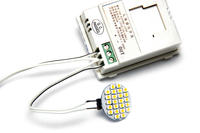
I call a sensor an electronic circuit that has two sensors built into it. The first of these, called the twilight sensor, ensures that the lights do not switch on when a certain set level of light intensity is reached in the sensor's environment. With this sensor, the sensor will not switch on the lights when it is simply bright. It is a good idea if the sensors purchased have built-in adjustment of this threshold level. The second sensor that is built into the sensor is the motion sensor (eng. motion sensor), which switches on the operation of the lights when movement is detected in „the field of view” of the sensor.
Many of the sensors on the market have the option of adjusting the operating time of the lights after recording the last movement in „the observed” environment. This allows flexible adjustment of the light bulb times individually for each room.
The sensors can be purchased online. Just search under the keyword 12V IR Infrared Motion Sensor. There are already quite a few different types of devices of this type on the market and there are sure to be more to come. We are interested in the specifications, i.e. the technical parameters, i.e. supply voltage: 12V, load: in this case 80W, i.e. up to 80 bulbs of 1W each, and the range of the motion sensor, given in metres. Here: 8 metres.
LIGHT BULBS
After the audit, we also now know how many light bulbs we will need. I leave the choice of bulbs to the designer. Just remember to select bulbs for the correct voltage: 12V. The choice is quite wide, so let's make the decision carefully. I will suggest that on Allegro you can type „12V G4 LED SMD” in the LIGHT SOURCES category. Pay attention to whether you need 360 degree bulbs or whether you will be bouncing light off walls and other surfaces. The huge possibility of playing with light gives you room to play. You can also buy several different types of bulbs and test them in different rooms.
If you do not have a soldering iron, you will also need to get G4 sockets (G4 holders) in which to mount the bulbs. Unless one prefers to mount the bulbs directly into the connecting strips. As I have illustrated in the connection diagram in chapter five.
TOOLS
- drill
- dowels and screws (if these were not included in the sensor kit)
- large screwdriver for screws
- small flat-bladed screwdriver to adjust sensors and terminal strips
- insulating tape
- knife
It may be useful to use terminal strips (the so-called. connection cubes, thin heat shrink tubing + lighter, hand-held stapler and optional soldering iron and tin.
4. Assembly
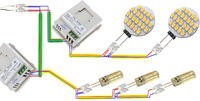
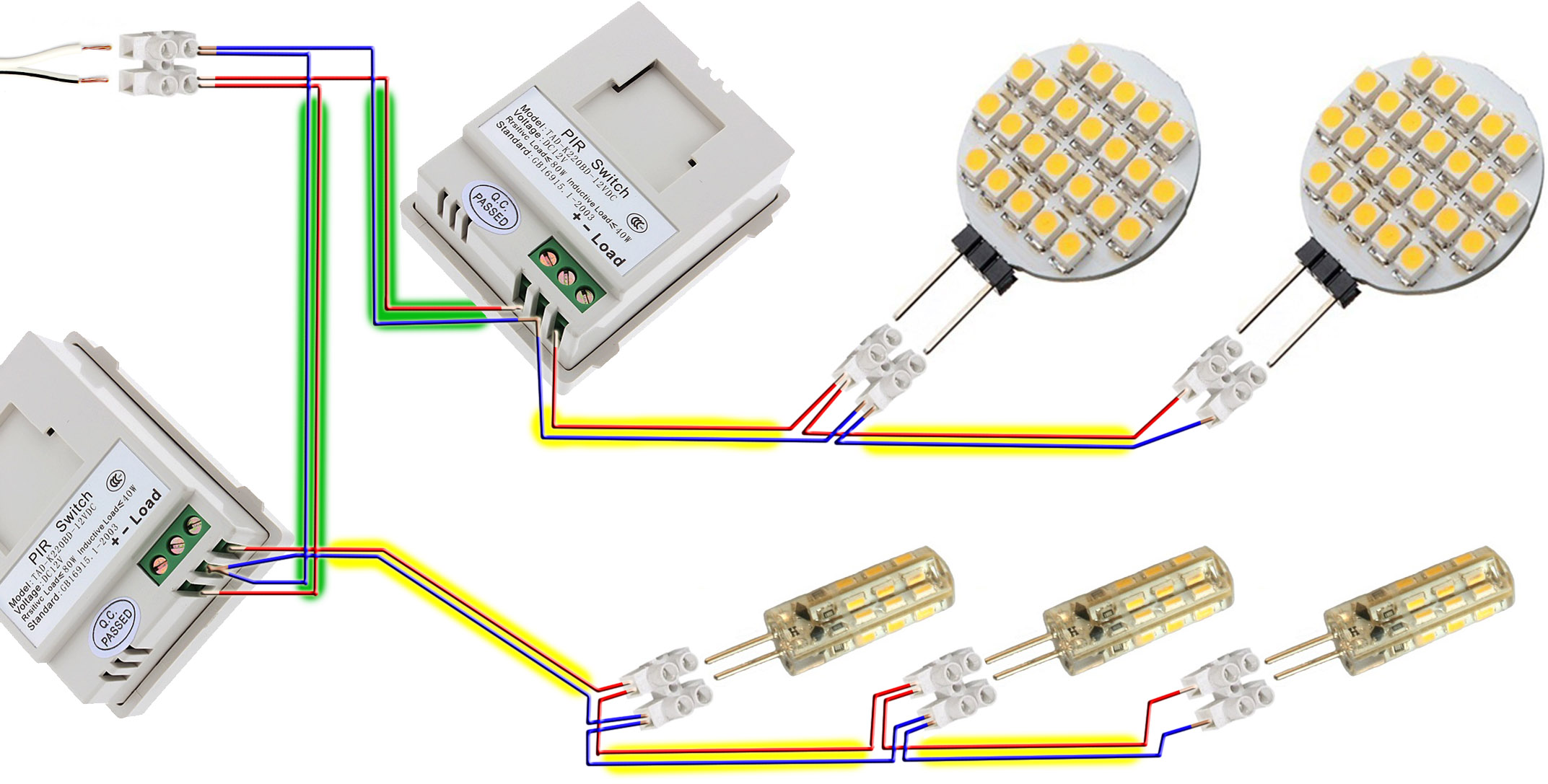
In Chapter Four, in Figure 3, I showed the design of an installation consisting of five separately powered circuits. To understand the topic of connecting all the components of the installation, it is sufficient to analyse the connection of the components of one circuit. As an example, in the diagram below, I will illustratively show the connection of all elements powered by power supply No. 1. The systems powered by the other power supplies are connected analogously. Only the number of sensors and bulbs will change, and with this the appropriate power supply will be selected.
I will limit the installation instructions to a description of the principles of connecting the basic components together. I will not elaborate on how to connect the power supply to the socket, as all the fun will consist in isolating and connecting the wires. First of all, we should (with the power supply unplugged) cut off the end plug of the power supply and isolate the wire by a few millimetres. The wire at the output of the power supply often has a continuous line drawn on one of the two wires. In the diagram below, this is a black line on one strand of white wire. Standards enforce this marking, so sometimes we will have the polarity issue resolved. This line marks the conductor with the positive charge, referred to as PLUS. For ease of reference, in the diagram below I have marked this PLUS in red and MINUS in blue. For ease of comparison between the diagram below and Fig. 3, the power wires to the sensors are coloured green and those from the sensors to the bulbs are coloured yellow.
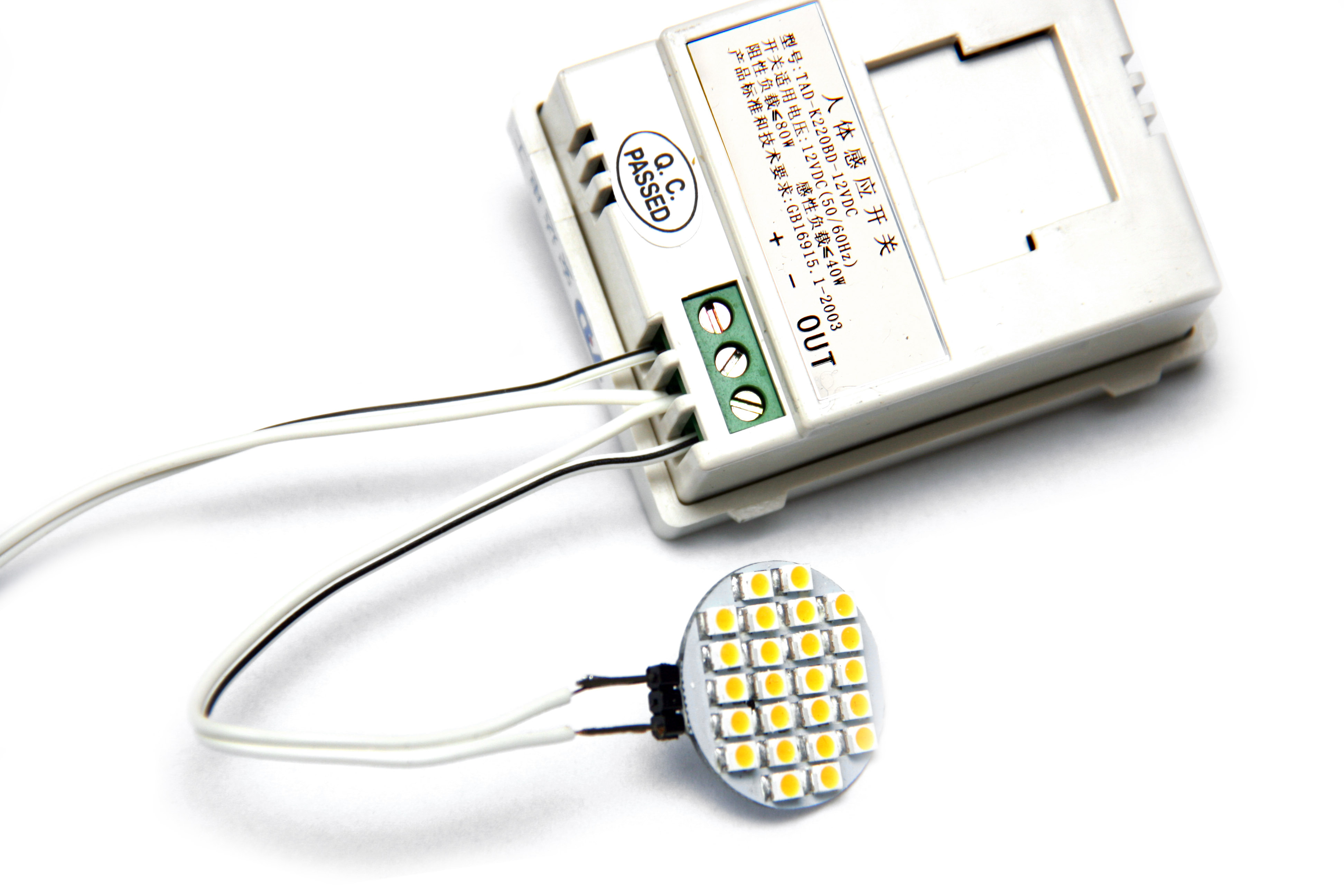
I recommend making a test connection, so called: a twisted pair, to check the operation of this part of the installation after switching on the power supply. After confirming correct operation, insulate the wires. Do this in such a way that no metal part of the cable remains exposed.
For those who want to carry out their project without a soldering iron, I recommend getting the smallest connection cubes.
From the diagram, it is easy to deduce the connection of the sensor. The stripped ends of the two wires from the power supply should be connected to the sensor in the places marked + and − and the bulbs in the places marked − and LOAD. To test whether our first circuit works, we need to plug the power supply into the socket, reduce the intensity of the light reaching the sensor and make a movement at the sensor. Sometimes it is enough to cover the sensor with your hand. If the circuit did not work, try plugging the power supply in reverse. That is, swap the wires of the power supply in the places marked with the symbols + and − on the sensor. That is the whole philosophy!
--------------------------------------------
This publication has been compiled for the benefit of all interested parties.
Corrections, additions, distribution, appreciation of the author's time and willingness are not necessary, but will always be welcomed.
Regards,
Krzeszewski Marcin
Most of the people I met who were considering at least partial self-sufficiency were not thinking of giving up electricity altogether. Rather, they are all unanimously thinking about reducing it. The first step in this direction is to carry out an audit of the energy consumption of all household electrical appliances and look into the possibility of replacing the most power-consuming ones with either energy-efficient or simply non-electric ones. Thus, we can replace an electric dryer for fruit, mushrooms, etc. with a solar dryer, and a solar cooker on sunny days with a simple solar oven. An audit can easily be carried out with an electricity meter. In this article, however, I focus on reducing the electricity used for lighting. I also encourage everyone to work with natural light.
The installation described can be done by anyone who wants to get started with electronics. I hope that this manual will be clear to everyone and that the execution itself, a sometimes enjoyable exploration of the deposits of technical knowledge. Intelligent lighting may be too much to say, but every evening I appreciate the convenience it brings.
1. Introduction
Lighting made using LED technology has several advantages. First of all, it is more energy efficient, but also completely resistant to frequent switching on and off, does not draw more energy at the start and does not need time to warm up to shine at full power. It is also resistant to shocks and vibrations. The LEDs shine in a spot (directional) manner. For some, this is an advantage, and for those who are bothered by this, manufacturers offer bulbs designed so that the LEDs shine in all directions. Photo 1 shows an incandescent bulb that emits directional light, and Photo 2 shows a so-called 360˚ (degree) bulb.
As far as the disadvantages, or even dangers, of using low-quality LED lighting are concerned, one can mention the blue colour of the light, flickering and too strong a light beam concentrated on a small area causing glare. However, I have found a solution to two of these drawbacks. Buy warm white bulbs. If you already have blue, also known as cold white, bulbs, use yellow shades. This will bring the colour closer to neutral, but will also reduce the brightness somewhat. In order to avoid glare and the negative effect on our eyesight, I recommend using light frosted glass shades on 360 degree lamps or reflecting the light of spotlights on larger white surfaces, such as ceilings.
The installation I made, which I have been using for more than two years, is only used as supplementary lighting. After dark, everyone in the house can forget where the light switches are and what it's like to walk „in the dark”. The incandescent bulbs I use, at 1W each, are sufficient to move around the house without fear of tripping. If I wish to illuminate each room with a stronger light, I use high-voltage main lighting, lit by standard switches at each door.
It is worth mentioning that, considering the environmental impact and the energy consumed in exploiting the elemental deposits needed to produce LED bulbs, things look a little worse. It is also made worse by the need for transport, usually from other continents. The best balance would be to use incandescent bulbs that were produced in the early 19th century. The world's oldest incandescent bulb was screwed in in 1901 and has already shone for 113 years (http://www.centennialbulb.org/cam.htm). Traditional light bulbs could be produced cheaply and reliably. It is also important that, unlike LED bulbs, they can be easily recycled. The overall energy balance will therefore come out much better once manufacturers start making things that last, from materials that are easily recycled.
However, in this day and age, when traditional light bulbs have been phased out of production, I recommend rearranging your own daily rhythm. This will allow us to take advantage of the free, natural lighting that the sun gives us and to enjoy the fact that when our bodies are exposed to sunlight, the body produces the vitamin D we need so much. I recommend reducing the use of artificial lighting to a minimum.
2. Audit the rooms to be illuminated and design the installation
Before purchasing bulbs, sensors or switches, it is a good idea to carry out an audit of the rooms in which you want to use LED lighting, so that you know how many of these elements and how much cable you will need to purchase.
We start by drawing up a layout of the rooms. This can be done by hand, preferably on a grid, measuring the rooms with a tape measure and keeping the proportions to a fixed scale. The flat on which I will design the installation is shown in Fig. 1 on page 8.
SENSOR PLACEMENT PRINCIPLES
Once the rooms have been plotted on the drawing, we can proceed with the arrangement of the sensors. As shown in Fig. 2, there is one sensor per room.
When positioning the sensors, the manufacturer's specified range should be taken into account. This parameter is given in metres. The sensors I use have a much greater range than the rooms I use them in, so there is no need to worry that the lights will not turn on when you leave the living room to go to the corridor (see Fig. 2 – the sensor on the left turns on the lights first).
The selection of „fields of view” of the motion sensors is also key. I have represented these in Fig. 2 as green areas. A person appearing in such a zone will cause that particular sensor to immediately activate the bulbs that are connected to it. As you can see, the areas of two of them overlap in the corridor. It is worth remembering to position the sensor so as to eliminate the possibility of triggering the lighting of room X by making a movement in room Y. The idea is that the sensor will not switch on the lights in a room you are not in. This is mainly important in cases where we leave doors open between rooms, or when we have rooms with combined functions. In the example shown, these are a living room with a kitchen and dining room or a hallway with a corridor. In general terms, each sensor is intended to switch on the lighting only when entering a particular room or part of a room. So I deliberately placed the sensor in the hallway in such a way as to eliminate the possibility of it being switched on from the living room, which is open to this space.
A similar situation occurs in the kitchen, where I placed the sensor in such a way that its „field of view” is limited to just the kitchen. With this positioning, the lights in the kitchen will only switch on when someone enters it and the people in the living room will not be annoyed by the light in the kitchen switching on at their every move.
At this point, I would also like to point out to people with pets that they should locate the sensors so that their pets do not trigger the lights. Sometimes the quickest and most convenient solution is to stick a piece of rubberised insulating tape over part of the sensor to „cut off” a section of „the environment observed” by the sensor. I would use the same method in rooms. Putting tape on the sensor to exclude only the area where the bed is, will eliminate the lights turning on when you turn to the other side while sleeping. You could also use a switch for this part of the lighting somewhere close to the bed, but I know myself that it's more convenient if you just extend your arm or leg out of the bed area when you want to switch the light on.
It is still worth mentioning here about the sensor motion detection itself. Sensors (not all) have a weaker ability to detect the movement of a person approaching the sensor in a straight line.
Installing sensors in the ceiling solves this problem. However, all pets will then switch on the lighting.
I recommend getting sensors that have an adjustable bulb burning time. The sensor starts counting down the set time as soon as there is no movement in its field of vision and then switches off the bulbs.
BULB PLACEMENT PRINCIPLES
The bulbs I use are 1W and give light comparable to a regular 10W bulb. As I wrote earlier, my installation is only to support the main lighting of the house, where the household members do all the activities i.e. cooking, DIY, cleaning, etc. Nevertheless, locating the bulbs in the right places will many times avoid lighting „for a moment” the main lights. It is therefore a good idea to place the bulbs close to the places where you most often do some activity. In the example discussed here, I placed two bulbs in the kitchen. One between the sink and the dish dryer, and the other above the table. This way, I don't need to switch on the main light, even when I want to rinse something over the sink at night or do something vague at the table. In the rooms, the lights are placed above the beds and next to the dressers, as this is where they perform their function best. It is therefore up to each individual to adapt these places to the needs of all members of the household.
When arranging the light bulbs, it is also important to minimise the length of the cable used to connect the power supply from the sensor to the light bulbs (yellow colour in Fig. 3).
Before fixing all bulbs permanently, it is worth thinking about the bulb holders. Of course, I recommend making the holders yourself; there is a lot of fun to be found in that too!
POWER SUPPLY PLACEMENT PRINCIPLES
Taking into account the total power consumed by the bulbs in each room, divide the installation into separately powered sections. If you are building a new house, you can already consider the location of the sockets for the power supplies at the electrical design stage. In an existing house, I suggest connecting power supplies to sockets that are little used. As the installation will be switched on continuously, it is important to ensure that the power supplies are placed in an airy location. For safety reasons, the power supplies must not be covered with anything, as this may lead to a fire. At best, such treatment will considerably shorten their service life. I have marked the power supplies in the drawing with black rectangles with numbers.
SWITCHES should be used where we want to be able to switch off parts of our installation. We may, for example, want to switch off a circuit on a veranda or balcony when, during windy weather, plants bending in the wind unnecessarily switch on the lighting there. In the example project, it is sufficient to use a switch on the socket to which the sensor on the balcony is connected.
After conducting an audit, we already know where and how many sensors and light bulbs we will place. We also know the length of the cable and the location of the power supply. Let's then move on to selecting the components and checking that we have all the necessary tools.
3. Selecting the components and the necessary tools
You don't need specialised equipment or complicated circuits or measuring devices to carry out the entire installation. Low voltage also eliminates the danger of electrical shock, so this lighting can also be used in rooms with temporarily increased humidity (i.e.: bathrooms, dry saunas, drying rooms, space above the cooker in the kitchen, verandas, covered balconies, etc.). Just remember to protect all components from direct splashing or very low temperatures and snow or frost. Our installation will consist of a mains power supply, two-wire cable, bulbs and sensors.
POWER SUPPLY
The first item to be selected is the power supply, which will reduce the voltage from the socket from 230 to 12 volts. I believe that the information at this link exhausts not only the topic of power supply selection, but also many others. I recommend reading the articles in the Technical Support section. I have not yet used modern power supplies specifically designed for use with LEDs. So far I've used power supplies from old deserving equipment like printers, scanners, modems, routers, Christmas tree lights, radio-magnetophones etc. You just need to know how to read their technical parameters. These can be found on a plate or sticker affixed to the power supply. Here are the three basic parameters:
- iNPUT or AC input voltage, expressed in volts [V]; it should be around 220-250V
- oUTPUT or DC output voltage, expressed in volts [V]; to be 12V
- oUTPUT output current, expressed in amperes [A] or milli-amperes [mA];
How many bulbs can be connected to a given power supply will be calculated from the formula:
I=P/U
where: I - output current
P - total power of the bulbs connected to the powered sensors;
U - voltage (here 12V).
From the above formula, we calculate the minimum output current of the power supply. So let's add up the power of all the bulbs we intend to connect to the sensors powered by the power supply. In the example I have presented, the installation has been divided into 5 parts. So there are 5 power supplies in the house, each marked in the drawing by a black rectangle with a number. In order to select a power supply, we need to determine the minimum value of its OUTPUT current. In the part of the installation powered by power supply 1, 2 sensors and 5 light bulbs will be connected. If each bulb has a power of 1W and the voltage is 12V, we can calculate the value of the current I from the formula given above. It is sufficient to divide P/U, i.e. 5, by 12. The result will be 0.416A (416mA). We already know that for this part of the installation we will need a power supply whose nameplate output current is more than 416mA. We will do the same with the other power supplies. The most loaded power supply will be power supply No. 3, to which 3 sensors and 8 bulbs will be connected. When they all switch on the lighting at the same time, the current drawn by this part of the installation will be approximately 670mA.
WIRING
After the audit, we know how much two-wire cable we will need. Simply count on the drawing the total length of the lines connecting the power supply to the elements of our installation. For an example installation, using 0.5mm2 wire is sufficient. If you have an appetite for a more „current-consuming” installation, I recommend calculating the maximum load and choosing the appropriate cable cross-section. You can find detailed information here.
When buying a cable, pay attention to whether the insulation on one of the cores is marked with a continuous stripe. This marking is helpful and is used to make it easier to recognise polarity, i.e. to determine which of the two wires is plus and which is minus.
SENSORS
I call a sensor an electronic circuit that has two sensors built into it. The first of these, called the twilight sensor, ensures that the lights do not switch on when a certain set level of light intensity is reached in the sensor's environment. With this sensor, the sensor will not switch on the lights when it is simply bright. It is a good idea if the sensors purchased have built-in adjustment of this threshold level. The second sensor that is built into the sensor is the motion sensor (eng. motion sensor), which switches on the operation of the lights when movement is detected in „the field of view” of the sensor.
Many of the sensors on the market have the option of adjusting the operating time of the lights after recording the last movement in „the observed” environment. This allows flexible adjustment of the light bulb times individually for each room.
The sensors can be purchased online. Just search under the keyword 12V IR Infrared Motion Sensor. There are already quite a few different types of devices of this type on the market and there are sure to be more to come. We are interested in the specifications, i.e. the technical parameters, i.e. supply voltage: 12V, load: in this case 80W, i.e. up to 80 bulbs of 1W each, and the range of the motion sensor, given in metres. Here: 8 metres.
LIGHT BULBS
After the audit, we also now know how many light bulbs we will need. I leave the choice of bulbs to the designer. Just remember to select bulbs for the correct voltage: 12V. The choice is quite wide, so let's make the decision carefully. I will suggest that on Allegro you can type „12V G4 LED SMD” in the LIGHT SOURCES category. Pay attention to whether you need 360 degree bulbs or whether you will be bouncing light off walls and other surfaces. The huge possibility of playing with light gives you room to play. You can also buy several different types of bulbs and test them in different rooms.
If you do not have a soldering iron, you will also need to get G4 sockets (G4 holders) in which to mount the bulbs. Unless one prefers to mount the bulbs directly into the connecting strips. As I have illustrated in the connection diagram in chapter five.
TOOLS
- drill
- dowels and screws (if these were not included in the sensor kit)
- large screwdriver for screws
- small flat-bladed screwdriver to adjust sensors and terminal strips
- insulating tape
- knife
It may be useful to use terminal strips (the so-called. connection cubes, thin heat shrink tubing + lighter, hand-held stapler and optional soldering iron and tin.
4. Assembly
In Chapter Four, in Figure 3, I showed the design of an installation consisting of five separately powered circuits. To understand the topic of connecting all the components of the installation, it is sufficient to analyse the connection of the components of one circuit. As an example, in the diagram below, I will illustratively show the connection of all elements powered by power supply No. 1. The systems powered by the other power supplies are connected analogously. Only the number of sensors and bulbs will change, and with this the appropriate power supply will be selected.
I will limit the installation instructions to a description of the principles of connecting the basic components together. I will not elaborate on how to connect the power supply to the socket, as all the fun will consist in isolating and connecting the wires. First of all, we should (with the power supply unplugged) cut off the end plug of the power supply and isolate the wire by a few millimetres. The wire at the output of the power supply often has a continuous line drawn on one of the two wires. In the diagram below, this is a black line on one strand of white wire. Standards enforce this marking, so sometimes we will have the polarity issue resolved. This line marks the conductor with the positive charge, referred to as PLUS. For ease of reference, in the diagram below I have marked this PLUS in red and MINUS in blue. For ease of comparison between the diagram below and Fig. 3, the power wires to the sensors are coloured green and those from the sensors to the bulbs are coloured yellow.
I recommend making a test connection, so called: a twisted pair, to check the operation of this part of the installation after switching on the power supply. After confirming correct operation, insulate the wires. Do this in such a way that no metal part of the cable remains exposed.
For those who want to carry out their project without a soldering iron, I recommend getting the smallest connection cubes.
From the diagram, it is easy to deduce the connection of the sensor. The stripped ends of the two wires from the power supply should be connected to the sensor in the places marked + and − and the bulbs in the places marked − and LOAD. To test whether our first circuit works, we need to plug the power supply into the socket, reduce the intensity of the light reaching the sensor and make a movement at the sensor. Sometimes it is enough to cover the sensor with your hand. If the circuit did not work, try plugging the power supply in reverse. That is, swap the wires of the power supply in the places marked with the symbols + and − on the sensor. That is the whole philosophy!


