

logo elektroda
logo elektroda
X
logo elektroda

BK7238 LED Ceiling Light (RGBIC+CCT) – Home Assistant Integration?

LidarCaptain 729 14
ADVERTISEMENT
  • #1 21884085
    LidarCaptain
    Level 2  
    Posts: 6
    Rate: 1
    Hi,

    I bought 3x of these ceiling lights from AliExpress:
    https://www.aliexpress.com/item/1005009635507929.html

    Specs:
    • WiFi + BLE (2.4GHz)
    • Chip: BK7238 (Beken)
    • 5 channels: RGBIC + CCT
    • Main white panel (3000K / 4000K / 6000K)
    • Secondary RGBIC ring (effects / ambient light)


    Current situation
    • Device works fully in the BRITURN app
    • Also discovered via Magic Home app, but:
    • Only ON/OFF works
    • No control of RGB / CCT / effects
    • Home Assistant:
    • Tried Flux LED (Magic Home) integration → fails: "Unknown Model FBF615. Cannot determine protocol"

    Observations
    • Device exposes a local WiFi AP (unconfigured mode)
    • After pairing → gets IP, but protocol seems non-standard
    • Likely custom firmware, not pure MagicHome-compatible

    According to HA docs, Flux/MagicHome only works if the protocol matches known controllers... which doesn’t seem the case here.

    Any clue how to flash it, integrate it?

    PLEASE HELP

    BK7238 LED Ceiling Light (RGBIC+CCT) – Home Assistant Integration?
    BK7238 LED Ceiling Light (RGBIC+CCT) – Home Assistant Integration? BK7238 LED Ceiling Light (RGBIC+CCT) – Home Assistant Integration? BK7238 LED Ceiling Light (RGBIC+CCT) – Home Assistant Integration?
  • ADVERTISEMENT
  • Helpful post
    #2 21884139
    insmod
    Level 31  
    Posts: 1364
    Help: 161
    Rate: 426
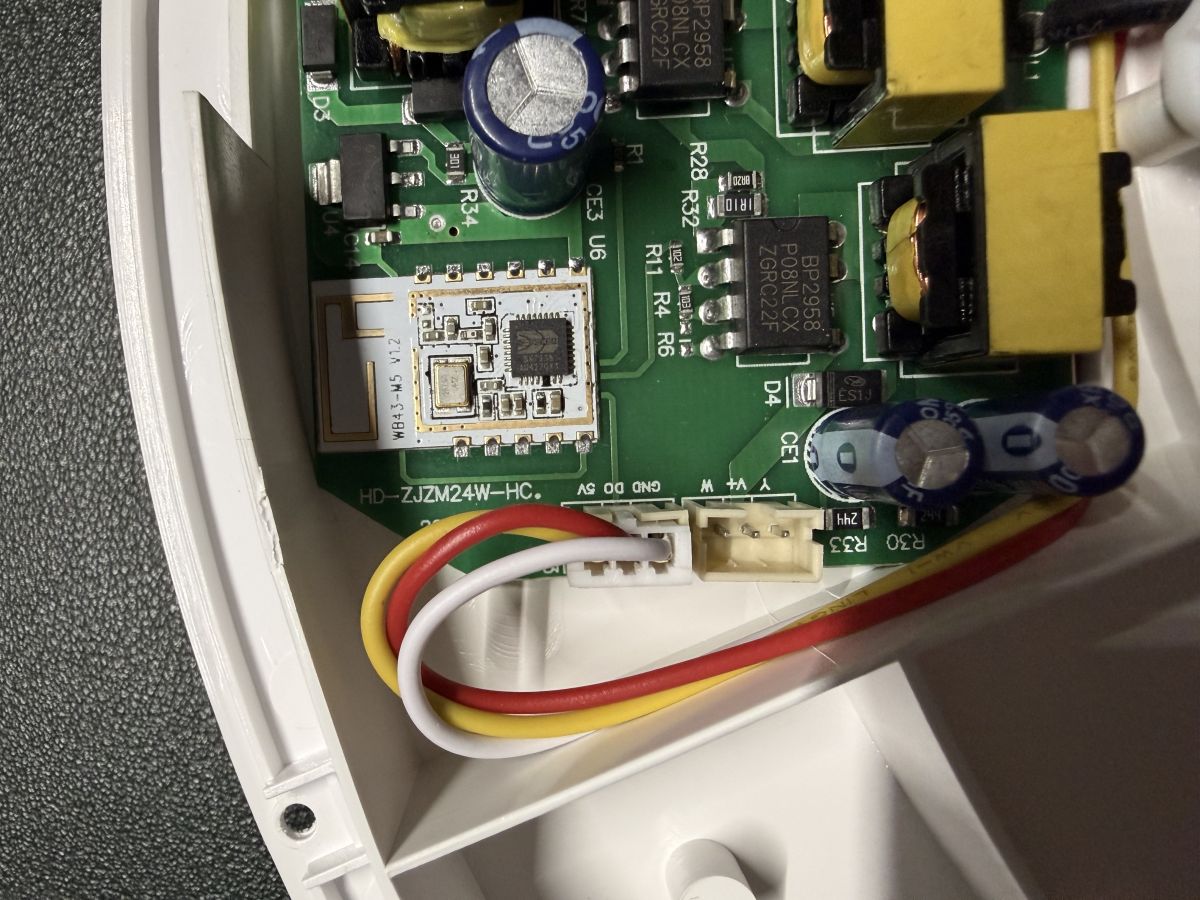
    You can flash it with OpenBK7238, but doing so requires desoldering the module. RX/TX pins are on the back of the module.
    RGB would be easy, since it uses addressable LEDs (DO pin). You would only need to count how many RGB LEDs there are.

    If you decide to go that way, always take backups of the original firmware.
  • ADVERTISEMENT
  • #3 21884296
    LidarCaptain
    Level 2  
    Posts: 6
    Rate: 1
    >>21884139 >>21884139

    Thanks @insmod!!

    Yesterday night, I flashed it with OpenBK7238.

    Instead of desoldering the module, I tried the side GPIOs, and it worked great!!

    1. I made a backup of the original firmware (attached file).
    2. Flash with OpenBK7238 old version > boot crashed.
    3. Flash again with your last version of OpenBK7238 merged > all working!! Great job @insmod

    4. Now the challenge is setup the modules of it.

    I will count the LEDs and try to discover more...
    Attachments:
    • BK7238 LED Ceiling Light (RGBIC+CCT) – Home Assistant Integration? Screenshot 2026-04-15 at 09.44.06.png (4.98 MB) You must be logged in to download this attachment.
    • W43-M5_V1.2_BK7238.bin (2 MB) You must be logged in to download this attachment.
  • #4 21884507
    LidarCaptain
    Level 2  
    Posts: 6
    Rate: 1
    Hi all,

    I wanted to share my findings after spending quite a bit of time trying to get a BK7238-based RGBIC CCT ceiling light working with OpenBeken.

    This is the typical Tuya-style unit with:
    • Main CCT white panel (warm/cold)
    • Outer addressable RGB ring (RGBIC)


    Hardware details
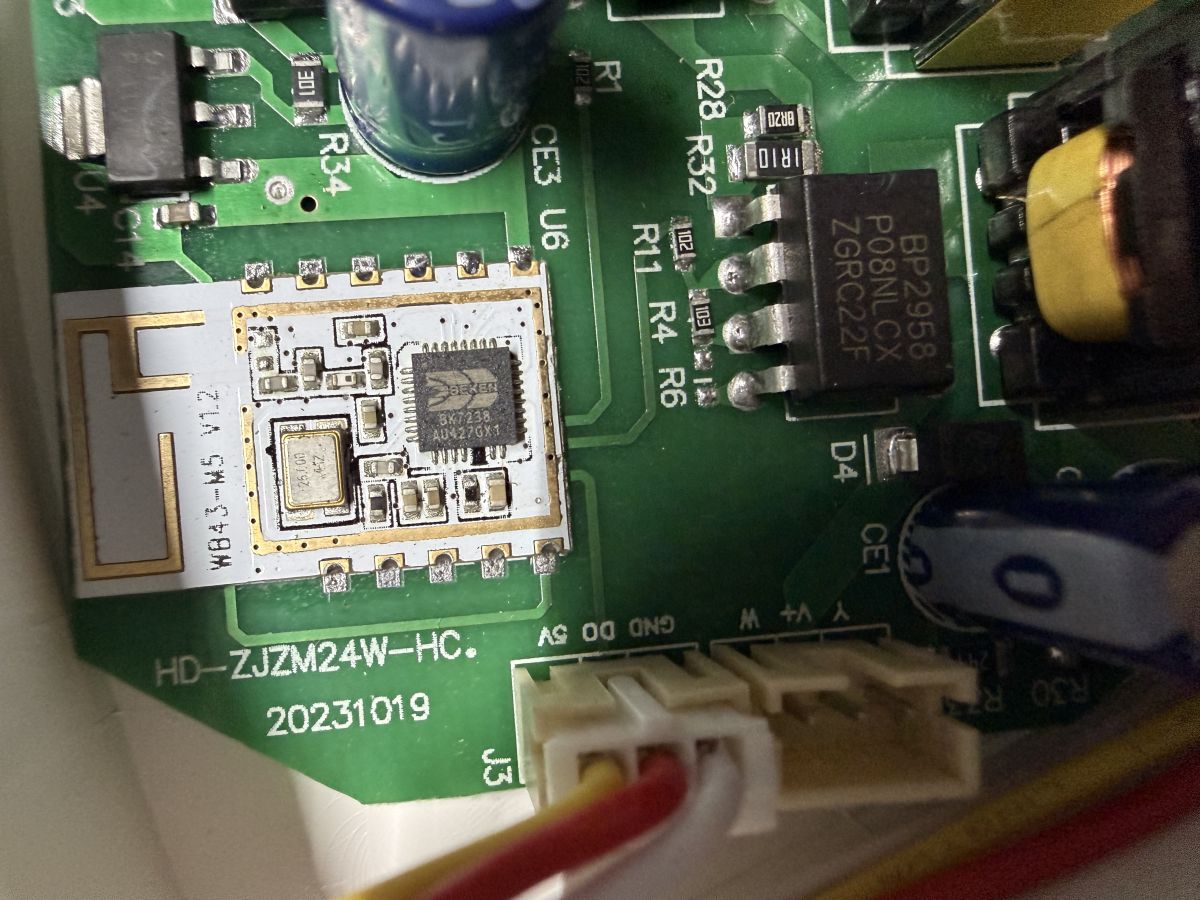
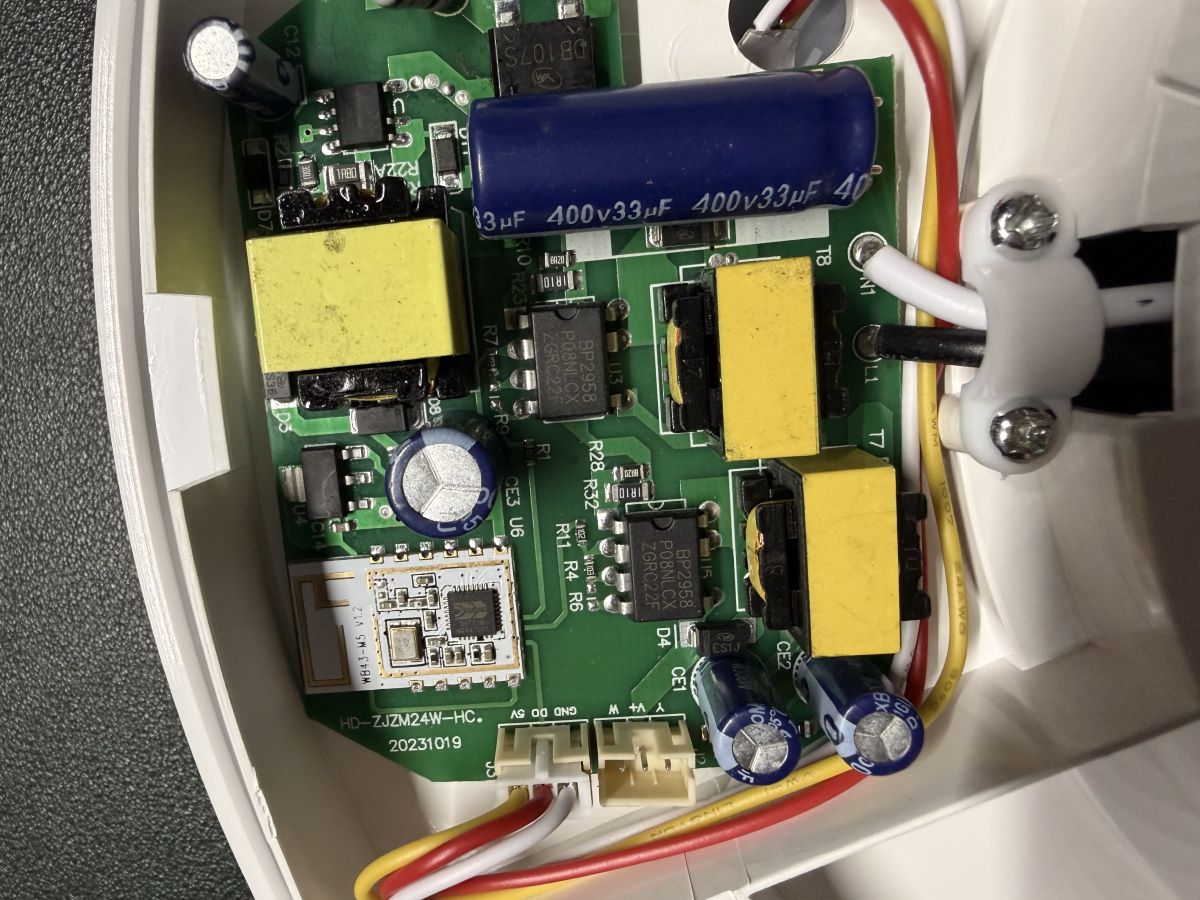
    • Module: WB43-M5 v1.2
    • Main chip: Beken BK7238
    • PCB: HD-ZJZM24W-HC
    • RGB ring: 38 LEDs (addressable, likely SM16703P or similar)

    What works ✅

    After a lot of trial and error, I managed to get the main white light fully working.

    Pin configuration:

    P6 -> PWM -> channel 1 (cold)
    P8 -> PWM -> channel 0 (warm)

    Startup command
    backlog setChannelType 0 cwww

    This gives full control of:
    • Brightness
    • Colour temperature

    So the CCT driver side is confirmed working and stable.


    What does NOT work ❌

    The RGBIC ring does not work at all with the current firmware build.

    Attempted configuration

    Tried assigning GPIOs as:
    SM16703P_DIN

    Attempted commands:
    SM16703P_Init 38 GRB
    SM16703P_SetPixel all 255 0 0
    SM16703P_Start

    All return... cmd ... NOT found
    CMD: cmd SM16703P_Init NOT found

    It looks like:

    The “merge” build fixes BK7238 booting, but was compiled without addressable LED (pixel) support.

    any clue @insmod on these??
  • Helpful post
    #5 21884583
    insmod
    Level 31  
    Posts: 1364
    Help: 161
    Rate: 426
    >>21884507
    Update to last OpenBK7238 version, 1.18.287
    Before using SM16703P commands, first use "start driver SM16703P"
  • #6 21884770
    LidarCaptain
    Level 2  
    Posts: 6
    Rate: 1
    Thanks again @insmod, updating to the latest firmware did indeed enable the RGB driver.

    I’ve updated to the latest OpenBeken version:
    • Version: 1.18.287
    • Driver init: startDriver SM16703P; SM16703P_Init 38 GRB

    Hardware observation

    This appears to be a 2-in-1 lighting device controlled by a WB43-M5 v1.2 (BK7238):
    • Channel 1: Main white LED (CCT / brightness)
    • Channel 2: Addressable RGB LEDs (SM16703P)

    So physically, there are two independent lighting systems behind a single controller.

    What works
    • SM16703P driver is functioning correctly
    • RGB strip responds properly to: SM16703P_SetPixel all R G B; SM16703P_Start
    • White channel works, but only if the driver is stopped. So with driver stopped white works in full (control colour and brightness sliders), when driver start, the white colour slider disapear and a box, that when clicked opens a colours picker for the RGB lights.

    The issue (firmware-level)

    The firmware exposes everything as a single light entity.

    As a result:
    • The device behaves like a merged light
    • Only the primary (white) channel is properly represented
    • The RGB strip is not mapped to its own logical light

    Root limitation

    The current firmware model seems to assume: One device = one light

    But this hardware is clearly: One device = two independent lights

    Because of this:
    • The RGB driver works, but has no entity-level representation
    • There is no separation between white and RGB control paths

    Expected behaviour

    Ideally, the firmware should allow:
    • Multiple light entities per device, e.g.:
    • Light_Master_Bedroom_White
    • Light_Master_Bedroom_RGB
    • Binding SM16703P to its own logical light output
    • Independent control of both channels

    P26 is set to use the SM16703P_DIN

    On Home Assistant mqtt this is the discovered attributes:

    min_color_temp_kelvin: 2000
    max_color_temp_kelvin: 6493
    supported_color_modes: color_temp
    friendly_name: Light Master Bedroom Light
    supported_features: 0
    color_mode: color_temp
    brightness: 255
    color_temp_kelvin: 2000
    hs_color: 30.601, 94.547
    rgb_color: 255, 137, 14
    xy_color: 0.598, 0.383

    Added after 3 [minutes]:

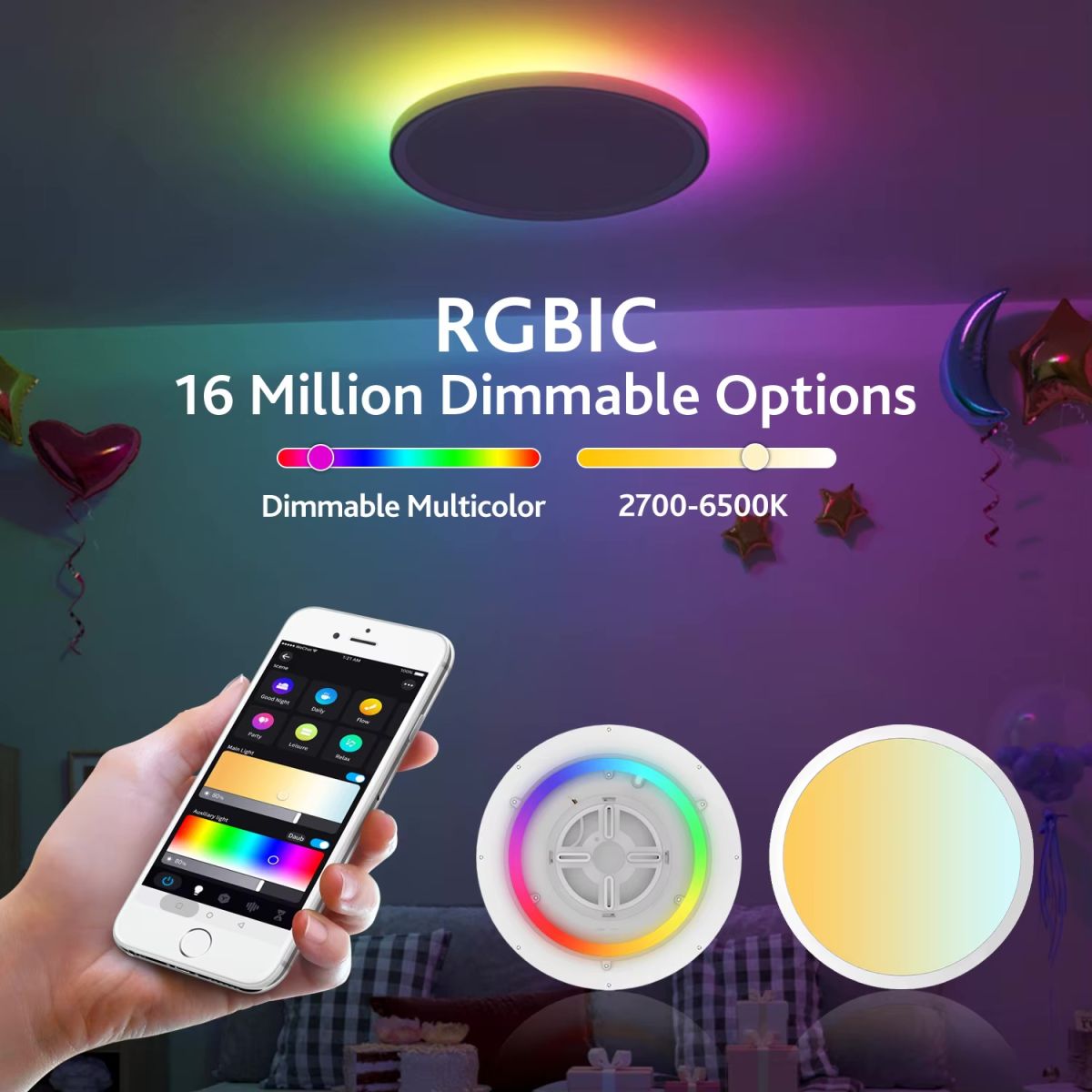
    This is how it looks like working:
    Ad for an RGBIC ceiling light with “16 Million Dimmable Options” text and a smartphone control app.
  • ADVERTISEMENT
  • #7 21884890
    insmod
    Level 31  
    Posts: 1364
    Help: 161
    Rate: 426
    Yes, it shows as a single light entity, and using RGB disables CW and vice-versa.
    But only if cold white is set to channel 3, and warm - channel 4. That way there's no need to disable SM16703P driver.

    @p.kaczmarek2
    Any suggestions?
    At the very least it would've been good to be able to control SM16703P via channels, and be able to manually set up 2 separate entities in HA.
  • Helpful post
    #9 21884900
    p.kaczmarek2
    Moderator Smart Home
    Posts: 14463
    Help: 650
    Rate: 12474
    The main issue is backwards compatibility. We can't break existing configs so we would need to update LED driver carefully.

    Maybe add a flag to allow split?

    Question: do we want two separate light entities or a single light entity that can work in RGBCW mode (all LEDs on)?

    Maybe we could instead add a custom WS2812 HA integration that works separately and keep main LED driver intact?
    Helpful post? Buy me a coffee.
  • ADVERTISEMENT
  • #10 21885049
    LidarCaptain
    Level 2  
    Posts: 6
    Rate: 1
    >>21884900

    Current scenario: global controls

    Device
    └── ONE Light (global & messy controls)
    ├── PWM warm white (P6)
    ├── PWM cold white (P8)
    └── SM16703P_DIN (P26)

    Result:
    - All control happens at the same global light level
    - RGB is not isolated from the white channels
    - Enabling RGB affects white light control on UI (the slider works only for the RGB, not the white)

    A few options would be:

    Proposed solution 1: one light with sub-controls
    Device
    └── ONE Light
    ├── White controls
    │ ├── PWM warm white (P6)
    │ └── PWM cold white (P8)
    └── RGB controls
    └── SM16703P_DIN (P26)

    Result:
    - One light entity kept for compatibility
    - White and RGB can be controlled independently inside the same light
    - Both systems can coexist. Home Assistant MQTT could create a virtual device if needed

    Proposed solution 2: split into two lights
    Device
    ├── Light 1: White light
    │ ├── PWM warm white (P6)
    │ └── PWM cold white (P8)
    └── Light 2: RGB light
    └── SM16703P_DIN (P26)

    Result:
    - Two separate light entities
    - White and RGB are fully independent
    - Matches the hardware layout more directly

    A flag that allows any of these solutions would be great!!

    Or the attribution of a different channel for the P26 > SM16703P_DIN > Channel 2, for example, to isolate it from channels 0 and 1 (cold/warm whites)?
  • #11 21885061
    insmod
    Level 31  
    Posts: 1364
    Help: 161
    Rate: 426
    On BK7238 SM16703P_DIN is hardcoded to P16, no matter what is set in GUI.
    If you remove it, nothing would change.
    Internally, it uses channel 0, 1, 2 for RGB, meaning you can't use them while the driver is running.
    Channels 3 and 4 are reserved for cold and warm white.

    You can set warm/cold channels to anything higher than 4, and then manually create a light in HA configuration.yaml that would use them.
  • Helpful post
    #12 21885222
    divadiow
    Level 38  
    Posts: 4911
    Help: 430
    Rate: 872
    excuse the interruption. just adding the dump boot log for the record

    Code: Text
    Log in, to see the code
  • #13 21889067
    LidarCaptain
    Level 2  
    Posts: 6
    Rate: 1
    Hey guys,

    I’ve been experimenting with the firmware and managed to put together a solution that better reflects how these hybrid RGB + CCT devices are actually wired.

    What I did

    I introduced a new driver concept called virtualLights, which splits the global light control into two independent logical lights.

    Instead of a single combined entity, the device is now exposed as:

    Device
    ├── Light 1: White light
    │ ├── PWM warm white (P6)
    │ └── PWM cold white (P8)
    └── Light 2: RGB light
    └── SM16703P_DIN (P16)

    How it works

    * White (CCT) → standard PWM channels
    * RGB → handled by SM16703P (addressable LEDs over SPI)
    * virtualLights driver → splits control into two independent entities

    Startup configuration

    This is the current startup setup:
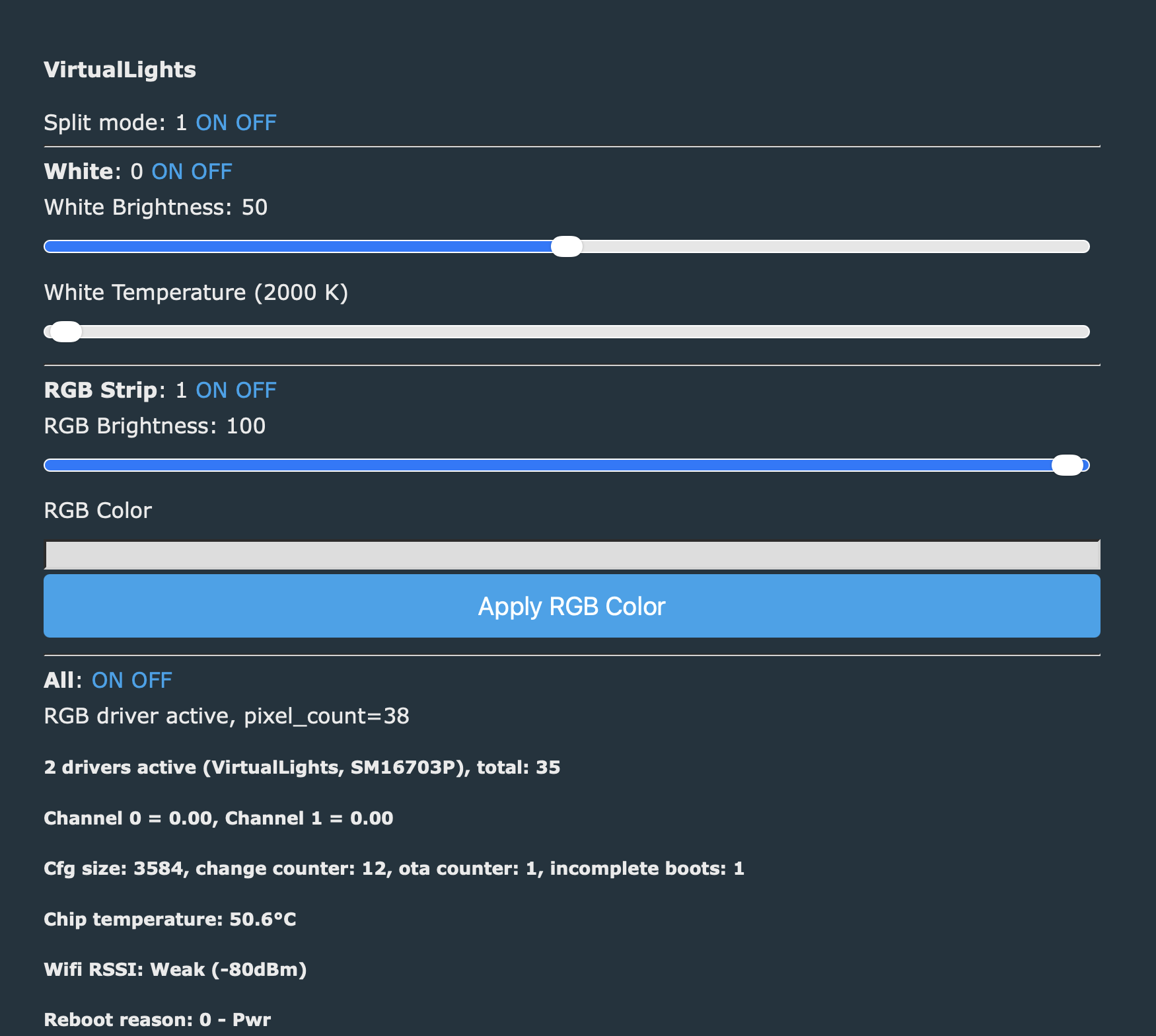
    backlog startDriver SM16703P; SM16703P_Init 38 GRB; SM16703P_Start; startDriver VirtualLights; VirtualLights_Enable 1;

    Result

    * Two separate light entities
    * White and RGB fully independent
    * No mode conflicts (e.g. white vs RGB overrides)
    * Better alignment with the actual hardware design

    Design note

    The virtualLights split can be optional.

    The idea is to make it a flag-based feature, so users can choose:

    * VirtualLights_Enable 1 → split into two lights
    * VirtualLights_Enable 0 → fallback to classic single light behavior

    This keeps backward compatibility while enabling a more accurate setup for devices that need it.


    Next steps

    If there’s interest, I can prepare a pull request with the changes (driver + integration).

    Happy to get feedback or adjust the implementation 👍

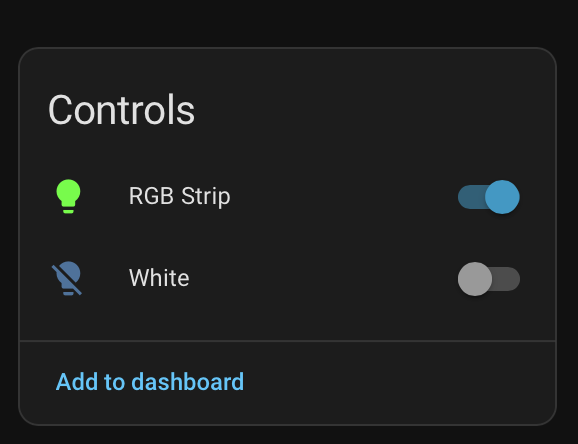
    How it looks like:
    “Controls” panel with toggles for “RGB Strip” and “White” plus an “Add to dashboard” link


    Firmware > OpenBeken7238 OpenBeken7...Lights.zip (2.1 MB)You must be logged in to download this attachment.
  • #14 21889074
    divadiow
    Level 38  
    Posts: 4911
    Help: 430
    Rate: 872
    oh wow. this looks cool.

    and if you decide not to start VirtualLights driver, does SM16703P behave as it did originally in all ways? I'm just wondering what the impact would be for anyone with a fully-configured device for basic SM16703P operation if they OTA to a release that includes code changes for this if it was merged.
  • #15 21889077
    p.kaczmarek2
    Moderator Smart Home
    Posts: 14463
    Help: 650
    Rate: 12474
    Please open a PR so I can compare it, also, does it still pass self tests?
    Helpful post? Buy me a coffee.

Topic summary

✨ Discussion about integrating an AliExpress BK7238-based RGBIC+CCT LED ceiling light into Home Assistant. The light works in the BRITURN app and is partially discovered by Magic Home, but only basic ON/OFF control is available; RGB, CCT, and effects are not accessible. A Flux LED/Magic Home integration attempt in Home Assistant fails with “Unknown Model FBF615. Cannot determine protocol,” suggesting the device uses a non-standard or custom firmware/protocol rather than a fully compatible MagicHome controller. The device exposes a local Wi‑Fi AP in unconfigured mode and then joins the network after pairing, but no working flashing or integration method is identified.
Generated by the language model.

FAQ

TL;DR: With 38 RGBIC LEDs and a BK7238 controller, this light can be flashed without desoldering, and one expert note was: "it worked great." This FAQ is for Home Assistant and OpenBeken users who need full local control of a BRITURN RGBIC+CCT ceiling light, including white CCT plus the RGB ring, and explains the current single-entity limitation and the new VirtualLights split approach. [#21884296]

Why it matters: This thread shows a practical path from unsupported vendor firmware to working local MQTT control on a hybrid BK7238 lamp.

Option White CCT control RGBIC ring control Home Assistant behavior
BRITURN app Full Full Vendor app only
Magic Home / Flux LED Limited or failed No usable control Reports unknown model
OpenBeken single light Works Works after driver start One merged light entity
OpenBeken + VirtualLights Works Works Two separate logical light entities

Key insight: The hardware is not one simple lamp. It is one BK7238 controller driving two lighting systems: PWM CCT whites and an addressable SM16703P RGB ring, so clean Home Assistant control needs either careful channel mapping or a split-light model. [#21884770]

Quick Facts

  • Hardware confirmed in the thread: WB43-M5 v1.2 module, Beken BK7238 SoC, HD-ZJZM24W-HC PCB, and an addressable RGB ring reported as 38 LEDs by the user’s working setup. [#21884507]
  • White panel settings that worked: P6 = PWM channel 1 (cold), P8 = PWM channel 0 (warm), with startup command backlog setChannelType 0 cwww for brightness and color-temperature control. [#21884507]
  • RGBIC support became available after updating to OpenBeken 1.18.287 and starting the driver before initialization: startDriver SM16703P; SM16703P_Init 38 GRB. [#21884770]
  • The original firmware boot log exposes several identifiers: build time 20250724, firmware string 3D_23_20250724_ZIL-BK38-M5-12, factory AP SSID LEDnet003DFBF615, BLE name IOTWF615, and Soft AP on channel 3. [#21885222]
  • On BK7238, the thread states SM16703P uses channels 0, 1, 2 internally, while channels 3 and 4 are reserved for cold and warm white, which explains the control conflict in a single light entity. [#21885061]

How do I flash a BK7238-based RGBIC+CCT ceiling light with OpenBK7238 without desoldering the WB43-M5 module?

You can flash it from the side GPIO pads without desoldering the WB43-M5 module. 1. Make a full backup of the original firmware first. 2. Connect through the side GPIOs and flash OpenBK7238. 3. If an older build crashes at boot, reflash the latest merged build. The user reported this exact path worked on April 15, 2026, after a failed boot with an older version and a successful recovery with the latest merged image. [#21884296]

Why does Home Assistant Flux LED report "Unknown Model FBF615. Cannot determine protocol" for this BRITURN ceiling light?

Flux LED fails because the lamp does not speak a supported Magic Home protocol. The device appears in the BRITURN app and is discovered by Magic Home, but only ON/OFF works there, while RGB, CCT, and effects do not. The reported model string is FBF615, and the thread’s conclusion is that the firmware is custom rather than a pure Magic Home-compatible controller. [#21884085]

What is OpenBK7238, and how is it used with Beken BK7238 smart lights?

"OpenBK7238 is replacement firmware that runs on Beken BK7238 smart devices, adds local drivers and MQTT-style control, and replaces vendor app logic with user-configurable functions." In this thread, it was flashed onto a BK7238 ceiling light to control PWM white channels and, after an update, the RGBIC ring through the SM16703P driver. It solved the vendor-protocol dead end and enabled Home Assistant-oriented control. [#21884296]

What is the SM16703P driver, and why does it matter for RGBIC control in OpenBeken?

"SM16703P is an addressable LED driver that controls pixel-style RGB LEDs over a data line, letting firmware set color and effects for each LED chain independently of PWM white outputs." It matters here because the ceiling light’s outer ring is addressable RGBIC, not a simple analog RGB strip. Without this driver, the white CCT panel can work, but the RGB ring cannot respond to pixel commands. [#21884507]

Which GPIO and PWM settings make the white CCT panel work on the HD-ZJZM24W-HC BK7238 ceiling light?

The working white CCT setup is P6 as PWM channel 1 for cold white and P8 as PWM channel 0 for warm white. The startup command backlog setChannelType 0 cwww enabled full brightness and color-temperature control on the main white panel. That configuration was reported stable on the HD-ZJZM24W-HC board with a WB43-M5 v1.2 BK7238 module. [#21884507]

Why do SM16703P commands like SM16703P_Init return "cmd NOT found" on some OpenBK7238 builds?

They return cmd NOT found when the build lacks addressable LED support or when the driver has not been started first. The user saw SM16703P_Init, SM16703P_SetPixel, and SM16703P_Start fail on an earlier merged build, then regained function after updating to version 1.18.287 and using startDriver SM16703P before the pixel commands. That is the key failure mode in this thread. [#21884583]

What startup commands are needed to enable the RGB ring on a BK7238 light running OpenBeken 1.18.287?

Use startDriver SM16703P; SM16703P_Init 38 GRB to enable the RGB ring on OpenBeken 1.18.287. The user then verified pixel output with SM16703P_SetPixel all R G B; SM16703P_Start. In the later split-light prototype, the startup line became backlog startDriver SM16703P; SM16703P_Init 38 GRB; SM16703P_Start; startDriver VirtualLights; VirtualLights_Enable 1;. [#21889067]

How can I control both PWM CCT white LEDs and the addressable RGB ring independently in Home Assistant over MQTT?

You can do it by separating the white and RGB paths instead of exposing one merged light. The thread gives two workable routes: map white to higher channels and create a manual Home Assistant light in configuration.yaml, or use the new VirtualLights driver to split the device into two logical light entities. The second approach matches the hardware layout more closely and removes mode conflicts. [#21885061]

Why does enabling RGB in OpenBeken make the white color-temperature slider disappear for this hybrid RGBIC+CCT lamp?

It happens because the firmware exposes the lamp as one light entity, not two independent lights. When the SM16703P RGB driver starts, the UI switches to RGB-style controls, so the white color-temperature slider disappears and a color picker appears instead. The thread explicitly describes the hardware as two systems behind one controller, but the default model still treats them as one light. [#21884770]

How are channels 0 to 4 used internally by OpenBK7238 for SM16703P RGB and cold/warm white outputs?

On BK7238, channels 0, 1, and 2 are used internally for SM16703P RGB, while channels 3 and 4 are reserved for cold and warm white. That internal allocation means you cannot safely use channels 0 to 2 for other outputs while the pixel driver runs. The same post also notes that SM16703P_DIN is hardcoded to P16 on BK7238, regardless of the GUI setting. [#21885061]

What is VirtualLights in OpenBeken, and how does it split one BK7238 ceiling light into separate white and RGB entities?

"VirtualLights is an OpenBeken driver that creates separate logical light entities from one physical controller, splitting PWM white channels from an addressable RGB driver while keeping one BK7238 device underneath." In this thread, it exposes Light 1 for warm and cold white on P6/P8 and Light 2 for the RGB ring on P16. The startup flag VirtualLights_Enable 1 turns on the split behavior. [#21889067]

OpenBeken single light entity vs split VirtualLights entities — which approach is better for RGBIC+CCT fixtures in Home Assistant?

Split VirtualLights entities are better when the fixture has truly separate white and RGB hardware paths. A single entity keeps backward compatibility, but the thread shows it causes messy controls, mode overrides, and UI conflicts between PWM CCT and SM16703P RGB. The split approach gives two lights, no white-versus-RGB override, and behavior that matches the actual wiring of this hybrid ceiling lamp. [#21889067]

How can I manually create two separate Home Assistant light entities in configuration.yaml when SM16703P uses reserved channels?

Move warm and cold white to channels higher than 4, then define a manual Home Assistant light that uses those higher-numbered channels. The thread states channels 3 and 4 are reserved for CCT and channels 0 to 2 are occupied by SM16703P RGB, so higher channels avoid the collision. This is the manual workaround when you do not use VirtualLights but still want separate MQTT-side control. [#21885061]

What clues in the boot log identify the original firmware, LED count, and factory AP mode for the LEDnet003DFBF615 ceiling light?

The boot log gives all three clues directly. It shows firmware string 3D_23_20250724_ZIL-BK38-M5-12, build time 20250724, and a factory AP with SSID LEDnet003DFBF615 on channel 3. It also prints _______led_num == 39______, plus BLE name IOTWF615 and local IP 10.10.123.3. That log confirms both vendor firmware identity and initial provisioning behavior. [#21885222]

What precautions should I take when backing up and restoring the original firmware before experimenting with OpenBK7238 on a BK7238 lamp?

Always make a full backup before flashing and keep it safe in case the replacement build fails. The thread includes two concrete warnings: one expert said to "always take backups of the original firmware," and the user later confirmed an older OpenBK7238 version crashed at boot before recovery with a newer merged build. Backup is the difference between a reversible experiment and a hard-to-restore lamp. [#21884139]
Generated by the language model.
ADVERTISEMENT