logo elektroda
logo elektroda
X
logo elektroda

How to send data over WiFi to the ESP8266 and then to the ATmega1284 via UART?

elektor18 11664 18
ADVERTISEMENT
Treść została przetłumaczona polish » english Zobacz oryginalną wersję tematu
  • #1 15178369
    elektor18
    Level 18  
    Hello
    I have an ESP8266 chip and would like to use it to communicate with the uC via UART, except that I want to send data from a laptop or smartphone. Is it possible to send data via wifi to the esp and "spit" this out via uart to the ATmega? If so where to look for this, seriously I have looked through many articles but have not found anything sensible....
  • ADVERTISEMENT
  • #2 15186153
    pablo_banita
    Level 13  
    Welcome!

    What you would like to get is the basics of the basics....
    Of course you can get that and much more. Expand on your thought (if it's not a secret) what you would like to obtain. With what to send this data (browser, terminal, or something else)? What next with the data in the uC, what would it do?
    Which version of the module do you have (there are from ESP8266-01 to ESP8266-12).

    I play around with these modules a bit and can help you.
  • ADVERTISEMENT
  • #3 15208474
    elektor18
    Level 18  
    I have version 01 (4Mb Flash). I would like to have access via an application written in Visual Studio C# and send data via wifi to the ESP and this via UART to the uC and then a possible uC reply the other way.
    So like a terminal.

    Alternatively, I could use a browser, but that would be more difficult as I don't know html etc.
  • ADVERTISEMENT
  • #4 15209572
    pablo_banita
    Level 13  
    I am just asking what the uC is supposed to do with this data. And I'm asking because there is a chance that the ESP itself could already control something, for example. I also wanted to tip you on the handle of the open door (so that you don't knock it down), because there are plenty of examples and software on the web but ok.
    Let's assume that the project is complex and you actually need an external uC.

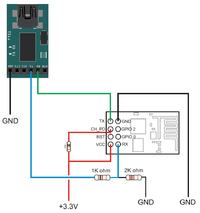
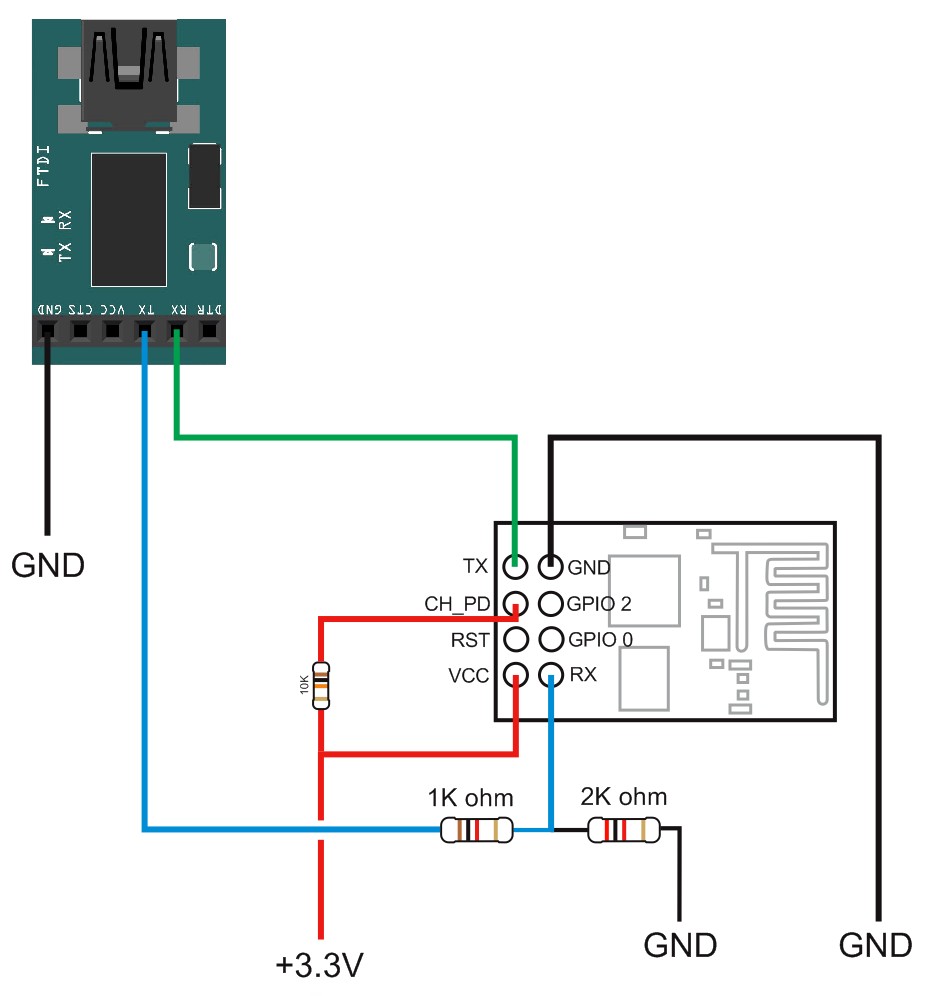
    I would start by connecting the ESP via an adapter (LVTTL or a divider on resistors for TTL signals) to the PC, so that you can see what happens in the module itself when a command is issued.
    Connection for the adapter with LVTTL level :
    How to send data over WiFi to the ESP8266 and then to the ATmega1284 via UART?
    or for TTL level:
    How to send data over WiFi to the ESP8266 and then to the ATmega1284 via UART?

    The Esp can operate in several modes i.e. connect to an existing WIFI network, create a new WIFI network or mixed.
    I assume that you would like to connect to an existing network. First you need to check the appropriate connection speed (9600 - usually or 115200). After connecting using any terminal, e.g. RealTerm, send the AT(+CRLF) command if the response is clear then ok, if not then change the connection speed.
    Once you have this figured out, type :
    AT+CWMODE=3 - change of operation mode to AP+STA
    AT+RST - restart module
    AT+CWLAP - search for available WIFI networks
    AT+CWJAP=“NAME”,“PASSWORD” - connecting to selected network
    AT+CIFSR - checking the IP address which the module received from the router
    AT+CIPSERVER=1,9999 - set TCP server on port 9999
    ITD...
    In addition, there are a couple of ready-made IDEs to upload to the ESP. I recommend nodemcu (which is not without its flaws) but for simple applications it will suffice. With it you can, for example, set a name and password for the network (you do this only once) and the module will automatically connect to the selected network after every reset or connection break. Additionally, with a few lines of code (written into the module) you can set it up as a connectionless server - what you send to the module via the terminal, the module will send to the uC and vice versa.

    As I mentioned you don't reveal what you would like to achieve (turn on a light, open a gate, read the temperature, or maybe blow something up with a nuke ;-) ), however if you decided to reveal the task I would probably offer a ready-made solution - probably without writing programs.
    If you have any questions attack...

    PS. documentation attached - AT commands
  • #5 15439931
    adambehnke
    Level 24  
    I'll join the topic because I don't want to create a new one.
    I have a perhaps trivial question.
    Well, I have an ESP8266 connected to an Atmega32.
    And I have a problem sending an AT command of the form : AT+CIPSTART=1, "UDP", "192.168.1.2",874,11012

    where:

    192.168.1.2 is the address of the module I am sending data to
    874 - destination port to which the data will be sent
    11012 - port from which data is sent.

    What I mean is that I have no idea how to create myself variables :port_sender , port_destination , ip_receiver. Because when I put the whole command "together" from these variables into some string variable, it obviously cuts out the quotes and the command looks like this:

    AT+CIPSTART=1,UDP,192.168.1.2,874,11012

    and of course it is not recognised as a valid AT command.

    Please help how to go about this.
    I have the same problem when I do the same thing not from the AVR but from the PC via the FT232RL based adapter.
    When I send myself from the terminal the command :AT+CIPSTART=1, "UDP", "192.168.1.2",874,11012
    everything works fine.

    The problem is that I want to send data to different IPs and ports and the whole AT command has to be reassembled each time.

    I know this is probably a trivial and ridiculous problem but I'm stuck :(
  • #6 15440185
    BlueDraco
    MCUs specialist
    And how do you put this command together and what is this mysterious entity cutting out those quotes for you? You have a simple bug in your program that you don't want to show, so how can we help you?
  • #7 15440541
    Elektronik_Kraków
    Level 13  
    Quote:

    What I mean is that I have no idea how to create myself the variables :port_sender , port_destination , ip_receiver. Because when I put the whole command "together" from these variables into some string variable, it obviously cuts out my quotes and the command looks like this:

    AT+CIPSTART=1,UDP,192.168.1.2,874,11012

    and of course it is not recognised as a valid AT command.

    I don't know what language your colleague is writing in, but I do it like this in Bascom:
    Code: VB.net
    Log in, to see the code
  • #8 15441458
    adambehnke
    Level 24  
    I write in Visual Studio and GCC. I'm about to practice with chr(34) and(or) double quotes. I will let you know soon. Thank you.
  • #9 15441473
    polprzewodnikowy
    Level 26  
    In C, just type ƒ" in the place where you want the inverted commas. E.g:
    Code: C / C++
    Log in, to see the code
  • #10 15441697
    adambehnke
    Level 24  
    i used : Cmd = "AT+CIPSTART=4," + Chr(34) + "TCP" + Chr(34) + "," + Chr(34) + "184.106.153.149" + Chr(34) + ".80"

    That is, chr(34) has taken care of things in Visual Studio.NET for this moment :D

    and in C I'll check right away, but Fellow Semiconductor is probably right!

    Thank you!
  • ADVERTISEMENT
  • #11 15446405
    adambehnke
    Level 24  
    Everything works as it should. Thank you very much for your help.
  • #12 15489010
    mototest
    Level 19  
    Hello colleagues
    i see that colleague pablo_banita is proficient in the subject, but I am asking for help of all deep in the subject of ESP
    i want to get a similar effect as the colleague in the first post , for now for a test I would like to send some arbitrary word e.g. "Hello: from the processor to the ESP and receive it in a terminal e.g. UDP in visual basic.
    I have a UDP terminal made and it works because it receives data sent by another module from Atnel, but Atnel is expensive so I am looking for a cheap solution (because I will need 10 modules),
    how to configure this ESP to send text via UDP to the terminal ?
    in Atnel, I created myself a separate network e.g. for the IP test: 10.10.100.254 and port 8899 I set the module in AP mode and if I set this port in the terminal I would receive data inserted on the RS232 of the module , but in ESP I don't know how to make this internal network 10.10.100.254 and port 8899 and UDP mode to receive it in the terminal

    i would also like it to work with static IP addresses so I don't have to search for modules in the network later on...
    ultimately, I would like to read the temperature from 10 sensors and display this in a UDP terminal, using 10 wifi modules

    i would also like to do all this via AT commands, not any external software

    the software for the module i have uploaded is :
    https://github.com/espressif/esp8266_at/tree/master/bin

    Boguslaw
  • #13 15489085
    bialy
    Level 16  
    elektor18 wrote:
    Hello
    I have an ESP8266 chip and would like to use it to communicate with a uC via UART, except that I want to send data from a laptop or smartphone. Is it possible to send data via wifi to the esp and "spit" this out via uart to the ATmega? If so where to look for this, seriously I have looked through many articles but have not found anything sensible...


    For me the OOTB soft with esp8266 is pure evil ;)
    You can change the soft to https://github.com/nodemcu/nodemcu-firmware.
    I have version 01 in which I changed the soft own nodemcu. Now you can use this chip without any problem. The change procedure itself is not too complicated everything is described on github.
  • #14 15544701
    adambehnke
    Level 24  
    Again I have a question about the communication between the atmega and the ESP8266.
    Well I have now set up communication via RXD and TXD .
    What you colleagues have helped me to unravel works perfectly. I have put the commands together and everything works.
    I transmit and receive packets without any problems.
    But if I receive a packet I don't know from which IP and port the packet came.
    How do I check this. Because I would like to be able to send a reply under the IP and port of the sender.
    I know that in arduino libraries for ESP8266 there is such possibility.
    But I do not use any library. I'm using communication over an ordinary UART.

    Please give me some hints and suggestions.
  • #15 15793341
    barth_bh
    Level 12  
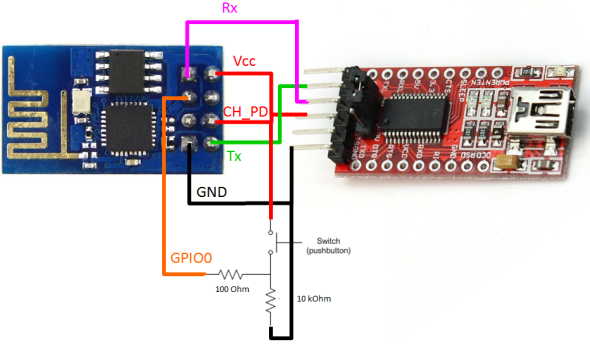
    Gentlemen, I have another question, I have ESP-01 connected to Due - it works, I would like to be able to update ESP firmware or just update the program itself which is executed on ESP. Taking out and programming the ESP module on FTDI is cumbersome - I thought that after uploading the software to Due, which from UART directs to serial TX RX, it will be possible to upload a new program to ESP via Due - and now yes, it works, but only as a serial AT command monitor. despite controlling the flashing leg, i.e. GPIO0 (LOW) from Due - it is not possible to upload a new software

    here is the code:
    #define Serial_ESP Serial1
    #define Serial_Debug Serial

    #define Serial_Baud 115200


    int CH_PD_8266 = 53;
    int RST_ESP=12;
    int Programming=9;

    // =======================================================================
    void setup() {
    Serial_ESP.begin(Serial_Baud);
    Serial_Debug.begin(Serial_Baud);

    pinMode(CH_PD_8266, OUTPUT);
    pinMode(Programming, OUTPUT);
    pinMode(RST_ESP, OUTPUT);

    digitalWrite(Programming, HIGH );
    //digitalWrite(CH_PD_8266, LOW );
    digitalWrite(RST_ESP, HIGH );
    digitalWrite(CH_PD_8266, HIGH );

    digitalWrite(Programming, LOW );
    digitalWrite(RST_ESP, LOW );

    digitalWrite(Programming, HIGH );
    digitalWrite(RST_ESP, HIGH);


    }
    // =======================================================================
    void loop() {
    if (Serial_ESP.available()) {

    Serial_Debug.write(Serial_ESP.read());
    }
    Serial_Debug.flush();

    if (Serial_Debug.available()) {

    Serial_ESP.write(Serial_Debug.read());
    }
    Serial_ESP.flush();
    }


    Looks like I can't get ESP into programming mode....
    ESP RESET hooked up via 10ko to +3v3
    CH_PD also

    Do you have any ideas?
  • #16 15802483
    pablo_banita
    Level 13  
    barth_bh wrote:
    #define Serial_Baud 115200
    ...Do you have any ideas?

    It's been a while now so I can't remember exactly, but try changing the speed to e.g. 38400, 9600, 19200 (preferably to what you program the module externally :D ) and see what happens.
    regards
    Paul
  • #17 15802596
    barth_bh
    Level 12  
    Everything is fine - it turns out that in order to load the program into the ESP via Due you have to do it immediately after a reboot - in my case other programs were executing before the state on GIPO0 changed to LOW it was already too late after the COM reset.

    In other words, if you want to program ESP and use Arduino instead of FTDI - you should do the upload procedure to ESP right after reboot - below is the code

    if(isUploading == true)
    {
    if (Serial1.available()) {
    Serial.write(Serial1.read());
    waitTime = millis();
    }
    Serial.flush();

    if (Serial.available()) {
    Serial1.write(Serial.read());}
    Serial1.flush();

    if (waitTime + 3000 <= millis())
    {
    digitalWrite(Programming, HIGH);
    digitalWrite(RST_ESP, LOW);
    digitalWrite(Programming, HIGH);
    delay(10);
    digitalWrite(RST_ESP, HIGH);
    digitalWrite(Programming, HIGH);
    isUploading = false;
    }

    }
    else ... execute the main program.

    The only drawback is that it takes a second longer to run the program, but then you gain convenience because you don't have to do anything but run Flash to ESP
  • #18 15804384
    piotr411
    Level 22  
    barth_bh wrote:
    Gentlemen I have another question, I have an ESP-01 connected to Due - it works, I would like to be able to update the firmw


    If you are familiar with Basic, you will find everything you need in Basic ESP
    Link

    All editing or uploading of a new programme is done via the "www" website
    Therefore, from any device that has a browser you can improve your programme. It can be a smartphone, tablet, PC, with any system, Android, iOS, Windows, Linux, etc......
  • #19 16487742
    Kamlos
    Level 11  
    I have a task ahead of me as in the first thread - I want to use my smartphone to read the temperature from the sensor and control the lighting. I've got the lighting control covered. I have uploaded a program to the ESP8266-07 that turns the ESP module into a webserver and controls the lighting from a browser. I want the control to be done from an Android app but I'm saving that for last. I'm stuck and stalling on the data exchange between the phone and ESP module via wifi(TCP or possibly UDP). I have the sensor hooked up to the ESP module. Is there anyone on the forum who can explain to me how to send data downloaded from the sensor using AT commands and how to receive it using e.g. a phone?
ADVERTISEMENT