logo elektroda
logo elektroda
X
logo elektroda
Dostępna jest polska wersja

Czy wolisz polską wersję strony elektroda?

Nie, dziękuję Przekieruj mnie tam

Temu Temp-Humidity Sensor (BK7238, AU5068XA) - Batch 25WSDJ01 /Model F-SL01WB Pinout

leon22heart 2466 93
ADVERTISEMENT
  • #1 21834129
    leon22heart
    Level 4  
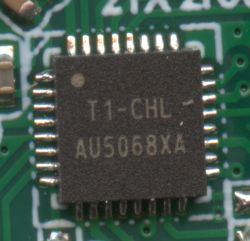
    Hello to all . First timer here . Got some Tuya/Smartlife Temp-Humidity sensors from Temu . Opened them and seem to be based on the BK7238 chip with the AU5068XA marking. Successfully backed original firmware that i attach , flashed OpenBK firmware (238T) , connected the device to the router and have access to the WebGUI . Can anyone guide me on how to troubleshoot the pins so that i can have the temp and humidity readings ?

    Logs from the BK7231 Easy UART Flasher

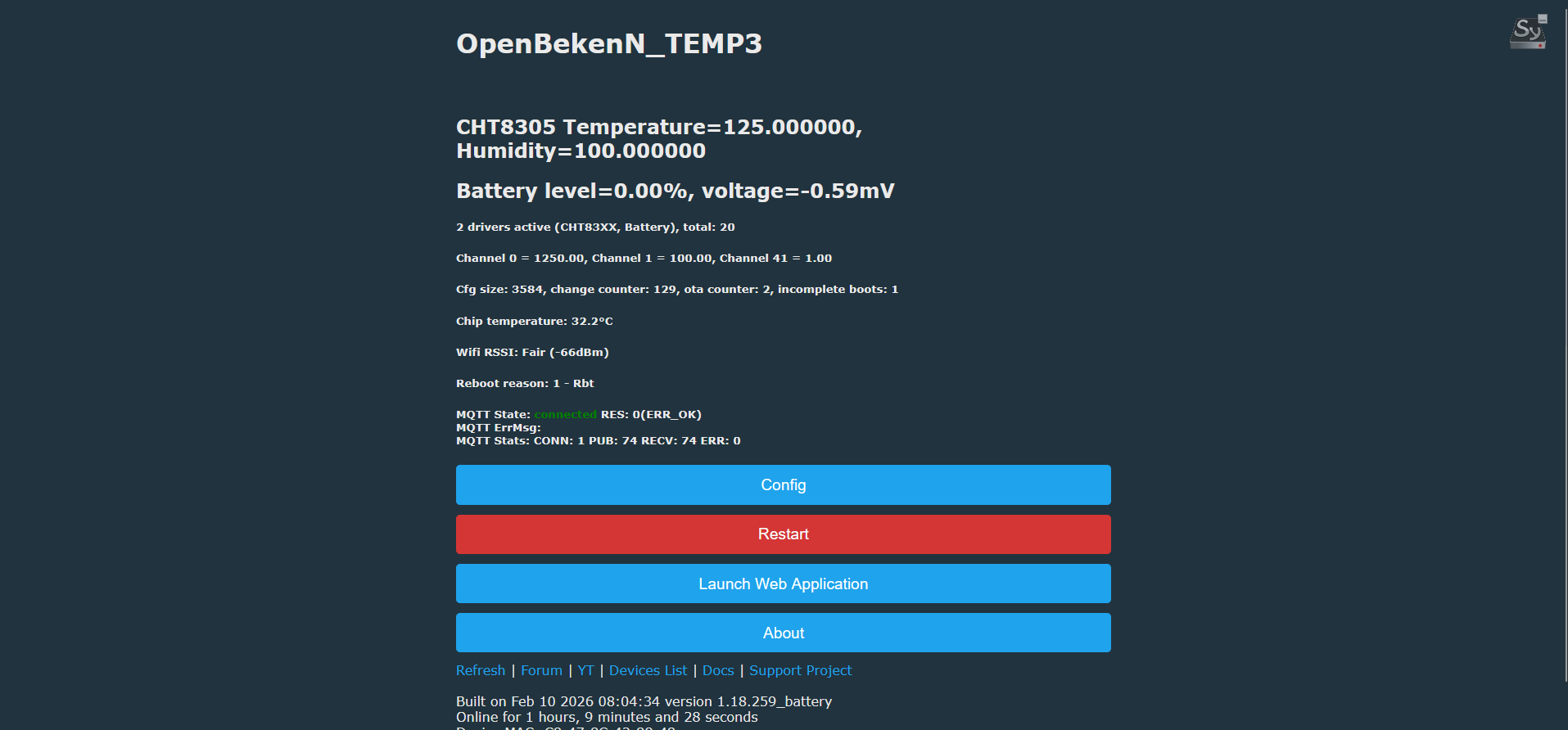
    Backup name is set to 238.
    
    Starting read!
    Read parms: start 0x00 (sector 0), len 0x200000 (0 sectors)
    Now is: Monday, 09 February 2026 18:40:14.
    Flasher mode: BK7238
    Going to open port: COM12.
    Serial port open!
    Getting bus... (now, please do reboot by CEN or by power off/on)
    Getting bus success!
    Going to set baud rate setting (921600)!
    Chip ID: 0x7238
    Will try to read device flash MID (for unprotect N):
    Flash MID loaded: 152085
    Will now search for Flash def in out database...
    Flash def found! For: 152085
    Flash information: mid: 152085, icName: P25Q16HBK, manufacturer: Puya, szMem: 200000, szSR: 2, cwUnp: 0, cwEnp: 7, cwMsk: 407C, sb: 2, lb: 5, cwdRd: 05-35-FF-FF, cwdWr: 01-31-FF-FF
    Flash size is 2MB
    Entering SetProtectState(True)...
    sr: 7c
    sr: 7c
    final sr: 7c
    msk: 407c
    cw: 0, sb: 2, lb: 5
    bfd: 0
    sr: 0
    sr: 0
    final sr: 0
    msk: 407c
    cw: 0, sb: 2, lb: 5
    bfd: 0
    SetProtectState(True) success!
    Going to start reading at offset 0x00...
    Reading 0x00... failed with serial.BytesToRead 0 (expected 4111)
    The beginning of buffer in UART contains  data.
    Failed! There was no result to save.
    Backup name is set to ll.
    
    Starting read!
    Read parms: start 0x00 (sector 0), len 0x200000 (0 sectors)
    Now is: Monday, 09 February 2026 18:41:56.
    Flasher mode: BK7238
    Going to open port: COM12.
    Serial port open!
    Getting bus... (now, please do reboot by CEN or by power off/on)
    Getting bus failed, will try again - 0/100!
    Getting bus failed, will try again - 1/100!
    Getting bus failed, will try again - 2/100!
    Getting bus failed, will try again - 3/100!
    Getting bus failed, will try again - 4/100!
    Getting bus failed, will try again - 5/100!
    Getting bus failed, will try again - 6/100!
    Getting bus failed, will try again - 7/100!
    Getting bus failed, will try again - 8/100!
    Getting bus failed, will try again - 9/100!
    Reminder: you should do a device reboot now (do power off/on of the device, but don't disconnect UART or do a CEN short to ground for 0.25sec)
    Getting bus failed, will try again - 10/100!
    Getting bus failed, will try again - 11/100!
    Getting bus failed, will try again - 12/100!
    Getting bus failed, will try again - 13/100!
    Getting bus failed, will try again - 14/100!
    Getting bus failed, will try again - 15/100!
    Getting bus failed, will try again - 16/100!
    Getting bus failed, will try again - 17/100!
    Getting bus failed, will try again - 18/100!
    Getting bus failed, will try again - 19/100!
    Reminder: you should do a device reboot now (do power off/on of the device, but don't disconnect UART or do a CEN short to ground for 0.25sec)
    Getting bus success!
    Going to set baud rate setting (921600)!
    Chip ID: 0x7238
    Will try to read device flash MID (for unprotect N):
    Flash MID loaded: 152085
    Will now search for Flash def in out database...
    Flash def found! For: 152085
    Flash information: mid: 152085, icName: P25Q16HBK, manufacturer: Puya, szMem: 200000, szSR: 2, cwUnp: 0, cwEnp: 7, cwMsk: 407C, sb: 2, lb: 5, cwdRd: 05-35-FF-FF, cwdWr: 01-31-FF-FF
    Flash size is 2MB
    Entering SetProtectState(True)...
    sr: 7c
    sr: 7c
    final sr: 7c
    msk: 407c
    cw: 0, sb: 2, lb: 5
    bfd: 0
    sr: 0
    sr: 0
    final sr: 0
    msk: 407c
    cw: 0, sb: 2, lb: 5
    bfd: 0
    SetProtectState(True) success!
    Going to start reading at offset 0x00...
    Reading 0x00... Ok! Reading 0x1000... Ok! Reading 0x2000... Ok! Reading 0x3000... Ok! Reading 0x4000... Ok! Reading 0x5000... Ok! Reading 0x6000... Ok! Reading 0x7000... Ok! Reading 0x8000... Ok! Reading 0x9000... Ok! Reading 0xA000... Ok! Reading 0xB000... Ok! Reading 0xC000... Ok! Reading 0xD000... Ok! Reading 0xE000... Ok! Reading 0xF000... Ok! Reading 0x10000... Ok! Reading 0x11000... Ok! Reading 0x12000... Ok! Reading 0x13000... Ok! Reading 0x14000... Ok! Reading 0x15000... Ok! Reading 0x16000... Ok! Reading 0x17000... Ok! Reading 0x18000... Ok! Reading 0x19000... Ok! Reading 0x1A000... Ok! Reading 0x1B000... Ok! Reading 0x1C000... Ok! Reading 0x1D000... Ok! Reading 0x1E000... Ok! Reading 0x1F000... Ok! Reading 0x20000... Ok! Reading 0x21000... Ok! Reading 0x22000... Ok! Reading 0x23000... Ok! Reading 0x24000... Ok! Reading 0x25000... Ok! Reading 0x26000... Ok! Reading 0x27000... Ok! Reading 0x28000... Ok! Reading 0x29000... Ok! Reading 0x2A000... Ok! Reading 0x2B000... Ok! Reading 0x2C000... Ok! Reading 0x2D000... Ok! Reading 0x2E000... Ok! Reading 0x2F000... Ok! Reading 0x30000... Ok! Reading 0x31000... Ok! Reading 0x32000... Ok! Reading 0x33000... Ok! Reading 0x34000... Ok! Reading 0x35000... Ok! Reading 0x36000... Ok! Reading 0x37000... Ok! Reading 0x38000... Ok! Reading 0x39000... Ok! Reading 0x3A000... Ok! Reading 0x3B000... Ok! Reading 0x3C000... Ok! Reading 0x3D000... Ok! Reading 0x3E000... Ok! Reading 0x3F000... Ok! Reading 0x40000... Ok! Reading 0x41000... Ok! Reading 0x42000... Ok! Reading 0x43000... Ok! Reading 0x44000... Ok! Reading 0x45000... Ok! Reading 0x46000... Got exception: System.InvalidOperationException: The port is closed.
       at System.IO.Ports.SerialPort.get_BytesToRead()
       at BK7231Flasher.BK7231Flasher.Start_Cmd(Byte[] txbuf, Int32 rxLen, Single timeout)!
    Failed! There was no result to save.
    Backup name is set to fff.
    
    Starting read!
    Read parms: start 0x00 (sector 0), len 0x200000 (0 sectors)
    Now is: Monday, 09 February 2026 18:45:21.
    Flasher mode: BK7238
    Going to open port: COM12.
    Serial port open!
    Getting bus... (now, please do reboot by CEN or by power off/on)
    Getting bus failed, will try again - 0/100!
    Getting bus success!
    Going to set baud rate setting (921600)!
    Chip ID: 0x7238
    Will try to read device flash MID (for unprotect N):
    Flash MID loaded: 152085
    Will now search for Flash def in out database...
    Flash def found! For: 152085
    Flash information: mid: 152085, icName: P25Q16HBK, manufacturer: Puya, szMem: 200000, szSR: 2, cwUnp: 0, cwEnp: 7, cwMsk: 407C, sb: 2, lb: 5, cwdRd: 05-35-FF-FF, cwdWr: 01-31-FF-FF
    Flash size is 2MB
    Entering SetProtectState(True)...
    sr: 7c
    sr: 7c
    final sr: 7c
    msk: 407c
    cw: 0, sb: 2, lb: 5
    bfd: 0
    sr: 0
    sr: 0
    final sr: 0
    msk: 407c
    cw: 0, sb: 2, lb: 5
    bfd: 0
    SetProtectState(True) success!
    Going to start reading at offset 0x00...
    Reading 0x00... Ok! Reading 0x1000... Ok! Reading 0x2000... Ok! Reading 0x3000... Ok! Reading 0x4000... Ok! Reading 0x5000... Ok! Reading 0x6000... Ok! Reading 0x7000... Ok! Reading 0x8000... Ok! Reading 0x9000... Ok! Reading 0xA000... Got exception: System.InvalidOperationException: The port is closed.
       at System.IO.Ports.SerialPort.get_BytesToRead()
       at BK7231Flasher.BK7231Flasher.Start_Cmd(Byte[] txbuf, Int32 rxLen, Single timeout)!
    Failed! There was no result to save.
    Backup name is set to hh.
    
    Starting read!
    Read parms: start 0x00 (sector 0), len 0x200000 (0 sectors)
    Now is: Monday, 09 February 2026 18:46:49.
    Flasher mode: BK7238
    Going to open port: COM12.
    Serial port open!
    Getting bus... (now, please do reboot by CEN or by power off/on)
    Getting bus failed, will try again - 0/100!
    Getting bus failed, will try again - 1/100!
    Getting bus success!
    Going to set baud rate setting (115200)!
    failed with serial.BytesToRead 0 (expected 12)
    The beginning of buffer in UART contains  data.
    Failed to set baud rate!
    Going to set baud rate setting (115200)!
    failed with serial.BytesToRead 0 (expected 12)
    The beginning of buffer in UART contains  data.
    Failed to set baud rate!
    Going to set baud rate setting (115200)!
    failed with serial.BytesToRead 0 (expected 12)
    The beginning of buffer in UART contains  data.
    Failed to set baud rate!
    Going to set baud rate setting (115200)!
    failed with serial.BytesToRead 0 (expected 12)
    The beginning of buffer in UART contains  data.
    Failed to set baud rate!
    Going to set baud rate setting (115200)!
    failed with serial.BytesToRead 0 (expected 12)
    The beginning of buffer in UART contains  data.
    Failed to set baud rate!
    Going to set baud rate setting (115200)!
    failed with serial.BytesToRead 0 (expected 12)
    The beginning of buffer in UART contains  data.
    Failed to set baud rate!
    Going to set baud rate setting (115200)!
    failed with serial.BytesToRead 0 (expected 12)
    The beginning of buffer in UART contains  data.
    Failed to set baud rate!
    Going to set baud rate setting (115200)!
    Got exception: System.InvalidOperationException: The port is closed.
       at System.IO.Ports.SerialPort.get_BytesToRead()
       at BK7231Flasher.BK7231Flasher.Start_Cmd(Byte[] txbuf, Int32 rxLen, Single timeout)!
    Failed to set baud rate!
    Going to set baud rate setting (115200)!
    Exception caught: System.InvalidOperationException: The port is closed.
       at System.IO.Ports.SerialPort.get_BytesToRead()
       at BK7231Flasher.BK7231Flasher.consumePending()
       at BK7231Flasher.BK7231Flasher.Start_Cmd(Byte[] txbuf, Int32 rxLen, Single timeout)
       at BK7231Flasher.BK7231Flasher.setBaudrate(Int32 baudrate, Int32 delay_ms)
       at BK7231Flasher.BK7231Flasher.doGetBusAndSetBaudRate()
       at BK7231Flasher.BK7231Flasher.doGenericSetup()
       at BK7231Flasher.BK7231Flasher.doReadInternal(Int32 startSector, Int32 sectors, Boolean fullRead)
       at BK7231Flasher.BK7231Flasher.doRead(Int32 startSector, Int32 sectors, Boolean fullRead)
    There was no result to save.
    Backup name is set to kk.
    
    Starting read!
    Read parms: start 0x00 (sector 0), len 0x200000 (0 sectors)
    Now is: Monday, 09 February 2026 18:47:27.
    Flasher mode: BK7238
    Going to open port: COM12.
    Serial port open!
    Getting bus... (now, please do reboot by CEN or by power off/on)
    Getting bus failed, will try again - 0/100!
    Getting bus failed, will try again - 1/100!
    Getting bus failed, will try again - 2/100!
    Getting bus success!
    Going to set baud rate setting (230400)!
    Chip ID: 0x7238
    Will try to read device flash MID (for unprotect N):
    Flash MID loaded: 152085
    Will now search for Flash def in out database...
    Flash def found! For: 152085
    Flash information: mid: 152085, icName: P25Q16HBK, manufacturer: Puya, szMem: 200000, szSR: 2, cwUnp: 0, cwEnp: 7, cwMsk: 407C, sb: 2, lb: 5, cwdRd: 05-35-FF-FF, cwdWr: 01-31-FF-FF
    Flash size is 2MB
    Entering SetProtectState(True)...
    sr: 7c
    sr: 7c
    final sr: 7c
    msk: 407c
    cw: 0, sb: 2, lb: 5
    bfd: 0
    sr: 0
    sr: 0
    final sr: 0
    msk: 407c
    cw: 0, sb: 2, lb: 5
    bfd: 0
    SetProtectState(True) success!
    Going to start reading at offset 0x00...
    Reading 0x00... Ok! Reading 0x1000... Ok! Reading 0x2000... Ok! Reading 0x3000... Ok! Reading 0x4000... Ok! Reading 0x5000... Ok! Reading 0x6000... Ok! Reading 0x7000... Ok! Reading 0x8000... Ok! Reading 0x9000... Ok! Reading 0xA000... Ok! Reading 0xB000... Ok! Reading 0xC000... Ok! Reading 0xD000... Ok! Reading 0xE000... Ok! Reading 0xF000... Ok! Reading 0x10000... Ok! Reading 0x11000... Ok! Reading 0x12000... Ok! Reading 0x13000... Ok! Reading 0x14000... Ok! Reading 0x15000... Ok! Reading 0x16000... Ok! Reading 0x17000... Ok! Reading 0x18000... Ok! Reading 0x19000... Ok! Reading 0x1A000... Ok! Reading 0x1B000... Ok! Reading 0x1C000... Ok! Reading 0x1D000... Ok! Reading 0x1E000... Ok! Reading 0x1F000... Ok! Reading 0x20000... Ok! Reading 0x21000... Ok! Reading 0x22000... Ok! Reading 0x23000... Ok! Reading 0x24000... Ok! Reading 0x25000... Ok! Reading 0x26000... Ok! Reading 0x27000... Ok! Reading 0x28000... Ok! Reading 0x29000... Ok! Reading 0x2A000... Ok! Reading 0x2B000... Ok! Reading 0x2C000... Ok! Reading 0x2D000... Ok! Reading 0x2E000... Ok! Reading 0x2F000... Ok! Reading 0x30000... Ok! Reading 0x31000... Ok! Reading 0x32000... Ok! Reading 0x33000... Ok! Reading 0x34000... Ok! Reading 0x35000... Ok! Reading 0x36000... Ok! Reading 0x37000... Ok! Reading 0x38000... Ok! Reading 0x39000... Ok! Reading 0x3A000... Ok! Reading 0x3B000... Ok! Reading 0x3C000... Ok! Reading 0x3D000... Ok! Reading 0x3E000... Ok! Reading 0x3F000... Ok! Reading 0x40000... Ok! Reading 0x41000... Ok! Reading 0x42000... Ok! Reading 0x43000... Ok! Reading 0x44000... Ok! Reading 0x45000... Ok! Reading 0x46000... Ok! Reading 0x47000... Ok! Reading 0x48000... Ok! Reading 0x49000... Ok! Reading 0x4A000... Ok! Reading 0x4B000... Ok! Reading 0x4C000... Ok! Reading 0x4D000... Ok! Reading 0x4E000... Ok! Reading 0x4F000... Ok! Reading 0x50000... Ok! Reading 0x51000... Ok! Reading 0x52000... Ok! Reading 0x53000... Ok! Reading 0x54000... Ok! Reading 0x55000... Ok! Reading 0x56000... Ok! Reading 0x57000... Ok! Reading 0x58000... Ok! Reading 0x59000... Ok! Reading 0x5A000... Ok! Reading 0x5B000... Ok! Reading 0x5C000... Ok! Reading 0x5D000... Ok! Reading 0x5E000... Ok! Reading 0x5F000... Ok! Reading 0x60000... Ok! Reading 0x61000... Ok! Reading 0x62000... Ok! Reading 0x63000... Ok! Reading 0x64000... Ok! Reading 0x65000... Ok! Reading 0x66000... Ok! Reading 0x67000... Ok! Reading 0x68000... Ok! Reading 0x69000... Ok! Reading 0x6A000... Ok! Reading 0x6B000... Ok! Reading 0x6C000... Ok! Reading 0x6D000... Ok! Reading 0x6E000... Ok! Reading 0x6F000... Ok! Reading 0x70000... Ok! Reading 0x71000... Ok! Reading 0x72000... Ok! Reading 0x73000... Ok! Reading 0x74000... Ok! Reading 0x75000... Ok! Reading 0x76000... Ok! Reading 0x77000... Ok! Reading 0x78000... Ok! Reading 0x79000... Ok! Reading 0x7A000... Ok! Reading 0x7B000... Ok! Reading 0x7C000... Ok! Reading 0x7D000... Ok! Reading 0x7E000... Ok! Reading 0x7F000... Ok! Reading 0x80000... Ok! Reading 0x81000... Ok! Reading 0x82000... Ok! Reading 0x83000... Ok! Reading 0x84000... Ok! Reading 0x85000... Ok! Reading 0x86000... Ok! Reading 0x87000... Ok! Reading 0x88000... Ok! Reading 0x89000... Ok! Reading 0x8A000... Ok! Reading 0x8B000... Ok! Reading 0x8C000... Ok! Reading 0x8D000... Ok! Reading 0x8E000... Ok! Reading 0x8F000... Ok! Reading 0x90000... Ok! Reading 0x91000... Ok! Reading 0x92000... Ok! Reading 0x93000... Ok! Reading 0x94000... Ok! Reading 0x95000... Ok! Reading 0x96000... Ok! Reading 0x97000... Ok! Reading 0x98000... Ok! Reading 0x99000... Ok! Reading 0x9A000... Ok! Reading 0x9B000... Ok! Reading 0x9C000... Ok! Reading 0x9D000... Ok! Reading 0x9E000... Ok! Reading 0x9F000... Ok! Reading 0xA0000... Ok! Reading 0xA1000... Ok! Reading 0xA2000... Ok! Reading 0xA3000... Ok! Reading 0xA4000... Ok! Reading 0xA5000... Ok! Reading 0xA6000... Ok! Reading 0xA7000... Ok! Reading 0xA8000... Ok! Reading 0xA9000... Ok! Reading 0xAA000... Ok! Reading 0xAB000... Ok! Reading 0xAC000... Ok! Reading 0xAD000... Ok! Reading 0xAE000... Ok! Reading 0xAF000... Ok! Reading 0xB0000... Ok! Reading 0xB1000... Ok! Reading 0xB2000... Ok! Reading 0xB3000... Ok! Reading 0xB4000... Ok! Reading 0xB5000... Ok! Reading 0xB6000... Ok! Reading 0xB7000... Ok! Reading 0xB8000... Ok! Reading 0xB9000... Ok! Reading 0xBA000... Ok! Reading 0xBB000... Ok! Reading 0xBC000... Ok! Reading 0xBD000... Ok! Reading 0xBE000... Ok! Reading 0xBF000... Ok! Reading 0xC0000... Ok! Reading 0xC1000... Ok! Reading 0xC2000... Ok! Reading 0xC3000... Ok! Reading 0xC4000... Ok! Reading 0xC5000... Ok! Reading 0xC6000... Ok! Reading 0xC7000... Ok! Reading 0xC8000... Ok! Reading 0xC9000... Ok! Reading 0xCA000... Ok! Reading 0xCB000... Ok! Reading 0xCC000... Ok! Reading 0xCD000... Ok! Reading 0xCE000... Ok! Reading 0xCF000... Ok! Reading 0xD0000... Ok! Reading 0xD1000... Ok! Reading 0xD2000... Ok! Reading 0xD3000... Ok! Reading 0xD4000... Ok! Reading 0xD5000... Ok! Reading 0xD6000... Ok! Reading 0xD7000... Ok! Reading 0xD8000... Ok! Reading 0xD9000... Ok! Reading 0xDA000... Ok! Reading 0xDB000... Ok! Reading 0xDC000... Ok! Reading 0xDD000... Ok! Reading 0xDE000... Ok! Reading 0xDF000... Ok! Reading 0xE0000... Ok! Reading 0xE1000... Ok! Reading 0xE2000... Ok! Reading 0xE3000... Ok! Reading 0xE4000... Ok! Reading 0xE5000... Ok! Reading 0xE6000... Ok! Reading 0xE7000... Ok! Reading 0xE8000... Ok! Reading 0xE9000... Ok! Reading 0xEA000... Ok! Reading 0xEB000... Ok! Reading 0xEC000... Ok! Reading 0xED000... Ok! Reading 0xEE000... Ok! Reading 0xEF000... Ok! Reading 0xF0000... Ok! Reading 0xF1000... Ok! Reading 0xF2000... Ok! Reading 0xF3000... Ok! Reading 0xF4000... Ok! Reading 0xF5000... Ok! Reading 0xF6000... Ok! Reading 0xF7000... Ok! Reading 0xF8000... Ok! Reading 0xF9000... Ok! Reading 0xFA000... Ok! Reading 0xFB000... Ok! Reading 0xFC000... Ok! Reading 0xFD000... Ok! Reading 0xFE000... Ok! Reading 0xFF000... Ok! Reading 0x100000... Ok! Reading 0x101000... Ok! Reading 0x102000... Ok! Reading 0x103000... Ok! Reading 0x104000... Ok! Reading 0x105000... Ok! Reading 0x106000... Ok! Reading 0x107000... Ok! Reading 0x108000... Ok! Reading 0x109000... Ok! Reading 0x10A000... Ok! Reading 0x10B000... Ok! Reading 0x10C000... Ok! Reading 0x10D000... Ok! Reading 0x10E000... Ok! Reading 0x10F000... Ok! Reading 0x110000... Ok! Reading 0x111000... Ok! Reading 0x112000... Ok! Reading 0x113000... Ok! Reading 0x114000... Ok! Reading 0x115000... Ok! Reading 0x116000... Ok! Reading 0x117000... Ok! Reading 0x118000... Ok! Reading 0x119000... Ok! Reading 0x11A000... Ok! Reading 0x11B000... Ok! Reading 0x11C000... Ok! Reading 0x11D000... Ok! Reading 0x11E000... Ok! Reading 0x11F000... Ok! Reading 0x120000... Ok! Reading 0x121000... Ok! Reading 0x122000... Ok! Reading 0x123000... Ok! Reading 0x124000... Ok! Reading 0x125000... Ok! Reading 0x126000... Ok! Reading 0x127000... Ok! Reading 0x128000... Ok! Reading 0x129000... Ok! Reading 0x12A000... Ok! Reading 0x12B000... Ok! Reading 0x12C000... Ok! Reading 0x12D000... Ok! Reading 0x12E000... Ok! Reading 0x12F000... Ok! Reading 0x130000... Ok! Reading 0x131000... Ok! Reading 0x132000... Ok! Reading 0x133000... Ok! Reading 0x134000... Ok! Reading 0x135000... Ok! Reading 0x136000... Ok! Reading 0x137000... Ok! Reading 0x138000... Ok! Reading 0x139000... Ok! Reading 0x13A000... Ok! Reading 0x13B000... Ok! Reading 0x13C000... Ok! Reading 0x13D000... Ok! Reading 0x13E000... Ok! Reading 0x13F000... Ok! Reading 0x140000... Ok! Reading 0x141000... Ok! Reading 0x142000... Ok! Reading 0x143000... Ok! Reading 0x144000... Ok! Reading 0x145000... Ok! Reading 0x146000... Ok! Reading 0x147000... Ok! Reading 0x148000... Ok! Reading 0x149000... Ok! Reading 0x14A000... Ok! Reading 0x14B000... Ok! Reading 0x14C000... Ok! Reading 0x14D000... Ok! Reading 0x14E000... Ok! Reading 0x14F000... Ok! Reading 0x150000... Ok! Reading 0x151000... Ok! Reading 0x152000... Ok! Reading 0x153000... Ok! Reading 0x154000... Ok! Reading 0x155000... Ok! Reading 0x156000... Ok! Reading 0x157000... Ok! Reading 0x158000... Ok! Reading 0x159000... Ok! Reading 0x15A000... Ok! Reading 0x15B000... Ok! Reading 0x15C000... Ok! Reading 0x15D000... Ok! Reading 0x15E000... Ok! Reading 0x15F000... Ok! Reading 0x160000... Ok! Reading 0x161000... Ok! Reading 0x162000... Ok! Reading 0x163000... Ok! Reading 0x164000... Ok! Reading 0x165000... Ok! Reading 0x166000... Ok! Reading 0x167000... Ok! Reading 0x168000... Ok! Reading 0x169000... Ok! Reading 0x16A000... Ok! Reading 0x16B000... Ok! Reading 0x16C000... Ok! Reading 0x16D000... Ok! Reading 0x16E000... Ok! Reading 0x16F000... Ok! Reading 0x170000... Ok! Reading 0x171000... Ok! Reading 0x172000... Ok! Reading 0x173000... Ok! Reading 0x174000... Ok! Reading 0x175000... Ok! Reading 0x176000... Ok! Reading 0x177000... Ok! Reading 0x178000... Ok! Reading 0x179000... Ok! Reading 0x17A000... Ok! Reading 0x17B000... Ok! Reading 0x17C000... Ok! Reading 0x17D000... Ok! Reading 0x17E000... Ok! Reading 0x17F000... Ok! Reading 0x180000... Ok! Reading 0x181000... Ok! Reading 0x182000... Ok! Reading 0x183000... Ok! Reading 0x184000... Ok! Reading 0x185000... Ok! Reading 0x186000... Ok! Reading 0x187000... Ok! Reading 0x188000... Ok! Reading 0x189000... Ok! Reading 0x18A000... Ok! Reading 0x18B000... Ok! Reading 0x18C000... Ok! Reading 0x18D000... Ok! Reading 0x18E000... Ok! Reading 0x18F000... Ok! Reading 0x190000... Ok! Reading 0x191000... Ok! Reading 0x192000... Ok! Reading 0x193000... Ok! Reading 0x194000... Ok! Reading 0x195000... Ok! Reading 0x196000... Ok! Reading 0x197000... Ok! Reading 0x198000... Ok! Reading 0x199000... Ok! Reading 0x19A000... Ok! Reading 0x19B000... Ok! Reading 0x19C000... Ok! Reading 0x19D000... Ok! Reading 0x19E000... Ok! Reading 0x19F000... Ok! Reading 0x1A0000... Ok! Reading 0x1A1000... Ok! Reading 0x1A2000... Ok! Reading 0x1A3000... Ok! Reading 0x1A4000... Ok! Reading 0x1A5000... Ok! Reading 0x1A6000... Ok! Reading 0x1A7000... Ok! Reading 0x1A8000... Ok! Reading 0x1A9000... Ok! Reading 0x1AA000... Ok! Reading 0x1AB000... Ok! Reading 0x1AC000... Ok! Reading 0x1AD000... Ok! Reading 0x1AE000... Ok! Reading 0x1AF000... Ok! Reading 0x1B0000... Ok! Reading 0x1B1000... Ok! Reading 0x1B2000... Ok! Reading 0x1B3000... Ok! Reading 0x1B4000... Ok! Reading 0x1B5000... Ok! Reading 0x1B6000... Ok! Reading 0x1B7000... Ok! Reading 0x1B8000... Ok! Reading 0x1B9000... Ok! Reading 0x1BA000... Ok! Reading 0x1BB000... Ok! Reading 0x1BC000... Ok! Reading 0x1BD000... Ok! Reading 0x1BE000... Ok! Reading 0x1BF000... Ok! Reading 0x1C0000... Ok! Reading 0x1C1000... Ok! Reading 0x1C2000... Ok! Reading 0x1C3000... Ok! Reading 0x1C4000... Ok! Reading 0x1C5000... Ok! Reading 0x1C6000... Ok! Reading 0x1C7000... Ok! Reading 0x1C8000... Ok! Reading 0x1C9000... Ok! Reading 0x1CA000... Ok! Reading 0x1CB000... Ok! Reading 0x1CC000... Ok! Reading 0x1CD000... Ok! Reading 0x1CE000... Ok! Reading 0x1CF000... Ok! Reading 0x1D0000... Ok! Reading 0x1D1000... Ok! Reading 0x1D2000... Ok! Reading 0x1D3000... Ok! Reading 0x1D4000... Ok! Reading 0x1D5000... Ok! Reading 0x1D6000... Ok! Reading 0x1D7000... Ok! Reading 0x1D8000... Ok! Reading 0x1D9000... Ok! Reading 0x1DA000... Ok! Reading 0x1DB000... Ok! Reading 0x1DC000... Ok! Reading 0x1DD000... Ok! Reading 0x1DE000... Ok! Reading 0x1DF000... Ok! Reading 0x1E0000... Ok! Reading 0x1E1000... Ok! Reading 0x1E2000... Ok! Reading 0x1E3000... Ok! Reading 0x1E4000... Ok! Reading 0x1E5000... Ok! Reading 0x1E6000... Ok! Reading 0x1E7000... Ok! Reading 0x1E8000... Ok! Reading 0x1E9000... Ok! Reading 0x1EA000... Ok! Reading 0x1EB000... Ok! Reading 0x1EC000... Ok! Reading 0x1ED000... Ok! Reading 0x1EE000... Ok! Reading 0x1EF000... Ok! Reading 0x1F0000... Ok! Reading 0x1F1000... Ok! Reading 0x1F2000... Ok! Reading 0x1F3000... Ok! Reading 0x1F4000... Ok! Reading 0x1F5000... Ok! Reading 0x1F6000... Ok! Reading 0x1F7000... Ok! Reading 0x1F8000... Ok! Reading 0x1F9000... Ok! Reading 0x1FA000... Ok! Reading 0x1FB000... Ok! Reading 0x1FC000... Ok! Reading 0x1FD000... Ok! Reading 0x1FE000... Ok! Reading 0x1FF000... Ok! 
    Basic read operation finished, but now it's time to verify...
    Starting CRC check for 512 sectors, starting at offset 0x00
    CRC matches 0x491A278C!
    All read!
    Loaded total 0x200000 bytes 
    Wrote 2097152 to readResult_BK7238_QIO_kk_2026-09-2-18-49-29.bin
    Backup created, now will attempt to extract OBK config.
    It's not an OBK config, header is bad
    OBK config not found.
    Backup created, will now attempt to extract Tuya config.
    Decryption took 4 ms
    Tuya config extractor - magic is at 2052096 (0x1F5000) 
    Saving debug Tuya decryption data to lastRawDecryptedStrings.bin
    Tuya keys extraction has found 45 keys
    Tuya config extracted and shown.
    MAC seems to be FF:FF:FF:FF:FF:FF
    
    Starting flash new (no backup)!
    Now is: Monday, 09 February 2026 19:05:04.
    Flasher mode: BK7238
    Going to open port: COM12.
    Serial port open!
    Getting bus... (now, please do reboot by CEN or by power off/on)
    Getting bus failed, will try again - 0/100!
    Getting bus success!
    Going to set baud rate setting (230400)!
    Chip ID: 0x7238
    Will try to read device flash MID (for unprotect N):
    Flash MID loaded: 152085
    Will now search for Flash def in out database...
    Flash def found! For: 152085
    Flash information: mid: 152085, icName: P25Q16HBK, manufacturer: Puya, szMem: 200000, szSR: 2, cwUnp: 0, cwEnp: 7, cwMsk: 407C, sb: 2, lb: 5, cwdRd: 05-35-FF-FF, cwdWr: 01-31-FF-FF
    Flash size is 2MB
    Entering SetProtectState(True)...
    sr: 0
    sr: 0
    final sr: 0
    msk: 407c
    cw: 0, sb: 2, lb: 5
    bfd: 0
    SetProtectState(True) success!
    Reading file firmwares/OpenBK7238_QIO_1.18.256.bin...
    Loaded 1253376 bytes from firmwares/OpenBK7238_QIO_1.18.256.bin...
    Preparing to write data file to chip - resetting bus and baud...
    Getting bus... (now, please do reboot by CEN or by power off/on)
    Getting bus success!
    Going to set baud rate setting (230400)!
    Will try to read device flash MID (for unprotect N):
    Flash MID loaded: 152085
    Will now search for Flash def in out database...
    Flash def found! For: 152085
    Flash information: mid: 152085, icName: P25Q16HBK, manufacturer: Puya, szMem: 200000, szSR: 2, cwUnp: 0, cwEnp: 7, cwMsk: 407C, sb: 2, lb: 5, cwdRd: 05-35-FF-FF, cwdWr: 01-31-FF-FF
    Flash size is 2MB
    Entering SetProtectState(True)...
    sr: 0
    sr: 0
    final sr: 0
    msk: 407c
    cw: 0, sb: 2, lb: 5
    bfd: 0
    SetProtectState(True) success!
    Going to do erase, start 0x00, sec count 306!
    Erasing block 0x00... ok! Erasing block 0x10000... ok! Erasing block 0x20000... ok! Erasing block 0x30000... ok! Erasing block 0x40000... ok! Erasing block 0x50000... ok! Erasing block 0x60000... ok! Erasing block 0x70000... ok! Erasing block 0x80000... ok! Erasing block 0x90000... ok! Erasing block 0xA0000... ok! Erasing block 0xB0000... ok! Erasing block 0xC0000... ok! Erasing block 0xD0000... ok! Erasing block 0xE0000... ok! Erasing block 0xF0000... ok! Erasing block 0x100000... ok! Erasing block 0x110000... ok! Erasing block 0x120000... ok! Erasing sector 0x130000... ok! Erasing sector 0x131000... ok! 
    All selected sectors erased!
    Writing sector 0x00... ok! Writing sector 0x1000... ok! Writing sector 0x2000... ok! Writing sector 0x3000... ok! Writing sector 0x4000... ok! Writing sector 0x5000... ok! Writing sector 0x6000... ok! Writing sector 0x7000... ok! Writing sector 0x8000... ok! Writing sector 0x9000... ok! Writing sector 0xA000... ok! Writing sector 0xB000... ok! Writing sector 0xC000... ok! Writing sector 0xD000... ok! Writing sector 0xE000... ok! Writing sector 0xF000... ok! Writing sector 0x10000... ok! Writing sector 0x11000... ok! Writing sector 0x12000... ok! Writing sector 0x13000... ok! Writing sector 0x14000... ok! Writing sector 0x15000... ok! Writing sector 0x16000... ok! Writing sector 0x17000... ok! Writing sector 0x18000... ok! Writing sector 0x19000... ok! Writing sector 0x1A000... ok! Writing sector 0x1B000... ok! Writing sector 0x1C000... ok! Writing sector 0x1D000... ok! Writing sector 0x1E000... ok! Writing sector 0x1F000... ok! Writing sector 0x20000... ok! Writing sector 0x21000... ok! Writing sector 0x22000... ok! Writing sector 0x23000... ok! Writing sector 0x24000... ok! Writing sector 0x25000... ok! Writing sector 0x26000... ok! Writing sector 0x27000... ok! Writing sector 0x28000... ok! Writing sector 0x29000... ok! Writing sector 0x2A000... ok! Writing sector 0x2B000... ok! Writing sector 0x2C000... ok! Writing sector 0x2D000... ok! Writing sector 0x2E000... ok! Writing sector 0x2F000... ok! Writing sector 0x30000... ok! Writing sector 0x31000... ok! Writing sector 0x32000... ok! Writing sector 0x33000... ok! Writing sector 0x34000... ok! Writing sector 0x35000... ok! Writing sector 0x36000... ok! Writing sector 0x37000... ok! Writing sector 0x38000... ok! Writing sector 0x39000... ok! Writing sector 0x3A000... ok! Writing sector 0x3B000... ok! Writing sector 0x3C000... ok! Writing sector 0x3D000... ok! Writing sector 0x3E000... ok! Writing sector 0x3F000... ok! Writing sector 0x40000... ok! Writing sector 0x41000... ok! Writing sector 0x42000... ok! Writing sector 0x43000... ok! Writing sector 0x44000... ok! Writing sector 0x45000... ok! Writing sector 0x46000... ok! Writing sector 0x47000... ok! Writing sector 0x48000... ok! Writing sector 0x49000... ok! Writing sector 0x4A000... ok! Writing sector 0x4B000... ok! Writing sector 0x4C000... ok! Writing sector 0x4D000... ok! Writing sector 0x4E000... ok! Writing sector 0x4F000... ok! Writing sector 0x50000... ok! Writing sector 0x51000... ok! Writing sector 0x52000... ok! Writing sector 0x53000... ok! Writing sector 0x54000... ok! Writing sector 0x55000... ok! Writing sector 0x56000... ok! Writing sector 0x57000... ok! Writing sector 0x58000... ok! Writing sector 0x59000... ok! Writing sector 0x5A000... ok! Writing sector 0x5B000... ok! Writing sector 0x5C000... ok! Writing sector 0x5D000... ok! Writing sector 0x5E000... ok! Writing sector 0x5F000... ok! Writing sector 0x60000... ok! Writing sector 0x61000... ok! Writing sector 0x62000... ok! Writing sector 0x63000... ok! Writing sector 0x64000... ok! Writing sector 0x65000... ok! Writing sector 0x66000... ok! Writing sector 0x67000... ok! Writing sector 0x68000... ok! Writing sector 0x69000... ok! Writing sector 0x6A000... ok! Writing sector 0x6B000... ok! Writing sector 0x6C000... ok! Writing sector 0x6D000... ok! Writing sector 0x6E000... ok! Writing sector 0x6F000... ok! Writing sector 0x70000... ok! Writing sector 0x71000... ok! Writing sector 0x72000... ok! Writing sector 0x73000... ok! Writing sector 0x74000... ok! Writing sector 0x75000... ok! Writing sector 0x76000... ok! Writing sector 0x77000... ok! Writing sector 0x78000... ok! Writing sector 0x79000... ok! Writing sector 0x7A000... ok! Writing sector 0x7B000... ok! Writing sector 0x7C000... ok! Writing sector 0x7D000... ok! Writing sector 0x7E000... ok! Writing sector 0x7F000... ok! Writing sector 0x80000... ok! Writing sector 0x81000... ok! Writing sector 0x82000... ok! Writing sector 0x83000... ok! Writing sector 0x84000... ok! Writing sector 0x85000... ok! Writing sector 0x86000... ok! Writing sector 0x87000... ok! Writing sector 0x88000... ok! Writing sector 0x89000... ok! Writing sector 0x8A000... ok! Writing sector 0x8B000... ok! Writing sector 0x8C000... ok! Writing sector 0x8D000... ok! Writing sector 0x8E000... ok! Writing sector 0x8F000... ok! Writing sector 0x90000... ok! Writing sector 0x91000... ok! Writing sector 0x92000... ok! Writing sector 0x93000... ok! Writing sector 0x94000... ok! Writing sector 0x95000... ok! Writing sector 0x96000... ok! Writing sector 0x97000... ok! Writing sector 0x98000... ok! Writing sector 0x99000... ok! Writing sector 0x9A000... ok! Writing sector 0x9B000... ok! Writing sector 0x9C000... ok! Writing sector 0x9D000... ok! Writing sector 0x9E000... ok! Writing sector 0x9F000... ok! Writing sector 0xA0000... ok! Writing sector 0xA1000... ok! Writing sector 0xA2000... ok! Writing sector 0xA3000... ok! Writing sector 0xA4000... ok! Writing sector 0xA5000... ok! Writing sector 0xA6000... ok! Writing sector 0xA7000... ok! Writing sector 0xA8000... ok! Writing sector 0xA9000... ok! Writing sector 0xAA000... ok! Writing sector 0xAB000... ok! Writing sector 0xAC000... ok! Writing sector 0xAD000... ok! Writing sector 0xAE000... ok! Writing sector 0xAF000... ok! Writing sector 0xB0000... ok! Writing sector 0xB1000... ok! Writing sector 0xB2000... ok! Writing sector 0xB3000... ok! Writing sector 0xB4000... ok! Writing sector 0xB5000... ok! Writing sector 0xB6000... ok! Writing sector 0xB7000... ok! Writing sector 0xB8000... ok! Writing sector 0xB9000... ok! Writing sector 0xBA000... ok! Writing sector 0xBB000... ok! Writing sector 0xBC000... ok! Writing sector 0xBD000... ok! Writing sector 0xBE000... ok! Writing sector 0xBF000... ok! Writing sector 0xC0000... ok! Writing sector 0xC1000... ok! Writing sector 0xC2000... ok! Writing sector 0xC3000... ok! Writing sector 0xC4000... ok! Writing sector 0xC5000... ok! Writing sector 0xC6000... ok! Writing sector 0xC7000... ok! Writing sector 0xC8000... ok! Writing sector 0xC9000... ok! Writing sector 0xCA000... ok! Writing sector 0xCB000... ok! Writing sector 0xCC000... ok! Writing sector 0xCD000... ok! Writing sector 0xCE000... ok! Writing sector 0xCF000... ok! Writing sector 0xD0000... ok! Writing sector 0xD1000... ok! Writing sector 0xD2000... ok! Writing sector 0xD3000... ok! Writing sector 0xD4000... ok! Writing sector 0xD5000... ok! Writing sector 0xD6000... ok! Writing sector 0xD7000... ok! Writing sector 0xD8000... ok! Writing sector 0xD9000... ok! Writing sector 0xDA000... ok! Writing sector 0xDB000... ok! Writing sector 0xDC000... ok! Writing sector 0xDD000... ok! Writing sector 0xDE000... ok! Writing sector 0xDF000... ok! Writing sector 0xE0000... ok! Writing sector 0xE1000... ok! Writing sector 0xE2000... ok! Writing sector 0xE3000... ok! Writing sector 0xE4000... ok! Writing sector 0xE5000... ok! Writing sector 0xE6000... ok! Writing sector 0xE7000... ok! Writing sector 0xE8000... ok! Writing sector 0xE9000... ok! Writing sector 0xEA000... ok! Writing sector 0xEB000... ok! Writing sector 0xEC000... ok! Writing sector 0xED000... ok! Writing sector 0xEE000... ok! Writing sector 0xEF000... ok! Writing sector 0xF0000... ok! Writing sector 0xF1000... ok! Writing sector 0xF2000... ok! Writing sector 0xF3000... ok! Writing sector 0xF4000... ok! Writing sector 0xF5000... ok! Writing sector 0xF6000... ok! Writing sector 0xF7000... ok! Writing sector 0xF8000... ok! Writing sector 0xF9000... ok! Writing sector 0xFA000... ok! Writing sector 0xFB000... ok! Writing sector 0xFC000... ok! Writing sector 0xFD000... ok! Writing sector 0xFE000... ok! Writing sector 0xFF000... ok! Writing sector 0x100000... ok! Writing sector 0x101000... ok! Writing sector 0x102000... ok! Writing sector 0x103000... ok! Writing sector 0x104000... ok! Writing sector 0x105000... ok! Writing sector 0x106000... ok! Writing sector 0x107000... ok! Writing sector 0x108000... ok! Writing sector 0x109000... ok! Writing sector 0x10A000... ok! Writing sector 0x10B000... ok! Writing sector 0x10C000... ok! Writing sector 0x10D000... ok! Writing sector 0x10E000... ok! Writing sector 0x10F000... ok! Writing sector 0x110000... ok! Writing sector 0x111000... ok! Writing sector 0x112000... ok! Writing sector 0x113000... ok! Writing sector 0x114000... ok! Writing sector 0x115000... ok! Writing sector 0x116000... ok! Writing sector 0x117000... ok! Writing sector 0x118000... ok! Writing sector 0x119000... ok! Writing sector 0x11A000... ok! Writing sector 0x11B000... ok! Writing sector 0x11C000... ok! Writing sector 0x11D000... ok! Writing sector 0x11E000... ok! Writing sector 0x11F000... ok! Writing sector 0x120000... ok! Writing sector 0x121000... ok! Writing sector 0x122000... ok! Writing sector 0x123000... ok! Writing sector 0x124000... ok! Writing sector 0x125000... ok! Writing sector 0x126000... ok! Writing sector 0x127000... ok! Writing sector 0x128000... ok! Writing sector 0x129000... ok! Writing sector 0x12A000... ok! Writing sector 0x12B000... ok! Writing sector 0x12C000... ok! Writing sector 0x12D000... ok! Writing sector 0x12E000... ok! Writing sector 0x12F000... ok! Writing sector 0x130000... ok! Writing sector 0x131000... ok! Starting CRC check for 306 sectors, starting at offset 0x00
    CRC matches 0xF85C5B45!
    
    NOTE: the OBK config writing is disabled, so not writing anything extra.
    Writing file data to chip successs.
    
    Starting write only OBK config!
    Now is: Monday, 09 February 2026 19:06:50.
    Flasher mode: BK7238
    Going to open port: COM12.
    Serial port open!
    Getting bus... (now, please do reboot by CEN or by power off/on)
    Getting bus failed, will try again - 0/100!
    Getting bus success!
    Going to set baud rate setting (230400)!
    Chip ID: 0x7238
    Will try to read device flash MID (for unprotect N):
    Flash MID loaded: 152085
    Will now search for Flash def in out database...
    Flash def found! For: 152085
    Flash information: mid: 152085, icName: P25Q16HBK, manufacturer: Puya, szMem: 200000, szSR: 2, cwUnp: 0, cwEnp: 7, cwMsk: 407C, sb: 2, lb: 5, cwdRd: 05-35-FF-FF, cwdWr: 01-31-FF-FF
    Flash size is 2MB
    Entering SetProtectState(True)...
    sr: 0
    sr: 0
    final sr: 0
    msk: 407c
    cw: 0, sb: 2, lb: 5
    bfd: 0
    SetProtectState(True) success!
    Preparing to write data file to chip - resetting bus and baud...
    Getting bus... (now, please do reboot by CEN or by power off/on)
    Getting bus success!
    Going to set baud rate setting (230400)!
    Will try to read device flash MID (for unprotect N):
    Flash MID loaded: 152085
    Will now search for Flash def in out database...
    Flash def found! For: 152085
    Flash information: mid: 152085, icName: P25Q16HBK, manufacturer: Puya, szMem: 200000, szSR: 2, cwUnp: 0, cwEnp: 7, cwMsk: 407C, sb: 2, lb: 5, cwdRd: 05-35-FF-FF, cwdWr: 01-31-FF-FF
    Flash size is 2MB
    Entering SetProtectState(True)...
    sr: 0
    sr: 0
    final sr: 0
    msk: 407c
    cw: 0, sb: 2, lb: 5
    bfd: 0
    SetProtectState(True) success!
    Going to do erase, start 0x1E1000, sec count 1!
    Erasing sector 0x1E1000... ok! 
    All selected sectors erased!
    
    Now will also write OBK config...
    Long name from CFG: OpenBekenN_TEMP3
    Short name from CFG: TEMP3
    Web Root from CFG: https://openbekeniot.github.io/webapp/
    Writing config sector 0x1E1000...Writing file data to chip successs.


    Results from extracting tuya config

    {
       "abi":"0",
       "id":"null",
       "swv":"1.6.9",
       "bv":"40.00",
       "pv":"2.3",
       "lpv":"3.5",
       "pk":"vcbxhbj855zfw5op",
       "firmk":"null",
       "cadv":"1.0.5",
       "cdv":"1.0.0",
       "dev_swv":"1.6.9",
       "s_id":"null",
       "dtp":"0",
       "sync":"0",
       "attr_num":"1",
       "mst_tp_0":"9",
       "mst_ver_0":"1.6.9",
       "mst_md5_0":"null",
       "mst_tp_1":"0",
       "mst_ver_1":"null",
       "mst_md5_1":"null",
       "mst_tp_2":"0",
       "mst_ver_2":"null",
       "mst_md5_2":"null",
       "mst_tp_3":"0",
       "mst_ver_3":"null",
       "mst_md5_3":"null",
       "mst_tp_4":"0",
       "mst_ver_4":"null",
       "mst_md5_4":"null",
       "mst_tp_5":"0",
       "mst_ver_5":"null",
       "mst_md5_5":"null",
       "mst_tp_6":"0",
       "mst_ver_6":"null",
       "mst_md5_6":"null",
       "mst_tp_7":"0",
       "mst_ver_7":"null",
       "mst_md5_7":"null",
       "mst_tp_8":"0",
       "mst_ver_8":"null",
       "mst_md5_8":"null",
       "mst_tp_9":"0",
       "mst_ver_9":"null",
       "mst_md5_9":"null "
    }


    and

    Sorry, no meaningful pins data found. This device may be TuyaMCU or a custom one with no Tuya config data.
    No module information found.
    And the Tuya section starts at 2052096 (0x1F5000), which is a default T1/XR806 and some T34/BK7231N offset.


    PS1 First Template

    {
      "vendor": "Tuya",
      "bDetailed": "0",
      "name": "Full Device Name Here",
      "model": "enter short model name here",
      "chip": "BK7238",
      "board": "TODO",
      "flags": "0",
      "keywords": [
        "TODO",
        "TODO",
        "TODO"
      ],
      "pins": {
        "17": "CHT83XX_SDA;0;1",
        "21": "WifiLED_n;0",
        "22": "dInput;41",
        "24": "CHT83XX_SCK;0"
      },
      "command": "backlog PowerSave 1 ; startDriver Battery ; startDriver CHT83XX ; TelePeriod 60\r\n",
      "image": "https://obrazki.elektroda.pl/YOUR_IMAGE.jpg",
      "wiki": "https://www.elektroda.com/rtvforum/topic_YOUR_TOPIC.html"
    }


    PS2 and autoexec.bat

     empty as for now
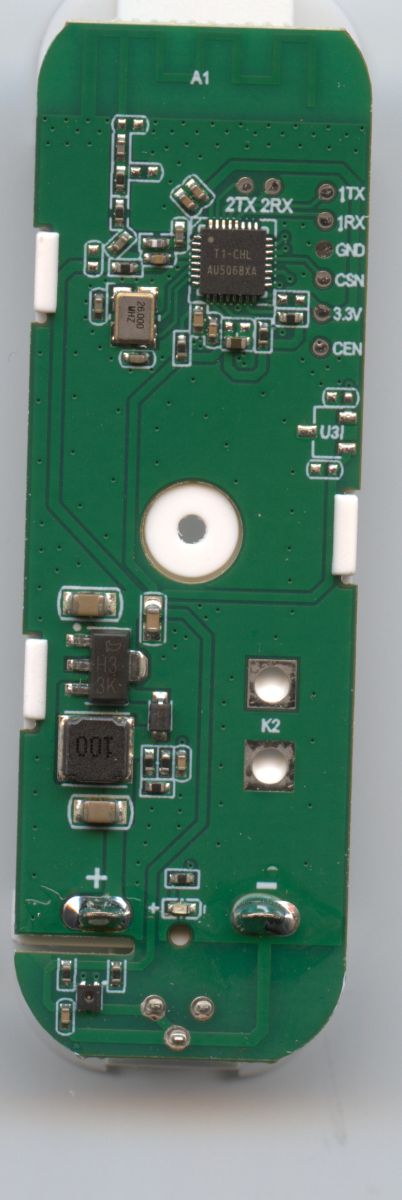

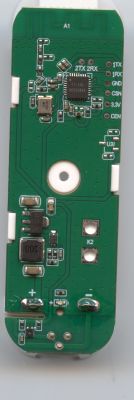
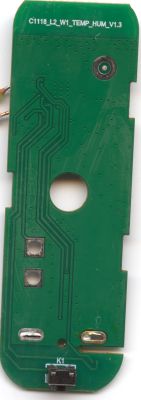
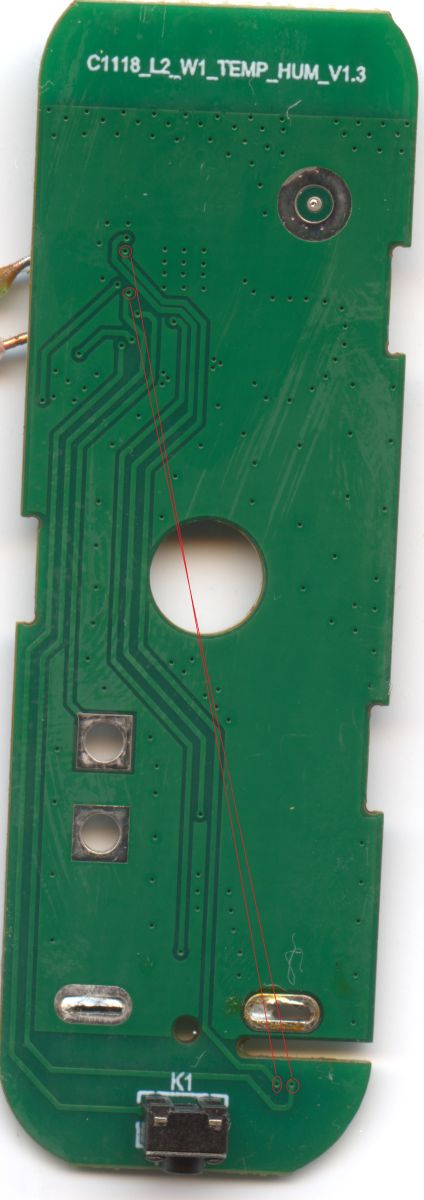
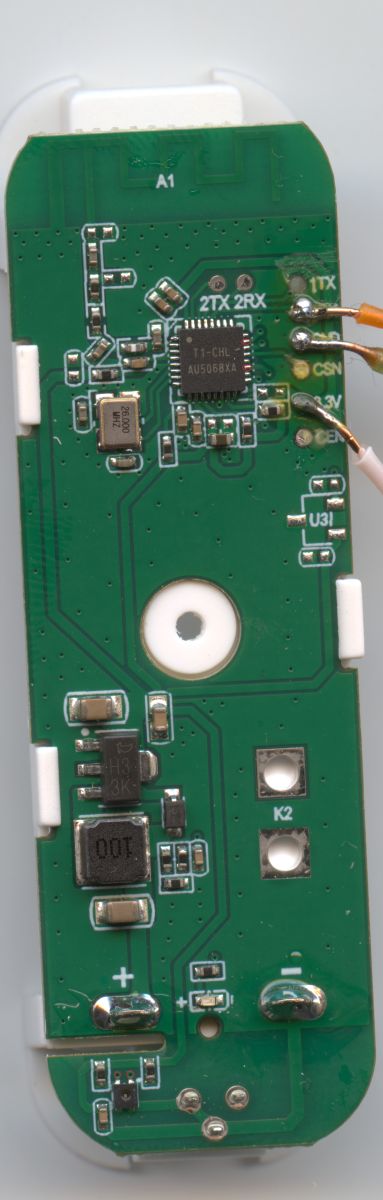
    Green PCB with AU5068XA chip and labeled pads 1TX, 1RX, GND, CSN, 3.3V, CENGreen PCB labeled “C1118_L2_W1_TEMP_HUM_V1.3” with K1 switch/button and mounting hole
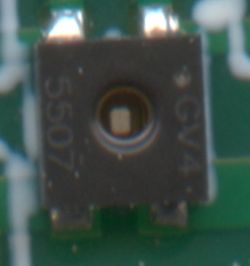
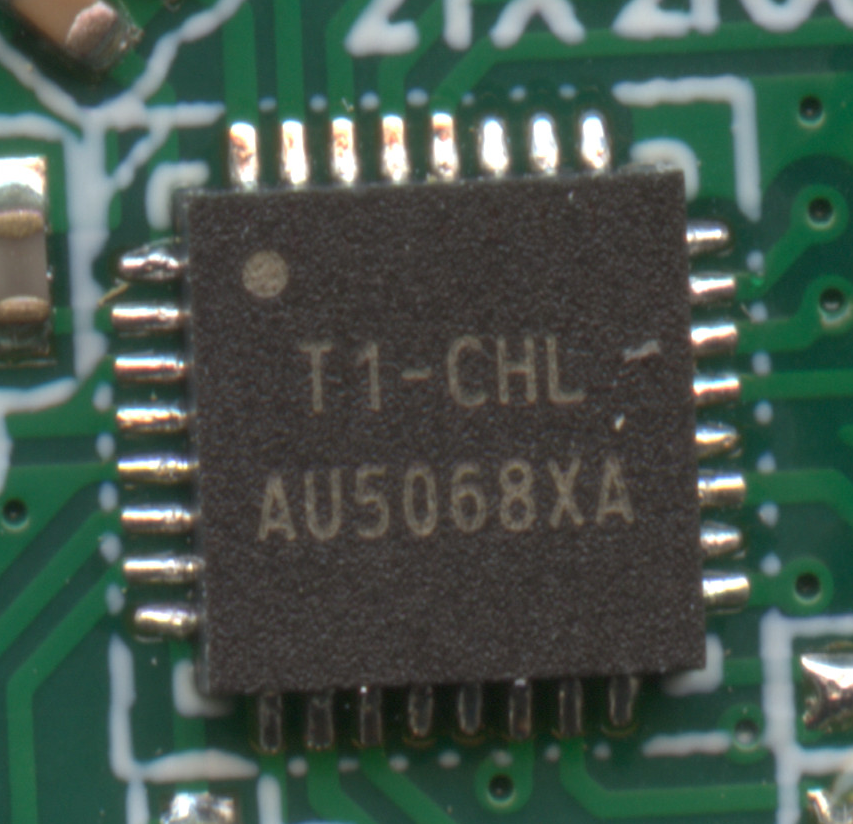
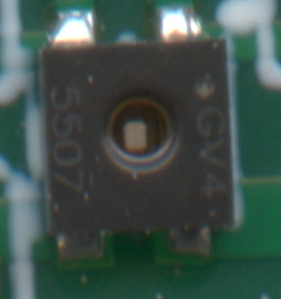
    Macro photo of an IC on a PCB labeled “T1-CHL” and “AU5068XA”.Blurry close-up of a black SMD component with a central hole on a green PCB
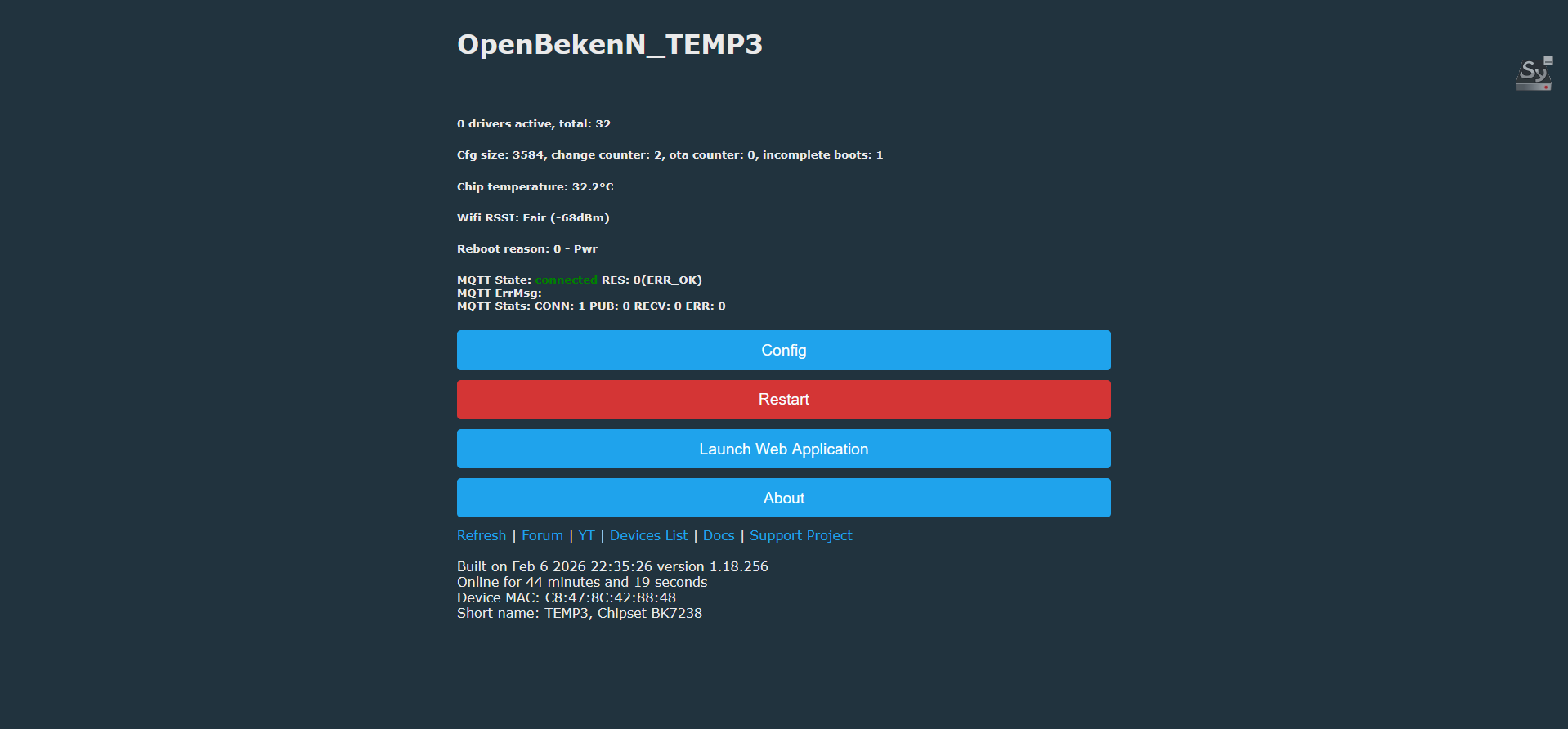
    OpenBekenN_TEMP3 WebGUI status page with Config, Restart, Launch Web Application, and About buttons

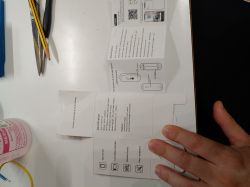
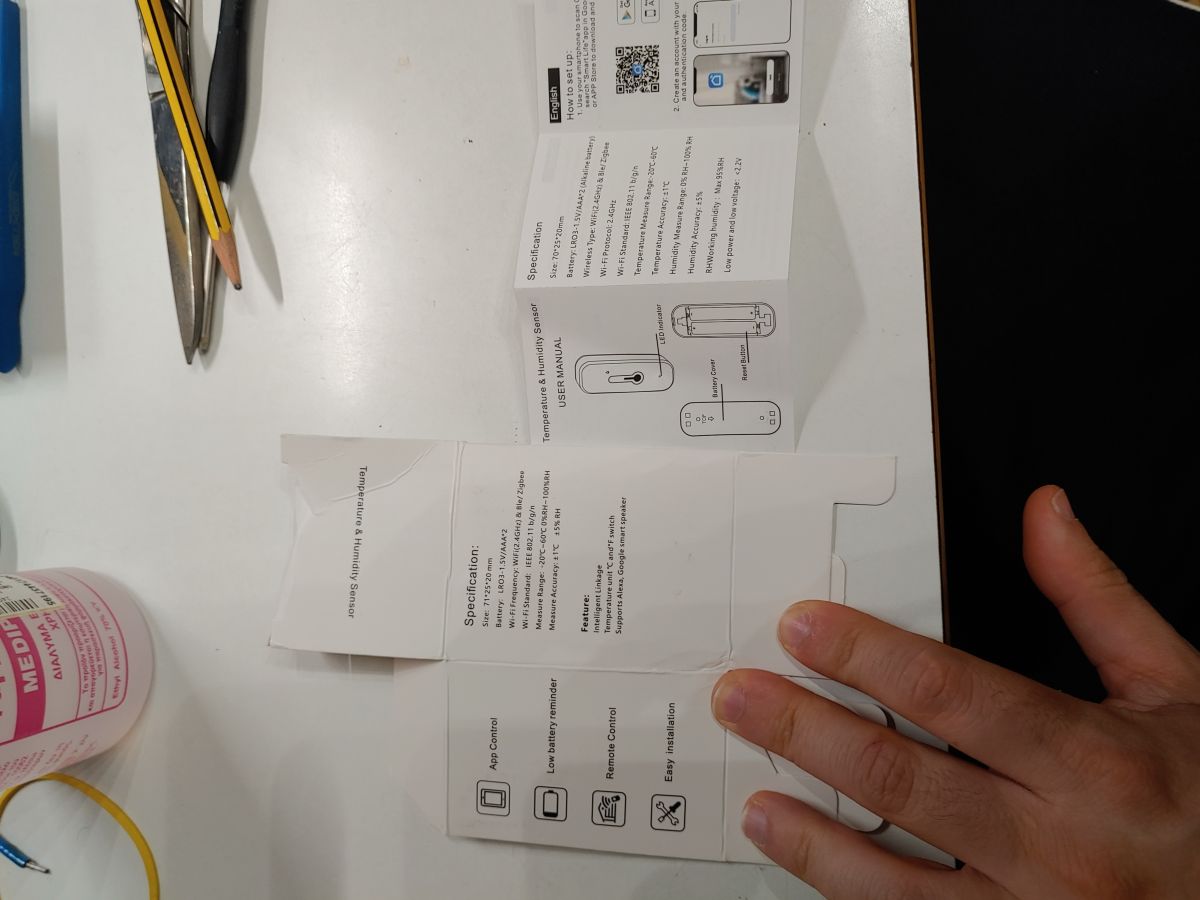
    White desk with a temperature and humidity sensor manual and a hand holding a piece of packaging

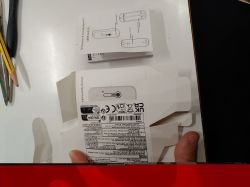
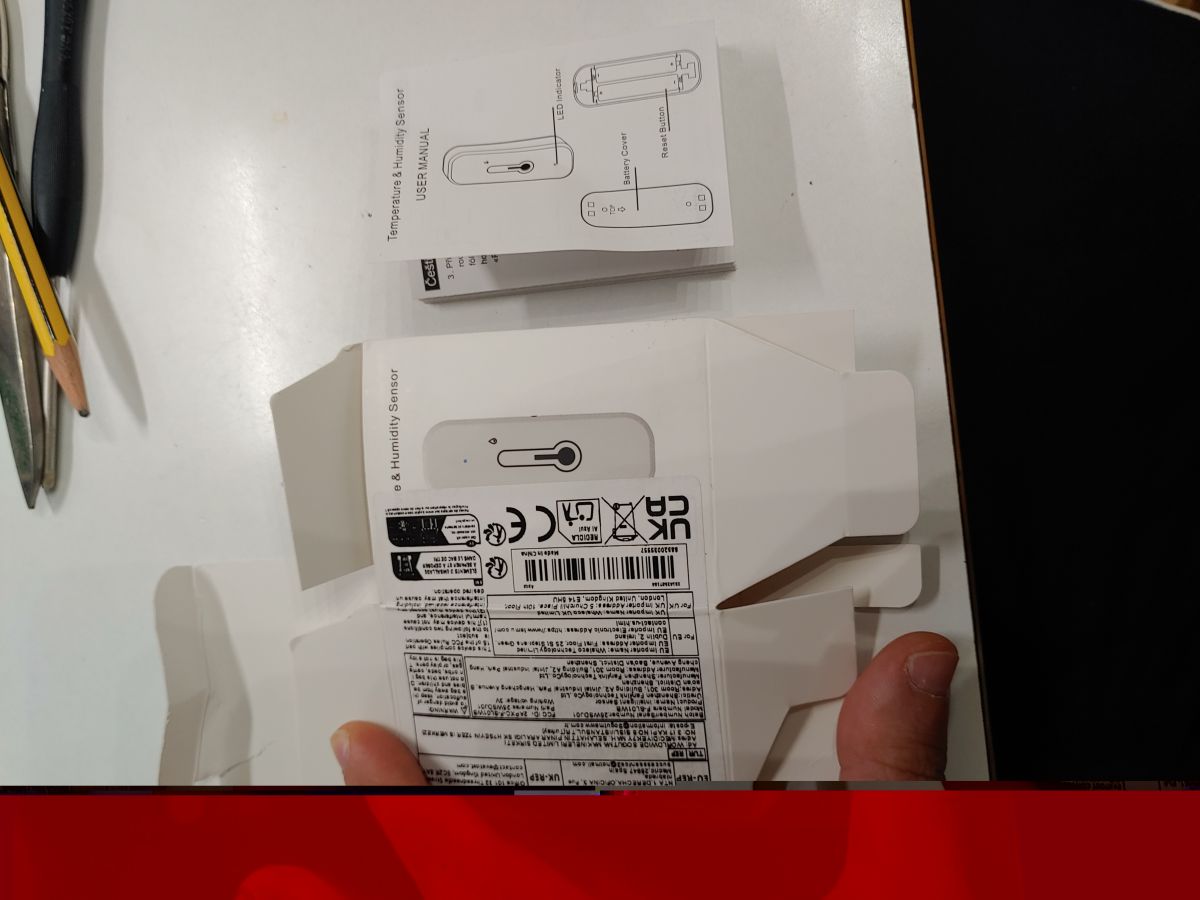
    Temperature and humidity sensor packaging with user manual on a white tabletop

    readResult...-49-29.bin (2 MB)You must be logged in to download this attachment.
  • ADVERTISEMENT
  • Helpful post
    #2 21835237
    divadiow
    Level 38  
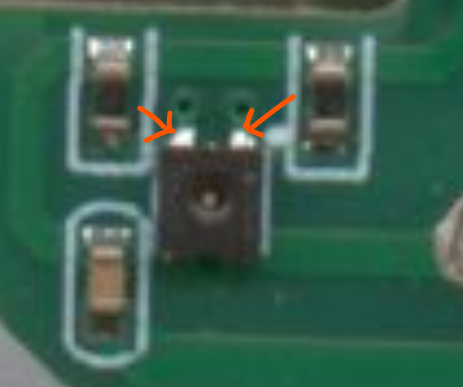
    do you have a multimeter to check continuity between two points?

    I'd perhaps suggest seeing where these two pins go

    Close-up of a green PCB section with a small black component and two orange arrows pointing at it.

    there's no mention of the pins in use in the boot log either

    Code: Text
    Log in, to see the code
  • #3 21835273
    leon22heart
    Level 4  
    >>21835237 Yes, of course I have a multimeter; will check and post tomorrow. I bought 4 of them that came in a single package, so I have spares to check with original firmware if needed.
  • ADVERTISEMENT
  • #4 21835285
    divadiow
    Level 38  
    OK. Here's a bit more info

    Code: JSON
    Log in, to see the code


    Code: JSON
    Log in, to see the code
  • #5 21835679
    leon22heart
    Level 4  
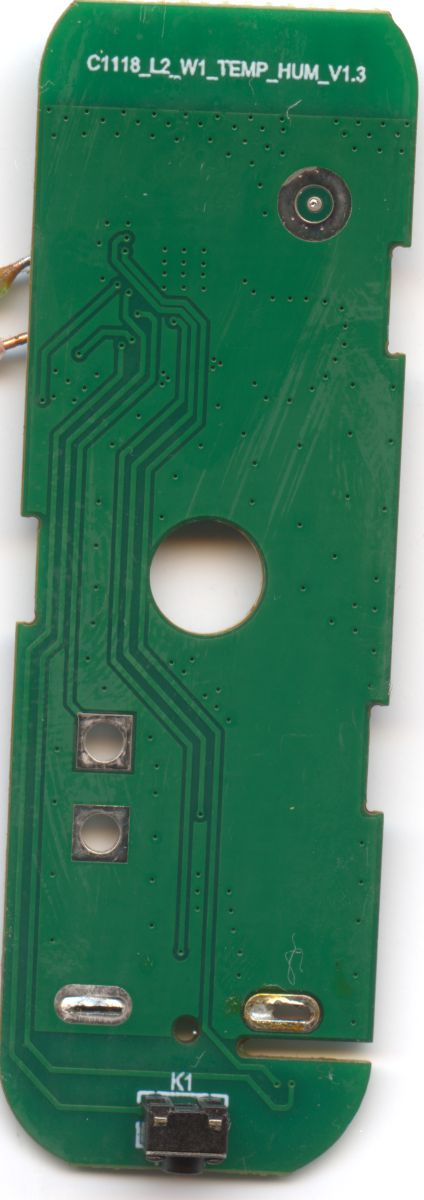
    Added and back photo of the PCBs. The components and traces are so minuscule that are only shown by scanning the PCB on my scanner with 3200 dpi precision. It's difficult to use the multimeter to scan for traces without a microscope or at least a magnifying glass.

    I think I manually traced them in the photos I attach below. They seem to go straight to the pins of the AU5068XA chip.


    Green PCB with a central hole, traces, and the text “C1118_L2_W1_TEMP_HUM_V1.3”Green PCB with an IC and three wires soldered on the right side, shown in close-up

    and 2 better ones

    Temu Temp-Humidity Sensor (BK7238, AU5068XA) - Batch 25WSDJ01 /Model F-SL01WB PinoutTemu Temp-Humidity Sensor (BK7238, AU5068XA) - Batch 25WSDJ01 /Model F-SL01WB Pinout
  • Helpful post
    #6 21835877
    p.kaczmarek2
    Moderator Smart Home
    To which T1 pins?

    By the way, it seems the same PCB is used by the door sensors. U3 footprint looks like hall sensor.
    Helpful post? Buy me a coffee.
  • ADVERTISEMENT
  • #7 21835888
    leon22heart
    Level 4  
    >>21835877 As you say T1 pins, you mean physical ones like the ones in the BK7238 chip or something else? The physical ones are circled in red in the second batch of photos, which allowed me to upload the full picture in its resolution. The service that the forum recommends, unfortunately, downscales the image.
  • Helpful post
    #8 21835900
    p.kaczmarek2
    Moderator Smart Home
    Does this match your device?
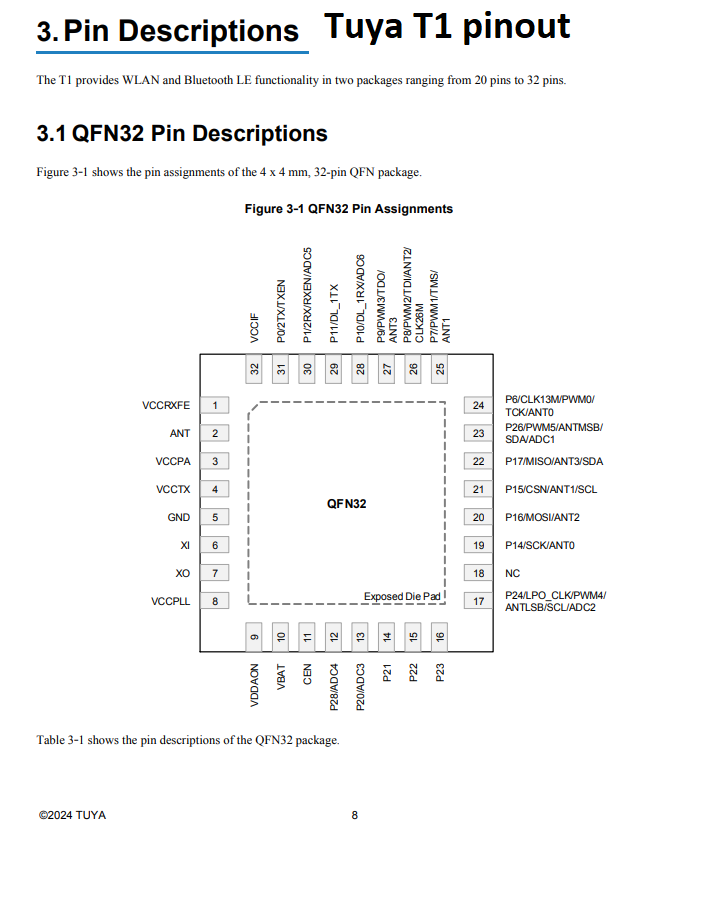
    Documentation page “Tuya T1 pinout” showing a QFN32 pin assignment diagram
    Helpful post? Buy me a coffee.
  • #9 21835932
    leon22heart
    Level 4  
    >>21835900 Sorry, my friend, I don't know how to identify it. Is there a guide I can follow before answering back? The only things I identified are the button and WiFi LED through the OpenBK web app. I don't know how to proceed further. BTW, thanks for the help.

    PS1: If I understand the die schematic right and its position, then we should be talking about pins 23 and 19. But I don't know which sensor driver to use in order to get readings from those pins.

    PS2: Btw didn't overwrite bootloader on flash , just a note.
  • ADVERTISEMENT
  • Helpful post
    #10 21836067
    max4elektroda
    Level 24  
    Does your firmware include sht3x driver?
    I would simply try if this driver works. So on config page try to define the two pins (P26 and P14) you traced as sht3x_sda and sht3x_sck and enter
    startdriver sht3x
    As a command on config page "execute custom command" or in webapp on log page.
    If it doesn't work, switch the pin settings and stop and start driver

    backlog stopdriver sht3x; startdrivet shtx3

    Added after 10 [minutes]:

    If that doesn't work, I'd try soft scanning on I2C pins.
    So you can define the two pins as
    SoftSCL and SoftSCA

    Load i2c driver
    Startdriver i2c
    and start the scan with
    scanI2C soft
  • #11 21836166
    leon22heart
    Level 4  
    >>21836067 By executing the command startDriver SHT3X i got this result . Seems to be missing the driver ?

    Info:MAIN:Driver SHT3X is not known in this build.
    Info:MAIN:Available drivers:
    Info:MAIN:TuyaMCU
    Info:MAIN:, tmSensor
    Info:MAIN:, PixelAnim
    Info:MAIN:, NTP
    Info:MAIN:, HTTPButtons
    Info:MAIN:, I2C
    Info:MAIN:, BL0942
    Info:MAIN:, BL0942SPI
    Info:MAIN:, BL0937
    Info:MAIN:, CSE7766
    Info:MAIN:, SM16703P
    Info:MAIN:, SM15155E
    Info:MAIN:, IR
    Info:MAIN:, RC
    Info:MAIN:, DDP
    Info:MAIN:, SSDP
    Info:MAIN:, DGR
    Info:MAIN:, Wemo
    Info:MAIN:, Hue
    Info:MAIN:, PWMToggler
    Info:MAIN:, DoorSensor
    Info:MAIN:, SM2135
    Info:MAIN:, BP5758D
    Info:MAIN:, BP1658CJ
    Info:MAIN:, SM2235
    Info:MAIN:, CHT83XX
    Info:MAIN:, KP18058
    Info:MAIN:, ADCSmoother
    Info:MAIN:, AHT2X
    Info:MAIN:, DS1820
    Info:MAIN:, Battery
    Info:MAIN:, Bridge 


    Device details are

    Current Device
    
    Uptime: 15 minutes, 58 seconds
    
    Release: Built on Feb 10 2026 08:05:25 version 1.18.259
    
    IP address: 192.168.1.66
    
    MAC address: c8:47:8c:42:88:48
    
    MQTT server: raspi5-home:1883
    
    MQTT topic: TEMP3
    
    Device short name: TEMP3
    
    Web app URL root: https://openbekeniot.github.io/webapp/
    
    Chipset: BK7238
    
    Flags: 0
    
    Version: 1.18.259 


    and my mistake the right pins are p17 and p24 . the result of defining the 17 as softSCL and 24 as softSDA

    Debug:CMD:cmd [scani2c soft]
    Info:I2C:Address 0x44 (dec 68)
    Info:CMD:[WebApp Cmd 'scani2c soft' Result] OK


    by reversing them i have this result

    Info:CMD:[WebApp Cmd 'scanI2C soft' Result] OK


    In conclusion , if i am not wrong the sensor is found and is SHT3X based , but since the firmware is missing the SHT3X driver i can not get any readings. Does anyone can compile a BK7238 OTA update with SHT3X enabled ? Reason being i banged the rx and tx traces on the pcb (extremely fragile) and now i have only OTA option . If not possible will open and mod another sensor for a full UART flash with the new firmware.
  • Helpful post
    #12 21836361
    max4elektroda
    Level 24  
    leon22heart wrote:
    Does anyone can compile a BK7238 OTA update with SHT3X enabled ? Reason being i banged the rx and tx traces on the pcb (extremely fragile) and now i have only OTA option . If not possible will open and mod another sensor for a full UART flash with the new firmware.

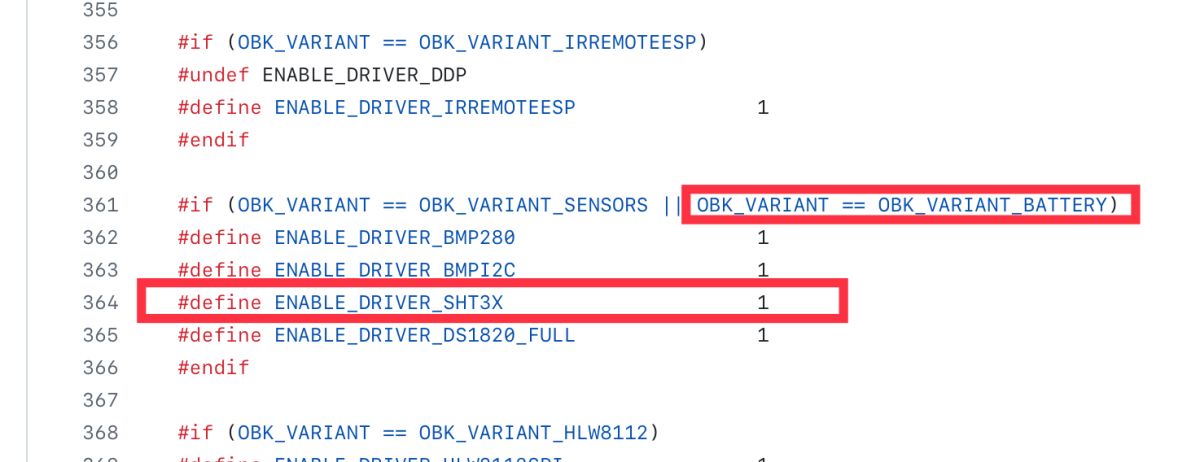
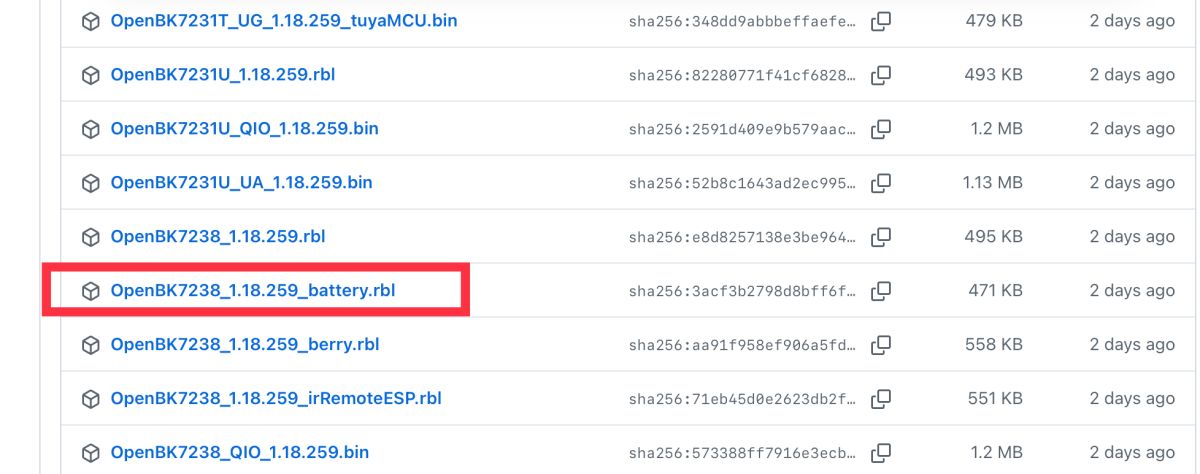
    No need for that. If you scroll down the page with the firmware images on github, under the table with the firmwares and their descriptions you'll find many links for even more firmware files.
    The "battery" one should include the driver, for OTA you need the .rbl file

    Screenshot of code with red boxes around “OBK_VARIANT…BATTERY” and “#define ENABLE_DRIVER_SHT3X”.


    Screenshot of a file list; a red box highlights “OpenBK7238_1.18.259_battery.rbl”.
  • #13 21836390
    leon22heart
    Level 4  
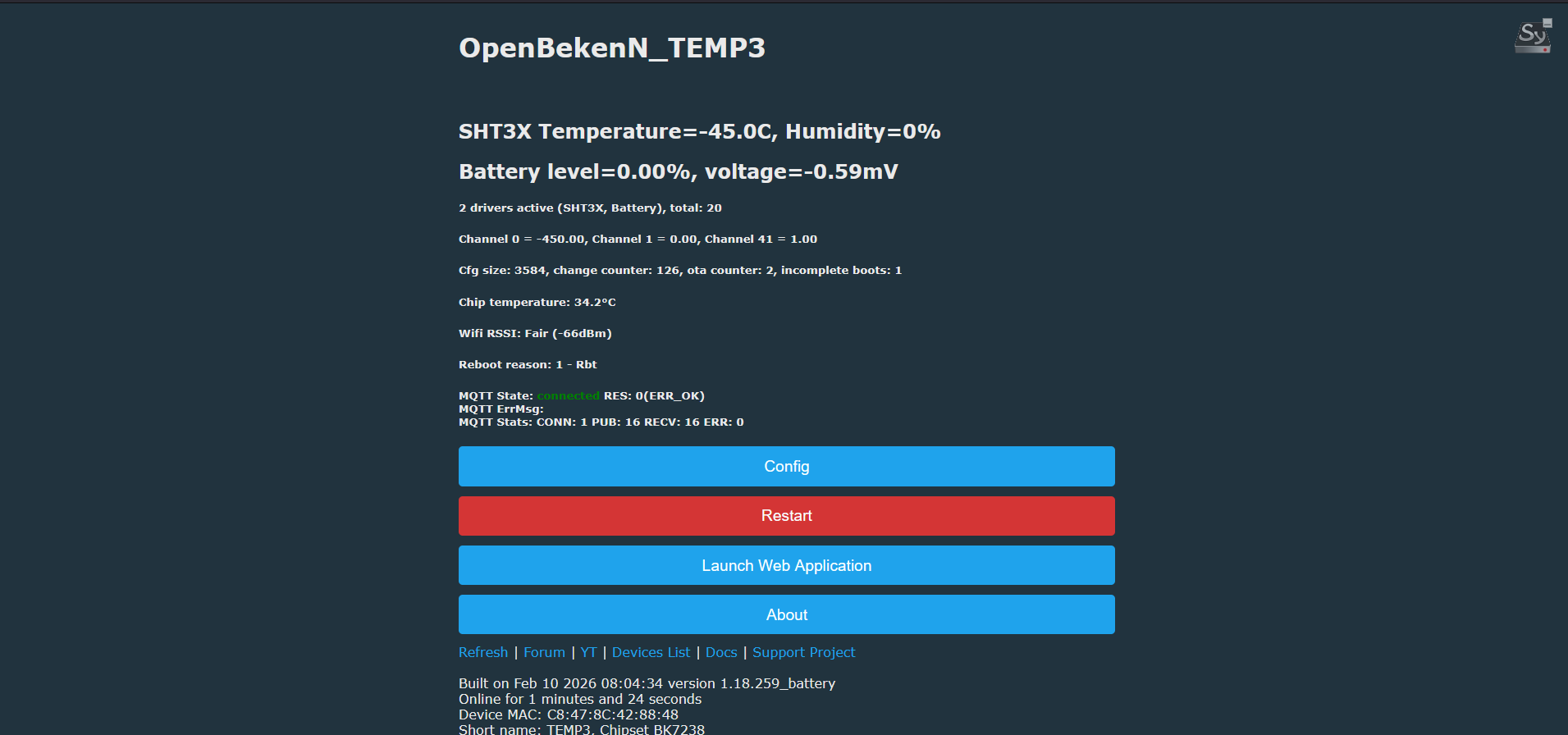
    >>21836361 Thank you for the suggestion . By flashing a battery firmware , the sensor is found but stuck at 0% humidity and -45C temperature . Any idea on how to troubleshoot it ? Also how should i go in order to find the BAT_ADC and BAT_Relay ? I assume that those also exist as in the generic BK7231 temp sensors .

    Also in the logs i got Info:SENSOR:DRV_CHT83XX_ReadEnv: Temperature:25.937500C Humidity:55.627441% but this doesn't show on the web interface. Same with battery Info:DRV:DRV_BATTERY : battery voltage : 3408.164062 and percentage 100.000000% . Powersave works off the bat .


    Also updated the template on the 1st post.

    Screenshot of OpenBekenN_TEMP3 showing SHT3X at −45.0°C and 0% humidity and battery level 0%

    and some logs

    Info:MAIN:Time 120320, idle 69467/s, free 71664, MQTT 1(1), bWifi 1, secondsWithNoPing 120227, socks 2/38 POWERSAVE
    Info:GEN:dhcp=0 ip=192.168.1.148 gate=192.168.1.1 mask=255.255.255.0 mac=c8:47:8c:00:00:00
    Info:GEN:sta: 1, softap: 0, b/g/n
    Info:GEN:sta:rssi=-75,ssid=LOLIDAS24TP_IOT,bssid=9c:05:d6:ba:e3:ee,channel=11,cipher_type:CCMP
    Info:MAIN:Time 120321, idle 67711/s, free 71664, MQTT 1(1), bWifi 1, secondsWithNoPing 120228, socks 2/38 POWERSAVE
    Info:DRV:DRV_BATTERY : Measure Battery volt en perc
    Info:MQTT:Publishing val 3408 to TEMP2/voltage/get retain=0
    Info:MQTT:Publishing val 100 to TEMP2/battery/get retain=0
    Info:DRV:DRV_BATTERY : battery voltage : 3408.164062 and percentage 100.000000%
    Info:MAIN:Time 120323, idle 69612/s, free 71432, MQTT 1(1), bWifi 1, secondsWithNoPing 120229, socks 2/38 POWERSAVE
    Info:MQTT:MQTT client in mqtt_incoming_publish_cb topic TEMP2/voltage/get
    Info:MQTT:MQTT client in mqtt_incoming_publish_cb topic TEMP2/battery/get
    Info:MAIN:Time 120324, idle 71159/s, free 71664, MQTT 1(1), bWifi 1, secondsWithNoPing 120230, socks 2/38 POWERSAVE
    Info:MAIN:Time 120324, idle 72505/s, free 71664, MQTT 1(1), bWifi 1, secondsWithNoPing 120231, socks 2/38 POWERSAVE
    Info:MAIN:Time 120325, idle 71406/s, free 71664, MQTT 1(1), bWifi 1, secondsWithNoPing 120232, socks 2/38 POWERSAVE
    Info:MAIN:Time 120326, idle 70359/s, free 71664, MQTT 1(1), bWifi 1, secondsWithNoPing 120233, socks 2/38 POWERSAVE
    Info:MAIN:Time 120327, idle 71661/s, free 71664, MQTT 1(1), bWifi 1, secondsWithNoPing 120234, socks 2/38 POWERSAVE
    Info:MAIN:Time 120328, idle 73286/s, free 59968, MQTT 1(1), bWifi 1, secondsWithNoPing 120235, socks 3/38 POWERSAVE
    Info:MAIN:Time 120330, idle 72438/s, free 71664, MQTT 1(1), bWifi 1, secondsWithNoPing 120236, socks 2/38 POWERSAVE
    Info:GEN:dhcp=0 ip=192.168.1.148 gate=192.168.1.1 mask=255.255.255.0 mac=c8:47:8c:00:00:00
    Info:GEN:sta: 1, softap: 0, b/g/n
    Info:GEN:sta:rssi=-75,ssid=LOLIDAS24TP_IOT,bssid=9c:05:d6:ba:e3:ee,channel=11,cipher_type:CCMP
    Info:MAIN:Time 120331, idle 67472/s, free 59968, MQTT 1(1), bWifi 1, secondsWithNoPing 120237, socks 3/38 POWERSAVE
    Info:MAIN:Time 120331, idle 72110/s, free 71664, MQTT 1(1), bWifi 1, secondsWithNoPing 120238, socks 2/38 POWERSAVE
    Info:DRV:DRV_BATTERY : Measure Battery volt en perc
    Info:MQTT:Publishing val 3467 to TEMP2/voltage/get retain=0
    Info:MQTT:Publishing val 100 to TEMP2/battery/get retain=0
    Info:DRV:DRV_BATTERY : battery voltage : 3467.203125 and percentage 100.000000%
    Info:MAIN:Time 120333, idle 71293/s, free 71240, MQTT 1(1), bWifi 1, secondsWithNoPing 120239, socks 2/38 POWERSAVE
    Info:MQTT:MQTT client in mqtt_incoming_publish_cb topic TEMP2/voltage/get
    Info:MQTT:MQTT client in mqtt_incoming_publish_cb topic TEMP2/battery/get
    Info:MAIN:Time 120333, idle 73810/s, free 71664, MQTT 1(1), bWifi 1, secondsWithNoPing 120240, socks 2/38 POWERSAVE
    Info:MAIN:Time 120334, idle 81157/s, free 71664, MQTT 1(1), bWifi 1, secondsWithNoPing 120241, socks 2/38 POWERSAVE
    Info:GEN:CHANNEL_Set channel 0 has changed to 260 (flags 0)
    
    Info:MQTT:Channel has changed! Publishing 260 to channel 0 
    Info:MQTT:Publishing val 260 to TEMP2/0/get retain=0
    Info:GEN:No change in channel 1 (still set to 55) - ignoring
    
    Info:SENSOR:DRV_CHT83XX_ReadEnv: Temperature:26.000000C Humidity:55.596923%
    Info:MAIN:Time 120336, idle 73380/s, free 59744, MQTT 1(1), bWifi 1, secondsWithNoPing 120242, socks 3/38 POWERSAVE
    Info:MQTT:MQTT client in mqtt_incoming_publish_cb topic TEMP2/0/get
    Info:MAIN:Time 120336, idle 61914/s, free 71448, MQTT 1(1), bWifi 1, secondsWithNoPing 120243, socks 3/38 POWERSAVE
    Info:MAIN:Time 120337, idle 72070/s, free 71664, MQTT 1(1), bWifi 1, secondsWithNoPing 120244, socks 2/38 POWERSAVE
    Info:MAIN:Time 120338, idle 73446/s, free 71664, MQTT 1(1), bWifi 1, secondsWithNoPing 120245, socks 2/38 POWERSAVE
    Info:MAIN:Time 120339, idle 68634/s, free 71664, MQTT 1(1), bWifi 1, secondsWithNoPing 120246, socks 2/38 POWERSAVE
    Info:MAIN:Time 120340, idle 71877/s, free 71664, MQTT 1(1), bWifi 1, secondsWithNoPing 120247, socks 2/38 POWERSAVE
    Info:GEN:dhcp=0 ip=192.168.1.148 gate=192.168.1.1 mask=255.255.255.0 mac=c8:47:8c:00:00:00
    Info:GEN:sta: 1, softap: 0, b/g/n
    Info:GEN:sta:rssi=-75,ssid=LOLIDAS24TP_IOT,bssid=9c:05:d6:ba:e3:ee,channel=11,cipher_type:CCMP
    Info:MAIN:Time 120341, idle 73958/s, free 71664, MQTT 1(1), bWifi 1, secondsWithNoPing 120248, socks 2/38 POWERSAVE
    Info:DRV:DRV_BATTERY : Measure Battery volt en perc
    Info:MQTT:Publishing val 3416 to TEMP2/voltage/get retain=0
    Info:MQTT:Publishing val 100 to TEMP2/battery/get retain=0
    Info:DRV:DRV_BATTERY : battery voltage : 3416.214843 and percentage 100.000000%
    Info:MAIN:Time 120343, idle 78872/s, free 71664, MQTT 1(1), bWifi 1, secondsWithNoPing 120249, socks 2/38 POWERSAVE
    Info:MQTT:MQTT client in mqtt_incoming_publish_cb topic TEMP2/voltage/get
    Info:MQTT:MQTT client in mqtt_incoming_publish_cb topic TEMP2/battery/get
    Info:MAIN:Time 120343, idle 67588/s, free 71664, MQTT 1(1), bWifi 1, secondsWithNoPing 120250, socks 2/38 POWERSAVE
    Info:MAIN:Time 120345, idle 69709/s, free 71456, MQTT 1(1), bWifi 1, secondsWithNoPing 120251, socks 2/38 POWERSAVE
    Info:MAIN:Time 120345, idle 70663/s, free 71664, MQTT 1(1), bWifi 1, secondsWithNoPing 120252, socks 2/38 POWERSAVE
    Info:MAIN:Time 120346, idle 72039/s, free 63056, MQTT 1(1), bWifi 1, secondsWithNoPing 120253, socks 3/38 POWERSAVE
    Info:MAIN:Time 120347, idle 69505/s, free 71664, MQTT 1(1), bWifi 1, secondsWithNoPing 120254, socks 2/38 POWERSAVE
    Info:MAIN:Time 120348, idle 74890/s, free 71664, MQTT 1(1), bWifi 1, secondsWithNoPing 120255, socks 2/38 POWERSAVE
    Info:MAIN:Time 120349, idle 70306/s, free 71664, MQTT 1(1), bWifi 1, secondsWithNoPing 120256, socks 2/38 POWERSAVE
    Info:MAIN:Time 120350, idle 71523/s, free 71664, MQTT 1(1), bWifi 1, secondsWithNoPing 120257, socks 2/38 POWERSAVE
    Info:GEN:dhcp=0 ip=192.168.1.148 gate=192.168.1.1 mask=255.255.255.0 mac=c8:47:8c:00:00:00
    Info:GEN:sta: 1, softap: 0, b/g/n
    Info:GEN:sta:rssi=-74,ssid=LOLIDAS24TP_IOT,bssid=9c:05:d6:ba:e3:ee,channel=11,cipher_type:CCMP
    Info:MAIN:Time 120351, idle 67311/s, free 71664, MQTT 1(1), bWifi 1, secondsWithNoPing 120258, socks 2/38 POWERSAVE
    Info:DRV:DRV_BATTERY : Measure Battery volt en perc
    Info:MQTT:Publishing val 3475 to TEMP2/voltage/get retain=0
    Info:MQTT:Publishing val 100 to TEMP2/battery/get retain=0
    Info:DRV:DRV_BATTERY : battery voltage : 3475.253906 and percentage 100.000000%
    Info:MAIN:Time 120353, idle 80198/s, free 71432, MQTT 1(1), bWifi 1, secondsWithNoPing 120259, socks 2/38 POWERSAVE
    Info:MQTT:MQTT client in mqtt_incoming_publish_cb topic TEMP2/voltage/get
    Info:MQTT:MQTT client in mqtt_incoming_publish_cb topic TEMP2/battery/get
    Info:MAIN:Time 120353, idle 71847/s, free 71664, MQTT 1(1), bWifi 1, secondsWithNoPing 120260, socks 2/38 POWERSAVE
    Info:MAIN:Time 120354, idle 80166/s, free 71664, MQTT 1(1), bWifi 1, secondsWithNoPing 120261, socks 2/38 POWERSAVE
    Info:MAIN:Time 120355, idle 69106/s, free 63056, MQTT 1(1), bWifi 1, secondsWithNoPing 120262, socks 3/38 POWERSAVE
    Info:MAIN:Time 120356, idle 70129/s, free 71664, MQTT 1(1), bWifi 1, secondsWithNoPing 120263, socks 2/38 POWERSAVE
    Info:MAIN:Time 120357, idle 65861/s, free 71664, MQTT 1(1), bWifi 1, secondsWithNoPing 120264, socks 2/38 POWERSAVE
    Info:MAIN:Time 120358, idle 71793/s, free 71664, MQTT 1(1), bWifi 1, secondsWithNoPing 120265, socks 2/38 POWERSAVE
    Info:MAIN:Time 120360, idle 70687/s, free 71664, MQTT 1(1), bWifi 1, secondsWithNoPing 120266, socks 2/38 POWERSAVE
    Info:GEN:dhcp=0 ip=192.168.1.148 gate=192.168.1.1 mask=255.255.255.0 mac=c8:47:8c:00:00:00
    Info:GEN:sta: 1, softap: 0, b/g/n
    Info:GEN:sta:rssi=-75,ssid=LOLIDAS24TP_IOT,bssid=9c:05:d6:ba:e3:ee,channel=11,cipher_type:CCMP
    Info:MAIN:Time 120360, idle 67775/s, free 71664, MQTT 1(1), bWifi 1, secondsWithNoPing 120267, socks 2/38 POWERSAVE
    Info:GEN:dhcp=0 ip=192.168.1.148 gate=192.168.1.1 mask=255.255.255.0 mac=c8:47:8c:00:00:00
    Info:GEN:sta: 1, softap: 0, b/g/n
    Info:GEN:sta:rssi=-75,ssid=LOLIDAS24TP_IOT,bssid=9c:05:d6:ba:e3:ee,channel=11,cipher_type:CCMP
    Info:MAIN:Time 120361, idle 67642/s, free 71664, MQTT 1(1), bWifi 1, secondsWithNoPing 120268, socks 2/38 POWERSAVE
    Info:DRV:DRV_BATTERY : Measure Battery volt en perc
    Info:MQTT:Publishing val 3406 to TEMP2/voltage/get retain=0
    Info:MQTT:Publishing val 100 to TEMP2/battery/get retain=0
    Info:DRV:DRV_BATTERY : battery voltage : 3406.822265 and percentage 100.000000%
    Info:MAIN:Time 120363, idle 73444/s, free 71432, MQTT 1(1), bWifi 1, secondsWithNoPing 120269, socks 2/38 POWERSAVE
    Info:MQTT:MQTT client in mqtt_incoming_publish_cb topic TEMP2/voltage/get
    Info:MQTT:MQTT client in mqtt_incoming_publish_cb topic TEMP2/battery/get
    Info:MAIN:Time 120363, idle 64800/s, free 71664, MQTT 1(1), bWifi 1, secondsWithNoPing 120270, socks 2/38 POWERSAVE
    Info:MAIN:Time 120364, idle 70543/s, free 71664, MQTT 1(1), bWifi 1, secondsWithNoPing 120271, socks 2/38 POWERSAVE
    Info:MAIN:Time 120365, idle 74287/s, free 71664, MQTT 1(1), bWifi 1, secondsWithNoPing 120272, socks 2/38 POWERSAVE
    Info:MAIN:Time 120366, idle 73679/s, free 71664, MQTT 1(1), bWifi 1, secondsWithNoPing 120273, socks 2/38 POWERSAVE
    Info:MAIN:Time 120367, idle 72539/s, free 71664, MQTT 1(1), bWifi 1, secondsWithNoPing 120274, socks 2/38 POWERSAVE
    Info:MAIN:Time 120368, idle 69934/s, free 71664, MQTT 1(1), bWifi 1, secondsWithNoPing 120275, socks 2/38 POWERSAVE
    Info:MAIN:Time 120369, idle 70771/s, free 71664, MQTT 1(1), bWifi 1, secondsWithNoPing 120276, socks 2/38 POWERSAVE
    Info:MAIN:Time 120370, idle 70537/s, free 71664, MQTT 1(1), bWifi 1, secondsWithNoPing 120277, socks 2/38 POWERSAVE
    Info:GEN:dhcp=0 ip=192.168.1.148 gate=192.168.1.1 mask=255.255.255.0 mac=c8:47:8c:00:00:00
    Info:GEN:sta: 1, softap: 0, b/g/n
    Info:GEN:sta:rssi=-74,ssid=LOLIDAS24TP_IOT,bssid=9c:05:d6:ba:e3:ee,channel=11,cipher_type:CCMP
    Info:MAIN:Time 120371, idle 70988/s, free 71664, MQTT 1(1), bWifi 1, secondsWithNoPing 120278, socks 2/38 POWERSAVE
    Info:DRV:DRV_BATTERY : Measure Battery volt en perc
    Info:MQTT:Publishing val 3437 to TEMP2/voltage/get retain=0
    Info:MQTT:Publishing val 100 to TEMP2/battery/get retain=0
    Info:DRV:DRV_BATTERY : battery voltage : 3437.683593 and percentage 100.000000%
    Info:MAIN:Time 120373, idle 73189/s, free 71432, MQTT 1(1), bWifi 1, secondsWithNoPing 120279, socks 2/38 POWERSAVE
    Info:MQTT:MQTT client in mqtt_incoming_publish_cb topic TEMP2/voltage/get
    Info:MQTT:MQTT client in mqtt_incoming_publish_cb topic TEMP2/battery/get
    Info:MAIN:Time 120373, idle 65687/s, free 71664, MQTT 1(1), bWifi 1, secondsWithNoPing 120280, socks 2/38 POWERSAVE
    Info:MAIN:Time 120374, idle 74523/s, free 71664, MQTT 1(1), bWifi 1, secondsWithNoPing 120281, socks 2/38 POWERSAVE
    Info:MAIN:Time 120376, idle 74858/s, free 71664, MQTT 1(1), bWifi 1, secondsWithNoPing 120282, socks 2/38 POWERSAVE
    Info:MAIN:Time 120376, idle 66943/s, free 71664, MQTT 1(1), bWifi 1, secondsWithNoPing 120283, socks 2/38 POWERSAVE
    Info:MAIN:Time 120377, idle 69516/s, free 71664, MQTT 1(1), bWifi 1, secondsWithNoPing 120284, socks 2/38 POWERSAVE
    Info:MAIN:Time 120378, idle 71257/s, free 71664, MQTT 1(1), bWifi 1, secondsWithNoPing 120285, socks 2/38 POWERSAVE
    Info:GEN:CHANNEL_Set channel 0 has changed to 259 (flags 0)
    
    Info:MQTT:Channel has changed! Publishing 259 to channel 0 
    Info:MQTT:Publishing val 259 to TEMP2/0/get retain=0
    Info:GEN:No change in channel 1 (still set to 55) - ignoring
    
    Info:SENSOR:DRV_CHT83XX_ReadEnv: Temperature:25.937500C Humidity:55.627441%
    Info:MAIN:Time 120380, idle 69485/s, free 71664, MQTT 1(1), bWifi 1, secondsWithNoPing 120286, socks 2/38 POWERSAVE
    Info:GEN:dhcp=0 ip=192.168.1.148 gate=192.168.1.1 mask=255.255.255.0 mac=c8:47:8c:00:00:00
    Info:GEN:sta: 1, softap: 0, b/g/n
    Info:GEN:sta:rssi=-75,ssid=LOLIDAS24TP_IOT,bssid=9c:05:d6:ba:e3:ee,channel=11,cipher_type:CCMP
    Info:MQTT:MQTT client in mqtt_incoming_publish_cb topic TEMP2/0/get
    Info:MAIN:Time 120380, idle 69501/s, free 71664, MQTT 1(1), bWifi 1, secondsWithNoPing 120287, socks 2/38 POWERSAVE
    Info:GEN:dhcp=0 ip=192.168.1.148 gate=192.168.1.1 mask=255.255.255.0 mac=c8:47:8c:00:00:00
    Info:GEN:sta: 1, softap: 0, b/g/n
    Info:GEN:sta:rssi=-75,ssid=LOLIDAS24TP_IOT,bssid=9c:05:d6:ba:e3:ee,channel=11,cipher_type:CCMP
    Info:MAIN:Time 120381, idle 63947/s, free 71664, MQTT 1(1), bWifi 1, secondsWithNoPing 120288, socks 2/38 POWERSAVE
    Info:DRV:DRV_BATTERY : Measure Battery volt en perc
    Info:MQTT:Publishing val 3418 to TEMP2/voltage/get retain=0
    Info:MQTT:Publishing val 100 to TEMP2/battery/get retain=0
    Info:DRV:DRV_BATTERY : battery voltage : 3418.898437 and percentage 100.000000%
    Info:MAIN:Time 120383, idle 68709/s, free 71432, MQTT 1(1), bWifi 1, secondsWithNoPing 120289, socks 2/38 POWERSAVE
    Info:MQTT:MQTT client in mqtt_incoming_publish_cb topic TEMP2/voltage/get
    Info:MQTT:MQTT client in mqtt_incoming_publish_cb topic TEMP2/battery/get
    Info:MAIN:Time 120383, idle 69227/s, free 71664, MQTT 1(1), bWifi 1, secondsWithNoPing 120290, socks 2/38 POWERSAVE
    Info:MAIN:Time 120384, idle 72021/s, free 71664, MQTT 1(1), bWifi 1, secondsWithNoPing 120291, socks 2/38 POWERSAVE
    Info:MAIN:Time 120385, idle 72672/s, free 71664, MQTT 1(1), bWifi 1, secondsWithNoPing 120292, socks 2/38 POWERSAVE
    Info:MAIN:Time 120386, idle 72171/s, free 71448, MQTT 1(1), bWifi 1, secondsWithNoPing 120293, socks 3/38 POWERSAVE
    Info:MAIN:Time 120387, idle 74408/s, free 71664, MQTT 1(1), bWifi 1, secondsWithNoPing 120294, socks 2/38 POWERSAVE
    Info:MAIN:Time 120388, idle 69864/s, free 71664, MQTT 1(1), bWifi 1, secondsWithNoPing 120295, socks 2/38 POWERSAVE
    Info:MAIN:Time 120390, idle 76436/s, free 71664, MQTT 1(1), bWifi 1, secondsWithNoPing 120296, socks 2/38 POWERSAVE
    Info:GEN:dhcp=0 ip=192.168.1.148 gate=192.168.1.1 mask=255.255.255.0 mac=c8:47:8c:00:00:00
    Info:GEN:sta: 1, softap: 0, b/g/n
    Info:GEN:sta:rssi=-74,ssid=LOLIDAS24TP_IOT,bssid=9c:05:d6:ba:e3:ee,channel=11,cipher_type:CCMP
    Info:MAIN:Time 120390, idle 69733/s, free 71664, MQTT 1(1), bWifi 1, secondsWithNoPing 120297, socks 2/38 POWERSAVE
    Info:GEN:dhcp=0 ip=192.168.1.148 gate=192.168.1.1 mask=255.255.255.0 mac=c8:47:8c:00:00:00
    Info:GEN:sta: 1, softap: 0, b/g/n
    Info:GEN:sta:rssi=-73,ssid=LOLIDAS24TP_IOT,bssid=9c:05:d6:ba:e3:ee,channel=11,cipher_type:CCMP
    Info:MAIN:Time 120391, idle 67359/s, free 71664, MQTT 1(1), bWifi 1, secondsWithNoPing 120298, socks 2/38 POWERSAVE
    Info:DRV:DRV_BATTERY : Measure Battery volt en perc
    Info:MQTT:Publishing val 3460 to TEMP2/voltage/get retain=0
    Info:MQTT:Publishing val 100 to TEMP2/battery/get retain=0
    Info:DRV:DRV_BATTERY : battery voltage : 3460.494140 and percentage 100.000000%
    Info:MAIN:Time 120393, idle 73445/s, free 59736, MQTT 1(1), bWifi 1, secondsWithNoPing 120299, socks 3/38 POWERSAVE
    Info:MQTT:MQTT client in mqtt_incoming_publish_cb topic TEMP2/voltage/get
    Info:MQTT:MQTT client in mqtt_incoming_publish_cb topic TEMP2/battery/get
    Info:MAIN:Time 120394, idle 68812/s, free 71664, MQTT 1(1), bWifi 1, secondsWithNoPing 120300, socks 2/38 POWERSAVE
    Info:MAIN:Time 120394, idle 68228/s, free 71664, MQTT 1(1), bWifi 1, secondsWithNoPing 120301, socks 2/38 POWERSAVE
    Info:MAIN:Time 120395, idle 74211/s, free 71664, MQTT 1(1), bWifi 1, secondsWithNoPing 120302, socks 2/38 POWERSAVE
    Info:MAIN:Time 120396, idle 68844/s, free 71664, MQTT 1(1), bWifi 1, secondsWithNoPing 120303, socks 2/38 POWERSAVE
    Info:MAIN:Time 120397, idle 72468/s, free 71664, MQTT 1(1), bWifi 1, secondsWithNoPing 120304, socks 2/38 POWERSAVE
    Info:MAIN:Time 120398, idle 73257/s, free 71664, MQTT 1(1), bWifi 1, secondsWithNoPing 120305, socks 2/38 POWERSAVE
    
  • Helpful post
    #14 21836457
    max4elektroda
    Level 24  
    leon22heart wrote:
    Info:SENSOR:DRV_CHT83XX_ReadEnv: Temperature:25.937500C Humidity:55.627441%

    That looks good, we simply used the wrong driver.
    So change the pins to CHT83XX_SDA and _SCK and use startdriver CHT83XX.
  • #15 21836472
    leon22heart
    Level 4  
    >>21836457 Ok. Changed the driver to CHT83XX as well as the pins, and now I have Info:SENSOR:DRV_CHT83XX_ReadEnv: Temperature:125.000000 °C Humidity:100.000000% in the logs and in the web interface. It recognizes it as CHT8305.

    Re-updated template at post 1.

    Btw wasn't there an option at modules CHT8305_SDA and SCK, and the CHT83XX was used for CHT8310 sensors? Or was it merged?

    Screenshot of OpenBekenN_TEMP3 status page showing CHT8305 readings and Config/Restart buttons
  • #16 21836619
    max4elektroda
    Level 24  
    That really looked better before ...
    Let's try to nail it down.
    SDA and SCK are the same for CHT83XX like the "working" assignment with softI2C and SHT3X?

    On the first test (with SHT3X) did you start the CHT83XX driver, before you got the entries like
    Info:SENSOR:DRV_CHT83XX_ReadEnv: Temperature:25.937500C Humidity:55.627441%


    If you remove the CHT83XX_SDA and CHT83XX_SCK pin config (by selecting "empty" selection) and then stop and start the driver ("backlog stopdriver CHT83XX; startdriver CHT83XX").
    Do you get some "valid" readings with the default pins from the driver?
    
       g_softI2C.pin_clk = 9;
       g_softI2C.pin_data = 14;
       g_softI2C.pin_clk = PIN_FindPinIndexForRole(IOR_CHT83XX_CLK, g_softI2C.pin_clk);
       g_softI2C.pin_data = PIN_FindPinIndexForRole(IOR_CHT83XX_DAT, g_softI2C.pin_data);


    If not, next test would be: define pins as SHT3X_ again and restart driver. Any change?
    If not, what if you start SHT3X driver and after that restart CHT83XX driver?

    It's a bit poking around, I know.
  • #17 21836744
    leon22heart
    Level 4  
    Well, my practice is: change the startup commands where I start the drivers, reboot the device and see the boot logs for any changes between each boot. I usually don't manually start or stop drivers through Web UI or custom command.
    Is there any option to save a single log for each boot in LittleFS so that I can upload them here?
  • #18 21836844
    max4elektroda
    Level 24  
    For testing I think this is a bit to much effort.

    And testing to alter config without writing a new startup command and reboot might be quicker...

    To answer your question: I'm not aware of a possibility to save logs to lfs.

    But if you want to keep rebooting the device and get the logs, it might help that the device log is accessible on TCP port 9000
    If you have nc (e.g. on Linux) you can try (changing IP to your device and maybe alter output name)

    while true; do echo "Connecting .."; nc -w 3 192.168.0.49 9000 | tee out_$(date +%Y%m%d_%H%M%S).txt ; echo "Connection lost. Waiting in 5 seconds..."; sleep 5; done

    This should start a new log on every restart of the device.
  • #19 21836877
    leon22heart
    Level 4  
    max4elektroda wrote:
    SDA and SCK are the same for CHT83XX like the "working" assignment with softI2C and SHT3X?

    Yes they are the same .

    max4elektroda wrote:
    On the first test (with SHT3X) did you start the CHT83XX driver, before you got the entries like
    Info:SENSOR:DRV_CHT83XX_ReadEnv: Temperature:25.937500C Humidity:55.627441%

    I cant confirm this but i believe no . Its possible during a reboot to have changed the pins temporarily from SHT3X_ to CHT83XX_ and saved them . I have yet to replicate the scenario where i got the right readings with a wrong driver.

    Working on the other scenarios .
    max4elektroda wrote:
    If you remove the CHT83XX_SDA and CHT83XX_SCK pin config (by selecting "empty" selection) and then stop and start the driver ("backlog stopdriver CHT83XX; startdriver CHT83XX").
    Do you get some "valid" readings with the default pins from the driver?

    If i clear the pins to default , stop and restart yhe driver i have
    Info:SENSOR:DRV_CHT83XX_ReadEnv: Temperature:125.000000C Humidity:100.000000%
    Info:MAIN:Time 628, idle 166246/s, free 119344, MQTT 1(1), bWifi 1, secondsWithNoPing 555, socks 2/24 POWERSAVE
    Info:MAIN:Drv CHT83XX stopped.
    Info:CMD:[WebApp Cmd 'backlog stopDriver CHT83XX' Result] OK
    Info:MAIN:Time 629, idle 155006/s, free 119344, MQTT 1(1), bWifi 1, secondsWithNoPing 556, socks 2/24 POWERSAVE
    Info:MAIN:Time 630, idle 165967/s, free 119344, MQTT 1(1), bWifi 1, secondsWithNoPing 557, socks 2/24 POWERSAVE
    Info:GEN:dhcp=0 ip=192.168.1.66 gate=192.168.1.1 mask=255.255.255.0 mac=c8:47:8c:42:88:48
    Info:GEN:sta: 1, softap: 0, b/g/n
    Info:GEN:sta:rssi=-64,ssid=LOLIDAS24TP_IOT,bssid=9c:05:d6:ba:e3:ee,channel=11,cipher_type:CCMP
    Info:MAIN:Time 631, idle 155898/s, free 119344, MQTT 1(1), bWifi 1, secondsWithNoPing 558, socks 2/24 POWERSAVE
    Info:DRV:DRV_BATTERY : Measure Battery volt en perc
    Info:DRV:DRV_BATTERY : ADC Value low device not on battery
    Info:MQTT:Publishing val 0 to TEMP3/voltage/get retain=0
    Info:MQTT:Publishing val 0 to TEMP3/battery/get retain=0
    Info:DRV:DRV_BATTERY : battery voltage : -0.585938 and percentage 0.000000%
    Info:MQTT:MQTT client in mqtt_incoming_publish_cb topic TEMP3/voltage/get
    Info:MAIN:Time 632, idle 153211/s, free 116024, MQTT 1(1), bWifi 1, secondsWithNoPing 559, socks 2/24 POWERSAVE
    Info:MQTT:MQTT client in mqtt_incoming_publish_cb topic TEMP3/battery/get
    Info:MAIN:Time 633, idle 155324/s, free 119344, MQTT 1(1), bWifi 1, secondsWithNoPing 560, socks 2/24 POWERSAVE
    Info:MAIN:Time 634, idle 161659/s, free 119344, MQTT 1(1), bWifi 1, secondsWithNoPing 561, socks 2/24 POWERSAVE
    Info:MAIN:Time 635, idle 159098/s, free 119344, MQTT 1(1), bWifi 1, secondsWithNoPing 562, socks 2/24 POWERSAVE
    Info:MAIN:Time 636, idle 169177/s, free 119344, MQTT 1(1), bWifi 1, secondsWithNoPing 563, socks 2/24 POWERSAVE
    Info:MAIN:Time 637, idle 162465/s, free 119344, MQTT 1(1), bWifi 1, secondsWithNoPing 564, socks 2/24 POWERSAVE
    Info:MAIN:Time 638, idle 164198/s, free 119344, MQTT 1(1), bWifi 1, secondsWithNoPing 565, socks 2/24 POWERSAVE
    Info:MAIN:Time 639, idle 164090/s, free 111040, MQTT 1(1), bWifi 1, secondsWithNoPing 566, socks 2/24 POWERSAVE
    Info:MAIN:Time 640, idle 165580/s, free 119344, MQTT 1(1), bWifi 1, secondsWithNoPing 567, socks 2/24 POWERSAVE
    Info:GEN:dhcp=0 ip=192.168.1.66 gate=192.168.1.1 mask=255.255.255.0 mac=c8:47:8c:42:88:48
    Info:GEN:sta: 1, softap: 0, b/g/n
    Info:GEN:sta:rssi=-67,ssid=LOLIDAS24TP_IOT,bssid=9c:05:d6:ba:e3:ee,channel=11,cipher_type:CCMP
    Info:MAIN:Time 641, idle 162091/s, free 119344, MQTT 1(1), bWifi 1, secondsWithNoPing 568, socks 2/24 POWERSAVE
    Info:SENSOR:DRV_CHT83XX_Init: ID: FF FF FFFF
    Info:MAIN:Started CHT83XX.
    Info:CMD:[WebApp Cmd ' startDriver CHT83XX' Result] OK
    Info:GEN:No change in channel 0 (still set to 1250) - ignoring
    
    Info:GEN:CHANNEL_Set channel 0 has changed to 100 (flags 0)
    
    Info:SENSOR:DRV_CHT83XX_ReadEnv: Temperature:125.000000C Humidity:100.000000%


    if i set the pins back to SHT3X and then load - unload -load the SHT3X driver i have the


    if i set the pins back to SHT3X and then load - unload -load the SHT3X driver , then load - unload -load the CHT83XX driver i have the

    Info:MQTT:Channel has changed! Publishing 100 to channel 0 
    Info:MQTT:MQTT client in mqtt_incoming_publish_cb topic TEMP3/0/get
    Info:MQTT:Publishing val 100 to TEMP3/0/get retain=0
    Info:SENSOR:DRV_CHT83XX_ReadEnv: Temperature:125.000000C Humidity:100.000000%
    Info:MAIN:Time 350, idle 182847/s, free 117320, MQTT 1(1), bWifi 1, secondsWithNoPing 283, socks 2/24 POWERSAVE
    Info:GEN:dhcp=0 ip=192.168.1.66 gate=192.168.1.1 mask=255.255.255.0 mac=c8:47:8c:42:88:48
    Info:GEN:sta: 1, softap: 0, b/g/n
    Info:GEN:sta:rssi=-66,ssid=LOLIDAS24TP_IOT,bssid=9c:05:d6:ba:e3:ee,channel=11,cipher_type:CCMP
    Info:MQTT:MQTT client in mqtt_incoming_publish_cb topic TEMP3/0/get
    Info:GEN:CHANNEL_Set channel 0 has changed to 1250 (flags 0)
    
    Info:MQTT:Channel has changed! Publishing 1250 to channel 0 
    Info:MQTT:Publishing val 1250 to TEMP3/0/get retain=0
    Info:GEN:CHANNEL_Set channel 0 has changed to 100 (flags 0)
    
    Info:MQTT:Channel has changed! Publishing 100 to channel 0 
    Info:MQTT:MQTT client in mqtt_incoming_publish_cb topic TEMP3/0/get
    Info:MQTT:Publishing val 100 to TEMP3/0/get retain=0
    Info:SENSOR:DRV_CHT83XX_ReadEnv: Temperature:125.000000C Humidity:100.000000%
    Info:MAIN:Time 351, idle 143518/s, free 117424, MQTT 1(1), bWifi 1, secondsWithNoPing 284, socks 2/24 POWERSAVE
    Info:MQTT:MQTT client in mqtt_incoming_publish_cb topic TEMP3/0/get


    Added after 6 [hours] 14 [minutes]:

    I cant seem to replicate the correct readings under the wrong driver. Was it a fluke or the order affected something ? Is it possible to extract more data from tuya IOT about the chip and its behavior ? From my second , third or fourth device .
  • #20 21837366
    max4elektroda
    Level 24  
    leon22heart wrote:
    I cant seem to replicate the correct readings under the wrong driver. Was it a fluke or the order affected something ? Is it possible to extract more data from tuya IOT about the chip and its behavior ? From my second , third or fourth device .

    It might be even simpler some issue with BK7238 and SHT3x:
    I flashed your dump to my BK7238 and attached a logic analyzer to the SDA SCL pins.

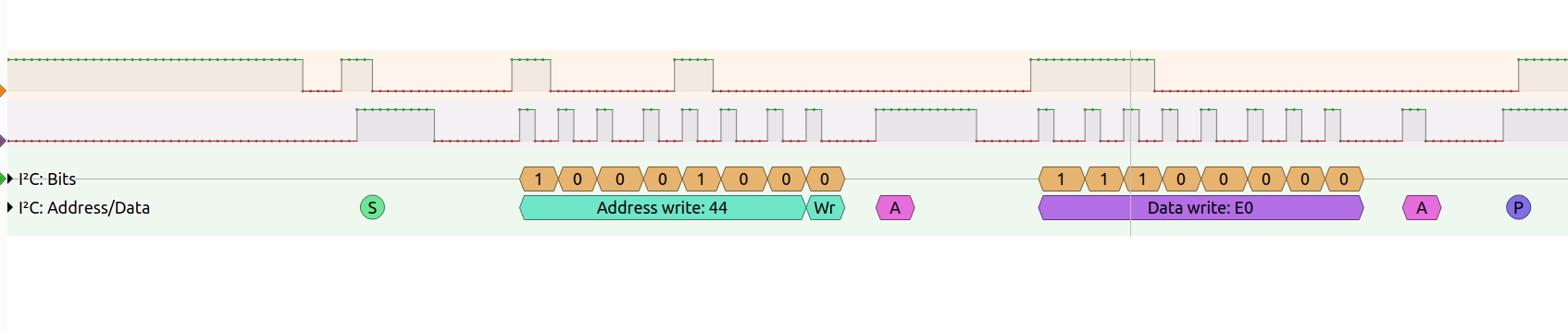
    It searched for address 0x44 and 0x22, later sending "0xE0" to 0x44 (see below):

    Logic analyzer screenshot: I2C write to address 0x44 with data 0xE0, including ACKs and STOP.


    So I would assume, SHT3x is correct, but I didn't get the complete communication (even when attaching a SHT31 sensor).
    Next I tried to run my SHT31 with OpenBK7238 and didn't succeed.
    Maybe my SHT is broken?!? AHT2X works.

    If you start (as in the beginning) SHT3x driver, will you get a reasonable status or only FF ?

    If we don't succeed, I can only think of capturing the communication on I2C with the sensor on an unmodified device.
    But this would mean you'd need e.g. a logic analyzer to do so..
  • #21 21837377
    leon22heart
    Level 4  
    >>21837366 Thank you for your effort. Will try today and during weekend various combinations to try and recreate the working scenario. It's probably something little and silly that just needs to be identified. Do you think that I should probably update the TuyaMCU firmware in a brand new device and then convert it to OpenBK? Or should I overwrite the bootloader during the OpenBK flashing?
  • #22 21837403
    max4elektroda
    Level 24  
    leon22heart wrote:
    Do you think that i should probably update the tuyamcu firmware in a brand new device and then convert it to openbk ? Or should i overwrite the bootloader during the openbk flashing ?

    Both should not be necessary, at least if OpenBK7238 works with the bootloader, I wouldn't change it, but to be honest, there might be other users more capable to give advice for this.
  • Helpful post
    #23 21837411
    insmod
    Level 31  
    Bootloader is always overwritten on BK7238. OTA is impossible otherwise.
  • #24 21837654
    leon22heart
    Level 4  
    >>21837411 Didn't know it became default. In older BK7238 topics it was mentioned as necessary for OTA updates. I believed that unless checked in the advanced options of the flasher GUI it remained original.
  • #25 21838797
    leon22heart
    Level 4  
    So a quick recap: identified the sensor traces by inspecting the PCB scans (traces too small for multimeter). According to the QNF32 schematics the pins are the P17 and P24. By setting softSDA the P14 and softSCK the P24 I find a sensor with ID 0x44. This is usually CHT80XXX based. If I input the image of the sensor to Gemini I get

    
    Gemini said
    Based on the visual markings in your image, the sensor is an SHT3x series (likely an SHT30 or SHT31) digital temperature and humidity sensor.
    The marking "5507" on the left side of the chip is a production or batch code, while the "GV4" marking is the characteristic identification for the SHT3x line.


    So by either using the SHT3 driver with the appropriate pins or the CHT80XXX driver with the right pins I get either Temperature: 125.000000°C Humidity: 100.000000% or Info:SENSOR:SHT3X_Measure: Temperature: -45.0°C Humidity: 0%.

    I don't get it.
  • #26 21838856
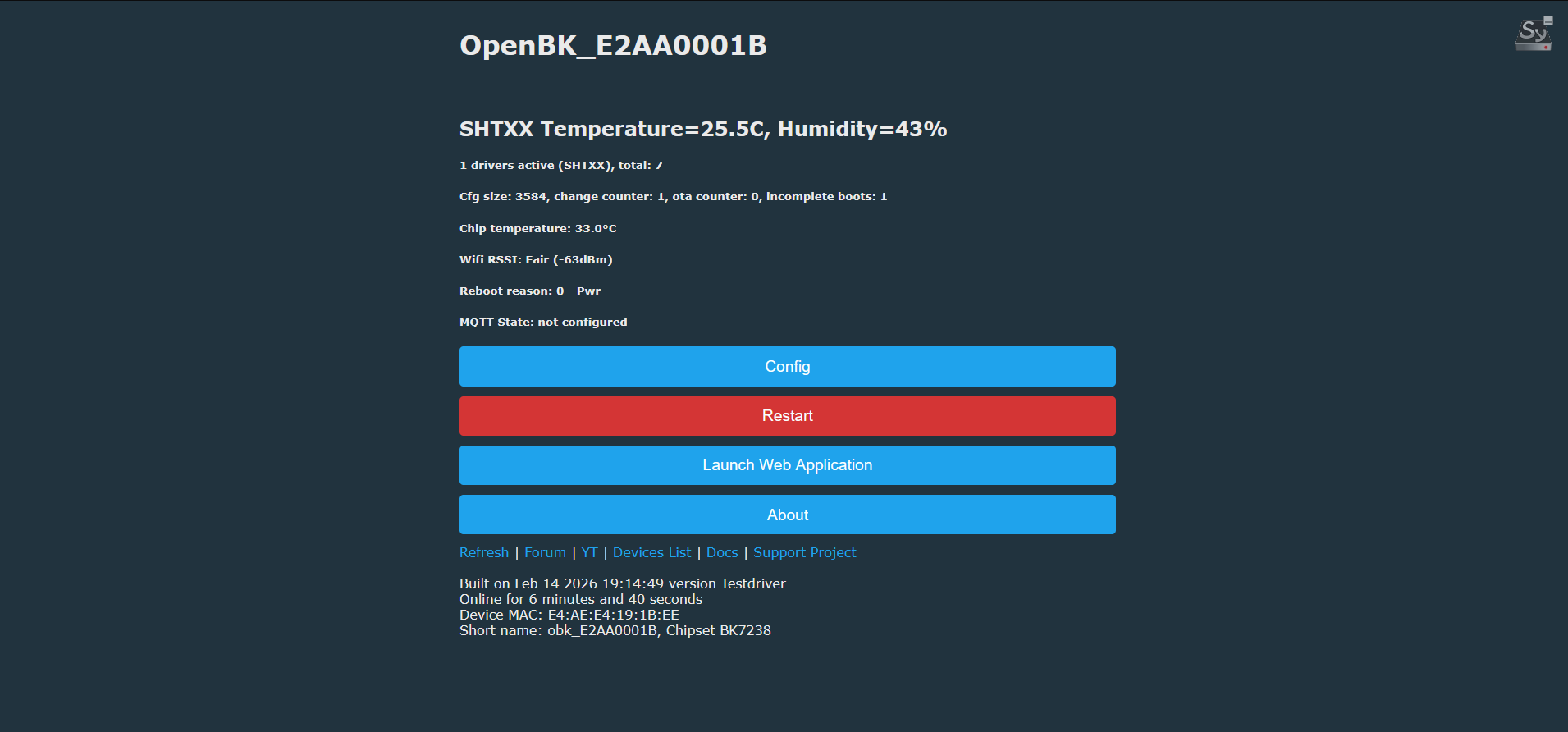
    max4elektroda
    Level 24  
    If you are willing to do some more testing:

    I tried writing a "mini driver" doing what I read on SDA SCL lines with the firmware dump:

    Writing "0xE" to address 0x44

    Then I'm reading from 0x44 and try to interpret it like CHT driver.

    Don't set pins on config page, just start with

    startdriver shtxx
    or
    startdriver shtxx <scl-pin> <sda-pin>

    (for your case "startdriver shtxx 24 17")

    pins are default 24 and 17
    Attachments:
    • OpenBK7238_testdriver.zip (1.85 MB) You must be logged in to download this attachment.
  • #27 21838903
    leon22heart
    Level 4  
    >>21838856 Well what i can say , i bow to you . Soldered a new sensor so that i can uart flash your firmware . Sensor is recognized in the front page and updates readings . Strangely it doesn't report in the logs. Do you think that all this happened due to the sensor being a newer or revised model ?

    Info:SENSOR:SHTXX : Read buffer: 64 FC A8 7E (100 252 168 126)
    Info:MAIN:Time 261, idle 432549/s, free 122824, MQTT 0(16), bWifi 1, secondsWithNoPing 195, socks 2/24 
    Info:MAIN:Time 262, idle 396193/s, free 122824, MQTT 0(16), bWifi 1, secondsWithNoPing 196, socks 2/24 
    Info:MAIN:Time 263, idle 411015/s, free 122824, MQTT 0(16), bWifi 1, secondsWithNoPing 197, socks 2/24 
    Info:MAIN:Time 264, idle 406425/s, free 122824, MQTT 0(16), bWifi 1, secondsWithNoPing 198, socks 2/24 
    Debug:API:POST to api/cmnd
    Debug:CMD:cmd [startdriver shtxx 24 17]
    Info:MAIN:Drv shtxx is already loaded.
    Info:CMD:[WebApp Cmd 'startdriver shtxx 24 17' Result] OK
    Info:MQTT:mqtt_host empty, not starting mqtt
    Info:MAIN:Time 265, idle 403660/s, free 122824, MQTT 0(17), bWifi 1, secondsWithNoPing 199, socks 2/24 
    Info:SENSOR:SHTXX : Read buffer: 65 01 92 7F (101 1 146 127)
    Info:MAIN:Time 266, idle 399117/s, free 122824, MQTT 0(17), bWifi 1, secondsWithNoPing 200, socks 2/24 
    Info:MAIN:Time 267, idle 380916/s, free 122824, MQTT 0(17), bWifi 1, secondsWithNoPing 201, socks 2/24 
    Info:MAIN:Time 268, idle 390515/s, free 122824, MQTT 0(17), bWifi 1, secondsWithNoPing 202, socks 2/24 
    Info:MAIN:Time 269, idle 388785/s, free 122720, MQTT 0(17), bWifi 1, secondsWithNoPing 203, socks 2/24 
    Info:MAIN:Time 270, idle 395243/s, free 122824, MQTT 0(17), bWifi 1, secondsWithNoPing 204, socks 2/24 
    Info:GEN:dhcp=0 ip=192.168.1.66 gate=192.168.1.1 mask=255.255.255.0 mac=e4:ae:e4:19:1b:ee
    Info:GEN:sta: 1, softap: 0, b/g/n
    Info:GEN:sta:rssi=-63,ssid=LOLIDAS24TP_IOT,bssid=9c:05:d6:ba:e3:ee,channel=11,cipher_type:CCMP
    Info:SENSOR:SHTXX : Read buffer: 64 FC A8 7E (100 252 168 126)
    Info:MAIN:Time 271, idle 428374/s, free 122824, MQTT 0(17), bWifi 1, secondsWithNoPing 205, socks 2/24 
    Info:MAIN:Time 272, idle 403232/s, free 122824, MQTT 0(17), bWifi 1, secondsWithNoPing 206, socks 2/24 
    Info:MAIN:Time 273, idle 419270/s, free 122824, MQTT 0(17), bWifi 1, secondsWithNoPing 207, socks 2/24 
    Info:MAIN:Time 274, idle 403029/s, free 122824, MQTT 0(17), bWifi 1, secondsWithNoPing 208, socks 2/24 
    Info:MAIN:Time 275, idle 412535/s, free 122824, MQTT 0(17), bWifi 1, secondsWithNoPing 209, socks 2/24 
    Info:SENSOR:SHTXX : Read buffer: 64 FC A8 7F (100 252 168 127)
    Info:MAIN:Time 276, idle 421603/s, free 122824, MQTT 0(17), bWifi 1, secondsWithNoPing 210, socks 2/24 


    OpenBK status page showing SHTXX readings: 25.5°C and 43% humidity, with Config and Restart buttons
  • #28 21838956
    max4elektroda
    Level 24  
    This was just a quick hack, so no log output of temp and hum...
    I did some more searching, maybe it's simply an SHT4x, which is not 100% the same as SHT3x.
    Maybe you are willing to check this firmware, again defining SHT3X_SDA and SCK and starting sht3x driver?
    If my (and mainly copilots ;-)) work is working AND if it's an SHT4x sensor, the driver should identify it and show some values.

    If not, we can try to enhance the quick and dirty shtxx driver..

    BTW: no need to solder, the .rbl file should work as OTA update
    Attachments:
    • OpenBK7238_SHT4x.zip (1.86 MB) You must be logged in to download this attachment.
  • #29 21838980
    max4elektroda
    Level 24  
    Updated code, first one would not proper detect SHT3x or SHT4x. Can't try for SHT4x (I have no sensor) but at least it now detects SHT3x and works correct ;-)
    The first code "detected" SHT4x for my SHT31 - giving no readings for temp and hum.

    EDIT: Also attached diff for driver, just in case ...
    Attachments:
    • drv_sht3x.diff.txt (12.96 KB) You must be logged in to download this attachment.
    • OpenBK7238_SHT3x_4x_new.zip (1.86 MB) You must be logged in to download this attachment.

Topic summary

✨ The discussion centers on a Tuya/Smartlife temperature and humidity sensor based on the BK7238 chip with AU5068XA marking, purchased from Temu. The original firmware was successfully backed up and replaced with OpenBK firmware (version 238T). The device connects to a router and provides access to a WebGUI. The main challenge is identifying and troubleshooting the sensor pinout to obtain temperature and humidity readings using the OpenBK firmware. The user shared UART flasher logs indicating successful communication with the BK7238 chip at a baud rate of 921600 and flash memory identification. The inquiry seeks guidance on pin mapping and sensor interfacing for data acquisition under the OpenBK environment.

FAQ

TL;DR: Backup showed 2,097,152 bytes (2 MB) flash, and “Bootloader is always overwritten on BK7238. OTA is impossible otherwise.” Use I2C scan to find 0x44 on P17/P24, then load the working SHTXX/CHT83XX path to get temp/humidity. [Elektroda, insmod, post #21837411]

Why it matters: This FAQ helps you bring Tuya/SmartLife TH sensors on BK7238 to life with OpenBeken, even after UART pads break.

Quick Facts

What device/chip is this guide for?

Tuya/SmartLife temperature–humidity sensors from Temu using BK7238 (marked AU5068XA). The board logs identify Puya P25Q16HBK 2 MB flash and show successful OpenBK flashing and WebGUI access. [Elektroda, leon22heart, post #21834129]

How do I find the sensor pins and address on this PCB?

Trace the sensor lines to BK7238: P17 = SDA and P24 = SCL. Configure softI2C on those pins and run scanI2C soft; you should see address 0x44. This confirms the I2C device presence for the temp/humidity sensor. [Elektroda, leon22heart, post #21836166]

How do I scan I2C on OpenBeken to detect the sensor?

Assign SoftSCL=P17 and SoftSDA=P24, start the I2C driver, then run scanI2C soft from the WebApp. A discovered device at 0x44 indicates the onboard sensor is responding on that bus. [Elektroda, leon22heart, post #21836166]

Why do I get -45°C and 0% humidity with SHT3X?

Those readings are a failure pattern when the driver does not match. Switch to soft I2C, confirm 0x44, then try the CHT83XX or the test SHTXX path. If mismatched, values may stick at -45°C/0%. [Elektroda, leon22heart, post #21838797]

Why do I see 125°C and 100% on CHT83XX?

125°C/100% indicates a decoding error or wrong command set for the sensor at 0x44. Re-scan I2C, try the updated SHTXX mini-driver, or re-test with SHT3X after pin checks. “That really looked better before ...” captures the mismatch. [Elektroda, leon22heart, post #21836472]

Is there a working driver path if SHT3X fails on BK7238?

Yes. A minimal SHTXX driver that writes 0xE to 0x44 and reads back values produced valid temperature/humidity on P24/P17. Start with startdriver shtxx 24 17 and verify on the main page. [Elektroda, leon22heart, post #21838903]

How do I set pins and test quickly (3‑step How‑To)?

  1. Set SoftSCL=P17 and SoftSDA=P24 in Config.
  2. run: startdriver i2c; scanI2C soft (expect 0x44).
  3. Try: startdriver CHT83XX or startdriver SHT3X; if still wrong, use startdriver shtxx 24 17. [Elektroda, max4elektroda, post #21836067]

Can I rely on default driver pins without manual mapping?

The CHT83XX driver has internal defaults (CLK=9, DAT=14). If your board is wired to P24/P17, defaults will not read correctly. Clear pin roles, restart the driver, and only rely on defaults if your hardware matches them. [Elektroda, max4elektroda, post #21836619]

How do I perform OTA if my UART pads are damaged?

Use an OpenBK .rbl build that includes battery and sensor drivers. BK7238 overwrites the bootloader for OTA functionality. “Bootloader is always overwritten on BK7238. OTA is impossible otherwise.” [Elektroda, insmod, post #21837411]

What is OpenBeken in this context?

OpenBeken (OpenBK) is custom firmware for Beken SoCs that replaces Tuya firmware, gives a WebGUI, MQTT, drivers, and pin role control. The thread shows flashing OpenBK and using its GUI and commands to bring up sensors. [Elektroda, leon22heart, post #21834129]

What is Tuya, and what did the Tuya config reveal here?

Tuya is a cloud platform and firmware stack used in smart devices. Extracted Tuya config identified product TH06 with product_id vcbxhbj855zfw5op and related metadata, helpful for matching drivers and expectations. [Elektroda, divadiow, post #21835285]

How can I capture boot logs per reboot without soldering?

OpenBeken exposes logs on TCP port 9000. Use netcat in a loop to collect a new log file on each reboot, which simplifies A/B driver and pin tests without serial access. [Elektroda, max4elektroda, post #21836844]

How do I read and publish battery metrics?

Start the Battery driver. Logs show voltage (e.g., 3,408 mV) and percentage (e.g., 100%), and MQTT topics publish TEMP2/voltage/get and TEMP2/battery/get. Low ADC can report 0% when not on battery. [Elektroda, leon22heart, post #21836390]

Is this PCB reused elsewhere (e.g., door sensors)?

Yes. Contributors note the same PCB appears in door sensors. U3 looks like a Hall sensor footprint, suggesting a shared design across SKUs. [Elektroda, p.kaczmarek2, post #21835877]

Could the sensor be SHT4x instead of SHT3x?

It’s possible. A revised build added SHT4x checks, with guidance to set SHT3X_SDA/SCK and start the updated SHT3X driver. Use soft I2C scan first to confirm 0x44, then test. [Elektroda, max4elektroda, post #21838956]

What Tuya product strings were recovered, and why care?

Strings like name “TH06” and product_name “C1118_P10_W1_SR03” help search firmware variants and driver hints. They align with I2C 0x44 behavior observed on P17/P24 pins. [Elektroda, divadiow, post #21835285]
ADVERTISEMENT