logo elektroda
logo elektroda
X
logo elektroda

Smart home - Combining IT and electronics to automate the home

masterpascaler 3309 9
ADVERTISEMENT
Treść została przetłumaczona polish » english Zobacz oryginalną wersję tematu
  • #1 15310277
    masterpascaler
    Level 11  
    I decided to combine computer science with electronics to build myself a cheap, fast and fully customisable smart home project, on top of voice control in Polish. The project uses:
    - an Android smartphone for speech recognition and task queuing
    - an AVT5353 kit on an FT232 chip as a relay executive module (the advantage of this solution is that you can connect any number of such chips to 1 computer, and thanks to their identification by serial numbers, you can address any one of them at any time, so you can have e.g. one in the garage, one in a large room, one in the kitchen etc. etc.)
    - Raspberry Pi 2 as an executive module (infrared), and as an input module (status of limiters, contractrons, counting how many times someone rang the doorbell in our absence, etc.)
    - an old laptop worth 200 PLN as a computing centre
    I'm writing the program in Delphi 7, the whole thing is under development, I'm wondering what else can be programmed, for now I definitely want to add a scheduler in the near future, so that the program will also perform the tasks ordered for later, and also recognition whether the command was issued within the same wi-fi network or while being away, then the voice feedback of the program would be sent to the phone.
    Feel free to check out my channel, where I present the humble beginnings of the project:

    LINK

    Feel free to discuss, comment and also make any suggestions :)
  • ADVERTISEMENT
  • #2 15310545
    piterek-23
    Level 33  
    It promises to be interesting.
    Why don't you show some more?

    I'm most curious about "talking to Android" What software do you use and how do you connect to the main computer? ;)
  • #3 15312652
    masterpascaler
    Level 11  
    piterek-23 wrote:

    I am most interested in "talking to Android"

    For this I use Autovoice - cost a few zloty in the Play shop, there is also a 7-day trial available. The mode I use is Autovoice Continous (the program listens all the time and translates everything "on the fly").
    piterek-23 wrote:
    What program do you use and how do you connect to the main computer? ;)

    Autovoice can work as a plug-in to Tasker (a dozen or so in the Play shop), which, depending on the command, writes the appropriate line to a file, e.g. monitor0, swiatlo0, tvunmute. In parallel, an ftp server runs on the phone (FTP Server Pro programme - cost PLN 4 in the Play shop, there is also a free version with advertisements). From this server, the Windows computer uses the ftp command to download the file to disk (or not if there is no file, i.e. we have not commissioned any task), and removes it from the server. The Delphi program reads the command from the file and performs the action - sets the appropriate relay states on the FT232 chip, or performs the action on the Raspberry - sending a sequence of buttons to the infrared (as you can see in video number 3) via Putty with prepared scripts. I read the GPiO states of the Raspberry through the plink program - this is functionally the same program as Putty, except that it spits out to the Windows console what the console spits out on the Raspberry, so we can capture this to a file and analyse it in our program.
  • ADVERTISEMENT
  • #4 15313323
    piterek-23
    Level 33  
    Thank you for all the information.
    As I looked at your videos it makes me envious of your normal-cool performance ;)

    Do you know of an Android program that would recognise speech (like yours) and send something like this after recognising a command:
    curl http://IP/cos.php?on=1
  • ADVERTISEMENT
  • #5 15313744
    masterpascaler
    Level 11  
    piterek-23 wrote:
    Thanks for all the information.
    As I looked at your videos it makes me envious of you normally-it works great ;)


    And thanks to ;)

    piterek-23 wrote:
    And maybe you know of an Android program that would recognise speech (like yours) after recognising a command it would send something like this:
    curl http://IP/cos.php?on=1


    Also Tasker. It's such a configurable program that I probably don't use a single 1% of its capabilities. I'm having a quick look at it now and in the network tasks it can perform there is e.g. HTTP Post and HTTP Get, maybe this will be useful to you :)

    I've now changed to a newer phone, so I'll optimise the program on the laptop and the commands in Tasker on occasion. The digital thermometers for the Raspberry also arrived today :) By the way, I'd like to add functionality to turn on the electric kettle, but I don't know how to solve checking if water is poured in the kettle? I was thinking of an IR gateway on both sides of the kettle or a distance meter, but one that I don't know if it would work through the water as I would like two that it's already a thick modification of the kettle, hmm... If anyone has any ideas it would be great :)
  • #6 15317686
    tomix
    Level 16  
    masterpascaler wrote:
    I was thinking of an IR gateway on both sides of the kettle or a distance meter, but one that I don't know if it would work through the water like I would like two that it's already a chunky kettle modification, hmm... If anyone has any ideas it would be great :)


    I recommend a Polish (although more Chinese I recommend) shopping portal and use the phrase "water level sensor", there are multitudes of solutions (for high temperatures too) including high current ones, thanks to getting around without additional components/electronics.
  • ADVERTISEMENT
  • #7 15318870
    masterpascaler
    Level 11  
    tomix wrote:
    I recommend a Polish (although more Chinese I recommend) shopping portal and use the phrase "water level sensor", there are many solutions (for high temperatures also) including high-current, so you can do without additional components/electronics.

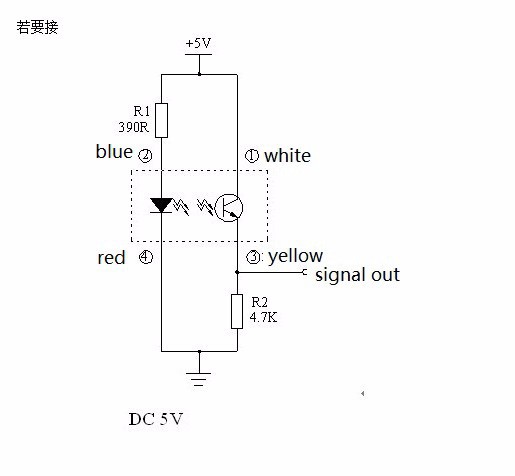
    Thanks for the hint, I can't find anything on Polish that would work for such an application. On the Chinese one, however, I found a curiosity. A sensor consisting simply of an IR diode and a phototransistor. Schematic diagram:
    Smart home - Combining IT and electronics to automate the home
    According to the Chinese, this is supposed to work as a water level sensor,hmm... It would be so cool that all you would have to do is screw it into the lid of the kettle, output to an A/D converter and read the value on the Raspberry. I'm going to buy a phototransistor on Monday and try if this will work.
  • #8 15319266
    tomix
    Level 16  
    Are you going to put the RPi in a kettle? Do I understand that correctly? :)
  • #9 15319463
    Jacek Rutkowski
    Level 28  
    In my opinion it is better to use 4 or more springs e.g. cut from pens under the base of the kettle selected so that the weight of the kettle itself does not cause it to fall and a small switch as a sensor. You can even use a separate pad under the base, e.g. from a small tray, so as not to interfere with the kettle without voiding the warranty. Detecting the presence of water then is 100% sure and easy.
    A sensor placed inside the kettle is a very poor idea. Moisture from boiling water will quickly take care of any connection. Aesthetics and sterility are not even mentioned....
  • #10 15321103
    masterpascaler
    Level 11  
    tomix wrote:
    Are you going to put the RPi in a kettle? Do I understand that correctly? :)

    He he, of course not :)

    Jacek Rutkowski wrote:
    In my opinion it is better to use 4 or more springs e.g. cut from pens under the base of the kettle selected so that the weight of the kettle itself does not cause sinking and a small switch as a sensor. You can even use a separate pad under the base, e.g. from a small tray, so as not to interfere with the kettle without voiding the warranty. Detecting the presence of water then is 100% sure and easy.

    The best solutions are the simplest ones. Great idea, that's what I'll do! :) Today I managed to improve the program (actually standardise the way tasks are queued) and rewrite all the commands to the new phone (unfortunately Tasker has no import/export function). After I overslept today and mine had to wait for me pissed off, I'm just sitting down to work out a schedule so that I can schedule certain tasks for later execution times (e.g. "wake me up in half an hour") ;)

    Added after 2 [hours] 29 [minutes]:

    However, there was not enough time for the schedule, but I took to checking the weather by parsing the html file downloaded by Httrack from the twojapogoda.pl website. Those who subscribe to my channel probably already got a notification, for the rest, link here:

    Link
ADVERTISEMENT