FAQ
TL;DR: For BK7231N DNS_led02 users whose Wi-Fi AP disappears after flashing, start with power, not firmware. At 3.3 V, the key warning was "USB-TTL 3.3v is not enough" because Wi-Fi startup can trigger a brownout before AP mode appears. [#21904272]
Why it matters: This solves a common false-firmware diagnosis on BK7231N lamps that actually fail because the module is underpowered during boot.
| Test setup |
Result reported in thread |
Best use |
| USB-TTL 3.3 V power |
AP may fail to appear |
Flashing and basic serial only |
| Power bank test |
AP still did not appear |
Quick power check |
| Separate external supply |
Problem fixed |
Reliable post-flash testing |
Key insight: A successful flash does not prove the module can start Wi-Fi. In this thread, the decisive fix was changing how the BK7231N/CB2S module was powered.
Quick Facts
- The module was powered from a 3.3 V USB-TTL adapter when the AP failed to appear after flashing. [#21904208]
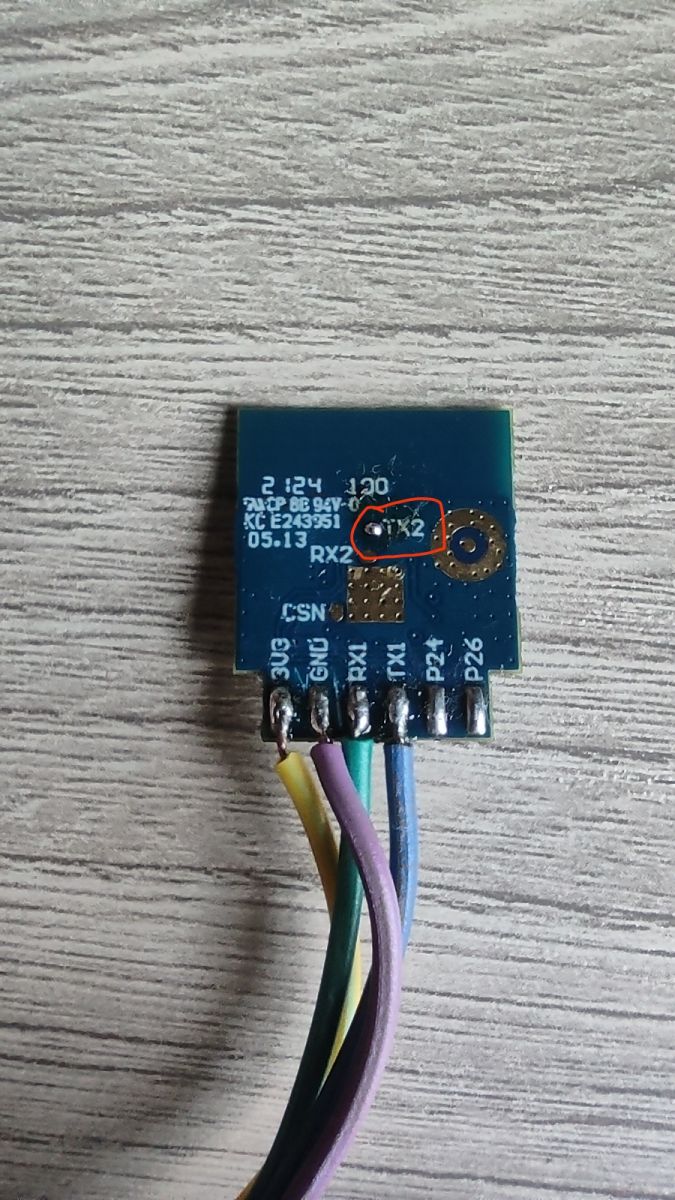
- Serial checking used TX2, PuTTY, and 115200 baud with a shared ground on the USB-TTL adapter. [#21904720]
- The original firmware dump was judged to look like standard Tuya key firmware, so OpenBK7231N was considered the correct build. [#21904692]
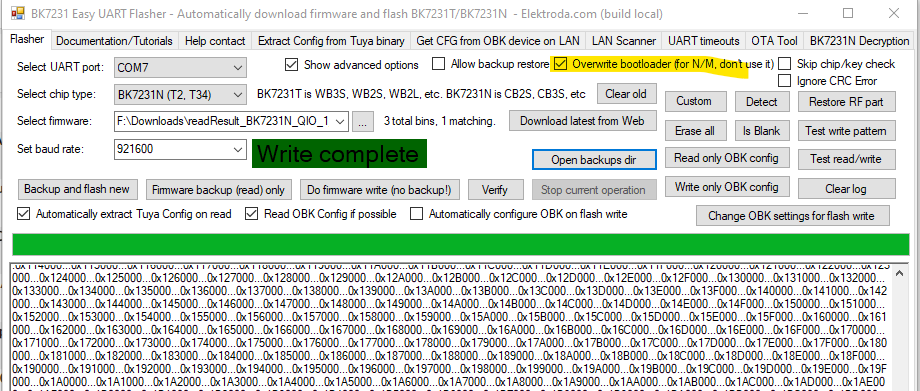
- Reflashing from scratch with the latest flasher and choosing to overwrite the bootloader was the recommended recovery path. [#21904787]
- The confirmed fix was simple: connecting a separate power supply to the module helped. [#21906434]
Why would a BK7231N DNS_led02 lamp stop creating a Wi-Fi access point after flashing the latest firmware?
The most likely cause in this thread was unstable power, not bad firmware. The DNS_led02 board used a BK7231N-based CB2S module, and the AP failed to appear when the module was fed from a 3.3 V USB-TTL source. The final report said a separate external supply restored normal behavior.
[#21906434]
How much power does a BK7231N or CB2S module need during Wi-Fi startup, and why is a USB-TTL adapter's 3.3 V output sometimes not enough?
The thread gives no current figure in mA, but it gives the failure mode clearly. A USB-TTL adapter's 3.3 V rail can be insufficient because the module may brown out exactly when Wi-Fi initializes, so the AP never starts even though flashing succeeded.
[#21904272]
What is the best way to power a BK7231N module while testing after flashing so the AP can start reliably?
Use a separate external power supply for the module during testing. In this case, powering only from the USB-TTL adapter did not bring up the AP, while an external supply solved the issue. For this board, stable power mattered more than reflashing alone.
[#21906434]
How do I check the TX2 boot log on a CB2S or BK7231N board with PuTTY and a USB-TTL adapter?
Check TX2 with a simple 3-step setup. 1. Connect the USB-TTL adapter to the board's TX2 pad and share ground. 2. Open PuTTY at 115200 baud. 3. Power the board and watch whether readable boot text appears or the port drops.
[#21904720]
What does it mean when TX2 output shows garbage characters and then the serial port disconnects on a BK7231N device?
It usually means the serial session is not staying stable during boot. In this thread, the user saw garbage text and then lost the port, while the main suspicion remained inadequate power during Wi-Fi startup rather than a proven firmware mismatch. That symptom fits a board that starts, then collapses during initialization.
[#21904272]
How do I reflash a BK7231N from scratch and overwrite the bootloader using the latest flasher?
Reflash it as a clean recovery. 1. Open the latest flasher. 2. Start a fresh flash instead of an incremental one. 3. Enable the option to overwrite the bootloader, then flash again. That exact recovery step was proposed for this board when AP mode would not return.
[#21904787]
Why can a separate external power supply fix a BK7231N device that flashes successfully but never brings up its Wi-Fi AP?
A separate supply can fix it because flashing and Wi-Fi startup stress the board differently. The device may accept firmware over serial, yet still fail when the radio starts. In this case, the confirmed result was that an external supply restored operation after repeated AP failures.
[#21906434]
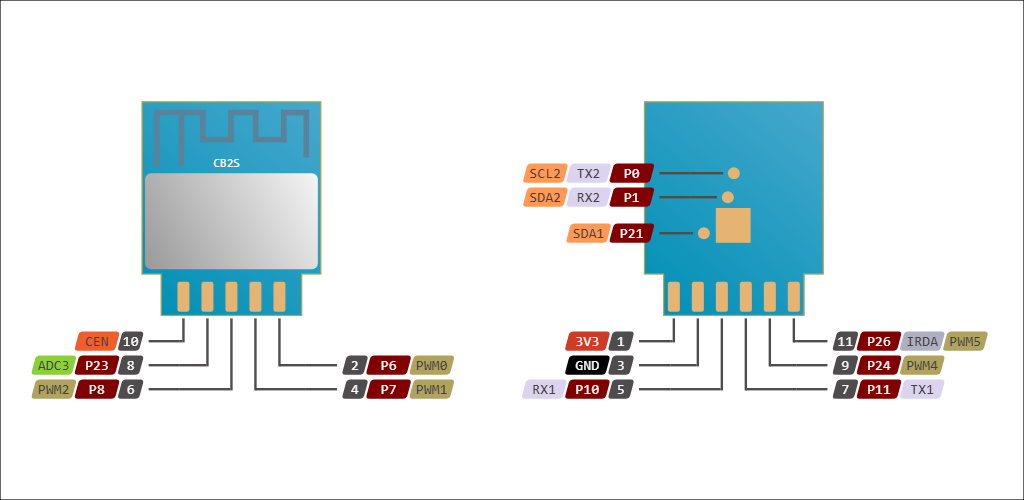
What is a CB2S module, and how is it related to BK7231N-based Tuya devices?
The CB2S in this thread is the actual module fitted on the lamp board, and it is the hardware identity the user confirmed after flashing issues.
"CB2S" is a module designation that identifies the board variant inside a Tuya-style device, helping you match backups, pads like TX2, and the expected firmware family. [#21904702]
What is TuyaMCU, and how does it affect firmware choice and configuration in OpenBK devices?
Here, TuyaMCU meant the device type identified from the backup and board behavior.
"TuyaMCU" is an OpenBK device classification that marks the hardware as a TuyaMCU-type design, which affects firmware choice and later configuration because it tells you the device is not being treated as an unknown board. [#21904692]
OpenBK7231N vs OpenBK7231M: how do I choose the correct build for a Tuya light or lamp board?
Choose the build from the original backup and module identification. In this case, the dump looked like standard Tuya key firmware, so OpenBK7231N was considered correct, while OpenBK7231M was mentioned only as the alternative for a different, non-standard device.
[#21904620]
How can I tell from an original firmware backup whether a device is a standard Tuya platform or something requiring a different OpenBK build?
Share or inspect the original firmware backup and compare its structure with known Tuya patterns. In this thread, the backup was checked and described as standard Tuya key firmware, which pointed to the normal OpenBK7231N path instead of a different build.
[#21904692]
What are the most common causes of brownout on BK7231N modules during Wi-Fi initialization, and how can I prevent them?
In this thread, the key brownout cause was powering the module from a weak 3.3 V USB-TTL output during Wi-Fi startup. Prevent it by using a stronger separate supply, keeping the ground common for serial work, and checking TX2 logs at 115200 baud to confirm the board stays alive through boot.
[#21904272]
Which wiring mistakes with USB-TTL adapters most often prevent BK7231N serial debugging, such as baud rate, ground, or TX2 pin selection?
The thread points to three checks first: wrong baud, missing common ground, or probing the wrong TX2 point. The recommended setup was 115200 baud, shared ground with the USB-TTL adapter, and TX2 taken from the pad on the back of the board shown in the discussion.
[#21904780]
How should I safely power and test a mains-powered DNS_led02 lamp board when diagnosing Wi-Fi AP and boot issues?
The thread-backed approach is to avoid depending on USB-TTL power alone and test the module with a separate supply while watching TX2. The discussion also asked whether the device was back together and on mains, but the confirmed successful fix was external module power, not a new firmware change.
[#21906434]
What troubleshooting steps should I try when resetting radio data and the MAC address does not restore AP mode on a BK7231N device?
Move to a structured check instead of repeating resets. 1. Replace USB-TTL 3.3 V power with a separate supply. 2. Watch TX2 in PuTTY at 115200 baud with common ground. 3. If needed, reflash from scratch and overwrite the bootloader with the latest flasher. Those were the practical next steps after radio-data and MAC resets failed.
[#21904787]
AI summary based on the discussion. May contain errors.