logo elektroda
logo elektroda
X
logo elektroda

How to Send Data from ESP8266 Using Bascom to Thingspeak Database (AT Commands)

Elektronik_Kraków 5088 18
ADVERTISEMENT
Treść została przetłumaczona polish » english Zobacz oryginalną wersję tematu
  • #1 15322112
    Elektronik_Kraków
    Level 13  
    Hello
    I am trying to send data to the Thingspeak database.

    Variables:
    Code: VB.net
    Log in, to see the code


    Configuration:
    Code: VB.net
    Log in, to see the code


    Sending:
    Code: VB.net
    Log in, to see the code


    Manually through the website works OK, but through the ESP8266 nothing is added.
    I guess the fact that I'm trying to send to two channels ( consecutively of course ) has no effect ?
    Any ideas ?

    The best thing would be to check for errors, but I have something wrong with the reception from the ESP8266, because I can't "pull" the IP address that the module gets.

    I am receiving from the UART like this:
    Code: VB.net
    Log in, to see the code
  • ADVERTISEMENT
  • #2 15322334
    piterek-23
    Level 33  
    Elektronik_Kraków wrote:
    The best thing would be to check for errors, but I have something wrong with the reception from the ESP8266, because I can't "pull" the IP address the module gets.

    And does the ESP connect to WiFi at all?
    Can you see it in the router?
  • #3 15322707
    Elektronik_Kraków
    Level 13  
    Yes, on the router it is
    I even hooked up the FT232 first to the Tx of the atmega and then to the Rx to see what it was transmitting. I had among other things
    STA: "192.168.0.120" and the Mac address of the module.

    What concerns me, however, is the syntax being sent to Thingspeak. After logging in, under the Data Import/Export tab, there is an example of a

    
    GET https://api.thingspeak.com/update?api_key=NB9OW9K1234567BF&field1=0
    

    or
    
    GET http://api.thingspeak.com/update?api_key=NB9OW9K1234567BF&field1=0
    

    while some write as follows
    
    GET /update?key=WM82DJMQF003MYGU&field1=8


    while I still found such information:
    before the first Field1 there should be no "&" sign
    
    Thing_string = "GET https://api.thingspeak.com/update?api_key=" + Apikey + "&Field1=" + T1 + "&Field2=" + T7 + "&Field3=" + T3 + "&Field4=" + Str(hum) + "&Field5=" + Str(pressure) + Chr(13) + Chr(10) + Chr(13) + Chr(10)
    

    and that " Chr(13) + Chr(10) + Chr(13) + Chr(10)" is also unnecessary

    and as regards
    Quote:
    The best thing to do would be to check for errors, but I have something wrong with the reception from the ESP8266 because I can't "pull" the IP address that the module gets.


    i was more referring to some problems with the configuration of the UART
    on the configured
    buffer = 245
    bytematch = 10

    Added after 45 [minutes]:

    Unfortunately for now I have a problem receiving more than, one line. Hence the problem to get a good handle on the ESP module.

    Maybe a colleague or someone reading will "lighten up" a bit for me ?
    It is about the use of Bytematch
    Suppose I have
    Code: VB.net
    Log in, to see the code


    then if there are e.g. 4 lines of data of say 50 characters each ending in character 13, they will be placed in order of arrival and now I standardly use
    Code: VB.net
    Log in, to see the code


    then I am to receive it
    Code: VB.net
    Log in, to see the code


    or maybe

    Code: VB.net
    Log in, to see the code

    whereby ciag1_uart will have the same size as the buffer - 254 and I still have to divide it into four parts myself by parsing with character 13 ?
  • ADVERTISEMENT
  • #4 15323121
    Anonymous
    Anonymous  
  • #5 15323272
    Elektronik_Kraków
    Level 13  
    Hello
    Regarding what he is up to :D ( i.e. how it should work ).
    First wanted to put up a webserver, but relied on good handling of reading a few lines ( detecting a few characters that will trigger a subroutine to send to the server ). So to start with something simpler, but I can also see that without good handling of reading a few lines it will be lame.

    Back to the topic
    Quote:

    When you enable receiving characters into the buffer they are received "in the background" in a "hidden" interrupt handler.

    this I knew

    Quote:

    Now, you can find out that there are characters waiting in the buffer either by testing with the Ischarwaiting() function or by setting the trigger to a specific character via Bytematch

    i.e. character 13 will cause e.g. a flag to be set and the contents of the buffer to be read by e.g. Input. So I should quickly check if there is something interesting there because another one is about to arrive ( e.g. ESP in server mode can send eight lines ) ?

    Maybe a stupid question, but will the atmega program "time out" at 115200 ?

    Ultimately:
    Buffer = 254
    Bytematch = 13

    1 line ending with 13
    Input ciag_uart Noecho
    parsing
    2 line ending with 13
    Input ciag_uart Noecho
    parsing
    3rd line ending with char 13
    Input ciag_uart Noecho
    parsing
    4 line ending with char 13
    Input ciag_uart Noecho
    parsing

    I also have a question about Input - I read that it automatically deletes the contents of the buffer, so you don't have to do clearin0 - is this true?

    i found this topic - thank you. Inkey is used there, but it gives some food for thought

    Added after 29 [minutes]:

    As for the ESP8266, the terminal shows:

    
    AT+RST
    
    
    OK
    WIFI DISCONNECT
    
     ets Jan  8 2013,rst cause:2, boot mode:(3,7)
    
    load 0x40100000, len 1396, room 16 
    tail 4
    chksum 0x89
    load 0x3ffe8000, len 776, room 4 
    tail 4
    chksum 0xe8
    load 0x3ffe8308, len 540, room 4 
    tail 8
    chksum 0xc0
    csum 0xc0
    
    2nd boot version : 1.4(b1)
      SPI Speed      : 40MHz
      SPI Mode       : QIO
      SPI Flash Size & Map: 8Mbit(512KB+512KB)
    jump to run user1 @ 1000
    
    ŚŐ(¤SQS(RQ¨)HT¨)SHHHC…ä˙rŽĂąô
    Ai-Thinker Technology Co. Ltd.
    
    ready
    AT+CWMODE=1
    
    
    OK
    AT+CWJAP="nigsdfdsf","qasdfgdfefd"
    
    WIFI CONNECTED
    WIFI GOT IP
    
    OK
    AT+CIFSR
    
    +CIFSR:STAIP,"192.168.0.100"
    +CIFSR:STAMAC,"5c:cf:7f:01:be:a8"
    
    OK
    AT+CIPMUX=1
    
    
    OK
    AT+CIPSTART=4,"TCP","184.106.153.149",80
    
    4,CONNECT
    
    OK
    AT+CIPSTART=4,119
    
    Link typ ERROR
    
    ERROR
    GET http://api.thingspeak.com/update?api_key=NB9O19K734GERRA4BF&Field1=34.5&Field2=47.5&Field3=48.3&Field4=52&Field5=1002
    
    
    ERROR
    AT+CIPCLOSE
    
    MUX=1
    
    ERROR
    AT+CIPSTART=4,"TCP","184.106.153.149",80
    
    ALREADY CONNECTED
    
    ERROR
    AT+CIPSTART=4,121
    
    Link typ ERROR
    
    ERROR
    GET http://api.thingspeak.com/update?api_key=D6GBHJ335G6RVXQI&Field1=54.6&Field2=49.3&Field3=23.6&Field4=34.5&Field5=34.8
    
    
    ERROR
    AT+CIPCLOSE
    
    MUX=1
    
    ERROR


  • #6 15326459
    Elektronik_Kraków
    Level 13  
    The error was in the code instead of CIPSEND I had CIPSTART.

    Now it sends OK ( i.e. I have SEND OK twice ) but I have a Bad Request:
    
    AT+CIPMUX=1
    
    
    OK
    AT+CIPSTART=4,"TCP","184.106.153.149",80
    
    4,CONNECT
    
    OK
    AT+CIPSEND=4,120
    
    
    OK
    > 
    
    busy s...
    
    Recv 120 bytes
    
    SEND OK
    AT+CIPSEND=4,118
    
    
    OK
    > 
    
    busy s...
    
    Recv 118 bytes
    
    SEND OK
    
    +IPD,4,323:HTTP/1.1 400 Bad Request
    Server: nginx/1.7.5
    Date: Tue, 12 Jan 2016 14:25:38 GMT
    Content-Type: text/html
    Content-Length: 172
    Connection: close
    
    <html>
    <head><title>400 Bad Request</title></head>
    <body bgcolor="white">
    <center><h1>400 Bad Request</h1></center>
    <hr><center>nginx/1.7.5</center>
    </body>
    </html>
    4,CLOSED
    AT+CIPCLOSE
    
    MUX=1
    
    ERROR


    What is the problem ?

    I now send like this:
    Code: VB.net
    Log in, to see the code


    Added after 20 [minutes]:

    I changed to every call before sending.

    Code: VB.net
    Log in, to see the code


    and now ThingSpeak shows that an item has been added, but nothing can be seen on the graph.

    Added after 9 [minutes]:

    I did an export to CSV and got:

    created_at entry_id field1 field2 field3 field4 field5
    2016-01-10 22:58:06 UTC 1 0 27.9 58.4 34
    2016-01-10 22:59:27 UTC 2 0.1 27.5 57.9 34 986
    2016-01-10 23:00:26 UTC 3 -0.4 26.5 55.8 34 984
    2016-01-11 18:56:31 UTC 4 2.1 26.5 55.8 34 984
    2016-01-11 22:25:50 UTC 5 2.1 26.5 55.8 34 984
    2016-01-11 22:51:56 UTC 6 2.1 26.5 55.8 34 984
    2016-01-12 14:37:00 UTC 7
    2016-01-12 14:37:32 UTC 8
    2016-01-12 14:37:48 UTC 9
    2016-01-12 14:38:05 UTC 10
    2016-01-12 14:39:39 UTC 11
    2016-01-12 14:43:36 UTC 12
    2016-01-12 14:53:44 UTC 13
    2016-01-12 14:55:47 UTC 14
    2016-01-12 14:58:32 UTC 15
    2016-01-12 14:59:02 UTC 16
  • #7 15326569
    Anonymous
    Anonymous  
  • #8 15336850
    Anonymous
    Anonymous  
  • #9 15337039
    piterek-23
    Level 33  
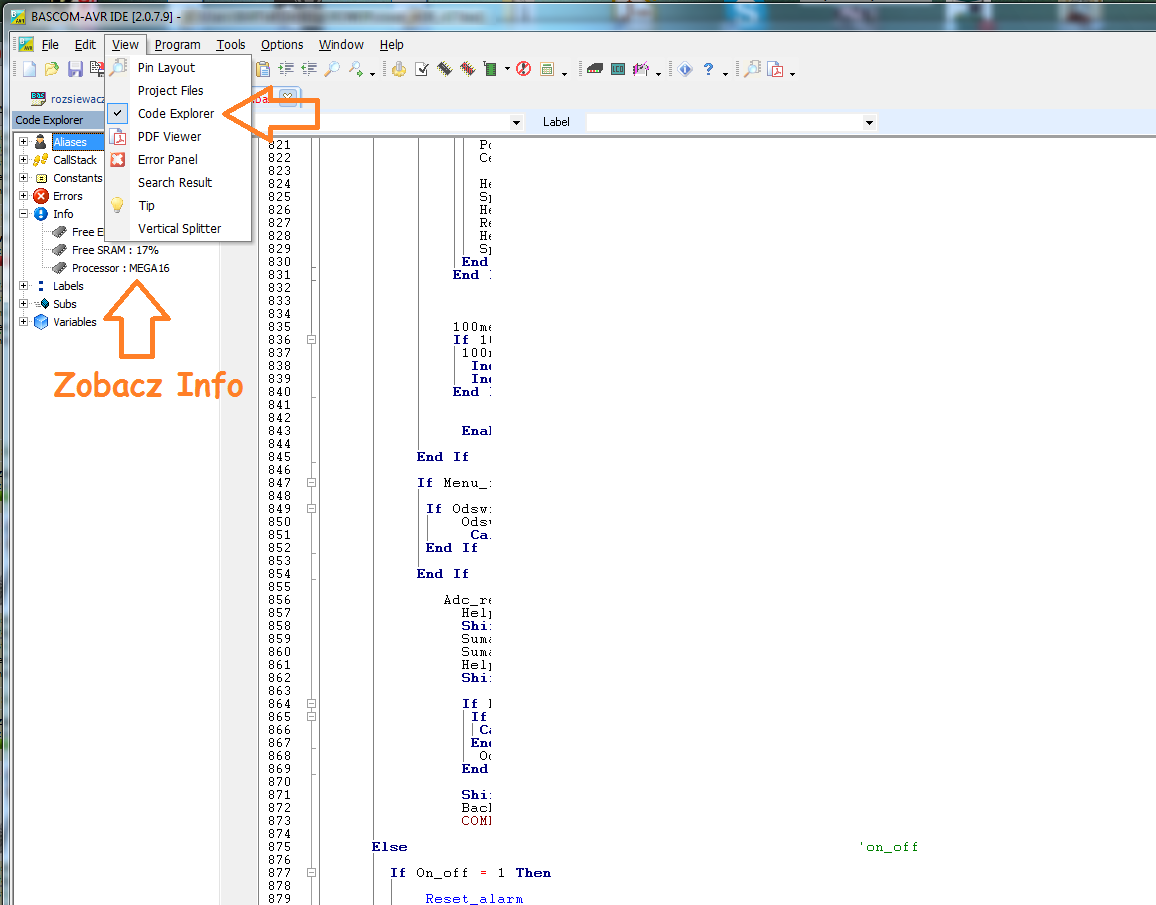
    Fellow @niveasoft a question a little bit from a different barrel.... Where do you get such nice lines connecting functions in BASCOM?
  • #10 15337097
    Anonymous
    Anonymous  
  • ADVERTISEMENT
  • #11 15348916
    Elektronik_Kraków
    Level 13  
    Thank you colleague niveasoft for your reply - I will be testing my colleague's solution. I was a bit afraid of this Inkey, because it always blocked something for me, but since there is information that it doesn't block anything it's a joy.
    Regarding my problem, two things came up:

    
    Thing_string = "GET https://api.thingspeak.com/update?api_key=" + Apikey + "&Field1=" + T1 + "&Field2=" + T7 + "&Field3=" + T3 + "&Field4=" + Str(hum) + "&Field5=" + Str(pressure) + Chr(13) + Chr(10)


    the field name "&field1=" is supposed to be lowercase, i.e. "&field1="

    and the other thing is unfortunately the WiFi range, turned out to be worse than I assumed, but I've already ordered a 12dBi antenna, so maybe it will work. Perhaps it's not entirely the module's fault, I have a small repeater like this that plugs into the socket, but it's without an antenna.

    I have also encountered opinions that the speed 115200 is a bit too high ( unfortunately it is not possible to change it permanently to another one ), but I see that a colleague uses one.
    Can the timing of the controller ( 8 MHz in my case ) affect the performance of the UART reading ?
  • #12 15349100
    Anonymous
    Anonymous  
  • #13 15349429
    Elektronik_Kraków
    Level 13  
    Thank you for your reply.
    As there are no waits anywhere, I wanted to ask how the Colleague did the ESP8266 configuration ?
    I am doing it on waits for now unfortunately.

    Code: VB.net
    Log in, to see the code


    I was wondering if this could be done with a Timer:

    Code: VB.net
    Log in, to see the code


    Alternatively, maybe using Case, checking whether an OK Error or ready came on the UART.
  • #14 15349494
    Anonymous
    Anonymous  
  • ADVERTISEMENT
  • #15 15349751
    Elektronik_Kraków
    Level 13  
    Quote:
    Why configure this ESP over and over again?
    I configured mine once. Now when I connect a terminal to it, it logs on to my router after switching on/resetting.
    It writes itself that WIFI CONNECTED and WIFI GOT IP


    That is, as long as you do not change the WiFi network, there is no need to configure, possibly after receiving WIFI GOT IP you can still ask for the IP - "AT+CIFSR", and there is also "AT+CWMODE=1" mode.

    But with me rather problems with correct reception from UART. Something too fast is going forward. If I want to receive characters from UART and display them on LCD I do the following


    Code: VB.net
    Log in, to see the code


    Because what should happen in Case I understand ( admittedly I didn't know about these labels for Case )
    1. incoming character - Ischarwaiting(#1) > 0
    2. receiving the character in the subroutine via Inkey(#1)
    3. omitting characters 10 and 13
    4. adding each received character to a variable of type string Uart_string
    5. when the value of the counter exceeds the size of the variable Uart_string resetting the counter and the variable Uart_string
    6. when there is something in the buffer, setting the flag Mark

    This is how I described it so that I don't know what's going on :D

    The code above, apart from the time from the PCF8563 being read every 0.5 seconds, does not display any data received.

    As for Thingspeak itself ( not to be off topic ) I want to update the data with a flag from the Timer - ie I have a board that :
    measures the DS18B20
    measures the DHT11
    measures MPL115A2
    sends throughout the house via RFM12
    writes to the SD card

    also planned
    to check the status of the pumps
    gas sensors
    chimney thermocouple sensor on MAX6675 chip
    a second master in the attic ( as the main one does not have access to all the data I am interested in)
  • #16 15349838
    Anonymous
    Anonymous  
  • #17 15349858
    Elektronik_Kraków
    Level 13  
    Quote:
    Either remove those " #1 " from those brackets or add in the code :


    That worked. Thank you

    Only there is a non-blocking problem. The display only refreshes the time when the mark(s) are received.
  • #18 15349906
    Anonymous
    Anonymous  
  • #19 15353143
    Elektronik_Kraków
    Level 13  
    Quote:
    You know, everyone has to sit down if they want to do something themselves and not monkey around

    Of course you are right mate - by the way, I was well defined by my brother-in-law who I got into electronics and controllers - I think too much about how a function works, instead of thinking about how to use it well.

    Quote:
    So the example works for what it is, but another module probably needs a different treatment.

    Correct, e.g. now disconnecting the board via FT232 to the PC and changing the
    Code: VB.net
    Log in, to see the code


    it works OK, but how it will work with the ESP8266 or with the SIM800L is to be seen in the "wash"
ADVERTISEMENT