logo elektroda
logo elektroda
X
logo elektroda

Failed connection to ESP-8266 after uploading new firmware

lexom 2046 9
Best answers LABEL_AI_GENERATED

How can I get an ESP8266 to boot normally and connect after flashing MicroPython firmware?

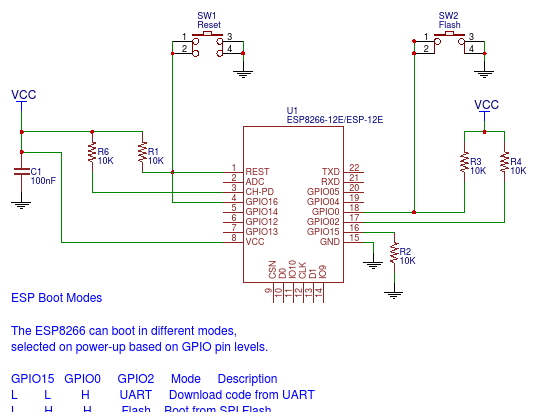
The ESP8266 is probably not booting into normal MicroPython mode because the boot pins are wired incorrectly; after flashing, GPIO0 must be disconnected from GND, and RST, GPIO0, and GPIO2 should be pulled up to VCC with 10k resistors while GPIO15 should be pulled down to GND with a 10k resistor [#18258646] [#18260860] One reply also confirmed that the same MicroPython firmware worked on an ESP-12 and that the default Wi‑Fi network was visible, so the firmware itself is likely fine [#18258646] If MicroPython is running correctly, a network named like “MicroPython-xxxxxx” should appear [#18257143]
AI summary based on the discussion. May contain errors.
ADVERTISEMENT
Treść została przetłumaczona polish » english Zobacz oryginalną wersję tematu
  • #1 18256913
    lexom
    Level 12  
    Posts: 234
    Help: 1
    Rate: 9
    I have a problem connecting to the ESP-8266.
    Everything connected according to this diagram (step 3).

    Installed esptool. uploaded new firmware:

    sudo esptool.py --port /dev/ttyUSB0 erase_flash
    esptool.py v2.8
    Serial port /dev/ttyUSB0
    Connecting....
    Detecting chip type... ESP8266
    Chip is ESP8266EX
    Features: WiFi
    Crystal is 26MHz
    Uploading stub...
    Running stub...
    Stub running...
    Erasing flash (this may take a while)...
    Chip erase completed successfully in 9.9s
    Hard resetting via RTS pin...
    .

    sudo esptool.py --port /dev/ttyUSB0 write_flash -fm qio 0x00000 /home/pawel/Pobrane/esp8266-20190529-v1.11.bin
    esptool.py v2.8
    Serial port /dev/ttyUSB0
    Connecting....
    Detecting chip type... ESP8266
    Chip is ESP8266EX
    Features: WiFi
    Crystal is 26MHz
    Uploading stub...
    Running stub...
    Stub running...
    Configuring flash size...
    Auto-detected Flash size: 4MB
    Flash params set to 0x0040
    Compressed 617880 bytes to 402086...
    Wrote 617880 bytes (402086 compressed) at 0x00000000 in 35.5 seconds (effective 139.1 kbit/s)...
    Hash of data verified.
    
    Leaving...
    Hard resetting via RTS pin...
    
    .

    I then started ESPlorer, unfortunately I can't connect to the chip (I have the same in minicom - I can't type anything in the console)
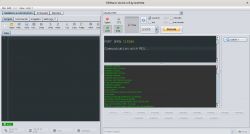
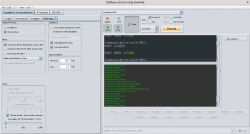
    Failed connection to ESP-8266 after uploading new firmware Failed connection to ESP-8266 after uploading new firmware .
    Anyone have any idea what the problem could be ?
  • ADVERTISEMENT
  • #2 18257100
    Anonymous
    Level 1  
  • #3 18257121
    lexom
    Level 12  
    Posts: 234
    Help: 1
    Rate: 9
    I uploaded from this page.
  • ADVERTISEMENT
  • #4 18257127
    Anonymous
    Level 1  
  • #5 18257139
    lexom
    Level 12  
    Posts: 234
    Help: 1
    Rate: 9
    I have no such network.
  • ADVERTISEMENT
  • #7 18257158
    lexom
    Level 12  
    Posts: 234
    Help: 1
    Rate: 9
    I uploaded the file again - the result is the same ( no network, RX/TX does not work).
    I bought the module some time ago, on the casing it says ESP8266MOD.
    Module itself looks like yes , it is soldered to yes board.
    I would add that after uploading the software, no LEDs light up on it (not sure if they should).
    Maybe there's something wrong with this connection - I've seen different variations on the internet.
  • #8 18258646
    Anonymous
    Level 1  
  • #9 18260789
    lexom
    Level 12  
    Posts: 234
    Help: 1
    Rate: 9
    I have uploaded the firmware.
    I only left the VCC, GND, and VCC to CH_PD connections and nothing.
  • ADVERTISEMENT
  • #10 18260860
    Anonymous
    Level 1  

Topic summary

LABEL_AI_GENERATED
The discussion revolves around a user's inability to connect to an ESP-8266 module after uploading new firmware (esp8266-20190529-v1.11.bin) using esptool. The user reports that the expected WiFi network "MicroPython-xxxxxx" is not visible post-upload, and no LEDs light up on the module. Other participants suggest checking the wiring, ensuring GPIO 0 is disconnected from ground during the upload, and pulling up GPIO pins with resistors. The user confirms the module is labeled ESP8266MOD and has attempted re-uploading the firmware without success.
AI summary based on the discussion. May contain errors.
ADVERTISEMENT