




logo elektroda
logo elektroda
X
logo elektroda

[Solved] Sonoff T2 EU smart light switch - how to control by voice?

pawelsake 2886 13
ADVERTISEMENT
Treść została przetłumaczona polish » english Zobacz oryginalną wersję tematu
  • #1 18308594
    pawelsake
    Level 10  
    Posts: 306
    Rate: 55
    Good afternoon, I have a problem at home with a switch the electrical installation has been done so that my door opens on the light switch.
    I wanted to use something from a smart home so that I can turn on the light when I approach the room, possibly a response from the switch to a clap or voice command - unfortunately I can't trace anything.
    Anything you guys recommend? This is a child's room.
    The only thing I have found is wifi operation. I have an asus 5 GHz router at home.
    https://www.komputronik.pl/product/649484/sonoff-t2-eu-tx-2-kanalowy-.html
  • ADVERTISEMENT
  • #2 18308633
    alster1
    CCTV and Stationary Alarms specialist
    Posts: 2094
    Help: 352
    Rate: 535
    If all you care about is switching the light on and off remotely, look at LIVOLO switches with remote control operation.

    ps. They don't need a neutral wire, which can be crucial in older installations.
  • #3 18308637
    xury
    Automation specialist
    Posts: 7071
    Help: 876
    Rate: 1486
    For amateurs, this is not a simple matter. Supposedly the T2s work with Google Home. I have them but the first thing I did was change the software in them to Tasmot. I have no idea at all how it works on the evelink app. Now they also work with Google Home except that under the control of Domoticz and Node-Red. The important thing is that T2 requires neutral to work which is a hassle with traditional lighting installations. I have Domoticz integrated into my control panel so the motion sensors are also used to control the lighting.
    https://youtube.com/watch?v=TlqyEaC51YI
    https://youtube.com/watch?v=P_bPROL_NcI
    However, as I wrote earlier this requires changes to the installation and a computer with some software like Domoticz, openHAB, Home Assistant etc.
  • ADVERTISEMENT
  • #4 18308648
    pawelsake
    Level 10  
    Posts: 306
    Rate: 55
    natural wire I understand it is not earth - 3 year old installations - so it should be? 4 core cable
  • #5 18308662
    xury
    Automation specialist
    Posts: 7071
    Help: 876
    Rate: 1486
    The fact that the installation is new does not at all mean that the neutral in the circuit breaker is. It depends on the installation. In a so-called "no-neutral" installation this will be the case, but if the lighting wires are led to the junction box above the switch, it is unlikely to be the case. And of course in a 230V installation there is no such thing as earth. 😉
    And another little note: If you have more than one switch in a frame system then there is no chance of putting the Sonoff there without reworking the switch boxes. There simply isn't enough space.
  • #6 18308845
    retrofood
    VIP Meritorious for electroda.pl
    Posts: 31317
    Help: 1140
    Rate: 4781
    xury wrote:
    T
    And a small note: If you have more than one switch in a frame system then there is no chance of putting a Sonoff in there without reworking the switch boxes. There is simply not enough space.
    .
    Sonoff can be placed on the surface. It will be behind the door anyway.
  • #7 18310079
    Ircys
    Intercoms specialist
    Posts: 6933
    Help: 1334
    Rate: 2053
    xury wrote:
    .
    And a small note: If you have more than one switch in a frame system then there is no chance of putting a Sonoff there without reworking the switch boxes. There is simply not enough space.


    What does this reworking consist of? Is the box too narrow or too shallow?

    Greetings
  • ADVERTISEMENT
  • #8 18310113
    kood
    CCTV and Stationary Alarms specialist
    Posts: 1896
    Help: 259
    Rate: 443
    Ircys wrote:
    Is the box too narrow or too shallow?


    Neither too narrow nor too shallow just the boxes are too close together because the Sonoff Touch is larger in size than the standard switches for the frame system.

    I have Supla preloaded into the Sonoff, it works well, it's just a shame that the Google speakers don't (yet) support Polish.
  • #9 18310275
    Ircys
    Intercoms specialist
    Posts: 6933
    Help: 1334
    Rate: 2053
    Ok, thanks, now I understand.

    Greetings
  • ADVERTISEMENT
  • #10 18312646
    xury
    Automation specialist
    Posts: 7071
    Help: 876
    Rate: 1486
    More specifically, the frame system has a can spacing of approximately 72mm from axis one to axis two. The box has a diameter of 60mm so there is about 6mm left on each side. The outer dimensions of the Sonoff are 86mmx86mm. From this we know that it won't fit next to it, as the maximum dimension would have to be 60mm + 2*6mm ie 72mm. 14mm is missing.
    I had to forge and separate the cans more or less like this:
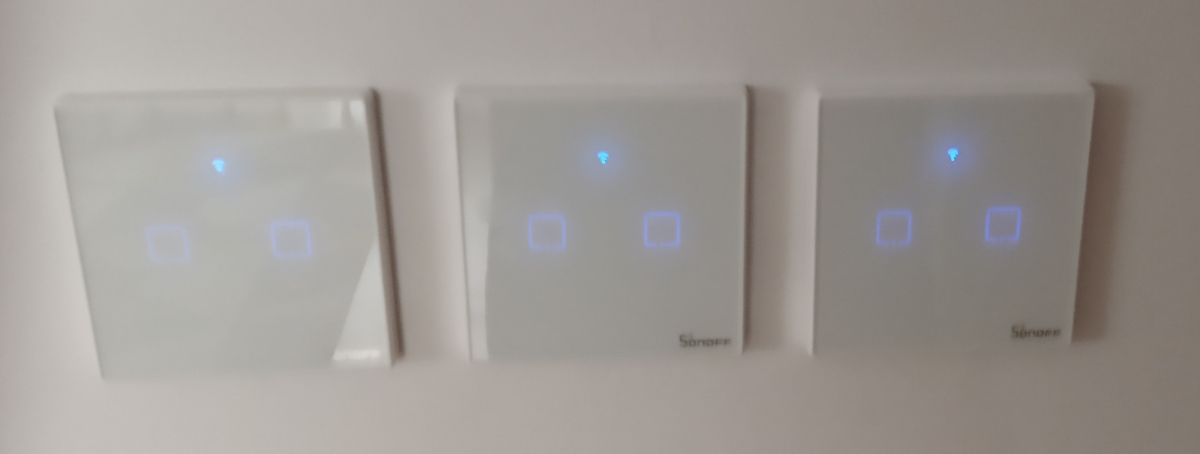
    Sonoff T2 EU smart light switch - how to control by voice? .
    Admittedly, it was possible to give them closer, but I wanted some separation between the antennas.
  • #12 18329694
    Anonymous
    Level 1  
  • #13 18349871
    pawelsake
    Level 10  
    Posts: 306
    Rate: 55
    https://allegro.pl/oferta/b-line-wylacznik-lacznik-dotykowy-szklany-czarny-7112072337
    |welcome not to start a new topic I have a problem with this switch, because it works in such functions:
    Button A works and buttons A with B attached (the whole chandelier activates), and B alone does not activate. Pressing button A again deactivates the entire chandelier. Although the Leds on the switch indicate when button B is activated that it is active, there is no light?

    Any advice on where the fault could be. A second switch is out of the question as I have tested a replacement model and it is the same.
  • #14 18349915
    pawelsake
    Level 10  
    Posts: 306
    Rate: 55
    https://allegro.pl/oferta/b-line-wylacznik-lacznik-dotykowy-szklany-czarny-7112072337
    |welcome not to start a new topic I have a problem with this switch, because it works in such functions:
    Button A works and buttons A with B attached (the whole chandelier activates), and B alone does not activate. Pressing button A again deactivates the entire chandelier. Although the Leds on the switch indicate when button B is activated that it is active, there is no light?

    Any advice on where the fault could be. A second switch is out of the question as I have tested a replacement model and it is the same.

    Added after 21 [minutes]: .

    xDD

Topic summary

✨ The discussion revolves around the Sonoff T2 EU smart light switch and its integration into a home automation system, particularly for controlling lights via voice commands or motion detection. Users express concerns about the necessity of a neutral wire for installation, which is often absent in older electrical setups. Alternatives like LIVOLO switches are suggested for simpler remote control without needing a neutral wire. Some users have modified their Sonoff switches with custom firmware (Tasmota) to enable compatibility with Google Home and other automation platforms like Domoticz and Home Assistant. The conversation also touches on the physical installation challenges due to the size of the Sonoff switch compared to standard switches. Additionally, a user inquires about a B-line product requiring a specific module for smartphone control, which is confirmed to be necessary for full functionality.
Generated by the language model.

FAQ

TL;DR: Standard two‑gang can spacing is 72 mm; "The outer dimensions of the Sonoff are 86mmx86mm." Plan wiring and fit before voice-control setup. [Elektroda, xury, post #18312646]

Why it matters: This FAQ helps homeowners choose a smart switch and wiring approach that actually fits and supports voice control, especially in kids’ rooms.

Quick Facts

How do I control a Sonoff T2 EU light switch by voice?

Users report Sonoff T2 works with Google Home. You can keep stock firmware (eWeLink ecosystem) or flash Tasmota and integrate via Domoticz or Node‑RED for voice routines. The Tasmota route needs a controller running 24/7. Pick the path that fits your skills and hub setup. [Elektroda, xury, post #18308637]

Does the Sonoff T2/TX require a neutral wire?

Yes. "T2 requires neutral to work," so confirm a neutral is present in your switch box before buying. Without it, the device won’t power up. If neutral isn’t present, consider alternatives or rewire. [Elektroda, xury, post #18308637]

I have a new installation. Do I definitely have neutral at the switch?

No. A new build doesn’t guarantee neutral in the switch box. It depends on how the lighting circuit was run, often with neutral at the junction box. Also, don’t confuse neutral with protective earth. Verify conductors before installing smart switches. [Elektroda, xury, post #18308662]

Will a Sonoff T2 fit in a multi-gang frame with standard boxes?

Often no. Standard two-gang spacing is about 72 mm center-to-center, and the Sonoff face is 86×86 mm. That’s a 14 mm shortfall, so two units typically won’t sit side by side without widening or separating boxes. Measure first to avoid rework. [Elektroda, xury, post #18312646]

Can I surface-mount a Sonoff switch if the box is too tight?

Yes. You can place the Sonoff on the surface, for example behind a door, to bypass cramped multi-gang boxes. This avoids chiseling and preserves the frame system for other switches. Use proper routing and a safe enclosure. [Elektroda, retrofood, post #18308845]

What if I don’t have neutral at the switch—what are my options?

Choose a model that doesn’t need neutral, like LIVOLO remote-control switches. You’ll gain remote switching without rewiring. If you want Wi‑Fi voice control, plan for adding neutral or using a different topology and hub. Match the product to your wiring. [Elektroda, alster1, post #18308633]

Do Sonoff TX/T2 switches work with a 5 GHz Wi‑Fi router?

They connect over 2.4 GHz only. Many dual‑band routers support both networks; enable 2.4 GHz SSID and pair the switch there. 5 GHz is not supported by these wall switches. [SONOFF TX Series Wi‑Fi Smart Wall Switches]

Can I add motion-triggered lighting with Sonoff?

Yes. One approach is flashing Tasmota and integrating Sonoff with Domoticz. Then use motion sensors to automate lights and still expose scenes to Google Home. This requires a controller and some configuration. [Elektroda, xury, post #18308637]

How do I retrofit two Sonoff Touch/TX in one location?

How‑To:
  1. Measure box center spacing and compare with the 86×86 mm Sonoff face.
  2. If spacing is ~72 mm, separate or widen boxes by ~14 mm total.
  3. Reinstall, ensuring antenna spacing and clean cable routing. "The outer dimensions of the Sonoff are 86mmx86mm." [Elektroda, xury, post #18312646]

Can I control a Tasmota‑flashed T2 with Google Home?

Yes, indirectly. Flash Tasmota and integrate with Domoticz or Node‑RED, then link to Google Home. This adds flexibility but needs a running controller and more setup than stock eWeLink. [Elektroda, xury, post #18308637]

Do Google smart speakers support Polish with this setup?

One user notes their Google speakers didn’t support Polish at the time, limiting native-language voice control. You can still operate in supported languages while waiting for local language support. [Elektroda, kood, post #18310113]

Do I need a Broadlink hub to control a B-Line touch switch by phone?

Yes. Without the Broadlink module, the B‑Line touch switch works only from its handheld remote. Add the Broadlink hub to gain smartphone control and scenes. [Elektroda, Anonymous, post #18329694]

Why does only button A work on my two‑gang B‑Line switch, while B does nothing?

Your description suggests the B channel isn’t connected to a load or is bridged with A when both are pressed. Since a replacement behaved the same, wiring is the likely cause. Verify L, L1, and L2 terminations and that the chandelier circuits are separated. [Elektroda, pawelsake, post #18349915]

What if there isn’t space next to other switches for a Sonoff?

In multi-gang frames, box proximity can block a Sonoff Touch from fitting. “There simply isn’t enough space.” Consider separating boxes or surface-mounting the unit nearby. Plan antenna spacing if installing multiple Wi‑Fi switches. [Elektroda, xury, post #18308662]
Generated by the language model.
ADVERTISEMENT