FAQ 
TL;DR: Up to 20 TB arrays, “extension for building a NAS server” [Elektroda, pseven, post #18336824], run on Pi 4 via JMS561 bridge. Driver pack adds RAID 0/1/5 and Ubuntu support. Power needs range from 30 W (2.5”) to 60 W (3.5”).
Why it matters: It turns a low-cost SBC into a multi-drive NAS without PCIe hats.
Quick Facts
• 2 or 4 SATA III ports, JMicron JMS561 USB-SATA bridge [Elektroda, pseven, post #18336824]
• Max capacity: 10 TB (DUAL) or 20 TB (QUAD) per array [Elektroda, pseven, post #18336824]
• Power: 30 W USB-C (2.5”), ≥60 W ATX (3.5”) [Elektroda, pseven, post #18336824]
• Prices: USD 25 (DUAL), USD 35 (QUAD), USD 99 (QUAD Kit) [Elektroda, pseven, post #18336824]
• Supported RAID levels: 0, 1, 5 via Radxa driver for Ubuntu [Elektroda, pseven, post #18336824]
What is the Radxa DUAL/QUAD SATA HAT?
It is a Raspberry Pi 4 and Rock Pi 4 add-on providing two or four SATA III ports through a JMicron JMS561 USB-to-SATA bridge, letting you build compact NAS arrays
[Elektroda, pseven, post #18336824]
Which single-board computers work with the HAT?
How many drives and what total capacity are supported?
Does the board support RAID, and which levels?
What power supply do I need for 2.5-inch and 3.5-inch disks?
Use a 30 W USB-C PD/Quick-Charge adapter for four 2.5-inch drives. For 3.5-inch drives, provide an ATX supply rated at least 60 W to cover spin-up current
[Elektroda, pseven, post #18336824]
How much does the SATA HAT cost?
Is there official driver support for Linux?
Can I boot the Raspberry Pi from the SATA array?
Yes, after flashing the Pi’s EEPROM to USB-boot mode, you can place /boot on any connected SSD; micro-SD is no longer required [Raspberry Pi Boot Docs].
What happens if a drive fails in RAID 5?
The array keeps running in degraded mode, but performance may drop by about 30 % until the failed disk is replaced and rebuilt [Linux mdadm FAQ].
How do I assemble the QUAD SATA HAT kit?
- Screw the RasPi 4 onto the kit’s baseplate.
- Plug the QUAD SATA HAT onto the GPIO header and secure with spacers.
- Slide up to four 2.5-inch drives into the bay, connect SATA cables, then attach the USB 3.0 bridge cable.
Is active cooling necessary?
The acrylic enclosure includes a 40 mm PWM fan; keep it running because four spinning drives can raise internal temps above 50 °C during parity rebuilds [LinuxGizmos].
Which controller chip is used and what throughput can I expect?
The JMicron JMS561 dual-lane USB 3.0 bridge peaks around 400 MB/s aggregate on a single USB 3.0 link [JMS561 Datasheet].
Can I mix SSDs and HDDs in one array?
You can, but RAID will run at the speed of the slowest disk; mixing may also complicate power budgeting [Linux mdadm FAQ].
What are the enclosure’s dimensions?
The acrylic NAS case measures approx. 110 × 94 × 132 mm, fitting four 2.5-inch drives and a Pi 4 [Allnet, 2020].
What’s an edge case I should watch for?
If you run four 7200 RPM 3.5-inch drives from a 30 W adapter, spin-up can brown-out the Pi and corrupt the array—always use the recommended 60 W ATX rail
[Elektroda, pseven, post #18336824]
AI summary based on the discussion. May contain errors.










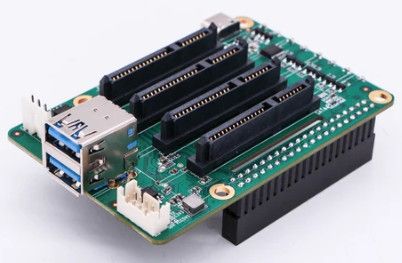
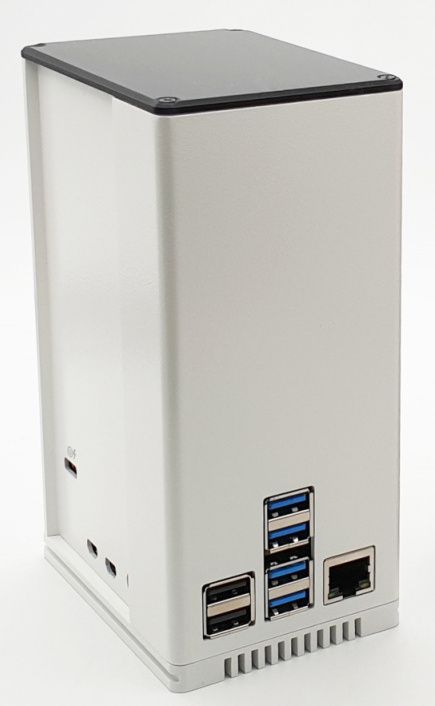 QUAD SATA HAT is available in a set with a housing with space for a Raspberry Pi 4 and 4 SSD / HDD drives in the size of 2.5 ".