How do I correctly read an AS5048A encoder over SPI with an ESP32 so I don’t get only zeros?
To read the AS5048A correctly on an ESP32, you must use the right SPI bus/pins and the AS5048A read sequence: send the command frame with the read bit set, then send a second dummy 0x0000 transfer to clock out the response [#18389303][#18390155][#18409773][#18412478] The original sketch used HSPI by default while the wiring matched the ESP32 VSPI defaults, so the bus/pin mapping had to match the code [#18389303] `beginTransaction()` sets the SPI settings, and `transfer()` sends bytes while returning the received bytes in the same buffer, so SPI is not like I2C with addresses/registers in one step [#18390155] The user eventually got valid readings after tying MOSI permanently to 3.3 V, which puts the AS5048A into read-only mode [#18409773][#18412478] If motor noise still corrupts the data, shield the motor cables too and connect the signal cable shield to ground only on the ESP32 side; grounding the shield on both ends of a measurement cable can turn it into an antenna [#18443203][#18443628][#18445327]
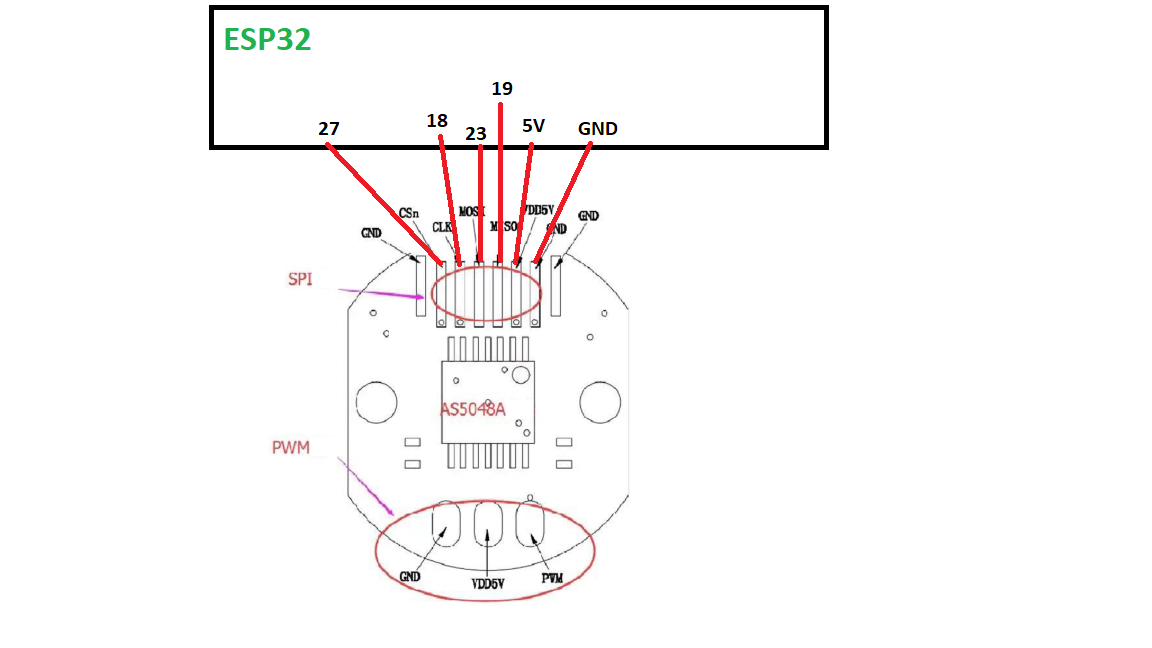
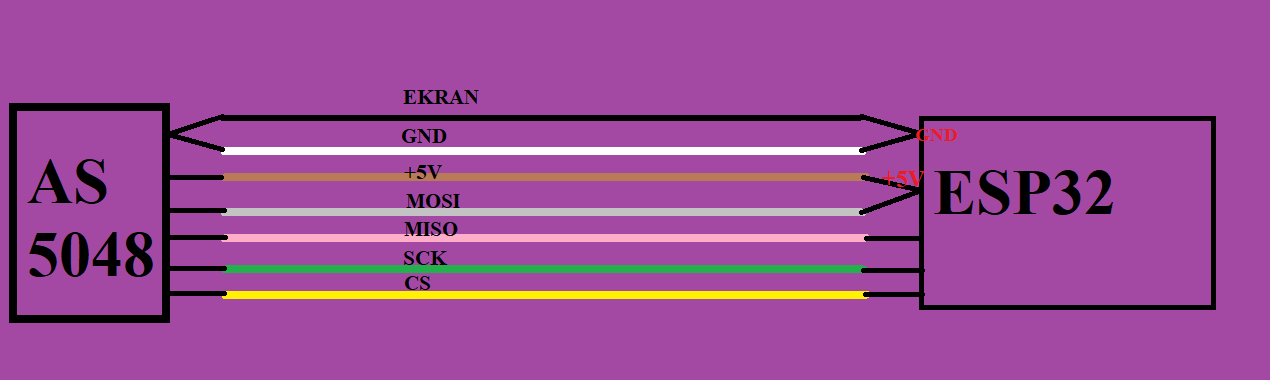
I recently bought some AS5048A encoders, communicating with the master over SPI. I assembled a connection like this:
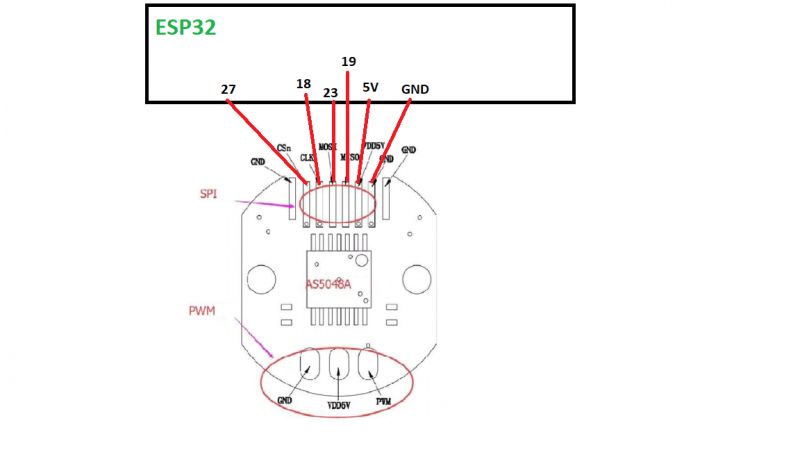
.
and uploaded the example I found:
Code: C / C++
Log in, to see the code
.
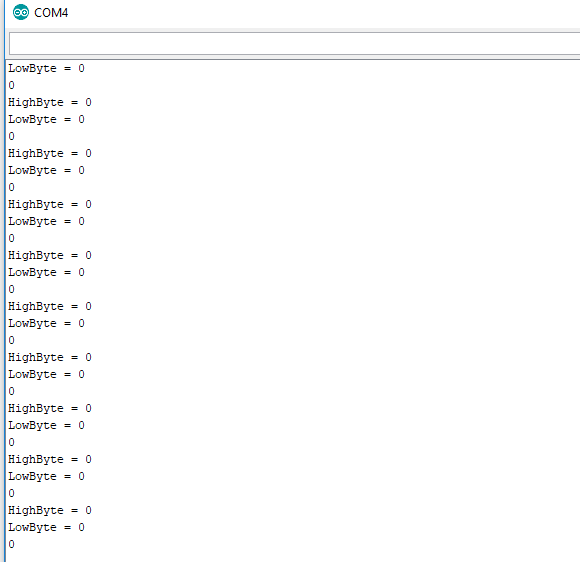
Unfortunately after uploading the code to the ESP32 dev Module, I get the same zeros whether I apply the magnet or not. When I get home with this the first thing I'll check is that I have an SCL signal on the oscilloscope and that I have a low state on pin 27 every second, but I'd also like to ask if maybe something is wrong with the code or pinology?
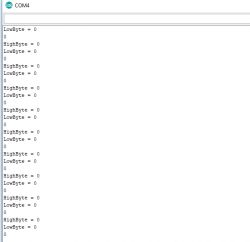
.
I also tried from HSPI pins before and there was no difference either. At the moment I have shortened the code from the link just to handle HSPI.
Code: C / C++
Log in, to see the code
.
However, I don't really understand how it works.
When I was using I2C I knew that first you have to establish a connection, give the address, register address, how many bytes etc....
With SPI I know that when picking up data from the slave, the CS pin is supposed to be in the low state, SCL is the clock, and MoSI and MISO are something like RX TX.
In the loop I have a call to the communication function:
Code: C / C++
Log in, to see the code
.
Could you please explain what is contained in beginTransaction, and what is behind the transfer(stuff) command;
beginTransaction(SPISettings settings);
SPISettings:
uint32_t clock (default 1000000)
uint8_t bitOrder (default SPI_MSBFIRST)
uint8_t dataMode (default SPI_MODE0)
This function sets up an SPI_MUTEX_LOCK on a given thread, which is later released by endTransaction().
madiz08 wrote:
what is behind the transfer(stuff) command;
.
void transfer(uint8_t * buffer, uint32_t size) - received data goes to the same buffer (instead of sent data); buffer size should be large enough
uint8_t transfer(uint8_t data) - concerns only sending and receiving one byte
https://www.arduino.cc/en/Reference/SPITransfer
I was about to give up on it. I tried it on UNO and MEGA and got zero readings. Finally, using the link:
https://forum.arduino.cc/index.php?topic=155238.0 I noticed that MOSI is permanently connected to 3V3 and suddenly everything started to work. Below I am uploading the ready-to-read AS5048A on ESP32
Code: C / C++
Log in, to see the code
.
Thanks for the links to the SPI, a lot of news it gave me
If the MOSI is permanently connected to HIGH, this means "Read only" mode for the AS5048A. - in the documentation you linked to in post #3 this is described on page 13. However, this does not mean that this is the way it has to be. You might want to program the encoder and change its settings? .
I would suggest moving the Serial.println(result) display behind the hspi->endTransaction() command. You should not block access to the SPI channel to other threads for longer than necessary.
Of course I would like to be able to program it, or a more apt word is to be able to. I would be most interested in setting the zero position. I understand the Transfer function as sending the appropriate byte, and in response the function returns a response in place of that byte.
I don't understand why this response comes after sending two bytes with a value of 0? I know the value is 14-bit, so we are not looking at the two oldest bits, but why are we sending 0?
Is it not really a 0, just the first byte of the array?
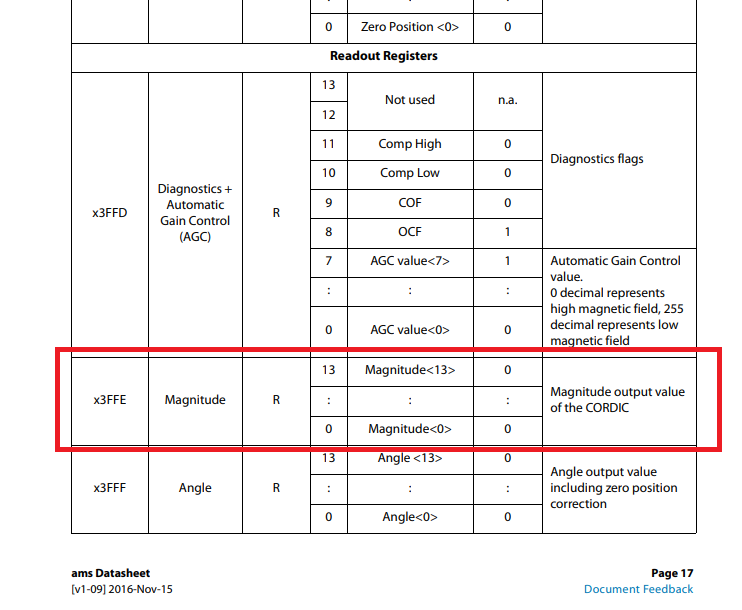
The register address I'd like to read the position from is 0x3FFE. I thought it would work on the principle that I split this value into two bytes, add a 1 to the older one in the 15th bit to let it know it's a read, and send that to the encoder. I've also tried Transfer(Val16), but also nothing.
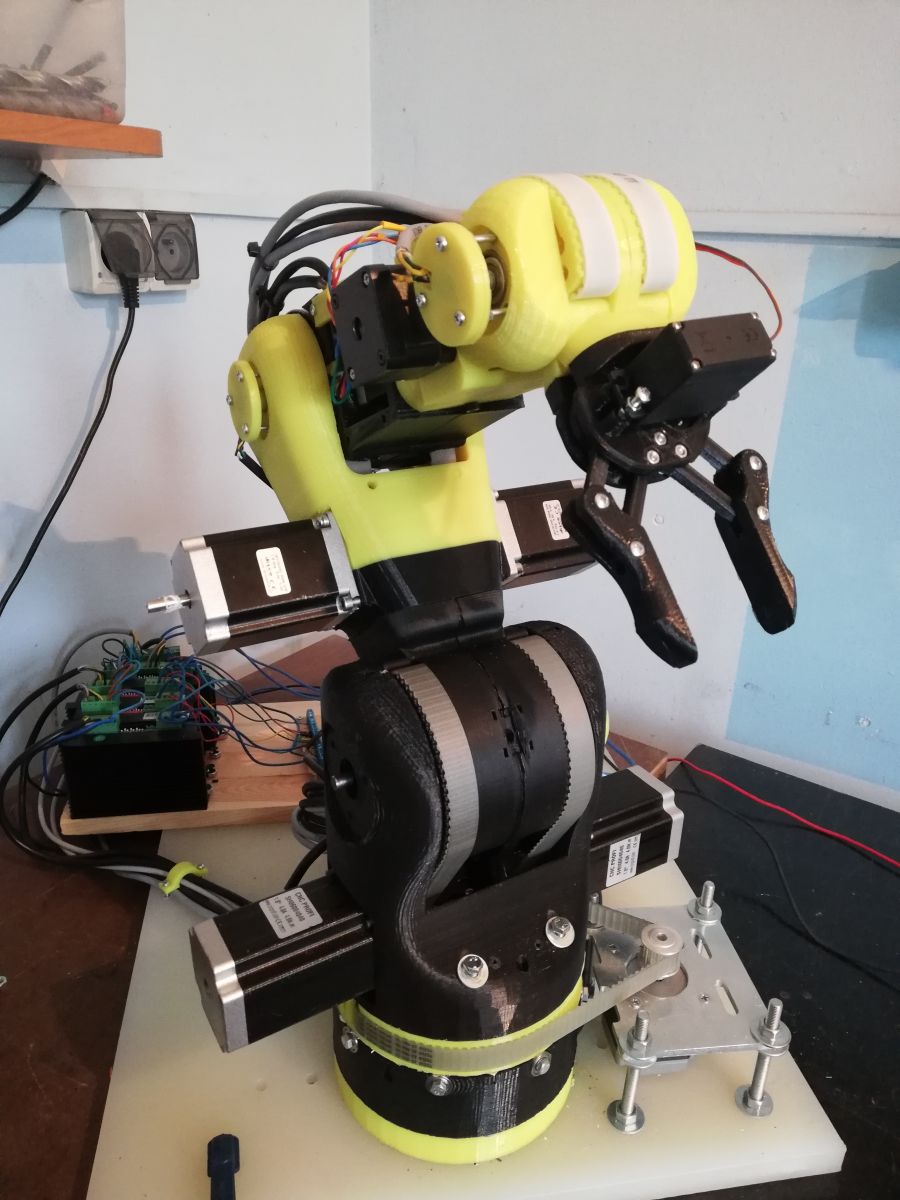
made everything clear to me. That is, we send the appropriate command + a 1 in front and then send 0 as a read. I had sent the former before, but didn't know that you then have to send a 0 to get the response. I'm ordering 6-wire shielded cables and when they arrive I'll try to fit these encoders to my robot instead of the AS5600. I hope that if they are connected directly to the ESP32 there will be no interference.
Thank you.
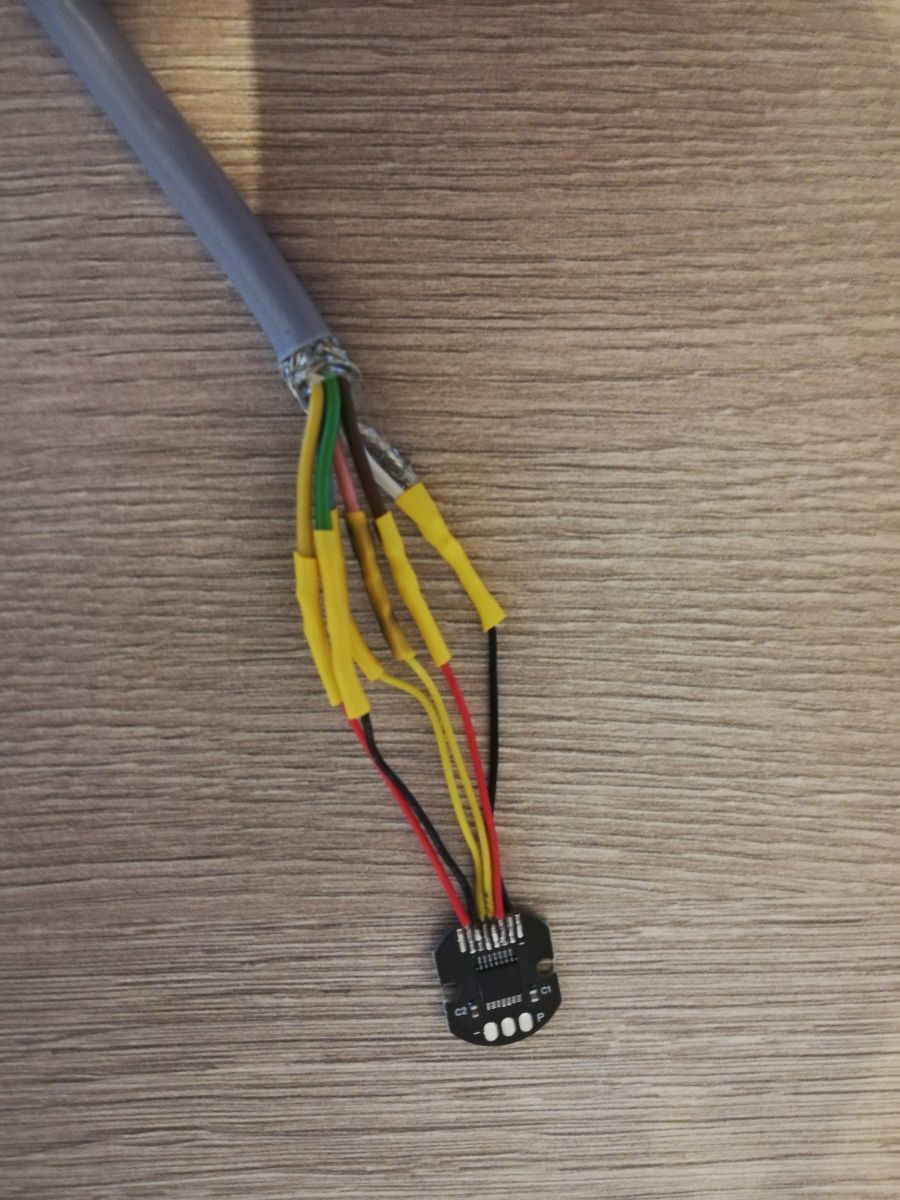
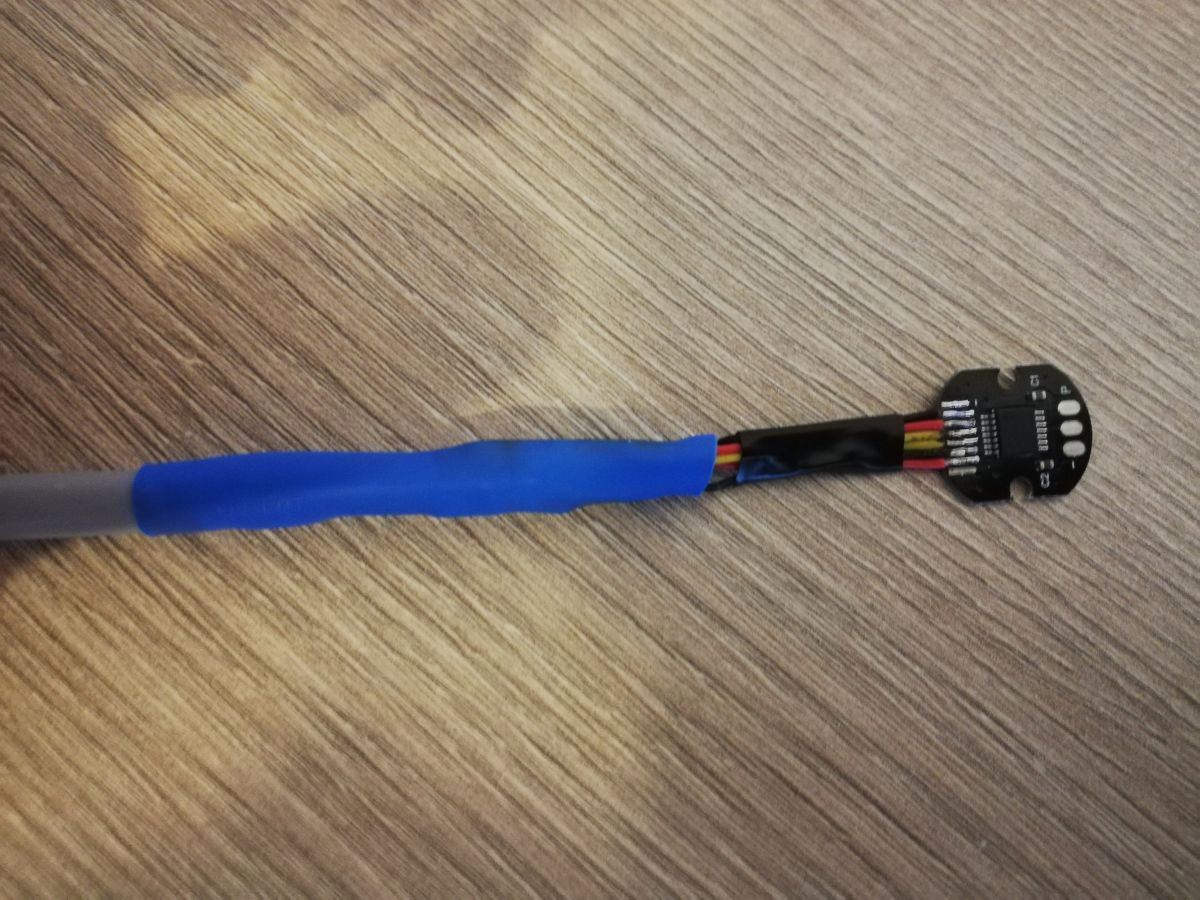
Today I soldered the encoders to the shielded cable
.
.
and I temporarily connected 2 of the 5 encoders on a test basis in a "3 Wire Mode (read only)" connection.
.
Tomorrow or the day after tomorrow (if I don't have trips at work), I will try to assemble the encoders on the individual axes and see how it works.
I'm just asking for input on whether this kind of reading is optimal?
Today I quietly connected everything, separated the 5V control voltage from the motors supply voltage. After switching on the control and moving the axes freely, 0 reading errors, but unfortunately after switching on the power supply to the motors automatically erroneous readings.
Well, I don't know where the interference comes from anymore. The same encoders are used in professional applications by Boston Dynamisc who use them in their motors doing such wonders:
https://www.youtube.com/watch?v=NR32ULxbjYc Perhaps my problem is that the encoders and magnets are not in a metal box forming a Faraday shield and the magnetic field of the motors affects their reading, or perhaps the ESP32 itself is too susceptible to interference.
Overall communication with AS048A resolved, but it's a shame not with positive results .
After switching on the control and freely moving the axes 0 reading errors, but unfortunately after powering up the motors with the automatic erroneous readings.
.
Can you approach on an oscilloscope what these disturbances on the SPI bus look like when the motors are switched on?
madiz08 wrote:
and perhaps the ESP32 itself is too susceptible to interference
.
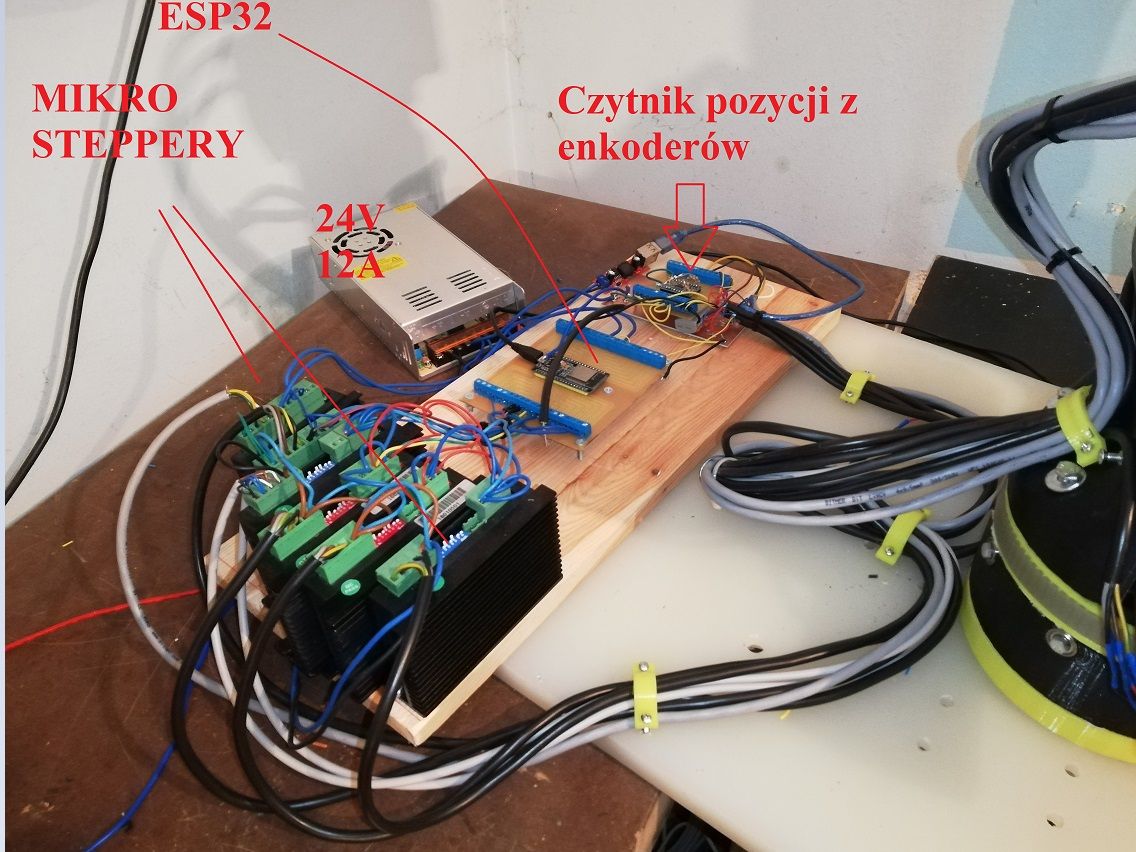
If this is a standard module from the ESP32 then it was not designed to withstand this kind of interference How close is this module to the motor? In the first instance I would screen the electronics module from the ESP32 and use an external WiFi antenna for the ESP32.
Maybe post a picture of what this whole circuit looks like?
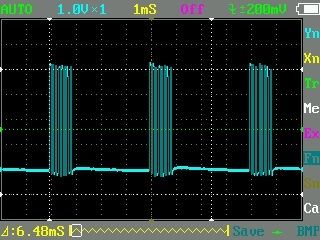
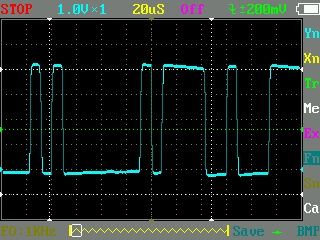
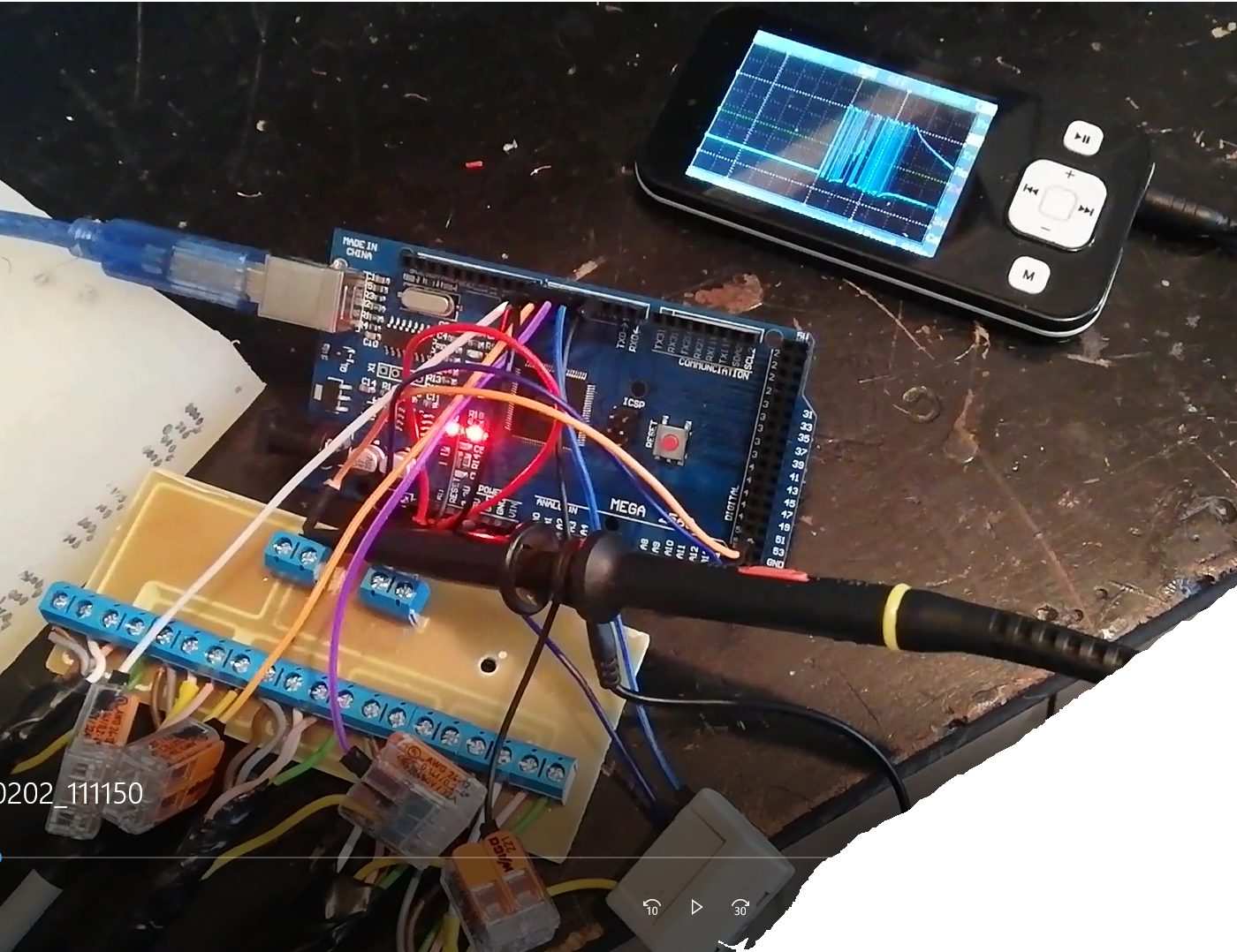
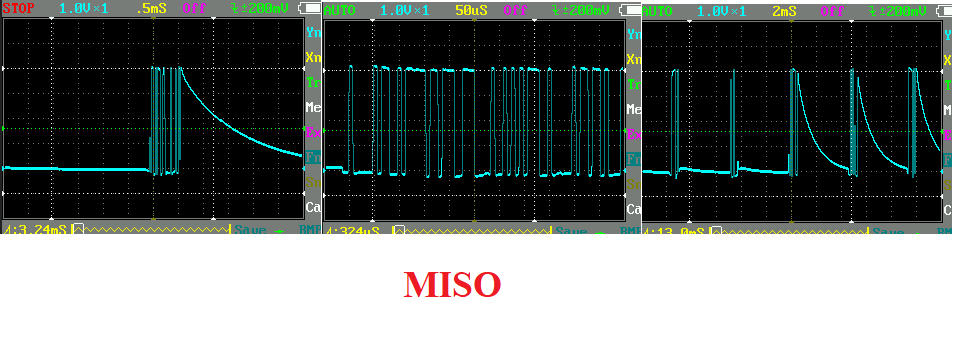
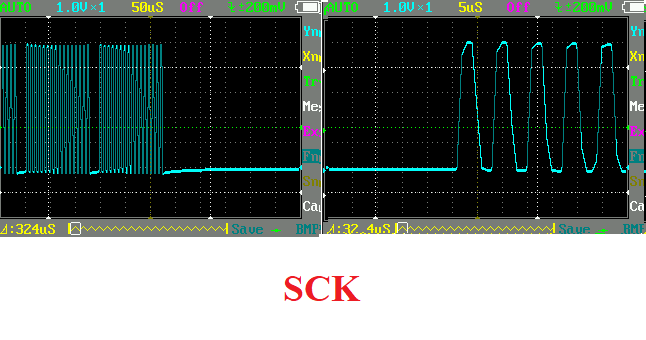
Well, an oscilloscope indeed! Unfortunately it is of the lower regiment, but it shows something:
.
Above, the MISO signal at intervals with the engines switched off
and here approximately. Unfortunately my oscilloscope does not give a full view of the whole frame
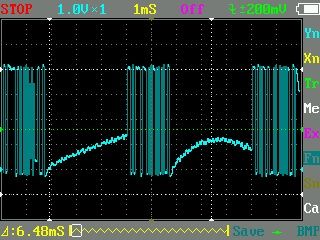
Below please see what the signal looks like when the power supply is switched on:
.
and approximately:
.
I am also sending a short video where it is shown what it looks like before and after the engines are switched on.
https://www.youtube.com/watch?v=qlD52KkkEK8&feature=youtu.be if the video does not fire
I have in the program that if the reading is 300 position units higher or lower than the previous reading, it is supposed to fire an error with an alarm. Sreial.print here has no effect on anything. I tried controlling the robot without serial and also position errors unfortunately.
I'm having a temporary problem flipping pictures from my phone, but on the picture with the previous I2C multiplexer it looked similar:
.
.
Now there is a board where the shielded encoder wires are plugged in and connecting all of them:
+Vcc
GND to which the shield is connected
MISO
SCK
these 4 above wires at the output of the board go about 10cm by wires to the ESP32. Each CS wire also goes loosely to the ESP32. I won't be able to do any more today as I'm leaving the house, but tomorrow I'd like to try hooking up the encoder board to an Arduino Mega with a read only program uploaded and see if it's the same. Thanks for the hint with checking the signal on the oscilloscope
The motor cables should also be shielded, a subject well known from 3D printers, for example, where the proximity of motor cables and e.g. tap wires caused the stop to be switched on due to the interference generated.
.
This is how it looks when it comes to the encoder wires
Regarding the motor cables, I somewhat regret that I did not use shielded cables right away. If it would have helped then I will definitely replace them with shielded ones.
I'm about to get round to switching everything over to reading the position from the Arduino Mega, just out of curiosity as to whether changing the microcontroller here will have any effect on the correctness of the reading.
In longer cables with measurement signals, in this case the SPI bus, the shield should only be connected to ground on one side, in this case the ESP32 side.
In cables where more current flows, the shield should be connected to ground on both sides.
.
I quickly assembled something like the one above and it's the same, admittedly now only misreading from one encoder (I'll ditch it later), but there it is.
.
SCK signal seems ok, CS signals are 100% perfect. Regarding the MISO, I wonder why the signal doesn't drop instantly to zero after readings, but often goes down slowly to ground potential.
I have the MOSI pin on the Arduino side unconnected
Added after 2 [minutes]: .
I see, I will also try disconnecting the screen from the encoder side
Added after 4 [hours] 32 [minutes]:
Hmmm... All I did was isolate the screen from ground at each encoder according to the guidelines and to my surprise (as I've always been told the screen should be wherever it goes) complete lack of erroneous readings. I typed in the code to count the erroneous readings and display the status of this counter every second and for over an hour the counter status was 0, also great, thank you for such a guideline. For now I have this result for the Arduino Mega, tomorrow I'll try to get the wires in order in conjunction with the ESP32 and hopefully eventually get the robot "driving" .
But I'm puzzled as to why isolating the ground from the shield at the encoder resulted in better interference cancellation?
But it puzzles me why isolating the ground from the shield at the encoder resulted in better interference cancellation?
.
In a nutshell: interference from the encoder to the Mega stopped flowing through the shield A cable screen connected to ground on two sides is a bit like a receiving antenna for interference. The longer, the better the antenna.
✨ The discussion revolves around troubleshooting issues with the AS5048A encoder connected to an ESP32 via SPI. The user initially faced problems with the encoder not providing readings, despite following example code and wiring diagrams. Key points included the need to ensure correct SPI bus configuration (VSPI vs. HSPI), proper handling of the MOSI pin, and the importance of sending a zero byte after the command to receive data. The user discovered that interference from motors affected readings, leading to erroneous outputs. Solutions discussed included using shielded cables, isolating the ground connection of the shield, and ensuring proper SPI transaction handling. Ultimately, the user achieved successful communication with the encoder after addressing these issues. Generated by the language model.
What ESP32 pins should I use to talk to an AS5048A over SPI?
For the default VSPI bus connect SCLK → GPIO 18, MISO → 19, MOSI → 23, and CS → 5. If you prefer HSPI, use SCLK 14, MISO 12, MOSI 13, CS 15 [Elektroda, khoam, post #18389303]
Which SPI mode and clock rate work reliably with the encoder?
Set SPI MODE1 (CPOL = 0, CPHA = 1). The thread shows clean transfers at 1 MHz; the datasheet allows up to 10 MHz, but noise margin falls above 5 MHz on long cables [AMS Datasheet, 2019][Elektroda, madiz08, post #18409524]
How do I read the 14-bit angle from register 0x3FFE?
Pull CS low.
transfer16(0xBFFE) → dummy, raises read bit.
Pull CS high, then low again and call transfer16(0x0000). Mask result with 0x3FFF and right-shift two bits: angle = (data & 0x3FFF) >> 2 [Elektroda, madiz08, post #18429302]
Why did I only get zeros from the AS5048A?
Zeros appear when MOSI floats or is tied high, forcing the chip into Read-Only mode so it ignores write commands [Elektroda, khoam, post #18409773] Confirm MOSI is driven and that CS toggles; wrong SPI bus pins also cause constant zeroes [Elektroda, khoam, post #18389303]
What do beginTransaction() and transfer() actually do?
beginTransaction() locks the SPI bus and applies SPISettings: clock, bit order, data mode [Elektroda, khoam, post #18390155] transfer() sends a byte/word while simultaneously reading the returned byte/word; transfer16() handles two bytes. Data replace the buffer you pass in “like a full-duplex shift register.” [Arduino Ref].
Can I connect five encoders to one ESP32?
Yes. Share the MISO, MOSI, and SCLK lines. Give each encoder its own CS pin and toggle them one at a time. The posted loop reads five devices in ≈0.5 ms at 1 MHz without loss [Elektroda, madiz08, post #18429302]
My readings fail when I power the motors—why?
Motor EMI couples into the 1.8 m SPI cable. With shields grounded at both ends it acted as an antenna, causing spurious bits. Grounding only at the controller side reduced error rate from dozens per second to zero [Elektroda, madiz08, post #18442128][Elektroda, khoam, post #18443628]
How should I shield and route the cables?
Use twisted, shielded 6-wire cable. Connect the shield to ESP32 ground only; leave the encoder end floating. Keep SCLK away from motor wires and add 100 nF decoupling at each sensor. "One-ended shielding stops interference currents" [Elektroda, khoam, post #18445327]
Can I still program the encoder if MOSI is high?
No. High MOSI (> 2 V) puts the AS5048A into Read-Only mode. Pull MOSI low through the ESP32 pin and issue write commands (bit 15 = 0) to change zero position or AGC settings [Elektroda, khoam, post #18409773][AMS Datasheet, 2019].
Is there a ready-made library for Arduino or ESP32?
Yes. The open-source AS5048A library on GitHub handles read, write, and CRC checking. It supports ESP32 and simplifies angle reads to one call [GitHub eborghi10/AS5048A][Elektroda, khoam, post #18412039]
Edge case: what if MISO floats?
A floating MISO line injects random bits, producing angles that jump hundreds of counts. Always enable the ESP32’s internal pull-up or add a 10 kΩ resistor to 3.3 V when the bus is idle [Elektroda, madiz08, post #18442881]
3-step how-to: read angle in 25 µs
hspi.beginTransaction(settings);
digitalWrite(CS, LOW); uint16_t val = hspi.transfer16(0);