logo elektroda
logo elektroda
X
logo elektroda

What could be the causes of the ESP32 burning up when connected to the expansion board?

prem111 2709 15
ADVERTISEMENT
Treść została przetłumaczona polish » english Zobacz oryginalną wersję tematu
  • #1 18559944
    prem111
    Level 5  
    Posts: 26
    Rate: 2
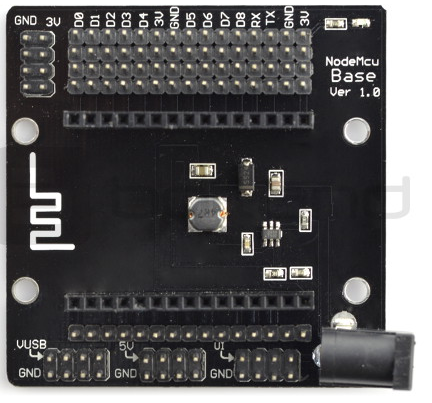
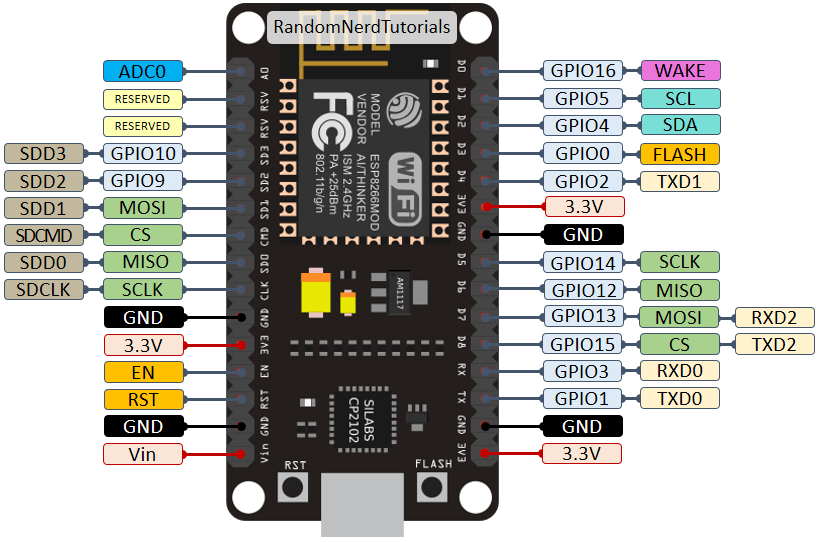
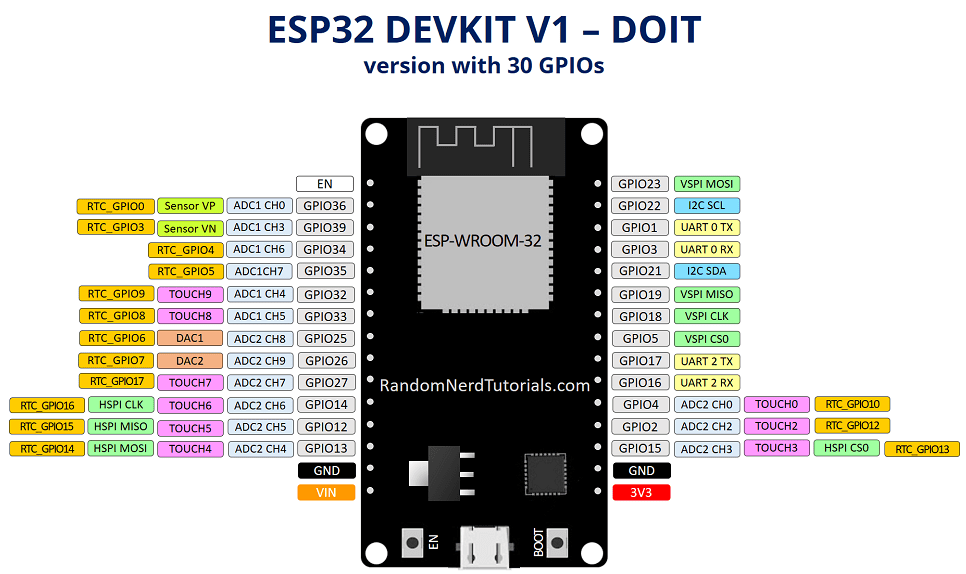
    Hello, I probably burnt the esp32 wroom devkit module. Now when I switch it on the LEDs don't light up and it gets very hot until it steams. I may have made a mistake. I will describe how I connected it. The module was plugged into an expansion board designed for nodemcu - maybe this was the problem ? I attach how this expansion board looks like. I powered this from a 12v liion pack - this nodemcu expansion board supports 6-24v input.
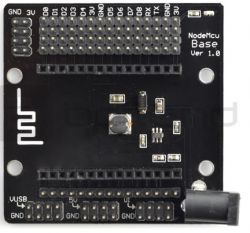
    What could be the causes of the ESP32 burning up when connected to the expansion board? .
  • ADVERTISEMENT
  • #2 18560293
    Anonymous
    Level 1  
  • ADVERTISEMENT
  • #3 18560308
    prem111
    Level 5  
    Posts: 26
    Rate: 2
    Yes i checked without it, i connect the microusb alone and it doesn't fire up either, it just automatically heats up. I'll add that 2 months it was running on this nodemcu base with no problem, just today while plugging in power it went out and heated up right away.

    The most important question for me is what happened, is it a matter of this nodemcu base or could it have contributed to this, but after all, it worked for some time without a problem. It never overheated etc.

    PS. do you know of any expansion boards for esp32 available here in Poland ?
  • ADVERTISEMENT
  • #4 18560341
    Anonymous
    Level 1  
  • #5 18560366
    prem111
    Level 5  
    Posts: 26
    Rate: 2
    What do you mean when you write you did not drive the critical pins as outputs ? I didn't connect anything new I simply connected the package to the DC socket on this nodemc base as usual.
  • #6 18560372
    Anonymous
    Level 1  
  • ADVERTISEMENT
  • #7 18560412
    prem111
    Level 5  
    Posts: 26
    Rate: 2
    Nothing new is likely to have happened here either, there is micropython and a few scripts, but nothing new has been added for a few days.
  • #8 18560712
    Anonymous
    Level 1  
  • #9 18560719
    prem111
    Level 5  
    Posts: 26
    Rate: 2
    I found one:

    keyestudio ESP32 IO Shield

    Unfortunately not available in Poland.
  • #10 18560732
    Anonymous
    Level 1  
  • #11 18560743
    prem111
    Level 5  
    Posts: 26
    Rate: 2
    I need to put the esp in an enclosure, so it would be convenient to sit it on "something" and plug the RF receiver (in my case xbee) under the uart. besides, I don't want to use contact boards because they are inconvenient for me.
  • #12 18560772
    Anonymous
    Level 1  
  • #13 18560794
    prem111
    Level 5  
    Posts: 26
    Rate: 2
    This may be the case.
  • #14 18560803
    Anonymous
    Level 1  
  • #15 18560818
    prem111
    Level 5  
    Posts: 26
    Rate: 2
    Thanks for the hint and for the replies in this thread greetings :)
  • #16 18617037
    Anonymous
    Level 1  

Topic summary

✨ The discussion revolves around the overheating and potential failure of an ESP32 Wroom DevKit module when connected to a NodeMCU expansion board. The user initially reported that the module was functioning well for two months but suddenly began to overheat and fail upon powering it with a 12V Li-ion pack. Responses indicate that the NodeMCU Base is designed for ESP8266 modules, which have different pin configurations, potentially causing short circuits when the ESP32 is used. Suggestions include testing the ESP32 without the expansion board and considering alternative expansion boards specifically designed for the ESP32, such as the keyestudio ESP32 IO Shield, although availability in Poland is limited. The conversation also touches on the need for a suitable base for housing the ESP32 and connecting peripherals like RF receivers.
Generated by the language model.

FAQ

TL;DR: A 6–24 V NodeMCU base plus an ESP32 DevKit can cook hardware; “some ESP32 pins are shorted to ground and power.” Unplug the base and power by USB to test. [Elektroda, khoam, post #18560293]

Why it matters: This FAQ helps makers using ESP32 DevKit with expansion boards diagnose burn-ups and prevent repeat failures.

Quick-Facts

Quick Facts

What likely caused my ESP32 to burn when plugged into a NodeMCU base?

The NodeMCU Base is for ESP8266, not ESP32. Pin functions differ, so the base can short ESP32 pins to ground or power. That creates high current and rapid overheating. As one expert noted, “some ESP32 pins are shorted to ground and power.” Remove the base and test via USB. [Elektroda, khoam, post #18560293]

Why did it work for months and then fail suddenly?

It stayed safe while your firmware avoided driving the “critical” pins that the base miswired. A reboot, script change, or different runtime state could have driven one of those pins as an output, triggering an immediate short. “As long as you did not drive these ‘critical’ pins as outputs, nothing bad happened.” This edge case explains delayed failure. [Elektroda, khoam, post #18560341]

How can I confirm if the ESP32 DevKit is dead?

Remove it from the base. Power by micro‑USB only. If LEDs stay off and the module heats rapidly, the SoC or regulator is likely shorted internally. The forum case shows exactly this symptom after isolating the board from the base. Replacement is usually the only fix. [Elektroda, prem111, post #18560308]

Is the base’s 6–24 V input what killed the board?

Unlikely by itself. The base’s regulator handles the 12 V pack. The real risk came from pin-incompatibility between ESP8266 bases and ESP32 DevKit, which can short ESP32 pins to GND/VCC. That short causes heat and failure independent of input voltage. [Elektroda, khoam, post #18560293]

Are NodeMCU Base boards pin‑compatible with ESP32 DevKit?

No. They target ESP8266, and several signals map differently on ESP32. Inserting an ESP32 DevKit can connect certain ESP32 pins directly to ground or power. That miswiring risks permanent damage. Always verify pin maps before mixing hardware. [Elektroda, khoam, post #18560293]

How do I safely test my ESP32 after a suspected short?

  1. Remove the ESP32 from any base or shield.
  2. Power only via micro‑USB from a PC and observe LEDs/temperature.
  3. If it boots normally, map pins carefully before reconnecting any base; otherwise, replace the board. [Elektroda, khoam, post #18560293]

Could my MicroPython code have caused the failure?

Yes, indirectly. Your code might have driven a miswired, “critical” pin as an output. That turns a latent mismatch into a hard short through the base. The hardware mapping caused the risk; the firmware state triggered it. “As long as you did not drive these ‘critical’ pins as outputs, nothing bad happened.” [Elektroda, khoam, post #18560341]

What symptoms indicate irreversible damage?

Rapid self‑heating, no status LEDs, and even visible steaming are red flags. If these persist when powered by USB alone, the module’s SoC or on‑board regulator has likely failed. Do not keep powering it to avoid further damage or hazards. [Elektroda, prem111, post #18559944]

Can I power the ESP32 DevKit by USB only?

Yes. Isolate the board and power it through the micro‑USB port for a known‑good 5 V supply. This is the recommended first check after removing any suspect base, as it avoids the base’s wiring entirely. If it still overheats, the board is damaged. [Elektroda, khoam, post #18560293]

What ESP32‑friendly alternatives to a NodeMCU Base are suggested?

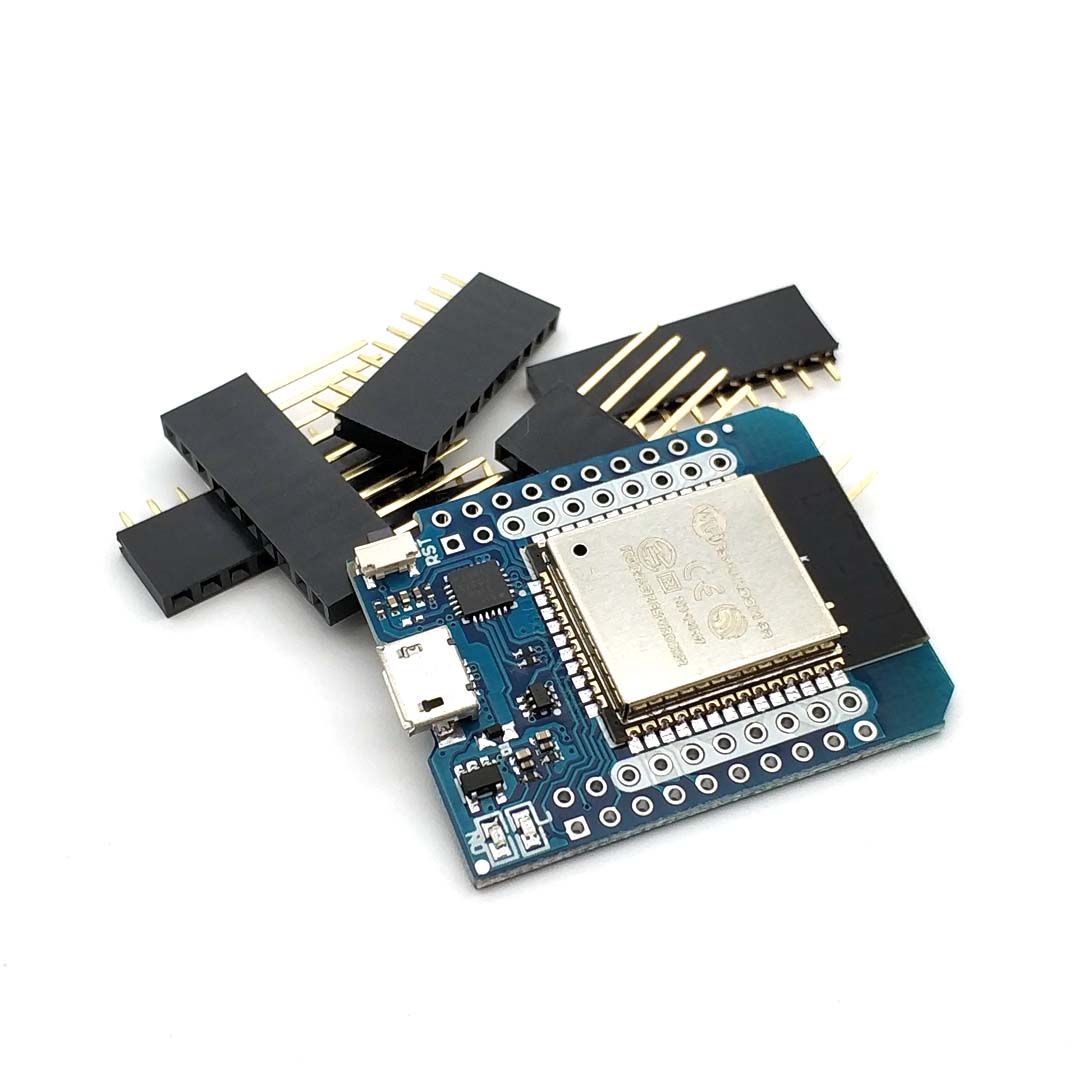
Use a D1 mini ESP32 with dual‑row headers; it’s available in Poland and makes attaching RF modules easier. This approach avoids ESP8266‑only bases and gives cleaner mechanical mounting for enclosures. [Elektroda, khoam, post #18560803]

Is there an ESP32 IO Shield like NodeMCU Base?

Yes, for example the keyestudio ESP32 IO Shield. Availability can be limited locally; one user noted it wasn’t available in Poland at the time. Consider sourcing alternatives or using header‑based boards instead. [Elektroda, prem111, post #18560719]

Any quick mounting trick if I dislike full breadboards?

Split a standard breadboard in the middle. Seat the left and right pin rows in separate halves. You’ll gain a gap for wiring while keeping the board compact for enclosures. It’s a simple, low‑cost mechanical workaround. [Elektroda, Anonymous, post #18617037]

Do newer ESP32 DevKits with >30 pins change compatibility?

They increase misalignment risk with ESP8266‑only bases. As one expert noted, “newer versions of ESP32 DevKit have more leads than 30.” That difference makes accidental shorts more likely on fixed‑routing bases. Use ESP32‑specific carriers. [Elektroda, khoam, post #18560712]

What should I do next if mine overheats on USB too?

Stop powering it. The board is likely irreparably damaged. Replace the ESP32 DevKit and avoid using ESP8266‑only bases. Power the new board via USB first, then add peripherals after verifying pin maps. This prevents repeat failures. [Elektroda, prem111, post #18560308]
Generated by the language model.
ADVERTISEMENT