logo elektroda
logo elektroda
X
logo elektroda

Transmission of PM 2.5 and PM 10 values from the SDS011 sensor via ESP8266 to Domoticz

Maciek1008 2295 11
ADVERTISEMENT
Treść została przetłumaczona polish » english Zobacz oryginalną wersję tematu
  • #1 19159886
    Maciek1008
    Level 11  
    Hello
    I have an ESP8266 (actually a Node MCU) and an SDS011 air quality sensor connected to it. On the ESP I have uploaded ESP Easy. In this software the sensor is implemented and thanks to this I was able to get results for the two quantities measured by the sensor without any problem, namely PM 2,5 and PM 10. The problem arises when I want to send the data to Domoticz. In ESP Easy there is the possibility to enter only one IDX of the controller. If I do this I get the measurement result in Domoticz, but only the PM 2.5 value. Can anyone advise how to send the other value to Domoticz? From what I have been able to read it is necessary to enter the appropriate code in Rules, however the one I found on another forum unfortunately does not work.
  • ADVERTISEMENT
  • #2 19159950
    Slawek K.
    Level 35  
    In Devices, add this sensor a second time, with a different IDX, and send the second value, i.e. enter PM10 in the first line of Values, instead of PM25.

    Greetings
  • ADVERTISEMENT
  • #3 19160785
    Maciek1008
    Level 11  
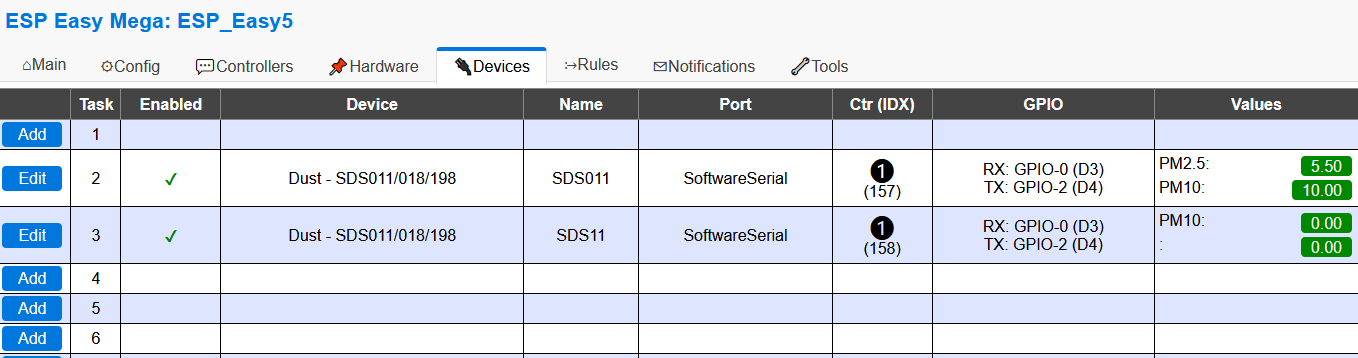
    Unfortunately, it does not work. To confirm the screen. The results only show up in the first of the added sensors.

    Transmission of PM 2.5 and PM 10 values from the SDS011 sensor via ESP8266 to Domoticz .
  • ADVERTISEMENT
  • #4 19160863
    Slawek K.
    Level 35  
    Set a different time interval for the second one, if you have e.g. 60s for the first one then set e.g. 55s for the second one and try it.
    And one more point, PM sensors should not be polled (read) too often as they have a certain life span.

    Greetings
  • #5 19161074
    Maciek1008
    Level 11  
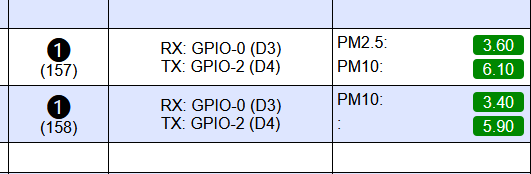
    I have tried with different interval values and once it sends me data from one sensor and once from the other. I have never been able to set it to send both. The other issue is that changing the name in the row in Values doesn't do anything, i.e. typing PM 10 in place of PM 2.5 doesn't display PM 10 values in the first row, which also causes PM 2.5 values to be sent from the second sensor to Domoticz as well (as shown in the screenshot).

    Transmission of PM 2.5 and PM 10 values from the SDS011 sensor via ESP8266 to Domoticz .

    Regarding the second part of your answer, yes, I am aware of this and ultimately want to set a measurement every 30 minutes or so.
  • Helpful post
    #6 19161646
    xury
    Automation specialist
    There are several ways to solve your problem:
    Way one - using rules
    Way two - using MQTT and node red.
    Way three - change the software to Tasmot
  • #7 19161692
    Maciek1008
    Level 11  
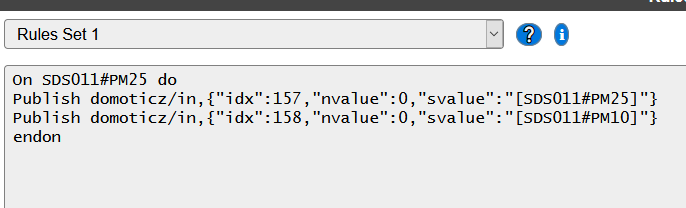
    The rules way would probably be the best solution for me, but as I mentioned, I already tried this method with the code found on another forum, but unfortunately it doesn't work, i.e. nothing flies to Domoticz. The communication itself over MQTT to Domoticz is configured correctly, because if I select Send to Controller in ESP then the PM 2.5 value is sent correctly. On the screengrab the code I paste into Rules and which supposedly should work. Perhaps some good soul can take a look at it and point out a possible error? I have the IDX entered correctly of course.
    Transmission of PM 2.5 and PM 10 values from the SDS011 sensor via ESP8266 to Domoticz .
  • #8 19162023
    xury
    Automation specialist
    I am not keen on EspEasy precisely because of the fact that something should work and doesn't want to.
    However, maybe instead of the Domoticz controller you can use MQTT for Home Assistant, and use Node-red as an intermediary.
    I highly encourage you to use nodered. Once you have mastered nodered, the world seems more beautiful :) .
  • ADVERTISEMENT
  • #9 19162210
    Slawek K.
    Level 35  
    And what kind of device are you using on the Domoticz side ? If this :

    Air quality

    Then you must send nvalue and not svalue :

    /json.htm?type=command¶m=udevice&idx=IDX&nvalue=PPM
    IDX = id of your device (This number can be found in the devices tab in the column "IDX")
    PPM = CO2-concentration

    Remove the svalue together with the preceding comma, and move what you have after the svalue to the nvalue

    Greetings
  • #10 19162971
    Maciek1008
    Level 11  
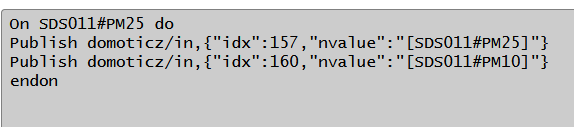
    In Domoticz, following instructions found on another forum, I use Custom Sensor. To test the change you suggested in the code I created one Air Quality and entered its idx (160) in the code. Unfortunately also without the desired results. However, maybe I made an error in editing the code? Please forgive me, but I am not a programmer and my knowledge on the subject is negligible.
    Transmission of PM 2.5 and PM 10 values from the SDS011 sensor via ESP8266 to Domoticz .
  • #12 19184228
    Maciek1008
    Level 11  
    Thanks gentlemen for your help. I finally managed to upload both measurements to Domoticz. I have included the working code in rules below for posterity.

    On SDS011#PM10 to
    SendToHTTP 192.168.1.3,8082,/json.htm?type=command&param=udevice&idx=158&nvalue=0&svalue=[SDS011#PM10]
    endon

    On SDS011#PM25 to
    SendToHTTP 192.168.1.3,8082,/json.htm?type=command&param=udevice&idx=157&nvalue=0&svalue=[SDS011#PM25]
    endon

    Of course you need to enter your ip and port and idx from Domoticz

Topic summary

✨ The discussion revolves around transmitting PM 2.5 and PM 10 values from an SDS011 air quality sensor connected to an ESP8266 (NodeMCU) using ESP Easy software to Domoticz. The user successfully retrieves PM 2.5 data but struggles to send PM 10 data due to limitations in the software, which allows only one IDX entry. Various solutions are proposed, including adding the sensor with a different IDX, adjusting polling intervals, and using rules or MQTT for data transmission. Ultimately, the user resolves the issue by implementing a specific code in the rules section to send both measurements to Domoticz, confirming the correct configuration of IDX and HTTP requests.
Generated by the language model.

FAQ

TL;DR: Use ESPEasy Rules (SendToHTTP) to push PM2.5 and PM10 into two Domoticz devices (e.g., idx 157 and 158); “I finally managed to upload both measurements to Domoticz.” [Elektroda, Maciek1008, post #19184228]

Why it matters: For ESP8266/NodeMCU + SDS011 users who need both PM readings in Domoticz without losing one value, this fixes one-idx-only issues.

Quick Facts

  • Working pattern: ESPEasy Rules send SDS011 PM2.5/PM10 via /json.htm?type=command&param=udevice to two idx; nvalue=0, svalue=[reading]. [Elektroda, Maciek1008, post #19184228]
  • Offset ESPEasy task intervals (e.g., 60 s vs 55 s) to prevent alternating sends; avoid frequent polling to extend life. [Elektroda, Slawek K., post #19160863]
  • Domoticz Air Quality expects JSON with nvalue and svalue like "90;2975.00" for updates. [Elektroda, xury, post #19163010]
  • SDS011 typical lifetime ≈8000 hours; resolution 0.1 µg/m³, range 0–999.9 µg/m³. [SDS011 Laser Dust Sensor Datasheet]
  • Alternatives: use MQTT with Node‑RED transform, or switch firmware to Tasmota if Rules misbehave. [Elektroda, xury, post #19161646]

How do I send both PM2.5 and PM10 from SDS011 via ESP8266 to Domoticz?

Use ESPEasy Rules to push each value to its own Domoticz Custom Sensor. How‑To:
  1. Create two Custom Sensor devices in Domoticz and note their IDX values.
  2. In ESPEasy Rules, send PM10 with: SendToHTTP ,,/json.htm?type=command&param=udevice&idx=&nvalue=0&svalue=[SDS011#PM10].
  3. Add a second rule for PM2.5 with its IDX and [SDS011#PM25]. Use your Domoticz IP and port. [Elektroda, Maciek1008, post #19184228]

Why do I only see PM2.5 in Domoticz when ESPEasy has one controller IDX?

One controller IDX maps to one Domoticz device. SDS011 exposes two readings, so the second value is not delivered. Create the sensor a second time with a different IDX, or use Rules to send each reading to its own device. [Elektroda, Slawek K., post #19159950]

Which Domoticz device type should I use: Custom Sensor or Air Quality?

Use Custom Sensor if you want one device per reading; send a single numeric svalue. Use Air Quality if you want both readings in one device; it expects payload like nvalue:0 and svalue:"90;2975.00". Choose based on your dashboard preference. [Elektroda, xury, post #19163010]

What ESPEasy Rule syntax works to push values to Domoticz?

Use SendToHTTP with the udevice command. Example: SendToHTTP 192.168.1.3,8082,/json.htm?type=command&param=udevice&idx=158&nvalue=0&svalue=[SDS011#PM10]. Repeat for PM2.5 with its IDX. Ensure Rules are enabled and your IP/port are correct. [Elektroda, Maciek1008, post #19184228]

Changing the "Values" label in ESPEasy doesn’t affect what’s sent—why?

The label change is cosmetic. The SDS011 plugin still treats Value1 and Value2 as fixed PM2.5 and PM10 slots. Renaming fields does not remap which measurement is transmitted. Use Rules or separate devices to control routing. [Elektroda, Maciek1008, post #19161074]

Why do my readings alternate between devices or get dropped?

Identical intervals can cause collisions, so only one task reports. Offset task intervals, for example 60 seconds for one and 55 seconds for the other. Also limit polling because particle sensors have finite lifespans. [Elektroda, Slawek K., post #19160863]

Can I use MQTT and Node‑RED instead of HTTP?

Yes. Publish SDS011 values over MQTT, then use Node‑RED to reshape and forward to Domoticz. This avoids controller constraints and adds flexibility. “Once you have mastered nodered, the world seems more beautiful :)”. [Elektroda, xury, post #19162023]

Is Tasmota a good alternative firmware for SDS011 + Domoticz?

Yes. Tasmota supports SDS011 and MQTT telemetry out of the box. It can simplify publishing both readings, especially if ESPEasy Rules feel brittle on your setup. Consider it if you prefer GUI configuration over scripting. [Elektroda, xury, post #19161646]

What is the SDS011’s resolution and expected lifespan?

SDS011 provides 0.1 µg/m³ resolution across roughly 0–999.9 µg/m³. The typical service life is about 8000 hours. Plan your sampling interval and duty cycle to fit that lifetime budget, especially for always‑on deployments. [SDS011 Laser Dust Sensor Datasheet]

Why won’t my Domoticz Air Quality device update with a single number?

Air Quality expects a structured payload. Send nvalue (often 0) and svalue as a semicolon‑separated string, for example "90;2975.00". If you send only a single numeric svalue, Domoticz may ignore the update. [Elektroda, xury, post #19163010]

Where do I find the idx numbers to use in Rules?

In Domoticz, open the Devices tab. The IDX column lists each device’s identifier. Use those exact IDX values in your ESPEasy SendToHTTP commands. Verify that devices are added and active. [Elektroda, Slawek K., post #19162210]

Which IP and port should I use in SendToHTTP?

Use your Domoticz server’s IP and its HTTP port. For example, 192.168.1.3 with port 8082 in the working setup. Replace both with your actual host and port from your Domoticz configuration. [Elektroda, Maciek1008, post #19184228]
Generated by the language model.
ADVERTISEMENT