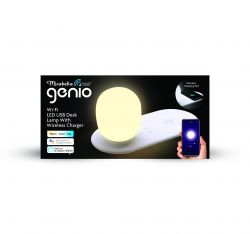
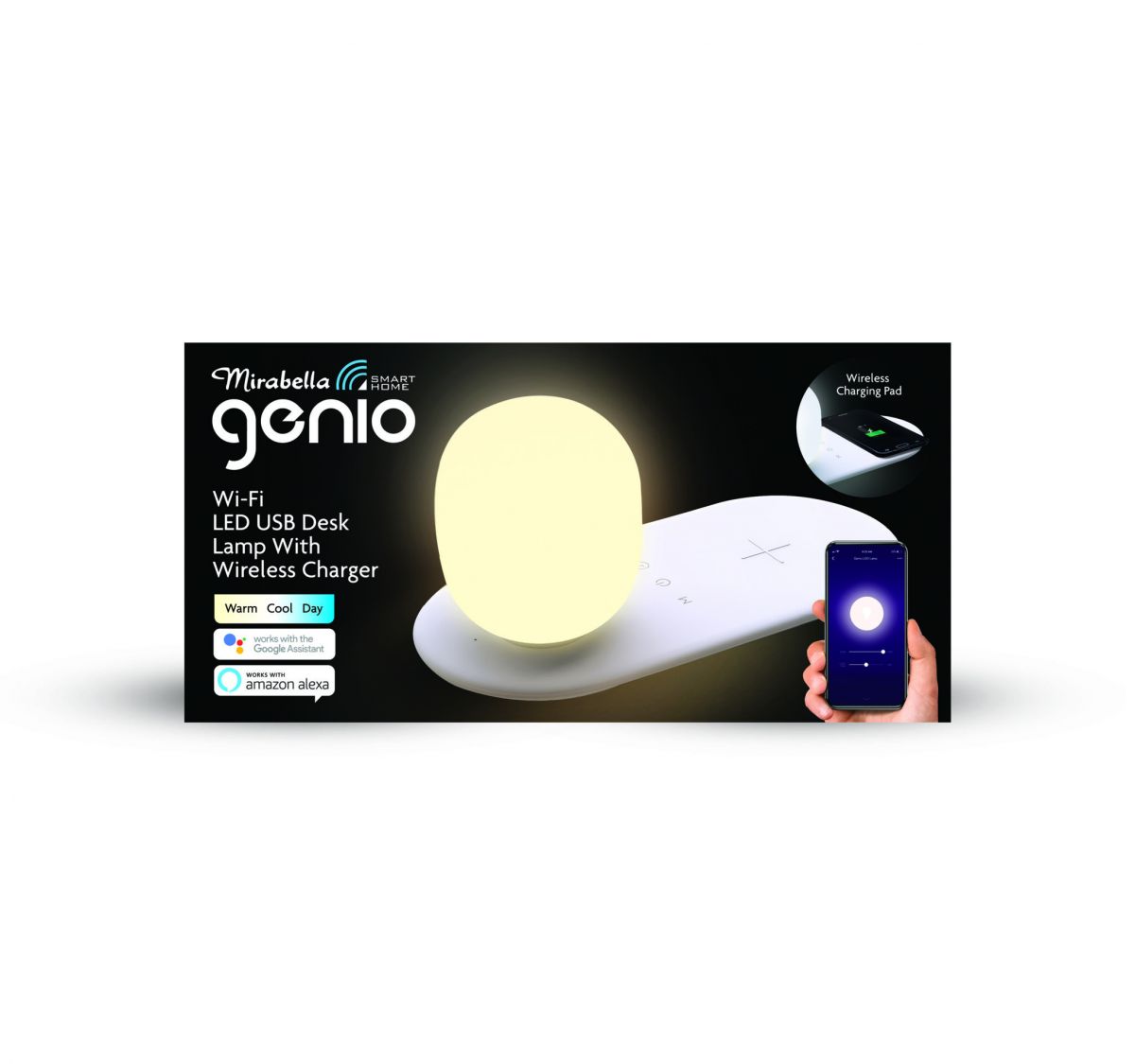
Device Name: Mirabella Genio Wi-Fi LED USB Desk Lamp With Wireless Charger - I003867
Device Type: Desk Lamp with Qi Charger
Device Chip: WB3S - BK7231T with TuyaMCU
Device Purchased Bunnings Warehouse - $29.95AUD - Appears they not stocking this anymore and selling last of stock
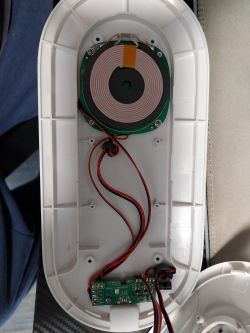
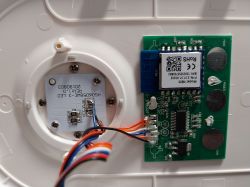
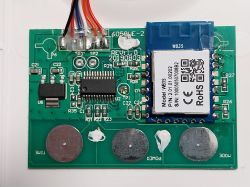
Flashing of Main Chip
CloudCutter Profile - Profile.json
I created a CloudCutter profile using LightLeak.
WB3S Module Datasheet
Configuration of Module
I still haven't worked this out yet. I have nothing configured and the device works if you press the buttons on the physical device. As far as I can tell this is using a TuyaMCU to change the light settings.
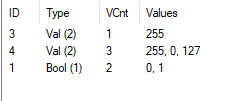
After looking at the profile.json I think these are the dpID values and what they do
dpID 1 - enum - Light Mode - cool, white, warm.
As per json it states 4 settings. Breathe, nature, read, night but when pressing the physical button it only cycles 3 settings
dpID 2 - value - Dimmer - Query dim light down to min of 25
dpID 3 - value - Dimmer - Query brighten light up to 255
dpID 4 - bool - Light ON/OFF
Setup with this code but nothing works
However, looking at the OBK logs it's a different story
Pressing - Light ON/OFF
ON
OFF
Pressing - Mode button - Light has to be on or it does nothing
I did notice I get different codes depending on the mode
Warm/White Light
Cool Light
Warm/Orange Light
Pressing the Dimmer button - holding down the power button makes the light dim and holding it down again will brighten the light.
I get this while holding the power button
On release, I get this when dimming down from cool white
and this on brightening from cool white
There is a timer button that when held down sets the light to turn off in 40 minutes. This doesn't log anything
So after looking at all this. I think these are the dpID values and what they do
dpID 1 - bool - Light ON/OFF
dpID 2 - No idea
dpID 3 - value - Light Mode - cool, white, warm. ? also does dimming
dpID 4 - value - Light Mode - cool, white, warm. ? also does dimming
I think the dimming/brightening might have something to do with the int: command maybe? It's the one that changes
Setup with this code - it kinda works
dpID 1 - Turns light ON if off but will not turn light OFF if on
dpID 2 - Nothing
dpID 3 - Query brightness level - The slider does change light but the slider defaults back to 0. Brightness does stay changed
dpID 4 might be the mode change as when moving the slider the temperature of light changes depending on where you move the slider but it doesn't work correctly and the slider defaults back to 0. Light does stay changed temperature. Light also does not change to all temperature levels
I've tried changing the channel type to see if there is something that might work better than sliders and toggles but still can't get anything to work.
Will keep trying to work this out and will post here if I get it sorted. I've not worked with TuyaMCU before so I'm sure it's something I'm doing.
Device Type: Desk Lamp with Qi Charger
Device Chip: WB3S - BK7231T with TuyaMCU
Device Purchased Bunnings Warehouse - $29.95AUD - Appears they not stocking this anymore and selling last of stock
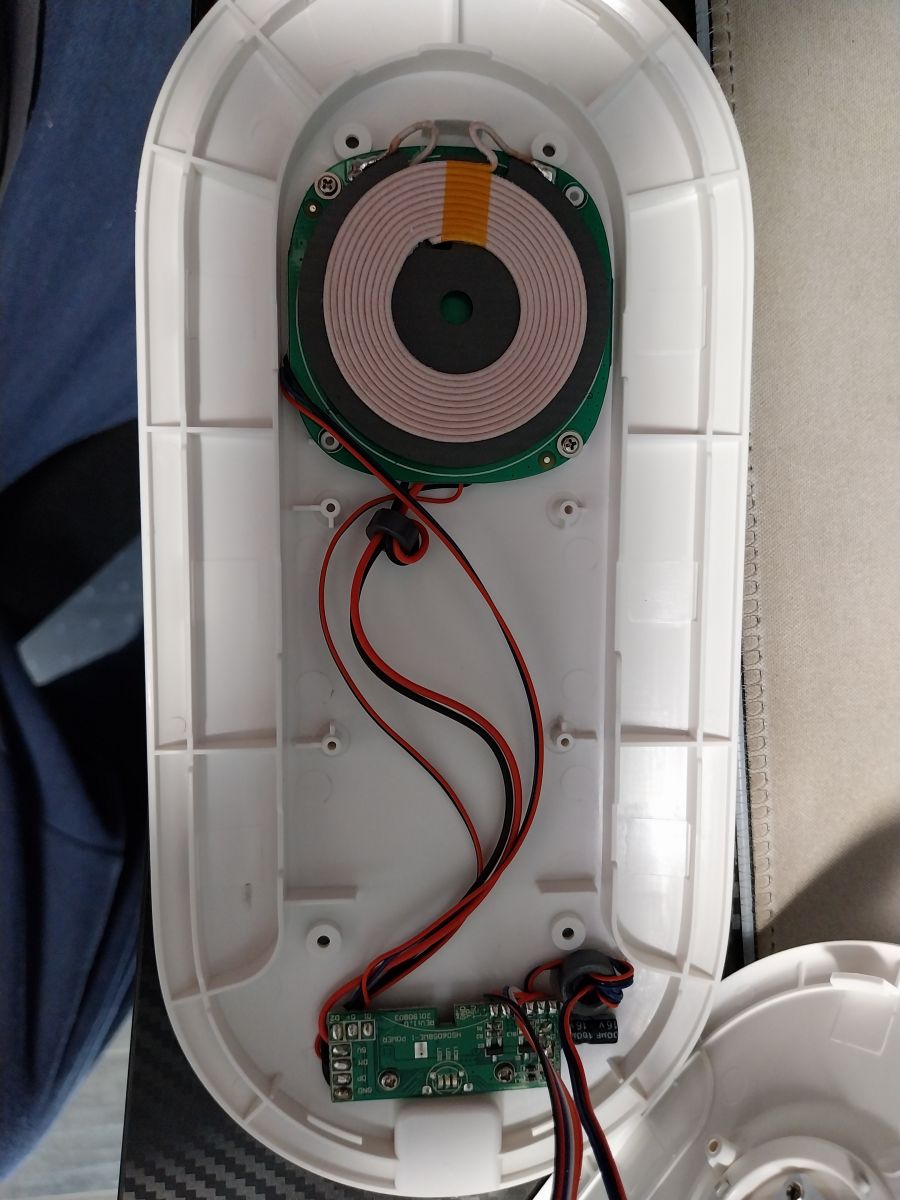
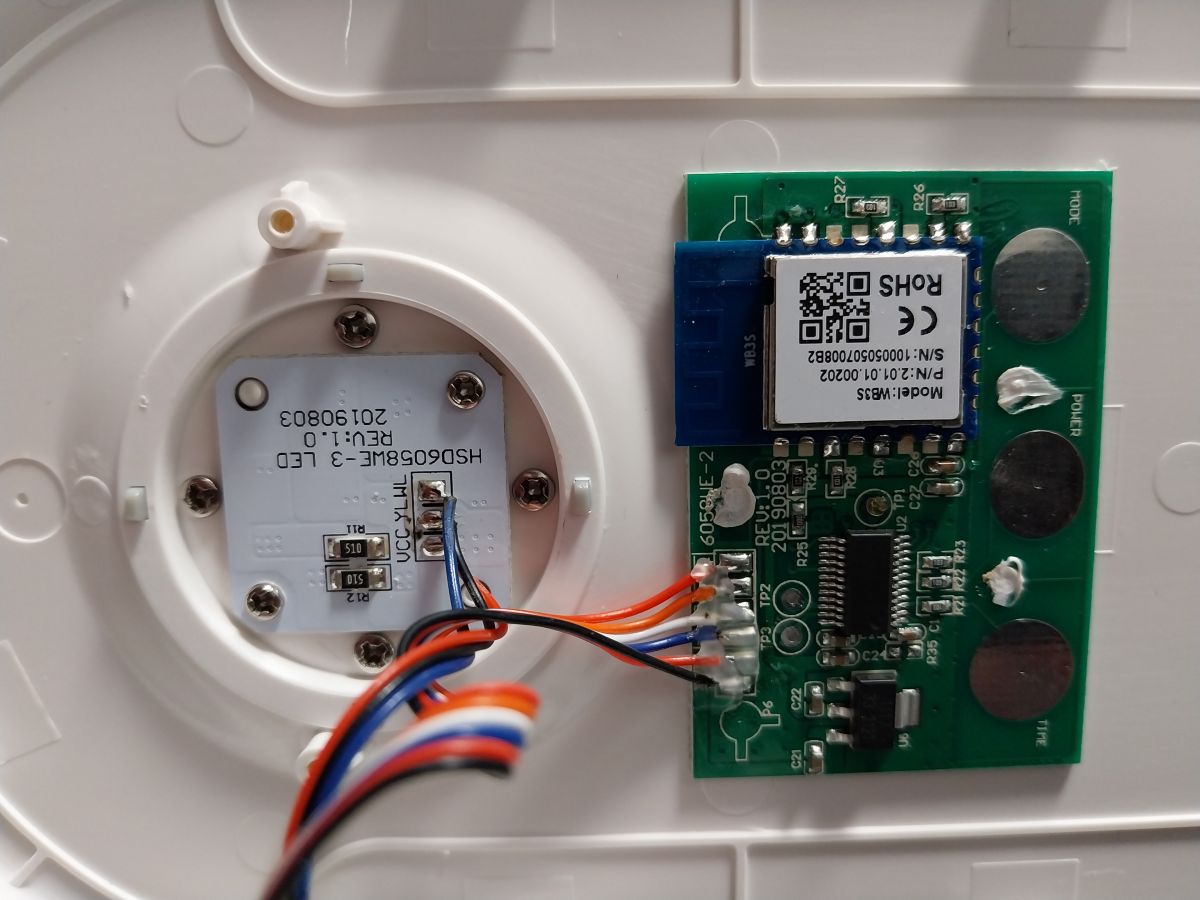
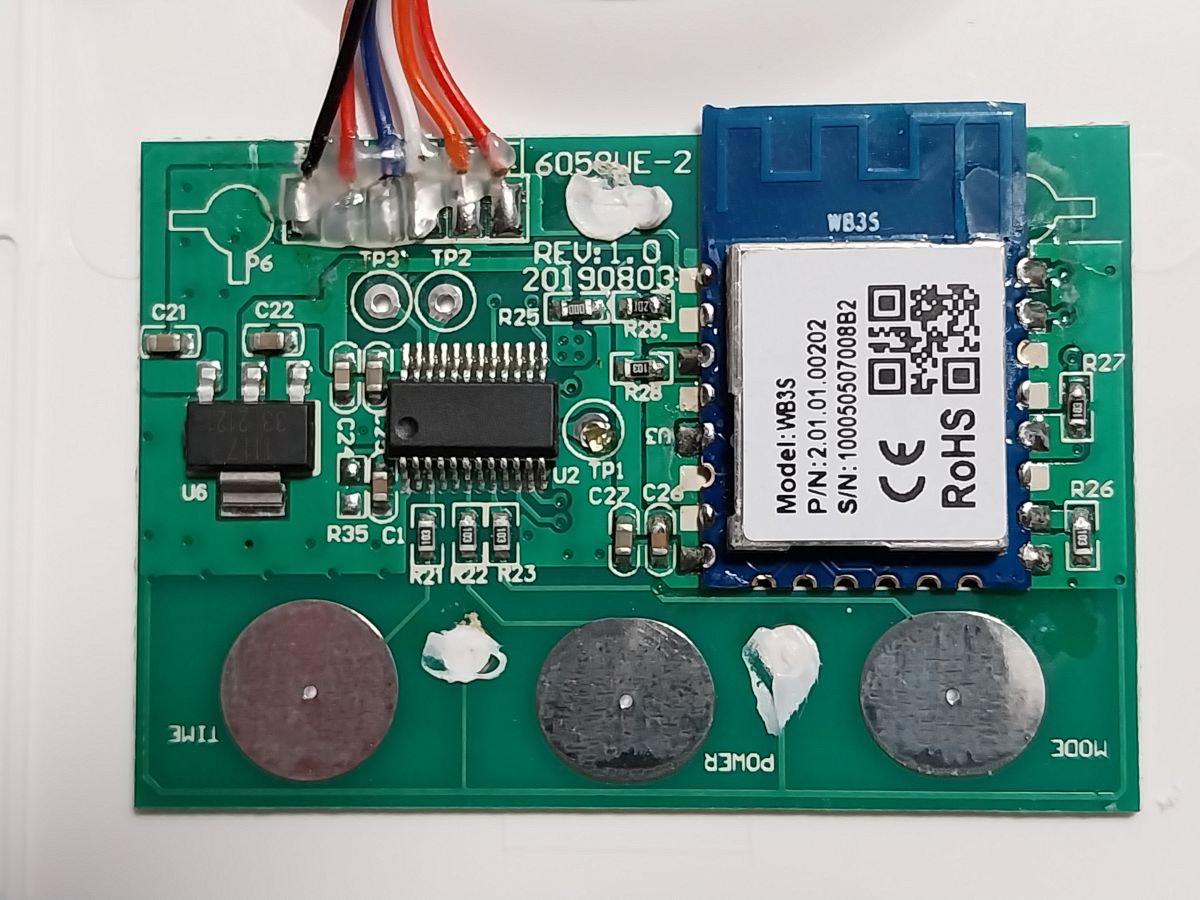
Flashing of Main Chip
CloudCutter Profile - Profile.json
I created a CloudCutter profile using LightLeak.
WB3S Module Datasheet
Configuration of Module
I still haven't worked this out yet. I have nothing configured and the device works if you press the buttons on the physical device. As far as I can tell this is using a TuyaMCU to change the light settings.
After looking at the profile.json I think these are the dpID values and what they do
dpID 1 - enum - Light Mode - cool, white, warm.
As per json it states 4 settings. Breathe, nature, read, night but when pressing the physical button it only cycles 3 settings
dpID 2 - value - Dimmer - Query dim light down to min of 25
dpID 3 - value - Dimmer - Query brighten light up to 255
dpID 4 - bool - Light ON/OFF
Setup with this code but nothing works
startDriver TuyaMCU
setChannelType 1 Toggle
setChannelType 2 LowMidHigh
setChannelType 3 Dimmer
setChannelType 4 Dimmer
tuyaMcu_setDimmerRange 0 1000
linkTuyaMCUOutputToChannel 4 bool 1
linkTuyaMCUOutputToChannel 1 enum 2
linkTuyaMCUOutputToChannel 2 val 3
linkTuyaMCUOutputToChannel 3 val 4
However, looking at the OBK logs it's a different story
Pressing - Light ON/OFF
ON
Info:TuyaMCU:TUYAMCU received: 55 AA 03 07 00 05 01 01 00 01 00 11
Info:TuyaMCU:TuyaMCU_ProcessIncoming[ver=3]: processing command 7 (State) with 12 bytes
Info:TuyaMCU:TuyaMCU_ParseStateMessage: processing dpId 1, dataType 1-DP_TYPE_BOOL and 1 data bytes
Info:TuyaMCU:TuyaMCU_ParseStateMessage: raw data 1 byte: 0
OFF
Info:TuyaMCU:TUYAMCU received: 55 AA 03 07 00 05 01 01 00 01 01 12
Info:TuyaMCU:TuyaMCU_ProcessIncoming[ver=3]: processing command 7 (State) with 12 bytes
Info:TuyaMCU:TuyaMCU_ParseStateMessage: processing dpId 1, dataType 1-DP_TYPE_BOOL and 1 data bytes
Info:TuyaMCU:TuyaMCU_ParseStateMessage: raw data 1 byte: 1
Pressing - Mode button - Light has to be on or it does nothing
I did notice I get different codes depending on the mode
Warm/White Light
Info:TuyaMCU:TUYAMCU received: 55 AA 03 07 00 08 03 02 00 04 00 00 00 FF 19
Info:TuyaMCU:TuyaMCU_ProcessIncoming[ver=3]: processing command 7 (State) with 15 bytes
Info:TuyaMCU:TuyaMCU_ParseStateMessage: processing dpId 3, dataType 2-DP_TYPE_VALUE and 4 data bytes
Info:TuyaMCU:TuyaMCU_ParseStateMessage: raw data 4 int: 255
Info:TuyaMCU:TUYAMCU received: 55 AA 03 07 00 08 04 02 00 04 00 00 00 7F 9A
Info:TuyaMCU:TuyaMCU_ProcessIncoming[ver=3]: processing command 7 (State) with 15 bytes
Info:TuyaMCU:TuyaMCU_ParseStateMessage: processing dpId 4, dataType 2-DP_TYPE_VALUE and 4 data bytes
Info:TuyaMCU:TuyaMCU_ParseStateMessage: raw data 4 int: 127
Cool Light
Info:TuyaMCU:TUYAMCU received: 55 AA 03 07 00 08 03 02 00 04 00 00 00 FF 19
Info:TuyaMCU:TuyaMCU_ProcessIncoming[ver=3]: processing command 7 (State) with 15 bytes
Info:TuyaMCU:TuyaMCU_ParseStateMessage: processing dpId 3, dataType 2-DP_TYPE_VALUE and 4 data bytes
Info:TuyaMCU:TuyaMCU_ParseStateMessage: raw data 4 int: 255
Info:TuyaMCU:TUYAMCU received: 55 AA 03 07 00 08 04 02 00 04 00 00 00 FF 1A
Info:TuyaMCU:TuyaMCU_ProcessIncoming[ver=3]: processing command 7 (State) with 15 bytes
Info:TuyaMCU:TuyaMCU_ParseStateMessage: processing dpId 4, dataType 2-DP_TYPE_VALUE and 4 data bytes
Info:TuyaMCU:TuyaMCU_ParseStateMessage: raw data 4 int: 255
Warm/Orange Light
Info:TuyaMCU:TUYAMCU received: 55 AA 03 07 00 08 03 02 00 04 00 00 00 FF 19
Info:TuyaMCU:TuyaMCU_ProcessIncoming[ver=3]: processing command 7 (State) with 15 bytes
Info:TuyaMCU:TuyaMCU_ParseStateMessage: processing dpId 3, dataType 2-DP_TYPE_VALUE and 4 data bytes
Info:TuyaMCU:TuyaMCU_ParseStateMessage: raw data 4 int: 255
Info:TuyaMCU:TUYAMCU received: 55 AA 03 07 00 08 04 02 00 04 00 00 00 00 1B
Info:TuyaMCU:TuyaMCU_ProcessIncoming[ver=3]: processing command 7 (State) with 15 bytes
Info:TuyaMCU:TuyaMCU_ParseStateMessage: processing dpId 4, dataType 2-DP_TYPE_VALUE and 4 data bytes
Info:TuyaMCU:TuyaMCU_ParseStateMessage: raw data 4 int: 0
Info:TuyaMCU:TUYAMCU received: 55 AA 03 00 00 01 01 04
Pressing the Dimmer button - holding down the power button makes the light dim and holding it down again will brighten the light.
I get this while holding the power button
Info:TuyaMCU:Consumed 256 unwanted non-header byte in Tuya MCU buffer
Info:TuyaMCU:Skipped data (part) 00 00 00 00 00 00 00 00 00 00 00 00 00 00 00 00 00 00 00 00 00 00 00 00 00 00 00 00 00 00 00 00 00 00 00 00 00 00 00 00 00 00 00 00 00 00 00 00 00 00 00 00 00 00 00 00 00 00 00 00 00 00 00 00 00 00 00 00 00 00 00 00 00 00 00 00 00 00 00 00 00 00 00 00 00
Info:TuyaMCU:Consumed 103 unwanted non-header byte in Tuya MCU buffer
Info:TuyaMCU:Skipped data (part) 00 00 00 00 00 00 00 00 00 00 00 00 00 00 00 00 00 00 00 00 00 00 00 00 00 00 00 00 00 00 00 00 00 00 00 00 00 00 00 00 00 00 00 00 00 00 00 00 00 00 00 00 00 00 00 00 00 00 00 00 00 00 00 00 00 00 00 00 00 00 00 00 00 00 00 00 00 00 00 00 00 00 00 00 00
Info:TuyaMCU:Consumed 52 unwanted non-header byte in Tuya MCU buffer
Info:TuyaMCU:Skipped data (part) 00 00 00 00 00 00 00 00 00 00 00 00 00 00 00 00 00 00 00 00 00 00 00 00 00 00 00 00 00 00 00 00 00 00 00 00 00 00 00 00 00 00 00 00 00 00 00 00 00 00 00 00
Info:TuyaMCU:Consumed 52 unwanted non-header byte in Tuya MCU buffer
Info:TuyaMCU:Skipped data (part) 00 00 00 00 00 00 00 00 00 00 00 00 00 00 00 00 00 00 00 00 00 00 00 00 00 00 00 00 00 00 00 00 00 00 00 00 00 00 00 00 00 00 00 00 00 00 00 00 00 00 00 00
Info:TuyaMCU:Consumed 15 unwanted non-header byte in Tuya MCU buffer
Info:TuyaMCU:Skipped data (part) 00 00 00 00 00 00 00 00 00 00 00 00 00 00 80
Info:TuyaMCU:TuyaMCU_ProcessIncoming[ver=3]: processing command 7 (State) with 15 bytes
On release, I get this when dimming down from cool white
Info:TuyaMCU:TUYAMCU received: 55 AA 03 07 00 08 03 02 00 04 00 00 00 19 33
Info:TuyaMCU:TuyaMCU_ProcessIncoming[ver=3]: processing command 7 (State) with 15 bytes
Info:TuyaMCU:TuyaMCU_ParseStateMessage: processing dpId 3, dataType 2-DP_TYPE_VALUE and 4 data bytes
Info:TuyaMCU:TuyaMCU_ParseStateMessage: raw data 4 int: 25
Info:TuyaMCU:TUYAMCU received: 55 AA 03 07 00 08 04 02 00 04 00 00 00 FF 1A
Info:TuyaMCU:TuyaMCU_ProcessIncoming[ver=3]: processing command 7 (State) with 15 bytes
Info:TuyaMCU:TuyaMCU_ParseStateMessage: processing dpId 4, dataType 2-DP_TYPE_VALUE and 4 data bytes
Info:TuyaMCU:TuyaMCU_ParseStateMessage: raw data 4 int: 255
and this on brightening from cool white
Info:TuyaMCU:TUYAMCU received: 55 AA 03 07 00 08 03 02 00 04 00 00 00 F6 10
Info:TuyaMCU:TuyaMCU_ProcessIncoming[ver=3]: processing command 7 (State) with 15 bytes
Info:TuyaMCU:TuyaMCU_ParseStateMessage: processing dpId 3, dataType 2-DP_TYPE_VALUE and 4 data bytes
Info:TuyaMCU:TuyaMCU_ParseStateMessage: raw data 4 int: 246
Info:TuyaMCU:TUYAMCU received: 55 AA 03 07 00 08 04 02 00 04 00 00 00 FF 1A
Info:TuyaMCU:TuyaMCU_ProcessIncoming[ver=3]: processing command 7 (State) with 15 bytes
Info:TuyaMCU:TuyaMCU_ParseStateMessage: processing dpId 4, dataType 2-DP_TYPE_VALUE and 4 data bytes
Info:TuyaMCU:TuyaMCU_ParseStateMessage: raw data 4 int: 255
Info:TuyaMCU:TUYAMCU received: 55 AA 03 00 00 01 01 04
There is a timer button that when held down sets the light to turn off in 40 minutes. This doesn't log anything
So after looking at all this. I think these are the dpID values and what they do
dpID 1 - bool - Light ON/OFF
dpID 2 - No idea
dpID 3 - value - Light Mode - cool, white, warm. ? also does dimming
dpID 4 - value - Light Mode - cool, white, warm. ? also does dimming
I think the dimming/brightening might have something to do with the int: command maybe? It's the one that changes
Setup with this code - it kinda works
startDriver TuyaMCU
setChannelType 1 Toggle
setChannelType 3 Dimmer
setChannelType 4 Dimmer
tuyaMcu_setDimmerRange 0 1000
linkTuyaMCUOutputToChannel 1 bool 1
linkTuyaMCUOutputToChannel 3 val 3
linkTuyaMCUOutputToChannel 4 val 4
dpID 1 - Turns light ON if off but will not turn light OFF if on
dpID 2 - Nothing
dpID 3 - Query brightness level - The slider does change light but the slider defaults back to 0. Brightness does stay changed
dpID 4 might be the mode change as when moving the slider the temperature of light changes depending on where you move the slider but it doesn't work correctly and the slider defaults back to 0. Light does stay changed temperature. Light also does not change to all temperature levels
I've tried changing the channel type to see if there is something that might work better than sliders and toggles but still can't get anything to work.
Will keep trying to work this out and will post here if I get it sorted. I've not worked with TuyaMCU before so I'm sure it's something I'm doing.
Cool? Ranking DIY