logo elektroda
logo elektroda
X
logo elektroda

[W600 / TW-03] Door Sensor - Bootloop on 1.18.110/109 Firmware

sevenissimo 1935 24
Best answers LABEL_AI_GENERATED

Why does my flashed W600/TW-03 door sensor bootloop or never expose an AP after flashing OpenW600, and what should I try next?

The WiFi module is likely being shut down by the board’s MCU/CEN line, and the AP bootloop can also point to insufficient power, so the best next step is to power the W600 directly from 3.3 V and isolate it from the MCU by cutting the CEN trace or desoldering the MCU/WiFi module [#21577008][#21577071][#21577166] When run from batteries, the MCU may briefly enable the radio and then turn it off again if OBK is not configured for the TuyaMCU behavior, so the AP may never stay up long enough to connect [#21577071] If you keep the MCU in circuit, battery power alone is not a reliable test because the MCU can still disable the module; direct 3.3 V feed removes that variable [#21577071][#21577166] The W600 is also considered relatively power-hungry for a battery device, so even if it works it may be a poor fit for this sensor [#21577053][#21577261] If you want to keep testing firmware, one user reported success with the newer `OpenW600_1629_merge_30b67b1e8996.fls` using Upgrade_Tools v1.5.9 after a power cycle [#21576838]
AI summary based on the discussion. May contain errors.
ADVERTISEMENT
  • Bootloop after flashing W600 door sensor firmware

    #1 21571156
    sevenissimo
    Level 3  
    Posts: 8
    Rate: 1
    Hey everyone,

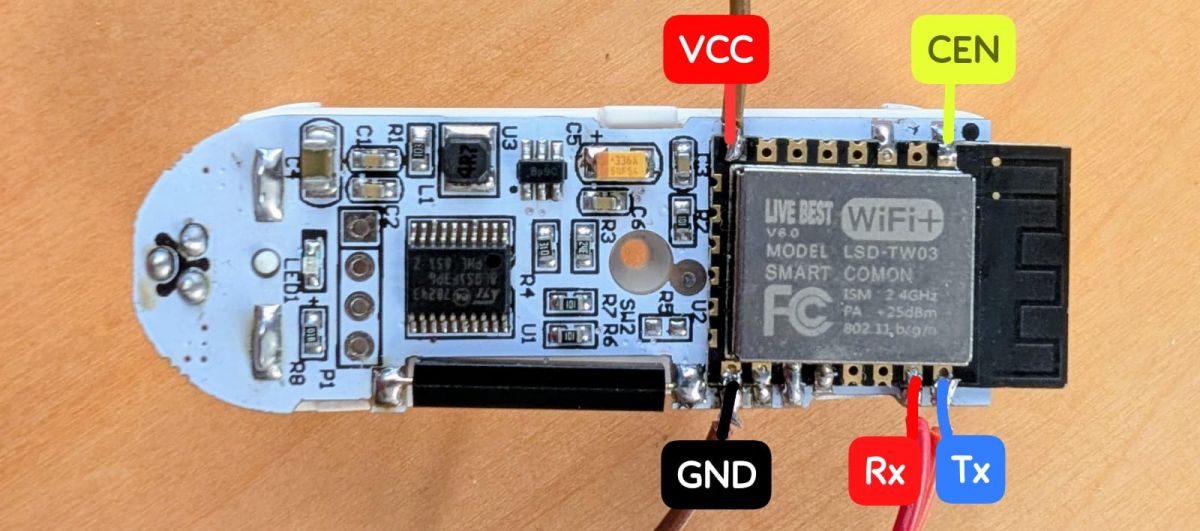
    I'm trying to flash an ancien "Live best" door sensor (LSD-TW03 / W601 chip). This sensor uses a reed switch, not cheap Hall.
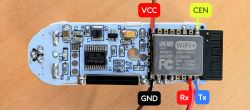
    Printed circuit board with LSD-TW03 WiFi module and labeled VCC, GND, Rx, Tx, and CEN pins.

    I mostly followed this (using the GUI tool).

    Flashed OpenW600_1.18.110.fls successfully, but got a bootloop (no AP).
    Did an "Erase Flash" then flashed OpenW600_1.18.109.fls, still a successful flash, but same bootloop (no AP).

    Flash and boot log:
    
    Firmware size: 530.46 kb
    
    Waiting for receive CCC ...
    
    Waiting for sync device timeout.
    Waiting for restarting device...
    CCCC=
    Sync success, W60X
    WIFI MAC:286DCD3BF2B5
    old gain: read error!!!
    new gain: 74667460747474747474747474747474747474747474747474747474
    PPPPPPPPPPPPPPPCCCC
    Erase secboot ok.
    Please wait for Erase flash ...
    >>>>>>CCCC
    Erase flash ok.
    
    Try 1000000 baud download file ...
    
    Wait for the chip to be ready ...
    Start the download ...
    
    Download "C:/Users/Matteo/Desktop/W600-TW03/OpenW600_1.18.110.fls" file success!
    
    w600 Compiled @Jun  4 2025 10:36:26
    Entering initLog()...
    Commands registered!
    initLog() done!
    Main_Init_Before_Delay done
    Main_Init_Delay
    Main_Init_Delay done
    Info:MAIN:Main_Init_Before_Delay
    Info:CFG:####### Boot Count 0 #######
    Info:CFG:####### HAL_FlashVars_GetBootFailures= -65535
    Warn:CFG:CFG_InitAndLoad: Config crc or ident mismatch. Default config will be loaded.
    Info:CFG:CFG_SetDefaultLEDCorrectionTable: setting defaults
    Info:GEN:PIN_SetupPins pins have been set up.
    Info:MAIN:Main_Init_Before_Delay done
    Info:MAIN:Main_Init_Delay
    Info:MAIN:Main_Init_Delay done
    Info:MAIN:Main_Init_After_Delay
    Info:MAIN:Using SSID []
    Info:MAIN:Using Pass []
    Error:HTTP:Created HTTP SV thread with (stack=2048)
    Info:MQTT:MQTT_RegisterCallback called for bT w600CD3BF2B5/ subT w600CD3BF2B5/+/set
    Info:MQTT:MQTT_RegisterCallback called for bT w600s/ subT w600s/+/set
    Info:MQTT:MQTT_RegisterCallback called for bT cmnd/w600CD3BF2B5/ subT cmnd/w600CD3BF2B5/+
    Info:MQTT:MQTT_RegisterCallback called for bT cmnd/w600s/ subT cmnd/w600s/+
    Info:MQTT:MQTT_RegisterCallback called for bT w600CD3BF2B5/ subT w600CD3BF2B5/+/get
    Info:CMD:CMD_StartScript: started @startup at the beginning
    Info:CMD:CMD_StartScript: failed to get file autoexec.bat
    Info:MAIN:Main_Init_After_Delay done
    Info:MAIN:Time 1, idle 0/s, free 30728, MQTT 0(0), bWifi 0, secondsWithNoPing -1, socks 2/8 
    Info:MAIN:Time 2, idle 0/s, free 30728, MQTT 0(0), bWifi 0, secondsWithNoPing -1, socks 2/8 
    Info:MAIN:Time 3, idle 0/s, free 30728, MQTT 0(0), bWifi 0, secondsWithNoPing -1, socks 2/8 
    Info:MAIN:Time 4, idle 0/s, free 30728, MQTT 0(0), bWifi 0, secondsWithNoPing -1, socks 2/8 
    
     ap create Successfully ! 
    Info:MAIN:Time 5, idle 0/s, free 30728, MQTT 0(0), bWifi 0, secondsWithNoPing -1, socks 2/8 
    
    w600 Compiled @Jun  4 2025 10:36:26
    Entering initLog()...
    Commands registered!
    initLog() done!
    Main_Init_Before_Delay done
    Main_Init_Delay
    Main_Init_Delay done
    Info:MAIN:Main_Init_Before_Delay
    Info:CFG:####### Boot Count 0 #######
    Info:CFG:####### HAL_FlashVars_GetBootFailures= -65535
    Warn:CFG:CFG_InitAndLoad: Config crc or ident mismatch. Default config will be loaded.
    Info:CFG:CFG_SetDefaultLEDCorrectionTable: setting defaults
    Info:GEN:PIN_SetupPins pins have been set up.
    Info:MAIN:Main_Init_Before_Delay done
    Info:MAIN:Main_Init_Delay
    Info:MAIN:Main_Init_Delay done
    Info:MAIN:Main_Init_After_Delay
    Info:MAIN:Using SSID []
    Info:MAIN:Using Pass []
    Error:HTTP:Created HTTP SV thread with (stack=2048)
    Info:MQTT:MQTT_RegisterCallback called for bT w600CD3BF2B5/ subT w600CD3BF2B5/+/set
    Info:MQTT:MQTT_RegisterCallback called for bT w600s/ subT w600s/+/set
    Info:MQTT:MQTT_RegisterCallback called for bT cmnd/w600CD3BF2B5/ subT cmnd/w600CD3BF2B5/+
    Info:MQTT:MQTT_RegisterCallback called for bT cmnd/w600s/ subT cmnd/w600s/+
    Info:MQTT:MQTT_RegisterCallback called for bT w600CD3BF2B5/ subT w600CD3BF2B5/+/get
    Info:CMD:CMD_StartScript: started @startup at the beginning
    Info:CMD:CMD_StartScript: failed to get file autoexec.bat
    Info:MAIN:Main_Init_After_Delay done
    Info:MAIN:Time 1, idle 0/s, free 30728, MQTT 0(0), bWifi 0, secondsWithNoPing -1, socks 2/8 
    Info:MAIN:Time 2, idle 0/s, free 30728, MQTT 0(0), bWifi 0, secondsWithNoPing -1, socks 2/8 
    Info:MAIN:Time 3, idle 0/s, free 30728, MQTT 0(0), bWifi 0, secondsWithNoPing -1, socks 2/8 
    Info:MAIN:Time 4, idle 0/s, free 30728, MQTT 0(0), bWifi 0, secondsWithNoPing -1, socks 2/8 
    
     ap create Successfully ! 
    Info:MAIN:Time 5, idle 0/s, free 30728, MQTT 0(0), bWifi 0, secondsWithNoPing -1, socks 2/8 
    
    w600 Compiled @Jun  4 2025 10:36:26
    Entering initLog()...
    Commands registered!
    initLog() done!
    Main_Init_Before_Delay done
    Main_Init_Delay
    Main_Init_Delay done
    Info:MAIN:Main_Init_Before_Delay
    Info:CFG:####### Boot Count 0 #######
    Info:CFG:####### HAL_FlashVars_GetBootFailures= -65535
    Warn:CFG:CFG_InitAndLoad: Config crc or ident mismatch. Default config will be loaded.
    Info:CFG:CFG_SetDefaultLEDCorrectionTable: setting defaults
    Info:GEN:PIN_SetupPins pins have been set up.
    Info:MAIN:Main_Init_Before_Delay done
    Info:MAIN:Main_Init_Delay
    Info:MAIN:Main_Init_Delay done
    Info:MAIN:Main_Init_After_Delay
    Info:MAIN:Using SSID []
    Info:MAIN:Using Pass []
    Error:HTTP:Created HTTP SV thread with (stack=2048)
    Info:MQTT:MQTT_RegisterCallback called for bT w600CD3BF2B5/ subT w600CD3BF2B5/+/set
    Info:MQTT:MQTT_RegisterCallback called for bT w600s/ subT w600s/+/set
    Info:MQTT:MQTT_RegisterCallback called for bT cmnd/w600CD3BF2B5/ subT cmnd/w600CD3BF2B5/+
    Info:MQTT:MQTT_RegisterCallback called for bT cmnd/w600s/ subT cmnd/w600s/+
    Info:MQTT:MQTT_RegisterCallback called for bT w600CD3BF2B5/ subT w600CD3BF2B5/+/get
    Info:CMD:CMD_StartScript: started @startup at the beginning
    Info:CMD:CMD_StartScript: failed to get file autoexec.bat
    Info:MAIN:Main_Init_After_Delay done
    Info:MAIN:Time 1, idle 0/s, free 30728, MQTT 0(0), bWifi 0, secondsWithNoPing -1, socks 2/8 
    Info:MAIN:Time 2, idle 0/s, free 30728, MQTT 0(0), bWifi 0, secondsWithNoPing -1, socks 2/8 
    Info:MAIN:Time 3, idle 0/s, free 30728, MQTT 0(0), bWifi 0, secondsWithNoPing -1, socks 2/8 
    Info:MAIN:Time 4, idle 0/s, free 30728, MQTT 0(0), bWifi 0, secondsWithNoPing -1, socks 2/8 
    
     ap create Successfully ! 
    Info:MAIN:Time 5, idle 0/s, free 30728, MQTT 0(0), bWifi 0, secondsWithNoPing -1, socks 2/8 
    
    w600 Compiled @Jun  4 2025 10:36:26
    Entering initLog()...
    Commands registered!
    initLog() done!
    Main_Init_Before_Delay done
    Main_Init_Delay
    Main_Init_Delay done
    Info:MAIN:Main_Init_Before_Delay
    Info:CFG:####### Boot Count 0 #######
    Info:CFG:####### HAL_FlashVars_GetBootFailures= -65535
    Warn:CFG:CFG_InitAndLoad: Config crc or ident mismatch. Default config will be loaded.
    Info:CFG:CFG_SetDefaultLEDCorrectionTable: setting defaults
    Info:GEN:PIN_SetupPins pins have been set up.
    Info:MAIN:Main_Init_Before_Delay done
    Info:MAIN:Main_Init_Delay
    Info:MAIN:Main_Init_Delay done
    Info:MAIN:Main_Init_After_Delay
    Info:MAIN:Using SSID []
    Info:MAIN:Using Pass []
    Error:HTTP:Created HTTP SV thread with (stack=2048)
    Info:MQTT:MQTT_RegisterCallback called for bT w600CD3BF2B5/ subT w600CD3BF2B5/+/set
    Info:MQTT:MQTT_RegisterCallback called for bT w600s/ subT w600s/+/set
    Info:MQTT:MQTT_RegisterCallback called for bT cmnd/w600CD3BF2B5/ subT cmnd/w600CD3BF2B5/+
    Info:MQTT:MQTT_RegisterCallback called for bT cmnd/w600s/ subT cmnd/w600s/+
    Info:MQTT:MQTT_RegisterCallback called for bT w600CD3BF2B5/ subT w600CD3BF2B5/+/get
    Info:CMD:CMD_StartScript: started @startup at the beginning
    Info:CMD:CMD_StartScript: failed to get file autoexec.bat
    Info:MAIN:Main_Init_After_Delay done
    Info:MAIN:Time 1, idle 0/s, free 30728, MQTT 0(0), bWifi 0, secondsWithNoPing -1, socks 2/8 
    Info:MAIN:Time 2, idle 0/s, free 30728, MQTT 0(0), bWifi 0, secondsWithNoPing -1, socks 2/8 
    Info:MAIN:Time 3, idle 0/s, free 30728, MQTT 0(0), bWifi 0, secondsWithNoPing -1, socks 2/8 
    Info:MAIN:Time 4, idle 0/s, free 30728, MQTT 0(0), bWifi 0, secondsWithNoPing -1, socks 2/8 
    
     ap create Successfully ! 
    Info:MAIN:Time 5, idle 0/s, free 30728, MQTT 0(0), bWifi 0, secondsWithNoPing -1, socks 2/8 
    
    w600 Compiled @Jun  4 2025 10:36:26
    Entering initLog()...
    Commands registered!
    initLog() done!
    Main_Init_Before_Delay done
    Main_Init_Delay
    Main_Init_Delay done
    Info:MAIN:Main_Init_Before_Delay
    Info:CFG:####### Boot Count 0 #######
    Info:CFG:####### HAL_FlashVars_GetBootFailures= -65535
    Warn:CFG:CFG_InitAndLoad: Config crc or ident mismatch. Default config will be loaded.
    Info:CFG:CFG_SetDefaultLEDCorrectionTable: setting defaults
    Info:GEN:PIN_SetupPins pins have been set up.
    Info:MAIN:Main_Init_Before_Delay done
    Info:MAIN:Main_Init_Delay
    Info:MAIN:Main_Init_Delay done
    Info:MAIN:Main_Init_After_Delay
    Info:MAIN:Using SSID []
    Info:MAIN:Using Pass []
    Error:HTTP:Created HTTP SV thread with (stack=2048)
    Info:MQTT:MQTT_RegisterCallback called for bT w600CD3BF2B5/ subT w600CD3BF2B5/+/set
    Info:MQTT:MQTT_RegisterCallback called for bT w600s/ subT w600s/+/set
    Info:MQTT:MQTT_RegisterCallback called for bT cmnd/w600CD3BF2B5/ subT cmnd/w600CD3BF2B5/+
    Info:MQTT:MQTT_RegisterCallback called for bT cmnd/w600s/ subT cmnd/w600s/+
    Info:MQTT:MQTT_RegisterCallback called for bT w600CD3BF2B5/ subT w600CD3BF2B5/+/get
    Info:CMD:CMD_StartScript: started @startup at the beginning
    Info:CMD:CMD_StartScript: failed to get file autoexec.bat
    Info:MAIN:Main_Init_After_Delay done


    There's an http server error in the log—not sure if it's critical.

    Any ideas on what's going wrong or next steps? Thanks!
    AI: Can you share exactly which flashing tool (name and version) and settings (e.g., baud rate, erase options) you used during the flash process?
    Flashed with "Upgrade_Tools_V1.5.9.exe" from https://github.com/openshwprojects/FlashTools
    Baud rate 115200, tested with and without "erase flash" option.

    AI: What power source are you using to power the sensor during flashing and boot? (e.g., USB, battery, voltage/current specs)
    External PSU @ 3.3v durring flash and normal use. Also fresh LR03 on live test, as intended by sensor.
  • ADVERTISEMENT
  • #2 21571161
    divadiow
    Level 38  
    Posts: 5236
    Help: 450
    Rate: 920
    interesting. Don't see many W600s appear. Is the behaviour any different if powered from the battery terminals instead?

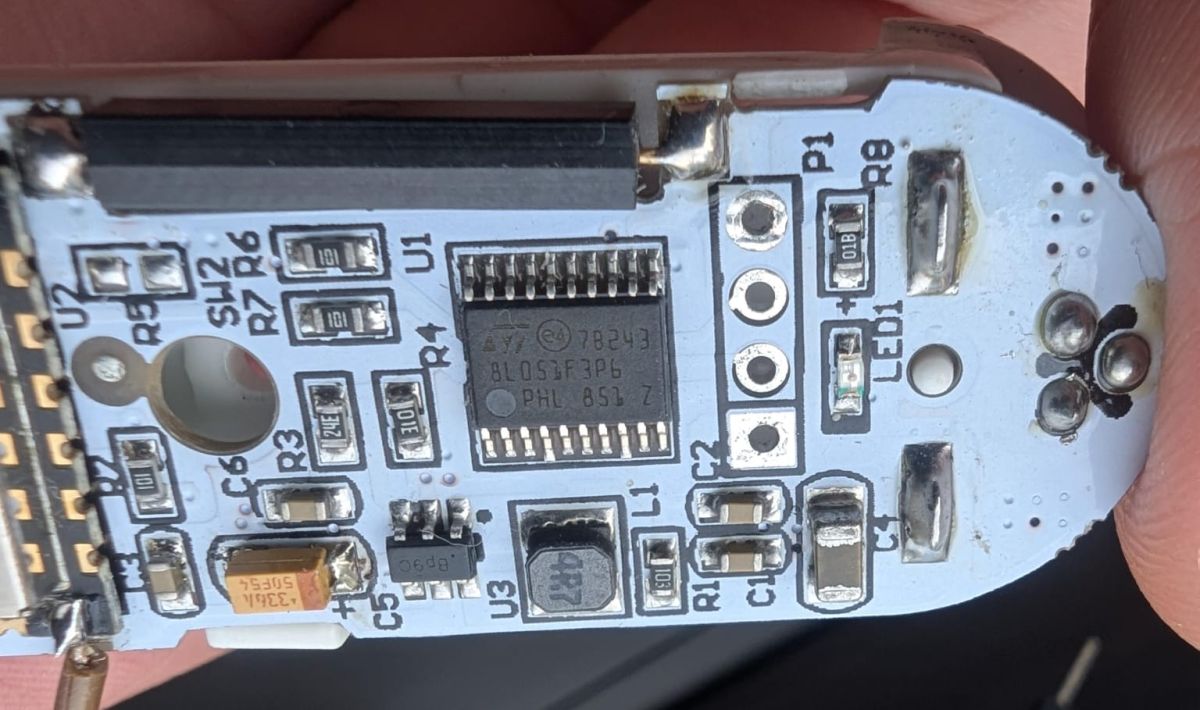
    But also, is that an ST 8L053F396 (cant really see it) MCU on the board?

    the only Google result for that: https://www.st.com/resource/en/datasheet/stm8l051f3.pdf
  • #3 21571186
    p.kaczmarek2
    Moderator Smart Home
    Posts: 14797
    Help: 659
    Rate: 12954
    How good are your soldering skills? I would first try to desolder WiFi module and check outside circuit. It's a battery powered device. It may be doing external resets of WiFi module, so it's better to be 100% sure before we proceed with investigating.
    Helpful post? Buy me a coffee.
  • No AP creation despite normal boot log

    #4 21571190
    sevenissimo
    Level 3  
    Posts: 8
    Rate: 1
    It's an old sensor on duty since 2022. As far as I remember it is Aubess branded. Slightly differs from similar in the external rounded shape.

    However, the behavior is pretty much the same regardless of the power source. I've tried both the external PSU and the battery terminals, and it's still stuck.

    Interestingly, after my last flash (with 1.18.110 again), the log no longer shows the AP creation message, and it's not even bootlooping anymore.
    But still no AP to connect to, so no way to get to OBK.
    w600 Compiled @Jun  4 2025 10:36:26
    Entering initLog()...
    Commands registered!
    initLog() done!
    Main_Init_Before_Delay done
    Main_Init_Delay
    Main_Init_Delay done
    Info:MAIN:Main_Init_Before_Delay
    Info:CFG:####### Boot Count 7 #######
    Info:CFG:####### HAL_FlashVars_GetBootFailures= -65528
    Warn:CFG:CFG_InitAndLoad: Correct config has been loaded with 1 changes count.
    Info:GEN:PIN_SetupPins pins have been set up.
    Info:MAIN:Main_Init_Before_Delay done
    Info:MAIN:Main_Init_Delay
    Info:MAIN:Main_Init_Delay done
    Info:MAIN:Main_Init_After_Delay
    Info:MAIN:Using SSID []
    Info:MAIN:Using Pass []
    Error:HTTP:Created HTTP SV thread with (stack=2048)
    Info:MQTT:MQTT_RegisterCallback called for bT w600CD3BF2B5/ subT w600CD3BF2B5/ /set
    Info:MQTT:MQTT_RegisterCallback called for bT w600s/ subT w600s/ /set
    Info:MQTT:MQTT_RegisterCallback called for bT cmnd/w600CD3BF2B5/ subT cmnd/w600CD3BF2B5/ 
    Info:MQTT:MQTT_RegisterCallback called for bT cmnd/w600s/ subT cmnd/w600s/ 
    Info:MQTT:MQTT_RegisterCallback called for bT w600CD3BF2B5/ subT w600CD3BF2B5/ /get
    Info:CMD:CMD_StartScript: started @startup at the beginning
    Info:CMD:CMD_StartScript: failed to get file autoexec.bat
    Info:MAIN:Main_Init_After_Delay done
    Info:MAIN:Time 1, idle 0/s, free 30728, MQTT 0(0), bWifi 0, secondsWithNoPing -1, socks 2/8 
    Info:MAIN:Time 2, idle 0/s, free 30728, MQTT 0(0), bWifi 0, secondsWithNoPing -1, socks 2/8 
    Info:MAIN:Time 3, idle 0/s, free 30728, MQTT 0(0), bWifi 0, secondsWithNoPing -1, socks 2/8 
    Info:MAIN:Time 4, idle 0/s, free 30728, MQTT 0(0), bWifi 0, secondsWithNoPing -1, socks 2/8 


    And yes, you're spot on about the MCU – it's an ST 8L053F3P6.
    Close-up of a PCB with electronic components, including an integrated circuit, resistors, and capacitors.
  • ADVERTISEMENT
  • WiFi module likely needs external reset isolation

    #6 21575999
    sevenissimo
    Level 3  
    Posts: 8
    Rate: 1
    p.kaczmarek2 wrote:
    How good are your soldering skills? I would first try to desolder WiFi module and check outside circuit. It's a battery powered device. It may be doing external resets of WiFi module, so it's better to be 100% sure before we proceed with investigating.

    I'm still fairly new to soldering, and my desoldering skills are far from good.
    However, I tried to get the module off the board. I put (a lot) of flux on it and cleaned it with brass-threads, but... No way I can get this thing out.
    [W600 / TW-03] Door Sensor - Bootloop on 1.18.110/109 Firmware

    So, before literally burning out the PCB, I resoldered the pins and added the wiring.

    Then I tested @insmod >>21571493 build.
    The boot process hangs at "secboot(1MB) running V3.9...", but maybe that's expected, Idk.

    Here are the flashing and boot logs.
    
    Firmware size: 549.86 kb
    Waiting for receive CCC ...
    Waiting for sync device timeout.
    Waiting for restarting device...
    CCCCCCCCCCCCCCCCCCCCCCCCCCCC=
    Sync success, W60X
    WIFI MAC:286DCD3BF2B5
    old gain: 74667460747474747474747474747474747474747474747474747474
    new gain: 74667460747474747474747474747474747474747474747474747474
    PPPPPPPPPPPPPPPCCCC
    Erase secboot ok.
    Please wait for Erase flash ...
    >>>>>>CCCC
    Erase flash ok.
    Try 1000000 baud download file ...
    Wait for the chip to be ready ...
    Start the download ...
    Download "C:/Users/Matteo/Desktop/W600-TW03/OpenW600_1629_merge_765fc4385077.fls" file success!
    secboot(1MB) running V3.9...
    CCCCCCCCCCCCCCCCCCCCCCCCCCCCCCCCCCCCCCCCCCCCCCCCCCCCCCCCCCCCCCCCCCCCCCCCCCCCCCCCCCCCCCCCCCCCCCCCCCCCCCCCCCCCCCCCCCCCCCCCCCCCCCCCCCCCCCCCCCCCCCCCCCCCCCCCCCCCCCCCCCCCCCCCCCCCCCCCCCCCCCCCCCCCCCCCCCCCCCCCCCCCCCCCCCCCCCCCCCCCCCCCCCCCCCCCCCCCCCCCCCCCCCCCCCCCCCCCCCCCCCCCCCCCCCCCCCCC
    secboot(1MB) running V3.9...
    CCCCCCCCCCCCCCCCCCCCCCCC
    

    *Reboot after flashing success, and after first "Secboot...CCCC" are due to my manual button press.
  • Upgrade_Tools_v1.5.9 successfully flashed latest W600 firmware

    #7 21576838
    insmod
    Level 31  
    Posts: 1432
    Help: 168
    Rate: 455
    >>21575999
    It works for me, i used Upgrade_Tools_v1.5.9.
    Flashed latest version, OpenW600_1629_merge_30b67b1e8996.fls
    Did you power cycle it?
    
    Firmware size: 551.71 kb
    
    Waiting for receive CCC ...
    
    Waiting for sync device timeout.
    Waiting for restarting device...
    CCCC=
    Sync success, W60X
    WIFI MAC:286DCEB74B4E
    old gain: 74667460747474747474747474747474747474747474747474747474
    new gain: 74667460747474747474747474747474747474747474747474747474
    PPPPPPPPPPPPPPPCCCC
    Erase secboot ok.
    
    Try 2000000 baud download file ...
    
    Wait for the chip to be ready ...
    Start the download ...
    
    Download "xxx/OpenW600_1629_merge_30b67b1e8996.fls" file success!

    
    w600 Compiled @Jun 10 2025 05:34:38
    Entering initLog()...
    Commands registered!
    initLog() done!
    Main_Init_Before_Delay done
    Main_Init_Delay
    Main_Init_Delay done
    Info:MAIN:Main_Init_Before_Delay
    Info:CFG:####### Boot Count 19 #######
    Info:CFG:####### HAL_FlashVars_GetBootFailures= 1
    Warn:CFG:CFG_InitAndLoad: Correct config has been loaded with 2 changes count.
    Error:CMD:no file early.bat err -2
    Info:GEN:PIN_SetupPins pins have been set up.
    Info:MAIN:Main_Init_Before_Delay done
    Info:MAIN:Main_Init_Delay
    Info:MAIN:Main_Init_Delay done
    Info:MAIN:Main_Init_After_Delay
    Info:MAIN:Using SSID [wrtaiot]
    Info:MAIN:Using Pass [inhumanpassword]
    Error:HTTP:Created HTTP SV thread with (stack=2048)
    Info:MQTT:MQTT_RegisterCallback called for bT w60000000000/ subT w60000000000/+/set
    Info:MQTT:MQTT_RegisterCallback called for bT w600s/ subT w600s/+/set
    Info:MQTT:MQTT_RegisterCallback called for bT cmnd/w60000000000/ subT cmnd/w60000000000/+
    Info:MQTT:MQTT_RegisterCallback called for bT cmnd/w600s/ subT cmnd/w600s/+
    Info:MQTT:MQTT_RegisterCallback called for bT w60000000000/ subT w60000000000/+/get
    Info:CMD:CMD_StartScript: started @startup at the beginning
    Info:CMD:CMD_StartScript: started autoexec.bat at the beginning
    Info:MAIN:Main_Init_After_Delay done
    Info:MAIN:Time 1, idle 0/s, free 30968, MQTT 0(0), bWifi 0, secondsWithNoPing -1, socks 2/8 
    
  • Bootloop only on external power after reflashing

    #8 21576968
    sevenissimo
    Level 3  
    Posts: 8
    Rate: 1
    >>21576838
    Yep, I've done plenty of power cycles.

    Just re-tested today:
    My first test (power cycles and battery-powered with common ground to the CH340) still showed no luck. I can't get past Secboot.

    Then, after I flashed the image again, the behavior changed:
    - External power: OBK gets to `ap create Successfully ! Info:MAIN:Time 5, idle 0/s, free 3096` and then bootloops.
    - Battery power: OBK doesn't even create the AP, but it doesn't bootloop either. It just stops.

    Here's the log, though it doesn't show anything particularly new:
    
    w600 Compiled @May 23 2025 08:41:01
    Entering initLog()...
    Commands registered!
    initLog() done!
    Main_Init_Before_Delay done
    Main_Init_Delay
    Main_Init_Delay done
    Info:MAIN:Main_Init_Before_Delay
    Info:CFG:####### Boot Count 29 #######
    Info:CFG:####### HAL_FlashVars_GetBootFailures= -65506
    Warn:CFG:CFG_InitAndLoad: Correct config has been loaded with 1 changes count.
    Error:CMD:lfs is absent
    Info:GEN:PIN_SetupPins pins have been set up.
    Info:MAIN:Main_Init_Before_Delay done
    Info:MAIN:Main_Init_Delay
    Info:MAIN:Main_Init_Delay done
    Info:MAIN:Main_Init_After_Delay
    Info:MAIN:Using SSID []
    Info:MAIN:Using Pass []
    Error:HTTP:Created HTTP SV thread with (stack=2048)
    Info:MQTT:MQTT_RegisterCallback called for bT w600CD3BF2B5/ subT w600CD3BF2B5/+/set
    Info:MQTT:MQTT_RegisterCallback called for bT w600s/ subT w600s/+/set
    Info:MQTT:MQTT_RegisterCallback called for bT cmnd/w600CD3BF2B5/ subT cmnd/w600CD3BF2B5/+
    Info:MQTT:MQTT_RegisterCallback called for bT cmnd/w600s/ subT cmnd/w600s/+
    Info:MQTT:MQTT_RegisterCallback called for bT w600CD3BF2B5/ subT w600CD3BF2B5/+/get
    Info:CMD:CMD_StartScript: started @startup at the beginning
    Error:CMD:LFS_ReadFile: lfs is absent
    Info:CMD:CMD_StartScript: failed to get file autoexec.bat
    Info:MAIN:Main_Init_After_Delay done
    Info:MAIN:Time 1, idle 0/s, free 30968, MQTT 0(0), bWifi 0, secondsWithNoPing -1, socks 2/8 
    Info:MAIN:Time 2, idle 0/s, free 30968, MQTT 0(0), bWifi 0, secondsWithNoPing -1, socks 2/8 
    Info:MAIN:Time 3, idle 0/s, free 30968, MQTT 0(0), bWifi 0, secondsWithNoPing -1, socks 2/8 
    Info:MAIN:Time 4, idle 0/s, free 30968, MQTT 0(0), bWifi 0, secondsWithNoPing -1, socks 2/8 


    As a third attempt, I re-flashed OpenW600_1.18.110.fls again. When powered by battery, the behavior is the same as above (no bootloop, but no AP).
    
    w600 Compiled @Jun  4 2025 10:36:26
    Entering initLog()...
    Commands registered!
    initLog() done!
    Main_Init_Before_Delay done
    Main_Init_Delay
    Main_Init_Delay done
    Info:MAIN:Main_Init_Before_Delay
    Info:CFG:####### Boot Count 1 #######
    Info:CFG:####### HAL_FlashVars_GetBootFailures= -65534
    Warn:CFG:CFG_InitAndLoad: Correct config has been loaded with 1 changes count.
    Info:GEN:PIN_SetupPins pins have been set up.
    Info:MAIN:Main_Init_Before_Delay done
    Info:MAIN:Main_Init_Delay
    Info:MAIN:Main_Init_Delay done
    Info:MAIN:Main_Init_After_Delay
    Info:MAIN:Using SSID []
    Info:MAIN:Using Pass []
    Error:HTTP:Created HTTP SV thread with (stack=2048)
    Info:MQTT:MQTT_RegisterCallback called for bT w600CD3BF2B5/ subT w600CD3BF2B5/+/set
    Info:MQTT:MQTT_RegisterCallback called for bT w600s/ subT w600s/+/set
    Info:MQTT:MQTT_RegisterCallback called for bT cmnd/w600CD3BF2B5/ subT cmnd/w600CD3BF2B5/+
    Info:MQTT:MQTT_RegisterCallback called for bT cmnd/w600s/ subT cmnd/w600s/+
    Info:MQTT:MQTT_RegisterCallback called for bT w600CD3BF2B5/ subT w600CD3BF2B5/+/get
    Info:CMD:CMD_StartScript: started @startup at the beginning
    Info:CMD:CMD_StartScript: failed to get file autoexec.bat
    Info:MAIN:Main_Init_After_Delay done
    Info:MAIN:Time 1, idle 0/s, free 30728, MQTT 0(0), bWifi 0, secondsWithNoPing -1, socks 2/8 
    Info:MAIN:Time 2, idle 0/s, free 30728, MQTT 0(0), bWifi 0, secondsWithNoPing -1, socks 2/8 
    Info:MAIN:Time 3, idle 0/s, free 30728, MQTT 0(0), bWifi 0, secondsWithNoPing -1, socks 2/8 
    Info:MAIN:Time 4, idle 0/s, free 30728, MQTT 0(0), bWifi 0, secondsWithNoPing -1, socks 2/8 
    
  • #9 21577008
    insmod
    Level 31  
    Posts: 1432
    Help: 168
    Rate: 455
    Bootloop on ap creation means there is not enough power. Wifi requires a lot, and common CH340 adapters aren't capable of handling it. You would need either a different adapter (with ams1117), or ams1117 wired to your adapter.
  • #10 21577026
    sevenissimo
    Level 3  
    Posts: 8
    Rate: 1
    >>21577008
    Yeah, I know about the power issue. Unfortunately, I just fried my LDOs by accidentally reversing the polarity with an external PSU.....
    That's precisely why I tried powering the device with batteries, as intended by its design. I was expecting it to be configurable via an AP, but I'm getting nothing. Is that normal behavior for obk?
  • ADVERTISEMENT
  • #11 21577053
    insmod
    Level 31  
    Posts: 1432
    Help: 168
    Rate: 455
    I don't know?
    This looks like a tuyamcu device, and it regulates if module is on or off.
    But tuyamcu driver is not enabled on W600.

    And W600 is not really suited for battery-powered devices.
    Since so few pins are soldered, perhaps you might want to switch module to beken? CB3S or BK7238 XH-WB3S would do much better.
  • Directly power WiFi module to prevent MCU reset

    #12 21577071
    p.kaczmarek2
    Moderator Smart Home
    Posts: 14797
    Help: 659
    Rate: 12954
    sevenissimo wrote:

    That's precisely why I tried powering the device with batteries, as intended by its design. I was expecting it to be configurable via an AP, but I'm getting nothing. Is that normal behavior for obk?

    If you put in the batteries, as intended by design, and have WiFi module flashed with 3rd party firmware, but don't configure tmSensor driver, then sometime later the MCU will turnon WiFi module for a short time, it will expect a TuyaMCU packet from WiFi module, and upon not receiving it, it will forcibly turn off WiFi modul again.

    This is why I suggest powering WiFi module directly to 3.3V WiFi module pad to make sure that MCU won't turn it off. I also suggested desoldering WiFi module, because MCU may just reset it via RST/CEN/anything, but I am not sure about that.

    If you don't want to desolder the WiFi module, then there is alternative - desolder the MCU. It's possible but tricky, depending on your toolset. Once you desolder the MCU, we will be finally 100% sure whether it's external reset that causes the problem or is it really a power supply issue.

    insmod wrote:

    And W600 is not really suited for battery-powered devices.

    Why do you think so? Deep sleep of WiFi module is not needed for TuyaMCU battery powered devices. They just need UART and a relatively quick WiFi connection procedure.
    Helpful post? Buy me a coffee.
  • ADVERTISEMENT
  • #13 21577079
    insmod
    Level 31  
    Posts: 1432
    Help: 168
    Rate: 455
    >>21577071
    There is no mosfet on picture, so module is powered off via CEN.
    As for why i don't think it is suitable, it is because it requires a lot of power. More than twice as much as bk7238, and a little more than BK7231T.
  • CEN trace cut to isolate WiFi module

    #14 21577166
    p.kaczmarek2
    Moderator Smart Home
    Posts: 14797
    Help: 659
    Rate: 12954
    insmod wrote:
    >>21577071
    There is no mosfet on picture, so module is powered off via CEN.

    Oh, fair point. I didn't notice it/I assumed that MOSFET has to be there, because 100% of TuyaMCU products that I had so far had MOSFET used to control the power of WiFi module.

    Well, so if it's using CEN, then whole "power supply bad" discussion is in my opinion pointless. OP just has to either cut CEN trace, or desolder MCU, or desolder WiFi module. I am not sure if MCU and WiFi module has 3.3V connected together and how would device behave if only WiFi module is powered (MCU is unpowered), but still... testing with MCU in circuit is not a good idea.

    insmod wrote:
    >>21577071
    As for why i don't think it is suitable, it is because it requires a lot of power. More than twice as much as bk7238, and a little more than BK7231T.

    Interesting, sources?
    Helpful post? Buy me a coffee.
  • #15 21577261
    insmod
    Level 31  
    Posts: 1432
    Help: 168
    Rate: 455
    >>21577166
    My own measurements, done with Kowsi KWS-X1. No powersave.
    HC01 W600 module (soldered on wires to D1 mini board), consumption is jumping like power save is enabled, from 0.1w to 0.55w. Max consumption spike was 0.75w.
    7231T on NiceMCU is ~0.48w.
    Original NiceMCU with 7238 is about 0.19-0.2w.
  • #16 21621485
    divadiow
    Level 38  
    Posts: 5236
    Help: 450
    Rate: 920
    insmod wrote:
    HC01 W600

    Google search for something I just found and had forgotten about brought me to this thread.

    HC-25 with HC-T TTL adaptor
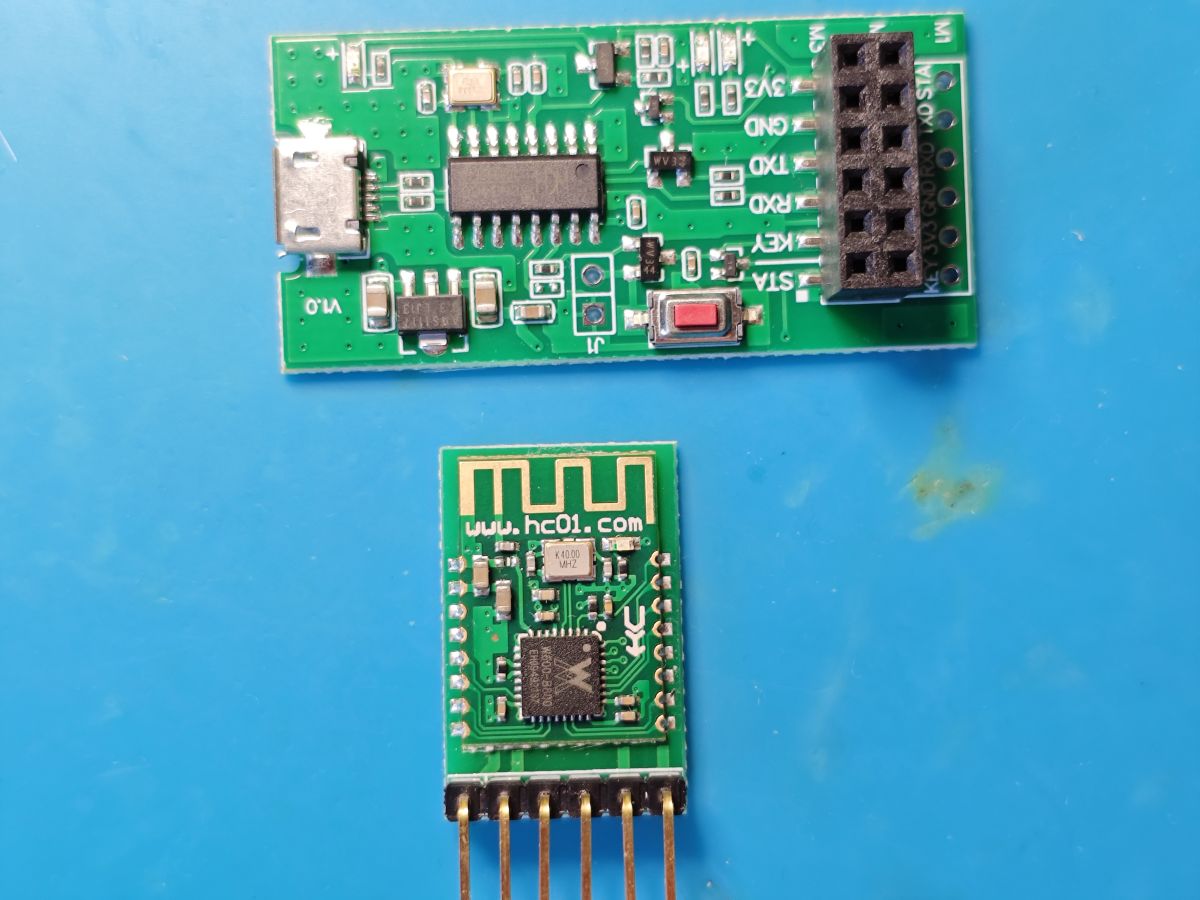
    https://www.hc01.com/goods/640e91920be12d0114404c99

    is this your module?
    HC-25 Bluetooth module with HC-T TTL adapter on a blue surface
    Attachments:
    • HC-25_V1.7.pdf (1.38 MB) You must be logged in to download this attachment.
  • #17 21621517
    insmod
    Level 31  
    Posts: 1432
    Help: 168
    Rate: 455
    >>21621485
    This one, but just the module without 6-pin board.
    I will also soon have air602.
  • SWD access on PB6/PB7 and flash dump via J-Link

    #18 21621522
    divadiow
    Level 38  
    Posts: 5236
    Help: 450
    Rate: 920
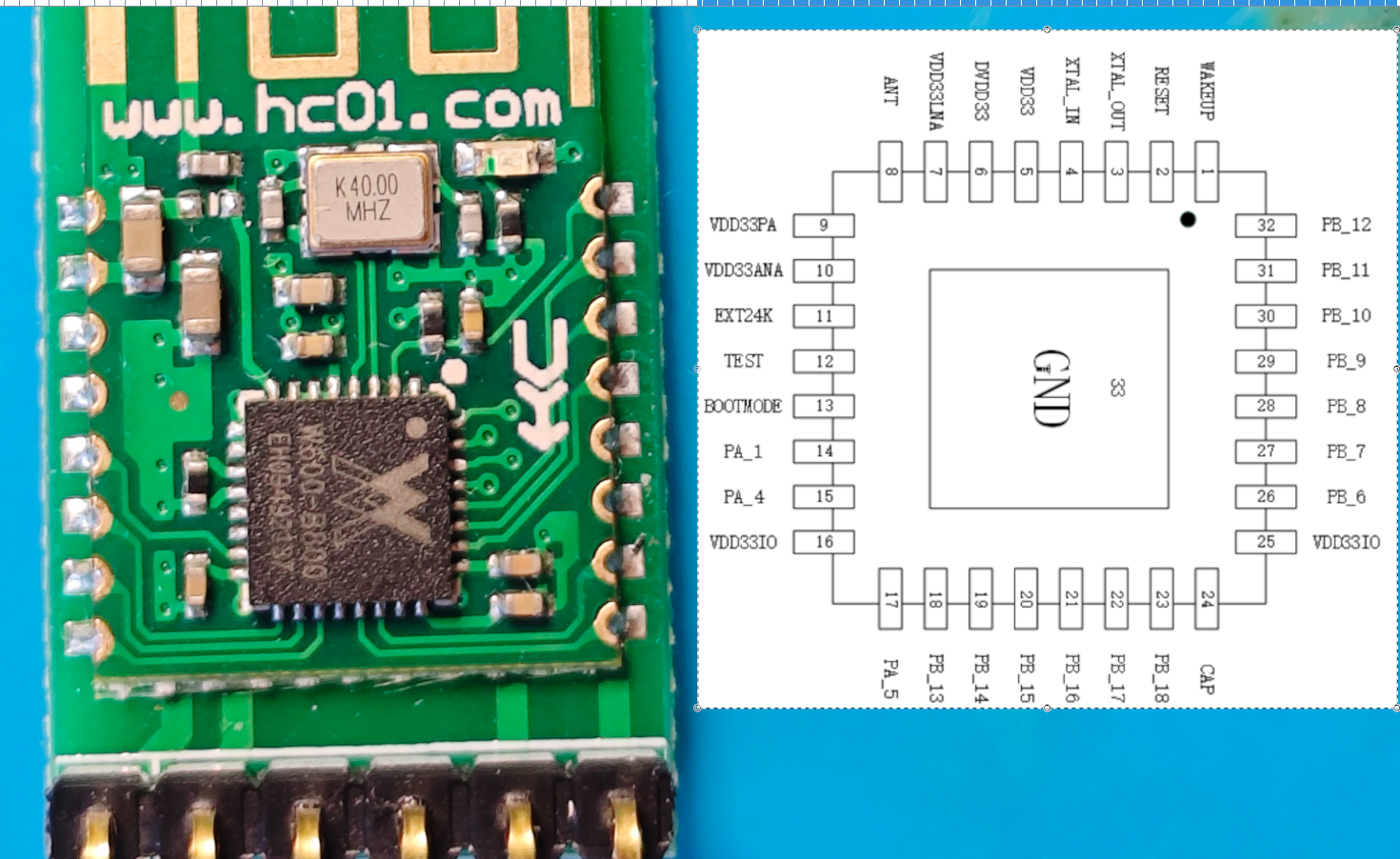
    interesting. PB6 and PB7 are routed out on these for SWDIO/SWCLK

    Electronic module with W600 microcontroller and pinout diagram showing PB6 and PB7

    J-Link Commander connection and dump to file

    Code: Text
    Log in, to see the code
    Attachments:
    • w600_flash.bin (1 MB) You must be logged in to download this attachment.
  • SWD dump read works, but restore fails

    #19 21621529
    divadiow
    Level 38  
    Posts: 5236
    Help: 450
    Rate: 920
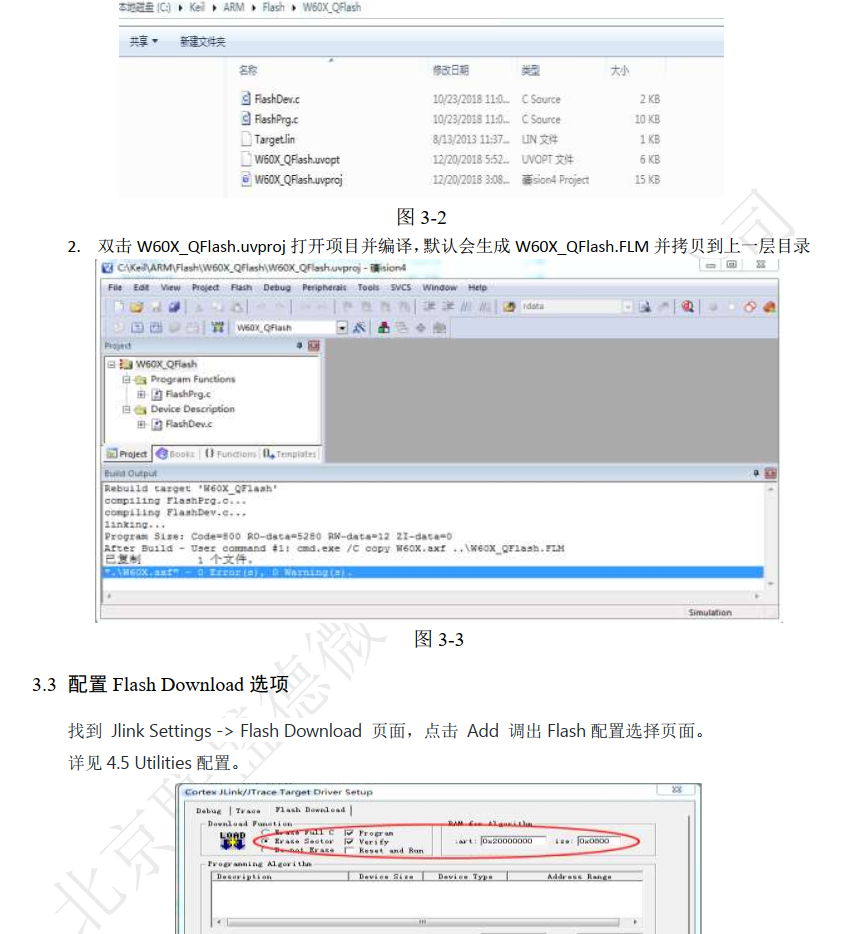
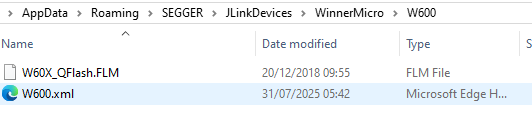
    I notice in the W600 SWD doc there's some flash algorithm file for Keil. Qflash. I wonder if plain SWD read is as good. hmm

    Screenshot of Keil with W60X_QFlash project and JLink Flash Download settings window

    Added after 13 [minutes]:

    https://github.com/RT-Thread/W601_IoT_Board/t...es/Doc/W60X_QFLASH_Driver_for_SWD/W60X_QFlash

    Added after 1 [hours] 17 [minutes]:

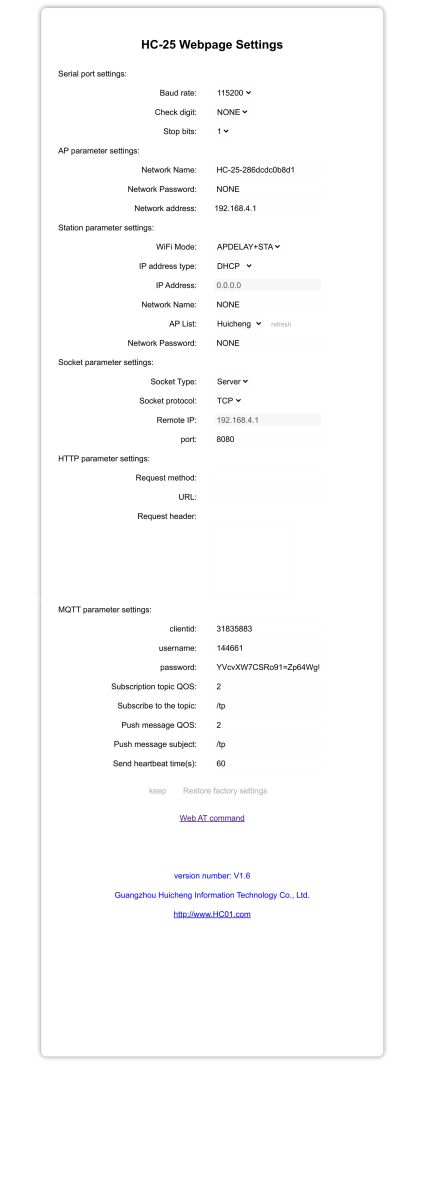
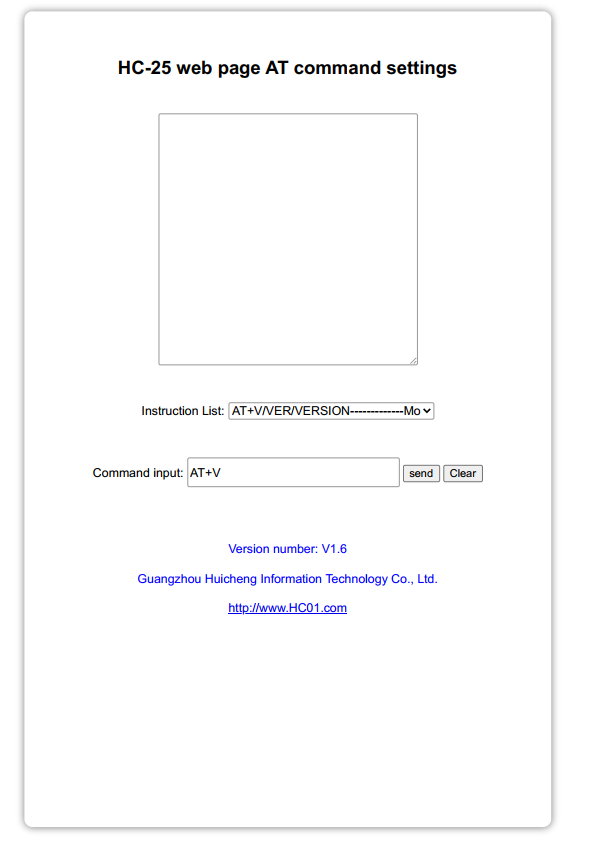
    AT firmware broadcasts AP and a cute little web console

    HC-25 settings page showing serial, Wi-Fi, TCP, and MQTT configuration HC-25 web interface for AT command settings with input field and command list

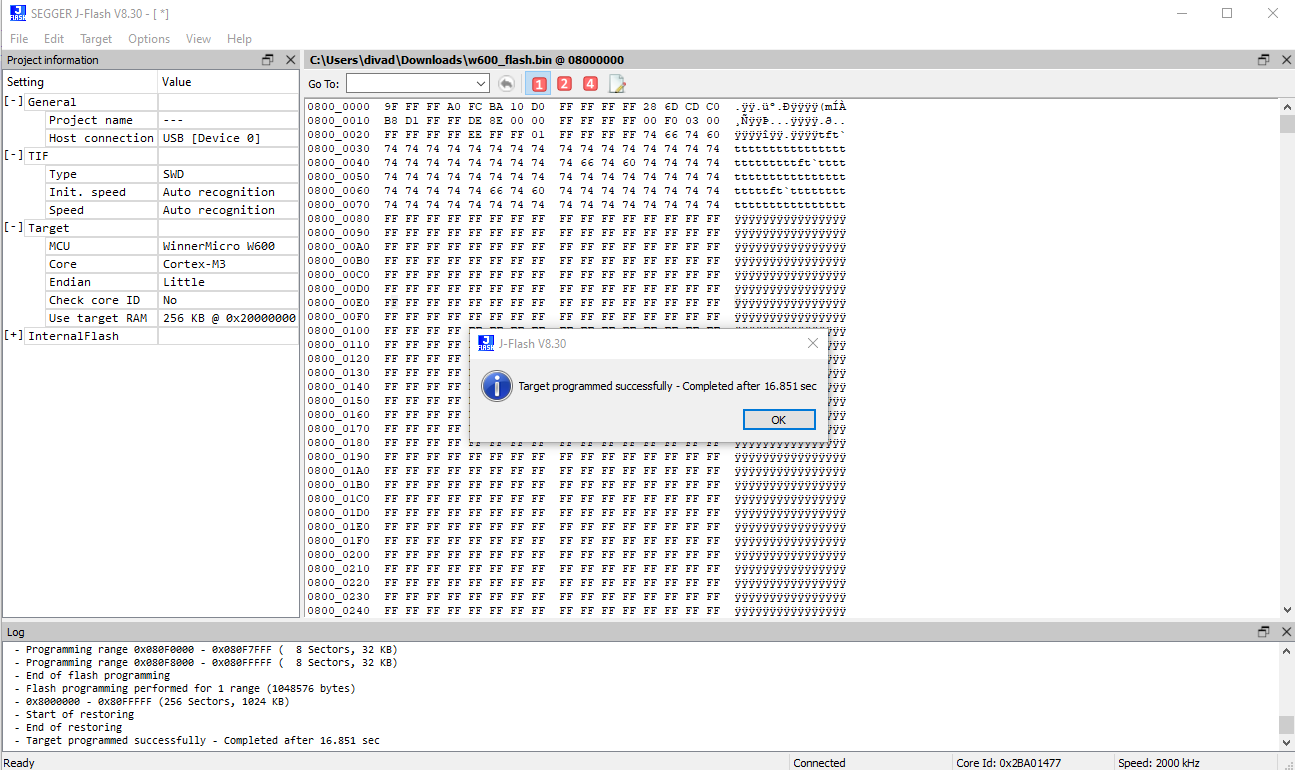
    Added after 10 [hours] 6 [minutes]:

    SEGGER J-Flash window showing successful programming of W600 microcontroller

    Folder showing W60X_QFlash.FLM and W600.xml files for WinnerMicro W600 device

    Code: Text
    Log in, to see the code


    hmm. write of dump does not appear to result in a restore of working firmware

    Added after 48 [minutes]:

    it's not actually writing. subsequent dumps show OBK code still.
  • TuyaMCU driver starts but no UART responses

    #20 21631550
    divadiow
    Level 38  
    Posts: 5236
    Help: 450
    Rate: 920
    regarding the original device in this thread, I was curious to see if TuyaMCU would work. I see the UART column for W600 in platforms.md is a ?

    https://github.com/divadiow/OpenBK7231T_App/actions/runs/16866121168

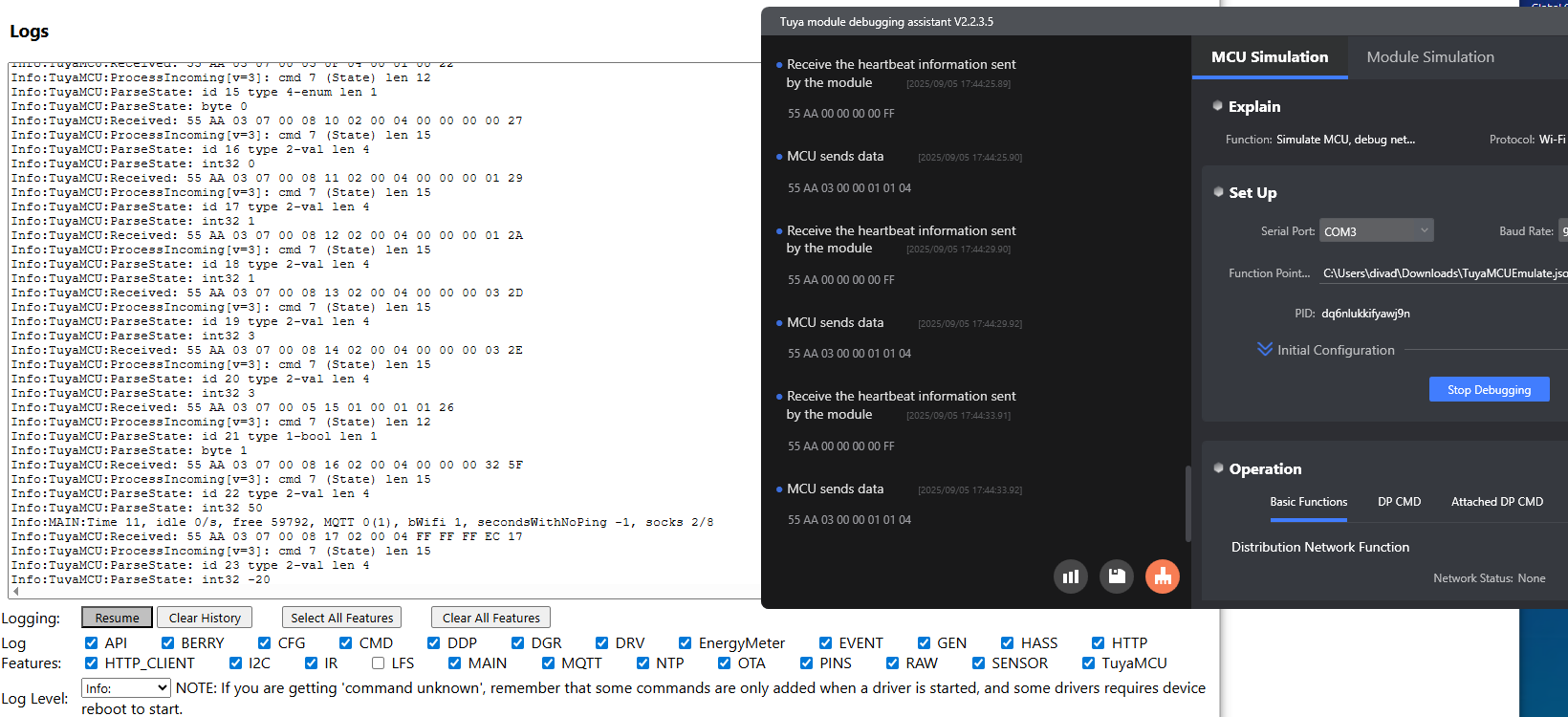
    driver starts but I'm getting nothing with TuyaMCU Debugging Assistant from either UART, flag 26 or not, using tuyaMcu_sendQueryState. Commands sent from TMDA are not reported by OBK.

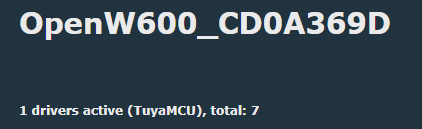
    Screenshot of OpenW600 showing one active TuyaMCU driver out of seven
  • #23 21631773
    insmod
    Level 31  
    Posts: 1432
    Help: 168
    Rate: 455
    >>21631758
    It was just configured with W800 in mind, not W600.
    I'll soon receive Air602 board and change pins for W600.

Topic summary

LABEL_AI_GENERATED
Discussion about flashing an old battery-powered door sensor based on a WinnerMicro W600 / W601 module (LSD-TW03 / W601 chip) with OpenBK/OpenW600 firmware. Initial flashes of OpenW600_1.18.109 and 1.18.110 succeeded but the device bootlooped or failed to create an AP. Participants suggested checking power source behavior, desoldering or isolating the WiFi module, and considering that the MCU may be controlling module power via CEN rather than a MOSFET. A newer OpenBK build was tested; behavior changed between external PSU and battery operation, but AP creation still failed or stopped at secboot. The thread later identified that bootloop on AP creation can indicate insufficient power for WiFi startup, though the device also appeared to be MCU-controlled and not well suited to W600 in battery mode. Further discussion covered W600 power consumption versus BK7231T/BK7238, TuyaMCU support on W600, UART pin mapping, and later successful experiments with Air602 / HC-25 style modules and TuyaMCU on W600 using updated builds and pin changes.
AI summary based on the discussion. May contain errors.

FAQ LABEL_AI_GENERATED

TL;DR: W600/TW‑03 bootloops after OpenW600 usually come from power or MCU‑CEN control: "Max consumption spike was 0.75W." Use a stable 3.3V, power‑cycle after flash, and isolate CEN if needed. This FAQ helps OpenBK/OpenW600 flashers restore AP and stop loops. [Elektroda, insmod, post #21577261]

Why it matters: It pinpoints root causes fast so you can bring up the AP and finish setup without tearing the board apart.

Quick Facts

What causes W600/TW‑03 to bootloop right after “ap create Successfully!”?

Insufficient 3.3V current during AP creation is the classic cause. Wi‑Fi spikes reset the radio when weak regulators sag. CH340 adapters’ 3.3V rails are often too weak. Use a stronger regulator or an adapter with AMS1117. Keep wiring short and ground solid. Quote: "Bootloop on ap creation means there is not enough power." [Elektroda, insmod, post #21577008]

Why does no AP appear when I power the sensor from batteries?

Your STM8 host likely toggles the CEN line. It turns Wi‑Fi on briefly, expects a TuyaMCU packet, then shuts it off if none arrives. "The MCU will turn on WiFi for a short time and, without a TuyaMCU packet, forcibly turn it off." Power the module directly or isolate CEN to keep it awake for setup. [Elektroda, p.kaczmarek2, post #21577071]

How do I stop the bootloop during AP creation? (3 steps)

  1. Use a solid 3.3V source rated for Wi‑Fi peaks (e.g., AMS1117‑based).
  2. Avoid powering from the CH340’s 3.3V; inject regulated 3.3V at the module VCC/GND.
  3. After flashing, power‑cycle the device before testing AP. These steps stabilize power so AP can start. [Elektroda, insmod, post #21577008]

I’m stuck at “secboot(1MB) running V3.9…”. What fixes it?

Power‑cycle the device after flashing. Use Upgrade_Tools v1.5.9 and try 1,000,000–2,000,000 baud for the download. Ensure a stable 3.3V supply during and after the flash. The maintainer confirmed success at 2,000,000 baud and emphasized power‑cycling before boot. [Elektroda, insmod, post #21576838]

Is “HTTP: Created HTTP SV thread” a real error?

No. Despite the word “Error” in the tag, it indicates the HTTP server thread was created. The log continues normally afterward, showing other subsystems starting. It does not prevent AP creation or Wi‑Fi bring‑up. Treat it as an informational line from this build’s log levels. [Elektroda, sevenissimo, post #21571156]

Which firmware build should I try if 1.18.110/109 bootloops?

Test a newer OpenW600_1629_merge build. Flash with Upgrade_Tools v1.5.9, use 1–2 Mbps, then power‑cycle. A maintainer reported a clean boot with that combination. If power is marginal, the AP step can still fail, so fix power first. [Elektroda, insmod, post #21576838]

Can I use the TuyaMCU driver on W600 right now?

Support was not enabled for W600 in the discussed builds. The host MCU still expects a TuyaMCU handshake, but the W600 build lacked that driver, so no UART exchange occurs. Consider using a BK7238/BK7231T module if TuyaMCU is a must today. [Elektroda, insmod, post #21577053]

What UART pins does OpenBK use for TuyaMCU on W600 builds?

PB6 and PB7 are the default UART pins in the W600/W800 HAL. Choose modules that expose PB6/PB7 or remap in code if your board lacks these pins. [Elektroda, insmod, post #21631725]

What is the CEN pin and how does it affect bring‑up?

CEN is the Wi‑Fi module’s enable/reset. The STM8 can assert CEN to shut the radio down if it doesn’t see Tuya traffic. To keep Wi‑Fi alive for setup, isolate control. "Cut CEN trace, or desolder MCU, or desolder WiFi module." [Elektroda, p.kaczmarek2, post #21577166]

Will the “LFS is absent” message block setup?

No. It means the internal filesystem and autoexec.bat are missing. The firmware still boots other services and can create the AP once power and control issues are handled. It does not cause a bootloop by itself. [Elektroda, sevenissimo, post #21576968]

Is W600 suitable for battery‑powered door sensors vs BK7238?

W600 draws noticeably more. One measurement shows 0.1–0.55W with spikes up to 0.75W, while BK7238 boards ran ~0.19–0.2W. Quote: "Max consumption spike was 0.75w." Expect shorter battery life unless the host keeps Wi‑Fi off most of the time. [Elektroda, insmod, post #21577261]

Can I dump or restore W600 firmware over SWD/J‑Link?

Yes, you can read 1MB over SWD with J‑Link Commander, but writing may require the W60X_QFlash algorithm. A user read successfully, yet subsequent writes appeared ineffective without the proper flash loader. Use the vendor’s QFlash loader when restoring. [Elektroda, divadiow, post #21621529]
AI summary based on the discussion. May contain errors.
ADVERTISEMENT