
logo elektroda
logo elektroda
X
logo elektroda

How to connect the 3.3V circuit to GPIO2 on the ESP01 for state detection?

Vexator 1707 11
ADVERTISEMENT
Treść została przetłumaczona polish » english Zobacz oryginalną wersję tematu
  • #1 20889485
    Vexator
    Level 10  
    Posts: 176
    Rate: 36
    Board Language: polish
    Hey,
    in ESP01 I have a status check on GPIO2. When I connect GND, it shows 1, when I disconnect it shows 0.
    I have a circuit for this (shared VCC and GND with the one from ESP) with a physical switch and LED.
    I would like to check if this additional circuit is closed, but there is 3.3v on it, not GND.

    How to connect one to the other? Some transistor between GND and GPIO2, with the middle leg to my circuit? Just which one? I'm completely green in these matters :/.
  • ADVERTISEMENT
  • #2 20889506
    jarekgol
    Level 40  
    Posts: 5113
    Help: 641
    Rate: 1131
    Board Language: polish
    Vexator wrote:
    When I connect GND, it appears 1, when I disconnect, it appears 0.

    Is it somehow the other way around? And "appears" means where does it appear, where and how do you see it?

    Normally when you want to connect a pin to a controller, you connect GPIO.n to the pin, the pin to ground and enable pull-up on the port, or you give an external resistor to + and GPIO.n
    You can also pin from + to the port if the controller supports pull-down or add a resistor to ground.
  • #3 20889550
    Vexator
    Level 10  
    Posts: 176
    Rate: 36
    Board Language: polish
    jarekgol wrote:
    Vexator wrote:
    When I connect GND, a 1 appears, when I disconnect, a 0 appears.

    Is it somehow the other way around? And "appears" means where does it appear, where and how do you see it?
    in software
    jarekgol wrote:
    Normally when you want to connect a pin to a controller, you connect GPIO.n to the pin, pin to GND and you turn on the pull-up on the port
    and that would work beautifully with GND, and I need it with VCC
    jarekgol wrote:
    , or you give an external resistor to + and GPIO.n
    You can also pin from + to port if the controller supports pull-down or add a resistor to ground.

    pull-down will not work. How else can I figure it out
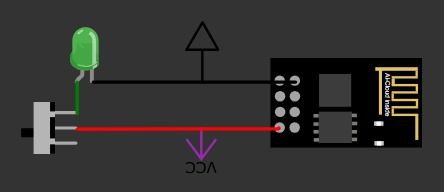
    I have roughly something like this:
    Diagram with a button, LED, and electronic module with VCC and GND labels. .
  • ADVERTISEMENT
  • #4 20889782
    Anonymous
    Level 1  
  • ADVERTISEMENT
  • #5 20889793
    jarekgol
    Level 40  
    Posts: 5113
    Help: 641
    Rate: 1131
    Board Language: polish
  • ADVERTISEMENT
  • #6 20890717
    Vexator
    Level 10  
    Posts: 176
    Rate: 36
    Board Language: polish
    khoam wrote:
    GPIO2 on the ESP8266 has an internal pull-up and without connecting anything you should read 1.
    you're right, that was a mental shortcut on my part. The default is 1, when GND is connected it's 0, but I reversed that in the code
    jarekgol wrote:
    or light the led from the switch and know its status?
    Describe somehow in full sentences what the work is in.
    This switch in the picture is the only one I found in the simulator, in reality there is a simple ON/OFF.
    In full sentences the work:
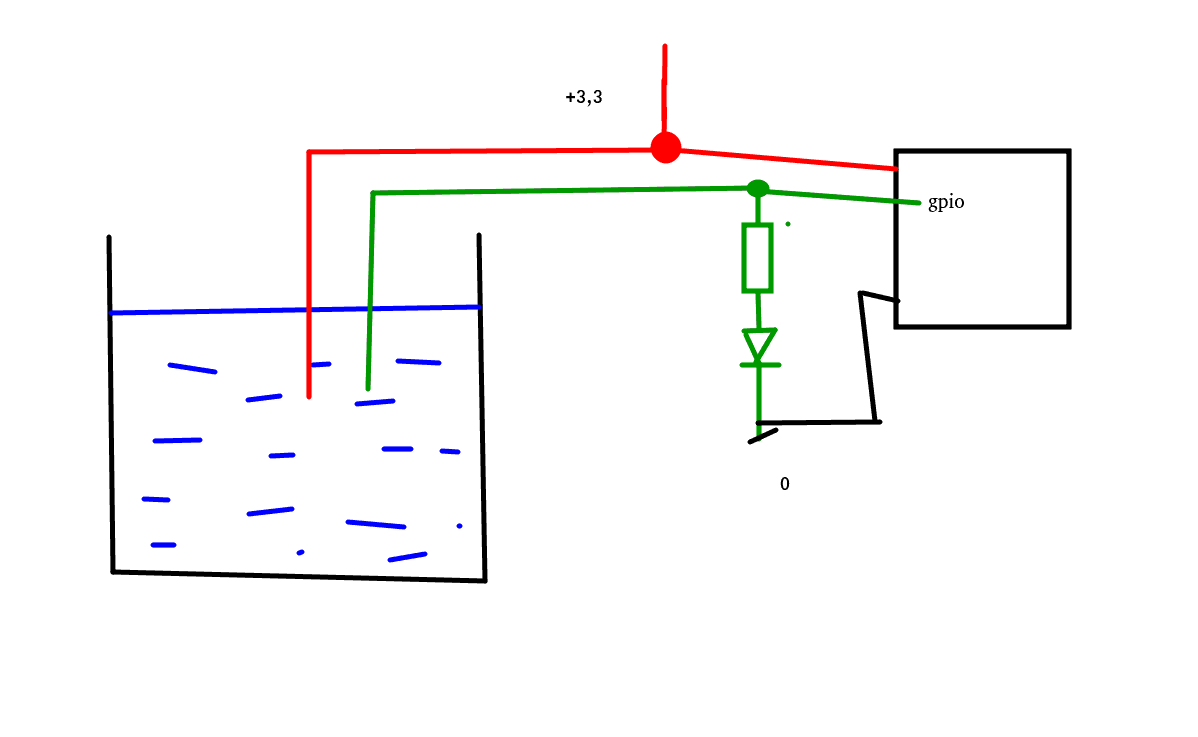
    I have a 3.3V DC power supply in the fuse box. To it is connected (under -) the wire that goes into the wall. Later it comes back and is connected under the diode and further to the power supply (under +).
    I can power it the other way round and it also works (after reversing the diode).
    This wire goes to the liquid tank and when there is a lot of liquid, it starts to pass current, the diode starts to light up.
    From the same power supply, I powered ESP01 in parallel.
    I want to check if the diode lights up (or more precisely, if the current is flowing and not through the photodiode ;) )
  • #7 20891471
    jarekgol
    Level 40  
    Posts: 5113
    Help: 641
    Rate: 1131
    Board Language: polish
    It would probably be nicer to give a comparator on the way there, but as it lights up for you, it should work.
    Be careful, because such a level check, can eat the cables due to electrolysis.

    ps. You may still have to give some resistor to ground from that green test line, but that will come out in the wash.
    Attachments:
    • How to connect the 3.3V circuit to GPIO2 on the ESP01 for state detection? czunik_poziomu.png (11.93 KB) You must be logged in to download this attachment.
  • #8 20891666
    Anonymous
    Level 1  
  • #9 20892200
    Vexator
    Level 10  
    Posts: 176
    Rate: 36
    Board Language: polish
    jarekgol wrote:
    Be careful, because checking the level like this, can eat the cables because of the electrolysis.
    I don't know what's in the tank, but the led has been running for a dozen years, so maybe there's a float in there that turns the circuit on dry?
    Maybe I misunderstand your drawing, but when the liquid level increases, doesn't a `+` appear on the GPIO when I need a `-`?
    My knowledge of electronics is low, so forgive me if I write some stupid stuff.... can't I do this by connecting an NPN transistor with the outer legs to GND and GPIO, and the middle leg between the LED and the tank?
    khoam wrote:
    GPIO2 must not be connected to GND. This will cause problems booting the ESP01.
    does this apply to both GPIO0 and GPIO2?
  • Helpful post
    #10 20892375
    Anonymous
    Level 1  
  • #11 20892949
    jarekgol
    Level 40  
    Posts: 5113
    Help: 641
    Rate: 1131
    Board Language: polish
    As for the 0.1 you can
    1) embrace it programmatically
    2) Reverse engineer my schematic (as you draw, you can throw in to check.
    3) Negate it hardware-wise, i.e. transistor, while remembering to have a resistor at least a few kilo ohms in the base.

    Maybe look into the tank and see what's there ;)


    @khoam what is this functionality used for? Because in this article it says that "can be prevented from booting if some pins are pulled LOW or HIGH. " but for what, I don't see.

    Any direct access to memory in such a state?
  • #12 20893003
    Anonymous
    Level 1  

Topic summary

✨ The discussion revolves around connecting a 3.3V circuit to GPIO2 on the ESP01 for state detection. The user describes a setup where connecting GND to GPIO2 results in a low state (0), while disconnecting it results in a high state (1). The user seeks advice on how to connect a circuit that operates at 3.3V to GPIO2, considering the internal pull-up resistor of the ESP8266. Suggestions include using an NPN transistor to interface the circuit with GPIO2, ensuring that the GPIO pin does not connect directly to GND to avoid boot issues. The importance of using resistors and the potential for electrolysis in the circuit are also discussed. The user is advised to check the circuit design and consider the implications of the liquid level on the GPIO state.
Generated by the language model.

FAQ

TL;DR: ESP-01 has 3 boot modes; "GPIO2 must be in high state" at power-up in two. Sense a 3.3 V loop with an NPN or a comparator, and avoid holding GPIO2 LOW during reset; invert in code if needed. [Elektroda, khoam, post #20893003]

Why it matters: This helps ESP‑01 users reliably detect a 3.3 V closed circuit (e.g., a tank-level LED) without causing boot failures.

Quick Facts

How do I wire ESP‑01 GPIO2 to detect a 3.3 V closed loop?

Use an NPN as a low‑side switch. Emitter to GND. Collector to GPIO2. Drive the base from the 3.3 V sense node through a ~10 kΩ resistor. GPIO2’s internal pull‑up gives HIGH when open; it goes LOW when the loop drives the transistor. Invert in software if desired. Ensure the circuit never forces GPIO2 LOW during reset. How‑To:
  1. Connect emitter to GND.
  2. Connect collector to GPIO2.
  3. Connect base to the 3.3 V sense node via ~10 kΩ. [Elektroda, jarekgol, post #20892949]

Which transistor and resistor values are safe to start with?

Use any small‑signal NPN transistor. Insert a base resistor of at least a few kilo‑ohms to limit base current. A 10 kΩ base resistor is a practical starting value at 3.3 V. Keep wiring short and reference grounds together. This setup sinks GPIO2 only when the loop is active, keeping the pin pulled up otherwise. Adjust the base resistor if the transistor does not switch cleanly. [Elektroda, jarekgol, post #20892949]

Can I just use a pull‑down on GPIO2 without a transistor?

Avoid that. GPIO2 is a boot‑strap pin. Forcing it LOW at reset can stop the ESP‑01 from starting. A transistor or comparator lets you sense the 3.3 V loop without directly tying the pin to ground. As the expert put it: "GPIO2 must not be connected to ground." [Elektroda, khoam, post #20891666]

Why does pulling GPIO2 LOW at boot prevent startup?

The ESP8266 selects among 3 boot modes using strap pins. For normal boot and UART programming modes, GPIO2 must be HIGH at reset. If your sensor circuit drives GPIO2 LOW, the chip may enter the wrong mode or fail to boot. Design so GPIO2 is HIGH or floating during reset. [Elektroda, khoam, post #20893003]

Will this affect flashing firmware over UART on an ESP‑01?

Yes. Programming over UART relies on specific boot‑strap levels. GPIO2 must be HIGH at reset to enter normal or UART programming modes. If your sensing circuit holds GPIO2 LOW, flashing will fail. Disconnect or redesign the sensing path so GPIO2 is not LOW during resets. [Elektroda, khoam, post #20893003]

How can I invert the reading without extra hardware?

Invert the logic in software. Read the pin and flip the state so a pulled‑LOW becomes a logical “on.” This keeps wiring simple and uses the built‑in pull‑up. Ensure you still meet the boot requirement: don’t allow the circuit to hold GPIO2 LOW during reset. [Elektroda, jarekgol, post #20892949]

Do I need a pull‑down on the sensor line to stop false triggers?

Add a high‑value bleed to ground on the sense node feeding the transistor’s base. This discharges leakage and noise when the loop is open, keeping the transistor off. Start with a high value and verify stability. This stabilizes the input without loading the loop heavily. [Elektroda, jarekgol, post #20891471]

Is a comparator better than a single transistor for cleaner detection?

Yes. A comparator gives a defined threshold and sharper switching when sensing LED current. It also reduces susceptibility to small voltage drops and noise. Insert it between the sense node and GPIO2, and choose a threshold that never drives GPIO2 LOW at reset. This approach improves reliability in noisy or high‑impedance loops. [Elektroda, jarekgol, post #20891471]

Can I detect the LED’s on/off state directly from its 3.3 V side?

Yes. Take the LED node and feed it to the NPN base through a resistor. When the LED is on and 3.3 V is present, the transistor turns on and pulls GPIO2 LOW. Leave the pin otherwise pulled HIGH. Invert the reading in software if you prefer a HIGH‑means‑on convention. [Elektroda, jarekgol, post #20892949]

What’s the risk of DC liquid‑level sensing in a tank?

Electrolysis can corrode probes and wiring over time, especially with DC across the liquid. That can cause intermittent readings or open circuits. Consider using a float switch or a design that limits DC across the electrodes. Inspect wiring if readings degrade. [Elektroda, jarekgol, post #20891471]

Does the boot‑pin rule apply to GPIO0 as well as GPIO2?

Yes. GPIO0 and GPIO2 are both boot‑strap pins. Pulling either one LOW at reset can change the boot mode or block startup. Keep both HIGH or floating while the ESP‑01 resets. Design your sensing circuit with this constraint in mind. [Elektroda, khoam, post #20892375]

My GPIO2 reads 1 when nothing is connected. Is that normal?

Yes. GPIO2 has an internal pull‑up, so it reads HIGH by default when left floating. Connecting to ground will read LOW. Your software can invert the logic if you want a different meaning for on/off. This is expected behavior on the ESP8266. [Elektroda, khoam, post #20889782]

How do I avoid boot issues if the sensor might be active at power‑on?

Ensure the sensing path never drives GPIO2 LOW during reset. Place the transistor so GPIO2 remains HIGH or floating at boot. If needed, disconnect the sense line during reset or choose a threshold that only pulls LOW after the system is up. GPIO2 must be HIGH for normal and UART boot. [Elektroda, khoam, post #20893003]

Can I verify polarity by flipping the LED orientation in my loop?

Yes. Reversing the LED and its diode direction changes where the voltage appears in your loop. This helps you choose a convenient node for sensing. Confirm brightness and current limits remain acceptable after reversing. Then wire the sensor input accordingly. [Elektroda, Vexator, post #20890717]
Generated by the language model.
ADVERTISEMENT