FAQ
TL;DR: If your Arduino IDE 2.3.6 baud list shows odd values, it’s a UI glitch; the six corrected entries are 300–9600. “Something is not right here.” [Elektroda, inot, post #21751608]
Why it matters: Without the right baud, ESP32 serial output looks garbled and slows debugging for Windows 11 users.
Who this is for: ESP32 ESP‑WROOM‑32U users on Windows 11 and anyone asking “how do I fix missing 9600/115200 in Arduino IDE?”
Quick Facts
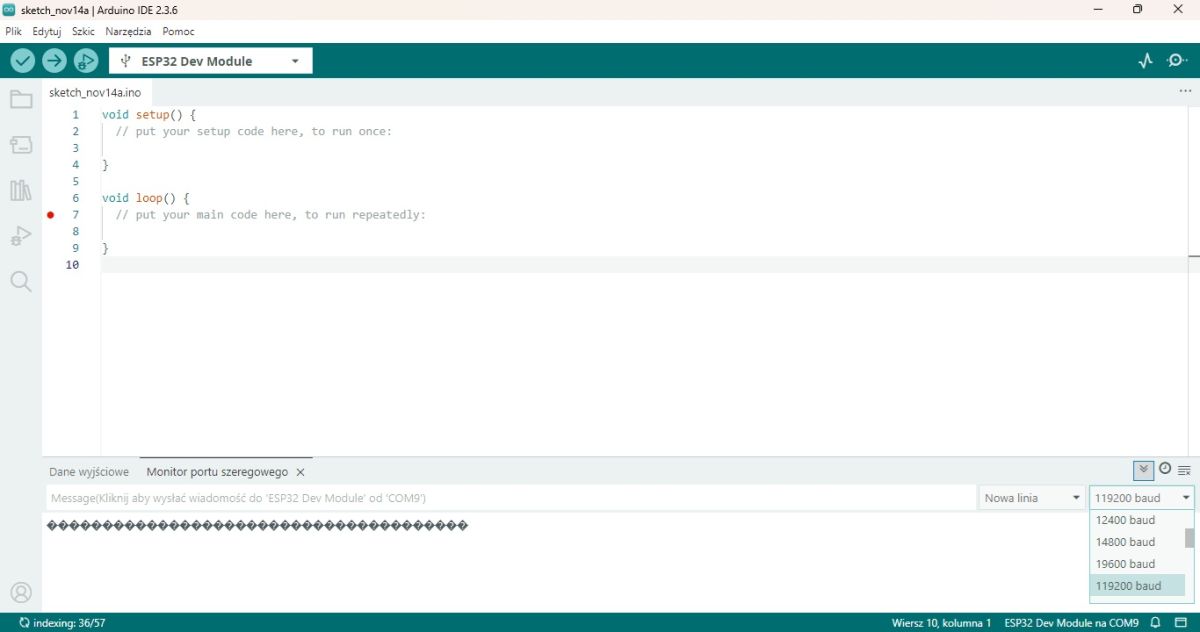
- Symptom: 9600 and 115200 absent from Serial Monitor’s baud dropdown in Arduino IDE 2.3.6 on Windows 11. [Elektroda, fachman1964, post #21751542]
- Tell‑tale pattern: entries like 1300/1600/1750/11200 map to 300/600/750/1200—ignore the leading “1.” [Elektroda, inot, post #21751608]
- Observed ceiling: faulty list can show up to 12,000,000 baud. [Elektroda, fachman1964, post #21751589]
- Fastest fix reported: reinstall Arduino IDE 2.3.6 when the list corrupts. [Elektroda, inot, post #21751620]
- Legacy host tip: Arduino IDE 1.8.19 works on Windows 7; ESP32 issues there are toolchain, not Python. [Elektroda, khoam, post #21751613]
Why are 9600 and 115200 missing in Arduino IDE 2.3.6 on Windows 11?
A UI glitch can corrupt the baud dropdown, adding a leading “1” to entries. The corrected set includes 300–9600, so 9600 appears as 19600. This mismatch makes serial text unreadable. Treat the leading “1” as noise and select the mapped value until you fix the list. “Something is not right here.” [Elektroda, inot, post #21751608]
What do the strange baud values 1300, 1600, 1750, 11200, 1480, 19600 mean?
They are misrendered standards. Drop the leading “1” to map them: 1300→300, 1600→600, 1750→750, 11200→1200, 1480→4800, 19600→9600. Use the mapped value to test communications until you repair the environment. [Elektroda, inot, post #21751608]
How do I fix the missing baud rates quickly?
Reinstall Arduino IDE 2.3.6. Users reported the corrupted list disappears after a clean reinstall. “I suggest installing this version of Arduino again, as something has gone wrong.”
- Uninstall Arduino IDE 2.3.6.
- Reboot Windows 11.
- Reinstall Arduino IDE 2.3.6 and recheck Serial Monitor.
[Elektroda, inot, post #21751620]
What baud should I try first if my ESP32 output is gibberish?
Start with 9600 baud and adjust if the text remains scrambled. Garbled output usually indicates a mismatch between the ESP32 sketch Serial.begin() and the Serial Monitor selection. [Elektroda, inot, post #21751567]
Is this issue device‑specific to ESP32 or an IDE problem?
It points to an IDE/environment problem. Another user with Arduino IDE 2.3.6 saw a normal list, which rules out an ESP32‑only fault. That suggests reinstalling or resetting IDE settings on the affected PC. [Elektroda, inot, post #21751581]
I see 12,000,000 baud in the list. Is that normal for ESP32?
That extremely high entry appears in the corrupted list. It is not a practical selection for typical Serial Monitor use and signals the dropdown is broken. Fix the environment before relying on those values. [Elektroda, fachman1964, post #21751589]
Does Arduino IDE 1.8.19 still work on Windows 7 for ESP32 projects?
Yes. Arduino IDE 1.8.19, and the whole 1.8.x line, remains Windows 7 compatible. “Arduino IDE 1.8.19 … is Windows 7 compatible.” ESP32 issues on old systems stem from the GCC/toolchain, not the OS Python. [Elektroda, khoam, post #21751613]
Is Python the reason ESP32 builds fail on old PCs?
No. The Arduino IDE bundles its own Python, so system Python is not the blocker. ESP32 core 3.x.x can struggle due to the GCC/toolchain on older systems. Update the toolchain or use IDE 1.8.19 on Windows 7. [Elektroda, khoam, post #21751613]
Could AI be wrong about this Arduino IDE baud list problem?
Forum experience shows the list can be wrong despite claims. One participant noted, “AI was right :D,” after confirming the screenshot and diagnosing a UI quirk. Validate with a reinstall and corrected mappings. [Elektroda, khoam, post #21751576]
How do I quickly map wrong entries to real speeds?
Use this guide: 1300→300, 1600→600, 1750→750, 11200→1200, 1480→4800, 19600→9600. This provides six working standards to test sketches without delays. Switch to a fixed environment afterward. [Elektroda, inot, post #21751608]
What’s an effective first troubleshooting step before reinstalling?
Open Serial Monitor, pick the corrected 9600 mapping (19600 in the broken list), and check if text becomes readable. If it does, the list is corrupt, not your code or board. [Elektroda, inot, post #21751567]
Why does matching the baud rate matter for debugging ESP32?
Serial communication requires identical baud settings on both ends. The corrected standards (300–9600) prove the list corruption, not a board fault. Mismatches yield scrambled output and slow debugging. Fix the list or reinstall to restore accurate choices. [Elektroda, inot, post #21751608]