logo elektroda
logo elektroda
X
logo elektroda

BK7321N RF config erased—how to restore or recalibrate RF partition after flashing?

yarix2 171 8
ADVERTISEMENT
  • #1 21826961
    yarix2
    Level 6  
    Hi all,
    I "lost" (erased, of course) my RF config on BK7321N.
    It was part of flashing a water heater; see >>21825378.
    It would be good to have a dedicated post for RF restoration or calibration; any tips/tricks/tutorials are welcome

    Thanks.
  • ADVERTISEMENT
  • #2 21826967
    insmod
    Level 30  
    From what i see in flasher log, you didn't write bootloader after erasing everything.
    Enable bootloader overwrite, then reflash again.
  • #3 21827235
    yarix2
    Level 6  
    >>21826967
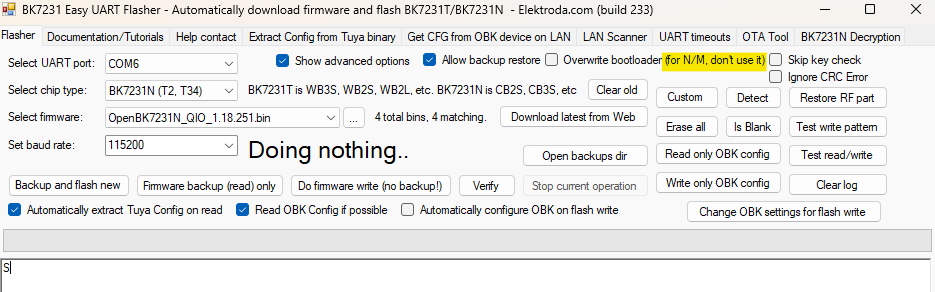
    Thanks for the reply. The "Overwrite bootloader" flag says "for N/M, don't use it."


    BK7231 Easy UART Flasher interface with COM6 selected and firmware options shown
  • ADVERTISEMENT
  • Helpful post
    #4 21827253
    insmod
    Level 30  
    Ignore it, your device currently has no bootloader. So you must write it first to make firmware bootable.
    In 99.9% cases it's safe to enable. And on BK7238 it's enabled by default (and this checkbox is ignored)
  • #5 21827330
    yarix2
    Level 6  
    hi
    thanks for the tip. it helped! i was afraid to use that flag.
    for some reason, the first attempt to flash the firmware didn't work (log below, if it's interesting...) i got error "Writing file data to chip failed".
    However, after some more resets (power off) and repeating the flash (with the bootloader flag), it was successful and i'm now able to get wifi access.

    the only thing now is the Device MAC: `C8:47:8C:00:00:00` i'd like to generate new one w/o too many zeros.


    Starting flash new (no backup)!
    Now is: Monday, 02 February 2026 20:16:58.
    Flasher mode: BK7231N
    Going to open port: COM7.
    Serial port open!
    Getting bus... (now, please do reboot by CEN or by power off/on)
    Getting bus success!
    Going to set baud rate setting (115200)!
    Chip ID: 0x7231c
    Will try to read device flash MID (for unprotect N):
    Flash MID loaded: 1560EB
    Will now search for Flash def in out database...
    Flash def found! For: 1560EB
    Flash information: mid: 1560EB, icName: TH25Q16HB, manufacturer: TH, szMem: 200000, szSR: 2, cwUnp: 0, cwEnp: 7, cwMsk: 407C, sb: 2, lb: 5, cwdRd: 05-35-FF-FF, cwdWr: 01-FF-FF-FF
    Flash size is 2MB
    Entering SetProtectState(True)...
    sr: 0
    sr: 400
    final sr: 400
    msk: 407c
    cw: 0, sb: 2, lb: 5
    bfd: 0
    SetProtectState(True) success!
    Going to read encryption key...
    Encryption key read done!
    Encryption key: 510fb093 a3cbeadc 5993a17e c7adeb03
    Reading file firmwares/OpenBK7231N_QIO_1.18.251.bin...
    Loaded 1220464 bytes from firmwares/OpenBK7231N_QIO_1.18.251.bin...
    Preparing to write data file to chip - resetting bus and baud...
    Getting bus... (now, please do reboot by CEN or by power off/on)
    Getting bus success!
    Going to set baud rate setting (115200)!
    Will try to read device flash MID (for unprotect N):
    Flash MID loaded: 1560EB
    Will now search for Flash def in out database...
    Flash def found! For: 1560EB
    Flash information: mid: 1560EB, icName: TH25Q16HB, manufacturer: TH, szMem: 200000, szSR: 2, cwUnp: 0, cwEnp: 7, cwMsk: 407C, sb: 2, lb: 5, cwdRd: 05-35-FF-FF, cwdWr: 01-FF-FF-FF
    Flash size is 2MB
    Entering SetProtectState(True)...
    sr: 0
    sr: 400
    final sr: 400
    msk: 407c
    cw: 0, sb: 2, lb: 5
    bfd: 0
    SetProtectState(True) success!
    Going to do erase, start 0x00, sec count 298!
    Erasing block 0x00... ok! Erasing block 0x10000... ok! Erasing block 0x20000... ok! Erasing block 0x30000... ok! Erasing block 0x40000... ok! Erasing block 0x50000... ok! Erasing block 0x60000... ok! Erasing block 0x70000... ok! Erasing block 0x80000... ok! Erasing block 0x90000... ok! Erasing block 0xA0000... ok! Erasing block 0xB0000... ok! Erasing block 0xC0000... ok! Erasing block 0xD0000... ok! Erasing block 0xE0000... ok! Erasing block 0xF0000... ok! Erasing block 0x100000... ok! Erasing block 0x110000... ok! Erasing sector 0x120000... ok! Erasing sector 0x121000... ok! Erasing sector 0x122000... ok! Erasing sector 0x123000... ok! Erasing sector 0x124000... ok! Erasing sector 0x125000... ok! Erasing sector 0x126000... ok! Erasing sector 0x127000... ok! Erasing sector 0x128000... ok! Erasing sector 0x129000... ok! 
    All selected sectors erased!
    Writing sector 0x00... ok! Writing sector 0x1000... ok! Writing sector 0x2000... ok! Writing sector 0x3000... ok! Writing sector 0x4000... ok! Writing sector 0x5000... ok! Writing sector 0x6000... ok! Writing sector 0x7000... ok! Writing sector 0x8000... ok! Writing sector 0x9000... ok! Writing sector 0xA000... ok! Writing sector 0xB000... ok! Writing sector 0xC000... ok! Writing sector 0xD000... ok! Writing sector 0xE000... ok! Writing sector 0xF000... ok! Writing sector 0x10000... ok! Writing sector 0x11000... ok! Writing sector 0x12000... ok! failed with serial.BytesToRead 0 (expected 15)
    The beginning of buffer in UART contains  data.
    Writing sector 0x13000... Writing sector 0x13000 failed!
    Writing file data to chip failed.
    
    
  • #6 21827335
    insmod
    Level 30  
    This MAC indicates that RF config is gone.
    Now, use either "Restore RF from backup", "Restore RF part", or in web app -> Flash tab -> "Restore (Recreate) RF Config (N & T)"
  • ADVERTISEMENT
  • #7 21827393
    yarix2
    Level 6  
    >>21827335
    i'm confused, i thought that if i have wifi and able to access the hotspot + connect to the router, then RF is configured.

    now, after clicking "Restore RF part" in the app, i'm not able to access the device anymore. event hotspot isn't working.

    is there a guide/video to learn more about that?

    Added after 27 [minutes]:

    >>21827393
    after few fast resets, i was able to get into safe mode, and access the hotspot. the MAC address was replaced.
    i see that the wifi settings are correct, and i also see in the router log that it assigns an ip to the device.
    `[DHCP IP: 192.168.1.21] to MAC address 38:1f:8d:b4:13:59, Monday, February 02, 2026 22:32:55`

    but, the web app is not accessible on the given IP.
    the only way to communicate with it is by entering to safe mode.
  • ADVERTISEMENT
  • #8 21827462
    insmod
    Level 30  
    >>21827393
    Strange, first time i've seen this behaviour
    Would router reboot help?
  • #9 21828342
    yarix2
    Level 6  
    >>21827462 Router restart didn't help either.
    Eventually, I decided to restore RF from original firmware (as posted here >>20975197), and then re-flash latest openbkn.
    It seems to work now.

Topic summary

The discussion addresses the issue of erased RF configuration on the BK7321N chip after firmware flashing. The initial problem was caused by not writing the bootloader during flashing. Enabling the "Overwrite bootloader" option resolved the issue, despite initial warnings against its use for N/M devices. After successful flashing with the bootloader, Wi-Fi access was restored, but the device MAC address showed zeros, indicating lost RF config. To restore RF settings, users should use options like "Restore RF from backup," "Restore RF part," or "Restore (Recreate) RF Config (N & T)" in the web app's Flash tab. However, restoring the RF part caused temporary loss of device access and hotspot functionality. After multiple resets, safe mode access was regained, and the MAC address was updated. The device connected to the router and obtained an IP address, but the web app remained inaccessible except in safe mode. A router reboot was suggested as a potential troubleshooting step for this unusual behavior.
Summary generated by the language model.
ADVERTISEMENT