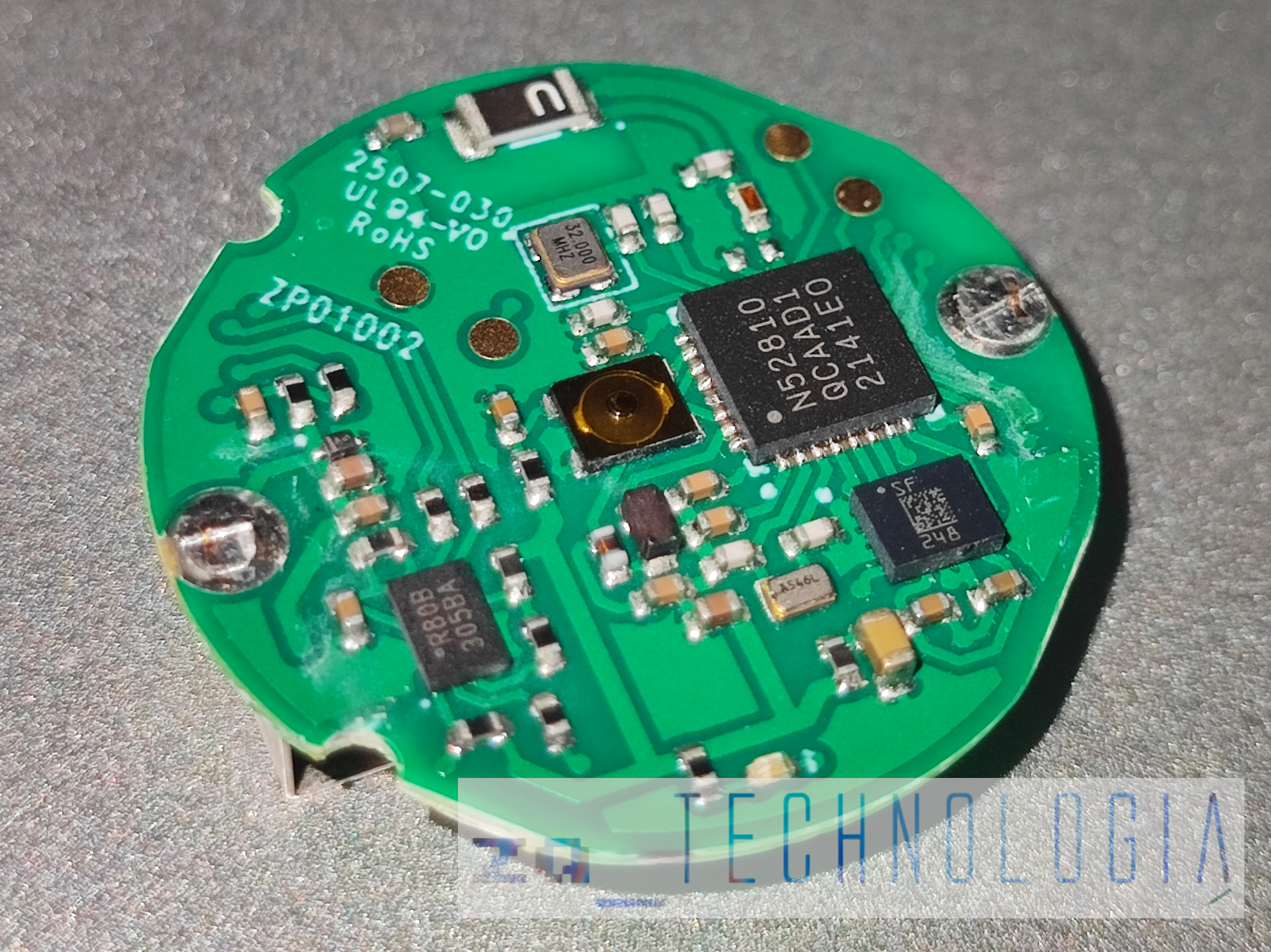
The Triki motion controller uses a Nordic nRF52810 BLE SoC and a mysterious SF 248 MEMS sensor.
The PCB also carries exposed programming pads and a 1MB Macronix MX25R8035F flash chip that appears mostly filled with FFs.
Reverse engineering used an Android phone, Bluetooth logging, USB debugging, ADB bugreport output, and Wireshark analysis of the Bluetooth logs.
The BLE communication runs over Nordic UART Service (NUS), which revealed commands for starting sensor data transmission and turning on the built-in LED.
The nRF52810 is locked, the pinout remains unconfirmed without a J-LINK programmer, and the SF 248 sensor still lacks a clear datasheet or online reference.
AI summary based on the discussion. May contain errors.
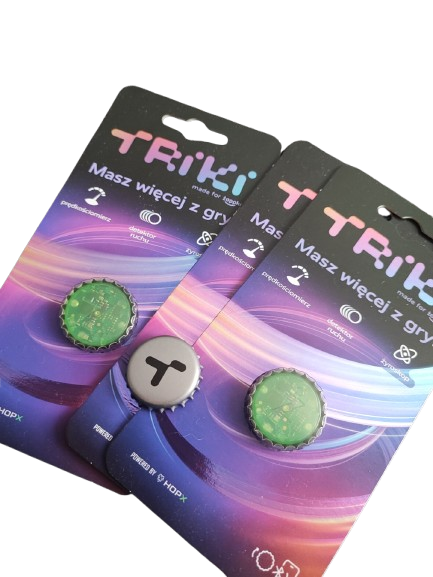
Hi everyone, today I’d like to show you the inside of the controller Tricks , which has become the flagship product of the green amphibian retail chain. It allows you to play games via the chain’s dedicated app.
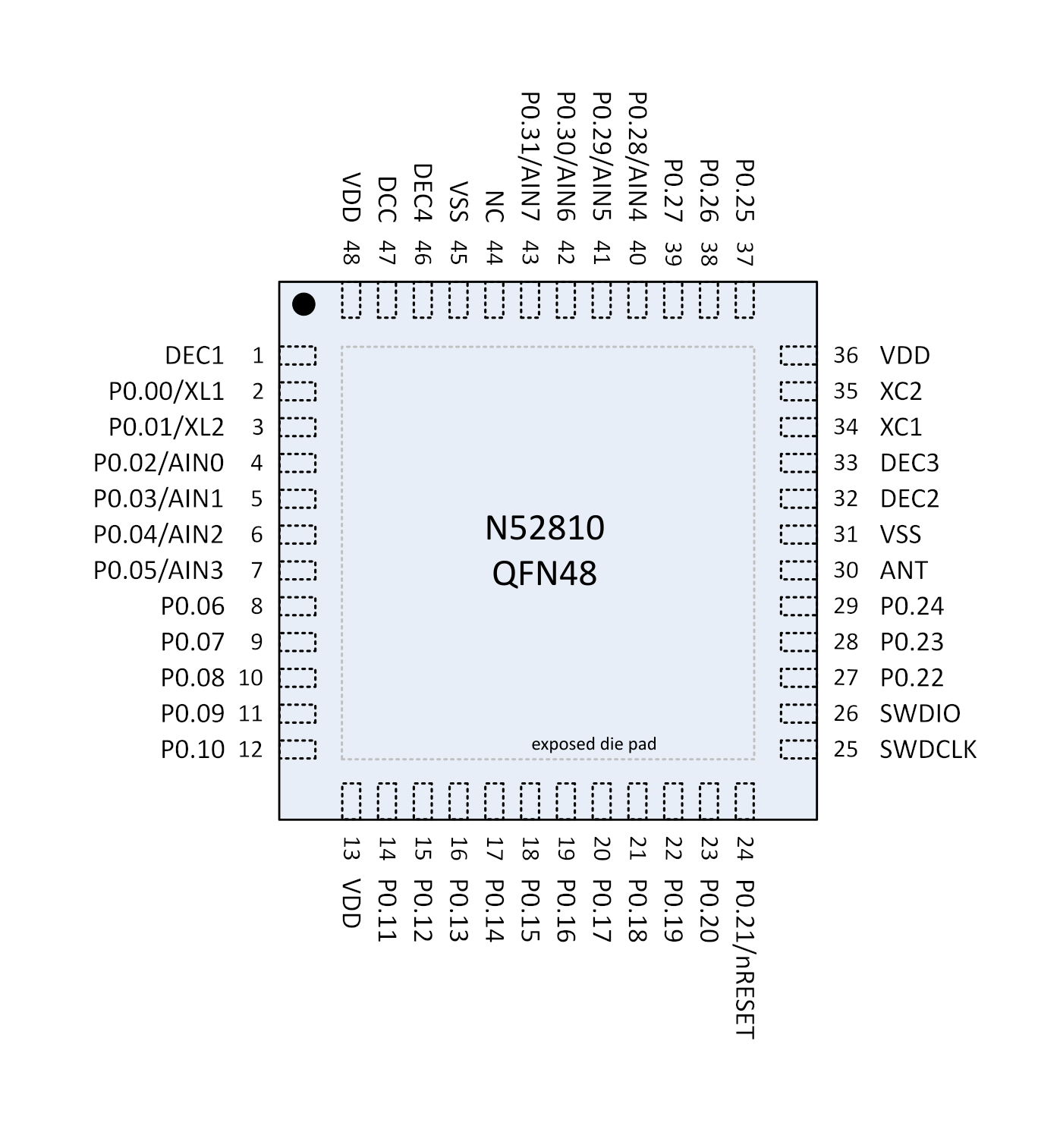
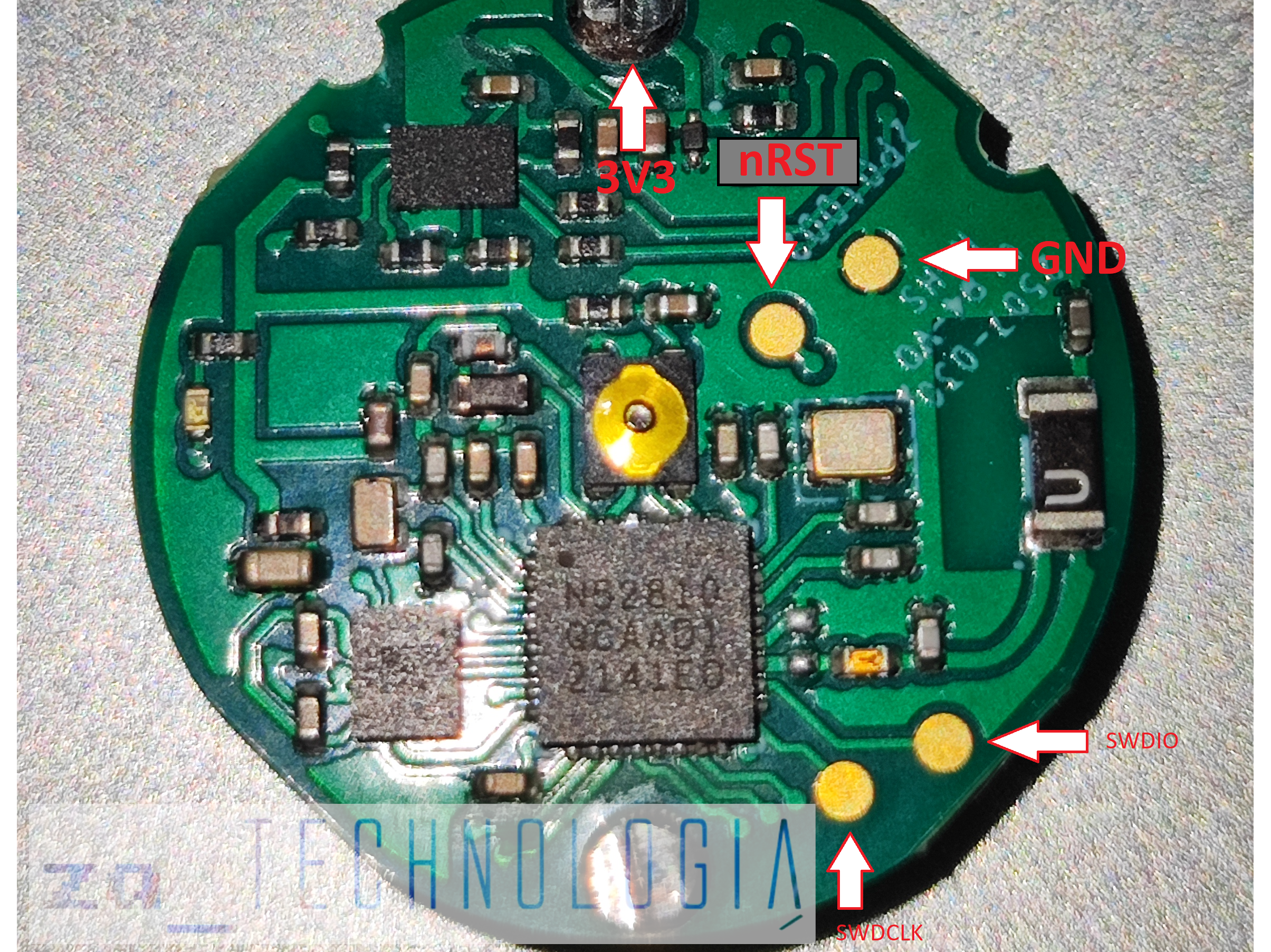
As we can see in the photo above, at the heart of the device is the SoC chip nRF52810 from Nordic Semiconductor, an energy-efficient Bluetooth Low Energy (BLE) microcontroller based on the ARM Cortex-M4. It is very popular in small IoT devices and wireless accessories. The chip is locked, and to unlock it, you need to erase its contents.
Typical applications of the nRF52810:
Quote:
Bluetooth locators (beacons, tags) Motion and activity sensors
Smart buttons and BLE remotes Fitness trackers and wearables Smartphone accessories BLE keyboards and mice
Smart locks Temperature, humidity and environmental sensors Gaming gadgets using BLE
The MEMS sensor is the SF 248 (probably LSM6DSL) , unfortunately, I haven’t been able to find any datasheet or even a mention of it online.
On the PCB, there are exposed programming pads, Unfortunately, I don’t yet have a J-LINK programmer to confirm my speculations regarding the pinout, so please take this with a pinch of salt.
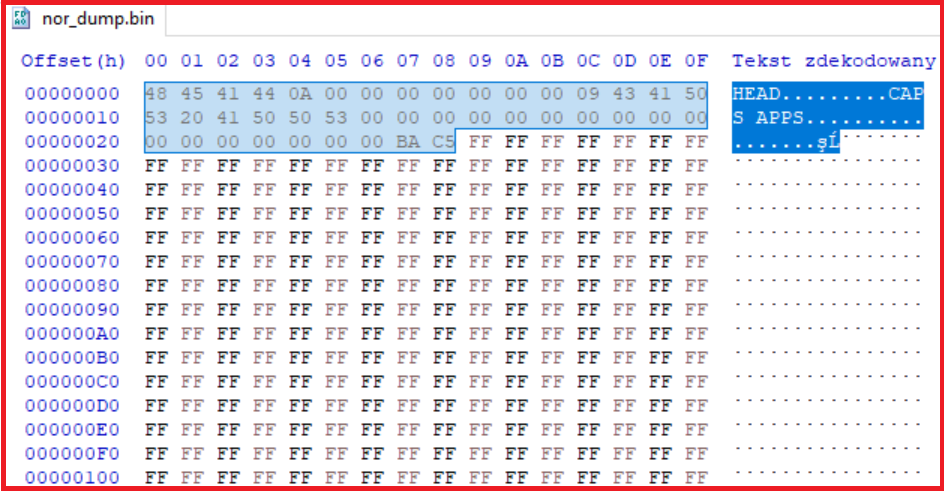
Interestingly, the board also features a FLASH memory chip, according to a dump from the user’s GitHub Piwencjusz R80B..... R80X..... ( 1MB Macronix MX25R8035F ) with some very interesting content; apart from the header shown below, the rest is filled with nothing but ‘FFs’, which might give us plenty of scope for DIY projects.
Time to reverse-engineer the BLE protocol and find out ‘how it all works’.
To eavesdrop on the communication, all I needed was an Android phone, an app dedicated to the controller, Bluetooth logging and USB debugging enabled in the developer options, and ADB on the computer, so that after listening in, a report could be generated from the system using the command:
Once the report is complete, an archive should appear log.zip on the C: drive. The Bluetooth log is located at: \FS\data\misc\bluetooth\logs .
It’s plain sailing from here – just import it into Wireshark and analyse it.
Summary: I’ve managed to find out that communication takes place via Nordic UART Service (NUS) – which command to use to start data transmission from the sensors, or even to light up the built-in LED.
Below are some example videos of what we’ve managed to achieve so far:
I won’t hide the fact that I used AI whilst working on this issue, as I’d never had any experience with the Bluetooth protocol before, although it seemed to me that it would be quite similar to Wi-Fi. Attached is an example keyboard and an HTML5 car game, in case anyone fancies having a go. In the future, I want to create a library that interprets the data and make it available so that everyone can have a go, and perhaps find a creative way to use this interesting invention. If anyone’s interested, feel free to check out my YouTube channel: #ZaTechnologią
PS Everything I’m presenting here was done for educational purposes. I really like this gadget and think it’s worth popularising.
PPS I’ve added a few interesting facts from the user Piwencjusz GitHub Useful links:
Well, I’ve got to say it’s great that you’ve given it a go, even using artificial intelligence. It’s the end result that counts, and you’ve achieved success. You get a thumbs-up from me.
Hi, I’ve also started playing around with my Triki and (with the help of AI, too) I’ve written some simple code that displays graphs from the gyroscope and accelerometer. It might be useful to you as well for further exploration of this controller, so I’m attaching it here. (the graph labels may not be correct)
Attachments:
wykresy.zip(4.04 KB)
You must be logged in to download this attachment.
Practical applications for Triki motion controller
Cheers for sharing the mods! There’s no shame in using AI – it’s a handy tool, so you’ve got to make the most of it! A really cool YouTube channel! Who knows, maybe thanks to the amphibian we’ll get the nation a bit more into electronics and practical applications that are useful in everyday life.
After all, ‘Płaz’ encourages people to play, but ‘Triki’ could have plenty of other uses. @ElektrodaBot, could you tell us what ‘Triki’ can be used for – what practical applications make life easier, provide support, or perhaps even have business applications?
Thanks for sharing the mods! There’s no shame in using AI – if you’ve got a hammer, you’ve got to use it! A really cool YouTube channel!
Who knows, maybe thanks to the amphibian we’ll instil a bit of ele in the nation...
A direct answer to the question
These tricks can be viewed not as a ‘game controller’, but as a ready-made, cheap wireless BLE module with an IMU motion sensor, an LED and a button or buttons . In practice, this means: a small gesture controller, a beacon, a vibration sensor, an IoT remote control or an educational module.
The most interesting practical applications:
- a gesture remote control for computers, presentations and multimedia , - smart home controller via BLE/MQTT/Home Assistant , - shock, tilt and drawer/door-opening sensor , - assistive interface for people with limited mobility , - simple activity, rehabilitation and posture sensor , - wireless vibration sensor for machinery and tools , - controller for robots, RC models, vehicles and interactive installations , - educational tool for learning about BLE, MEMS, signal filtering and IoT , - a business gadget for events, exhibitions, escape rooms, training sessions and gamification .
The greatest value lies in the fact that the hardware is already complete: the casing, battery, BLE, antenna, nRF52810 microcontroller, motion sensor and LED. All you need to do is write the software layer to receive data via the Nordic UART Service.
---
Detailed analysis of the problem
What Triki actually has
Based on the information available so far in this thread, it appears that Triki features:
- Nordic nRF52810 An ARM Cortex-M4 microcontroller with Bluetooth Low Energy. Suitable for small IoT devices, remote controls, beacons, sensors and simple HID/BLE interfaces.
- SF248 MEMS sensor Most likely an IMU-type chip, i.e. an accelerometer + gyroscope. Since we’ve managed to obtain data from both the gyroscope and the accelerometer, we effectively have a 6-axis motion sensor.
- BLE communication via Nordic UART Service (NUS) This is very convenient, as on the PC, Android, Raspberry Pi or ESP32 side, the transmission can be treated almost like a simple serial port over BLE.
- Software-controlled LED It may seem like a minor detail, but in practical applications it provides very useful feedback: connection status, an alarm, gesture confirmation, low battery, etc.
- SWD pads on the PCB If the pinout is confirmed and there is no read/write lock, it may be possible to flash your own firmware. But even without that, simply using the factory firmware via NUS already offers plenty of possibilities.
---
1. Gesture remote control for a computer
This is one of the simplest and most useful applications.
Examples
- Presentation remote control - turn clockwise: next slide, - turn anti-clockwise: previous slide, - shake: black screen / pause, - click: confirm.
- Air mouse - tilt along the X-axis: move the cursor left/right, - tilt along the Y-axis: move the cursor up/down, - button: click, - quick gesture: scroll.
for keyboard and mouse emulation, - a browser-based application using the Web Bluetooth API, - a small programme in C# on Windows.
This is a good first demonstration project, as it requires no additional electronics.
---
2. Smart home control
This can be a very handy remote control for Home Assistant or your own automation system.
Example gestures
Code: text
Log in, to see the code
Architecture
Code: text
Log in, to see the code
The nRF52810 does not have Wi-Fi, so a gateway is required to connect to the IP world:
- Raspberry Pi, - laptop/mini-PC, - ESP32 with BLE and Wi-Fi, - Android phone as an intermediary, - web browser with Web Bluetooth.
Practical example
Triki is lying by the bed. A single shake turns the lights off, a twist adjusts the brightness of the bedside lamp, and holding it down or tilting it for longer activates the ‘night’ scene.
This is much more natural than searching for your phone and launching an app.
---
3. Opening, movement and impact sensors
The accelerometer allows you to turn Triki into a simple wireless intrusion sensor.
Possible applications
- a drawer containing documents, - a toolbox, - a cellar door, - a window, - a bicycle in the garage, - a suitcase, - a parcel during transport.
Operating logic
Code: text
Log in, to see the code
Example criteria:
- sudden surge in acceleration, - change in angle relative to gravity, - series of vibrations, - movement following a long period of inactivity.
This is no substitute for a certified alarm, but as a home or workshop project it is very interesting.
---
4. Support for the elderly and those with limited mobility
This is where Triki can have some really useful applications.
Possible functions
- Help request button/gesture A shake or a specific gesture sends a notification to the carer.
- Fall detection A sudden acceleration, followed by a lack of movement for, say, 30–60 seconds, may trigger an alarm.
- Alternative computer control interface For someone who cannot use a mouse comfortably, Triki, when attached to the hand, head or armrest, can control the cursor or trigger simple commands.
- Remote control for the bed, lamp, TV and blinds One controller and a few simple gestures.
Important disclaimer
Common sense must be exercised when using this for care or medical purposes. As a domestic aid, a prototype or an additional alert system — by all means. As the sole safety system for a sick person — no, as the device is not certified for this purpose.
---
5. Rehabilitation, activity, exercises
The IMU enables the detection of repetitive movements. This is very well suited to simple rehabilitation exercises.
Examples
- wrist exercise repetition counter, - range of motion monitoring, - simple rehabilitation game, - balance exercises, - movement pace control, - detection of excessively sudden movements.
Example:
Code: text
Log in, to see the code
This could be a great educational project with real-world applications: electronics + programming + biomechanics + gamification.
---
6. Posture monitor
The tags can be attached to a harness, T-shirt, wristband or rucksack and used as a tilt sensor.
Example of how it works
1. The user sits up straight. 2. The app records the reference position. 3. If the tilt angle exceeds, say, 15–20° for a prolonged period, an alert is triggered. 4. The LED flashes or the phone emits a quiet beep.
You don’t even need a gyroscope here — the accelerometer alone, which measures the direction of the gravitational vector, is sufficient to detect static tilt.
---
7. Wireless vibration sensor for workshops and small businesses
This is a very interesting ‘semi-industrial’ application.
Applications
- monitoring the operation of a motor, - a pump, - a fan, - a compressor, - a grinder, - a bench drill, - a 3D printer, - a generator, - a washing machine or tumble dryer in a domestic setting.
What can be measured
- whether the device is operating, - how long it has been operating, - whether vibrations have increased compared to normal levels, - whether an impact has occurred, - whether the machine has been moved, - whether an unusual vibration pattern is present.
Business example:
Code: text
Log in, to see the code
Of course, professional vibration diagnostics require the appropriate bandwidth, sampling frequency, calibration and sensor mounting. But for simple ‘working/not working’ or ‘vibrating more than usual’ detection, such a gadget may suffice.
---
8. Overload and transport logger
Following firmware modifications or when transmitting continuously to the Triki receiver, it can be used as an impact logger.
Examples
- whether a parcel was thrown, - whether a crate was knocked over, - how hard a bike or scooter braked, - whether equipment in a car shifted during transport, - recording impacts on a suitcase.
The limitations here will be memory, battery life and access to data. If the factory firmware only streams data, a receiver will be needed nearby. If it were possible to flash custom firmware, a local event buffer could be created and the data read later via BLE.
---
9. Controller for robotics and RC models
The Triki is ideally suited as a simple wireless controller.
- robot arm: - gyroscope controls the rotation axis, - accelerometer controls the position, - button activates the gripper.
Typical setup
Code: text
Log in, to see the code
When it comes to models and robotics, you need to bear in mind delays and reliability. For fun and BLE demonstrators, this is sufficient. For critical applications, it is better to have an additional physical ‘stop’ switch.
---
10. Interactive exhibitions, events and marketing
There are very real business applications here.
Examples
- a trade fair stand where a customer rotates a physical prop and a 3D model rotates on the screen, - gesture voting during a presentation, - an interactive game at an event, - an escape room: you have to perform the correct sequence of movements, - a museum: shake or rotate an item to trigger an animation, - a shop: the controller as a cheap ‘magic token’ to activate content.
From an event company’s perspective, this is great because the equipment is cheap, compact and requires no cables. And for the client, it looks impressive.
---
11. BLE beacon with additional motion data
The nRF52 is very well suited to the role of BLE beacons. It can act as an identifier, but one enhanced with motion data.
Examples
- locating tools in a workshop, - identifying a person at a training course, - an attendance token at an event, - a stock tag in a warehouse, - confirming task completion with a gesture, - detecting when an item is taken out of a zone.
Diagram:
Code: text
Log in, to see the code
This will not provide precise positioning like UWB, but it is sufficient for determining whether an item ‘is in this zone’ or ‘has left the zone’.
---
12. MIDI controller and musical applications
A very interesting, less obvious direction.
Examples
- a hand movement changes the synthesiser’s filter, - tilting controls the delay/reverb effect, - shaking triggers a sample, - rotating changes the pan, - a button starts a loop.
Schematic:
Code: text
Log in, to see the code
This could be a great project for electronic musicians. A ‘gesture controller’ like this normally costs considerably more than a promotional gadget.
---
13. Education: a very good kit for learning electronics
Here, the ‘Amphibian’ could actually ‘instil an interest in electronics in the nation’.
With just one small device, you can teach:
- Bluetooth Low Energy, - Nordic UART Service, - protocol reverse engineering, - Bluetooth login from Android, - frame analysis in Wireshark, - working with an IMU, - signal filtering, - gesture detection, - the basics of kinematics, - communication with a browser via Web Bluetooth, - integration with Python, Node-RED, MQTT and Home Assistant, - microcontroller programming via SWD, if you manage to delve deeper.
This is a very rewarding topic for a series of workshops:
1. ‘Read data from Triki’. 2. ‘Plot an accelerometer graph’. 3. “Detect a shake”. 4. “Make a remote control for slides”. 5. “Connect to Home Assistant”. 6. “Control a robot”. 7. “Write your own firmware”.
---
Proposed library / SDK for the community
The greatest progress would come from creating a simple library that hides the details of BLE and frames.
Useful functions
Code: text
Log in, to see the code
A sensible data structure
Code: text
Log in, to see the code
It would be a good idea to prepare versions for at least:
- JavaScript / Web Bluetooth, - Python / Bleak, - ESP32 / Arduino or ESP-IDF, - possibly C# for Windows.
---
Gesture detection — a practical approach
You don’t need any artificial intelligence to get started. Simple thresholds and filtering are enough.
Tilt
The angle can be estimated using an accelerometer:
Code: text
Log in, to see the code
This is sufficient for controlling a lamp, a blind or a presentation.
Shake
We calculate the acceleration module:
Code: text
Log in, to see the code
If
a
deviates sharply from 1 g and there are several changes in direction within a short time, we have a shake.
Tap
A short acceleration pulse, e.g.:
Code: text
Log in, to see the code
Idle
Low variance in the accelerometer and gyroscope for a few seconds:
Code: text
Log in, to see the code
Rotation
Here we use the gyroscope:
Code: text
Log in, to see the code
Only later can you experiment with a complementary filter, a Kalman filter or gesture classification using machine learning.
---
Limitations worth bearing in mind
1. The exact layout of the SF248 is unknown
As there is no data sheet, the following must be determined experimentally:
- the accelerometer’s range, e.g. ±2 g, ±4 g, ±8 g, - the gyroscope’s range, e.g. ±250/500/1000/2000 °/s, - the sampling frequency, - data scaling, - byte order, - offsets, - noise, - gyroscope drift.
Without this information, the measurements will be rather approximate.
2. Gyroscope drift
After integration, the gyroscope ‘drifts’. It’s good for short-term orientation, but the error accumulates over time. That’s why, to determine tilt reliably, it needs to be combined with an accelerometer.
3. BLE is not a cable
BLE is energy-efficient, but:
- it has delays, - it can lose packets, - it depends on the phone/computer, - its range depends on the casing, the antenna and the surroundings.
For controlling a lamp — OK. For an emergency stop on a large machine — not as the sole communication channel.
4. Battery
If Triki is constantly streaming IMU data at a high frequency, the battery will drain much faster than in beacon/standby mode. For home sensors, it is worth using the following mode:
Code: text
Log in, to see the code
However, this requires firmware support or clever use of what is already in the factory software.
5. Legal issues and security
For hobbyist use — complete educational freedom. For commercial implementation, you must be mindful of:
- trademarks and branding, - terms of use for the application/protocol, - device certification following firmware modification, - BLE data security, - medical and industrial applications, where standards and responsibility for system operation are required.
---
The best projects ‘to get you started’
If I had to choose a few projects that best demonstrate Triki’s potential, I would suggest:
Project
Difficulty
Practical effect
Accelerometer and gyroscope graph
low
education, diagnostics
Presentation remote control
low
practically useful
Gesture-based volume control
low
instant ‘wow’ effect
Drawer/door alarm
medium
home use
Integration with Home Assistant
average
home automation
Exercise repetition counter
average
rehabilitation/sport
Controlling a toy car with ESP32
average
robotics
Machine vibration sensor
medium/high
workshop use
MIDI controller
medium
music/installations
Custom firmware via SWD
high
full hardware control
---
My suggestion for the direction of this thread
The most valuable thing for the community would be to create a package:
1. Description of the NUS Triki protocol Commands, responses, frame formats, sample logs.
2. Python and JS library A simple API for reading data.
3. A few ready-made examples - presentation remote control, - 3D orientation chart, - LED control, - motion alarm, - MQTT for Home Assistant.
4. Table of known hardware versions - PCB designation, - IMU chip designation, - firmware version, - any differences in the bezels.
5. Description of SWD pins - VCC, - GND, - SWDIO, - SWDCLK, - RESET, if available.
This turns the toy into a community-driven mini-ecosystem: ‘SDK Tricks’. And this could make for a really cool educational project on Elektroda.
---
Summary
Triki is a good example of a device which, from a marketing perspective, is a ‘game controller’, but technically is a fully-fledged, small IoT module with BLE and an IMU. I see the greatest potential in three areas:
1. Education and popularisation of electronics — BLE, sensors, reverse engineering, programming. 2. Practical domestic and assistive applications — gesture-controlled remote, alarm, support for the elderly, rehabilitation. 3. Business prototypes — events, interactive exhibitions, vibration monitoring, logistics, gamification.
If the thread’s author were to make available a library for interpreting data from Triki, the barrier to entry would be significantly lowered. Then even those with no experience of BLE would be able to create their own application in a few dozen lines of code.
You can call me in any topic by writing @ElektrodaBot. Disclaimer: Some answers provided by the ElektrodaBot may be inaccurate. Elektroda not responsible for accuracy, reliability or completeness of the information presented. All ElektrodaBot responses should be verified by the user. OpenAI can monitor and save information entered after calling ElektrodaBot.
@p.kaczmarek2 what do you think? Are we writing a library, or rather coding a vibe? I wonder how many of these they’ve sold and are selling; I suspect that before long everyone will have one in their pocket.
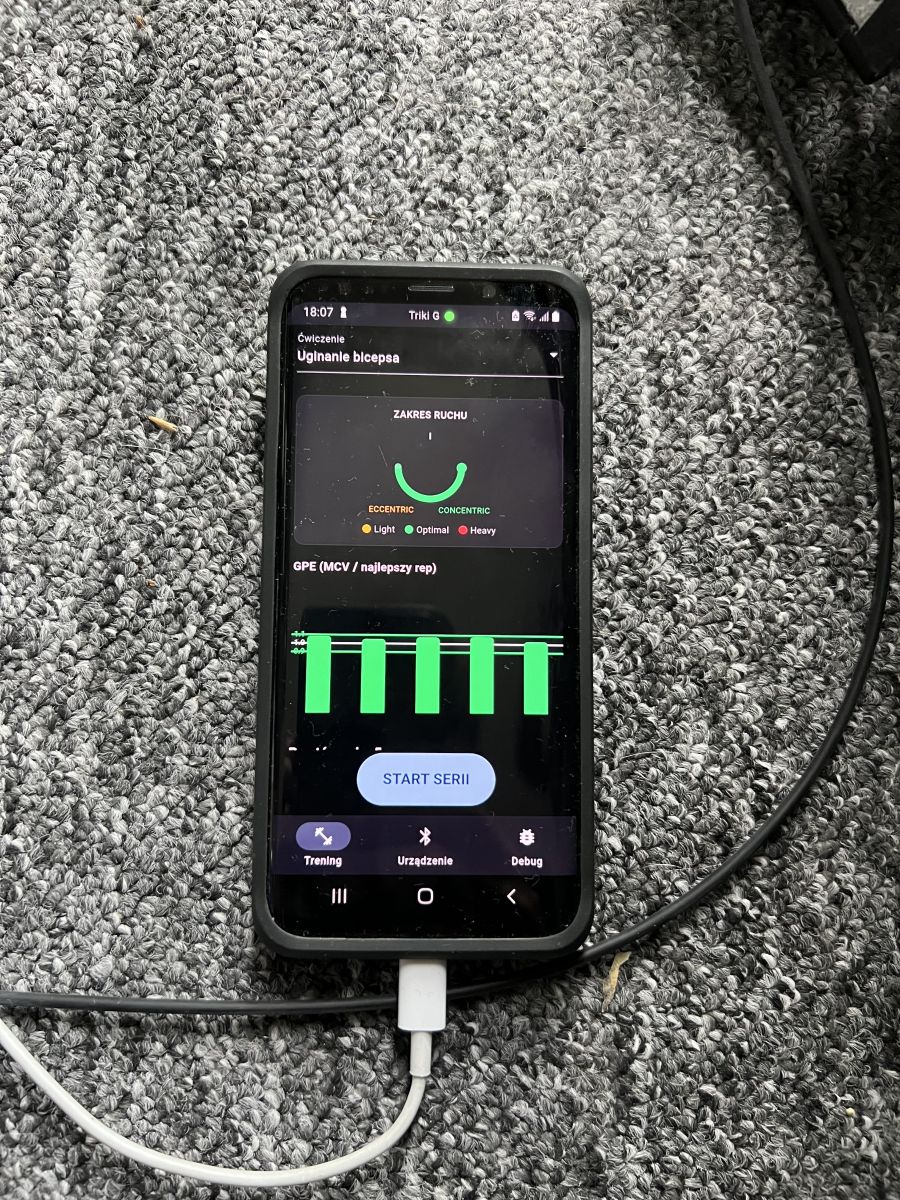
Cheers, once I’ve got hold of the sensor, I’ll get to work on it. I’m planning to turn it into an acceleration sensor for resistance training at the gym – i.e. Velocity-Based Training – plus a mobile app.
Great, once you’ve made it, share it in the DIY section – you don’t need to share the code if you can’t; what’s more important are interesting applications and practical projects. The cool thing about this is that it’s a ready-made module with a casing – something you’d normally have to have made in China, but we’ve got it right here.
I suspect it’s being sold close to production cost including VAT, as it’s meant to serve a marketing purpose for their app.
I’m glad to see some response to this thread. @gulson, on the day of the launch, you could snap it up for one zloty once you’d met the conditions (it’s possible the offer might happen again). The situation on AliExpress looks very interesting, because if you search for ‘Holyiot NRF52810’, you can find a very similar device with a different IMU.
Thanks for the info – it’s actually on AliExpress.
You know, if you tell the Chinese bloke, he’ll just slap something else on there straight away I reckon they chose a better IMU after testing it.
Compared to AliExpress, what’s more important is that they’re already in Poland, tested and verified, with a returns policy, easy to buy just round the corner, and they’re aimed at Generation Z – plus there’s some interesting marketing targeted at Generation Z all around.
The module might help popularise electronics a bit.
@Ciolololo I’ve checked this code and something isn’t quite right. Attached is the code for debugging, live parameter preview and log generation that I used a few days ago.
Attachments:
debug.rar(4.75 KB)
You must be logged in to download this attachment.
From a YouTube video by the user “Ziemniak”, we can learn that Triki is designed and assembled in Poland
Does ‘assembled’ mean that every component is soldered, or does it mean that a ready-made electronics module is inserted into the casing and then heat-sealed into a blister pack? Because the video only shows the finished module.
It looks to me as though the entire electronics module is shipped over from our brothers in the East; here, we just upload the firmware, test it, pop it into a case with the green animal logo and seal it in blister packaging. Oh, and then there’s adding the battery. That’s the whole ‘assembly’ process. In fact, if you could sort it out with the supplier, you could even have the software flashing and testing done at the supplier’s end, and we’d just be responsible for the blister packaging. But there’s always a risk that something might not upload properly over there, so it’s good that they pay close attention to local testing.
If you like, they’ll make you modules in the East that aren’t quite as ready-made. It’s just a question of how you utilise them and good marketing (which happens to be our strong point).
I think that today’s drone controllers offer better handling, accuracy and safety. But wouldn’t it be interesting to have a ‘mouse’ like that for giving slide presentations, where pressing it would highlight the cursor?
I was wondering what sort of rubbish Żabka was promoting – some sort of controller for those daft games in their app. But it turns out we’ve got a pretty cool gadget here, with ‘open’ communication.
You could, for example, make a tiny fall detector for an elderly person, provided the BLE range is reasonable.
I wonder how sensitive this MEMS sensor is – would it, for instance, detect a single misfire amidst the vibration noise from the engine’s revs?
I’ve had a look at various projects on GitHub and I like the solution from kumpelstachu Link (3D orientation). I can’t wait for the wizards at elektroda to get to grips with this topic.
I’ve managed to sort out the trickiest bit in terms of the ‘algorithm’ involved in signal processing, so that Triki can orientate itself in space whilst, for example, doing dumbbell curls