FAQ
TL;DR: 32 Gbit/s Ultra M.2 triples SATA III throughput; “direct CPU link unlocks full Gen3 x4 speed” [Elektroda, exti, post #13597421] Expect ~1.16 GB/s real-world reads, but booting requires BIOS NVMe support. Why upgrade? Lower latency, no SATA cables.
Why it matters: Choosing the right slot prevents spending on bottlenecked SSDs.
Quick Facts
• Interface: PCIe 3.0 x4, 32 Gbit/s theoretical bandwidth [Elektroda, exti, post #13597421]
• Measured speed: Samsung XP941 ≈ 1.16 GB/s sequential read [Elektroda, exti, post #13597421]
• Typical adapter cost: US$10–20 for x4 card (Amazon PCIe M.2 Adapter Listings)
• Boot support: UEFI 2.3.1+ with NVMe module required [Intel, 2020]
• SATA III cap: 6 Gbit/s (≈ 550 MB/s real-world) [SATA-IO, 2019]
1. What is Ultra M.2 and how does it differ from standard M.2?
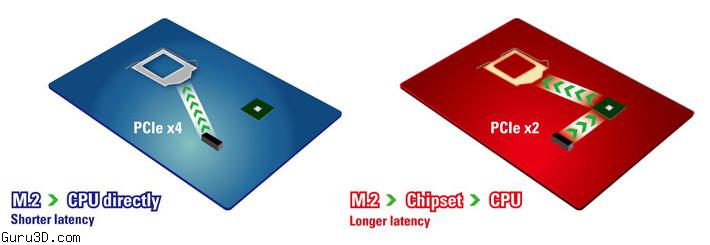
Ultra M.2 uses four PCIe 3.0 lanes wired straight to the CPU. Standard consumer M.2 slots on early Z97/H97 boards use two PCIe 2.0 lanes routed through the chipset. The result is 32 Gbit/s versus 10 Gbit/s bandwidth and lower latency
[Elektroda, exti, post #13597421]
2. How much faster is Ultra M.2 than SATA III?
Ultra M.2’s 32 Gbit/s pipe is over five times wider than SATA III’s 6 Gbit/s link. In practice, a Samsung XP941 hits 1.16 GB/s, about 46 % faster than the same drive in a two-lane M.2 slot and roughly double high-end SATA SSDs ~560 MB/s
[Elektroda, exti, post #13597421]
3. Do I need a special SSD for Ultra M.2?
Any NVMe or AHCI M.2 2280 SSD that supports PCIe 3.0 x4 can exploit Ultra M.2 bandwidth. Drives limited to PCIe 2.0 or SATA M.2 will not exceed their own controller ceilings, even in the faster slot [Samsung Datasheet, 2021].
4. Can I boot an operating system from an Ultra M.2 SSD on an adapter card?
Yes, if the motherboard’s UEFI includes NVMe support. Many Z97 boards received updates enabling this. Without that module, the SSD appears only after boot, blocking OS start-up [Intel, 2020]. "Firmware, not the adapter, decides bootability"
[Elektroda, oskar777, post #13598195]
5. Are PCIe M.2 adapter cards expensive?
No. Plain x4 adapters without a heatsink cost about US$10–20, and models with cooling run near US$25 [Amazon PCIe M.2 Adapter Listings]. The SSD itself remains the major expense.
6. Which motherboards ship with native Ultra M.2?
ASRock Z97 Extreme 6 introduced the first Ultra M.2 slot. Later boards like X99 Taichi, Z370 Extreme 4, and many AMD X570 boards also expose CPU-linked PCIe 3.0/4.0 x4 M.2 sockets [ASRock offers Ultra M.2...].
7. Does higher bandwidth lower game or app load times?
Large file transfers gain the most. Benchmarks show NVMe drives shaving 15–30 % off level loads compared with SATA SSDs. Smaller random reads see modest gains because CPU scheduling and storage stacks dominate latency [GamersNexus, 2019].
8. What are the main limitations or edge cases?
Edge case: Some early M.2 AHCI drives throttle when adapter thermals exceed 70 °C, cutting speed by 40 % until cool-down [Tom’s Hardware, 2018]. Another failure point is BIOS lacking NVMe boot, leaving the drive visible only as secondary storage [Intel, 2020].
9. How do I install a PCIe M.2 SSD?
- Insert the SSD into the adapter at a 30° angle and secure the screw.
- Slot the card into a free PCIe 3.0 x4 or higher lane.
- Enable “PCIe/NVMe boot” in UEFI, then install or clone your OS. The drive now appears like any other disk.
10. How does Ultra M.2 speed compare with RAM?
11. Is it still worth buying SATA SSDs?
For budget or secondary drives, yes. SATA models remain cheaper per gigabyte and universally compatible. However, heavy media editing or VM users will feel NVMe responsiveness and should choose Ultra M.2 when possible [PCMag, 2021].
12. Does Ultra M.2 increase system power draw?
An NVMe SSD on PCIe 3.0 x4 typically draws 5–7 W under load, about 2 W more than a SATA SSD. Idle consumption is similar, around 50 mW with power states enabled [Western Digital Datasheet, 2022].
AI summary based on the discussion. May contain errors.






Comments
so now it is better to buy an SSD to PCIe and put it in the rail than to connect the SSD with SATA [Read more]
From the very beginning, this solution was better. [Read more]
And more expensive - including the snag. [Read more]
Adapters as I looked at this interface are not very expensive, the problem is that I have not encountered any that would allow the system to boot. Does anyone have any link to such a working adapter? [Read more]
These drives will not be as fast as RAM for a long time [Read more]