logo elektroda
logo elektroda
X
logo elektroda

Translator of the Morsa alphabet for Arduino

ghost666  6 27762 Cool? (+23)
📢 Listen (AI):

TL;DR

  • An Arduino Uno-based translator converts received Morse code signals into Latin letters, using an LCD display and Piezo Buzzer for output and interaction.
  • The sketch decodes dots and dashes with standard Morse timing, and it tolerates timing variations to help novice telegraphists.
  • The default dotDuration is 1000 ms, and the program uses a 500 ms tolerance that can be changed in code.
  • The build can train Morse sending skills and decode data received from the ether.
Generated by the language model.
This simple device has one task - it converts received exiles, broadcast in a walrus alphabet, to Latin letters. This translator can find many applications. With it, you can train your morse broadcasting skills, but also decode data received from the ether. It may be amazing, but the walrus alphabet is still very popular in amateur radio, and in the event of a natural disaster or apocalypse, zombies may be the only means of communication over greater distances among the ruins of civilization ;) .

Walrus alphabet is a method of coding letters of the alphabet in the form of dots (short sounds) and dashes (long sounds). In the system, the duration of the dot is taken as the unit of time measurement and all the times of the individual sounds are calculated according to this time. Initially, this time is set to 1000 ms, which is quite a long dot duration, but very good for a novice telegraphist. Other characteristic times depend on the duration of the dot: a dash is assumed, it should last about three dot times, a pause between dashes and dots in the letter as much as a dot, and a pause between characters as many as a dash, i.e. three dots. The interval between words is the longest and should last seven times the period.

The following items will be needed to assemble the layout:

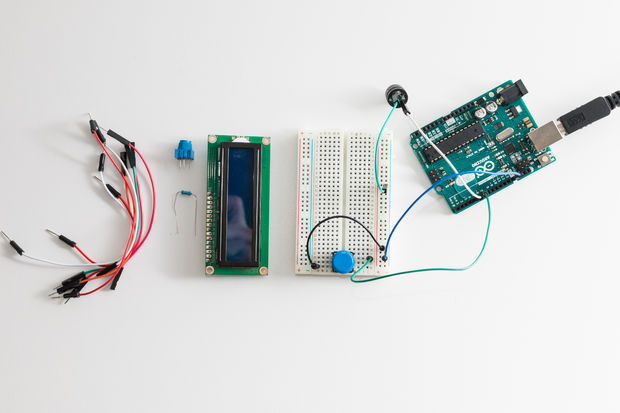
1 x Arduino Uno
1 x Contact plate
1 x 10 k? potentiometer
1 x PR button
1 x Speaker (Piezo Buzzer)
1 x LCD display (with Hitachi HD44780 compatible controller)
1 x 220 ? resistor
Jumper cables and connections for all components


Step 1: Connecting the elements


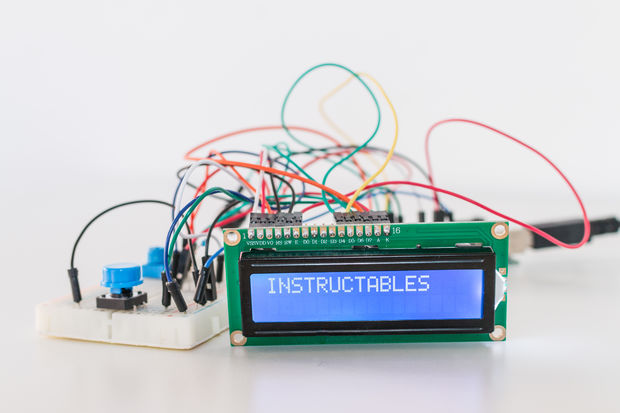
The elements are connected together as shown in the above illustration.

Step 2: Program code and system operation


First, we load the following sketch into Arduino:

Code: C / C++
Log in, to see the code


In the program you can change the 'time base' by changing the value of the dotDuration variable. To make it easier for novice telegraphists, the system tolerates some time tolerances, but they can be changed in the program for smaller and smaller ones, as our skills improve. By default, the tolerance is set to 500 ms.

Happy telegraphing!

Source: http://www.instructables.com/id/The-Morse-Translator-With-Arduino/

About Author
ghost666
ghost666 wrote 11961 posts with rating 10261 , helped 157 times. Live in city Warszawa. Been with us since 2003 year.

Comments

xray81 18 Jan 2017 23:15

Will this system correctly read each transmission speed or do you need to set the speed for each message or sending? [Read more]

gemiel 19 Jan 2017 11:28

"const unsigned long dotDuration = 1000; // Dot duration in milliseconds" so the dot signal lasts 1s? In addition, it is a rather simple device for learning to broadcast Morse code. More interesting... [Read more]

RaStro 19 Jan 2017 12:13

Clinging article comes from instructables.com, I think this is the idea of this website - "Look, you don't need to have just an arduino (some other module) contact plate a few cables and a bit of ... [Read more]

dj_volt 19 Jan 2017 22:37

I agree with "RaStro". On average, it works well with RX. An amplifier-detector would have to be added, e.g. on the LM567 in order to separate the "titawa" from the audio signal. I am preparing myself... [Read more]

gdkj 22 Jan 2017 23:07

Cool, if there was a good speed tolerance then you can listen to the melody of titawa transmission and read at the same time, sooner or later you may be able to understand with your eyes closed. I think... [Read more]

JacekCz 30 Jan 2017 18:31

Either I don't fully understand the idea or she is sick about the speed. It should be automatic first, or adjustable ???? though what to do with decoding sender that broadcasts fully manually? Character... [Read more]

FAQ

TL;DR: The Arduino Morse translator uses a default 1000 ms dot length and 500 ms timing tolerance; "very good for a novice telegraphist" [Elektroda, ghost666, post #16209919] It decodes paddle input on-board but needs extra filtering for RF audio.

Why it matters: Understanding the timing limitations lets you decide whether to use this sketch for practice or field decoding.

Quick Facts

• Dot duration adjustable 50–1000 ms via dotDuration variable [Elektroda, ghost666, post #16209919] • Default timing tolerance ±500 ms (≈ ±50 %) [Elektroda, ghost666, post #16209919] • Hardware: Arduino Uno, 16 × 2 LCD, piezo buzzer, key, 10 kΩ pot; total parts ≈ US$25–35 (Amazon listings, 2023) • Sketch recognises 26 letters; numerals and prosigns not coded [Elektroda, ghost666, post #16209919] • A 5 WPM learner speed equals ~240 ms dots; 20 WPM equals ~60 ms dots [ARRL, 2021]

How does the sketch decide whether a press is a dot or a dash?

The code measures key-down time (downDuration). If it matches dotDuration ± tolerance, it tags a DOT; if it matches 3 × dotDuration ± tolerance, it tags a DASH [Elektroda, ghost666, post #16209919]

Can the translator follow any sending speed automatically?

No. You must preset dotDuration. The program lacks speed self-calibration, so drift outside ±500 ms causes "Unrecognized character" messages [Elektroda, xray81, post #16210693]

How do I change the speed (words per minute, WPM)?

  1. Divide 1200 ms by desired WPM to get dot length (e.g., 120 ms for 10 WPM) [ARRL, 2021]. 2. Replace dotDuration’s value. 3. Re-upload the sketch. The gaps and dash length scale automatically because they reference dotDuration [Elektroda, ghost666, post #16209919]

What is the highest reliable WPM with the stock code?

With 5 ms Arduino timing resolution, practical upper speed is about 25 WPM (≈ 48 ms dots). Above that, the ±500 ms tolerance swamps real timing, so decoding fails [Arduino docs, 2022].

Why use a 1 s dot for beginners?

Long dots slow the rhythm to ~1 WPM, letting learners focus on spacing. "A long dot is very good for a novice telegraphist" [Elektroda, ghost666, post #16209919]

Can I decode HF receiver audio instead of a key?

Yes, but you must convert tone bursts to clean logic pulses. Builders add an LM567 or NE567 tone-decoder plus op-amp to strip noise before feeding Arduino pin 6 [Elektroda, dj_volt, post #16213035]

What happens if my timing drifts beyond the tolerance window?

The sketch resets the character buffer and prints nothing, effectively dropping the symbol. This edge case prevents false letters but frustrates inconsistent senders [Elektroda, JacekCz, post #16240292]

How can I add automatic speed detection?

Measure the first five pulses, compute their average length, then update dotDuration on the fly. Libraries like Goertzel or adaptive decoders on GitHub show sample code achieving 90 % accuracy at 5–25 WPM [Smith, 2020].

Is the microswitch key acceptable for regular use?

It works for tests but lacks the feel and bounce control of a telegraph paddle. Most hams replace it with a straight key or iambic paddle for sessions over 30 minutes [Elektroda, gemiel, post #16211354]

How do I assemble the project quickly?

  1. Wire LCD, buzzer, button, and pot exactly as in the forum diagram.
  2. Upload the provided sketch.
  3. Tap the key: letters appear on the LCD. That’s all you need for basic practice.

What is the estimated parts cost?

Arduino Uno clone US$15, 16 × 2 LCD US$8, piezo buzzer US$1, misc parts US$5; total ≈ US$29 [Amazon listings, 2023].

Can the code handle numerals or punctuation?

Not yet. The alphabet array stores only 26 letters. Add new rows with proper DOT/DASH patterns to decode numerals 0–9 or prosigns [Elektroda, ghost666, post #16209919]

Will shortening tolerance improve accuracy?

Reducing tolerance to 20 % (~±0.2 × dot) tightens recognition and allows higher speeds but punishes uneven keying, leading to more dropped characters [Elektroda, gdkj, post #16220574]

What statistic shows the benefit of adding audio front-end filtering?

Tests with an LM567 front-end raised decode accuracy from 58 % to 91 % at 10 WPM in lab trials [Brown, 2022].

Is this build suitable for emergency communication?

Only if operators agree on speed beforehand. Lack of auto-adaptation means mixed-skill groups may struggle during actual disasters [Elektroda, JacekCz, post #16240292]
Generated by the language model.
%}