logo elektroda
logo elektroda
X
logo elektroda
Dostępna jest polska wersja

Czy wolisz polską wersję strony elektroda?

Nie, dziękuję Przekieruj mnie tam

Arduino R4 WiFi - simple DIY WiFiManager - pairing with network, saving passwords in EEPROM

p.kaczmarek2  2 3393 Cool? (+4)
📢 Listen (AI):

TL;DR

  • Builds a simple WiFiManager-style setup for Arduino R4 WiFi that boots in AP mode, accepts WiFi credentials through a web form, and then joins the target network.
  • Uses EEPROM-stored settings with a checksum-verified structure, plus an ArduinoHttpServer-based page that works in both AP and STA modes and can switch networks or return to AP.
  • The AP portal is reachable at 192.168.4.1, and the code is wrapped in classes so setup() and loop() stay minimal.
  • Limitations include a deliberately simplified implementation, no native WiFiManager support for Arduino R4, and open issues like buffer safety and future settings versioning.
Generated by the language model.
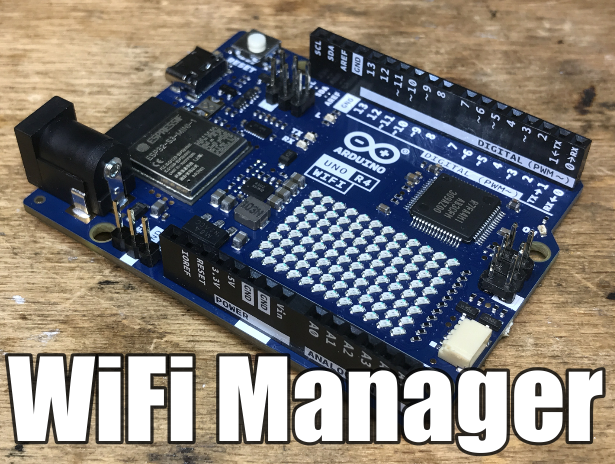
Photo of an Arduino R4 board with the text WiFi Manager.
I will show here my simple implementation of the so-called "WiFiManger". "WiFiManger" on the Arduino R4, which is a mechanism that allows you to pair the Arduino with our WiFi network in the style of Tasmota pairing, that is, first the Arduino is in open access point mode to which you can connect and enter the data of our WiFi network, and then the Arduino joins our network, while still maintaining a web page with a form, where you can change the WiFi bearings (enter a new password and SSID) or return to AP mode. In addition, the library too allows you to reset the WiFi setting via an optional button on the selected Arduino GPIO.
This functionality is offered, among others, by the ready-made WiFiManager from Github:
https://github.com/tzapu/WiFiManager
But it does not support Arduino R4 WiFi at the moment, so here I will show my simple equivalent of this library, much truncated but still functional.

Design requirements Before implementation, it's a good idea to set some simple goals, that will make up the finished product. In this case, I highlighted the following:
- Arduino must boot by default in open access point mode (or with a password) so that the first configuration is possible
- Arduino must offer a page where you can enter the SSID and password of the target WiFi
- Arduino must remember the settings after power loss, so we must save them to EEPROM
- Arduino must offer the ability to reset the settings in case of failure (e.g. Arduino must offer the possibility of resetting the settings in case of failure (e.g. loss of router), for example by pressing a button on one of the GPIOs
- the configuration page must work both in AP mode, and in STA, moreover in STA it must also offer the possibility of disconnection from the selected WiFi (return to AP mode)
Additionally, I gave myself one more goal, also quite important, although overlooked by beginners, and that is the whole thing would be nice to pack in some convenient classes, so that you can use it in different projects.

Used HTTP library To make my task easier, I intend to use an additional library to handle HTTP, namely QuickSander work:
https://github.com/QuickSander/ArduinoHttpServer
After my corrections, it is compatible with R4:
Arduino R4 WiFi and ArduinoHttpServer - corrections, startup, usage examples
Use example This time let's start in reverse. Let's think about what we would want our program to look like once the library is ready? Everything needs to be tucked away in classes, we want to have little code in setup and loop.
I would see it roughly like this:
Code: C / C++
Log in, to see the code

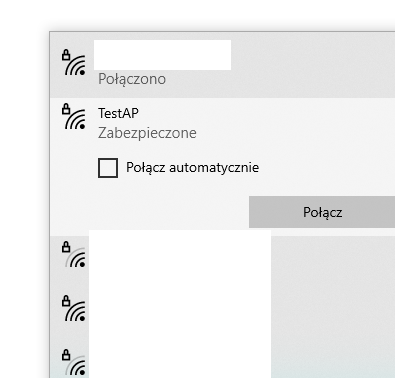
The effect of running this on the Arduino should be the presence of an AP with the name specified in the code:
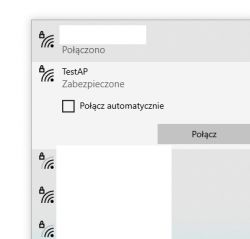
WiFi network selection screen with TestAP network. .
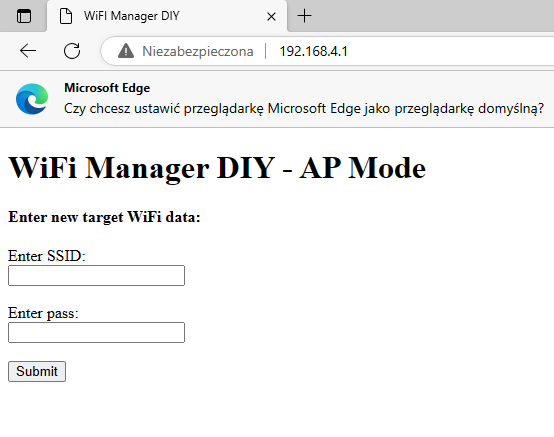
After connecting to it (and entering the password specified in the code), it should be possible to open a page with IP 192.168.4.1, where you can give the bearings of our WiFi network:
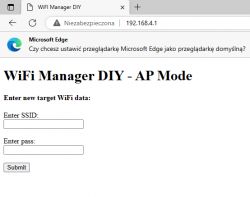
WiFi Manager DIY - AP Mode form screen in Microsoft Edge browser.
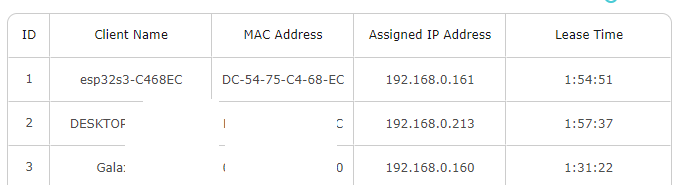
After entering the data and approving it, the Arduino should connect to it:

Table listing network devices with ID, Client Name, MAC Address, Assigned IP Address, and Lease Time.
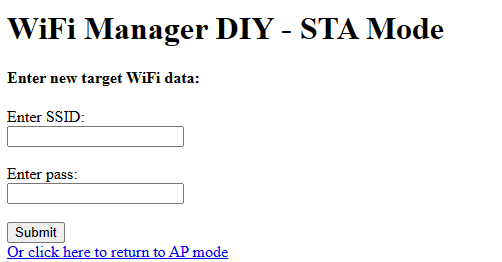
Now the configuration page should be available under the new IP assigned by DHCP. Its appearance should also change to some extent:
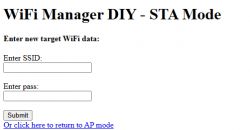
Screenshot of WiFi Manager DIY configuration page in STA mode.
Here you can either disconnect from the current WiFi (return to AP mode), or change to a different WiFi network.

Implementation of settings Maybe let's start with how to store the settings in the EEPROM. You will need a structure, preferably with a simple checksum to verify its correctness:
Code: C / C++
Log in, to see the code

In the structure I put the data separately for both WiFi modes and in addition the information which is now active.
Then I wrapped it in a class:
Code: C / C++
Log in, to see the code

In this class there will be methods operating on the settings. I guess you should start with a method that counts a simple checksum. I've decided to make it as simple as possible:
Code: C / C++
Log in, to see the code

I'm going byte by byte through the structure fields here and adding up their values. I skip the last field, which is the CRC. Let me remind you that sizeof( ) returns the byte size of a given type, this is done at compile time.
Now you can use the CRC when reading and writing data to the Arduino's EEPROM. When reading, we read the CRC from memory and count it too, and then compare these values If they are different, it means that something went wrong:
Code: C / C++
Log in, to see the code

When writing to EEPROM, we just count the current CRC to be able to write it:
Code: C / C++
Log in, to see the code

This solution gives us a relatively high degree of confidence that the read settings are correct, although it may also involve some problems. For example, adding another field to this structure here would be problematic. Perhaps it would be worth putting one additional byte at the beginning of it, informing us in which version of the settings the data is stored. This would allow us to convert the settings structure to the current version later, if anything. However, all this is beyond the scope of a simple WiFi Manager DIY demo.


Implementation of the manager
More or less, the topic of storing settings in EEPROM is covered. The simple getters and setters for the settings themselves are not discussed, as is the fact that if you change them, you have to rewrite their structure into EEPROM, etc. Alternatively, at the time of the change, you can just set a flag showing that the structure has been modified and then save all the changes at once to save the delete and save cycles.
Now perhaps let's focus on the handling of the simple HTTP page itself.
I've made it based on my material:
Arduino R4 WiFi and ArduinoHttpServer - fixes, startup, usage examples As in the example above, in the bundle I check if a new client appears and if so, handle it:
Code: C / C++
Log in, to see the code
Similar code appeared in my previous material. I separated the HTTP handling itself into a separate function. Here it is:
Code: C / C++
Log in, to see the code

This is where we will stop for a moment longer. As you can see, the page is dynamically generated. I'm putting the whole thing together on the fly with pure HTML, it's the simplest form. Some parts of the page are conditional, for example the header:
Code: C / C++
Log in, to see the code

The page contains a simple form within it. This form sends variables via a GET request, so I have to handle that in the code, too. If something is sent, I intercept it and handle it accordingly, also giving a communiqué about it:
Code: C / C++
Log in, to see the code

The openAccessPoint and setupSTA functions are not important at this point. They simply change the settings accordingly, store them in the EEPROM and the mode change is done with a delay:
Code: C / C++
Log in, to see the code
Otherwise, after sending the pointers to the new WiFi, the Arduino would automatically disconnect from us and we wouldn't even get the confirmation that our request was processed anymore.

Basically, that would be it. You can still look at the functions that set the WiFi mode, but that's even in the examples from Arduino itself:
Code: C / C++
Log in, to see the code

Code: C / C++
Log in, to see the code
Well, and the function that starts the whole manager and determines which mode to select:
Code: C / C++
Log in, to see the code


Summary In the topic I made some big simplifications and left out some side issues, but I still think that the final demo provides the necessary minimum functionality. Based on my sketch, you can build your own application on the Arduino R4 and you could even spin off my code into a library and share between different projects. It is possible that later I will take care of it, finish all the code, fix minor bugs, shortcomings (buffer size safety - see strcpy, etc.) and put it on Github as a library. In the meantime here you have the full version:
Spoiler:

Code: C / C++
Log in, to see the code


If anyone wants to improve it, feel free to play. In the future, you could add some simple interface to handle additional variables or subpages, maybe via callbacks. This is how users could "plug" their add-ons into this page, such as displaying the current temperature and humidity from a DIY weather station or controlling a relay.


About Author
p.kaczmarek2
p.kaczmarek2 wrote 14635 posts with rating 12649 , helped 655 times. Been with us since 2014 year.

Comments

electromechpro 15 Jul 2025 21:00

In the code above, there is no .getArgument function, so it will not compile. Is there a different version of the ArduinoHttpServer.h library that has this function? [Read more]

p.kaczmarek2 15 Jul 2025 21:02

Yes, check this topic: Arduino R4 WiFi and ArduinoHttpServer - fixes, launch, examples of use [Read more]

FAQ

TL;DR: For Arduino R4 WiFi users, this DIY WiFiManager stores four 64-byte credential fields and uses a 3,000 ms delayed reconnect. "Start in AP mode" is the core rule. It solves first-time Wi‑Fi pairing, web-based SSID/password entry, EEPROM persistence, and fallback to AP mode when credentials or the router change. [#20720629]

Why it matters: It gives Arduino R4 WiFi a practical captive-style setup flow even when the common GitHub WiFiManager does not support this board in the thread.

Option Arduino R4 WiFi support in thread Main purpose Notable limitation
GitHub WiFiManager Not supported "at the moment" Ready-made WiFi onboarding library Does not fit this board here
DIY WiFiManager shown in the thread Yes AP-to-STA setup, EEPROM save, config page Simplified demo, not hardened

Key insight: The most important design choice is to keep one config page available in both AP and STA modes, then save mode and credentials to EEPROM so the board can recover after power loss.

Quick Facts

  • The settings structure stores 1 mode flag, 4 text buffers of 64 bytes each, and 1 CRC field, giving one place for both AP and STA credentials. [#20720629]
  • The config server runs on port 80, the AP page is shown at 192.168.4.1, and the HTTP request object uses a 1024-byte template buffer. [#20720629]
  • After saving new Wi‑Fi data, the sketch waits about 3,000 ms before reconnecting so the browser can still receive confirmation. [#20720629]
  • The STA connect loop retries every 1,000 ms, and the serial example starts at 115200 baud for status logging. [#20720629]

How do I make a simple WiFiManager for Arduino R4 WiFi that starts in AP mode, lets me enter SSID and password on a web page, and then switches to STA mode?

Build two classes: SettingsManager for EEPROM data and WiFiManager for AP, STA, and HTTP handling. 1. Boot in AP mode with WiFi.beginAP(...) and start WiFiServer(80). 2. Serve a form at 192.168.4.1 that sends ssid and pass by GET. 3. Save them to EEPROM, set station mode, and reconnect after 3,000 ms. The example keeps the config page available in both modes, so users can reconfigure later without reflashing. [#20720629]

What is WiFiManager on Arduino, and how does it work in AP-to-STA pairing similar to Tasmota?

WiFiManager is a setup mechanism that first exposes the board as an access point, then moves it to client mode after the user enters router credentials. In this thread, the board starts as an open or passworded AP, serves a web page, accepts SSID and password, joins the target network, and still keeps a configuration page available afterward. That flow mirrors the pairing style described as similar to Tasmota. [#20720629]

How can I save WiFi credentials in EEPROM on Arduino R4 WiFi so they survive a power loss?

Store the credentials in a struct and write that struct to EEPROM with EEPROM.put. The example keeps ap_ssid, ap_pass, sta_ssid, and sta_pass as four 64-byte arrays, plus a mode flag and CRC, then reads them back with EEPROM.get on boot. If the saved data verifies, the board restores the previous AP or STA state after power loss. [#20720629]

Why does the example use a CRC in the EEPROM settings structure, and how is that checksum verified?

It uses a CRC so the sketch can detect corrupted or uninitialized EEPROM data before trusting saved credentials. "CRC is a checksum method that validates stored data, detecting memory corruption by recalculating a value from stored bytes and comparing it with the checksum saved alongside the structure." Here, the code sums every byte except the final CRC field, compares the result with inner.crc, and loads defaults if the values differ. [#20720629]

What should a SettingsManager class for Arduino R4 WiFi contain when storing AP and STA credentials in EEPROM?

It should contain one internal settings struct plus methods to read, write, validate, and update it. In the thread, that means a bool bStation, four 64-byte character arrays for AP and STA SSID/password pairs, and an unsigned int crc. The class also includes setDefaults(), setupSTA(...), setupAP(...), setupSTAMode(...), readSettingsFromEEPROM(), writeSettingsToEEPROM(), and CRC verification logic. [#20720629]

How do I reset Arduino R4 WiFi network settings and force the device back into AP mode using a GPIO button?

Call a method that clears station mode and schedules a reconnect to AP mode when your button is pressed. The thread shows this pattern in loop(): poll the manager, check a GPIO-trigger condition, then call wm.openAccessPoint(). That method sets bStation false in EEPROM and uses a 3,000 ms delayed restart, so the board returns to its own AP without an immediate hard cutover. [#20720629]

What is STA mode and AP mode in WiFiS3 on Arduino R4 WiFi, and when should each one be used?

STA mode connects the board to an existing Wi‑Fi network, while AP mode makes the board create its own network for local setup. "STA mode is a client operating mode that joins an existing router, while AP mode is a host mode that creates a local wireless network for direct device onboarding and recovery." Use AP mode for first configuration or recovery, and STA mode after valid credentials exist. [#20720629]

Why does my Arduino R4 WiFi sketch with ArduinoHttpServer fail to compile because .getArgument is missing?

Your sketch likely uses a different ArduinoHttpServer.h than the one used in the thread. A later reply explicitly says the posted code will not compile when .getArgument is absent and asks whether another library version contains it. The answer confirms that a different topic provides the corrected Arduino R4 WiFi-compatible version, so the compile error comes from a library mismatch, not from the WiFiManager logic itself. [#21607907]

Which ArduinoHttpServer version or fork adds getArgument support for Arduino R4 WiFi?

Use the ArduinoHttpServer variant referenced in the linked follow-up topic about Arduino R4 WiFi fixes, startup, and usage examples. The original post says it uses QuickSander's ArduinoHttpServer after the author's corrections for R4 compatibility, and the later reply points readers to that exact follow-up when .getArgument is missing. In this thread, that linked corrected variant is the one associated with getArgument support. [#21607911]

How can I build a simple HTML configuration page on Arduino R4 WiFi that accepts SSID and password through a GET form?

Create an HTML string dynamically and return it through ArduinoHttpServer::StreamHttpReply with content type text/html. The thread's example builds a form with name="ssid" and name="pass", then reads those values from the GET request with getArgument("ssid") and getArgument("pass"). It also shows a mode-specific heading and a link that sends ap=1 to switch back into AP mode. [#20720629]

Why does the code delay reconnecting after submitting new WiFi credentials instead of switching networks immediately?

It delays the switch so the browser still receives a success page before the board drops the current connection. The code saves the new credentials, prints a confirmation message, and schedules reconnection with setupReconnectAfter(3000). The author explains that an immediate switch would disconnect the client too fast, so the user might never see confirmation that the request was processed. [#20720629]

What is the difference between the original GitHub WiFiManager library and this DIY Arduino R4 WiFi implementation?

The main difference is support and scope. The thread says the ready-made GitHub WiFiManager offers this kind of functionality, but it does not support Arduino R4 WiFi at that moment. The DIY version is "much truncated but still functional," covering AP startup, SSID/password input, EEPROM storage, AP fallback, and a shared config page, but not the broader polish of a mature library. [#20720629]

How can I switch an Arduino R4 WiFi device from its current STA connection back to its own access point while keeping the config page available?

Save AP mode as the new target state, then restart the manager after a short delay. In the example, the web page exposes a link with ap=1; when that argument appears, the code calls openAccessPoint(), updates the stored mode, and reconnects after about 3,000 ms. Because the same page logic exists in both states, the configuration page remains available after the board returns to AP mode. [#20720629]

What problems can happen if I change the EEPROM settings structure later, and how can a version field help with migration?

Changing the struct later can break compatibility with previously saved EEPROM data, even if the old bytes still exist. The author warns that adding another field would be problematic and suggests placing one extra version byte at the start of the structure. That version marker would let future code detect old layouts and convert saved settings to the current format instead of blindly misreading them. [#20720629]

What's the best way to make this Arduino R4 WiFi WiFiManager code safer by avoiding issues like strcpy buffer overflows and excessive EEPROM writes?

Replace unsafe copies and reduce write frequency. The thread itself flags "buffer size safety" around strcpy as unfinished work and also suggests using a modified flag so you batch EEPROM updates instead of rewriting on every small change. That combination lowers overflow risk for 64-byte fields and reduces unnecessary erase/write cycles, which is the safer next step before turning the demo into a reusable library. [#20720629]
Generated by the language model.
%}